
 by
by
Photography blogging works when each post does more than display good pictures. A useful photographer blog helps a buyer make a decision, explains the craft behind the work, loads well on the device in front of them, and gives the next step a clear place to go.
The hard part is not publishing more. It is choosing a narrow job for every post. A wedding story can prove style and venue experience. A lighting tutorial can show judgment. A camera comparison can capture a purchase decision. Mixing all three without a purpose gives you a large gallery and a weak website.
The five moves: curate for a specific reader, choose a cadence your workload can survive, build an image delivery system, write for real decisions and local intent, then protect and monetize the work with clear terms. The first-party data below explains why decision specificity comes before volume.
1. Photography Blogging Starts With Curation, Not Volume
Curation is the first editorial decision. Do not upload every usable frame from a session. Select the images that establish place, subject, progression, technique, and result. Near-duplicate frames make the reader work harder without adding evidence.
| Keep an image when it | Remove or rethink it when it |
|---|---|
| Changes the story, mood, angle, or proof | Repeats a stronger frame |
| Shows a technique or decision you explain | Needs a long apology for why it belongs |
| Helps a client imagine the experience | Looks impressive but serves no reader decision |
| Supports the page’s search or service intent | Introduces an unrelated subject |
A strong session post often has a visual opening, context, a few distinct moments, useful detail, and a closing frame. The exact count depends on the story and page budget. Study photography portfolio examples for sequencing, then apply the same editorial discipline required to become a successful blogger: publish what helps the reader, not everything you have.

2. Commit to a Publishing System You Can Repeat
A sustainable schedule is a capacity decision, not a ranking signal. Choose it after accounting for shoots, culling, editing, client delivery, writing, image preparation, publishing, and promotion. A weaker post published to protect a streak is still a weaker post.
Use a six-week test instead of making a year-long promise:
- Week 1: publish one decision-led post tied to a service, location, or tool you understand.
- Week 2: update one portfolio or service page that the post should support.
- Week 3: publish one shoot story with distinct images, context, and a relevant next step.
- Week 4: improve titles, internal links, image delivery, and mobile layout using real Search Console and analytics observations.
- Weeks 5 and 6: repeat the two post types, then review impressions, clicks, inquiries, booking value, and production time separately.
Keep one finished post in reserve only if it still serves a real reader need. A buffer should protect quality during a busy week, not create filler that exists merely to keep a calendar full.
3. Display and Optimize Images for Speed and Search
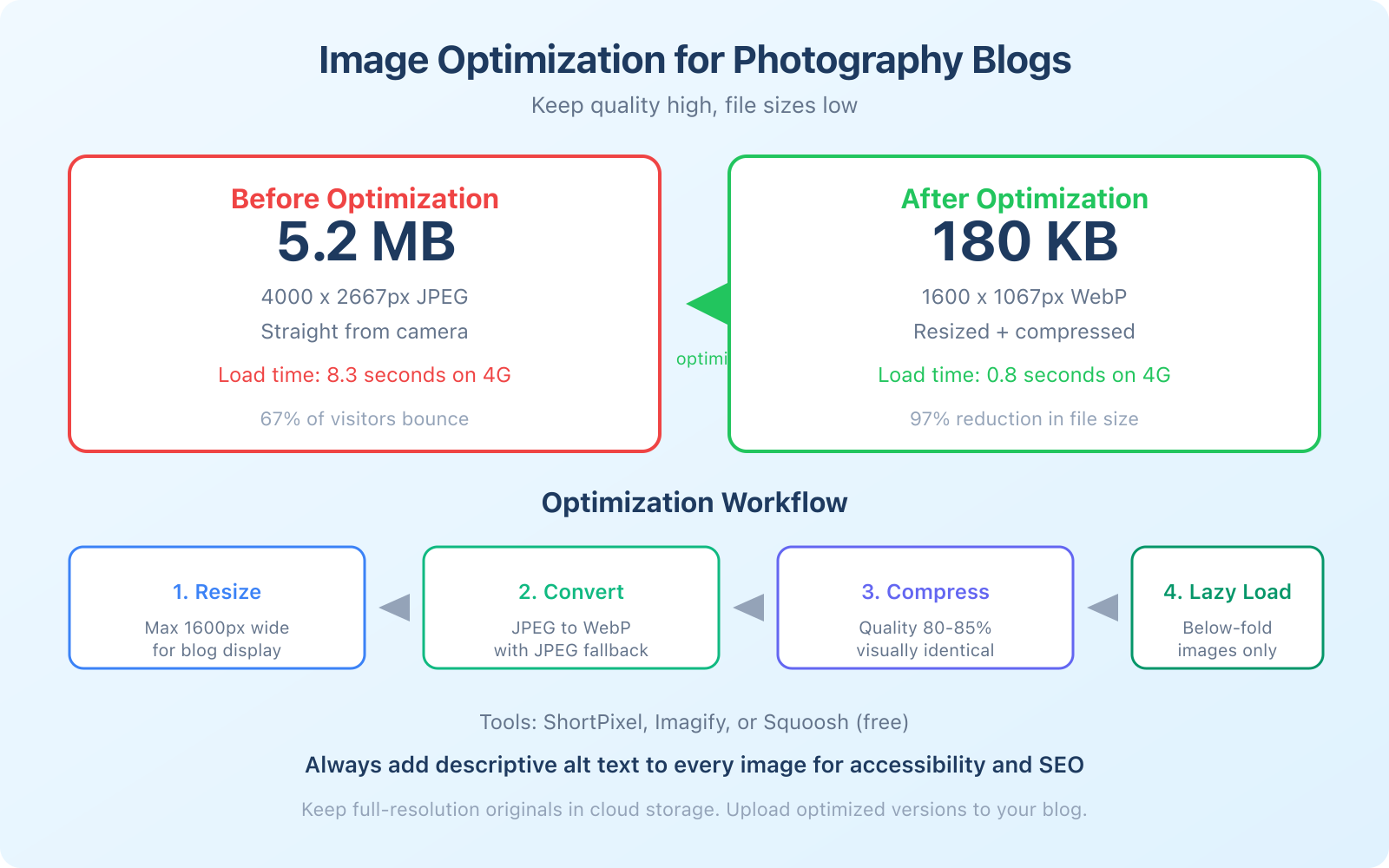
A photography blog has to preserve visual quality without making the browser download the working master. The production file, archive file, delivery file, and website file can be different assets. Keep the original backed up; publish a derivative sized and encoded for the actual layout.
Start with layout. A full-width hero, editorial sequence, grid, before-and-after comparison, and image-text pairing solve different storytelling problems. Choose a WordPress themes for photographers setup that keeps captions, keyboard access, responsive images, and lightbox behavior usable. Add WordPress plugins only for a requirement the theme or platform does not already satisfy.
Use a measured image-delivery workflow
Do not rely on a universal pixel width or compression percentage. Use the layout’s rendered width, target device density, and a visual comparison. Keep one fallback you can serve reliably.
- Resize: export close to the largest rendered size you need, with an appropriate higher-density candidate when the design justifies it.
- Encode: test AVIF or WebP against a suitable JPEG. Compare fine detail, gradients, skin tones, and file size rather than assuming one format always wins.
- Compress: use a tool such as ShortPixel or another encoder, but inspect the output. My guide to compressing images without losing quality covers the practical tradeoffs.
- Serve responsively: provide width and height, use
srcsetandsizes, and let the browser choose an appropriate candidate. - Verify: test the real page on mobile and desktop, then check field data when enough visits exist.
| Format | Use it when | Check before shipping |
|---|---|---|
| AVIF | Your encoder preserves the photograph at a useful size | Fine texture, gradients, decode support, fallback |
| WebP | You need broad modern-browser delivery and predictable tooling | Transparency, metadata policy, visual artifacts |
| JPEG | Compatibility or the specific photograph makes it the better choice | Chroma artifacts, file weight, progressive loading |
| PNG | The asset is line art, text-heavy, or needs lossless transparency | Do not use it by habit for photographic galleries |
For Core Web Vitals, identify the actual Largest Contentful Paint resource before changing loading behavior. The web.dev LCP guidance sets the good threshold at 2.5 seconds or less for at least 75% of visits and warns against lazy-loading the LCP image. A likely hero can use fetchpriority="high", but the attribute is a hint, not a substitute for correct discovery, dimensions, caching, and file size.
Treat every change to Core Web Vitals as a measured experiment. Record the page, template, image URL, format, dimensions, bytes, test device, cache state, and result. Keep the previous asset and markup as the rollback.
4. Write for Decisions, Local Intent, and Accessibility
Search engines do not need a fixed word count from a photography post. They need a page whose images, text, entities, links, and next step make sense together. Write enough to answer the decision. Stop when another paragraph would only repeat it.
What a one-year first-party sample showed
I compared seven published photo-related pages on this site in Google Search Console for the year ending July 26, 2026. Two decision-led pages covered a camera-buying question and AI product-photography tools. Five broader pages covered blogging, themes, portfolios, stock photography, and selling artwork.
| Group | Pages | Impressions | Clicks | Share of impressions |
|---|---|---|---|---|
| Decision-led | 2 | 1,886 | 2 | 93.0% |
| Portfolio and advice | 5 | 142 | 0 | 7.0% |
| Total | 7 | 2,028 | 2 | 100% |
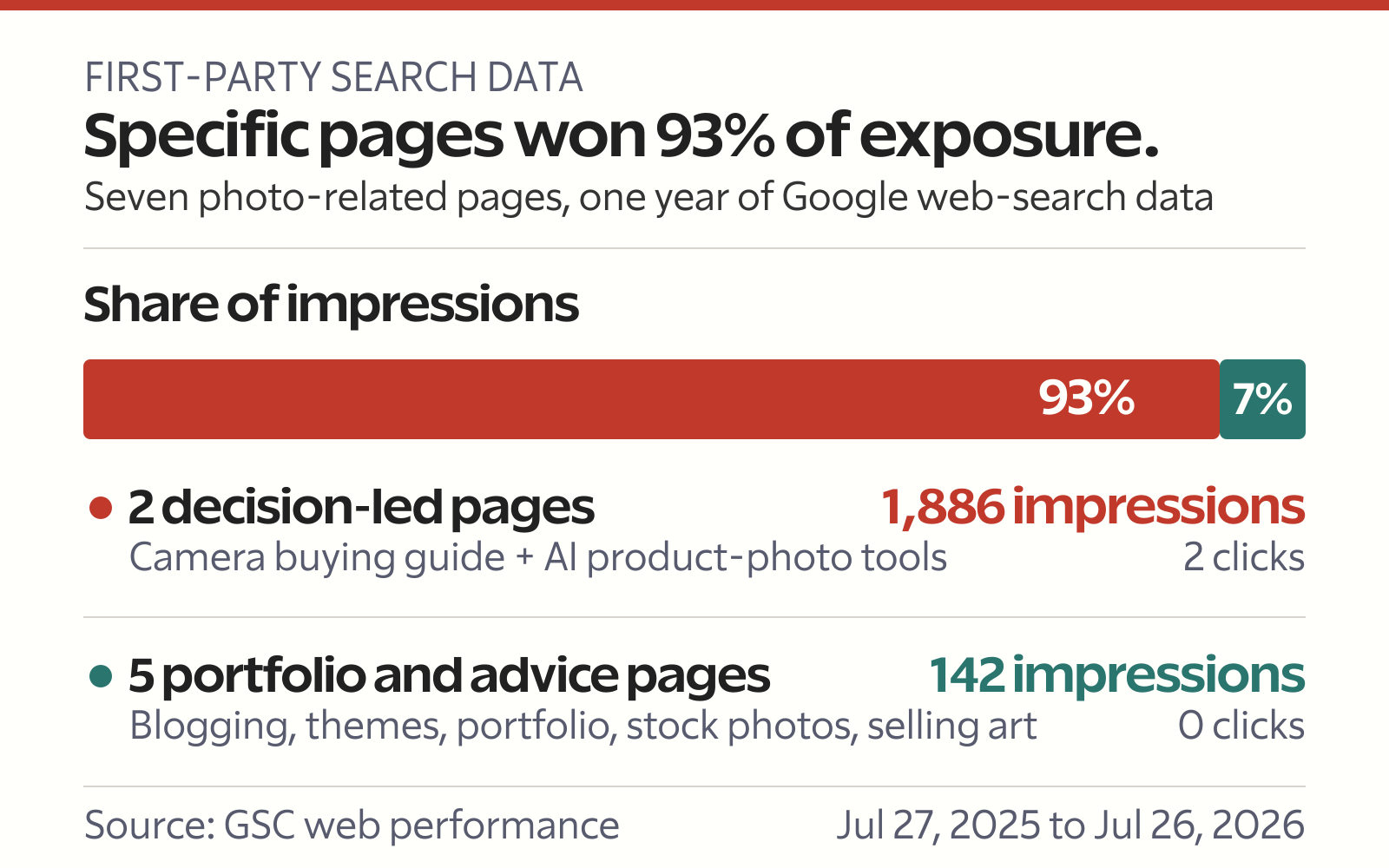
This is not proof that photographer blogs should become gear sites. It is a small, site-specific sample with only seven pages and two clicks. Several pages were first observed partway through the period, and Search Console cannot tell me which visits became bookings. It does show that concrete decision intent earned most of the available exposure in this group.
The lesson is specificity. Camera comparison posts answer a purchase decision. A venue guide can answer a location decision. A pricing explainer can answer a budget decision. A shoot story can still work, but it needs a reader problem, place, technique, or service context beyond the gallery.
Use image context, not keyword rituals
Google’s image SEO documentation recommends placing images near relevant text, using short descriptive filenames, and writing useful alt text. Google uses alt text with page context and computer vision; it also warns against keyword stuffing.
- Title: state the subject and decision, not only the client’s first names.
- Location: use real venue and service-area entities where relevant. A working pattern is
Wedding Photography at [Venue Name] in [City], then replace the placeholders with the actual names before publishing. - Filename: keep it short and descriptive, and make the extension match the delivered file type.
- Alt text: describe the image’s purpose in this context. The W3C alternative-text guidance explains when an image needs a description, an empty alternative, or a longer nearby explanation.
- Internal path: connect the post to the relevant service, portfolio, location, or decision page.
Write high-quality content that ranks in search by adding evidence a thin gallery cannot provide: lighting constraints, weather, access, permissions, timelines, gear tradeoffs, editing choices, and what you would change. The same decision-first approach applies when writing about travel for a blog, especially for destination shoots and location guides.
If you meet clients in person or travel to a service area, keep your Business Profile verified and accurate. Google’s local ranking guidance names relevance, distance, and prominence as the main local factors and says you cannot request or pay for better local ranking.
5. Protect Rights and Monetize With Clear Terms
Protection starts with records and agreements, not a plugin that blocks right-click. Screenshots, browser tools, cropping, and metadata stripping make download deterrents incomplete. Keep original files, export records, contracts, releases, licenses, delivery terms, and a log of where important work appears.
The U.S. Copyright Office’s photographer guidance says an original photograph is protected when it is fixed and the person who takes it is generally the initial author and owner. Registration can create a public record and additional U.S. legal benefits. That is U.S. guidance, not universal legal advice. Employment, assignment, licensing, contracts, model rights, and remedies vary by jurisdiction.
| Control | What it helps with | What it cannot guarantee |
|---|---|---|
| Subtle watermark | Attribution and casual deterrence | Prevention of screenshots, cropping, or removal |
| Embedded metadata | Ownership and contact context when preserved | That platforms or downloaders will retain it |
| Contract and model release | Permission, usage scope, delivery, and portfolio terms | Coverage outside its language and jurisdiction |
| Registration where applicable | Public record and jurisdiction-specific legal benefits | Automatic detection or enforcement |
Choose a revenue model with a measurable unit
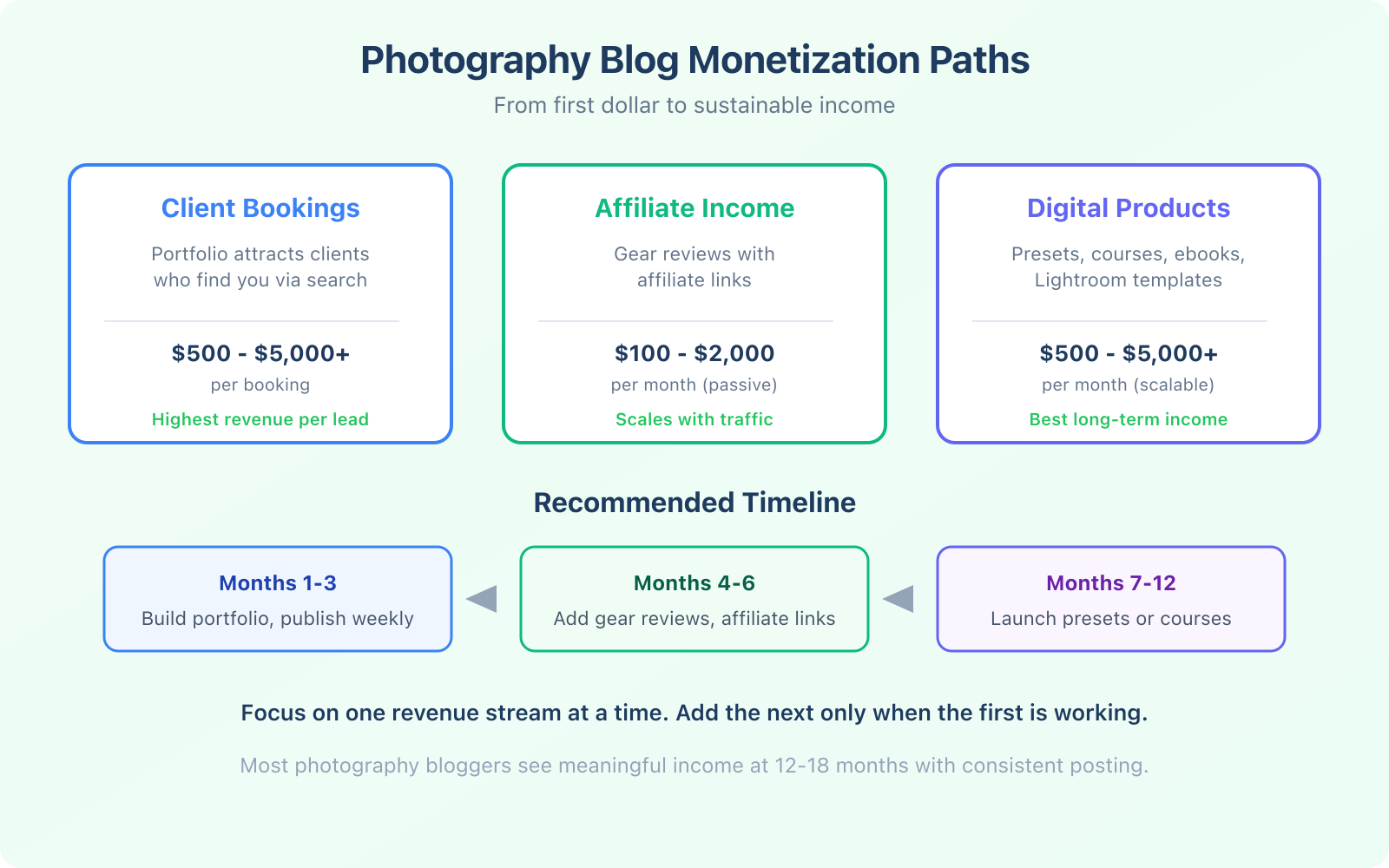
A photography blog can support client bookings, print or license sales, presets, education, sponsorships, and Affiliate income. Do not combine them into one revenue forecast. Each has a different margin, conversion path, rights burden, refund risk, and production cost.
| Model | Unit to measure | Cost or risk to include |
|---|---|---|
| Client booking | Qualified inquiry to booked job | Sales time, travel, production, editing, delivery |
| Print or license | Contribution per fulfilled sale | Lab, shipping, platform fee, returns, usage scope |
| Preset or course | Net revenue per buyer | Support, updates, refunds, payment fees |
| Affiliate review | Commission per qualified visitor | Testing, disclosure, rate changes, returns |
For product recommendations, follow the FTC Endorsement Guides when U.S. rules apply. A material connection should be clear and conspicuous; the FTC says commissionable link is probably not clear enough. My guide to affiliate marketing for beginners explains the operating model, but your disclosure still has to fit the page and jurisdiction.
Frequently Asked Questions
These answers keep the decisions separate from unsupported traffic, income, and timeline promises.
What platform should I use for a photography blog?
Use WordPress when you want control over hosting, image delivery, structured content, plugins, and future migration. A hosted builder can be easier to maintain, but check export options, image processing, metadata, and recurring cost before choosing. The right platform is the one you can keep fast, accessible, backed up, and updated.
How many images should I publish in one photography post?
There is no universal number. Choose the smallest set that tells the story or proves the decision. A session post may need an opener, context, details, people, and a closing image. A tutorial may need only the frames that demonstrate each step. Remove near-duplicates and test the final page on a mobile connection.
How do I get traffic to a new photography blog?
Start with decision-led searches you can answer credibly: venue guides, session planning, pricing structure, gear comparisons, editing problems, and local service questions. Connect each post to a relevant service or portfolio page, keep business details accurate, and measure impressions, clicks, inquiries, and bookings separately.
Should I watermark my blog photos?
Use a watermark only when its deterrent or attribution value is worth the visual cost. It does not stop screenshots, cropping, or file removal. Keep ownership records, contracts, releases, licenses, and original files. For important commercial work, get jurisdiction-specific legal advice about registration and enforcement.
How long does a photography blog take to make money?
There is no defensible universal timeline. Client demand, local competition, offer quality, publication pace, ranking, referral sources, and conversion rate all matter. Set a 90-day test with a publishing plan, inquiry tracking, costs, and a stop or revise rule. Treat affiliate, print, preset, and course revenue as separate models with separate margins.
The strongest photography blogging plan is smaller than most people expect: one clear audience, one decision per post, a curated image sequence, measured delivery, useful context, and a next step you can track. Publish that system consistently. Let the evidence decide what deserves more of your time.
Tell Google you want more of this.
Add Gaurav Tiwari as a preferred sourceOne tap, and this site shows up more often in your own Top Stories, AI Overviews and AI Mode. Remove it any time.