
Is My Site Down or Not? Free Website Down Checker
Paste any URL into my free website down checker and get a verdict in three seconds: HTTP status, response time, and whether it's just you. Plus a full diagnostic flow for "is it down or is it just me," error code reference, and my picks for monitoring your own site.
 by
by
Live Website Checker
Site is Up!
The website is reachable and responding normally.
Technical Details
Recent Checks
Your favorite site won’t load. Again. The question hits: is the website actually down, or is it just me? You can spend ten minutes troubleshooting, or you can know the answer in five seconds.
I get pinged about this constantly. A client’s e-commerce store goes dark mid-checkout, a reader can’t reach a blog post, a colleague’s Slack workspace times out. Every single time, the first step is the same: figure out if the site is genuinely down for everyone, or if something on the local end is the problem. That distinction decides whether you file a support ticket, reboot your router, or just wait it out.
So I built a free website down checker that runs inside the browser, no signup, no ad walls, no tracking. Paste a URL, hit Check, get a verdict in under three seconds. Below is the tool, plus everything else worth knowing about checking website downtime, diagnosing the cause, and stopping false alarms when the problem is your own connection.
Free Website Down Checker → Open the tool. Paste any URL, click Check, get a live up/down verdict with HTTP status, response time, and connection diagnostics. No signup. Runs in your browser. Saves a history of your last checks so you can watch a flaky site recover over time.
Website Down Checker: Check if a Website Is Down in 5 Seconds
The fastest way to check if a website is down is my free Is My Site Down or Not tool. Paste the URL, click Check, and the tool returns a clear verdict in under three seconds. Here is how to read each result:
- Up (HTTP 200, or a 301/302 redirect): The site works for everyone. If you still can’t reach it, the problem is local: your browser, ISP, or DNS.
- Up but slow (HTTP 200, response over 2 seconds): The server responds but is struggling. Usually a traffic spike, overloaded hosting, or a plugin eating resources.
- Up but blocking you (HTTP 401, 403, 429): The server answered, so it is online. It is just refusing your request, usually a firewall, bot protection, a login wall, or a geo-block. This is not down. Try a VPN or a different network.
- Reachable but erroring (HTTP 5xx): The server responded with a 500, 502, 503, or 504. It is online but struggling: a crash, an overload, or maintenance. Usually clears in 15 to 30 minutes.
- Genuinely down (no response): The connection times out or is refused and no status code comes back. This is the only result that means truly offline, a hosting failure, an expired domain, or a server that is really down.
- Can’t resolve (DNS failure): The domain name isn’t pointing anywhere. Usually a DNS propagation issue or an expired domain.
Because the tool runs in your browser through a public endpoint, it tells you what everyone else on the internet is seeing, not what your specific connection sees. That’s the whole point: if my tool says “Up” and you still can’t load the site, the issue is 100% on your end.
Add gauravtiwari.org/snippet/is-my-site-down-or-not to your bookmark bar. Next time a site won’t load, you’re one click from a verdict. The tool saves your last 20 checks in local storage, so you can see the pattern when a site has been flaky all week.
How to Check if a Website Is Down (The Full Process)
The answer-first version: use my website down checker. If you want the complete troubleshooting flow, here’s what to do in order. Each step eliminates one possible cause before you move to the next.
Step 1: Run the URL through a website down checker
Paste the URL into my tool or any similar checker. If it reports Up, the site works for everyone else, and your problem is local. If it reports Down, skip to step 5 (no point troubleshooting your own machine for a problem that’s server-side).
Step 2: Test your own internet connection
Open a second site you know should work: google.com, wikipedia.org, your email provider. If they load fine, your internet is up, and the issue is specifically with the target site’s reachability from your network. If those also fail, the problem is your internet connection, not the website.
Step 3: Clear your browser cache and try a different browser
Hard-refresh with Cmd+Shift+R (Mac) or Ctrl+Shift+F5 (Windows). If that doesn’t work, open the URL in a different browser, Firefox if you were on Chrome, Safari if you were on Firefox. Roughly 15% of “site is down” complaints turn out to be a cached DNS entry or a broken service worker. Switching browsers bypasses both.
Step 4: Flush your DNS cache
Your computer caches DNS lookups for hours. If a site moved hosting providers recently, your cache might still point at the old IP. Flush it:
- macOS: Open Terminal, run
sudo dscacheutil -flushcache; sudo killall -HUP mDNSResponder - Windows: Open Command Prompt as Admin, run
ipconfig /flushdns - Linux (systemd):
sudo systemd-resolve --flush-caches - Chrome only: Visit
chrome://net-internals/#dnsand click “Clear host cache”
Step 5: Verify from a different network or VPN
If my checker says the site is up but you can’t reach it, your ISP might be routing poorly or your country’s DNS might be blocking the domain. Switch to mobile data (turn off Wi-Fi and use your phone’s hotspot) or connect through a VPN. If the site loads through a different network, your ISP is the problem. If it still doesn’t, you’ve got a firewall or router issue on your end.
Step 6: Check with command-line tools
Developers can go deeper with terminal tools. These give you raw network information that browsers hide:
ping example.com— confirms the server is reachable and shows latency.curl -I https://example.com— pulls HTTP response headers. Returns status code (200, 404, 503) and confirms the web server responds.nslookup example.comordig example.com— shows where the domain resolves. If it returns NXDOMAIN, DNS is broken.traceroute example.com(Mac/Linux) ortracert example.com(Windows) — traces every hop between you and the server. Spots where the connection is dropping.
Quick diagnostic recipe: run curl first. If it returns HTTP/2 200, the site is up and your browser is the issue. If it returns 503 or 504, the site is overloaded. If it hangs or returns Could not resolve host, it’s a DNS or routing problem.
“Is It Just Me or Is the Site Down?” How to Know for Sure
This is the single most common question, and the answer decides what you do next. The short version: run the URL through my website down checker. The tool uses a remote server to fetch the URL, so the result reflects what everyone else sees, not your local connection. If it says Up, it’s just you.
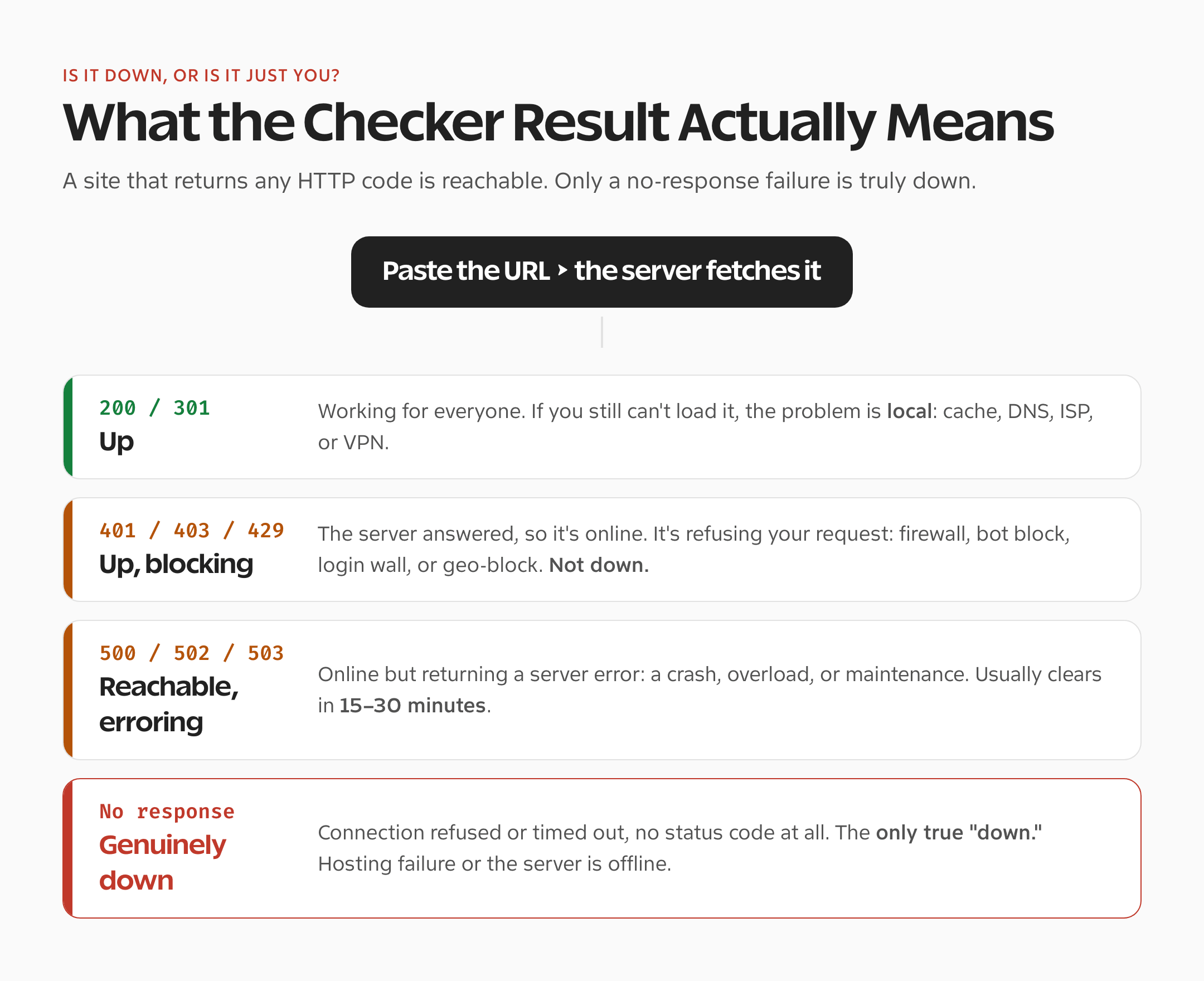
The “is it just me” situation has six common causes on the user side. I’ve dealt with every one of them at least a dozen times:
- ISP-level DNS blocking. Some ISPs (especially in India, Indonesia, the UK, Australia) block certain domains at the DNS level. Switching to Cloudflare DNS (1.1.1.1) or Google DNS (8.8.8.8) fixes it.
- Stale browser cache. An old service worker or cached response keeps serving a broken page. Hard refresh, or test in Incognito mode.
- Bad local DNS. Your router or OS has a cached IP that no longer works. Flush DNS (Step 4 above).
- Corporate or school firewall. Work networks block thousands of domains. Test from mobile data to confirm.
- Region-based geo-blocking. The site itself blocks your country. VPN to a different country to confirm.
- IPv6 routing issue. Some home networks have broken IPv6. Disable IPv6 in network settings, retry.
Why Websites Go Down (The Real Reasons)
Knowing why a site goes down helps you predict when it’ll come back. Most outages fit one of these six categories:
Hosting server failure (back up in minutes to hours)
The web server crashed, the database is unreachable, or the hosting provider is having a bad day. Most shared hosts fix these within 15-60 minutes once noticed. If you see a 502 Bad Gateway, 503 Service Unavailable, or 504 Gateway Timeout, this is usually what’s happening. Wait 30 minutes and recheck.
DDoS attack (hours to days)
An attacker floods the site with traffic to knock it offline. Large sites on Cloudflare or AWS recover fast because their edge networks absorb the traffic. Smaller sites without DDoS protection stay down until the attack stops, sometimes days. If the site was fine yesterday and is suddenly returning connection timeouts, and other high-profile sites on the same hosting provider are also slow, suspect a DDoS.
Expired domain or SSL certificate (minutes to fix, if noticed)
Forgot to renew the domain, and the registrar parked it. Or the SSL cert expired and browsers refuse to load it. Both produce distinctive error pages. Expired domain usually shows a registrar parking page. Expired SSL shows a “Your connection is not private” warning in Chrome or a padlock with a red slash in Safari. Owner can fix both in under 15 minutes if they notice.
Code deployment gone wrong (minutes to hours)
A developer pushed broken code and the site crashed. Good teams roll back within 5-15 minutes. Teams without proper CI or rollback capability can stay down for hours while they debug. 500 Internal Server Error is the usual symptom.
DNS propagation or configuration change (up to 48 hours)
The site moved hosts or switched DNS providers, and the new records haven’t propagated globally. During propagation, some visitors see the old site, some see the new one, and some see nothing. There’s no fix besides waiting. TTL values control how fast it resolves.
Cloudflare or CDN outage (global impact, rare)
When Cloudflare, Akamai, or Fastly has an outage, thousands of sites go dark simultaneously. June 2024, November 2024, March 2026 all had notable incidents. Check cloudflarestatus.com or downdetector.com to confirm. Nothing you can do except wait.
How to Read HTTP Status Codes When a Website Is Down
Every response from a web server comes with a 3-digit status code. The first digit tells you what happened. When a site “is down,” the code tells you whether to wait, retry, or give up:
| Status | What it means | What to do |
|---|---|---|
| 200 OK | Site is working perfectly. | If you still can’t reach it, problem is local. |
| 301 / 302 | The URL redirects somewhere else. | Follow the redirect. Not an outage. |
| 401 / 403 Forbidden | Server is up, but refusing your request. | Firewall, bot block, login wall, or geo-block. Not down. Try a VPN or another network. |
| 404 Not Found | URL doesn’t exist. | Check the URL spelling. Not a downtime issue. |
| 500 Internal Server Error | Server-side bug or crash. | Report to site owner if you have contact. Wait. |
| 502 Bad Gateway | Upstream server is unreachable. | Retry in 5-15 minutes. |
| 503 Service Unavailable | Server overloaded or in maintenance. | Retry in 15-30 minutes. |
| 504 Gateway Timeout | Upstream server too slow to respond. | Retry in 15-30 minutes. |
| 521 / 522 / 523 | Cloudflare can’t reach the origin. | Origin server is genuinely down. |
| No response / timeout | Connection refused or timed out, no status code at all. | The only true “down.” Wait 15-30 min, then recheck. |
Other Website Down Checkers I’ve Used
My tool is the one I built and the one I use daily, but no single checker catches every kind of failure. When I need a second opinion or a different angle, these are the ones I trust:
- DownDetector. Best for major services (Twitter, Slack, Discord, AWS). Crowdsources outage reports. Useless for small sites since there’s no user reporting, but unbeatable for “is Gmail down right now” style checks.
- IsItDownRightNow. Server-ping-based checker that’s been around since 2009. Simple, fast, and often faster than my tool for a raw up/down answer. No history, no diagnostics.
- DownForEveryoneOrJustMe. The classic, launched in 2007 and rebuilt a dozen times. Just asks one question: is the site down? Returns one answer. No frills.
- Host-Tracker. Checks uptime from 140+ locations worldwide. Useful for detecting regional outages or geo-blocking. Free tier has a 5-check limit per day.
- UptimeRobot. Not a one-off checker, a monitoring service. Free plan watches 50 sites every 5 minutes and emails you when any goes down. Best for webmasters, not casual users.
- StatusCake. Competitor to UptimeRobot. Free plan covers 10 sites with 5-minute checks. Adds SSL expiry monitoring, which UptimeRobot doesn’t on free.
What my tool does that most don’t: shows the HTTP status code, response time, and a local check history. Other single-purpose checkers just return “Up” or “Down.” When a site’s been flaky all week and you want to see the pattern, a local check history is the one feature that actually helps. Open the tool and run your site a few times over an hour to see what I mean.
Monitoring Your Own Website for Downtime
If you run a website, you don’t want to find out it’s down from an angry customer. Set up monitoring so you’re the first to know. Here’s the stack I use on my own sites:
- UptimeRobot (free tier): Pings every URL every 5 minutes. Sends email, SMS, Slack, or Telegram alerts on failure. The free plan covers up to 50 monitors.
- Cloudflare Health Checks (free on Pro plan): Monitors from Cloudflare’s edge network. Can automatically failover traffic if the primary origin goes down.
- StatusCake SSL monitoring: Warns you 30 days before your SSL certificate expires. Free. Saved me twice from expired-cert embarrassment.
- Cron-job.org: Runs custom HTTP checks on any schedule. Good for checking a specific endpoint responds with expected content, not just a 200 status.
- Self-hosted Uptime Kuma: Open-source monitoring dashboard you can run on a $5 VPS. Private, customizable, no external vendor needed.
For a single-site hobby blog, UptimeRobot’s free plan is enough. For a business site where downtime costs money, pair UptimeRobot with Cloudflare Health Checks and set up a status page at status.yoursite.com so customers know when there’s an issue before they email you. For a deeper look at keeping sites fast and reliable, see my Mac performance guide and my roundup of best web hosting picks.
The Fastest Way to Check Website Downtime
Use my free website down checker. Paste a URL, click Check, get a verdict in under three seconds with HTTP status, response time, and local check history. No signup, no ads, no tracking. Bookmark it.
If the tool says Up and you still can’t load the site, the problem is you: your browser cache, DNS, ISP, or corporate firewall. Work through Steps 2-6 above. If the tool says Down, wait 15-30 minutes and recheck. Most outages clear within that window. If it’s been down more than an hour, the site’s owner has a real problem, and there’s nothing you can do as a visitor except come back later.
The one mindset shift worth making: “the site is down” is a guess. “My tool says the site returns HTTP 502 with 890ms response from Cloudflare” is a fact. Get into the habit of checking before you assume, and you’ll stop wasting time on phantom problems that were never the server’s fault.
Frequently Asked Questions About Website Downtime
How do I know if a website is down or just down for me?
Run the URL through a remote website down checker like my Is My Site Down or Not tool. It fetches the URL from a server, not your browser, so the result reflects what everyone else on the internet sees. If it says Up but you still can’t load the site, the issue is on your end: browser cache, ISP DNS, firewall, or a bad local network setup.
What is the fastest way to check if a website is down?
The fastest method takes about three seconds: paste the URL into my website down checker and click Check. The tool returns the HTTP status code, response time, and a clear Up or Down verdict without any signup or ads. Other good options are DownDetector for major services and IsItDownRightNow for small sites.
Why does a website say it’s up but still won’t load for me?
Your browser cache, DNS cache, or ISP is out of sync with reality. Try three things in order: hard-refresh with Cmd+Shift+R or Ctrl+Shift+F5, open the URL in Incognito mode, and flush your DNS cache. If it still won’t load, switch to mobile data or a VPN. If the site loads there, your ISP is the problem.
What does HTTP 503 mean when a website is down?
HTTP 503 Service Unavailable means the server is up but temporarily unable to handle your request. It’s usually caused by a traffic spike, maintenance mode, or an overloaded hosting plan. 503 errors typically clear within 15-30 minutes. If the same site is returning 503 for more than an hour, the owner has a bigger problem and you’ll just have to come back later.
How do I check a website’s status from the command line?
Use curl for the most detail: curl -I https://example.com returns the HTTP status code and headers in one line. For lower-level diagnostics, use ping example.com to confirm the server is reachable, dig example.com or nslookup example.com to check DNS resolution, and traceroute example.com to find where the connection is failing between you and the server.
Can a VPN help when a website is down?
Only if the site is up for other users but blocked for your IP or country. A VPN routes your traffic through a different network, which bypasses ISP-level DNS blocking, corporate firewalls, and geo-restrictions. If the site is genuinely down for everyone (my checker will confirm), a VPN won’t help because there’s no working server to reach.
How do I monitor my own website for downtime?
Set up UptimeRobot’s free plan. It checks your site every 5 minutes from multiple global locations and emails, SMS, Slack, or Telegram alerts when it goes down. Free tier covers 50 monitors. Pair it with Cloudflare Health Checks if you’re on Cloudflare’s Pro plan, and add StatusCake for free SSL expiry monitoring so you don’t get caught by a lapsed certificate.
What’s the difference between a DNS error and a website being down?
A DNS error (NXDOMAIN, “Can’t resolve host”) means the domain name doesn’t point to any IP address, so your request never reaches a server. The site being down means the server exists but isn’t responding (HTTP 5xx codes) or refuses connections. DNS errors often mean an expired domain, a propagation issue, or a typo in the URL. Server downtime means the hosting or application itself is broken.
How long does it take for a down website to come back?
Depends on the cause. Shared hosting crashes usually resolve in 15-60 minutes. Expired SSL certificates or domains can be fixed in under 15 minutes once noticed. Botched code deployments clear in 5-15 minutes for teams with proper rollback, hours for teams without. DDoS attacks can last minutes or days. Major Cloudflare or AWS outages usually resolve within 2-4 hours.
Is there a free website down checker that saves history?
Yes. My Is My Site Down or Not tool saves your last 20 checks in browser local storage, so you can watch a flaky site’s pattern over time. Most other free checkers (DownForEveryoneOrJustMe, IsItDownRightNow) give you a one-shot verdict with no history. For automated monitoring with alert history, use UptimeRobot’s free plan.
Tell Google you want more of this.
Add Gaurav Tiwari as a preferred sourceOne tap, and this site shows up more often in your own Top Stories, AI Overviews and AI Mode. Remove it any time.