
SEO for Regional Languages in India: Hindi, Tamil & Vernacular Content Guide
Interested in learning about Vernacular SEO? You’re in the right place.
Whether you’re exploring Hindi SEO, diving into Tamil SEO, or targeting Bengali, Telugu, or Marathi audiences — this guide covers everything you need to rank regional language content in India.
Here’s a fact that should make every English-only blogger nervous: over 500 million Indians now access the internet in their native language. That’s not a future trend. That’s today.
I spent years ignoring regional language SEO. My reasoning?
“English content ranks better.”
“The tools don’t support Hindi.”
“Vernacular audiences don’t convert.”
Every single assumption was wrong.
When I finally tested Hindi content on a client’s education site, the results stunned me. A single Hindi article on UPSC preparation outperformed five English articles combined — in traffic, engagement, and conversions. The competition was almost nonexistent. The audience was hungry. And Google was ready to serve them.
In this article, you’ll learn:
- Why vernacular SEO matters more than ever in 2025
- How AI is transforming Hindi, Tamil, and regional content creation
- Step-by-step WordPress setup for multilingual sites (because WordPress is the first tool that can help you in this)
- Best Fonts for Devanagari, Tamil, Bengali, and other scripts
- Keyword research strategies that actually work for Indian languages
- On-page and technical SEO specific to regional content
- A 30-day action plan to launch your vernacular SEO strategy
If you’re still publishing only in English, you’re leaving millions of readers — and significant revenue — on the table.
Let’s fix that.
Recommended: How to Start a Blog in 2026 and Make an Income Out of It?
Table of Contents
Why Regional Language SEO Matters Now
The numbers tell a clear story.
India has 900+ million internet users.
Less than 15% prefer consuming content in English.
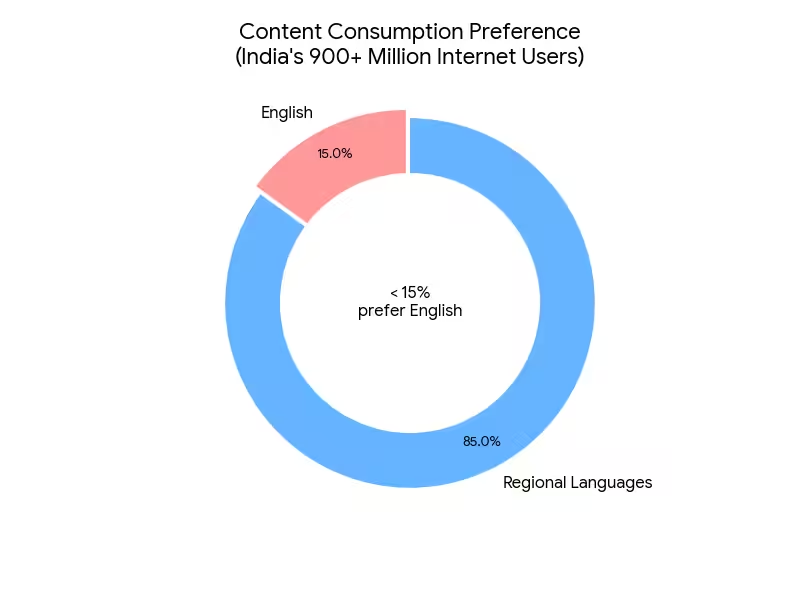
The rest? They’re searching, reading, and buying in Hindi, Tamil, Telugu, Bengali, Marathi, Kannada, Malayalam, Gujarati, and Punjabi using text and voice commands.
Google knows this. That’s why they’ve invested heavily in Indic language processing. Their algorithms now understand Hindi queries with impressive accuracy. Voice search in regional languages has exploded.
And the key point is that the competition for vernacular keywords is a fraction of English competition.
The Opportunity Gap
Let me break this down with real data:
| Metric | English SEO | Hindi SEO |
|---|---|---|
| Keyword competition (average) | High to Very High | Low to Medium |
| Content saturation | Oversaturated | Underserved |
| Cost per click (ads) | ₹15-50 | ₹3-12 |
| Voice search growth | 25% YoY | 95% YoY |
| New internet users (2024-25) | Flat | 80 million+ |
The opportunity is massive. But most publishers are still sleeping on it.
Who Should Invest in Vernacular SEO?
Regional language content works exceptionally well for:
- Education and exam preparation — Students searching for study materials in their native language
- Health and wellness — People researching symptoms, treatments, and remedies
- Finance and insurance — Complex topics that readers prefer understanding in their mother tongue
- News and current affairs — Local and national news consumption
- E-commerce and product reviews — Buyers researching before purchase
- Government schemes and services — Citizens looking for scheme details and application processes
- Entertainment and lifestyle — Recipes, astrology, festivals, and regional culture
If your audience includes Tier 2 and Tier 3 cities, vernacular content isn’t optional. It’s essential.
How AI is Transforming Regional Language Content
Let’s be real: creating quality content in Hindi, Tamil, or Bengali used to be painful. Finding native writers was expensive. Quality control was difficult. Scaling was nearly impossible for solo publishers.
AI has changed everything.
The AI Advantage for Vernacular Content
Modern AI models — Claude, ChatGPT, Gemini — have surprisingly strong capabilities in Indian languages.
I’ve tested them extensively.
Here’s what works and what doesn’t.
What AI does well:
- Generating first drafts in Hindi, Tamil, Bengali, and Telugu
- Translating concepts while preserving meaning (not just word-for-word)
- Creating multiple variations of headlines and meta descriptions
- Answering FAQs in natural vernacular language
- Generating structured content outlines in regional languages
What AI still struggles with:
- Highly colloquial expressions and regional dialects
- Cultural nuances and local idioms
- Technical jargon in niche fields
- Proofreading its own grammar errors
- Understanding context-specific humor
The key insight: AI is your accelerator, not your replacement.
Use it to create 70% of the draft, then have a native speaker polish the remaining 30%.
My AI Workflow for Hindi Content
Here’s the exact process I now use:
Write your article structure, key points, and examples in English. This is your blueprint
Use Claude or GPT-4 with a specific prompt:
Write this section in conversational Hindi (Devanagari script).
Use simple vocabulary that a 10th-grade student would understand.
Include the English term in parentheses for technical words.
Target audience: Middle-class Indians from Tier 2 cities.

[Paste your English section here]
Have a Hindi native speaker read the content aloud. If it sounds unnatural, rewrite those sections. This step is non-negotiable.
Insert India-specific examples, references, and cultural touches that AI often misses.
Add your target keywords naturally, optimize headings, and structure for featured snippets.
This workflow cuts content creation time by 60% while maintaining quality. I’ve used it to produce 20+ Hindi articles monthly with a single part-time editor.
AI Tools for Regional Language Content
| Tool | Best For | Regional Language Support |
|---|---|---|
| Claude | Long-form content, nuanced writing | Excellent Hindi, good Tamil/Bengali |
| ChatGPT | Versatile content, translations | Good across major Indian languages |
| Gemini | Google ecosystem integration | Strong Hindi, improving others |
| DeepL | Translation with context | Limited Indian language support |
| Bhashini (Gov’t) | Official translations | All 22 scheduled languages |
Pro Tip: For Tamil and Telugu content, Gemini often outperforms other models due to Google’s specific training on South Indian languages.
The Human-AI Balance
Publishing raw AI content in regional languages will hurt you. Native speakers can instantly tell when content is machine-generated. It lacks the natural flow, the colloquial expressions, the cultural resonance.
Here’s my formula:
- AI contribution: Structure, first drafts, research synthesis, FAQs
- Human contribution: Voice, local flavor, idioms, final polish, quality control
Budget at least ₹500-1,000 per article for native speaker editing, even when using AI for drafts. It’s the difference between content that ranks and content that converts.
Understanding How Google Handles Indian Languages
Before diving into tactics, you need to understand how Google processes regional language content. This changed dramatically over the past three years.
Google’s Indic Language Capabilities
Google now supports all 22 official Indian languages in Search. Their natural language processing for Hindi, Tamil, Telugu, and Bengali has reached near-English accuracy levels.
The search engine can:
- Understand transliterated queries (Hindi written in English script)
- Process mixed-language searches (“best laptop under 50000 में”)
- Recognize regional spelling variations
- Handle voice queries in native scripts
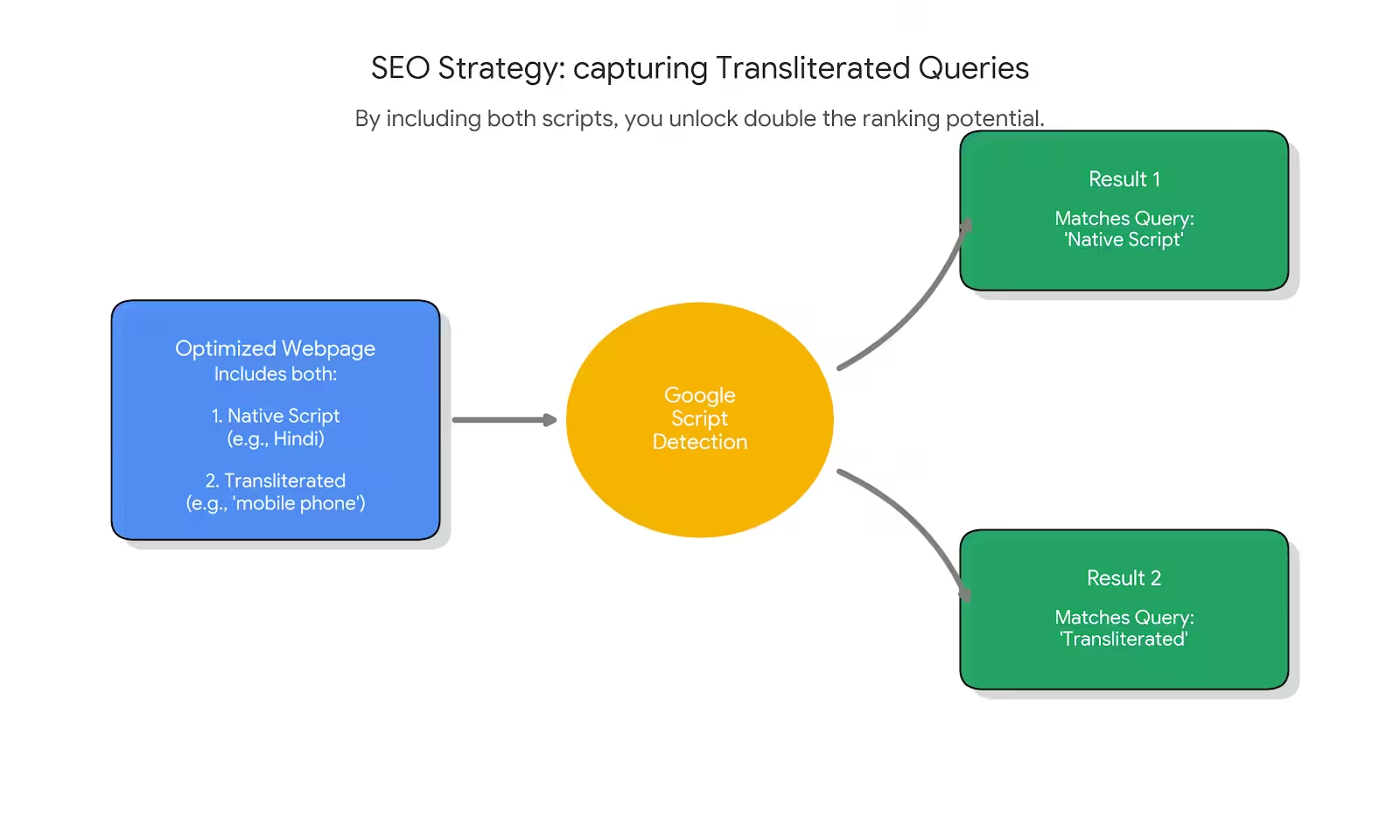
Google treats Devanagari Hindi and transliterated Hindi as related but distinct. Target both for maximum coverage.
Script Detection and Indexing
Google automatically detects the script of your content. A page written in Tamil script gets indexed for Tamil queries. But here’s what most people miss: you can rank for transliterated queries even with native script content if your on-page SEO includes both versions.
For example, if you’re writing about “मोबाइल फोन” (mobile phone in Hindi), include the transliterated version “mobile phone” naturally in your content. Google connects them.
The Hreflang Question
Should you use hreflang tags for regional language content?
Here’s my take after extensive testing:
Use hreflang when:
- You have the same content in multiple languages on different URLs
- You’re targeting specific regions (
hi-INfor Hindi in India) - You want to prevent cannibalization between English and Hindi versions
Skip hreflang when:
- You’re creating unique regional content, not translations
- Your site is entirely in one regional language
- You’re just starting and want to keep things simple
For most Indian publishers, starting without hreflang and adding it later works fine. Don’t let technical complexity delay your launch.
Keyword Research for Regional Languages
This is where most people give up. “The tools don’t support Hindi keywords.” I hear this constantly. It’s a cop-out.
Yes, traditional keyword tools have limitations. But there are workarounds that work brilliantly.
SEO Tools That Actually Work for This
| Tool | Best For | Limitations |
|---|---|---|
| Google Keyword Planner | Volume estimates, CPC data | Requires Google Ads account |
| Google Trends | Relative popularity, seasonal trends | No absolute volume numbers |
| Google Autocomplete | Real user queries, long-tail ideas | Manual process |
| AnswerThePublic | Question-based queries | Limited Indic support |
| Ahrefs/Semrush | Competitor analysis | Spotty regional data |
| YouTube Search | Video intent queries | Needs manual extraction |
My Keyword Research Process
Here’s the exact process I use for Hindi keyword research:
Step 1: Seed keyword expansion
Start with your topic in English. Use Google Translate to get the Hindi version. But don’t stop there. Search that Hindi term on Google and note:
- Autocomplete suggestions
- “People also ask” questions
- Related searches at the bottom
- Competitor content titles
Step 2: Transliteration mapping
For every Devanagari keyword, create its transliterated version. Many users type Hindi words using English letters. “कंप्यूटर कोर्स” becomes “computer course in Hindi.” Target both.
Step 3: Intent clustering
Group keywords by search intent:
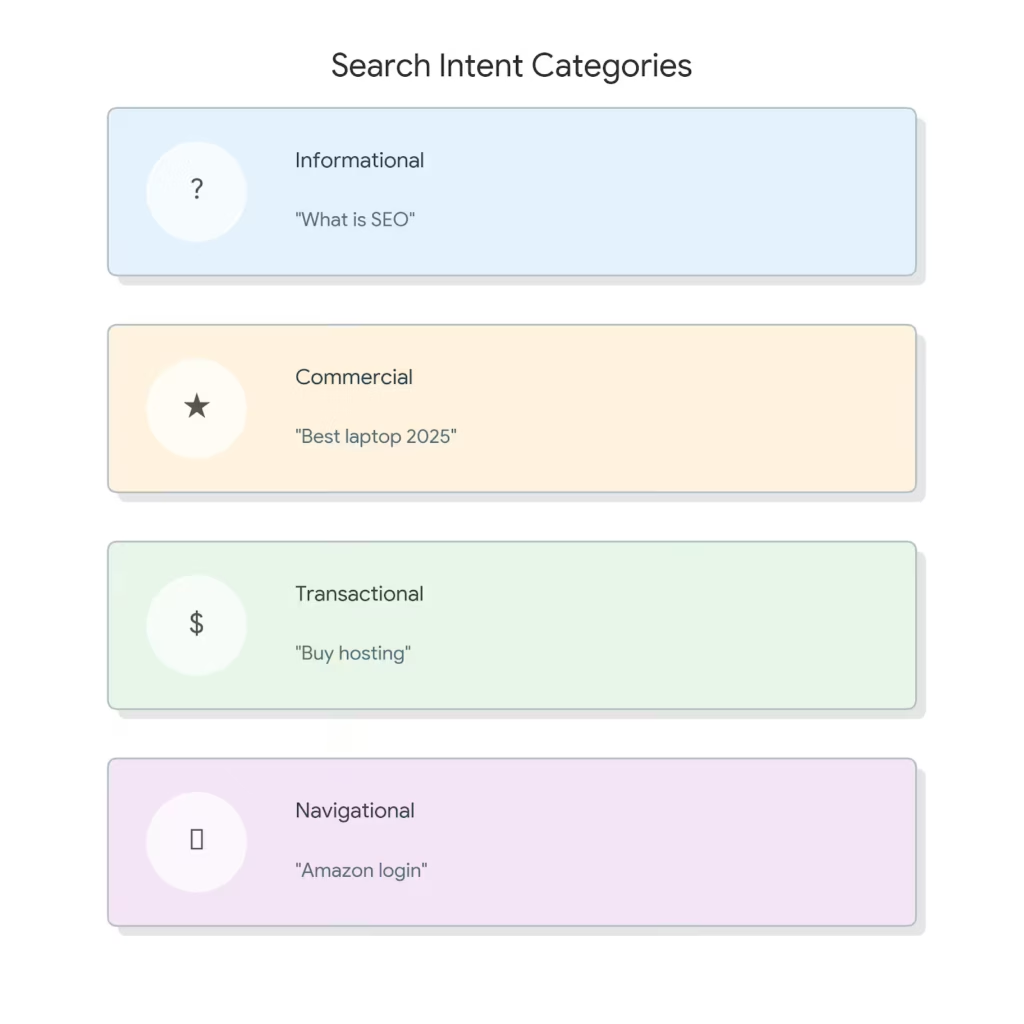
- Informational: “SEO क्या है” (What is SEO)
- Commercial: “बेस्ट लैपटॉप 2025” (Best laptop 2025)
- Transactional: “होस्टिंग खरीदें” (Buy hosting)
- Navigational: “अमेज़न लॉगिन” (Amazon login)
Step 4: Volume validation
Use Google Keyword Planner with location set to India and language set to Hindi. The volumes won’t be perfect, but they give you relative comparison. Anything showing 1,000+ monthly searches is worth targeting.
Step 5: Competition analysis
Search your target keyword. Count the results on page one that are:
- From major publications (hard to beat)
- From niche blogs (beatable)
- Thin or outdated content (easy win)
If you see 3+ weak results on page one, that keyword is worth pursuing.
Using AI for Keyword Discovery
Here’s a technique that’s worked brilliantly for me: use AI to generate keyword variations that tools miss.
Prompt example:
I'm targeting Hindi speakers who want simple, practical information about mutual funds. Generate 20 natural search queries that a middle-class Indian from a Tier 2 city would type into Google. Include:

• Devanagari versions
• Transliterated versions
• Question-style queries
• Comparison queries
• A mix of formal and everyday Hindi

Keep the queries realistic, conversational, and intent-focused.
AI won’t give you search volumes, but it generates natural language variations that reflect how real people search. Validate these against Google Autocomplete.
Red Flag: Don’t Trust Direct Translations
Direct translation from English keywords often misses how native speakers actually search. “How to lose weight” translates to “वजन कैसे कम करें” — but many users search “मोटापा कम करने के उपाय” (tips to reduce obesity) or “पेट की चर्बी कैसे घटाएं” (how to reduce belly fat).
Always validate translated keywords against actual search behavior using autocomplete and related searches.
WordPress Setup for Regional Language Sites
WordPress powers over 40% of the web — and it’s excellent for regional language content. But you need the right configuration.
Essential WordPress Settings
Step 1: Set your site language
Go to Settings → General → Site Language. WordPress supports Hindi, Tamil, Bengali, Telugu, Marathi, and other major Indian languages. This changes your admin interface and sets default language tags.
Step 2: Configure permalinks
Use transliterated URLs for stability:
Settings → Permalinks → Post nameThen manually set each post’s slug in transliterated form. “SEO क्या है” becomes seo-kya-hai.
Step 3: Enable UTF-8 encoding
Most modern WordPress installations handle this automatically. Verify by checking your wp-config.php:
define('DB_CHARSET', 'utf8mb4');Must-Have WordPress Plugins for Regional Languages
| Plugin | Purpose | Free/Paid |
|---|---|---|
| WPML | Full multilingual site management | Paid ($39-199/year) |
| Polylang | Multilingual alternative to WPML | Free + Paid |
| TranslatePress | Visual translation interface | Free + Paid |
| Rank Math | SEO with better schema for regional content | Free + Paid |
Setting Up WPML for Hindi Content
WPML + Rank Math is my go-to for serious multilingual sites. Here’s the setup:
- Install WPML Multilingual CMS + String Translation
- Run the setup wizard, select Hindi (hi) as secondary language
- Configure URL format:
/hi/subdirectory recommended - Enable automatic hreflang tags
- Set up language switcher in header/footer
Use WPML’s “Translation Management” to track which posts need Hindi versions. It prevents content gaps.
Setting Up Polylang (Free Alternative)
Polylang works well for smaller sites:
- Install and activate Polylang
- Add Hindi as a language (Settings → Languages)
- Configure URL structure (subdirectory or subdomain)
- Create language switcher widget
- Start creating content in both languages
The key difference: WPML has better translation workflow tools. Polylang is simpler but requires more manual management.
TranslatePress for Visual Editing
If you prefer a visual approach, TranslatePress lets you translate directly on the frontend, which I WPML can too:
- Install TranslatePress
- Add target languages
- Click “Translate Site” in admin bar
- Browse your site and translate text inline
- Translations save automatically
This is excellent for translating theme elements, menus, and widgets without touching code.
Configuring SEO Plugins for Regional Languages
Rank Math Setup:
- Go to Rank Math → General Settings → Edit robots.txt
- Ensure no regional language URLs are blocked
- Configure schema in your target language
- Set up language-specific sitemaps
Yoast SEO Setup:
- Install Yoast SEO + WPML integration (if using WPML)
- Enable language-specific meta titles/descriptions
- Configure social previews in regional language
- Generate separate sitemaps per language
Both plugins now support Devanagari and Tamil scripts in titles and descriptions. Test your output in Google Search Console.
Best Fonts for Indian Languages
Here’s something most guides ignore: font choice dramatically impacts readability and user experience for regional language content. The wrong font makes content look unprofessional. The right font builds trust.
I recommend using system fonts for most of the things and so is true for Indian languages as well, since all the devices in India will obviously have local language typographic support inbuilt. But if you want to give your site a definitive and different look using fonts, you can explore Google fonts.
Fonts for Hindi (Devanagari Script)
| Font | Best For | Style | Weight Range |
|---|---|---|---|
| Noto Sans Devanagari | Body text, UI | Clean, modern | 100-900 |
| Poppins | Headlines, modern sites | Geometric, bold | 100-900 |
| Mukta | Body text, readability | Humanist, warm | 200-800 |
| Tiro Devanagari Hindi | Long-form reading | Traditional, elegant | 400 |
| Hind | UI, compact spaces | Clean, efficient | 300-700 |
| Khand | Headlines, display | Condensed, modern | 300-700 |
| Rozha One | Headlines, branding | Bold, distinctive | 400 |
My recommendation for Hindi blogs:
- Headlines: Poppins or Khand
- Body text: Mukta or Noto Sans Devanagari
- UI elements: Hind
Fonts for Tamil
| Font | Best For | Style |
|---|---|---|
| Noto Sans Tamil | Universal use | Clean, modern |
| Noto Serif Tamil | Long-form content | Traditional, readable |
| Mukta Malar | Body text | Warm, approachable |
| Hind Madurai | UI, compact text | Efficient |
| Catamaran | Modern sites | Geometric |
| Meera Inimai | Traditional feel | Classic |
My recommendation for Tamil blogs:
- Headlines: Catamaran
- Body text: Noto Sans Tamil or Mukta Malar
- Traditional content: Noto Serif Tamil
Fonts for Bengali
| Font | Best For | Style |
|---|---|---|
| Noto Sans Bengali | Universal use | Clean, modern |
| Noto Serif Bengali | Long-form reading | Traditional |
| Hind Siliguri | UI, body text | Clean, efficient |
| Mina | Display, headlines | Bold |
| Galada | Decorative, branding | Script style |
Fonts for Telugu
| Font | Best For | Style |
|---|---|---|
| Noto Sans Telugu | Universal use | Modern |
| Noto Serif Telugu | Long-form content | Traditional |
| Hind Guntur | Body text | Readable |
| Mandali | Clean text | Simple |
| Ramabhadra | Headlines | Bold |
Fonts for Other Languages
| Language | Recommended Fonts |
|---|---|
| Marathi | Noto Sans Devanagari, Mukta, Hind |
| Gujarati | Noto Sans Gujarati, Hind Vadodara, Mukta Vaani |
| Kannada | Noto Sans Kannada, Hind Mysuru |
| Malayalam | Noto Sans Malayalam, Hind Kochi, Manjari |
| Punjabi (Gurmukhi) | Noto Sans Gurmukhi, Hind Jalandhar, Mukta Mahee |
| Odia | Noto Sans Oriya |
Implementing Fonts in WordPress
Method 1: Theme Customizer
Many modern themes support Google Fonts natively. Use a theme like GeneratePress, Blocksy, Astra or Kadence to get native support for Google Fonts.
- Go to Appearance → Customize → Typography
- Select your regional language font
- Adjust sizes and weights
Method 2: Plugin (Easy Google Fonts)
- Install “Google Fonts plugin by Olympus”
- Select your target fonts
- Apply to specific elements (body, headings, etc.)
Method 3: Manual CSS
Add to your theme’s style.css or Customizer → Additional CSS:
@import url('https://fonts.googleapis.com/css2?family=Mukta:wght@300;400;500;700&family=Poppins:wght@500;600;700&display=swap');

body {
    font-family: 'Mukta', sans-serif;
}

h1, h2, h3, h4, h5, h6 {
    font-family: 'Poppins', sans-serif;
}
Font Performance Optimization
Regional language fonts are larger than Latin fonts. Optimize loading using these or just use a plugin like Perfmatters or FlyingPress.
1. Use font-display: swap
@font-face {
    font-family: 'Mukta';
    font-display: swap;
    /* rest of font-face declaration */
}
2. Preload critical fonts
<link rel="preload" href="/fonts/mukta-regular.woff2" as="font" type="font/woff2" crossorigin>3. Subset fonts when possible Use tools like glyphhanger to create subsets with only the characters you need.
4. Consider system font stacks as fallbacks
font-family: 'Mukta', 'Noto Sans Devanagari', system-ui, sans-serif;Test your fonts on budget Android devices. What looks great on your MacBook might be unreadable on a ₹8,000 smartphone.
On-Page SEO for Hindi and Tamil Content
The fundamentals of on-page SEO apply to regional languages. But there are critical differences in execution.
Title Tags and Meta Descriptions
Write your title tag in the native script. This is non-negotiable. A Hindi article needs a Hindi title tag.
Good example:
<title>SEO क्या है? 2025 में वेबसाइट रैंक करने की पूरी गाइड</title>Bad example:
<title>SEO Kya Hai - Complete Guide in Hindi</title>The second example uses transliteration in the title, which reduces click-through rates from native Hindi searchers. They expect to see Devanagari script in search results.
For meta descriptions, follow the same principle. Write in native script, include your primary keyword, and make it compelling.
Keep Hindi titles under 50 characters and meta descriptions under 140 characters. Devanagari characters take more display space than English.
URL Structure
Here’s where it gets tricky. Should URLs be in English, transliterated Hindi, or native script?
My recommendation: Use transliterated URLs.
| Approach | Example | Verdict |
|---|---|---|
| Native script | /सीखें-seo-हिंदी-में/ | Avoid — encoding issues |
| Transliterated | /seo-kya-hai-hindi/ | Recommended |
| English | /what-is-seo-hindi/ | Acceptable |
Native script URLs can cause technical issues with some hosting setups and analytics tools. Transliterated URLs are readable, SEO-friendly, and technically stable.
Heading Structure
Use native script for all headings. Structure them logically:
# Main Title (H1) — In native script
## Section Heading (H2) — In native script
### Subsection (H3) — In native script
Include your target keyword in at least one H2. But don’t force it — readability matters more.
Content Formatting for Regional Languages
Regional language readers have specific preferences:
- Shorter paragraphs — 2-3 sentences maximum
- More subheadings — Break content every 150-200 words
- Visual aids — Images with Hindi/Tamil alt text
- Bullet points — For lists and steps
- Bold key terms — Especially technical terms
One pattern I’ve noticed: Hindi readers engage more with content that includes English technical terms in parentheses. For example: “सर्च इंजन ऑप्टिमाइजेशन (SEO)” performs better than pure Hindi or pure transliteration.
Image Optimization
Every image needs:
- Alt text in native script — Describe the image in Hindi/Tamil
- File names in transliteration — “seo-kya-hai-diagram.png”
- Compressed file size — Same as English SEO
- Relevant context — Place images near related content
Google can now read text within images in Indian languages. If your infographic contains Hindi text, that’s additional ranking signal.
Technical SEO Considerations
Regional language sites face unique technical challenges. Get these wrong, and your rankings suffer regardless of content quality.
Character Encoding
This is critical. Your site must properly declare UTF-8 encoding.
<meta charset="UTF-8">Without this, Devanagari and Tamil characters may display as garbled text. Most modern CMS platforms handle this automatically, but verify it in your source code.
Language Declaration
Declare your content language in the HTML tag:
<html lang="hi"> <!-- For Hindi -->
<html lang="ta"> <!-- For Tamil -->
<html lang="bn"> <!-- For Bengali -->
This helps search engines and screen readers understand your content’s language. If you are using a plugin from the table above, you are already sorted. Also, even if you missed adding these, don’t worry. Google now understands in which language the current page is, however it is recommended to use these language parameters. Also see hreflang attribute for more targeted multilingual sites.
Font Loading and Performance
Regional language fonts are typically larger than English fonts. A Hindi web font can add 200-500KB to your page load. Stick to system font or use a lighter font with “Devnagari” in the name.
Optimization strategies:
- Use Google Fonts with
display=swap - Subset fonts to include only required characters
- Consider system fonts as fallbacks (Noto Sans Devanagari)
- Preload critical font files
<link rel="preload" href="/fonts/hindi-font.woff2" as="font" type="font/woff2" crossorigin>Mobile Optimization
Over 95% of regional language users access the internet via mobile. Your site must be flawless on smartphones.
Key checks:
- Touch targets sized appropriately
- Text readable without zooming
- No horizontal scrolling
- Fast loading on 3G/4G connections
- Works on budget Android devices
Test your site on actual devices, not just Chrome DevTools. Borrow a ₹10,000 smartphone and see how your site performs.
Structured Data
Schema markup works for regional language content. Use it.
Recommended schemas:
- Article — For blog posts
- FAQPage — For Q&A content
- HowTo — For tutorials
- BreadcrumbList — For navigation
Write schema content in the native script. If your article title is in Hindi, your schema headline should be in Hindi too.
Content Strategy for Vernacular Markets
Creating regional language content isn’t just about translation. It requires a fundamentally different content strategy.
Don’t Translate — Transcreate
Direct translation produces awkward, unnatural content. “10 Tips to Boost Your Productivity” translated literally sounds corporate and foreign to Hindi readers.
Instead, transcreate: adapt the concept for your audience’s cultural context.
| English Topic | Poor Translation | Good Transcreation |
|---|---|---|
| Productivity tips | उत्पादकता बढ़ाने के टिप्स | दिनभर एक्टिव रहने के आसान तरीके |
| Investment guide | निवेश गाइड | पैसे कहाँ लगाएं – पूरी जानकारी |
| Diet plans | आहार योजना | वजन घटाने का देसी डाइट प्लान |
Notice the difference? Transcreated titles use familiar expressions that resonate with native speakers.
Content Formats That Work
Based on my testing, these formats perform best for regional language audiences:
High performers:
- How-to guides with step-by-step instructions
- Comparison posts (this vs that)
- Government scheme explainers
- Exam preparation guides
- Product reviews in native language
- Local news and updates
Underperformers:
- Thought leadership and opinion pieces
- Abstract concept explanations
- Industry news (unless localized)
- Technical documentation
The pattern is clear: practical, actionable content wins. Regional language readers often search with specific intent to solve a problem.
Local Relevance
Add local context wherever possible. Instead of generic examples, use India-specific references:
- Mention Indian brands and products
- Reference Indian pricing (₹, not $)
- Include India-specific regulations and processes
- Use examples from Indian cities and contexts
- Reference local festivals and cultural events when relevant
This isn’t just about engagement — it’s an SEO signal. Content with local relevance ranks better for local queries.
Content Length
Here’s what surprised me: shorter content often performs better in regional languages.
English SEO has trained us to write 2,000+ word articles. But for many Hindi and Tamil queries, 800-1,200 words is the sweet spot. Readers want answers quickly. They’re often on mobile with limited data plans. Respect their time.
That said, comprehensive guides still have their place. Match content length to search intent:
- Quick answers: 500-800 words
- How-to guides: 1,000-1,500 words
- Ultimate guides: 2,000-3,000 words
Test and measure. Let data guide your content length decisions.
Link Building for Regional Language Sites
Link building in vernacular spaces is different. The tactics that work for English SEO often don’t apply.
The Reality of Regional Backlinks
Let’s be honest: high-authority regional language sites are rare. There’s no Hindi equivalent of Forbes or TechCrunch with DR 90+.
This changes your link building strategy entirely.
What works:
- Guest posts on established Hindi/Tamil blogs
- Mentions in regional news portals
- Links from educational institutions (.edu.in domains)
- Government scheme aggregator links
- Regional business directory listings
- Social shares and community links
What doesn’t work:
- Cold outreach to English publications
- Generic directory submissions
- Link exchanges with irrelevant sites
Building Relationships in Regional Spaces
The regional language blogosphere is smaller and more relationship-driven. Here’s how to build genuine connections:
- Identify active bloggers in your niche who publish in your target language
- Engage authentically — comment on their posts, share their content
- Offer value first — help them before asking for anything
- Collaborate on content — expert roundups, interviews, joint resources
- Attend regional events — local blogging meetups and conferences
One relationship with a respected regional blogger can generate more value than 50 cold outreach emails to random sites.
Internal Linking Strategy
For newer regional language sites, internal linking becomes even more important. You’re building topical authority from scratch.
Structure your site around topic clusters:
- Create pillar content for broad topics
- Link supporting articles to pillars
- Interlink related content within clusters
- Use Hindi/Tamil anchor text for internal links
A well-structured internal linking setup can compensate for limited external backlinks in the early stages.
Using Analytics for Regional Content
Standard analytics work for regional language sites. But interpretation requires nuance.
Key Metrics to Track
Use Google Analytics or Independent Analytics likes tools to measure these metrics from day-one.
| Metric | Why It Matters | Target Benchmark |
|---|---|---|
| Organic traffic | Overall SEO performance | 20%+ MoM growth (early stage) |
| Average session duration | Content engagement | 2+ minutes |
| Bounce rate | Content relevance | Under 65% |
| Pages per session | Site structure | 1.5+ pages |
| Conversion rate | Business impact | Varies by goal |
Google Search Console Insights
Filter Search Console by query language to see Hindi-specific performance:
- Go to Performance report
- Add filter: Query contains (your Hindi keyword in any script)
- Analyze impressions, clicks, and CTR
This helps you understand which Hindi keywords drive traffic and where opportunities exist.
Content Performance Analysis
Track individual article performance:
- Which topics generate the most organic traffic?
- Which articles have highest engagement?
- Where do users drop off?
- What converts best?
Use this data to inform future content decisions. Double down on what works.
Voice Search Tracking
Voice search is huge for regional languages. Users find it easier to speak queries in Hindi than type them.
Unfortunately, direct voice search tracking is limited.
Proxy indicators include:
- Increase in question-based queries
- Longer, conversational search terms
- Mobile-heavy traffic patterns
If you see these patterns, optimize for voice: use conversational language, answer questions directly, and include natural phrasing.
Common Mistakes to Avoid
I’ve made most of these mistakes myself. Learn from them.
Mistake #1: Treating Regional Content as Secondary
Many publishers create Hindi content as an afterthought. Thin translations. No promotion. Minimal optimization.
This guarantees failure. Regional content deserves the same attention as English content. Often more, because the competition is lower.
Mistake #2: Ignoring Transliterated Search
A significant portion of Hindi internet users type Hindi words in English script. “Best mobile phone” becomes “best mobile phone hindi” or “sabse accha mobile phone.”
If you only optimize for Devanagari, you miss this audience entirely.
Mistake #3: Using Machine Translation Without Editing
Google Translate and AI have improved dramatically. But they still produce unnatural content that native speakers immediately recognize as translated.
Always use native speakers for final editing. If budget is limited, use AI translation as a starting point but have a native speaker polish thoroughly.
Mistake #4: Neglecting Local Keywords
“How to file income tax return” has different search patterns than “income tax return kaise file kare.” Generic English patterns don’t apply.
Research keywords fresh for each language. Don’t assume translation preserves search behavior.
Mistake #5: Slow Mobile Performance
Regional language users are often on slower connections and budget devices. A 5-second load time that’s “acceptable” for urban English users is a dealbreaker for Tier 3 city Hindi users.
Target under 3 seconds on 3G connections. It’s achievable with proper optimization.
Mistake #6: Wrong Font Choices
Using default system fonts or poorly designed Devanagari fonts destroys credibility instantly. Invest time in selecting appropriate, professional fonts for your target language.
The Future of Regional Language SEO
The trajectory is clear: regional language internet usage in India will only grow.
Trends to Watch
- Voice search explosion — Google Assistant and other voice interfaces are driving massive growth in spoken queries. Optimize for conversational language.
- Video content dominance — YouTube in regional languages is booming. Consider video as part of your content strategy, with proper SEO for titles, descriptions, and transcripts.
- AI-powered creation — Tools are getting better rapidly. Within 2 years, AI will produce near-native-quality content in major Indian languages. Early adopters who build workflows now will have significant advantages.
- E-commerce localization — Major platforms are investing heavily in regional language experiences. Follow their lead.
- Government digitization — As government services move online, demand for vernacular content about schemes, applications, and procedures will surge.
My Prediction
Within three years, the most successful digital publishers in India will have robust regional language strategies. English-only sites will plateau while vernacular content captures the next 300 million users.
The question isn’t whether to invest in regional language SEO. It’s how quickly you can start.
Action Plan: Your First 30 Days
Here’s a practical roadmap to launch your regional language SEO effort:
Week 1: Research and Planning
- Identify your target language(s) based on audience data
- Conduct keyword research for 20-30 target terms
- Analyze top-ranking competitors in your niche
- Define content formats and publishing frequency
- Select fonts for your target language
Week 2: Technical Setup
- Install and configure multilingual plugin (WPML/Polylang)
- Configure proper character encoding and language tags
- Set up URL structure for regional content
- Install and configure fonts
- Create templates for regional content
Week 3: Content Creation
- Set up AI workflow with native speaker review process
- Publish 3-5 foundational articles
- Optimize all on-page elements in native script
- Add structured data markup
- Internal link to existing English content where relevant
Week 4: Promotion and Measurement
- Share content on regional social platforms
- Begin relationship building with regional bloggers
- Set up Search Console filters for language tracking
- Analyze initial performance and adjust
This isn’t a one-month project. It’s the start of an ongoing strategy. But these first 30 days establish your foundation.
FAQs
Should I create a separate website for regional language content?
Not necessarily. Subfolders (gauravtiwari.org/hi/) or subdomains (hi.gauravtiwari.org) both work. Subfolders are simpler to manage and share domain authority. Create a separate site only if your regional content strategy is substantial enough to warrant independent branding.
How do I find native writers for regional content?
Several options work well. LinkedIn job posts targeting specific regions. Regional content writing agencies. University students from Hindi/Tamil medium backgrounds. Local journalism networks. Start with one reliable writer and build from there.
What's the minimum budget to start regional language SEO?
You can start with minimal investment if you’re willing to learn and create content yourself. Budget ₹5,000-10,000 monthly for one native writer producing 8-10 articles. Add ₹2,000-3,000 for tools and hosting. With AI assistance, you can potentially double output at the same cost. Profitable within 6-12 months if content quality is good.
Which regional language should I prioritize?
Hindi has the largest audience by far (400+ million speakers). Tamil, Telugu, and Bengali follow. Choose based on your niche and existing audience data. If 30 percent of your current visitors are from Maharashtra, Marathi content makes sense.
How long before I see results from regional language SEO?
Faster than English SEO due to lower competition. Expect initial rankings within 4-8 weeks for low-competition keywords. Meaningful traffic within 3-6 months. Build a 50+ article foundation before expecting significant returns.
Can I use AI tools for regional language content?
Yes, but strategically. Use AI for research, outlines, and first drafts. Always have native speakers edit and refine. Current AI produces grammatically correct but often unnatural regional language content. Human polish is essential. The sweet spot is AI for 70 percent efficiency, human for 30 percent quality control.
How do I handle mixed language queries?
Target them explicitly. Many users search in Hinglish (Hindi-English mix). Include both script versions naturally in your content. For example, ‘Best laptop under 50000 में कौन सा खरीदें’ combines English and Hindi. Acknowledge this reality in your keyword strategy.
Which Google Fonts work best for Hindi websites?
For body text, use Mukta or Noto Sans Devanagari. For headlines, Poppins or Khand work well. Avoid decorative fonts for main content because readability matters most. Test on multiple mobile devices before finalizing your choices.
What WordPress plugins are essential for multilingual sites?
Start with either WPML (paid, more features) or Polylang (free, simpler). Add your SEO plugin (Rank Math or Yoast) configured for multilingual content. Consider TranslatePress for visual translation editing. Font plugins like Easy Google Fonts help manage typography.
Final Thoughts
Regional language SEO in India
For the WordPress side of regional language sites, Rank Math supports multilingual SEO out of the box. If you need help with hreflang setup, regional keyword research, or a full multilingual WordPress build, I offer both SEO services and WordPress development services for regional content projects.
isn’t a niche opportunity anymore. It’s the main event.The publishers who move early will build dominant positions in underserved markets. Those who wait will face increasing competition as the space matures.
AI has removed the biggest barrier — content creation at scale. WordPress makes the technical setup straightforward. The right fonts ensure professional presentation. The playbook is clear.
I’ve shared everything I know about making this work. The strategies, the tools, the pitfalls, and the opportunities. Now it’s your turn to execute.
Start small. Test relentlessly. Respect your audience by providing genuine value in their native language.
The next 500 million Indian internet users are waiting. Will your content be ready for them?
Disclaimer: This site is reader-supported. If you buy through some links, I may earn a small commission at no extra cost to you. I only recommend tools I trust and would use myself. Your support helps keep gauravtiwari.org free and focused on real-world advice. Thanks. - Gaurav Tiwari