
 by
by
YouTube video search in 2026 has evolved substantially from the simple keyword-and-channel filtering of a decade ago. The platform now supports natural-language queries via its AI-powered search, time-bounded queries (“find a 5-minute explanation of…”), chapter-level results (return matches inside specific timestamps of long videos), and increasingly sophisticated filters for video type, format, and intent. If you use YouTube as a research tool or a learning platform, knowing the advanced search techniques can cut your time-to-find by 80%. This guide covers the search operators, filters, and tricks I actually use — written from the perspective of someone who has used YouTube heavily for both content creation and consumption since 2008.
When it comes to online video viewing, nothing beats YouTube. It has world’s largest video collection of all genres possible. Without a doubt, YouTube is so essential to video lovers, as Google is to search and Wikipedia is to research. Started in 2005 by three ex-PayPal employees, YouTube was bought by Google for a whopping $1.65 billion and still runs under Google‘s subsidiary.
Do you know?
YouTube inherits its trademark’s letter styling from PayPal.
According to official YouTube data, it has more than 1 billion users & nearly 13 days of videos are being uploaded every minute. It’s said that an image is more powerful than thousands of texts, so is a video more powerful than hundreds of images. Everything, you upload or watch on YouTube, becomes significantly important to not just you but the complete society around you. That’s why YouTube is seen as world’s more impactful social media. But despite of these impactful impressions, most YouTube users are unaware of its full potential. Here I have listed some handy YouTube tips & tricks which you should consider next time you search a YouTube video.
2026 Search Operators That Still Work
YouTube’s official search supports several operators most users don’t know about. Quoted phrase: "exact phrase" forces YouTube to match the exact word order. Useful for specific quotes, song lyrics, error messages. Channel filter: channel:"name" or channel: name restricts results to videos from a specific channel. Date filter: built-in date filters (Today / This week / This month / This year) are accessible from the filter button below the search bar. Duration filter: short (under 4 min), medium (4-20 min), long (over 20 min). Type filter: video, channel, playlist, movie. Features filter: HD, subtitles/CC, Creative Commons, 3D, 4K, HDR, Location.
What’s new in 2026: natural-language AI search (“show me a beginner’s tutorial on quantum entanglement under 10 minutes from a university channel”) works increasingly well. YouTube also indexes chapter markers and video transcripts, so searching for a specific phrase often returns matches inside long videos with timestamps pointing to the exact moment the phrase appears. For research-heavy use, the third-party YouTube Transcript downloaders + grep workflow is still faster than YouTube’s built-in search for very specific quote-hunting. For everyday discovery, the AI-powered search now handles intent well enough that operator-level search is rarely necessary.
Filter YouTube videos
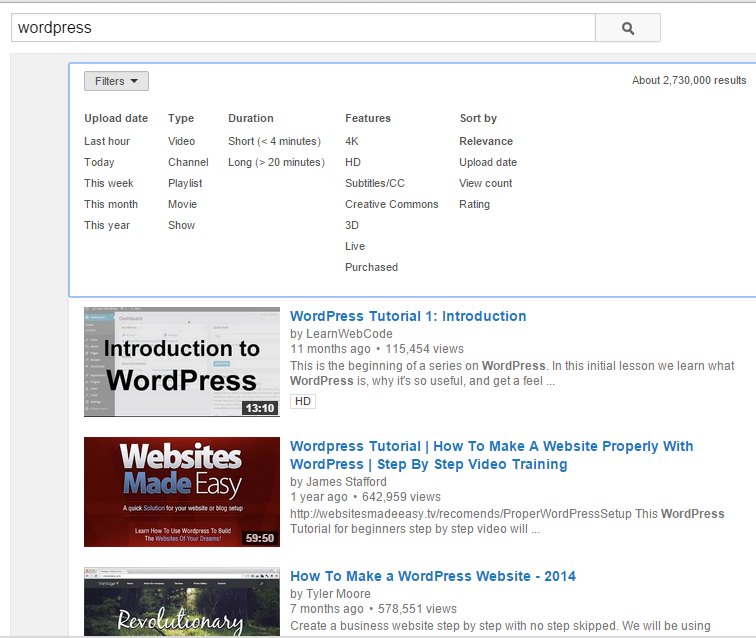
You can easily filter your YouTube search according to time, quality, duration & other features. This helps you find an appropriate video in the plethora of videos/playlists. For example searching wordpress will give you around 2.7 million results. You can, however, filter those search results according to your need. This is how a typical video filter looks like:
Restrict your results with search-tags
YouTube tries to find your search term from different video metadata, like Title, Tag, Channels & Video Description. If you want to strict your search term to be matched only in titles, you can use "allintitle:" tag in search box. For example, if you are trying to find a video about wordpress, you can easily search with the appropriate term like allintitle: wordpress. But if you want to combine other words with it, you should apply containing single quotes ' '. That is, to search a video having both WordPress & Tutorial in title, you should type allintitle: 'wordpress tutorial' in search. It will lead your search to videos having only the terms in title.
Again if you want to ‘not-include’ something in search title, you can prefix a dash to that. For example, If you want to search for a WordPress related video but don’t want to include tutorials in the titles of videos, you can type allintitle: 'wordpress -tutorial'. in search box & hit enter. Similarly, if you were looking for an age of ultron trailer but wanted to exclude teaser trailers from your search, just type allintitle: 'age of ultron trailer -teaser'. This will return all videos with Age of Ultron trailer in the title but will definitely skip video results having teaser in the title.
If you are looking for a video channel, you should suffix channel next to search term separated by a comma. For example, typing WordPress, channel will show all channel results to WordPress search term. Similarly you can try video, today, this week, this month, this year, movie, show, playlist, short, long, 4k, HD etc., like words that appear in YouTube filters.
Tell Google you want more of this.
Add Gaurav Tiwari as a preferred sourceOne tap, and this site shows up more often in your own Top Stories, AI Overviews and AI Mode. Remove it any time.