
Rank Math Review: The Best WordPress SEO Plugin in 2026! Period.
If you’re a regular reader of this blog, you might already know how much I love Rank Math. I’ve even created a plugin, Dynamic Month & Year into Posts, that perfectly complements it. And even if you’re not a regular one, you may already know that Rank Math is an S-tier all-in-one WordPress SEO plugin that handles everything from on-page optimization to schema markup, redirects, and analytics integration. Also see my optimize your blog posts for SEO.
Rank Math is kind of the Swiss Army knife for all things SEO, but it caters best to content creators and WordPress professionals who want granular control without managing five separate plugins.
The module-based architecture means you only enable what you need. The learning curve is real, especially in Advanced Mode, but the payoff is a single dashboard that replaces a dozen tools.
I’ve been using Rank Math on gauravtiwari.org and other sites since 2018, when the free version first launched. I remember how eager I was to jump ship from Yoast SEO – which was not only very bloated and heavy on my server but was pretty limited in the Free version. Rank Math’s free version had everything I needed to run a proper blog.
And when they launched the paid version, I upgraded to Pro the first chance I got on June 2, 2021, and I’ve renewed every year since.
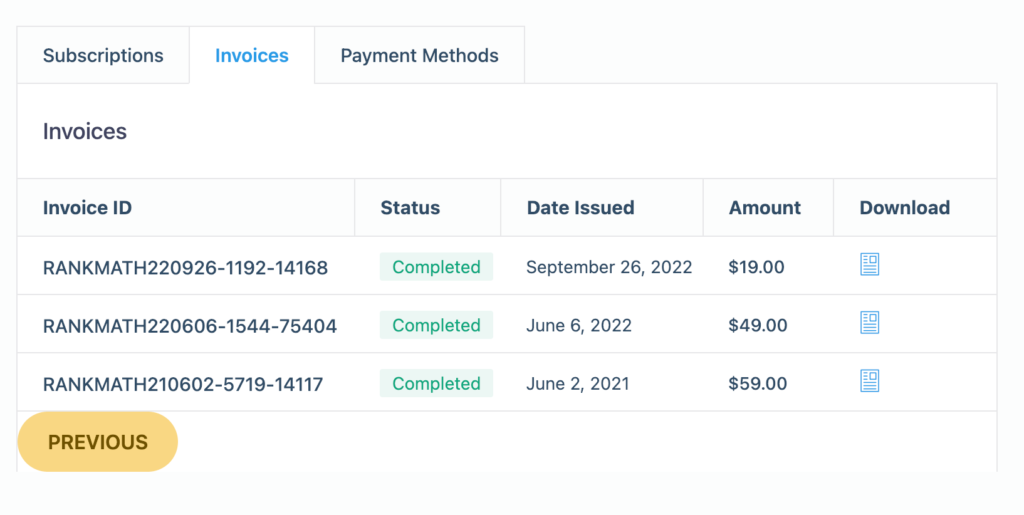
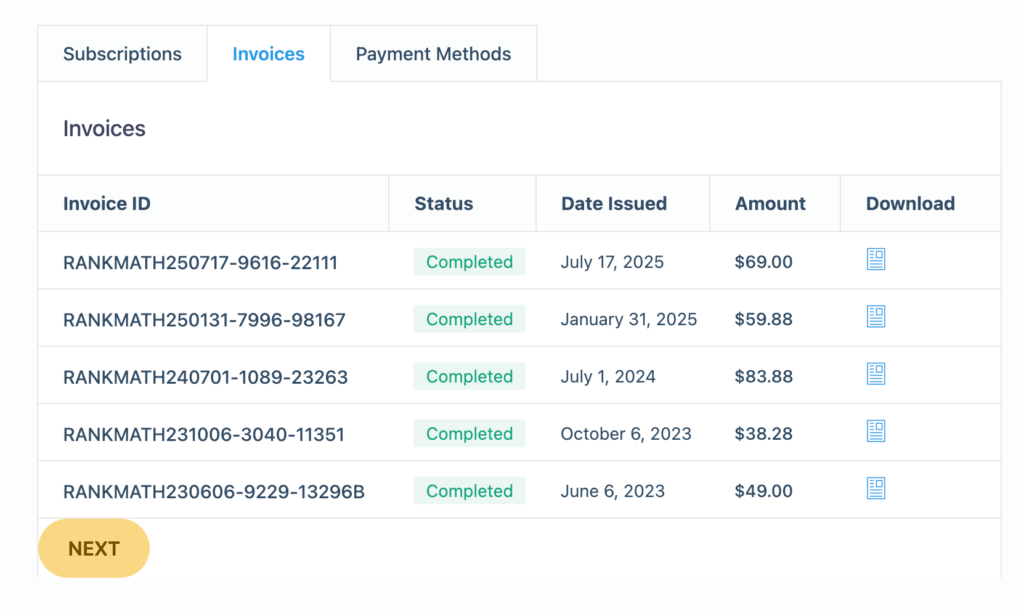
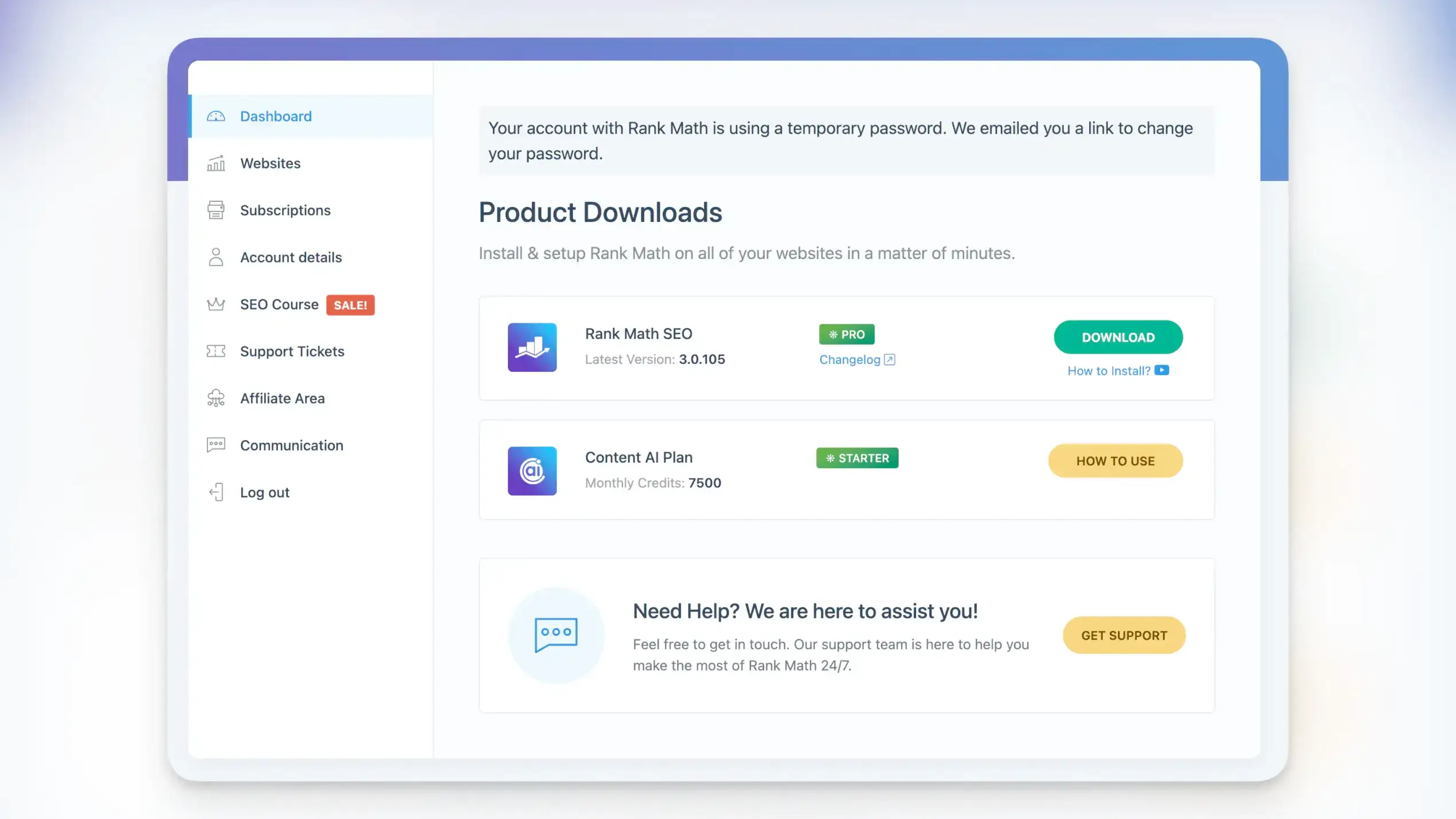
Currently, I’m running version Rank Math Pro 3.0.105 with around 17 active modules. This Rank Math review was a long time coming. I’ve been planning to write a review of it for a long time, but as they say, there’s a right time for every right thing. So, here it’s. This isn’t a surface-level review. I’m going to show you what nearly eight years of daily use looks like, including my exact configuration, the code snippets I use to customize it, and where Rank Math still irritates me.
A sincere disclosure: Some links in this review are affiliate links. I only recommend tools I actually use.
What Rank Math Actually Does
At its core, Rank Math optimizes your WordPress content for search engines. But that description sells it short.
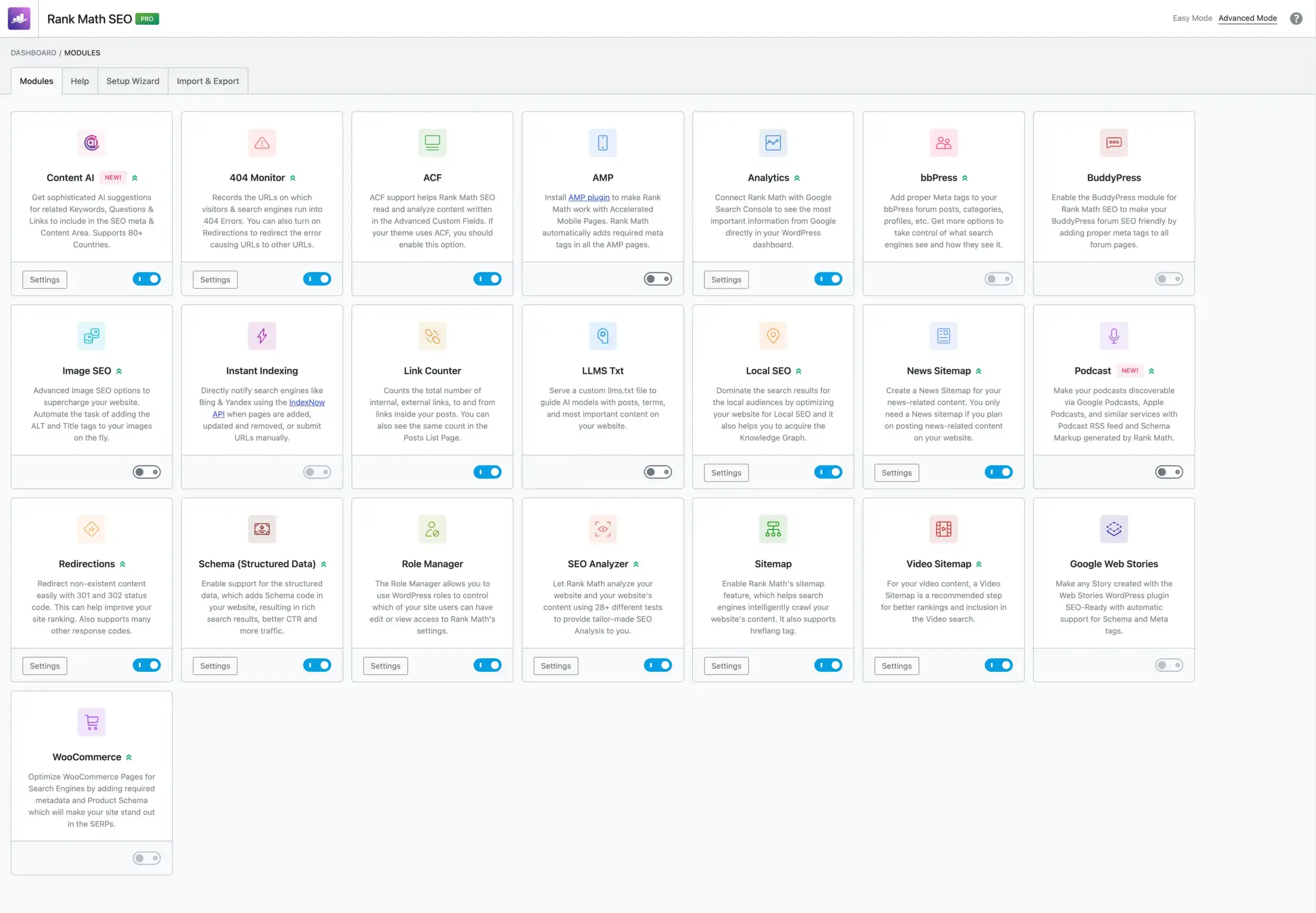
The plugin operates through modules. You pick what you need: SEO analysis, schema markup, redirects, 404 monitoring, analytics, sitemaps, WooCommerce integration. Each module is a mini-plugin that you can enable or disable. I run 18 modules on my site. You might only need 8.
The module approach solves a real problem. With Yoast, you get everything whether you want it or not. With All-in-One SEO, same thing. Rank Math lets you build exactly the SEO toolkit you need. Running a simple blog? Enable the basics. Running an e-commerce site with custom post types? Enable WooCommerce, schema, video sitemaps, and local SEO.
There’s a free version that covers most bloggers. The Pro version which costs around $96 now – pretty costly compared to $59/year when on offer for personal use, unlocks advanced modules, schema types, Google Analytics integration, and priority support. I’ll break down whether Pro is worth it later. But first let’s talk about how I set up Rank Math for my needs, especially on gauravtiwari.org.
My Complete Setup on gauravtiwari.org
First, I always run the Setup wizard, and once done, I switch Rank Math to Advanced Mode instead of Easy Mode. I’m totally used to it now. This gives full control over every setting. Easy Mode exists for beginners, but you’ll outgrow it fast. Also see my Perfmatters for performance optimization.
Active Modules
Here’s exactly what I’ve enabled:
- Link Counter – Internal/external link tracking per post
- Analytics – Google Search Console integration
- SEO Analysis – Site-wide audits and per-post scoring
- Sitemap – XML, HTML, Video, and News sitemaps
- Rich Snippet – Schema markup for all content types
- Image SEO – adds ALT text automatically
- ACF – Advanced Custom Fields integration
- Web Stories – Google Web Stories support
- Content AI – AI-powered keyword research
- Instant Indexing – Direct submission to Google/Bing
- Role Manager – User permission control
- Local SEO – Business location schema
- News Sitemap – For news-style content
- Video Sitemap – YouTube embed optimization
- 404 Monitor – Broken link tracking
- Redirections – 301/302 redirect management
- LLMs Txt – currently testing. Useful for AI-search engines.
Inactive Modules
There are some modules that I don’t activate generally as I don’t use related features. For example on gauravtiwari.org, I’ve deactivated:
- BuddyPress – Forum and community SEO (for client sites)
- Analytics – I activate Google Search Console integration but not Google Analytics as I use my own self-hosted Umami Analytics now.
- WooCommerce – For product schema and e-commerce SEO which I don’t currently use.
- bbPress – Discussion forum optimization : not using.
- AMP – no longer relevant.
- Podcast SEO – not hosting podcasts here.
That’s 16 and a half (call it 17) modules activated. SEO is changing with AI search, and Rank Math keeps adding relevant features. The LLMS Txt module is the newest addition, designed for AI crawlers to understand your content better.
General Settings Configuration
Let me walk through my actual settings. These come from my exported configuration.
Link Management:
- Strip Category Base: Enabled – Removes /category/ from URLs for cleaner structure
- Redirect Attachments: Enabled – Points attachment pages to parent post (prevents thin content)
- Orphan Attachment Redirect: Points to homepage
- Nofollow External Links: Disabled – I manually control rel attributes using my own Functionalities plugin
- Open External Links in New Tab: Disabled – User preference, I let readers decide. Useful for accessibility.
404 Monitor:
- Mode: Simple – Captures error URLs without excessive logging
- Limit: 100 entries – Prevents database bloat
- Ignore Query Parameters: Enabled – Reduces duplicate error entries
Redirections:
- Default Header Code: 301 – Permanent redirects for most cases
- Auto-redirect on Post Delete: Enabled – Catches removed content automatically
Content AI Configuration:
- Post Types: All 10 of my custom post types are enabled
- Country: All – Global keyword suggestions
- Tone: Formal – Matches my writing style
- Language: US English
Analytics Email Reports:
- Frequency: Monthly – Weekly is too noisy
- Recipient: My main email
- Sections included: Summary, positions, winning posts, winning keywords, losing keywords
Titles and Meta Configuration
This is where Rank Math shines for complex sites. I’ve 10 custom post types, and each one has individual SEO settings.
Standard Posts:
- Title Pattern:
%title% %sep% %sitename% - Description:
%excerpt% - Default Schema: Article (BlogPosting)
- Link Suggestions: Enabled
- Primary Taxonomy: Category
Pages:
- Default Schema: Article
- Link Suggestions: Enabled
Deals (Custom Post Type):
- Title Pattern:
%title% %sep% %sitename% - Default Schema: Article (BlogPosting)
- Sitemap: Enabled
- Link Suggestions: Enabled
Snippets (Custom Post Type):
- Default Schema: Article
- Sitemap: Enabled
Study Notes:
- Default Schema: Article
- Sitemap: Enabled
Taxonomies:
- Categories: Indexed
- Tags: Noindexed – Too many thin tag pages
- Deal Types: Indexed
- Programming Languages: Indexed
- Subjects: Indexed
Archive Settings:
- Author Archives: Noindexed – Single author site, no value
- Date Archives: Disabled – Prevents duplicate content issues
- Search Results: Noindexed
- Subpages of Archives: Noindexed
- Password Protected Content: Noindexed
Sitemap Configuration
Sitemaps are critical for crawlability. Here’s my setup:
XML Sitemap:
- Items Per Page: 300 – Default, works well for most sites
- Include Images: Enabled
- Include Featured Images: Disabled – Redundant with above
- Authors Sitemap: Enabled
- Local Sitemap: Enabled
Post Types in Sitemap:
- Posts: Yes
- Pages: Yes
- Deals: Yes
- Snippets: Yes
- Study Notes: Yes
- Attachments: No (redirected anyway)
- Testimonials: No (thin content)
- Tools: No (utility pages)
- Ebooks: No (gated content)
- Projects: No (portfolio items, not blog content)
HTML Sitemap:
- Display Method: Shortcode –
[rank_math_html_sitemap] - Sort Order: Published date
- Show Dates: Enabled
- Not using it actively.
Video Sitemap Post Types: All content types enabled. YouTube embeds get indexed properly.
News Sitemap:
- Publication Name: Gaurav Tiwari
- Post Types: Posts, Deals, Snippets, Study Notes
Role Manager Configuration
This controls who can access what in Rank Math. Critical for multi-author sites or client handoffs.
Administrator (me): Full access to everything: titles, general settings, sitemap, 404 monitor, link builder, redirections, role manager, analytics, site analysis, on-page tools, Content AI, admin bar.
Editor:
- Site analysis
- On-page analysis (general, snippet, social)
- No access to global settings
Author:
- On-page analysis only
- Can optimize their own posts
- Can’t change site-wide settings
This setup means I can hand off content creation to writers without them accidentally breaking SEO configurations.
Key Features That Actually Matter
I’m not going to list every feature. You can read the Rank Math website for that. Instead, here’s what genuinely affects my workflow.
Content AI
This is the flagship Pro feature, and Rank Math has expanded it substantially since I first started using it. Content AI now operates through four distinct views, each serving a different purpose in your content workflow. I mainly use it in Block Editor sidebar to research without leaving the editor.
Here I start with Research view.
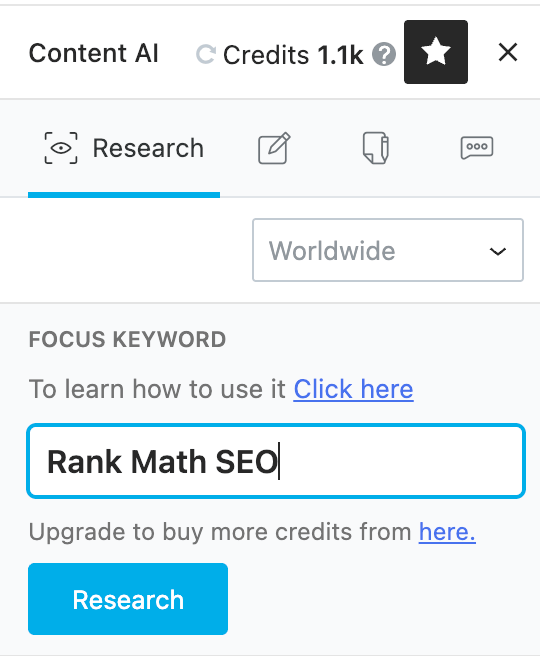
Research View is where you start. Enter your focus keyword, and Content AI pulls data from Google’s top-ranking pages with gives you a score. You also get:
- Related keywords to include (with usage counts from ranking content)
- Questions people ask about the topic
- Suggested internal and external links
- Content length recommendations based on competitors
- Readability scoring
Each research costs 500 credits. Worth it for primary keywords, overkill for secondary terms you already understand.
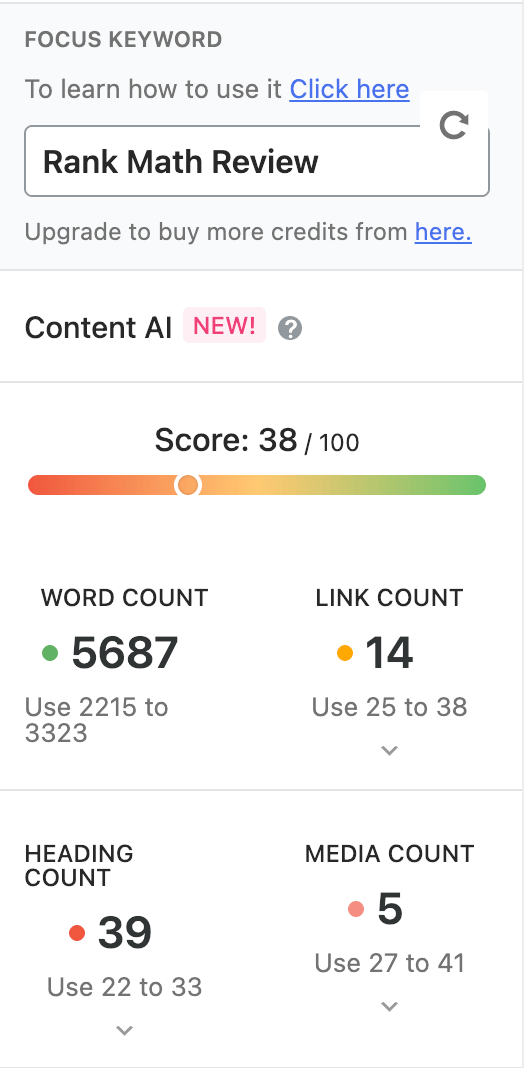
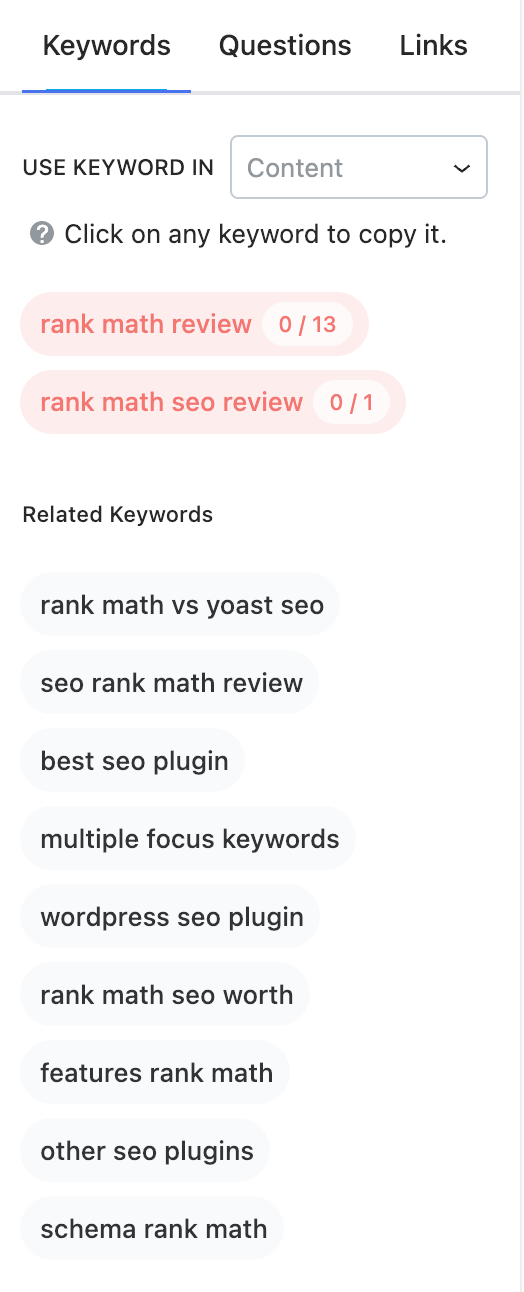
Editing View (not an official name, but I call it so) activates once you have research data. As you write in the Gutenberg editor, Content AI scores your content in real-time. It tracks:
- Keyword usage and placement
- Related keyword coverage
- Content length versus competitors
- Heading structure
- Link count (internal and external)
- Image optimization
The scoring updates live. I aim for 80+ on cornerstone content, 70+ on regular posts. Below 60 means I’m missing something obvious. I’ve just started editing this article and Rank Math is rating my content a total 77/100 and the content AI is rating it 39/100. I will work on editing more to improve the content to increase to score at least 90 in total and 80 in content AI.
Also, in Content AI Tools settings, which is the newest addition, you can try out 45 content generation templates:
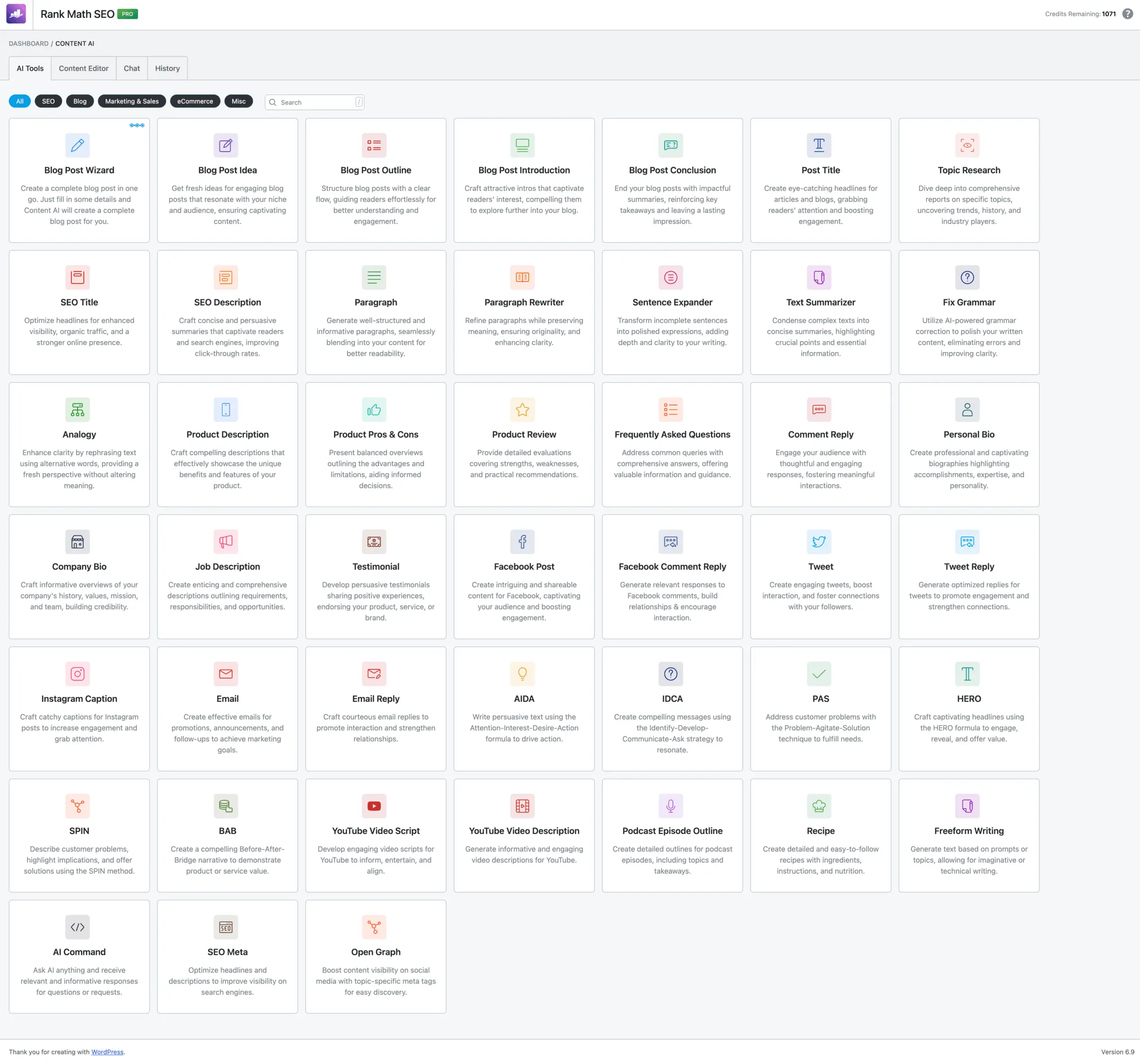
The key ones that I use
- Blog post outlines
- Meta descriptions
- FAQ generation
- Product descriptions
- Social media posts
- Email subject lines
- Paragraph rewriting
- Content summarization
Each generated word costs 1 credit. These can be used in both Content AI module settings (as seen above – good for Classic Editor users) and in Block Editor.
For Block Editor, you just have to type two forward slashes // and you’re ready to go.
I think the quality is comparable to ChatGPT 3.5, not even GPT-4 level. I really hope they improve it. Currently I use Content AI for meta descriptions, image alts and FAQ drafts, then edit those manually. The templates save time on repetitive tasks but doesn’t replace and shouldn’t replace actual writing.
Chat View (RankBot) works like ChatGPT inside WordPress. Ask questions, get answers, request content. Useful for brainstorming or quick research without leaving your editor. Same 1-credit-per-word pricing.
Credit System Explained
Content AI operates on a credit system separate from your Pro subscription:
| Action | Credits |
|---|---|
| Keyword Research | 500 credits |
| Word Generation | 1 credit per word |
| Image ALT Text | 50 credits per image |
Credit plans:
- Starter: $6.99/month for 5000 credits
- Creator: $11.99/month for 12000 credits
- Expert: $18.99/month for 30000 credits
Pro includes 750 free credits monthly. That covers one keyword research sessions plus some generation. Active publishers will need a separate credit plan.
Auto ALT Text Generation
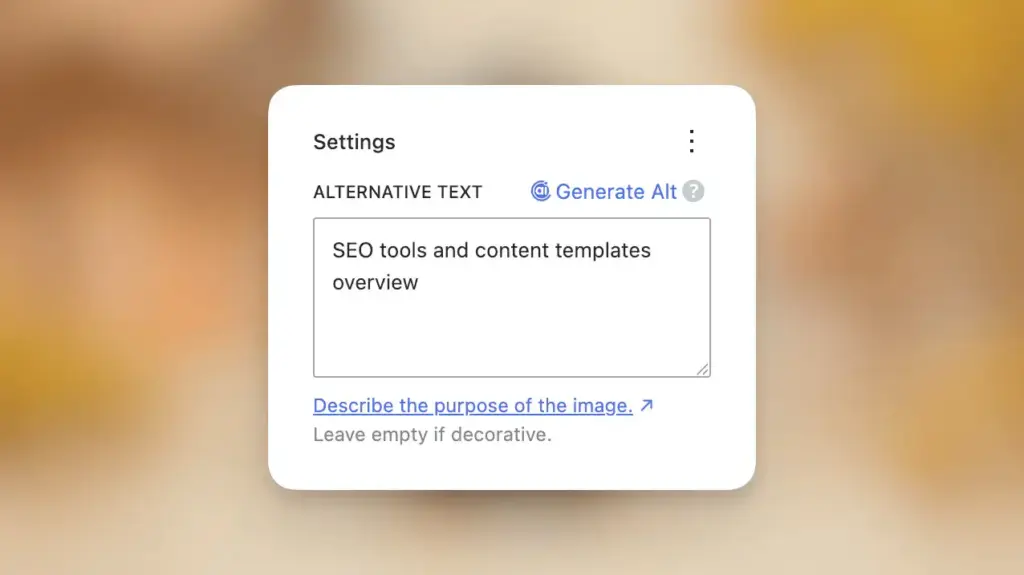
This feature deserves special mention. Content AI can generate ALT text for images automatically using AI image recognition. Upload an image, click generate, get a descriptive ALT. Costs 50 credits per image.
For sites with hundreds of images missing ALT text, this is a legitimate time-saver. I still write ALT text manually for important images, but the auto-generation handles screenshots and decorative images efficiently.
My Content AI Configuration
From my actual settings export:
- Post Types: All 10 enabled (posts, pages, deals, ebooks, projects, snippets, study notes, testimonials, tools, attachments)
- Country: All (global keyword data)
- Tone: Formal
- Audience: General Audience
- Language: US English
Instant Indexing
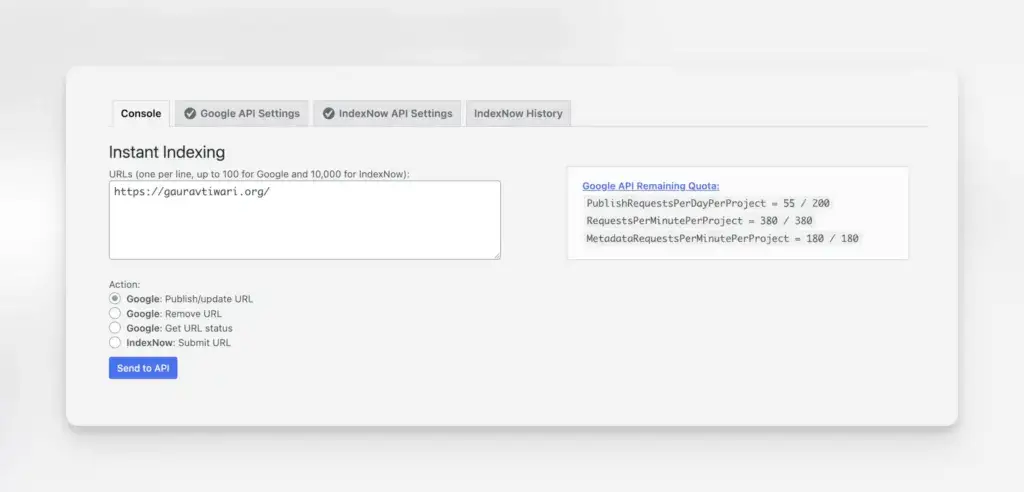
New content gets submitted directly to Google (you need to install an extra plugin for this) and IndexNow (used by Bing, DuckDuckGo, Yandex and Brave) the moment you hit publish. No waiting for crawlers to find it. No manually submitting URLs in Search Console.
I’ve tested this. Fresh posts typically appear in Google within 2-4 hours instead of 1-3 days. For time-sensitive content like news, product launches, or trending topics, this matters.
Schema Markup
This is where Rank Math destroys the competition.
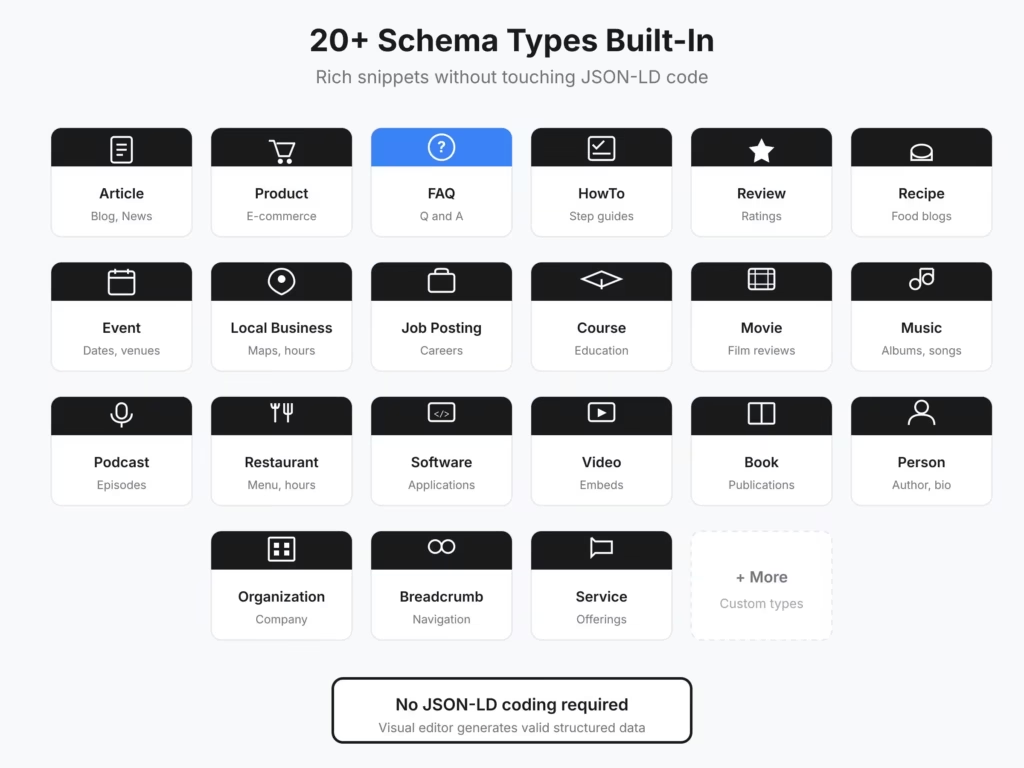
Out of the box, you get schema support for: Articles, Products, Recipes, Events, Reviews, FAQs, How-To, Local Business, Job Postings, Courses, Movies, Music, Podcasts, Restaurants, Software Applications, Videos, and even custom JSON/LD codes.
Most plugins give you basic Article schema and make you pay extra for everything else. Rank Math Pro includes 20+ schema types.
I use several schema types on many of my articles. These get featured snippets in search results. The visual editor makes adding schema straightforward, even for complex types. You don’t need to touch JSON-LD code unless you want to.
My default schema types by post type:
- Posts: BlogPosting
- Pages: Article
- Deals: BlogPosting
- Snippets: Article
- Products: Product (via WooCommerce module)
Analytics Integration
Rank Math connects to Google Search Console & Google Analytics and displays data directly in your WordPress dashboard. You see:
- Click-through rates by post
- Keyword rankings over time
- Index status
- Traffic trends
Is it as detailed as the actual Search Console? No. But having basic metrics inside WordPress saves time. I check the Rank Math dashboard daily, as it’s more reachable, and Search Console weekly. I don’t use Google Analytics – as I’ve told you in the start of the Rank Math review.
My analytics caching is set to 90 days. Monthly email reports keep me informed without constant dashboard checking.
Redirections Manager
Every site needs redirect management eventually. You update URLs, delete old posts, restructure categories. Without redirects, those old links become 404 errors.
Rank Math’s redirect module handles 301 and 302 redirects with a simple interface. You can set up automatic redirects for deleted content, regex-based redirects for complex patterns, and redirect chains detection.
I’ve 436 redirections active only on gauravtiwari.org.
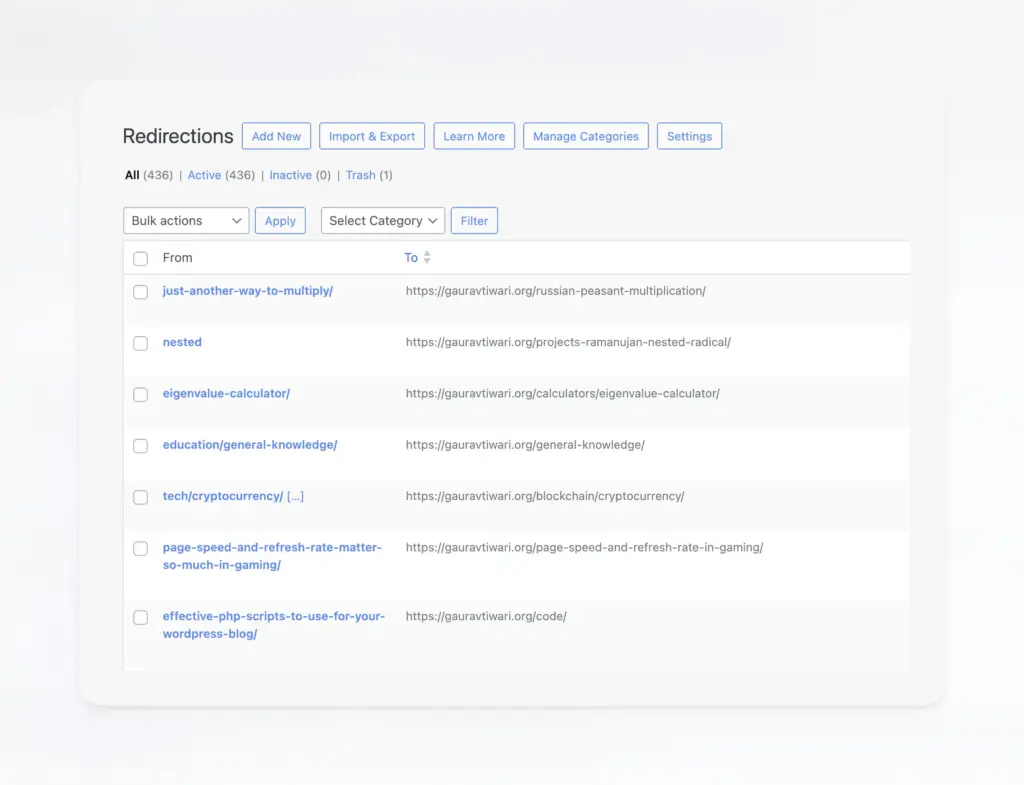
Here are some recent redirects from my site:
/just-another-way-to-multiply/→/russian-peasant-multiplication/(8 hits)/tech/cryptocurrency/→/blockchain/cryptocurrency/(184 hits)/eigenvalue-calculator/→/calculators/eigenvalue-calculator/(4 hits)/puzzle/→/children-friends-and-puzzle/(91 hits)
That last one has saved 91 visits from becoming 404 errors. The redirect hit tracking shows you exactly how valuable each redirect is.
404 Monitor
Related to redirects, but different. The 404 Monitor tracks every broken URL hit on your site. You see which URLs are 404-ing, how often, and where the traffic is coming from.
I check this monthly. Usually find old social media links pointing to removed content, or external sites linking to pages I’ve reorganized. Fix with a redirect, traffic saved.
My 404 monitor runs in Simple mode with 100 entry limit. That’s enough to catch issues without bloating the database.
Image SEO
This module automatically adds ALT text and title attributes to images that are missing them. You can configure patterns using variables like %filename%, %title%, %site_name%.
My settings:
- Add ALT: Disabled (I write them manually)
- ALT Format:
%filename%(fallback pattern) - Add Title: Disabled
- Title Format:
%title% %count(title)%
For sites with hundreds of images missing ALT text, this is a massive time saver. For new content, I write ALT text manually. But the automatic fallback catches images I miss.
Link Counter
Shows internal and external link counts for every post directly in your post list. Sounds minor. It’s not.
Internal linking is critical for SEO. Most people neglect it because they can’t easily see which posts have too few links. Link Counter makes this visible at a glance. I aim for 3-5 internal links per post minimum. The counter keeps me honest.
Code Snippets I Use to Power Up Rank Math
Rank Math is powerful out of the box, but developers often need more control. Here are some PHP snippets and CSS customizations I use on my sites and client projects.
Customizing Breadcrumbs
Rank Math’s breadcrumb system is flexible, but the default output doesn’t always match your theme. Here’s how to customize it.
1. Change the breadcrumb separator:
add_filter( 'rank_math/frontend/breadcrumb/args', function( $args ) {
    $args['separator'] = ' » '; // Use » instead of default
    return $args;
});
2. Add a Blog link to single post breadcrumbs:
add_filter( 'rank_math/frontend/breadcrumb/items', function( $crumbs, $class ) {
    if ( is_home() || is_front_page() ) {
        return $crumbs;
    }

    // Insert Blog link after Home
    $blog_crumb = [
        0 => 'Blog',
        1 => get_permalink( get_option( 'page_for_posts' ) ),
    ];

    array_splice( $crumbs, 1, 0, [ $blog_crumb ] );

    return $crumbs;
}, 10, 2 );
3. Remove post title from breadcrumbs (show only categories):
add_filter( 'rank_math/frontend/breadcrumb/settings', function( $settings ) {
    $settings['remove_title'] = true;
    return $settings;
});
4. Limit breadcrumb title length:
add_filter( 'rank_math/frontend/breadcrumb/items', function( $crumbs ) {
    $max_length = 50;

    foreach ( $crumbs as $key => $crumb ) {
        if ( strlen( $crumb[0] ) > $max_length ) {
            $crumbs[ $key ][0] = substr( $crumb[0], 0, $max_length ) . '...';
        }
    }

    return $crumbs;
});
5. Remove categories from single post breadcrumbs:
add_filter( 'rank_math/frontend/breadcrumb/items', function( $crumbs ) {
    if ( is_singular( 'post' ) && isset( $crumbs[1] ) ) {
        unset( $crumbs[1] );
        $crumbs = array_values( $crumbs ); // Reindex array
    }
    return $crumbs;
});
White-Labeling the Sitemap
By default, Rank Math adds its branding to XML sitemaps. For client sites, you’ll want to remove this.
Remove sitemap credit:
// Remove "Generated by Rank Math" credit
add_filter( 'rank_math/sitemap/remove_credit', '__return_true' );
After adding these snippets, go to Settings → Permalinks and click Save (no changes needed). Then clear your cache. The sitemap will display as clean XML without Rank Math branding.
CSS Customizations for Rank Math Blocks
Rank Math adds several Gutenberg blocks: FAQ, HowTo, and Table of Contents. The default styling is minimal. Here’s CSS I use to make them look professional.
FAQ Block Styling:
/* FAQ Block Container */
.rank-math-faq-block {
    margin: 2rem 0;
    border: 1px solid #e5e7eb;
    border-radius: 8px;
    overflow: hidden;
}

/* Individual FAQ Items */
.rank-math-faq-block .rank-math-list-item {
    border-bottom: 1px solid #e5e7eb;
    padding: 0;
}

.rank-math-faq-block .rank-math-list-item:last-child {
    border-bottom: none;
}

/* Question Styling */
.rank-math-faq-block .rank-math-question {
    font-weight: 600;
    font-size: 1.1rem;
    padding: 1.25rem 1.5rem;
    background: #f9fafb;
    margin: 0;
    cursor: pointer;
    display: flex;
    justify-content: space-between;
    align-items: center;
}

.rank-math-faq-block .rank-math-question:hover {
    background: #f3f4f6;
}

/* Answer Styling */
.rank-math-faq-block .rank-math-answer {
    padding: 1.25rem 1.5rem;
    line-height: 1.7;
    color: #4b5563;
}

/* Add expand icon */
.rank-math-faq-block .rank-math-question::after {
    content: '+';
    font-size: 1.5rem;
    color: #9ca3af;
    transition: transform 0.2s ease;
}
Table of Contents Block:
/* TOC Container */
.rank-math-toc-container {
    background: #f8fafc;
    border: 1px solid #e2e8f0;
    border-radius: 8px;
    padding: 1.5rem 2rem;
    margin: 2rem 0;
}

/* TOC Title */
.rank-math-toc-title {
    font-size: 1.25rem;
    font-weight: 700;
    margin-bottom: 1rem;
    color: #1e293b;
}

/* TOC List */
.rank-math-toc-list {
    list-style: none;
    padding: 0;
    margin: 0;
}

.rank-math-toc-list li {
    padding: 0.5rem 0;
    border-bottom: 1px solid #e2e8f0;
}

.rank-math-toc-list li:last-child {
    border-bottom: none;
}

.rank-math-toc-list a {
    color: #3b82f6;
    text-decoration: none;
    transition: color 0.2s ease;
}

.rank-math-toc-list a:hover {
    color: #1d4ed8;
    text-decoration: underline;
}

/* Nested items */
.rank-math-toc-list .rank-math-toc-list {
    margin-left: 1.5rem;
    margin-top: 0.5rem;
}
HowTo Block Styling:
/* HowTo Container */
.rank-math-howto-block {
    margin: 2rem 0;
}

/* Step Numbers */
.rank-math-howto-block .rank-math-step {
    display: flex;
    gap: 1rem;
    margin-bottom: 1.5rem;
    padding: 1.5rem;
    background: #fff;
    border: 1px solid #e5e7eb;
    border-radius: 8px;
    box-shadow: 0 1px 3px rgba(0, 0, 0, 0.05);
}

.rank-math-howto-block .rank-math-step-num {
    flex-shrink: 0;
    width: 40px;
    height: 40px;
    background: #3b82f6;
    color: white;
    border-radius: 50%;
    display: flex;
    align-items: center;
    justify-content: center;
    font-weight: 700;
    font-size: 1.1rem;
}

/* Step Content */
.rank-math-howto-block .rank-math-step-title {
    font-weight: 600;
    font-size: 1.1rem;
    margin-bottom: 0.5rem;
    color: #1e293b;
}

.rank-math-howto-block .rank-math-step-content {
    color: #4b5563;
    line-height: 1.7;
}

/* Duration and Cost display */
.rank-math-howto-block .rank-math-howto-duration,
.rank-math-howto-block .rank-math-howto-cost {
    display: inline-block;
    background: #f1f5f9;
    padding: 0.5rem 1rem;
    border-radius: 4px;
    margin-right: 0.5rem;
    margin-bottom: 1rem;
    font-size: 0.9rem;
    color: #475569;
}
Modifying Schema Output
Sometimes you need to modify the JSON-LD schema Rank Math generates. Here’s how:
Add custom properties to Article schema:
add_filter( 'rank_math/snippet/rich_snippet', function( $data, $post ) {
    if ( isset( $data['@type'] ) && $data['@type'] === 'Article' ) {
        $data['wordCount'] = str_word_count( strip_tags( $post->post_content ) );
        $data['speakable'] = [
            '@type' => 'SpeakableSpecification',
            'cssSelector' => ['.entry-title', '.entry-content p:first-of-type']
        ];
    }
    return $data;
}, 10, 2 );
Modify breadcrumb schema:
add_filter( 'rank_math/snippet/breadcrumb', function( $data ) {
    // Add organization to first breadcrumb item
    if ( isset( $data['itemListElement'][0] ) ) {
        $data['itemListElement'][0]['item']['@type'] = 'Organization';
    }
    return $data;
});
Where to Add This Code
Create a file called rank-math.php in your theme’s root folder. Rank Math automatically loads this file when active, so your customizations only run when the plugin is enabled.
For CSS, add to your theme’s style.css or use the WordPress Customizer’s Additional CSS section.
What Rank Math Does Well
Single Dashboard Control
Before Rank Math, I ran separate plugins for SEO, redirects, schema, and sitemaps. That’s four plugins to update, configure, and potentially conflict. Now it’s one plugin with one interface. Settings are organized logically. Updates happen together.
Module Architecture
Not using WooCommerce? Don’t enable the WooCommerce module. No overhead, no settings cluttering your dashboard. This philosophy runs through the entire plugin. You control what’s active.
Schema Without Code
Adding FAQ schema to a post takes 30 seconds. Select the block, add your questions and answers, done. The plugin generates proper JSON-LD in the background. I’ve watched clients struggle with JSON-LD by hand. Rank Math removes that pain.
Performance
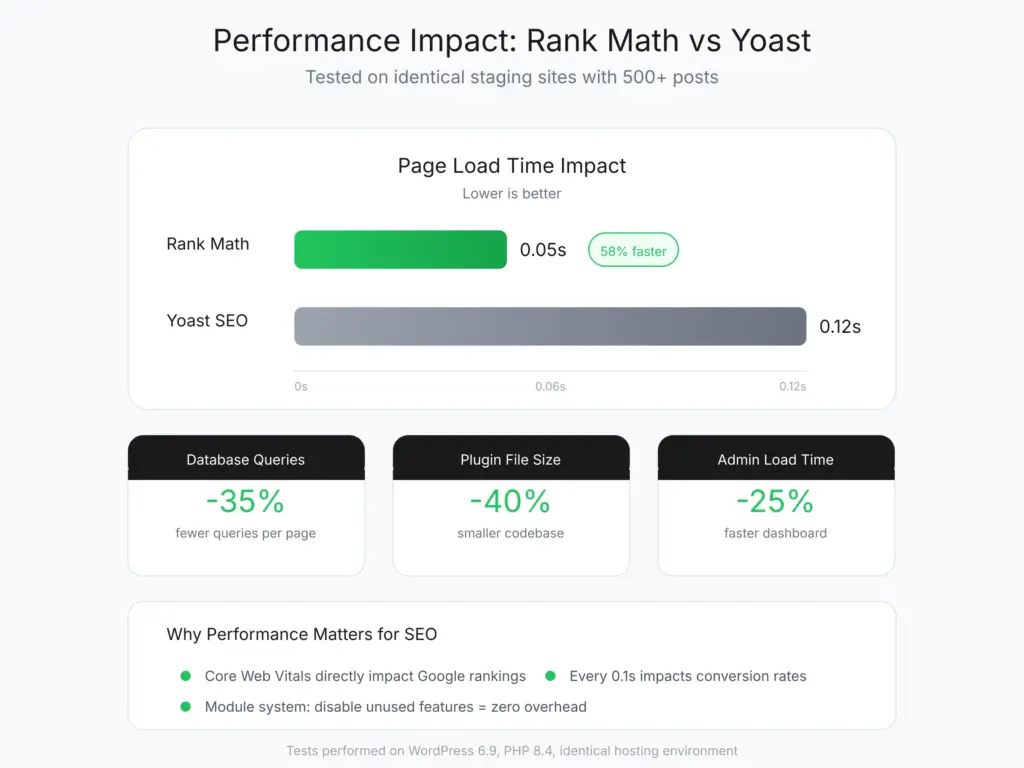
Rank Math is lighter than Yoast. I’ve tested both on identical staging sites. Rank Math added 0.05 seconds to page load. Yoast added 0.12 seconds. Not huge numbers, but they compound across every page view. Core Web Vitals matter for SEO, and every millisecond counts.
Pro Features Actually Deliver
Some plugins have weak Pro tiers that barely justify the cost. Rank Math Pro genuinely adds value. Content AI alone is worth the $59/year if you’re publishing weekly. Advanced schema types, Google Analytics integration, and priority support are bonuses.
Custom Post Type Support
I run 10 custom post types on my site: Deals, Ebooks, Projects, Snippets, Study Notes, Testimonials, Tools, and more. Rank Math handles all of them with individual SEO settings for each. Same with custom taxonomies. Not every SEO plugin supports this well. Rank Math does.
Extensive Filter and Hook System
As shown in the code snippets above, Rank Math provides filters and hooks for almost everything. Breadcrumbs, schema, sitemaps, meta output. If the default doesn’t work, you can change it without hacking core files.
What Rank Math Doesn’t Do Well
Advanced Mode Complexity
Advanced Mode exposes every setting. That’s powerful but overwhelming. New users see 50+ options and don’t know which ones matter. I’d estimate 80% of users only need 20% of the settings. The rest are edge cases. There should a medium mode – a balance between these too.
My advice: start with Easy Mode, switch to Advanced after 6 months when you understand what you’re looking for.
Support Response Times
Free users get community support. Pro users get priority email support. During my experience, responses took 24-48 hours. Not terrible, but not instant – problematic when your site faces critical issues. If your site breaks on Friday, you’re waiting until Monday for a response.
For critical sites, this matters. I’ve learned to test updates on staging before production.
Content AI Limitations
Content AI is useful but not a replacement for dedicated tools. It doesn’t do SERP analysis, competitor gap analysis, or content briefs. It gives keyword suggestions and basic scoring. That’s fine for most bloggers. SEO professionals will still need Surfer, Clearscope, or MarketMuse for serious optimization.
Pricing
Rank Math offers four paid tiers plus a free version:
| Plan | Sites | Price/Year | Per Site/Year |
|---|---|---|---|
| Free | Unlimited | $0 | $0 |
| Pro | Unlimited Personal | $96 | $96 |
| Business | 100 Client Sites | $300 | $3 |
| Agency | 500 Client Sites | $660 | $1.32 |
- Free covers: Basic SEO analysis, sitemap generation, basic schema, 404 monitoring, redirects, link builder, role manager, and most core functionality. Honestly, the free version handles more than most bloggers need.
- Pro ($7.99/month billed annually) adds: Content AI trial with 5,000 credits, advanced schema generator, Rank Tracker with 500 keywords, AI Search Traffic Tracker, llms.txt generator, robots.txt editor, and 24/7 standard support. Renews at $8.99/month.
- Business ($24.99/month billed annually) adds: 100 client sites, 10,000 keyword tracking, 12,000 Content AI trial credits, daily Google data fetching, unlimited data retention, flexible email reports, and 24/7 priority support. Best for freelancers and small agencies.
- Agency ($54.99/month billed annually) adds: 500 client sites, 50,000 keyword tracking, 30,000 Content AI trial credits, and priority support access. Built for larger agencies managing multiple client properties.
Comparison of pricing with other SEO Plugins
Yoast Premium is $118.80/year for one site. All-in-One SEO Pro starts at $49.60/year for one site. Rank Math Pro at $96/year for unlimited personal sites is still cheaper if you run more than one website.
For agencies, $660/year for 500 sites works out to $1.32 per site. Yoast charges $118.80 per site. The math still favors Rank Math.
SEOPress is the cheapest among all, but its UX in the Block Editor didn’t suit me.
Note on pricing changes: When I first upgraded to Pro in 2021, it was $59/year. Prices have increased since then. I had a bad feeling about this and even bashed them for this. But no other SEO plugin could replace it and the value proposition remained strong given the feature set – I’m still using it.
Rank Math vs Alternatives
Rank Math handles on-page SEO well, but it’s one piece of the puzzle. For the full picture, you’ll want proper URL structures, a solid backlink strategy, and regular content decay audits. If you want someone to set up the whole stack, I offer freelance SEO services that include Rank Math configuration as part of a broader strategy.
| Feature | Rank Math | AIOSEO | SEOPress | Slim SEO | Squirrly SEO |
|---|---|---|---|---|---|
| Free Version | Yes (generous) | Yes (limited) | Yes (good) | Yes | Yes (limited) |
| Pro Price | $6.99/mo | $49.60/yr | $49/yr | $99/yr | $29.99/mo |
| Schema Markup Important | 20+ types (free) | 17+ types (pro) | Basic (free), more in pro | Auto schema | JSON-LD |
| Keyword Tracking | Yes (pro) | No | Google Trends (pro) | No | Yes (built-in) |
| Redirections | Yes (free) | Yes (pro) | Yes (free) | No | No |
| WooCommerce SEO | Yes (pro) | Yes (pro) | Yes (pro) | Basic | Yes |
| Local SEO | Yes (pro) | Yes (pro) | Yes (pro) | No | Yes |
| Internal Linking | Yes (pro) | Yes (pro) | No | No | No |
| Content AI | Yes (pro) | No | No | No | Yes (built-in) |
| Performance Impact | Light | Light | Very Light | Minimal | Moderate |
| Best For | All-in-one SEO (best free) | Beginners, Yoast migrants | Privacy-focused, lightweight | Auto SEO, minimal setup | AI-assisted SEO |
| Visit Rank Math | Visit AIOSEO | Visit SEOPress | Visit Slim SEO | Visit Squirrly |
Rank Math vs Yoast
Yoast pioneered WordPress SEO. It’s the most popular plugin with the most brand recognition. But popularity doesn’t equal superiority.
Choose Yoast if
You want the most tutorials, guides, and community resources available.
Yoast has been around longer, so third-party documentation is extensive.
Choose Rank Math if
You want more features for less money.
Rank Math Free offers more than Yoast Premium in several areas: redirect management, schema types, internal linking suggestions.
I switched from Yoast to Rank Math in 2018 when Rank Math launched. Haven’t looked back. The module system, lighter code, and better schema support made the difference from day one.
Rank Math vs All-in-One SEO
All-in-One SEO (AIOSEO) sits between Yoast and Rank Math in functionality. It’s competent but not exceptional at anything.
Choose AIOSEO if: You’re already using it and it works. Migration hassle might not be worth the marginal gains.
Choose Rank Math if: You want the most advanced feature set without managing multiple plugins. Rank Math’s Content AI and schema implementation are stronger.
Rank Math vs SEOPress
SEOPress is the lightweight alternative. Minimal interface, fast loading, basic SEO done well.
Choose SEOPress if: You want the simplest possible SEO plugin. No bells, no whistles, just optimization fundamentals.
Choose Rank Math if: You need advanced features like Content AI, advanced schema, or WooCommerce integration. SEOPress keeps things minimal by design. Rank Math maximizes what’s possible.
Who Should Use Rank Math
Rank Math is kind of useful to all lanes of website owners.
Content Creators and Bloggers
If you publish regularly and care about organic traffic, Rank Math’s Content AI and SEO scoring help you optimize faster. The free version covers most bloggers. Pro is worth it once you’re publishing 4+ posts monthly.
Affiliate Marketers
Schema markup for product reviews, redirect management for affiliate links, WooCommerce integration for comparison tables. Rank Math handles the technical SEO side so you can focus on content. Best WordPress plugins for content marketers often include Rank Math for good reason.
WordPress Agencies
The Agency plan at $499/year for 500 sites makes client management affordable. Each site gets full Pro features. The role manager controls what clients can access. Headless WordPress support is cool for optimizing next-gen websites. White-label options exist for those who want them.
E-commerce Store Owners
WooCommerce integration adds product schema automatically. Rich snippets show prices, availability, and ratings in search results. For stores competing on organic traffic, this visibility matters.
Local Businesses
The Local SEO module generates location schema, optimizes for map searches, and handles multi-location businesses. If you’re a dentist, plumber, or restaurant relying on “near me” searches, Rank Math helps you show up.
Developers
Custom post type support, hooks and filters for customization, and clean code that plays well with other plugins. I’ve built client sites that required specific schema configurations. Rank Math handled them without custom development.
Who Should NOT Use Rank Math
Well, there’s only one type of people that shouldn’t use Rank Math – those who have already paid for any other SEO plugin. No surprises here.
How did Rank Math Fare with me?
On gauravtiwari.org, I’ve been using Rank Math since 2018. Over nearly eight years, this is what I’ve observed:
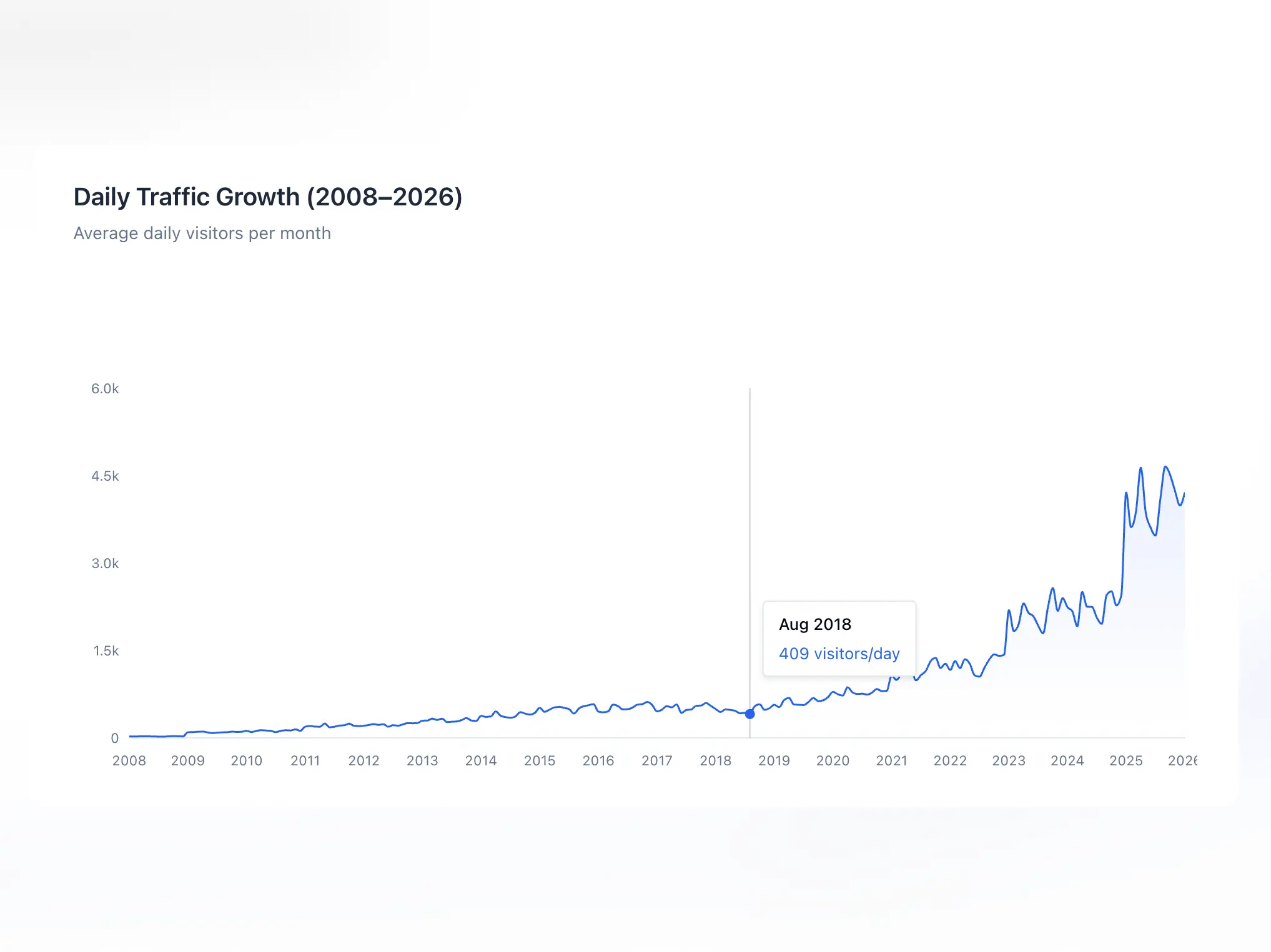
- Consistent organic growth that I can partially attribute to better technical SEO management. Hard to isolate plugin impact from content quality, but Rank Math made optimization easier. 10X traffic growth since installing the plugin could be to some ratio attributed to the plugin.
- Rich snippets appearing for FAQ content across dozens of articles. Before Rank Math, I had zero FAQ rich results. Now they appear regularly.
- Reduced plugin count from 38 to 24 by consolidating SEO, redirects, schema, and sitemap functionality into one plugin.
- Four major site restructures managed smoothly through the redirections module. URL changes that would have caused traffic loss became seamless transitions.
- 400+ redirects (including regex redirects that cover like hundreds more pages) are currently active, saving thousands of potential 404 errors from old links across the web.
The analytics integration saves me roughly 30 minutes weekly by not switching between WordPress and Search Console for basic metrics.
Content AI speeds up my research phase by providing keyword suggestions I’d otherwise need to look up separately. Around 15-20 minutes saved per article.
The role manager means I can give client access to their sites without worrying they’ll break global SEO settings. Editors can optimize their posts. Only administrators touch site-wide configuration.
These aren’t dramatic numbers. That’s the reality of SEO plugins. They don’t magically boost rankings. They remove friction from the optimization process and give you data to make better decisions.
Rank Math Review
Rank Math PRO

Pros
- Module-based architecture. Only enable what you need, no bloat.
- 20+ schema types built in. FAQ, HowTo, Product schema without touching code.
- Lighter than Yoast. 0.05s vs 0.12s page load impact in my testing.
- Content AI with keyword research, real-time scoring, and 40+ templates.
- Full support for custom post types and taxonomies.
- Extensive filter and hook system for developers.
Cons
- Documentation gaps. Some features have sparse official guides.
- Advanced Mode can overwhelm new users with 50+ settings.
- Support response times are 24-48 hours. No phone support.
- Content AI not as deep as Surfer SEO or Clearscope for serious optimization.
Summary
Rank Math is the all-in-one WordPress SEO plugin I’ve used since 2018. The module-based architecture means you only enable what you need. Schema markup support is exceptional with 20+ types built in. Content AI handles 80% of what most publishers need for keyword research. Lighter than Yoast, more features than the competition. Best fit for serious WordPress users who want granular control without plugin bloat.
Price: USD 7.99 /month
Try Rank Math PRORank Math is the best WordPress SEO plugin for most serious WordPress users. The free version offers more than competitors’ paid tiers. The Pro version at $59/year is worth it once you’re publishing regularly.
Get Rank Math if you want:
- A single plugin replacing multiple SEO tools
- Advanced schema without touching code
- Content AI for faster optimization
- Module-based architecture you can customize
- Developer-friendly filters and hooks
- Support for complex sites with custom post types
Skip Rank Math if you want:
- The simplest possible experience (try SEOPress)
- Instant premium support with fast SLAs
- Maximum third-party documentation and tutorials (Yoast has more)
After nearly eight years of daily use (since 2018, with Pro since June 2021), I’m not switching. The module system, schema flexibility, and continuous feature updates show a team that’s thinking ahead. Combined with plugins like Dynamic Month & Year into Posts for keeping content fresh, Rank Math forms the backbone of my SEO workflow.
For $96/year for unlimited personal sites, it’s the best value in WordPress SEO. For more, see my all my WordPress plugin recommendations.
Frequently Asked Questions
Is Rank Math free or paid?
Both. Rank Math Free includes SEO analysis, sitemaps, basic schema, redirects, and 404 monitoring. Rank Math Pro ($59 to $96/year) adds Content AI, advanced schema types, Google Analytics integration, and priority support. Most bloggers can start with Free and upgrade when they need Content AI or advanced features.
Is Rank Math better than Yoast?
For most users, yes. Rank Math Free offers more features than Yoast Premium in several areas, including redirect management and schema types. Rank Math is also lighter on performance. Yoast has more third-party tutorials and documentation due to being around longer. If you’re starting fresh, choose Rank Math.
Can I migrate from Yoast to Rank Math?
Yes. Rank Math includes a built-in migration tool that imports your Yoast settings, meta titles, descriptions, and other data automatically. The migration takes a few minutes and preserves your existing SEO configuration. I migrated a site with 500+ posts without issues.
Does Rank Math slow down WordPress?
Rank Math is lighter than most SEO plugins. In my testing, it added 0.05 seconds to page load compared to 0.12 seconds for Yoast on identical staging sites. The module system helps too: disable modules you don’t use, and there’s zero overhead from those features.
What’s the difference between Easy Mode and Advanced Mode?
Easy Mode hides advanced settings and shows simplified options. Advanced Mode exposes every setting: robots meta directives, link attributes, advanced schema configuration, and more. Start with Easy Mode if you’re new. Switch to Advanced after 6 months when you understand what settings you want to tweak.
Is Rank Math Pro worth the price?
If you publish 4+ posts monthly, yes. Content AI alone saves 15-20 minutes per article in keyword research. Advanced schema types (FAQ, HowTo, Product) help get rich snippets. At $59/year for unlimited personal sites, it pays for itself quickly if you’re serious about content.
How does Rank Math Content AI credits work?
Content AI uses a credit system separate from Pro subscription. Keyword research costs 500 credits, AI-generated content costs 1 credit per word, and auto ALT text costs 50 credits per image. Pro includes 750 free credits monthly. Additional credit plans are available too.
Does Rank Math work with WooCommerce?
Yes. The WooCommerce module adds product schema automatically, showing prices, availability, and ratings in search results. It also handles product category SEO, brand schema, and global identifier support (GTIN, MPN). Enable the module and most optimization happens automatically.
How do I get support if something breaks?
Free users get community forum support. Pro users get priority email support with 24-48 hour typical response times. For critical issues, documentation and the knowledge base often have solutions. I recommend testing updates on staging first to avoid production emergencies waiting on support.
Can I customize Rank Math breadcrumbs?
Yes. Rank Math provides multiple filters for breadcrumb customization: rank_math/frontend/breadcrumb/items for modifying the crumb array, rank_math/frontend/breadcrumb/args for changing separators and wrappers, and rank_math/frontend/breadcrumb/settings for overriding user settings. Create a rank-math.php file in your theme to add custom filters.
How do I white-label the Rank Math sitemap?
Add two filters to your theme: add_filter(‘rank_math/sitemap/xsl’, ‘__return_false’) removes the XSL stylesheet, and add_filter(‘rank_math/sitemap/remove_credit’, ‘__return_true’) removes the ‘Generated by Rank Math’ credit. For complete white-labeling, use add_filter(‘rank_math/whitelabel’, ‘__return_true’). After adding, save permalinks and clear cache.
Disclaimer: This site is reader-supported. If you buy through some links, I may earn a small commission at no extra cost to you. I only recommend tools I trust and would use myself. Your support helps keep gauravtiwari.org free and focused on real-world advice. Thanks. - Gaurav Tiwari