
How to use Pomodoro Technique to Combat Procrastination?
I’ve tried every productivity system out there. GTD, time blocking, the Eisenhower matrix, you name it. Most of them lasted about two weeks before I abandoned them. The Pomodoro Technique is the only one that stuck. I’ve been using it for over 8 years now, and it’s the single biggest reason I can ship client work, write blog posts, and manage my team without burning out.
The idea is dead simple: work for 25 minutes, break for 5. Repeat. After 4 rounds, take a longer break. That’s it. No fancy app subscriptions, no complex setup. Just a timer and the discipline to respect it. If you struggle with procrastination, context switching, or that 3pm brain fog that kills your afternoon, this technique will fix it.
I’m going to walk you through exactly how I use the Pomodoro Technique in 2026, the tools I recommend, and the mistakes most people make when they first try it. This isn’t theory. This is what works when you’re juggling real deadlines.
What Is the Pomodoro Technique?
The Pomodoro Technique is a time management method created by Francesco Cirillo in the late 1980s. “Pomodoro” means tomato in Italian, named after those tomato-shaped kitchen timers you’ve probably seen. The concept is straightforward: you break your work into focused intervals called “pomodoros,” each lasting 25 minutes, followed by a short 5-minute break.
After completing 4 pomodoros (about 2 hours of focused work plus breaks), you take a longer break of 15 to 30 minutes. One full cycle of 4 pomodoros is called a “set.” You can run as many sets as your workday demands.
Here’s the structure that I follow every day:
- 1 Pomodoro = 25 minutes of uninterrupted work + 5-minute break
- 1 Set = 4 pomodoros (roughly 2 hours including breaks)
- Long break = 15 to 30 minutes after every set
The reason this works is neurological. Your brain can maintain deep focus for about 25 minutes before it starts looking for distractions. By giving it a scheduled break, you’re working with your biology instead of fighting it. I noticed the difference in my first week. I was getting through tasks that used to take me an entire afternoon in just two pomodoros.
Why the Pomodoro Technique Works for Procrastination
Procrastination isn’t laziness. I’ve worked with over 800 clients across 16 years, and the hardest-working people I know are often the worst procrastinators. The real problem is that your brain perceives a big task as threatening, so it avoids it. The Pomodoro Technique short-circuits this by making the commitment tiny. You’re not committing to “finish the entire project.” You’re committing to 25 minutes. That’s it.
There’s a concept from Brian Tracy’s book Eat That Frog that pairs perfectly with this technique. Tracy says you should tackle your hardest task first thing in the morning, the “frog” you’d rather avoid. Combine that with Pomodoro, and suddenly your most dreaded task only needs 25 minutes of courage to start. Most of the time, once you start, you keep going through multiple pomodoros without wanting to stop.
I use this combo every morning. My first pomodoro of the day goes to whatever I’m dreading most, whether that’s writing a difficult proposal, debugging a tricky WordPress issue, or handling a conversation I’ve been putting off. By 10am, the worst part of my day is behind me. Everything after that feels lighter.
How to Use the Pomodoro Technique (Step by Step)
I’ve refined my Pomodoro workflow over the years. Here’s the exact process I follow, and the one I recommend if you’re just starting out.
Step 1: Pick One Task
This is where most people mess up. They sit down with a vague idea like “work on the website” and wonder why they can’t focus. You need to pick one specific task before you start the timer. Not three. Not “a bunch of emails.” One task.
If you have multiple tasks competing for attention, pick the most urgent one. If nothing is urgent, pick the hardest one. Getting the hard stuff out of the way early creates momentum that carries you through the rest of the day. I keep a simple list in my notebook, nothing fancy, just a handwritten list of 3 to 5 tasks for the day ranked by priority.
Step 2: Break It Into Sub-Tasks
Once you’ve picked your task, figure out how many pomodoros it’ll take. A blog post might need 4 pomodoros: one for the outline, two for writing, one for editing. A client project might need 8 pomodoros spread across two sets.
Each sub-task gets its own pomodoro. When you finish a pomodoro, tick it off. This visual progress tracking is surprisingly motivating. I use a simple checkbox system in my notebook:
- Pomodoro 1: Outline the article structure
- Pomodoro 2: Write the first 800 words
- Pomodoro 3: Write the remaining sections
- Pomodoro 4: Edit, add links, format for WordPress
If you finish your task before using all 4 pomodoros in a set, move on to the next task on your list. If the task takes more than 4 pomodoros, start a new set after the long break. I label these “Task A – Part 2” so I know it’s a continuation, not a new project.
Step 3: Set the Timer and Work
Start the 25-minute timer and work. No phone. No social media. No Slack. No “just checking one thing.” Those 25 minutes belong to your task and nothing else.
I put my phone in another room during pomodoros. Not on silent, not face down, in another room. If you keep your phone within reach, you’ll check it. I guarantee it. The notification sound alone is enough to break your focus, and research shows it takes about 23 minutes to fully regain focus after a distraction. That’s almost an entire pomodoro wasted.
When the 25 minutes are up, stop. Even if you’re in the middle of something good. Take your 5-minute break. Walk around. Get water. Check your phone if you want. The break is part of the system, not optional. Skipping breaks leads to burnout by the afternoon, and I’ve made that mistake enough times to know.
Step 4: Take the Long Break
After 4 pomodoros, you’ve earned 15 to 30 minutes off. This is your reset. I usually spend this time making tea, going for a short walk, or just sitting and doing nothing. Don’t use the long break to check email or start another task. Your brain needs actual downtime, not a different kind of work.
Once the long break is over, start a new set. I can usually manage 3 sets on a productive day (about 6 hours of focused work). That might not sound like much, but 6 hours of focused, distraction-free work produces more than 10 hours of unfocused work every time. I’ve tracked this across my own projects and it’s not even close.
Tips for Making the Pomodoro Technique Actually Work
The technique sounds simple, and it is. But simple doesn’t mean easy. Here’s what I’ve learned from years of using it daily.
Don’t multitask. One task per pomodoro. If a new idea or to-do pops into your head, write it on a piece of paper and get back to your current task. I keep a “distraction sheet” next to my keyboard for exactly this. Most of those random thoughts aren’t urgent at all.
Protect your pomodoros. Tell your team, your family, whoever is around that you’re unavailable for 25 minutes. If someone interrupts, the pomodoro is void. You start over. This sounds harsh, but once people see how much more you get done, they’ll respect the boundary. I’ve had team members adopt the technique after seeing the results firsthand.
Adjust the intervals if you need to. The classic 25/5 split works for most people, but I sometimes run 50/10 pomodoros for deep coding sessions. Productivity books will tell you different things about ideal focus intervals. Experiment and find your own rhythm. The principle matters more than the exact numbers.
Track your pomodoros. At the end of each day, count how many pomodoros you completed. I average 10 to 12 on a good day. Tracking creates accountability and helps you spot patterns. You’ll notice that certain tasks always take longer than you estimate, which helps you plan better the next week.
Pair it with a good home office setup. Your environment matters. A comfortable chair, a clean desk, and good lighting make it much easier to sustain focus across multiple sets. I didn’t take this seriously until I invested in a proper standing desk and a decent chair. The difference in my daily output was measurable.
Best Pomodoro Timers in 2026
You can use your phone’s built-in timer, but I don’t recommend it. Having your phone out is an invitation to get distracted. You need a dedicated timer, either a web-based tool or a physical device on your desk. Here are the options I’ve tested and trust.
Tomato Timer (Free Web App)
Tomato Timer is a free browser-based Pomodoro timer that does exactly what it says. You get three tabs: Pomodoro (25 min), Short Break (5 min), and Long Break. The default long break is set to 10 minutes, so you’ll want to adjust that to 15 or 30 minutes in the settings.
What I like about it: no downloads, no account, no nonsense. Open the page, hit start. The countdown shows in your browser tab, so you can see it even when you’re working in another window. You can customize sounds, volume, and set daily pomodoro goals. I used this for my first 3 years with the technique before switching to a physical timer.
The downside is obvious: it runs in your browser, which means you need your computer open, which means the internet is one click away. If you have the self-control to keep a browser tab running without opening Twitter, this is all you need. If you don’t (no judgment), get a physical timer instead.
Physical Pomodoro Timers
A dedicated timer on your desk removes the temptation entirely. No screen, no notifications, just a ticking timer that keeps you honest. I switched to a physical timer about 5 years ago and never looked back. Having a tangible object on your desk creates a visual cue that says “I’m in focus mode.” It works as a signal to yourself and to anyone around you.
Here are three physical timers that work well for the Pomodoro Technique. I’ve used or tested each of these and can vouch for their build quality.
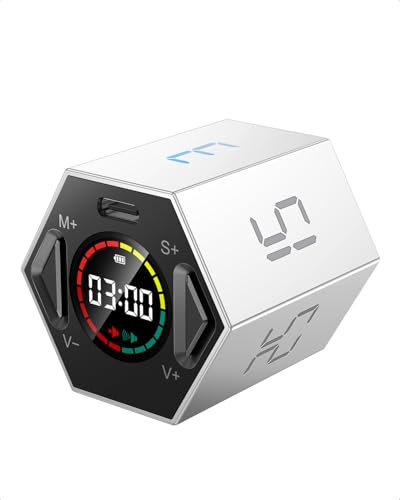
Ticktime Pomodoro Timer – Hexagon Magnetic Flip Focus Timer
- 6 preset countdown times: 3, 5, 10, 15, 25, and 30 minutes. Flip any side up to start the timer instantly.
- Dual timing modes: preset countdowns plus custom countdown via the app for intervals beyond the 6 presets.
- Mute and adjustable sound alert. Magnetic base sticks to metal surfaces for hands-free use at your desk.
The Ticktime Hexagon is my top pick for most people. You flip it to the side showing the time you want, and the countdown starts instantly. No buttons to press, no menus to scroll through. It has 6 preset times (3, 5, 10, 15, 25, and 30 minutes), which covers the standard Pomodoro intervals perfectly. The 25-minute side is the one you’ll use most.
The magnetic base is a nice touch. I stick mine to the metal leg of my desk lamp, so it’s always in my line of sight without taking up desk space. You can toggle between mute and sound alerts depending on your environment. At $39.99, it’s a one-time investment that pays for itself in the first week of focused work.
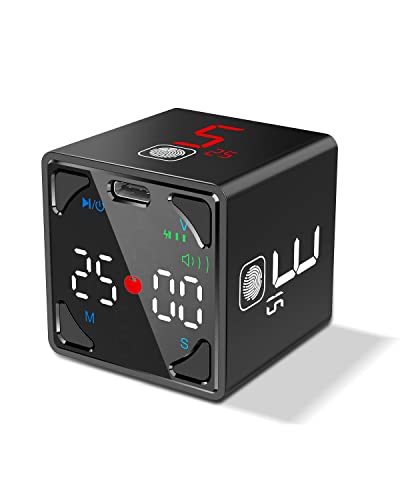
Ticktime Cube Pomodoro Timer with Pause and Resume
- Flip to start. 4 preset countdown times (1, 3, 5, 10 minutes) plus custom countdowns up to 60 minutes.
- Multiple timing modes: countdown, count-up, and dedicated Pomodoro mode with automatic break intervals.
- Pause and resume support. Vibration and adjustable sound alerts for quiet workspaces.
The Ticktime Cube is the upgraded version for people who want more control. It has 8 preset times (1, 3, 5, 10, 15, 25, 45, and 60 minutes), plus a dedicated Pomodoro mode that automatically alternates between work and break intervals. That means you don’t have to manually switch to the break timer after each pomodoro.
The pause and resume feature is the big differentiator. If someone walks into your office with an urgent question, you can pause the timer and pick up exactly where you left off. The hexagon version doesn’t have this. The cube also supports vibration alerts, which is great if you work in a shared space and don’t want a buzzer going off every 25 minutes. Same price as the hexagon, so it comes down to whether you want simplicity or flexibility.
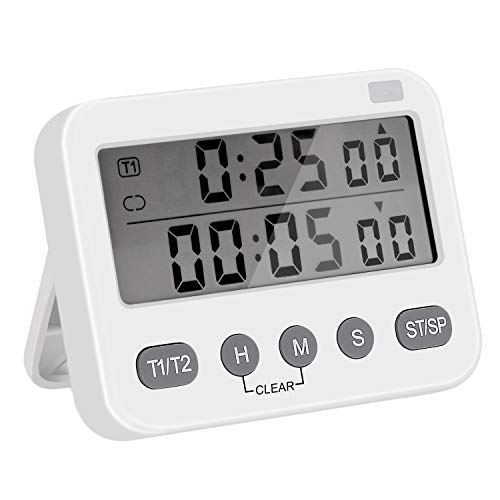
Pomodoro 25/5 Minute Adjustable Productivity Timer
- Designed specifically for the Pomodoro Technique with adjustable 25-minute work and 5-minute break settings.
- Simple mechanical timer that requires no batteries, apps, or charging. Wind it up and go.
If you want the most affordable option, this is it. Under $10 for a mechanical timer built specifically for the Pomodoro Technique. No batteries, no app, no charging cable. You wind it up like a classic kitchen timer and it ticks down. There’s something satisfying about the physical ticking sound that keeps you aware of time passing without being distracting.
The trade-off is flexibility. You can adjust the work and break durations, but it’s not as precise as the digital options. And the ticking might annoy people around you in a quiet office. For the price though, it’s a great way to test the Pomodoro Technique before investing in a premium timer. If you decide the technique works for you (and it will), you can always upgrade later.
Best Pomodoro Apps and Software
If you prefer digital tools over physical timers, there are some solid options. I’ve tested dozens of Pomodoro apps over the years, and most of them overcomplicate things with gamification, analytics dashboards, and social features nobody asked for. You need a timer. Keep it simple.
Tomato Timer (Web) is still my go-to free option. It runs in your browser, has customizable intervals, and shows the countdown in your tab title. No account needed.
Focus To-Do combines a Pomodoro timer with a task manager. If you want to assign specific pomodoros to specific tasks and track how many you complete per project, this is a good pick. It syncs across devices and has a free tier that does enough for most people.
Forest App takes a different approach. You plant a virtual tree when you start a pomodoro, and if you leave the app (to check social media, for example), the tree dies. It sounds silly, but the guilt of killing a virtual tree is surprisingly effective motivation. They also plant real trees based on your usage, which is a nice touch.
For college students, Forest is my recommendation. The gamification actually works for that age group, and the real tree planting adds a feel-good factor that keeps you coming back.
Common Mistakes People Make with the Pomodoro Technique
I’ve coached friends and team members through adopting this technique, and the same mistakes come up over and over. Avoid these and you’ll get results faster.
Skipping breaks. This is the number one mistake. People feel productive and think “I’ll just push through.” Don’t. The breaks are what make the system sustainable. Without them, you’ll burn out by 2pm and accomplish nothing in the afternoon. I learned this the hard way during a product launch week where I skipped every break for 3 days straight. By day 4, I couldn’t focus for more than 10 minutes at a time.
Using your phone as the timer. I already mentioned this, but it’s worth repeating. Your phone is a distraction machine. Using it as your Pomodoro timer is like asking a fox to guard the henhouse. Get a dedicated timer or use a browser-based tool on your computer.
Starting without a plan. If you don’t know what you’re working on before the timer starts, you’ll waste the first 5 minutes deciding. That’s 20% of your pomodoro gone. Spend 2 minutes before your first pomodoro of the day writing down your tasks and assigning pomodoros to each one.
Being too rigid. The 25/5 split is a guideline, not a law. Some tasks need longer focus periods. Some breaks need to be longer when you’re mentally drained. I use 25/5 for writing and admin work, but I switch to 50/10 for deep coding sessions. Adjust to your work, not the other way around.
Giving up after one bad day. You’ll have days where you only complete 4 pomodoros instead of 12. That’s fine. The technique works over weeks and months, not individual days. Track your weekly average and you’ll see a clear upward trend in both output and focus.
Using the Pomodoro Technique for Different Types of Work
The technique adapts to any kind of work, but the way you apply it changes depending on what you’re doing.
For writing and content creation: I use strict 25/5 pomodoros. Writing benefits from the time pressure. Knowing you only have 25 minutes to write forces you to get words on the page instead of staring at a blank screen. I can write about 600 to 800 words per pomodoro, which means a 2,400-word blog post takes about 4 pomodoros from outline to first draft.
For coding and development: I extend to 50/10. Getting into a flow state with code takes longer, and a 25-minute interruption right when you’ve loaded the entire problem into your working memory is counterproductive. The 50-minute block gives enough time to make meaningful progress on a feature or bug fix.
For studying: The classic 25/5 is perfect. Research confirms that spaced repetition with breaks improves retention. If you’re a student, pair the Pomodoro Technique with active recall (testing yourself instead of re-reading notes) and you’ll study more effectively in 2 hours than most people do in 6. Check out my list of study tools for college students for more resources.
For meetings and calls: You can’t always control meeting length, but you can use the Pomodoro mindset. I block my calendar in 25-minute chunks and schedule 5-minute buffers between meetings. This prevents back-to-back calls from draining my entire day and gives me a moment to process what was discussed before moving on.
For creative work: Some people find the timer creates anxiety during creative tasks. If that’s you, try a softer version: set the timer but don’t treat it as a hard stop. Use it as a check-in. “It’s been 25 minutes, am I still focused or have I drifted?” This keeps the awareness benefit without the pressure.
Combining the Pomodoro Technique with Goal Setting
The Pomodoro Technique handles daily execution. But execution without direction is just busyness. I pair my daily pomodoros with weekly and quarterly goals using the OKR and KPI framework. Each quarter, I set 3 objectives. Each week, I break those into tasks. Each day, I assign pomodoros to those tasks.
This creates a direct line between “I’m going to work for 25 minutes on this blog post” and “I’m building toward my quarterly goal of publishing 12 articles.” Without that connection, you risk spending your pomodoros on tasks that feel productive but don’t move you toward anything meaningful.
My weekly review takes about 2 pomodoros (roughly an hour). I look at what I accomplished, what carried over, and what I’m prioritizing next week. This single habit has done more for my productivity than any app or tool I’ve ever used.
Start Your First Pomodoro Today
You don’t need to read another article about productivity. You don’t need the perfect timer or the right app. Open Tomato Timer in a new tab, pick the one task you’ve been putting off, and hit start. That’s your first pomodoro. Do four of those, take a long break, and see how it feels.
I’ve been doing this for 8+ years and it hasn’t gotten old. Some days are better than others, but the system always works when I show up and actually use it. The Pomodoro Technique won’t magically eliminate procrastination, but it gives you a structure that makes starting less painful and finishing more likely. That’s all any productivity system needs to do.
If you’re looking to build better work habits, also check out my list of must-read productivity books. They pair well with the Pomodoro Technique and give you the mindset shifts that make the mechanical habits stick.
Frequently Asked Questions
How long is one Pomodoro session?
One Pomodoro is 25 minutes of focused, uninterrupted work followed by a 5-minute break. After completing 4 Pomodoros (about 2 hours), you take a longer break of 15 to 30 minutes. That’s one full set.
Why is the Pomodoro Technique effective for procrastination?
Your brain perceives big tasks as threatening and avoids them. The Pomodoro Technique shrinks the commitment to just 25 minutes, which feels manageable. Once you start, you usually keep going. It works with your brain’s natural focus cycle instead of fighting it.
What’s the best free Pomodoro timer?
Tomato Timer is a solid free web app that works in any browser with no signup required. For mobile, most phones have a built-in timer that works perfectly fine. You don’t need a fancy app to get started.
Can I change the 25-minute interval?
You can, but I wouldn’t recommend it when starting out. The 25-minute interval is based on how long your brain can maintain deep focus. Some people eventually adjust to 50/10 splits for deep work, but start with the standard 25/5 until the habit is solid.
What if I get interrupted during a Pomodoro?
If it’s an urgent interruption, stop the timer and restart the full Pomodoro later. If it’s not urgent, write down the interruption and deal with it during your break. A voided Pomodoro doesn’t count toward your daily total. Protecting your focus time is the whole point.
How many Pomodoros should I do per day?
Most people can handle 8 to 12 Pomodoros per day, which is about 4 to 6 hours of deep focused work. That might sound low, but it’s more genuine focus than most people get in an 8-hour workday filled with meetings and distractions.
Does the Pomodoro Technique work for creative work?
Yes. I use it for writing, content strategy, and design work. The key is picking tasks that have clear next steps. Instead of “write an article,” break it into “outline the article” or “draft the introduction.” Creative work responds well to structured focus sessions.