
What Is SaaS? Benefits of SaaS, On-Premise Comparison, and 2026 Outlook
 by
by
The benefits of SaaS are speed, transferred operating work, and lower initial commitment. You use an application the provider runs instead of buying and maintaining its underlying infrastructure. That can be a strong trade for a small team, but it does not make the software cheap, secure, portable, or reliable by default.
Treat SaaS as a responsibility and cash-flow decision, not a fashionable delivery model. Compare the full three-year cost, test identity and recovery controls, export your data before renewal, and write down the failure that would force you to leave. The right choice is the one that passes those tests.
Quick verdict: SaaS is the practical default when you need fast provisioning and do not gain an advantage from running the application stack. Choose on-premise or self-managed software when control, offline operation, special integration, data constraints, or scale economics justify the operating burden.
What Is SaaS (Software as a Service)?
NIST’s cloud computing definition describes software as a service as the use of a provider’s applications running on cloud infrastructure. The consumer does not manage the underlying network, servers, operating systems, or storage, apart from limited application settings. That control boundary is more useful than the loose idea that every subscription website is SaaS.
- You operate: user access, permissions, data quality, workflow, integrations, endpoint security, and contract decisions.
- The provider operates: the application service and underlying cloud infrastructure, subject to the contract.
- Shared or negotiated: incident response, logs, retention, backup expectations, recovery targets, support, and migration.
Common examples include email, collaboration, accounting, CRM, design, and commerce platforms such as Shopify. A SaaS product may use multi-tenant or dedicated components behind the service. The buyer should care about the promised isolation and outcome, not assume one architecture from the billing model.
Adoption is substantial but not universal. Eurostat’s 2025 enterprise survey covered EU enterprises with at least ten employees or self-employed persons in specified business sectors. It found 52.7% bought cloud computing services in 2025, up 7.4 percentage points from 2023.
- 85.2% of cloud-using enterprises bought cloud email.
- 71.7% bought office software.
- 71.5% bought file storage.
- 65.5% bought cloud security software.
- 58.2% bought finance or accounting applications.
- 27.9% bought CRM software.
That distribution matches the practical pattern: standardized business functions move first. The same hosted model supports cloud storage and almost every business app a small team evaluates.
The Core Benefits of SaaS
A benefit is only real when you can measure the outcome. I would evaluate six claims, each with a condition and a buyer-side metric.
| Potential benefit | It exists when | Measure it with |
|---|---|---|
| Lower initial commitment | No large license, hardware, or implementation bill replaces it | Cash paid through go-live |
| Faster provisioning | Identity, configuration, data, and training are actually ready | Days from approval to first completed workflow |
| Provider-managed updates | Updates reduce internal work without breaking integrations | Internal maintenance hours and update incidents |
| Remote access | Supported devices and networks meet the workflow | Successful task completion by location and device |
| Elastic capacity | The plan scales without punitive price or architecture changes | Cost per active user, transaction, or workload unit |
| Built-in reporting | The data is complete, exportable, and useful for a decision | Decision latency and reconciliation errors |
Run a short proof before an annual commitment
The benefits of SaaS should appear in a real workflow before you sign a long contract. I would test five representative users for ten working days and choose ten tasks that cover normal work, an approval, an integration, a permission change, a report, and an export. Record task completion, errors, support contacts, setup hours, and the number of manual workarounds.
Set the pass condition before the trial. For example: at least 45 of 50 planned task attempts complete without admin intervention, the critical export contains all required fields, and the tested monthly cost stays within 10% of the quote. Those numbers are an illustrative acceptance plan, not a universal benchmark. The point is to make the buying decision falsifiable.
Lower upfront cost is a cash-flow benefit
SaaS can replace a capital purchase with monthly or annual operating expense. That helps when cash is scarce or demand is uncertain. It does not prove the lifetime cost is lower. Implementation, data cleanup, integrations, training, premium support, usage overages, and exit still belong in the model.
Managed updates transfer work, not accountability
The provider can patch infrastructure and ship application updates for every customer. You still need release notes, a test account, integration checks, permission review, and a recovery plan for business-critical changes. Automatic does not mean harmless.
Elasticity is useful when the pricing unit matches value
Per-user pricing is easy to understand but expensive when inactive seats accumulate. Usage pricing can track demand more closely but makes forecasting harder. Outcome pricing can sound aligned while hiding a disputed definition of success. Model the exact unit, minimums, overages, and renewal increase.
SaaS vs On-Premise Software
The useful comparison is not cloud good, server bad. It is who must perform each task, how quickly they can recover, and what the business pays over the same period.
| Factor | SaaS | On-premise or self-managed |
|---|---|---|
| Provisioning | Provider service plus your setup | You procure, deploy, and configure |
| Infrastructure | Provider operates it | You or your contractor operate it |
| Application updates | Provider schedules and ships | You choose and execute |
| Customization | Within product and API boundaries | Potentially deep, with maintenance cost |
| Offline operation | Usually limited or unavailable | Possible when designed for it |
| Data location | Provider options and contract | Your selected environment |
| Failure control | Vendor status, support, and your continuity plan | Your monitoring, recovery, and staff |
| Exit | Export, API, contract, and migration limits | Data and system are owned, but migration still costs |
NIST SP 800-146 recommends evaluating cloud opportunities and risks against organizational requirements. Its portability discussion is still sharp: standardized interfaces and data formats matter, and SaaS entities are harder to transfer than low-level infrastructure resources.
If the underlying architecture itself is the decision, a SaaS consultant can help you pick the right technology stack only if the engagement produces tests, assumptions, failure behavior, and a handoff your team owns.
A worked three-year cost threshold
Here is an illustrative model for 25 users over 36 months. These are assumptions for arithmetic, not market averages or quotes.
| Input | SaaS example | On-premise example |
|---|---|---|
| Subscription | $30 × 25 users × 36 months = $27,000 | None |
| License | Included | $15,000 |
| Server and backup hardware | Included | $6,000 |
| Implementation | Included in this simple case | $4,000 |
| Administration | Included in this simple case | 4 hours/month × $60 × 36 = $8,640 |
| Upgrade allowance | Included | $3,000 |
| Three-year total | $27,000 | $36,640 |
Decision threshold: divide the $36,640 on-premise total by 25 users and 36 months. The break-even SaaS price is $40.71 per user per month. At 50 users with the same on-premise assumptions, it falls to $20.36. Real systems are not that linear, which is the point: seat count, integration, support, downtime, hardware replacement, and migration can reverse the result.
The Downside of SaaS: Lock-In, Recurring Cost, and Shared Risk
Vendor lock-in is not the fact that a product has a renewal date. It is the gap between downloading files and restoring an equivalent working process elsewhere. Data, identity, automations, audit history, permissions, integrations, and user habits can all be separate dependencies.
A reproducible export and restore drill
I tested the buyer-side part I could control on this site’s hosted content system. The source was read-only; no live record was changed. The environment was macOS 27.0.0 on arm64, Node.js v26.0.0, and SQLite 3.53.1.
| Test | Method | Measured result |
|---|---|---|
| Baseline export | 100 published records, 12 fields, five authenticated REST runs | 5/5 identical SHA-256 datasets; median 5.04 s |
| Backup | Save machine-readable JSON | 3.20 MiB export |
| Record integrity | Load payloads into SQLite and recompute each hash | 100/100 matched; integrity check OK |
| Failure mode 1 | Remove 1,024 bytes from the JSON | Rejected with SyntaxError |
| Failure mode 2 | Remove 8,192 bytes from the SQLite database | Corruption detected |
| Rollback | Rebuild a clean database from saved JSON | 100/100 restored in 46.2 ms; integrity check OK |
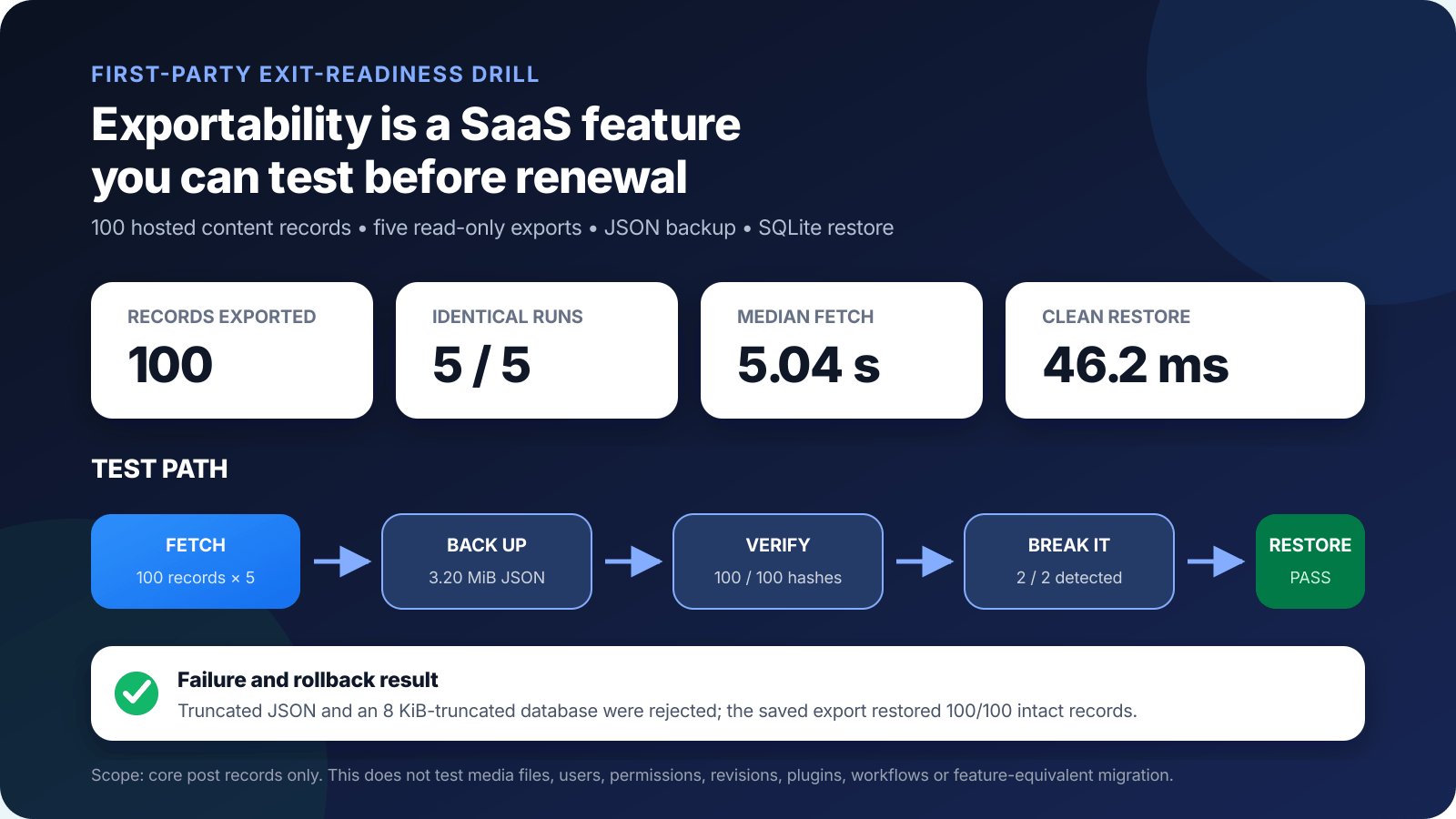
This proves the selected core records were exportable, readable, and restorable. It does not cover media binaries, revisions, comments, users, plugin tables, permissions, workflows, or a feature-equivalent migration to another SaaS product. REST timing also reflects this network path and server state, so it is not a SaaS speed benchmark.
The European Commission’s Data Act explainer says EU Data Act rules require Platform and Software as a Service providers to make open interfaces available and, at minimum, export data in a commonly used machine-readable format. It also says switching charges, including data egress charges, are to be removed from January 12, 2027. Contract scope and legal applicability still need case-specific review.
- Before purchase: request the data dictionary, export formats, API limits, retention terms, and deletion process.
- Before renewal: export a representative dataset and verify counts, attachments, relationships, and hashes.
- Before migration: map fields, identities, permissions, integrations, automations, and audit requirements.
- Before cancellation: complete a restore or import test and document the rollback trigger.
Security is shared even when infrastructure is managed
CISA’s Secure Cloud Business Applications resources includes no-cost guidance and assessment resources for hardening SaaS configurations, including practices around MFA, strong passwords, and audit logging. That is an important correction to the sales shorthand that the vendor handles security.
- Provider evidence: independent assurance, incident terms, service commitments, data location, encryption, and support.
- Tenant controls: phishing-resistant MFA where available, least privilege, admin separation, logging, and access review.
- Continuity: recovery objectives, offline workarounds, status monitoring, contact paths, and tested exports.
- Commercial controls: seat ownership, renewal alerts, usage thresholds, invoice reconciliation, and deletion.
What “SaaS Development” Means If You Are Building
Building SaaS means accepting the provider side of the control boundary. You operate an application for multiple customers, meter access or usage, secure identities and tenants, ship changes, support recovery, and keep the economics viable. Recurring billing is the revenue mechanism, not the product architecture.
Retention matters because acquisition does not repair a product customers cannot trust or leave cleanly. Study how to reduce churn in product subscriptions and build a proven SaaS marketing strategy around activation and durable value, not signups alone.
The 2026 Outlook: AI Changes the Meter, Not the Buyer Test
AI features are pushing some SaaS products away from simple per-seat pricing because model calls, tools, and automated actions create variable cost. Buyers should ask which action is metered, how failed or duplicated work is billed, what data the model can access, how output is reviewed, and whether the logs and results can be exported.
The useful question is not whether a product calls itself AI-native. It is whether the feature completes a bounded job with an acceptable error rate and unit cost. My analysis of how AI is transforming SaaS products separates those workflow changes from the branding.
So, Is SaaS Right for You?
Choose SaaS when the provider can run the application better or more economically than you need to, and the product passes your security, cost, continuity, and exit tests. Choose self-managed or on-premise software when direct control creates measurable value that exceeds the work of operating it.
| Decision gate | Pass condition |
|---|---|
| Workflow | The product completes the real task with acceptable error and delay |
| Three-year cost | The same-scope model fits the budget under seat and usage sensitivity |
| Security | Provider evidence and tenant controls meet the risk |
| Continuity | Outage workaround, recovery path, and support are documented |
| Portability | Representative data exports and restores with known gaps |
| Contract | Renewal, pricing, deletion, liability, and exit terms are understood |
My default is conditional, not ideological: rent the application when ownership adds no advantage, but test the exit while the relationship is healthy. A SaaS product earns trust when it makes daily work easier and leaving possible. That is how the benefits of SaaS survive contact with the renewal invoice.
Frequently Asked Questions
What is SaaS in simple terms?
Software as a service is an application the provider runs on cloud infrastructure and you access through a browser, app, or program interface. The provider controls the underlying network, servers, operating systems, and storage. You usually control user settings, data, permissions, integrations, and the subscription.
What are the main benefits of SaaS?
The main benefits of SaaS are faster provisioning, lower initial capital needs, provider-managed updates, easier remote access, elastic capacity, and a measurable subscription. Those are potential advantages, not guarantees. Integration, configuration, support, security, and exit costs can erase them.
Is SaaS always cheaper than on-premise software?
No. SaaS often reduces upfront cost and internal operations work, but recurring per-user or usage fees can exceed an owned system at scale. Compare both options over the same period and include licenses, hardware, implementation, administration, support, upgrades, migration, downtime, and exit.
What is the biggest risk of SaaS?
The biggest risk depends on the workload, but poor exit readiness is widely underestimated. Before renewal, export representative data, verify record counts and hashes, document dependencies, test a restore, and record what does not transfer. A download button is not proof of a workable migration.
Is SaaS more secure than on-premise software?
Neither model is automatically more secure. A capable SaaS provider can operate infrastructure and patches well, but the customer still owns identity, permissions, configuration, endpoint security, data handling, monitoring, and incident response. Test the controls required by your risk and compliance obligations.
When should I choose on-premise software instead of SaaS?
Choose on-premise or a self-managed deployment when a tested requirement needs direct infrastructure control, offline operation, special hardware integration, deep application changes, or a data location and access model the SaaS product cannot meet. Calculate the operating burden before treating control as free.
Tell Google you want more of this.
Add Gaurav Tiwari as a preferred sourceOne tap, and this site shows up more often in your own Top Stories, AI Overviews and AI Mode. Remove it any time.