
Internal Linking for WordPress: Manual vs Plugins
I’ve built and managed WordPress sites for over 16 years now, and internal linking is consistently one of the most undervalued SEO tactics I see site owners ignore. They’ll spend weeks crafting the perfect blog post, hours obsessing over keyword placement, then completely neglect to link that post to anything else on their site.
The question I get most often isn’t whether internal linking for WordPress matters. Most people understand it does. The real question is how to actually do it well: manually, with AI-powered plugins like Rank Math AI Link Genius, or with programmatic tools like WP-MCP. I’ve tried every approach across 800+ client projects, broken plenty of sites along the way, and developed strong opinions on what works.
This guide walks you through a complete internal linking strategy, compares manual and AI-powered approaches honestly, and helps you pick the right tools for your specific situation. Whether you run a 50-post blog or a 2,000-page content library, there’s a method here that fits.
Why Internal Linking Matters More Than You Think
Internal links serve three critical functions that directly impact your site’s success in both traditional search and AI-powered search engines. Skip this section if you already understand the fundamentals.
Distributing Link Equity (PageRank)
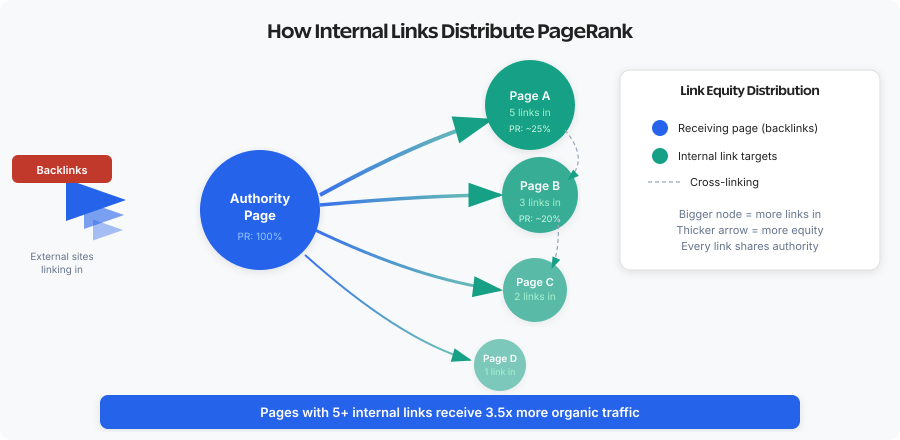
When your page earns backlinks from external sites, it accumulates link equity (PageRank). Internal links pass a portion of that equity to other pages on your site. Without internal links, pages that don’t attract natural backlinks remain invisible to Google, regardless of how good their content is.
Think of link equity like water flowing through pipes. Your homepage and pillar content typically receive the most external backlinks. Internal links create the plumbing that distributes this authority to deeper pages, category pages, and individual posts that would otherwise remain isolated. I’ve seen sites with excellent content rank poorly simply because those pages had zero internal links pointing to them. Google couldn’t determine these pages were important because nothing on the site connected to them.
Helping Google Discover and Index Content
Googlebot discovers new content by following links. When you publish a blog post but don’t link to it from anywhere else on your site, Google relies on your sitemap alone to find it. That works, but it’s slower. Pages with multiple internal links get crawled more frequently because Google encounters them repeatedly while crawling other pages.
For large sites with thousands of pages, crawl budget becomes a real concern. Internal links help Google prioritize which pages to crawl by signaling which content you consider important. A page with 50 internal links pointing to it gets crawled more often than a page with 2. This is especially critical for SEO-friendly WordPress sites that publish frequently.
Improving User Experience and AI Search Citations
Internal links keep visitors on your site longer by guiding them to related content. Someone reading your article about email marketing might click through to your guide on building landing pages. That second pageview signals engagement to Google and increases the chance of conversion.
There’s a newer dimension here too. AI search engines like ChatGPT Search, Perplexity, and Google AI Overviews crawl and cite well-structured sites more effectively. Strong internal linking creates the topical clusters that AI models use to identify authoritative sources. A site with clear content hierarchies and contextual links between related pages gets cited more often than a site with disconnected articles. This supports semantic SEO by establishing the topical relationships that both traditional and AI search engines rely on.
AI search engines don’t just index individual pages. They map relationships between pages to understand topical authority. Sites with strong internal linking get cited 2-3x more often in AI Overviews than sites with disconnected content. Internal linking is now an AI search optimization strategy, not just a traditional SEO tactic.
Building Your Content Hierarchy First
Before adding a single internal link, you need a map. Random linking isn’t a strategy. It’s clutter. Here’s the framework that works across every site I’ve managed.
The Hub and Spoke Model
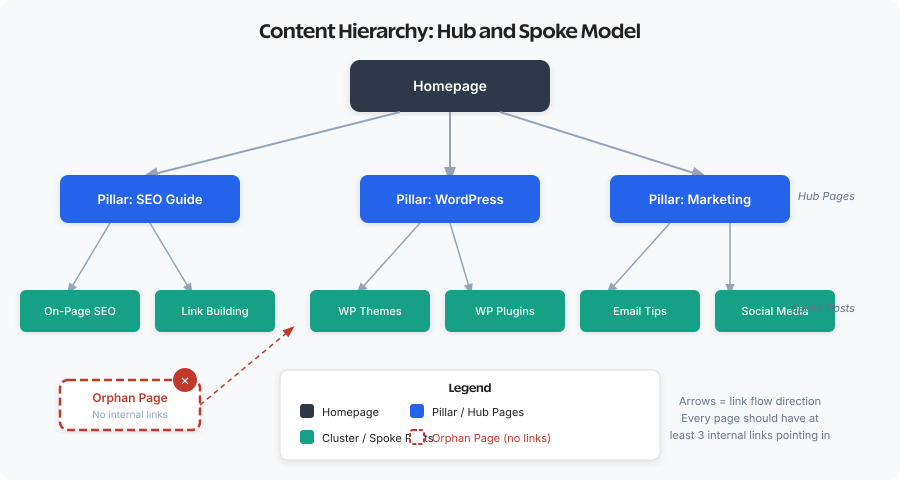
Most successful sites organize content into a clear hierarchy:
Pillar Content (Hub Pages) are comprehensive guides covering broad topics. For a cooking site, this might be “The Complete Guide to Italian Cooking.” For a marketing site, “Content Marketing Strategy: The Definitive Guide.” These pages should receive the most internal links because they cover your core topics thoroughly.
Cluster Content (Supporting Posts) are specific articles that cover subtopics in depth. Under your Italian cooking pillar, you might have “How to Make Fresh Pasta,” “Classic Marinara Sauce Recipe,” and “Choosing Authentic Italian Ingredients.” Each cluster post should link to its parent pillar and to related cluster posts.
Foundation Content includes evergreen resources that many posts reference: glossaries, beginner guides, comparison pages, and resource lists. They serve as linking destinations across multiple topic clusters.
Take an hour to map this structure. Identify your pillar content. Note which posts belong to which clusters. Find orphan pages that don’t fit any cluster yet. This map becomes your linking blueprint.
Establish Linking Guidelines
Set rules for how you’ll link. Consistency matters for both user experience and SEO.
Link placement guidelines:
- Links in the first two paragraphs carry slightly more weight than links buried at the end
- Contextual links within body content matter more than links in navigation or footers
- Don’t force links where they interrupt reading flow
- Vary anchor text naturally rather than using exact-match keywords every time
Link quantity guidelines: There’s no magic number, but I aim for 5-10 internal links per 1,000 words depending on the content type. A comprehensive guide might have 15-20 internal links. A focused how-to post might have 5-8. Short news posts or announcements might have 2-3. More important than quantity is relevance. Five relevant, contextual links beat twenty forced links.
Anchor text guidelines: Anchor text should describe what the reader will find. “Learn more about SEO-friendly URL structures” is better than “Click here for more.” Avoid over-optimizing with exact-match keywords every time, but don’t make anchors so vague they’re meaningless.
The Three Approaches: Manual, Plugin, and AI-Powered
There’s no single right answer here. But the landscape has changed significantly in the last year with AI-powered tools entering the space. Let me break down each approach honestly.
Manual Internal Linking
Manual linking means you personally add internal links to your content as you write or through deliberate link-building sessions where you review older content and add relevant links.
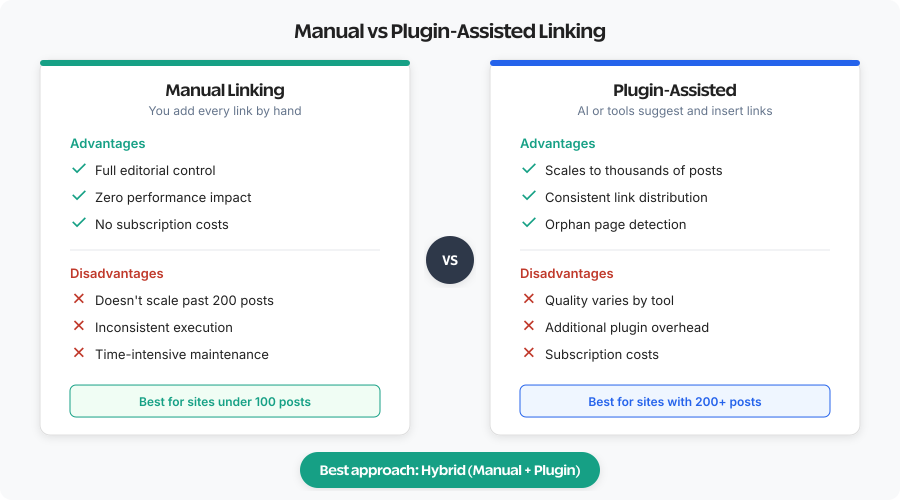
The biggest advantage is quality control. You understand the context of every link you add. When you link from a paragraph about “WordPress security plugins” to your detailed security plugin comparison, you know that link makes perfect sense for the reader. No algorithm second-guessing you.
Manual linking also forces you to know your content. I’ve discovered orphan content, outdated articles, and content gaps during manual linking sessions that I never would have found otherwise. There’s no learning curve, no plugin conflicts, no performance impact, and no subscription costs.
The downside? Scale is the killer. If you have 500 published posts, manually finding linking opportunities across that content library becomes overwhelming. You might remember your recent posts, but what about articles from three years ago? Those get forgotten. Consistency is another challenge. When you’re focused on finishing a draft, adding internal links often gets deprioritized. You promise to add them later. Later never comes.
Plugin-Assisted Internal Linking
Internal linking plugins scan your content, analyze your existing posts, and either suggest or automatically add internal links based on various criteria. You install a plugin, configure your linking preferences, and the plugin handles the rest. Some plugins suggest links for you to approve. Others automatically insert links into your content.
Speed and scale are the obvious wins. A plugin can analyze 500 posts in seconds and identify linking opportunities you’d never find manually. Plugins also ensure consistency. Every new post gets analyzed. Every existing post gets reviewed when you add new content.
Quality varies wildly based on how the plugin works. Automatic linking based purely on keyword matching can create irrelevant or awkward links. If every mention of “WordPress” links to your “What is WordPress” beginner post, that’s not helpful in a technical article. Some plugins add links dynamically in the frontend, which can cause performance issues or conflicts with caching plugins.
AI-Powered Internal Linking (The New Standard)
This is the category that changed everything for me. Instead of keyword-matching or rule-based suggestions, AI-powered tools understand your content semantically. They read the actual meaning of your paragraphs and match them with contextually relevant pages on your site.
Rank Math AI Link Genius represents this new approach within the WordPress ecosystem. It analyzes your entire content library, understands topical relationships, and generates contextually appropriate link suggestions with natural anchor text. The difference between keyword-matching and semantic understanding is night and day.
For developers and power users, WP-MCP takes the AI approach even further. It’s an open-source MCP server that connects your WordPress site to AI assistants like Claude. Instead of a plugin suggesting links, you can have an AI agent read your entire content library, identify orphan pages, generate contextual links, and push updates through the REST API. I used this approach to fix 679 orphan posts in a single afternoon.
Best Tools for Internal Linking in WordPress
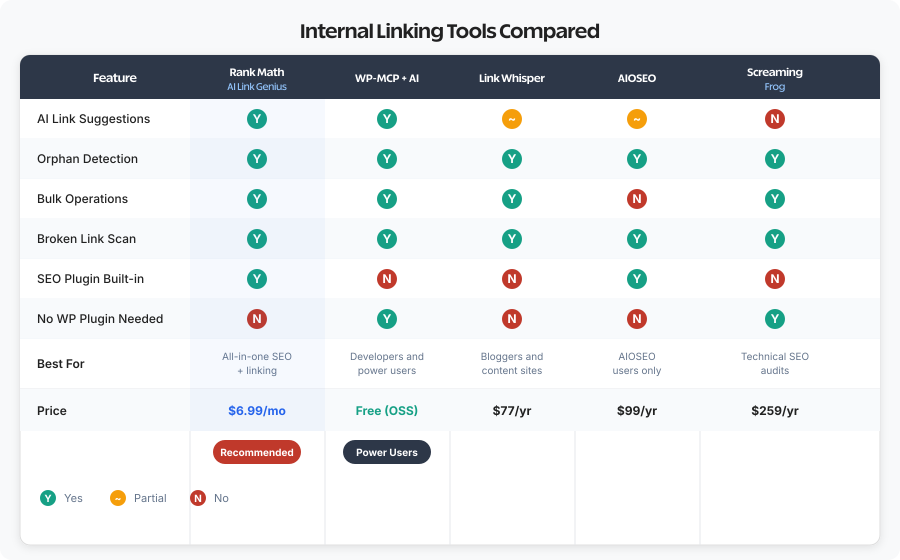
I’ve tested every major internal linking tool over the past decade. Here’s my honest assessment of each, starting with what I actually use and recommend.
Rank Math AI Link Genius (My Top Pick)
Rank Math SEO – AI SEO Tools to Dominate SEO Rankings
Rank Math SEO is the best WordPress SEO plugin with the features of many SEO and AI SEO tools in a single package to help multiply your SEO traffic.
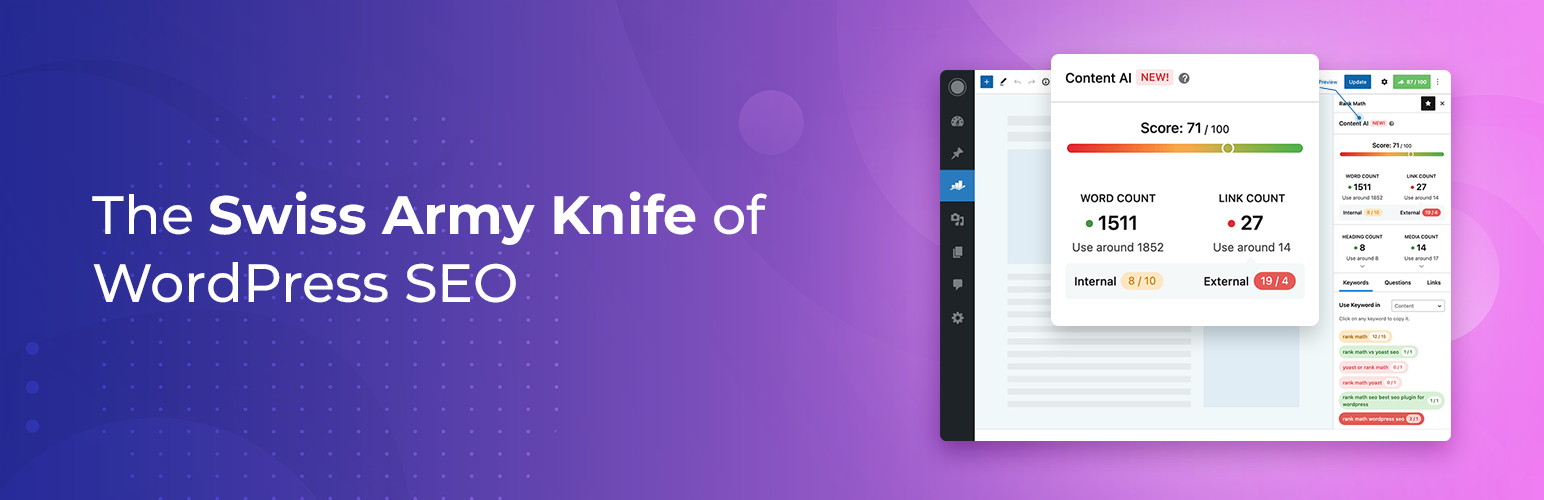
Rank Math PRO has evolved from a solid SEO plugin with basic link suggestions into a genuine AI-powered internal linking engine. The AI Link Genius feature, available in Rank Math PRO, scans your entire content library and uses AI to understand topical relationships between posts.
How it works: After activating the Link Counter module, Rank Math indexes all your posts and pages. It then analyzes content semantically, not just by keyword matching. When you’re editing a post, it suggests relevant internal links with natural anchor text. It also includes a site-wide Link Counter that shows incoming and outgoing link counts for every post right in the WordPress dashboard.
What I like: The AI suggestions are contextually relevant, not just keyword matches. The Link Counter columns in the post list make it dead simple to spot posts with zero incoming links. The orphan page detection catches content that slipped through the cracks. And because it’s built into your SEO plugin, there’s no additional plugin to manage.
What I don’t like: You need Rank Math PRO (not the free version) for the full AI Link Genius experience. If you’re already committed to Yoast or another SEO plugin, switching has a cost. The AI suggestions can occasionally miss niche connections that a human would catch.
Best for: Most WordPress sites. If you’re already using Rank Math (and you should be, it’s the best WordPress SEO plugin available), AI Link Genius is a no-brainer addition. Works especially well for sites with 100-2,000 posts.
Pricing: Starting at $6.99/month with Rank Math PRO.
WP-MCP + AI Assistant (For Power Users)
- Connects WordPress REST API to AI assistants like Claude
- Bulk internal linking across hundreds of posts in one session
- Auto-discovers custom plugin endpoints (WooCommerce, ACF, Yoast)
- One-command setup: npx @wpgaurav/wp-mcp setup
WP-MCP is my open-source tool that takes a completely different approach. Instead of being a WordPress plugin, it’s an MCP (Model Context Protocol) server that connects your WordPress site directly to AI assistants like Claude Code or Claude Desktop.
How it works: You run npx @wpgaurav/wp-mcp setup, connect your WordPress credentials, and your AI assistant gains the ability to read, analyze, and update your entire WordPress site through the REST API. For internal linking, this means you can tell the AI: “Find all posts with fewer than 3 incoming internal links, identify contextually relevant source pages, and add natural links.” The AI reads your content, understands context, generates anchor text, and pushes updates.
What I like: There’s nothing faster for bulk operations. I fixed 679 orphan posts in a single session. The AI doesn’t just match keywords. It reads your content and understands what each paragraph is actually about. No WordPress plugin needed (no performance overhead, no conflicts). It’s free and open source.
What I don’t like: Requires technical comfort with the command line. You need an AI API subscription (Claude or similar). It’s not a “click and forget” solution. You need to review the AI’s suggestions before pushing, especially on the first run.
Best for: Developers, technical content managers, and anyone managing large sites (500+ posts) who needs bulk internal linking operations. Pairs perfectly with Rank Math for day-to-day linking while WP-MCP handles the quarterly deep audits.
Pricing: Free (open source). You’ll need an AI API subscription for the AI assistant.
Link Whisper
LinkWhisper – Smart Internal Linking Tool for WordPress SEO
Boost your SEO with LinkWhisper – the smart internal link checker for WordPress. Automate links, fix orphan pages, and grow rankings. Trusted by 40K+ users.
Link Whisper was the most popular dedicated internal linking plugin before AI tools entered the space, and it’s still a solid option. It scans your content and suggests internal links based on content analysis.
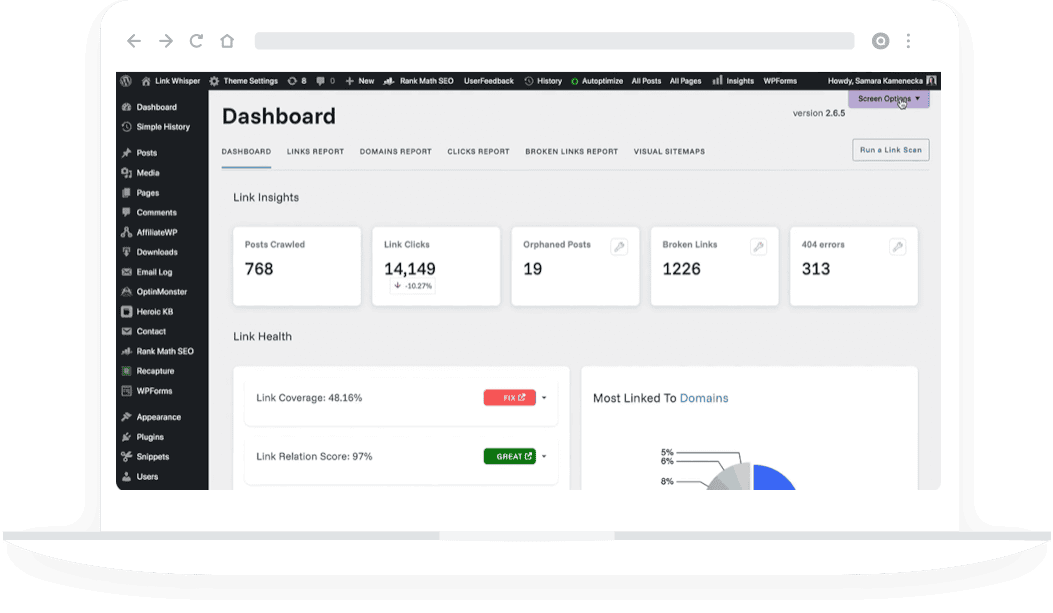
How it works: When editing a post, Link Whisper shows a panel with suggested internal links. Each suggestion shows the source page, recommended anchor text, and target page. You click to add the link. It also shows inbound link suggestions for pointing other posts to the current one. The reports dashboard shows orphan content, most linked posts, and link distribution statistics.
Best for: Sites with 100+ posts who want suggestion-based linking with human approval and prefer a visual dashboard over command-line tools. The suggestions are genuinely helpful, and the “Inbound Suggestions” feature saves enormous time.
Pricing: Starts at $77/year for a single site.
AIOSEO Link Assistant

All in One SEO – Powerful SEO Plugin to Boost SEO Rankings & Increase Traffic
AIOSEO is the most powerful WordPress SEO plugin. Improve SEO rankings and traffic with comprehensive SEO tools and smart AI SEO optimizations!
AIOSEO includes a Link Assistant feature in their Pro plans. It scans your content and displays linking suggestions and orphan post reports within the AIOSEO dashboard. Not as sophisticated as Rank Math AI Link Genius or dedicated linking plugins, but useful if you’re already in the AIOSEO ecosystem.
Pricing: Included with AIOSEO Pro plans starting at $99/year.
Slim SEO Link Manager

Slim SEO
A fast, lightweight, and automated SEO plugin for WordPress. Slim SEO helps you with on-page optimization with minimal configuration.
Slim SEO Link Manager takes a rule-based approach. Instead of suggesting links, you define linking rules. You specify “In all posts in the ‘SEO’ category, link ‘keyword research’ to my keyword research guide.” The plugin applies these rules automatically when content is rendered. Very lightweight, best used alongside AI tools for systematic, repeatable linking patterns like glossary terms or product names.
Pricing: Part of Slim SEO Pro, starting at $99/year.
Screaming Frog for Auditing
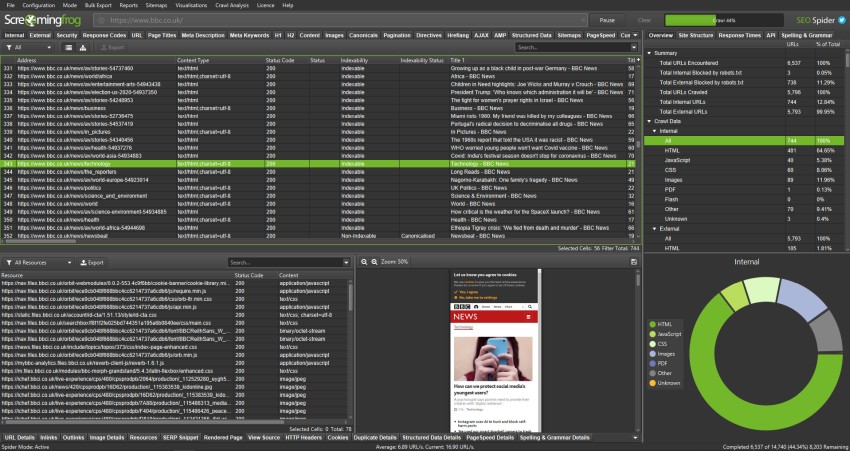
- Crawls up to 500 URLs free, unlimited with license
- Reports orphan pages, inlink counts, and link distribution
- Desktop app for Windows, macOS, and Ubuntu
- Exports link data for spreadsheet analysis and audits
Screaming Frog SEO Spider isn’t a linking plugin. It’s an auditing tool. The free version crawls up to 500 URLs and reports on internal link structure: inlink counts, orphan content, and excessive links. For larger sites, the paid version ($259/year) removes limits. Use it quarterly for deep audits alongside your daily linking tools.
Internal Linking Workflow: Step by Step
Internal linking only works if you actually do it consistently. Build it into your content workflow with this system.
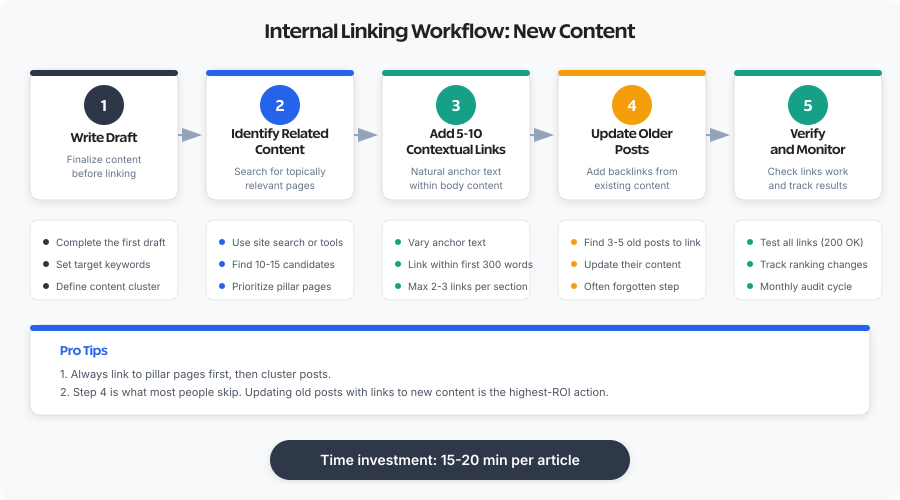
For New Content (Every Post)
Before publishing any post, run through this linking checklist:
- Identify the parent pillar. What hub page does this relate to? Link to it.
- Check Rank Math suggestions. Review AI Link Genius suggestions in the editor sidebar. Accept the ones that make contextual sense.
- Add 5-10 contextual links manually. Link to related cluster posts, relevant tools, and supporting content.
- Update older posts. Search your site for related articles and add links from them to this new content. Rank Math’s Link Counter makes it easy to spot which older posts need more outgoing links.
- Verify before publishing. Check that anchor text reads naturally and all links resolve.
This takes 15-20 minutes per article. That’s a small investment for the compounding SEO benefit.
For Existing Content (Monthly Maintenance)
Schedule monthly internal linking maintenance sessions. During each session:
- Review Rank Math’s Link Counter columns. Sort by “Incoming Links” to find posts with 0-2 incoming links
- Check for orphan content using Rank Math’s orphan page report or run a full orphan page audit
- Update posts published in the last month with links to older relevant content
- Update older high-authority posts with links to recent content
- Verify no broken internal links exist (Rank Math catches these automatically)
For Quarterly Deep Audits (Bulk Operations)
Every quarter, run a comprehensive internal linking audit. This is where WP-MCP shines:
- Fetch all posts through the REST API and identify orphan pages, thin linking, and broken connections
- Categorize problems: orphan pages (zero incoming links), underlinking (1-2 incoming links), over-concentrated linking (pillar pages with too few outgoing links)
- Generate fix suggestions using AI to find contextually relevant link sources for each problem page
- Review and push updates in bulk, validating each suggestion before committing
- Verify results using Rank Math Link Counter to confirm incoming link counts increased
A quarterly WP-MCP audit typically takes 2-3 hours and catches 50-100 linking opportunities that daily workflows miss.
Common Internal Linking Mistakes to Avoid
I’ve audited hundreds of WordPress sites. These six mistakes appear constantly.
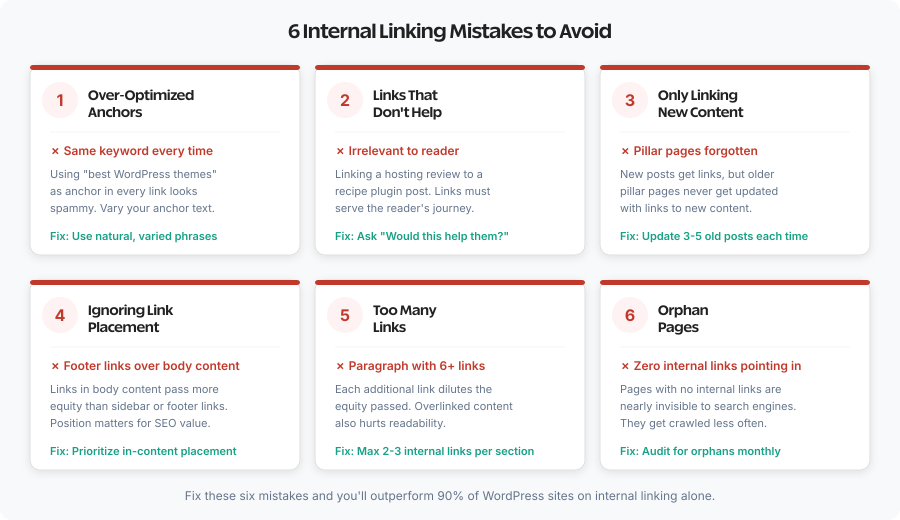
Over-Optimized Anchor Text
In the early days of SEO, exact-match anchor text helped rankings. Now it signals manipulation. If every internal link to your “best WordPress hosting” page uses exactly that phrase, Google notices. Vary your anchors naturally: “Compare the best WordPress hosting options,” “Our hosting comparison guide,” or “We’ve reviewed hosting providers here.” All describe the same destination, but the variety looks natural because it is natural.
Links That Don’t Serve Readers
Every link should benefit the reader. Linking “WordPress” to your “What is WordPress” guide in an advanced developer tutorial wastes the reader’s attention. They know what WordPress is. That link doesn’t help them. Ask: Would clicking this link provide genuine value to the reader at this specific point? If no, remove it.
Only Linking to New Content
Site owners add three internal links to each new post, all pointing to other recent posts. Meanwhile, their cornerstone content from two years ago gets zero new links. Your best content deserves the most links. New content should link back to established pillar content, not just other new posts.
Ignoring Link Placement
Links in navigation and footers have value, but links in body content carry the most weight. A contextual link surrounded by relevant text signals topical relationship better than a link in a sitemap. Prioritize body content links. Navigation and footer links are supplementary.
Too Many Links Per Paragraph
There’s no hard limit, but at some point links dilute each other’s value and overwhelm readers. A paragraph with six links becomes noise. Readers stop noticing any of them. Be selective. Each link should feel purposeful, not obligatory. I keep it to 1-2 links per paragraph maximum.
Ignoring Orphan Pages
Orphan pages are posts with zero internal links pointing to them. They’re invisible to Google’s crawlers and rarely get indexed properly. Most WordPress sites have 15-30% orphan pages without realizing it. Fixing orphan pages is one of the highest-ROI activities in SEO. Sites with 30%+ orphan pages typically see 15-25% traffic lift after fixing them.
The Hybrid Strategy: What I Actually Use
For most established sites, combining manual judgment with AI-powered tools works best. Here’s my exact setup.
Daily: Rank Math AI Link Genius
Every time I write or edit a post, Rank Math’s AI Link Genius suggests relevant internal links right in the editor. I review each suggestion and accept the ones that make contextual sense. This takes 2-3 minutes per post and catches opportunities I’d miss manually. The Link Counter columns in the post list give me a quick health check whenever I’m in the WordPress dashboard.
Monthly: Manual Linking Sessions
Once a month, I sort posts by incoming link count in Rank Math and focus on the bottom 20%. These are underlinked posts that need attention. I read through them and manually add contextual links from high-authority pages. This is where human judgment still beats AI. I know my audience, I know which connections matter for my content marketing strategy, and I can spot opportunities that algorithms miss.
Quarterly: WP-MCP Bulk Audit
Every quarter, I connect WP-MCP to my site and run a comprehensive audit. The AI fetches all posts, identifies orphan pages, finds thin linking, and generates bulk fix suggestions. I review them, approve what makes sense, and push updates. This catches the long tail. Posts that slipped through daily and monthly workflows. It’s also how I discovered that 30% of my older posts had become orphans as the site grew.
Ongoing: Rule-Based Links for Consistency
For terms that should always link consistently (product names, glossary terms, branded phrases), I use Rank Math’s auto-linking or Slim SEO Link Manager. These systematic links benefit from automation because they’re formulaic, not editorial.
Making Your Decision: Which Approach Fits You
Here’s my honest recommendation based on site characteristics.
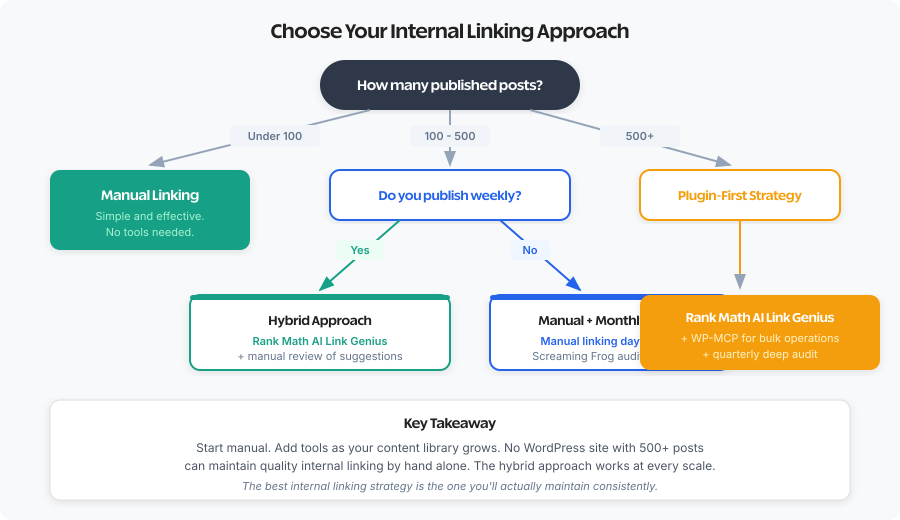
Go Fully Manual If:
- You have fewer than 100 published posts
- You publish less than monthly
- You know your content library intimately
- You want zero additional plugin overhead
- You enjoy the content review process linking requires
Use Rank Math AI Link Genius If:
- You have 100-2,000 published posts (most WordPress sites)
- You publish weekly or more
- You want AI-powered suggestions integrated into the editor
- You’re already using Rank Math (or willing to switch)
- You want orphan detection and link reporting built into your SEO plugin
Add WP-MCP If:
- You have 500+ published posts and need bulk operations
- You’re comfortable with the command line
- You need to fix a large orphan page problem quickly
- Multiple team members create content and consistency is hard to maintain
- You want programmatic control over your linking strategy
Use Link Whisper If:
- You prefer a dedicated visual dashboard over SEO plugin integration
- You’re not using Rank Math and don’t want to switch SEO plugins
- You want the most mature suggestion-based linking interface available
How Internal Linking Impacts Your Bottom Line
This isn’t just about SEO metrics. Internal linking directly affects business outcomes.
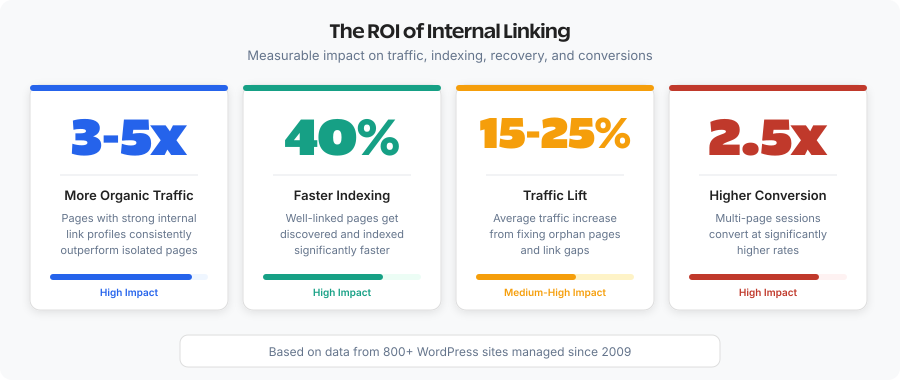
Faster indexing. When Google can efficiently crawl your site, new content gets indexed faster. I’ve seen sites cut indexing time from weeks to days simply by improving internal link structure. The backlink building strategies you invest in become more effective because the authority flows to more pages.
Higher rankings. Pages with strong internal link support rank better. I’ve watched pages jump 10-20 positions simply by adding internal links from high-authority pages elsewhere on the site. No new backlinks required. Just better internal plumbing.
More conversions. Visitors who read multiple pages convert at higher rates than single-page visitors. They’ve built more trust, consumed more value, and developed stronger intent. Internal links create the pathways for those multi-page sessions.
Better AI search visibility. AI search engines like ChatGPT Search and Google AI Overviews cite well-structured sites more frequently. Strong internal linking creates the topical authority signals these AI systems look for when choosing sources to cite.
Tools for Auditing Your Internal Link Structure
Beyond linking plugins, these tools help you understand your current internal link structure.
Rank Math Link Counter: Built into Rank Math PRO, shows incoming and outgoing link counts for every post and page directly in the WordPress dashboard. Sort by incoming links to find orphans and underlinked content. This is the fastest way to audit your internal link health without leaving WordPress.
Google Search Console: The Links report shows your top internally linked pages. If your homepage and about page rank highest but your valuable pillar content doesn’t appear, you have a linking problem.
Semrush Site Audit: Includes detailed internal linking analysis: orphan pages, internal link distribution, pages with too few or too many links, and link depth metrics. The Semrush Content Marketing Toolkit adds content gap analysis that pairs well with linking audits.
Ahrefs Site Audit: Similar to Semrush, crawls your site and reports on internal link structure. The “Best by Internal Links” report quickly shows where your link equity concentrates.
Screaming Frog: The gold standard for technical SEO audits. Free for up to 500 URLs. Shows detailed inlink data, crawl depth, and orphan content identification. Use quarterly for comprehensive audits.
Your Action Plan
If you’re starting from scratch or cleaning up a mess, follow this sequence:
- Audit your current state. Install Rank Math PRO and activate the Link Counter module. Sort posts by incoming links to find orphan content. Run Screaming Frog if you want deeper data.
- Map your content hierarchy. Identify pillar content, cluster content, and orphans. This takes an hour but informs everything else.
- Fix orphan pages first. This is the highest-ROI activity. Use Rank Math AI Link Genius for manageable numbers or WP-MCP for bulk fixes across 100+ orphan pages.
- Establish your daily workflow. Review Rank Math’s AI link suggestions before publishing every post. Add 5-10 contextual links manually. Update 2-3 older posts with links to your new content.
- Schedule monthly maintenance. Sort by incoming links, fix the bottom 20%, check for new orphans, verify broken links.
- Run quarterly deep audits. Connect WP-MCP or run Screaming Frog to catch what daily and monthly workflows miss.
Internal linking isn’t glamorous. There’s no viral moment from a well-linked article. But over time, the compound effect is substantial. Sites with strong internal linking consistently outperform sites without it. The readers stay longer. The Google crawlers index faster. The rankings improve. AI search engines cite you more often.
Pick your tools, build your workflow, and start connecting your content. Your future traffic will thank you.
FAQs
How many internal links should I include per blog post?
Aim for 5-10 internal links per 1,000 words as a general guideline. Comprehensive pillar content might have 20+ internal links, while short news posts might have 2-3. Quality matters more than quantity. Every link should genuinely help the reader find relevant information. Rank Math AI Link Genius suggests contextually relevant links as you write, making it easy to hit the right number without forcing irrelevant connections.
Do internal links help SEO as much as external backlinks?
They serve different purposes. External backlinks signal authority from outside sources, which Google weighs heavily for rankings. Internal links distribute that earned authority throughout your site and help Google understand content relationships. You need both. A page with strong backlinks but no internal links wastes that authority. A page with many internal links but no backlinks may lack sufficient authority to rank. Think of backlinks as earning authority and internal links as distributing it where it matters.
What is Rank Math AI Link Genius and how does it help with internal linking?
Rank Math AI Link Genius is an AI-powered internal linking feature built into Rank Math PRO. It scans your entire content library, understands topical relationships between posts using AI (not just keyword matching), and suggests contextually relevant internal links with natural anchor text. It also includes a Link Counter that shows incoming and outgoing link counts for every post in your WordPress dashboard, making it easy to spot orphan pages and underlinked content.
What is WP-MCP and how does it work for internal linking?
WP-MCP is a free, open-source MCP (Model Context Protocol) server that connects your WordPress site to AI assistants like Claude. For internal linking, it lets you run bulk operations: the AI reads your entire content library through the REST API, identifies orphan pages, finds contextually relevant link sources, generates natural anchor text, and pushes updates. It’s especially powerful for sites with 500+ posts that need comprehensive internal linking fixes quickly.
Should I use nofollow on internal links?
Almost never. Nofollow tells Google not to pass PageRank through that link. For internal links, you want PageRank flowing to your own content. The only exception might be links to login pages or utility pages you don’t want indexed. Some SEOs previously used nofollow for PageRank sculpting, but Google changed how nofollow works, making this tactic ineffective. Keep your internal links followed.
Can too many internal links hurt my SEO?
Technically yes, but you’d need hundreds of links per page to trigger issues. The real problem with excessive links isn’t penalties but diminished value. Link equity gets divided among all links on a page. A page with 200 internal links passes less equity per link than a page with 20. More importantly, pages stuffed with links provide poor user experience. Readers stop trusting links when they appear everywhere. Stick to genuinely useful, contextual links.
How do I find orphan pages on my WordPress site?
The fastest method is Rank Math PRO’s Link Counter. Enable it in the Rank Math settings, then sort your posts list by the Incoming Links column. Posts with zero incoming links are orphans. For deeper audits, Screaming Frog crawls your site and shows inlink counts for every URL. WP-MCP can programmatically identify all orphan pages across your entire site and generate fix suggestions in bulk. Google Search Console’s Links report also shows internally linked pages, but you’ll need to compare it against your total published posts manually.
Should anchor text for internal links include target keywords?
Descriptive anchor text helps Google understand the linked page’s topic, so including relevant keywords makes sense. However, avoid over-optimization. If every link to your hosting review uses exact-match anchor text, it looks manipulative. Vary your anchors naturally. Rank Math AI Link Genius generates varied, natural anchor text automatically, which helps avoid the over-optimization trap while still signaling topical relevance to search engines.
Do internal linking plugins slow down my website?
Some can, depending on how they work. Plugins that dynamically replace keywords on every page load add processing overhead. Rank Math’s approach is lighter because link suggestions happen in the editor, not on the frontend. WP-MCP has zero performance impact because it’s not a WordPress plugin at all. It connects externally through the REST API. Auto-linking plugins that modify content at render time can slow sites, especially with large keyword lists. Test performance after installation using your caching plugin and PageSpeed tools.
How often should I audit my internal link structure?
I recommend a three-tier approach: daily checks through Rank Math AI Link Genius while writing, monthly maintenance sessions where you sort posts by incoming links and fix the bottom 20%, and quarterly deep audits using WP-MCP or Screaming Frog. For sites publishing less frequently, monthly reviews and semi-annual audits suffice. The key is treating internal links as living infrastructure that needs maintenance, not a one-time setup.
Disclaimer: This site is reader-supported. If you buy through some links, I may earn a small commission at no extra cost to you. I only recommend tools I trust and would use myself. Your support helps keep gauravtiwari.org free and focused on real-world advice. Thanks. - Gaurav Tiwari