
 by
by
WordPress migration plugins solve different kinds of moves. WP Migrate is the developer choice for controlled database and file sync. All-in-One WP Migration is the simpler package-and-import workflow. Migrate Guru is the free cloud-assisted option for large host-to-host moves. Use a destination host’s managed migration first when it includes rollback and support.
The tool is only half the decision. Site size, file count, bandwidth, PHP limits, multisite, serialized data, live orders, DNS, SSL, cron, webhooks, and cache layers determine whether a move is easy or fragile.
Never test a migration path on the only production copy. Create an independent backup, keep the old site available, define a rollback point, and verify the destination before changing DNS.
Best WordPress Migration Plugins by Method
| Tool | Method | Best use | Rollback | Main limit |
|---|---|---|---|---|
| WP Migrate | Database and file push/pull | Developer staging and production workflows | Take a database/file backup first | Files and multisite depend on plan/add-ons |
| All-in-One WP Migration | Single-file export/import | Guided moves and portable packages | Keep the export plus host backup | Free import size follows host/server limits |
| Migrate Guru | Cloud-assisted host transfer | Large sites and supported hosts | Separate backup required | Five different sites per account per month; not a backup product |
| Duplicator | Installer package | Cloning and controlled deployment | Retain package and source | Server resources and package handling |
| BlogVault | Backup service with migration | Business and WooCommerce sites needing ongoing backups | Service restore points | Subscription and remote-service dependency |
| UpdraftPlus | Backup restore with migration tools | Sites already using its backup workflow | Restore from retained backup | Feature availability varies by free/paid plan |
| Backup Migration | Selective backup and restore | Excluding large or unnecessary data | Retain an independent full backup | Restore reliability must be tested on your host |
| Clone by Inisev | URL/file restore | Small sites and localhost experiments | Source plus separate host backup | Vendor warns it should not be the only backup |
Vendor maximum sizes are not performance promises. Transfer time and practical limits depend on total bytes, number of files, CPU, disk, bandwidth, compression, API limits, and the destination host.
Best WordPress Migration Plugins in 2026
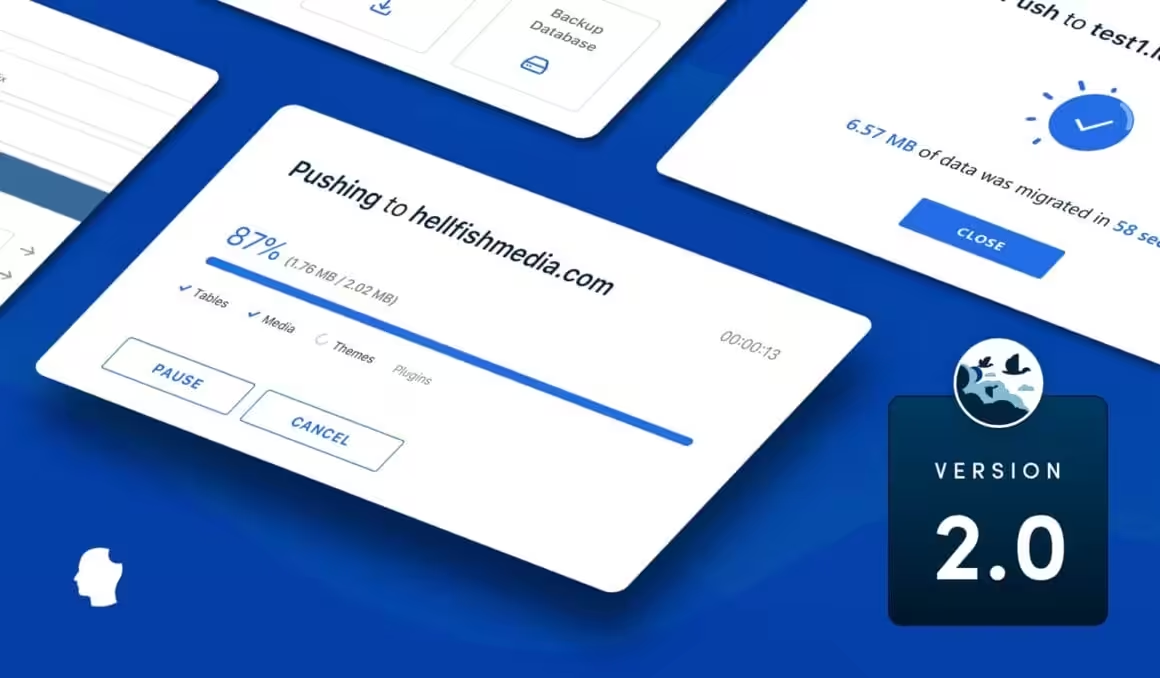
I narrowed this list to tools with distinct migration methods: database push/pull, package import, cloud-assisted transfer, backup restore, or host-managed migration. The method matters more than the number of plugins in the roundup.
WP Migrate
Best for: Developers who push and pull databases between staging and production environments.
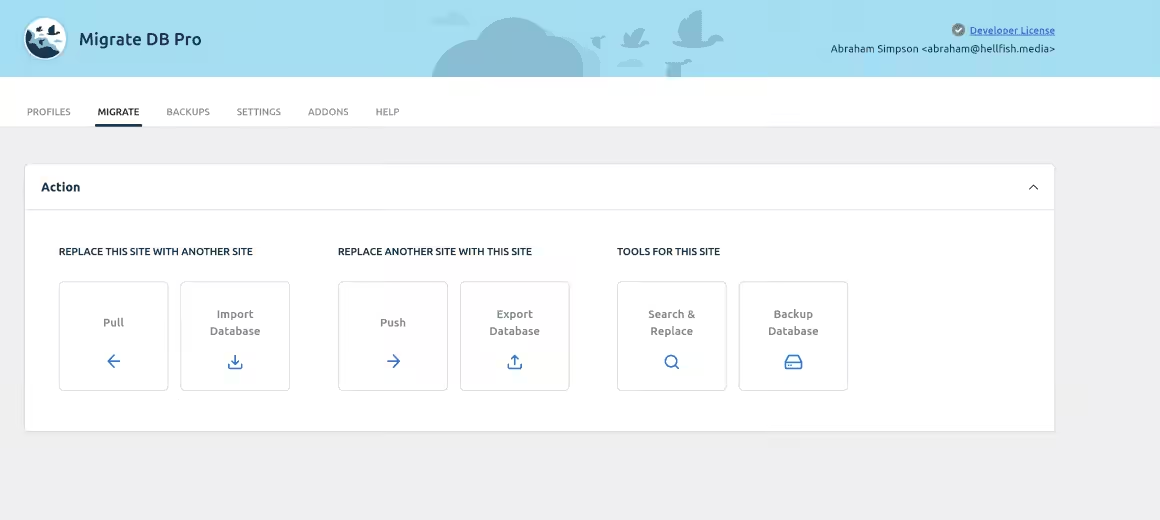
- Serialized data safe search-and-replace
- Push and pull between environments
- Migrations complete in minutes, not hours
WP Migrate, formerly WP Migrate DB Pro, is now a WP Engine product. The free plugin exports the database with serialized-data-aware search and replace. Paid licenses add push/pull workflows and, by plan, media, theme/plugin files, and multisite tools. Official pricing checked July 24, 2026 showed Basic at $99 standard or $49 introductory and Standard at $149 or $99 introductory; compare renewal, site, and add-on limits before buying.
WP Migrate is a specialist developer tool, not a universal mover. Its strength is serialized-data-aware database search and replace plus controlled push/pull workflows. Media, theme/plugin files, multisite features, and site counts depend on the license.
Solid Backups and the Kadence Backups Transition
Best for: Existing Solid Backups customers assessing continuity while new sales move to Kadence Backups.

Solid Backups (Existing Customers)
- Continuity path for existing installs
- New sales move to Kadence Backups
- Verify storage and restore access

Solid Backups is no longer sold as a standalone product to new customers. Its backup capabilities are now packaged as Kadence Backups inside the new Kadence plans, while existing customers keep their current features and pricing. Treat this entry as continuity guidance for installed sites, not a fresh standalone recommendation.
Migrations work through one-click restores. You can move sites to new locations or create new sites from existing backups. It also includes automated backup scheduling, incremental saves through Stash Live, and AES-256 encryption for security.
If you already use Solid Backups, confirm portal access, storage, restore points, and migration support before a move. New buyers should compare Kadence Backups as part of the full Kadence package, not against standalone migration-plugin prices.
All-in-One WP Migration
Best for: Non-technical users who want a single .wpress export and import workflow.

- Single-file export and import
- No technical knowledge required
- Free import size depends on destination limits

All-in-One WP Migration exports the database, media, themes, and plugins as one .wpress file. The free community plugin does not impose one universal 256 MB ceiling. The import limit shown in WordPress can come from PHP, the web server, the host, a proxy, or the browser path. ServMask’s Unlimited Extension is $69 per year and is designed to bypass hosting upload, timeout, and memory limits for up to 50 sites.
Backup Migration
Best for: Selective migrations where you need granular control over what gets backed up and moved.

- Automated backup scheduling
- Handles large databases efficiently
- Free tier available on WordPress.org

Backup Migration is a newer plugin that focuses on giving you control over what gets migrated. You can run full or partial backups (database only, media library only, or specific folders) with custom exclusion rules.
Backup Migration plugin can conduct full and partial backups and migration, e.g. database only or media library folder, but it also has several thoughtfully created exclusion rules, so you can leave unwanted stuff out of the backup.
Additional features are being added with each plugin update, and support is available to both free and (prioritized) premium users.
Migrate Guru
Best for: Large WordPress sites (up to 200GB) that need server-side processing during migration.

- Vendor-stated support for sites up to 200 GB
- Five different site migrations per account per month
- Free; separate backup required

Migrate Guru was built by the BlogVault team for cloud-assisted host-to-host transfers. It offloads much of the migration processing and advertises support for sites up to 200 GB, but that is a vendor limit rather than a promise of zero origin load, zero downtime, or a successful cutover.
Migrate Guru is free. It processes migrations on its own infrastructure, supports vendor-stated sites up to 200 GB, and limits an account to five different site migrations per month unless the developer requests an extension. It is not a backup product, so keep a separate restore path.
BlogVault
Best for: WooCommerce and business sites that need real-time incremental backups alongside migration.

- Real-time incremental backups
- Built-in staging environment
- One-click migration included

BlogVault combines incremental backup, staging, and migration workflows. For WooCommerce, the important question is the purchased backup frequency and restore point objective, not the word “incremental” by itself. Confirm how orders written during the migration window will be captured.
BlogVault pricing and backup frequency vary by plan and site count. Price the exact staging, real-time WooCommerce backup, retention, security, and support requirements at checkout; a migration subscription cannot by itself guarantee zero downtime.
Duplicator
Best for: Creating installable site packages for cloning, staging, or moving to a new domain.

- Create full site packages
- Drag-and-drop site duplication
- Supports multisite networks

Duplicator packages your entire WordPress site (files, database, plugins, themes) into a single installable zip. You upload the zip and an installer.php file to the new host, run the installer, and the site goes live. Over 1.5 million sites use it. The free version handles basic migrations, while the Pro version ($49.50/year) adds scheduled backups, cloud storage, and multisite support.
Clone
Best for: Moving sites to and from localhost, and quick one-click backups on a budget.

- One-click backup and restore
- Cloud storage integration
- Lightweight and simple to use

Clone by Inisev can move WordPress sites to and from localhost and restore from a file or URL. The vendor explicitly warns not to use it as the only backup. Keep an independent host or storage backup and test restores before relying on it.
UpdraftPlus
Best for: Users who want scheduled backups to 10+ cloud storage services with migration as a bonus.

- 3 million+ active installs
- Backs up to 10+ cloud storage services
- Scheduled automatic backups

UpdraftPlus is primarily a backup plugin, but its migration features are solid. With 3 million+ active installs, it’s the most widely used WordPress backup plugin. The free version backs up to Dropbox, Google Drive, S3, and seven other cloud services. You can clone your site and move it to a new host from any backup.
The premium version ($70/year) adds multisite support, database search-and-replace, and priority support. If you already use UpdraftPlus for backups, it makes sense to use its migration feature instead of adding another plugin.
WP BackItUp
Best for: Beginners who want one-click backup and restore without touching any settings.

- One-click backup for beginners
- Simple restore process
- Downloadable backup files

WP BackItUp does one thing: creates a downloadable backup of your site that you can restore on another host. No cloud integrations, no staging environments, no advanced options. You click “Backup,” download the file, and restore it on the new server. The premium version ($79/year) adds scheduled backups, automatic migrations, and priority support.
What is WordPress Migration?
WordPress migration means moving your entire site (database, files, themes, plugins, media) from one server to another. Common reasons include switching hosting providers, moving from shared hosting to a VPS, changing domain names, or pushing a local development site to production.
A manual migration can be reliable when the operator handles serialized data, URLs, permissions, caches, cron, environment configuration, and search-and-replace correctly. A careless raw SQL replacement can corrupt serialized values. WP-CLI and serialized-data-aware tools reduce that risk.
A migration plugin reduces manual steps, but it cannot promise a universal transfer time. Database size, small-file count, bandwidth, disk speed, compression, remote limits, DNS, SSL, and post-move testing all matter. Use my step-by-step WordPress migration guide for the complete workflow.
Migration Verification and Rollback Checklist
A completed progress bar is not a completed migration. Verify the destination before DNS cutover and again after traffic reaches it.
- Content: Home, posts, pages, archives, search, media URLs, custom fields, serialized options, and menus.
- Accounts: Login, password reset, user roles, memberships, course access, and protected files.
- Commerce: Orders, stock, subscriptions, scheduled actions, taxes, payment webhooks, and transactional email.
- SEO: Redirects, canonicals, robots directives, sitemap, schema, analytics, and Search Console verification.
- Infrastructure: SSL, mixed content, cron, outgoing mail, file permissions, cache, object cache, CDN, backups, and monitoring.
Keep the source unchanged until the acceptance checks pass. Record the DNS change, lower TTL in advance when appropriate, preserve the old database, and define exactly how you will route traffic back if checkout, login, or data synchronization fails.
Which WordPress Migration Plugin Should You Pick?
If you are moving databases between staging and production, choose WP Migrate. Start with WP Migrate Lite for export and serialized-data-aware search and replace. Paid push/pull, media, theme/plugin files, multisite tools, and site limits depend on the license.
If you want a guided package import, use All-in-One WP Migration after checking destination upload limits. For a large host-to-host move, Migrate Guru offloads much of the transfer work, but still schedule a maintenance window and verify orders, webhooks, and data after the move.
And if your hosting provider offers free migration (most managed WordPress hosts like Cloudways, Kinsta, and SiteGround do), use that first. A plugin is your backup plan when the host can’t handle it.
WordPress Migration FAQ
What is the best free WordPress migration plugin?
Use your destination host’s free managed migration first when it includes support and rollback. All-in-One WP Migration is a straightforward package workflow, while Migrate Guru is a free cloud-assisted host transfer. The better choice depends on destination limits, site size, localhost needs, and rollback.
Does All-in-One WP Migration have a 256 MB free limit?
No universal 256 MB plugin limit applies to every current installation. The import limit can come from PHP, the web server, the host, a proxy, or the browser upload path. Check the limit shown on the destination and the current ServMask documentation before exporting.
Is Migrate Guru a backup plugin?
No. Migrate Guru moves sites and deletes temporary copies after the migration. Keep an independent source and destination backup and test the restore path separately.
Can I migrate WordPress manually without breaking serialized data?
Yes. Manual migration is reliable when you use serialized-data-aware search and replace, transfer all required files, preserve permissions, update environment settings, clear caches, and run a complete verification checklist. Raw SQL replacement is the risky part, not manual work itself.
Tell Google you want more of this.
Add Gaurav Tiwari as a preferred sourceOne tap, and this site shows up more often in your own Top Stories, AI Overviews and AI Mode. Remove it any time.
Disclaimer: This site is reader-supported. If you buy through some links, I may earn a small commission at no extra cost to you. I only recommend tools I trust and would use myself. Your support helps keep gauravtiwari.org free and focused on real-world advice. Thanks. - Gaurav Tiwari