
Best WordPress Caching and Performance Plugins
Are you looking for the best WordPress caching plugin that you can install and use on your WordPress website or blog to boost the site’s loading time? Well, then, you have come to the right place.
I know how important it is to have a fast and responsive website, and that’s why I have searched high and low for the best WordPress caching plugins.
But before that, let’s see what Caching is and why you need such a plugin. If you already know your way around, use this table of contents to skip to relevant sections.
What is Caching?
Caching [fn id=”w2IbMv2″] helps not only in speeding up your website but also helps you rank better in search engine results.
Why is Caching Needed in WordPress?
As you know, WordPress is written in PHP and MySQL databases are used to query posts and other data to show on the frontend. When a page is shown to you or to your reader, it is rendered in HTML. In this process, PHP and MySQL are used on each page load. This whole process requires RAM and CPU for each rendering on each page load.
When many readers visit your site, your WordPress installation uses a lot of RAM and processing power. This way, your server’s resources are divided, and the rendering gets slower for subsequent visitors.
Why Use WordPress Caching Plugins?
Using a WordPress Cache Plugin, you can enable WordPress to skip the whole process of rendering on each page load. Cache plugins create a cache system inside your WordPress installation and generate static HTML files for various pages. These HTML files are saved and served to the readers once they visit a specific URL. In this process, only a few queries are made to the MySQL database. Caching reduces server load, reduces loading time and improves your site’s SEO.
Why is Caching Important for Your WordPress Website?
As I just wrote, caching reduces server load, reduces loading time and improves your site’s SEO. I have already talked about how loading time can impact your website.
Suppose you have an ecommerce business running on your WordPress website. Every extra second that it takes to load will make your customer anxious, disturbed, and even frustrated. He or she may even skip buying your product and may never visit your site again.
Here’s what a slow website can cost you:
- Low sales
- Low conversion rate
- Lower organic traffic
- Poor search engine rankings
Well, these are like losing everything you wanted. This is why you’d need a WordPress caching plugin.
Which is the Best WordPress Caching Plugin?
Now, to increase your site’s search engine rankings, get more organic traffic, increase conversion and thus boost sales, you will need the best WordPress caching plugin that there is.
So, which one should you pick?
Well, there are free, paid and freemium — all types of WordPress caching plugins available. There are several lists online that name 5-10 or even 20 plugins in a list, including free plugins.
Free plugins are good to start with, but as per my experience, you should only opt for a premium caching plugin as they offer a complete experience and help you pass the core web vitals.
The biggest reason, however, is the freedom to use the plugin. All free plugins, except WP Super Cache, have some premium features locked. These premium features are actually the ones that can give you a real edge over others.
Besides Hummingbird — I can’t find any other free plugin that is even satisfactory in features. But again, Hummingbird is a freemium plugin, which means you have to upgrade to benefit from its best features.
This is why going for a premium plugin is the best. No matter how much you are making from your website, if you are serious about your site, buy a premium caching plugin.
Which one, you may ask?
Cache Plugins →
I recommend FlyingPress. The most complete WordPress cache and performance plugin out there.
FlyingPress
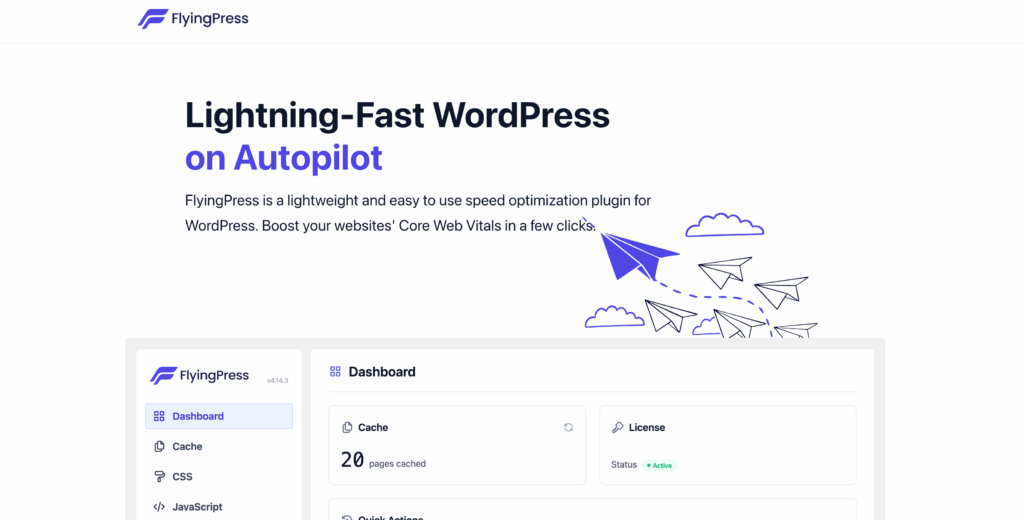
FlyingPress is the top choice for WordPress users who value speed and simplicity. It combines powerful caching with advanced optimization features like lazy loading, critical CSS generation, and WebP image support.
What makes FlyingPress stand out is its all-in-one approach to performance. It handles everything from caching and database cleanup to CDN integration with its custom FlyingCDN option. Plus, the intuitive interface makes it easy for anyone to set up and manage.
Highlights:
- Intelligent page caching with automatic updates.
- Critical CSS and JavaScript optimization.
- Image compression with WebP support.
- Database cleanup for improved site performance.
- Prefetching and preloading for faster navigation.
- FlyingCDN
Price: Starts at $59/year for a single site.
FlyingPress is a premium-only plugin, but its robust features and exceptional performance make it worth every penny. Perfect for beginners and pros alike!
In addition to FlyingPress, I also use perfmatters.
Read: FlyingPress Review
FlyingPress

Pros
- Best overall Core Web Vitals improvement in testing
- Removes unused CSS automatically without breaking layouts
- Clean UI where every setting is understandable
- Excellent critical CSS generation
- Active developer with frequent updates
- Built-in CDN integration with BunnyCDN
Cons
- Per-site pricing ($59/year) adds up with multiple sites
- No lifetime deal available
- Smaller community compared to WP Rocket
- No built-in lazy loading for background images
Summary
The best WordPress caching plugin available. Combines page caching, CSS/JS optimization, image lazy loading, unused CSS removal, and CDN integration into one clean interface. It replaced WP Rocket on every site I manage and the performance difference was immediate.
Price: USD 59 /year
Try FlyingPressPerfmatters
Perfmatters is a terrific plugin that helps to reduce the number of server requests on most pages by up to 50% or more. This plugin was built with simplicity in mind. Perfmatters helps your site speed up by disabling scripts that aren’t being used. Emojis, for example, are loaded by default on every page of your website. And If you don’t use them, you’re just slowing your site down.
Perfmatters can be used with FlyingPress as both complement each other in functionalities.
With Perfmatters, the performance optimizations shouldn’t be complicated, and everything should be easy to be enabled/disabled with a single click. In addition, it costs just $24.95 for a single-site license offering many great features to speed up your site quickly.
Use coupon-code GAURAVTIWARI for even more discount.
After FlyingPress and Perfmatters combo, other top WordPress caching plugins that I recommend include the following.
Perfmatters

Pros
- Script Manager lets you disable plugins per page
- Removes WordPress bloat (emojis, embeds, dashicons)
- Excellent lazy loading with fade-in effect
- Works alongside any caching plugin
- Lightweight – adds almost no overhead itself
Cons
- Not a standalone caching solution
- Script Manager requires trial-and-error per site
- No CDN integration
- Documentation could be more detailed for beginners
Summary
The essential companion to any cache plugin. Handles script management, lazy loading, DNS prefetching, and bloat removal that caching plugins miss. The Script Manager alone is worth the license fee. Pairs perfectly with FlyingPress or WP Rocket.
Price: USD 29.95 /year
Try PerfmattersWP Rocket
WP Rocket is a popular WordPress caching plugin that helps to increase performance. This plugin has a user-friendly interface that makes it easier to use than other cache plugins. When compared to other cache plugins, WP-rocket offers some of the best features, the first being the option to remove unused CSS completely.
Here’s a list of features that WP Rocket offers:
- Page Caching: Automatically caches WordPress site for fast loading.
- Cache Preloading: Preloads cache for immediate speed improvement.
- Critical CSS: If you are not using Unused CSS feature, you can also use critical CSS to optimize above-the-fold [fn id=”clVo1c4″] rendering of your webpages.
- Browser Caching: Stores frequently accessed site resources in local memory.
- GZIP Compression: Compresses web pages for faster delivery.
- eCommerce Optimization: Ensures smooth running of eCommerce sites without cache interference.
- Compatibility: Works well with popular themes, plugins, and managed WordPress hostings.
- Customization Options: Includes cache, file optimization, minification, media, preloading, database, CDN, and add-ons settings. These can be set sitewide and be customized post/page-wise.
- LazyLoad for Media: Defers loading of images/iframes for better performance.
- Database Optimization: Offers database cleanup and optimization tools.
- CDN Integration: Supports CDN usage for reduced latency and improved availability.

It is just $59 per year for a site and renewals can be as cheap as $29.50 per year if you are loyal. As I said earlier, I have been using WP Rocket since 2014 (here is my review of WP Rocket) and it has been one of the key instruments in growing my blog online.
WP Rocket comes with a 14-day refund guarantee. Try it, set it up using this guide and if you are still not satisfied, ask for a refund.
WP Rocket

Pros
- Easiest caching plugin to set up
- Excellent browser caching and GZIP compression
- Good lazy loading for images and iframes
- Large community and extensive documentation
Cons
- Annual pricing has increased ($59/year single site)
- Unused CSS removal less effective than FlyingPress
- Critical CSS generation can break some themes
- No script manager built-in
Summary
The most popular premium caching plugin. Easy to configure and covers caching, file optimization, and lazy loading. However, FlyingPress now outperforms it on Core Web Vitals, and the annual pricing keeps increasing. Still solid for set-and-forget caching.
Price: USD 59 /year
Try WP RocketHummingbird
Hummingbird is a versatile cache plugin that scans your website and gives you a performance report with actionable recommendations. It optimizes your site with features like GZIP compression, caching, and minification to help you achieve a perfect score on Google PageSpeed Insights.
Hummingbird

Pros
- Clean interface with performance reports
- Built-in performance scanning and recommendations
- GZIP and browser caching are well-implemented
- Works well alongside Smush for images
Cons
- Full features locked behind WPMU DEV membership
- Performance impact is moderate vs top options
- Asset optimization is less aggressive than FlyingPress
- Not as actively developed as standalone plugins
Summary
A capable caching plugin from WPMU DEV with a clean interface and good feature set. Handles page caching, GZIP compression, browser caching, and asset optimization. The free version is decent; full power requires a WPMU DEV membership.
W3 Total Cache
W3 Total Cache is another top-tier plugin that promises to improve your site’s performance by up to 10x. With features like Minify, CDN integration, and browser caching, it’s an excellent choice for optimizing their site without breaking the bank.
W3 Total Cache

Pros
- Most feature-complete caching plugin available
- Supports every type of caching
- Excellent CDN integration
- Free version is very capable
Cons
- Extremely complex configuration
- Easy to break your site with wrong settings
- Known compatibility issues with some hosts
- UI is dated and overwhelming
Summary
The veteran caching plugin with every possible caching feature. Handles page cache, object cache, browser cache, CDN, and minification. Overwhelmingly complex. Misconfiguration can break your site. Best for experienced developers only.
LiteSpeed Cache
LiteSpeed Cache is a powerful cache plugin developed by LiteSpeed Technologies. It comes with an array of optimization features such as HTTP/2 and QUIC support, Image Optimization, and CSS/JS minification. The best part? It’s entirely free!
LiteSpeed Cache

Pros
- Completely free with no premium tier
- Server-level caching is faster than PHP-based
- Built-in image optimization with WebP
- QUIC.cloud CDN integration
- Object caching support included
Cons
- Full features require LiteSpeed server
- Configuration is complex with too many options
- UI is cluttered and not intuitive
- Can conflict with other optimization plugins
Summary
The best free caching plugin if your host runs LiteSpeed server. Server-level caching, image optimization, CDN support, and CSS/JS minification – all free. The catch: full features only work on LiteSpeed servers.
WP Super Cache
WP Super Cache is a popular choice for many WordPress users due to its simplicity and effectiveness. It generates static HTML files from your dynamic WordPress site, reducing the load on your server and increasing your website’s speed.
WP Super Cache

Pros
- Developed by Automattic – reliable and well-maintained
- Extremely simple to configure
- Stable with minimal compatibility issues
- Free with no upsells
Cons
- Only handles page caching – no CSS/JS optimization
- No lazy loading or image optimization
- No unused CSS removal
- Performance improvement is minimal compared to modern tools
Summary
A basic, reliable page caching plugin from Automattic. Does one thing well: generates static HTML files. No CSS/JS optimization, no image lazy loading, no unused CSS removal. For sites that just need basic page caching with zero complexity.
WP Fastest Cache
WP Fastest Cache is another easy-to-use cache plugin that delivers outstanding results. It offers features like GZIP compression, browser caching, and minification, ensuring your website loads as quickly as possible for your users.
WP Fastest Cache

Pros
- Simple checkbox-based configuration
- Reliable page caching
- Free version handles basics well
- Minimal compatibility issues
Cons
- Premium features are underwhelming
- Minification is basic and can break scripts
- No unused CSS removal
- No critical CSS generation
Summary
A straightforward caching plugin with a simple checkbox interface. Handles page caching, GZIP, browser caching, and basic minification. The free version covers basics; premium adds CSS/JS optimization and image optimization. A decent budget option.
Cache Enabler
Cache Enabler is a lightweight cache plugin developed by KeyCDN. It’s perfect for those who want a simple, no-frills solution to improve their site’s speed. It creates static HTML files, supports WebP images, and works seamlessly with Autoptimize for script minification.
Cache Enabler

Pros
- Extremely lightweight with minimal overhead
- WebP image support built-in
- Simple interface
- Works well with KeyCDN
Cons
- Very limited feature set
- No CSS/JS optimization
- No lazy loading
- Development has slowed significantly
Summary
An ultra-lightweight page caching plugin from KeyCDN. Generates static HTML files with WebP support. No CSS/JS optimization, no lazy loading. Best paired with KeyCDN for a minimal caching setup.
Comet Cache
Comet Cache is a user-friendly cache plugin that comes with an intuitive interface and powerful features. With options like browser caching, GZIP compression, and automatic cache clearing, Comet Cache ensures your website stays fast and up-to-date.
Comet Cache

Pros
- Simple page caching that works
- Client-side caching option
- Apache and Nginx support
Cons
- Development has essentially stalled
- Limited feature set
- Multiple rebrandings raise concerns
- Better free alternatives exist
Summary
Formerly ZenCache and Quick Cache. A page caching plugin that has been through multiple rebrandings. Works but development has stalled. There are better free options available now.
Swift Performance
From the makers of my favorite EWWW Image Optimizer plugin, Swift Performance is an all-in-one cache and performance plugin that focuses on niche website optimization. It provides features like database optimization, image optimization, CSS/JS minification, and caching. With a user-friendly interface, it’s suitable for both beginners and experts.
Swift Performance

Pros
- All-in-one performance solution
- Built-in image optimization
- Critical CSS generation included
- Database optimization tools
Cons
- Can be unstable on certain server configurations
- Too many features crammed into one plugin
- Support quality varies
- Free version is quite limited
Summary
A full-featured caching plugin with built-in image optimization, database optimization, and critical CSS generation. Tries to be an all-in-one performance solution. Feature-rich but can be unstable on some configurations.
Breeze
Breeze is a lightweight and straightforward cache plugin developed by Cloudways. It offers essential caching features like minification, GZIP compression, browser caching, and compatibility with Varnish and CloudwaysCDN for added performance improvements.
Breeze

Pros
- Optimized for Cloudways hosting
- Simple interface
- Varnish cache integration
- Free and lightweight
Cons
- Limited features on non-Cloudways hosts
- Basic minification only
- No image optimization
- No unused CSS removal
Summary
A caching plugin built by Cloudways for their hosting platform. Works on any host but optimized for Cloudways. Basic page caching, minification, and Varnish cache integration. Best if you are on Cloudways hosting.
Which WordPress Cache Plugin should I choose?
Here is the comparison table of all the cache plugins for WordPress that I recommend:
| Name | Paid / Free / Freemium | Download Link |
|---|---|---|
| FlyingPress | Paid | Download |
| Perfmatters | Paid | Download |
| WP Rocket | Paid | Download |
| Hummingbird | Freemium | Download |
| W3 Total Cache | Freemium | Download |
| LiteSpeed Cache | Free | Download |
| WP Super Cache | Free | Download |
| WP Fastest Cache | Freemium | Download |
| Cache Enabler | Free | Download |
| Comet Cache | Freemium | Download |
| Swift Performance | Freemium | Download |
| Breeze | Free | Download |
| Feature | WP Rocket | FlyingPress | Perfmatters | Hummingbird | WP Super Cache | W3 Total Cache | Jetpack Boost | Swift Performance | Cache Enabler | LiteSpeed Cache | Breeze |
|---|---|---|---|---|---|---|---|---|---|---|---|
| Caching | Yes | Yes | No | Yes | Yes | Yes | No | Yes | Yes | No | No |
| Lazy Loading | Yes, complete | Yes, complete | Yes, complete | Yes, complete | No | No | Yes, complete | Yes, complete | No | No | No |
| Minification | Yes | Yes | Yes | Yes | No | Yes | Yes | Yes | No | No | No |
| Script Management | Basic | Basic | Advanced | Basic | No | Advanced | No | Advanced | No | No | No |
| Database Optimization | Basic | Yes | Yes | No | No | Yes | No | Yes | No | No | No |
| CDN Integration | Yes | Yes | Yes | Yes | No | Yes | No | Yes | No | No | No |
| CDN | RocketCDN powered by Bunny.net (only for assets) | FlyingCDN powered by Cloudflare Enterprise (page, HTML & assets) | WPMU CDN | Photon | No | No | |||||
| Remove Unused CSS Best Value | Yes, inline | Yes, file based | Yes, inline and file based both | No | No | No | No | No | No | No | No |
| WebP Support | No | Yes | No | No | No | No | No | Yes | Yes | No | No |
| Critical CSS Generation | Yes | Yes | No | No | No | No | Yes | Yes | No | No | No |
| Unique Features | Easy setup, all-in-one optimization | Easy setup, all-in-one optimization, advanced preloading | Disable unused WP features, advanced preloading | GZIP compression, Smush integration, performance testing | Simple modes for setup, compatibility with object caching | Granular control, fragment caching, database support | Generates critical CSS, defers non-essential JavaScript | Plugin organizer, advanced caching, WebP optimization | Lightweight design, automatic WebP delivery | No | No |
| Pricing | $59/year | $49/year | $29/year | $60/year | Free | Free | Free | $49/year | Free | No | No |
| Object Cache Support | No | No | No | Yes, with Redis/Memcached | No | Yes | No | Yes | No | Yes, built-in | No |
| Image Optimization | No | Yes, built-in lazy load + WebP | No | Yes, via Smush integration | No | No | No | Yes, WebP + lazy load | Basic WebP | Yes, built-in with QUIC.cloud | Yes, via Cloudways integration |
| Ease of Use | Beginner friendly | Beginner friendly | Intermediate | Intermediate | Easy | Advanced, steep learning curve | One-click | Intermediate | Very easy | Intermediate | Easy |
| Overall Rating | 9/10 | 9.5/10 | 9/10 | 7.5/10 | 7/10 | 8/10 | 7/10 | 8.5/10 | 7.5/10 | 9/10 | 7.5/10 |
In my opinion, you should go with the FlyingPress and Perfmatters combination like me.
Disclaimer: This site is reader-supported. If you buy through some links, I may earn a small commission at no extra cost to you. I only recommend tools I trust and would use myself. Your support helps keep gauravtiwari.org free and focused on real-world advice. Thanks. - Gaurav Tiwari