
What is Amazon Calculator? (And How Does It Help with Amazon FBA?)
I’ve watched too many new Amazon sellers jump into product sourcing without running the numbers first. They find a product on Alibaba for $3, see it selling on Amazon for $25, and assume they’ll pocket the difference. Then FBA fees, referral fees, storage costs, and shipping eat through their margins until they’re barely breaking even. The Amazon FBA calculator exists to prevent exactly this scenario, and if you’re serious about selling on Amazon, it’s the first tool you should learn to use.
What is Fulfillment by Amazon (FBA)?
Fulfillment by Amazon is the backbone of most successful Amazon selling operations. You source your products, ship them to Amazon’s warehouses, and Amazon handles storage, picking, packing, shipping, customer service, and returns. In exchange, you pay fulfillment fees and monthly storage fees based on the size and weight of your products.
The FBA model works because Amazon’s logistics network is massive. They’ve got warehouses across the country, and their delivery infrastructure means your customers can get products in one or two days. That speed and reliability translates directly into higher conversion rates. Products fulfilled by Amazon consistently outsell merchant-fulfilled listings because buyers trust the Prime badge.
But here’s the thing most people miss: FBA isn’t free, and the fees aren’t simple. There are referral fees (typically 15% of the sale price), fulfillment fees (based on product size and weight), storage fees (monthly and long-term), and various other charges that can stack up fast. That’s exactly where the Amazon FBA calculator comes in. It lets you plug in your product details and see a realistic fee breakdown before you commit a single dollar to inventory.
What is the Amazon FBA Calculator?
The Amazon FBA calculator (officially called the Revenue Calculator) is a free tool Amazon provides to help sellers estimate their fees and potential profit for any product. You can access it directly through Amazon Seller Central, and it works for both existing ASINs and hypothetical products you’re considering.
The calculator compares two scenarios side by side: selling through FBA versus fulfilling orders yourself. This comparison is valuable because it shows you exactly what you’re paying for when you use Amazon’s fulfillment services. Sometimes the FBA fees are worth every cent. Other times, you’ll realize that self-fulfillment makes more financial sense for a particular product category.
There are also third-party FBA calculators from companies like Jungle Scout, Helium 10, and AMZScout. These often include additional data points like historical pricing, sales velocity estimates, and competition analysis. Amazon’s official calculator is the most accurate for fee calculations since it pulls directly from their current fee schedule, but third-party tools give you a broader picture of market viability.
How to Use the Amazon FBA Calculator Step by Step
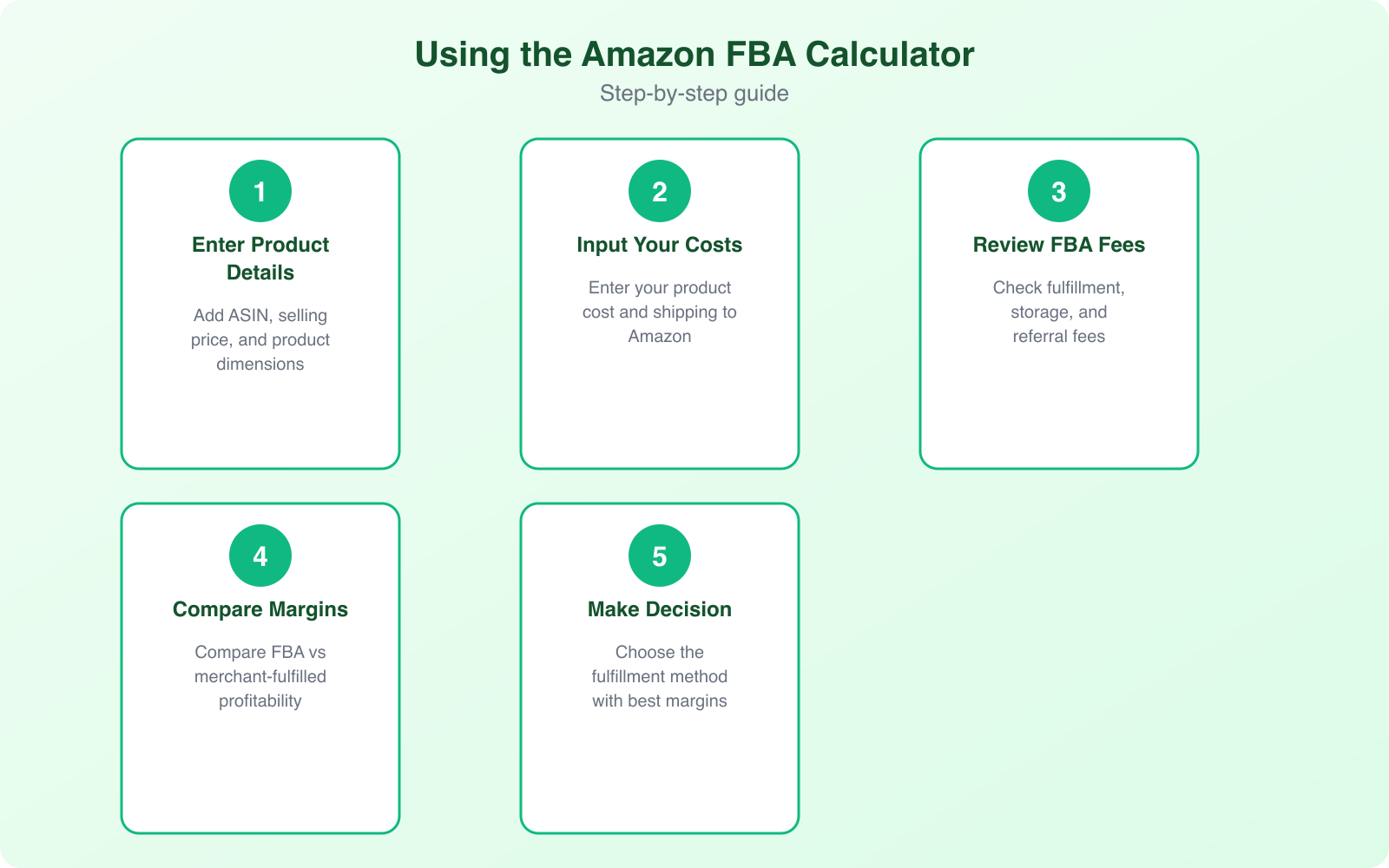
Using Amazon’s Revenue Calculator is straightforward, but you need accurate inputs to get useful outputs. Here’s the process I recommend for evaluating any product.
Step 1: Find Your Product on the Calculator
Go to Amazon Seller Central and open the Revenue Calculator. You can search by ASIN, product name, or UPC. If you’re researching a product that’s already selling on Amazon, searching by ASIN gives you the most accurate results because the calculator will pull the exact dimensions and weight Amazon has on file.
Step 2: Enter Your Cost Data
The calculator needs your product cost (what you pay your supplier per unit), your shipping cost to Amazon’s warehouse, and your intended selling price. Be honest with these numbers. If you fudge your product cost to make the margins look better, you’re only fooling yourself. Include everything: the unit cost, packaging, labeling, prep fees, and inbound shipping.
Step 3: Review the Fee Breakdown
The calculator will show you the referral fee (percentage of sale price that goes to Amazon), the fulfillment fee (what Amazon charges to pick, pack, and ship your product), and the estimated monthly storage fee. It’ll also show your estimated net profit and margin percentage for both FBA and self-fulfilled scenarios.
Step 4: Adjust and Compare
This is where it gets useful. Change the selling price and watch how your margins shift. Try different product cost scenarios. What happens if your supplier raises prices by 10%? What if you need to lower your price to compete? Running these scenarios takes five minutes and can save you thousands in bad inventory purchases.
Always calculate your break-even point before ordering inventory. Take your total landed cost per unit (product + shipping + prep) and add FBA fees. If your break-even price is within 20% of the average selling price, the margins are too thin to absorb price drops, returns, or PPC advertising costs. I look for products where my break-even is at least 40% below the selling price.
Understanding Every Amazon FBA Fee
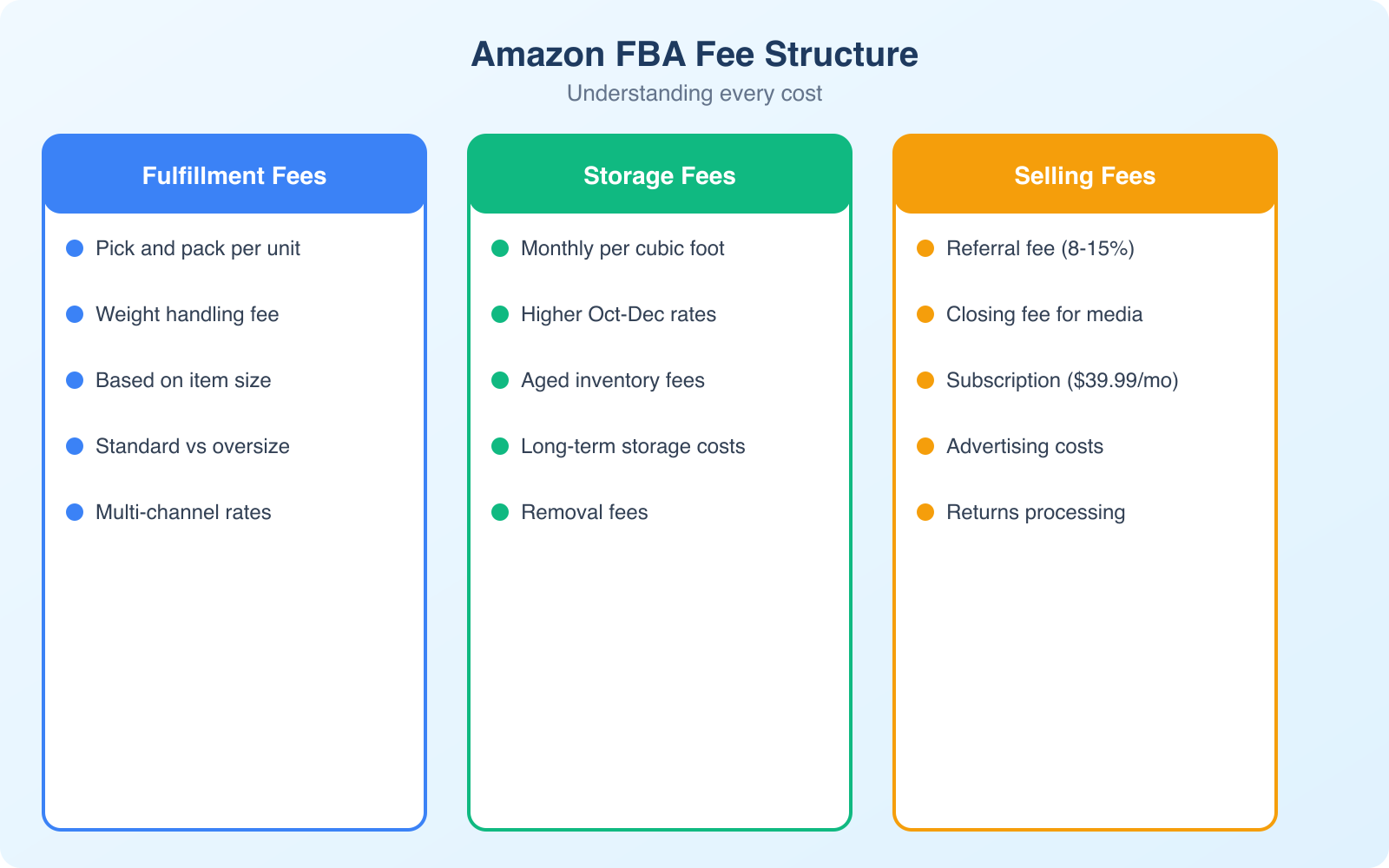
The calculator shows you the total fees, but understanding each component helps you make smarter sourcing decisions. Some fees are fixed, some scale with your product’s size and weight, and some depend on how long your inventory sits in Amazon’s warehouse.
Referral Fees
Amazon charges a referral fee on every sale, typically 15% of the total sale price. This percentage varies by category. Electronics and computers drop to 8%, while Amazon device accessories sit at 45%. Most categories fall between 8% and 15%. You can’t negotiate these rates. They’re the cost of accessing Amazon’s 300+ million active customer accounts.
Fulfillment Fees
FBA fulfillment fees are based on the size tier and shipping weight of your product. Standard-size items (under 20 lbs and fitting within 18″ x 14″ x 8″) cost significantly less to fulfill than oversize items. As of 2026, a standard-size item weighing 1 lb costs around $3.22 to fulfill, while a small oversize item in the same weight range runs about $9.73. These fees cover picking, packing, shipping, and handling customer service for that order.
Monthly Storage Fees
Amazon charges monthly storage fees based on the cubic footage your inventory occupies. From January through September, standard-size storage costs about $0.87 per cubic foot. From October through December (peak season), that jumps to $2.40 per cubic foot. If your inventory sits in Amazon’s warehouse for more than 365 days, you’ll get hit with aged inventory surcharges that can destroy your margins entirely.
Other Fees to Watch
Beyond the big three, there are removal fees (if you need to pull unsold inventory), disposal fees, return processing fees for certain categories, and unplanned service fees if your shipments don’t meet Amazon’s prep requirements. These smaller fees add up. I’ve seen sellers lose $2-3 per unit on prep-related charges alone because they didn’t label their products correctly before shipping to FBA.
Advantages of the FBA Program
FBA isn’t just about convenience. It fundamentally changes your competitive position on Amazon’s marketplace. Here’s why most successful Amazon sellers use it.
Prime Badge and Faster Delivery
FBA products automatically qualify for Amazon Prime, which means free two-day shipping for over 200 million Prime members worldwide. Prime members spend an average of $1,400 per year on Amazon compared to $600 for non-Prime shoppers. When your product carries the Prime badge, you’re tapping into the most active and highest-spending customer segment on the platform.
Buy Box Advantage
When multiple sellers offer the same product, Amazon’s algorithm decides which seller gets the “Buy Box” (the default purchase option). FBA sellers get significant preference in this algorithm. Since roughly 83% of Amazon sales go through the Buy Box, this advantage alone justifies the fees for many sellers. Without the Buy Box, you’re competing for the remaining 17% of purchases, and most shoppers don’t even scroll down to see other sellers.
Customer Service and Returns
Amazon handles customer inquiries, returns, and refunds for FBA orders. This saves you enormous time and keeps your seller metrics healthy. A single negative customer service interaction on a merchant-fulfilled order can tank your seller rating. With FBA, Amazon’s customer service team absorbs that risk, and any delivery-related complaints don’t count against your performance metrics.
Multi-Channel Fulfillment
FBA isn’t limited to Amazon orders. You can use Amazon’s fulfillment network to ship orders from your own Shopify store, eBay listings, or any other sales channel. This multi-channel fulfillment feature means you can consolidate your inventory in one place while selling everywhere. The fees are slightly higher for non-Amazon orders, but the convenience of unified inventory management often makes it worthwhile.
Scalability Without Infrastructure
You can go from selling 50 units a month to 5,000 units without renting warehouse space, hiring staff, or buying packing materials. Amazon’s infrastructure scales with your business. I’ve seen sellers go from side hustle to seven figures in revenue without ever touching a shipping label. That kind of scalability simply isn’t possible with self-fulfillment unless you invest heavily in your own logistics operation.
Disadvantages of the FBA Program
FBA isn’t perfect for every product or every seller. Understanding the downsides helps you make an informed decision about your fulfillment strategy.
Fees Can Eat Your Margins
For low-priced products (under $10-15), FBA fees can consume a disproportionate chunk of your revenue. A product selling for $9.99 might have $3.22 in fulfillment fees plus $1.50 in referral fees, leaving razor-thin margins after product cost. The calculator helps you identify these margin killers before you invest in inventory, but many new sellers don’t run the numbers until it’s too late.
Long-Term Storage Penalties
If your products don’t sell quickly, storage fees escalate. Inventory sitting in Amazon’s warehouse for more than 365 days gets hit with aged inventory surcharges that can cost more than the product itself. This is Amazon’s way of discouraging sellers from using their warehouses as cheap long-term storage. You need to manage your inventory carefully and pull slow-moving stock before these penalties kick in.
Limited Branding Control
When Amazon fulfills your order, it ships in an Amazon-branded box. Your customer’s first physical interaction with your product is through Amazon’s packaging, not yours. For sellers building a brand, this disconnect can be frustrating. You can use custom inserts and branded product packaging inside the Amazon box, but the unboxing experience will always start with that brown Amazon smile.
Prep Requirements
Amazon has strict requirements for how products must be prepped and labeled before they arrive at FBA warehouses. Products need specific barcodes, packaging standards, and in some cases poly-bagging or bubble-wrapping. If your shipment doesn’t meet these requirements, Amazon will either reject it or charge you unplanned service fees to fix the issues. Learning Amazon’s prep requirements has a learning curve, and mistakes cost real money.
Amazon updates its FBA fee structure annually, usually in January. Always run your calculations using the current fee schedule before making sourcing decisions. A product that was profitable last year might not be profitable this year if fulfillment fees increased for your product’s size tier. Bookmark the Amazon FBA fee schedule page and check it at the start of every year.
Calculating Profit: A Practical Example
Let me walk through a real calculation to show you how the FBA calculator works in practice. I’ll use a product that’s common for new sellers: a silicone kitchen utensil set.
Your product costs $4.50 per unit from your supplier. Shipping from China to an Amazon warehouse in the US costs about $1.50 per unit (including customs and freight forwarding). Your total landed cost is $6.00 per unit. You plan to sell it for $24.99.
Here’s what the FBA calculator shows:
- Referral fee (15%): $3.75
- FBA fulfillment fee (standard size, 12 oz): $3.22
- Monthly storage fee (estimated): $0.15 per unit
- Total Amazon fees: $7.12 per unit
- Your product cost: $6.00 per unit
- Net profit: $11.87 per unit
- Profit margin: 47.5%
That’s a healthy margin. But now factor in the costs the calculator doesn’t show: PPC advertising (typically $2-5 per unit for a new product), product photography ($200-500 one-time), product liability insurance ($50-100/month), and returns (expect 3-5% of units sold). After these hidden costs, your realistic per-unit profit is closer to $7-9, which is still a solid 28-36% margin.
The key takeaway: the FBA calculator gives you the baseline. You need to add your own business costs on top of that baseline to get the real picture. I always recommend building a simple spreadsheet that starts with the calculator’s output and adds your specific costs for advertising, photography, and overhead.
Amazon FBA vs Selling on Your Own Store
One question I hear constantly: should you sell on Amazon through FBA, or build your own ecommerce store? The answer is usually both, but the strategy depends on your stage and product type.
When Amazon FBA Makes More Sense
Amazon FBA is the better starting point when you’re launching a new product and need immediate access to buyers. Amazon’s marketplace has over 300 million active customer accounts. You don’t need to invest in ecommerce SEO, build trust from zero, or figure out fulfillment logistics. You’re essentially renting Amazon’s customer base, fulfillment network, and trust factor.
FBA also makes sense for commodity products where customers search by product type rather than brand name. If someone searches “silicone spatula set,” they don’t care about your brand. They care about price, reviews, and fast shipping. Amazon delivers all three through the FBA program.
When Your Own Store Wins
Your own store (built on Shopify or WooCommerce) becomes the better play when you’re building a brand with repeat customers. On your own store, you control the customer relationship, collect email addresses for email marketing, and keep higher margins by avoiding Amazon’s referral fees. You can use Amazon’s Multi-Channel Fulfillment to still leverage FBA for shipping even on non-Amazon orders.
The smartest sellers I know use Amazon to validate demand and generate initial sales, then gradually shift their marketing spend toward driving traffic to their own store. Amazon becomes one sales channel among several rather than the only one.
Third-Party Amazon Calculators Worth Knowing
Amazon’s official calculator is great for fee estimates, but third-party tools expand on that foundation with market data and competitive analysis. Here are the ones that actually deliver value.
Jungle Scout Profit Calculator
Jungle Scout’s calculator integrates with their product database, so you get fee calculations alongside estimated monthly sales volume, competition levels, and historical pricing data. It’s the most complete picture you’ll get from a single tool. Their Chrome extension also lets you run calculations directly on Amazon product pages while browsing, which is incredibly useful during product research sessions.
Helium 10 Profitability Calculator
Helium 10 offers similar features to Jungle Scout but includes additional data on keyword search volume and listing optimization scores. Their Profitability Calculator factors in PPC advertising costs, which Amazon’s official calculator doesn’t touch. For sellers who rely heavily on sponsored ads to drive sales, this more comprehensive calculation matters.
Semrush for Amazon
Semrush’s Amazon tools approach profitability from a different angle. Instead of just calculating fees, they analyze keyword competition and traffic patterns to help you estimate realistic sales volumes. Combining Semrush‘s traffic data with Amazon’s fee calculator gives you both the cost side and the revenue side of the equation. I’ve reviewed Semrush’s Amazon features in detail, and the keyword research capabilities alone justify the subscription for serious Amazon sellers.
Common Mistakes When Using the FBA Calculator
The calculator is only as good as the data you feed it. Here are the mistakes I see most often, and they all lead to the same outcome: sellers who think they’re profitable when they’re actually losing money.
Underestimating Shipping Costs
Your product cost isn’t just what your supplier charges. It includes freight shipping, customs duties, customs broker fees, drayage, last-mile delivery to Amazon’s warehouse, and any prep service costs. I’ve seen new sellers enter their supplier’s FOB price as their “product cost” and wonder why they’re losing money. Your landed cost (total cost to get the product from the factory into Amazon’s warehouse) is what belongs in the calculator.
Ignoring Returns
Amazon’s return rate varies by category, but 3-5% is typical for most products. Clothing and shoes can hit 15-20%. When a customer returns a product, you lose the sale, pay return shipping, and often can’t resell the item as new. If your margins are 25% and your return rate is 5%, returns alone eat 20% of your profit. The FBA calculator doesn’t factor in returns, so you need to build that into your own calculations.
Not Accounting for PPC Costs
Almost every new product on Amazon needs paid advertising to generate initial sales and reviews. Expect to spend $2-8 per unit in PPC costs during the launch phase, and $1-3 per unit ongoing. These costs don’t appear in the FBA calculator but they’re as real as the fulfillment fees. A product that looks profitable on the calculator can easily become unprofitable once you factor in advertising spend.
Using Optimistic Pricing
New sellers often plug in the highest current selling price when they run calculations. But prices on Amazon fluctuate constantly. A product selling for $24.99 today might be $18.99 in two months when a competitor runs a promotion. Always run your calculations at the 25th percentile price (the price at which your product would still be competitive during price wars), not the highest price you hope to achieve.
Tips for Maximizing Your FBA Profit Margins
Once you understand the fee structure, you can make strategic decisions to improve your margins without cutting quality or raising prices.
Optimize Product Size and Weight
FBA fees jump significantly at each size tier boundary. A product that’s 18.1 inches long costs substantially more to fulfill than one at 17.9 inches because it crosses into the next size tier. Work with your supplier to optimize packaging dimensions and keep your product in the smallest possible size tier. Even reducing your package by half an inch can save $1-3 per unit in fulfillment fees.
Manage Inventory Turnover
Storage fees compound over time, so faster-selling products cost less to store per unit sold. Aim for 30-60 day inventory turnover. This means ordering smaller, more frequent shipments rather than one massive shipment. Yes, per-unit shipping costs might be slightly higher, but you’ll avoid long-term storage fees and reduce your cash tied up in inventory.
Negotiate Supplier Costs
The FBA calculator shows you the floor on Amazon’s fees, which you can’t negotiate. What you can negotiate is your product cost. Once you’ve proven demand with initial orders, go back to your supplier and negotiate better pricing for larger quantities. A $0.50 reduction in unit cost on a product selling 500 units per month adds $3,000 per year to your bottom line.
Bundle Products Strategically
Bundling two or three related products into one listing increases your average selling price without proportionally increasing FBA fees. A single item selling for $12.99 might have $3.22 in fulfillment fees (24.8% of sale price). Bundle three items for $29.99 with fulfillment fees of $5.40 (18% of sale price), and you’ve improved your fee-to-revenue ratio while offering customers better value.
Making the Final Decision
The Amazon FBA calculator is a starting point, not the final answer. It tells you whether a product has the potential to be profitable, but real profitability depends on execution: your marketing, your listing quality, your reviews, your brand-building efforts, and your ability to manage costs over time.
Here’s what I recommend for anyone considering Amazon FBA. Run every potential product through the calculator first. If the margins don’t work on paper, they won’t work in practice. If they do work on paper, add a 25% safety buffer for the costs the calculator doesn’t show (advertising, returns, overhead). If the numbers still look good after that buffer, you’ve got a product worth testing.
Start small. Order 200-500 units for your first shipment, not 5,000. Use the real sales data to validate your calculator estimates. If the actual numbers match what you projected, scale up. If they don’t, you’ve learned a valuable lesson with a manageable investment rather than a catastrophic one.
The sellers who consistently succeed on Amazon aren’t the ones with the best products or the biggest budgets. They’re the ones who understand their numbers inside and out, and the FBA calculator is where that understanding starts.
Frequently Asked Questions
Is the Amazon FBA calculator free to use?
Yes, Amazon’s official Revenue Calculator is completely free. You don’t even need a seller account to access it. Go to sellercentral.amazon.com and search for ‘Revenue Calculator’ or ‘FBA Calculator.’ You can look up any existing ASIN or enter custom product dimensions to estimate fees. Third-party calculators from Jungle Scout, Helium 10, and similar tools require paid subscriptions but offer additional features like sales estimates and competition analysis.
How accurate is the Amazon FBA calculator?
Amazon’s official calculator is very accurate for fee estimates because it pulls directly from Amazon’s current fee schedule. The referral fees, fulfillment fees, and storage fees it shows are what you’ll actually pay. However, it doesn’t account for PPC advertising costs, product photography, returns, or other business expenses. Treat the calculator’s output as the Amazon-specific cost baseline and add your own business costs on top for a complete picture.
What profit margin should I aim for with Amazon FBA?
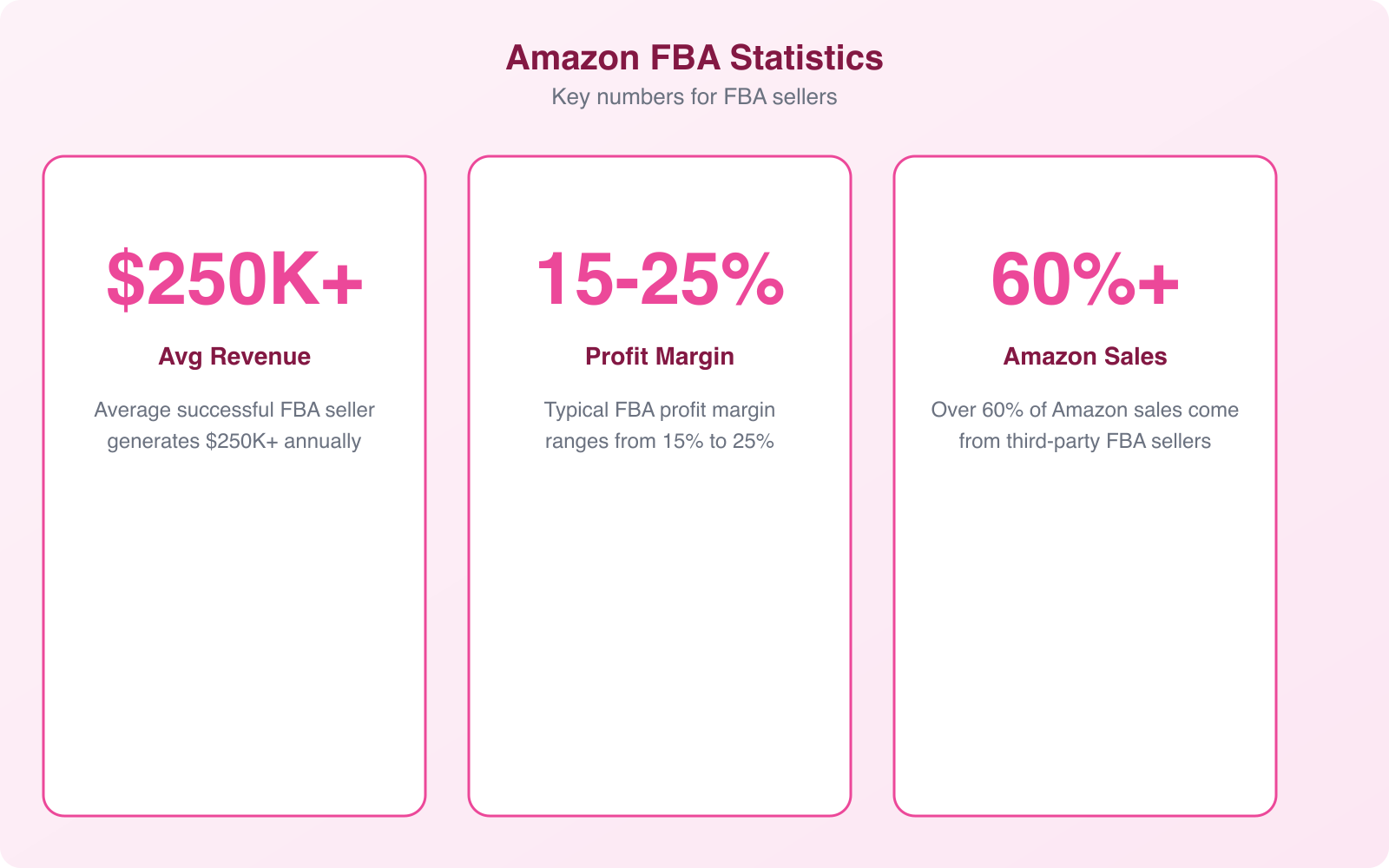
Aim for at least 30% net profit margin after all Amazon fees but before advertising costs. Once you factor in PPC spending and returns, a realistic target is 15-25% net profit. Products with margins below 20% before advertising are risky because any price drop, fee increase, or competitive pressure can push you into unprofitable territory. I personally won’t source a product unless the calculator shows at least 40% margin before advertising and returns.
Can I use FBA to fulfill orders from my own website?
Yes, Amazon offers Multi-Channel Fulfillment (MCF) that lets you use FBA to ship orders from any sales channel, including your Shopify store, eBay listings, or custom website. The fees are slightly higher than standard FBA fulfillment (roughly 10-15% more), and orders ship in Amazon-branded or unbranded packaging. This is a popular strategy for sellers who want to sell on multiple platforms without managing separate inventory and fulfillment operations for each channel.
What happens to products that don’t sell in Amazon’s warehouse?
Products that sit in Amazon’s warehouse incur monthly storage fees. After 181 days, Amazon starts charging aged inventory surcharges that increase the longer your products remain unsold. After 365+ days, the surcharges can exceed $6.90 per cubic foot on top of regular storage fees. You can create a removal order to have unsold inventory shipped back to you (for a fee) or disposed of. The best practice is to monitor your Inventory Health report in Seller Central and pull slow-moving stock before surcharges kick in.