
20 Best Websites to Download Free eBooks
Free eBooks are abundant in 2026, but the internet is also full of sketchy “free download” sites that exist mainly to install malware, harvest your email, or scam you into a $30/month subscription you didn’t realize you signed up for. The 20 sites in this article are the ones I actually use and trust. They’re all genuinely free, most are legal in the strict copyright sense, and the few that occupy a legal gray zone (Library Genesis, Internet Archive’s lending library since the 2023 Hachette ruling) are flagged so you can decide for yourself.
I’ve sorted them by what each site is actually best for: classic literature, modern fiction, academic textbooks, technical books, children’s content, and audiobooks. Most of the sites overlap on basic public-domain titles (Project Gutenberg, ManyBooks, Authorama, Feedbooks, and Bookyards all carry roughly the same Charles Dickens and Mark Twain catalog), so I’ve called out where each one earns its unique place. If you only have time for two, start with Project Gutenberg for classics and Open Library for everything else.
Best websites to download eBooks for free
Below are 20 sites for downloading free eBooks, ranked by what each one is genuinely best at rather than alphabetically. Each entry tells you the size of the catalog, the formats available (epub, mobi, PDF, HTML), whether you need an account, and what kind of reader gets the most value out of it.
Start with Project Gutenberg or Open Library. Both are completely free, require no account for browsing, and have the largest collections of legal free eBooks. If you need academic textbooks, check Wikibooks and FreeTechBooks first before paying for expensive print editions.
Quick Summary
- Project Gutenberg, ManyBooks, Open Library for classic literature in the public domain
- Internet Archive, Library Genesis for massive collections (with the legal caveats noted in each entry)
- Google Books, Scribd for modern titles and subscription-based unlimited reading
- FreeTechBooks, Wikibooks for academic and technical content (free legal alternatives to $200 college textbooks)
- Overdrive (now Libby) for library-connected free borrowing of new releases and bestsellers
- LibriVox for free public-domain audiobooks read by volunteers
- International Children’s Digital Library for kids’ books across multiple languages
1. Project Gutenberg
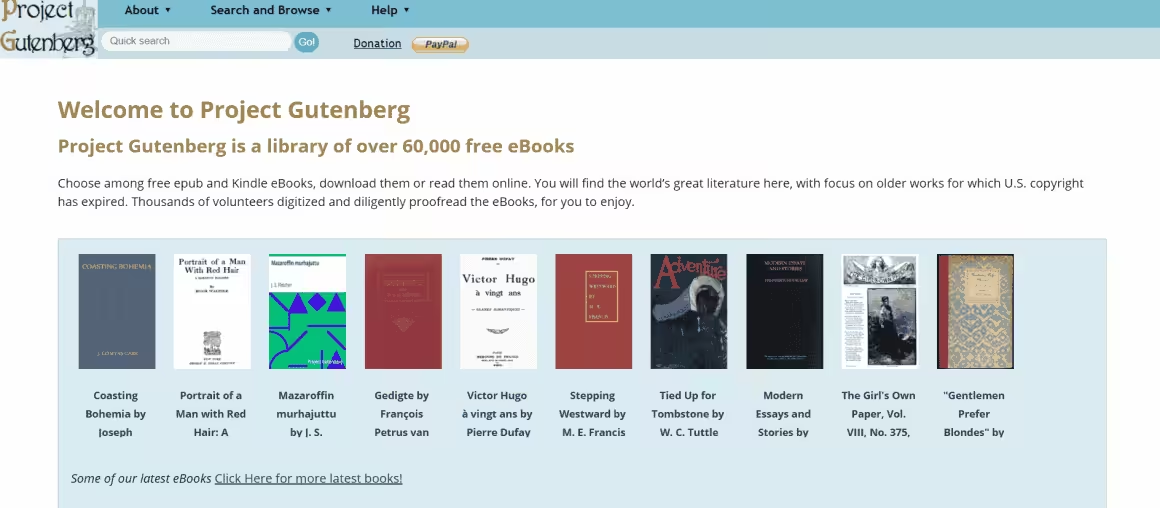
Project Gutenberg is the oldest free eBook library on the internet. It launched in 1971 (when “ebook” wasn’t even a word yet) and is still the gold standard for legal free downloads of public domain literature. As of 2026, the catalog has crossed 70,000 titles, all genuinely in the public domain, all free, all available in multiple formats: EPUB, Kindle (mobi), plain text, and HTML for in-browser reading. No account, no email capture, no popup ads, no upsells. Just books.
The interface looks like it was designed in 2003 because it largely was, and Project Gutenberg has resisted modernizing the site for the same reason it resisted accepting venture capital: the volunteers who run it want to spend their time digitizing books, not redesigning landing pages. Browse by author, title, language, or recently added. The “random book” feature is genuinely useful for stumbling onto something you’d never search for. If you’re a fan of any author who died before 1929, their work is here. The catalog refreshes every January 1 (US “Public Domain Day”) with new titles whose copyright has expired, and 2025 added authors like Virginia Woolf and Ernest Hemingway’s earliest work.
Best for: Anyone who reads classic literature. Catch: Nothing published in the last 95 years is here, by definition.
- Free: 100% free, public domain
- Content type: Classic literature, fiction, non-fiction
- Best for: Readers who love literary classics
- Key feature: 70,000+ free eBooks in epub and mobi
One of the oldest and largest free eBook libraries with 70,000+ public domain titles in multiple formats.
2. ManyBooks
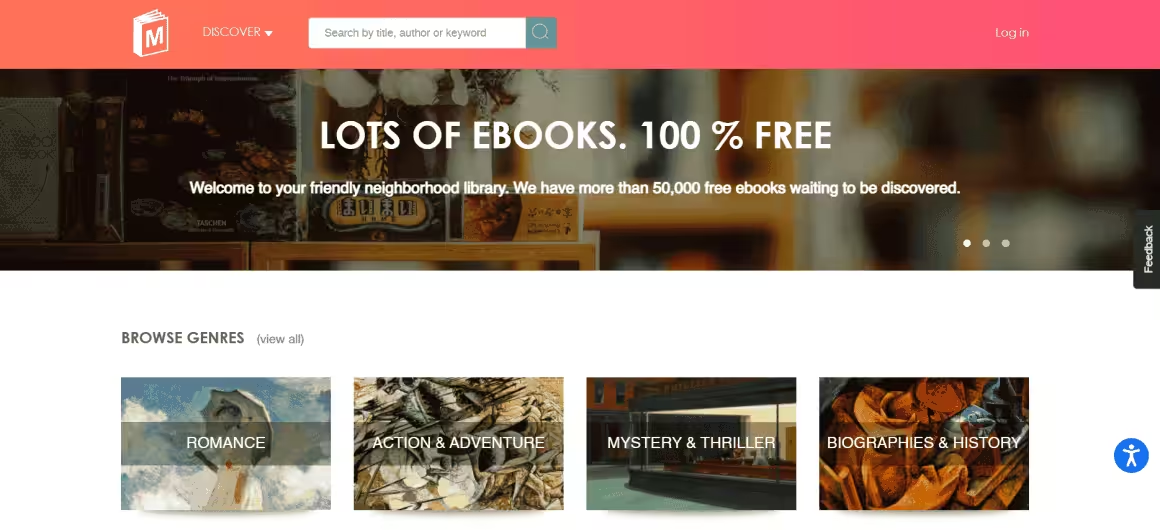
ManyBooks started in the mid-2000s as a Project Gutenberg mirror with a friendlier interface, and it has since carved out its own identity by adding self-published works that don’t appear in the Gutenberg catalog. The current collection sits at around 50,000 titles, of which roughly 30,000 are free, with the remainder offered as discounted modern fiction from indie authors. You can browse by genre, language, author, popularity, ratings, and editor’s picks, which makes it easier to discover something new than Gutenberg’s barebones author lists.
Files are available in EPUB, Kindle MOBI, and PDF, all device-friendly for iPads, Kindles, Kobos, and Nooks. Each book has a star rating and short reader reviews, which is the closest thing to Goodreads inside a free-eBook portal. ManyBooks does collect emails for downloads (free account required) and runs a newsletter with weekly recommendations, which is mildly annoying but not aggressive. The newer self-published titles are hit or miss; the old public-domain catalog is reliable.
Best for: Readers who want public-domain classics with a better browsing experience than Gutenberg. Catch: Free account required for downloads.
3. Open Library
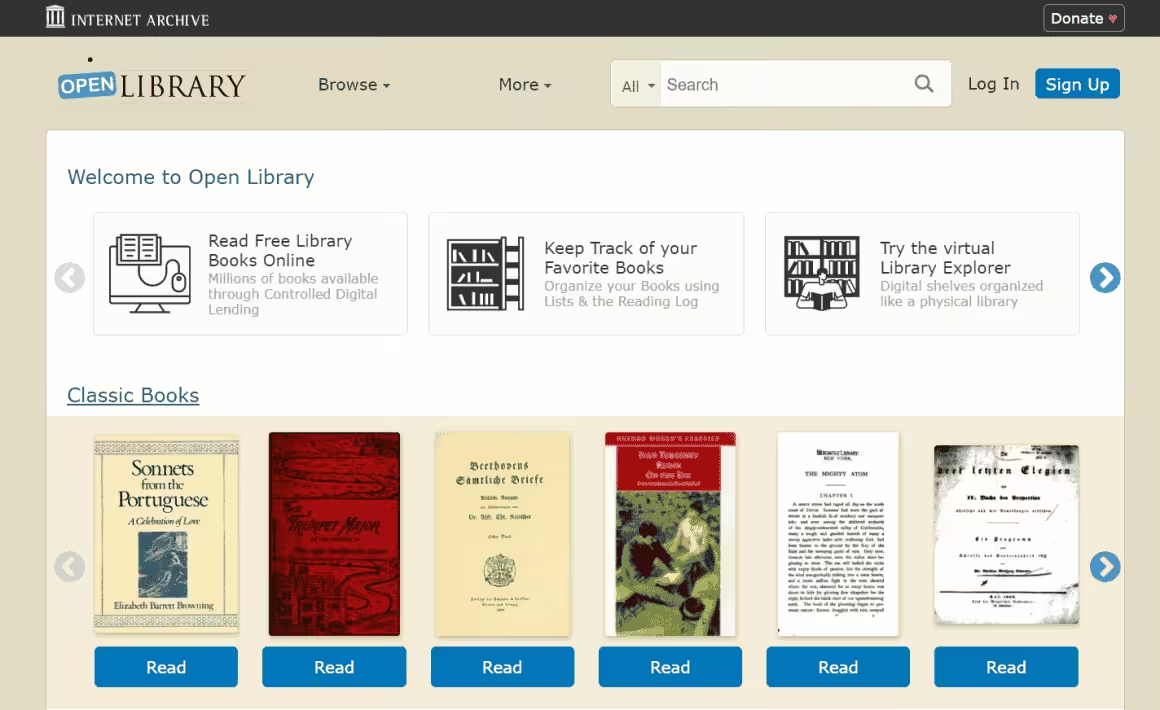
Open Library is a project of the Internet Archive and aims to do something genuinely radical: build a single web page for every book ever published, with a free borrowable digital copy whenever the law allows it. The catalog has crossed 3 million records, of which about 1.5 million are actually borrowable. Public-domain titles are downloadable directly. Modern in-copyright books are available through Open Library’s Controlled Digital Lending (CDL) program, where you borrow a digital copy for two weeks much like a physical library loan.
The CDL system is the reason Open Library is more useful than Project Gutenberg for modern reading, but it’s also the reason it’s been at the center of a major lawsuit. In 2023, a federal court ruled against Internet Archive in Hachette v. Internet Archive, finding that the National Emergency Library expansion of CDL during the pandemic was not fair use. Open Library has since pulled hundreds of thousands of titles from in-copyright lending. The remaining catalog is still huge, but if a specific modern book you used to be able to borrow has disappeared, this is why.
Best for: Readers who want a real digital library with modern books, not just classics. Catch: Free account required for borrowing modern in-copyright books, and the available catalog is smaller now than it was in 2022.
- Free: 100% free to browse, borrow with account
- Content type: Fiction, non-fiction, textbooks
- Best for: Students and general readers
- Key feature: 1.5 million searchable titles
Internet Archive-backed digital library with nearly 1.5 million searchable titles across all categories.
4. Authorama
Authorama is a stripped-down public-domain library that takes the opposite approach to ManyBooks. Where ManyBooks tries to be slick, Authorama is austere: a single alphabetical author list, books in plain HTML/XHTML, and no search beyond your browser’s built-in find. The catalog is small (a few hundred authors) but every title is properly formatted, legally free, and readable directly in the browser without any download.
That stripped-down design has one real advantage: it loads fast on slow connections, works fine on old phones, and reads well in any browser without an e-reader app. There’s no account, no popup, no email capture. If you want to read Shakespeare or Jane Austen on a Chromebook with a flaky wi-fi connection, Authorama is the most reliable option on this list. If you want a modern library experience with covers, ratings, and discovery tools, look elsewhere.
Best for: Reading classics in-browser on slow connections or old devices. Catch: Tiny catalog and no search.
5. Internet Archive
The Internet Archive is one of the most ambitious non-profits on the web. The book collection alone has over 20 million freely downloadable titles, plus another 2.3 million modern books available for borrowing through Controlled Digital Lending. Beyond books, the Internet Archive holds 80 billion archived web pages (the Wayback Machine), 14 million audio recordings, 8 million videos, and the largest collection of digitized academic papers outside of paywalled journals. It’s the digital equivalent of the Library of Congress, run by volunteers and donations.
Books download in EPUB, MOBI, PDF, and DAISY (the format for visually impaired readers). The Archive has been digitizing physical books non-destructively from 1,100+ partner libraries since 2005, including the Library of Congress, the Boston Public Library, and university collections worldwide. The 2023 Hachette v. Internet Archive ruling has limited the modern-book lending program (see Open Library above), but the public-domain catalog remains untouched. The legal status of CDL for in-copyright works is still being appealed as of 2026.
Best for: Researchers, historians, and anyone looking for obscure or rare titles. Catch: The lending program for modern in-copyright books has been significantly reduced post-2023 ruling.
- Free: 100% free, account needed for borrowing
- Content type: Books, audio, video, web pages
- Best for: Researchers and avid readers
- Key feature: 20 million+ free downloadable books
Non-profit digital library offering free universal access to 20 million+ books, films, music, and archived web pages.
6. Feedbooks
Feedbooks sits in an interesting middle ground. The site hosts roughly a million titles total, with two clear sections: a “free public domain” library that overlaps with Project Gutenberg, and a “free original” library where indie authors self-publish for free. The original library is the unique value here. A lot of the titles are first novels, fan fiction, and short story collections you won’t find anywhere else, and some have actually been picked up by traditional publishers after gaining a following on Feedbooks first.
Files are available in EPUB, MOBI, and PDF. Each title comes with a reading-time estimate and word count, which is genuinely useful when you’re picking what to read on a flight or a commute. The paid section runs as a regular ebook store and is mostly Kindle-priced modern releases. You can ignore it and stick to the free side.
Best for: Discovering original work from indie authors before it gets traditionally published. Catch: Self-published quality varies wildly.
7. Library Genesis
Library Genesis (LibGen) needs an honest disclaimer up front: it operates in a legal gray zone and is best understood as a “shadow library.” The site indexes roughly 3 million eBooks and 60 million academic articles, which is one of the largest text collections on the web, but a significant portion of it is in-copyright material that hasn’t been licensed to LibGen by the publishers. In the US, EU, and most other jurisdictions, downloading copyrighted material without authorization is technically illegal, even if enforcement against individual users is rare.
That said, LibGen exists for a reason. Academic researchers in countries without affordable journal access, students priced out of $200 textbooks, and readers in regions where a book simply isn’t sold all use LibGen to get access they can’t get any other way. The 2024 lawsuit between Elsevier and LibGen is still working through European courts, and the site has hopped through multiple domains over the past decade. The current working domain is libgen.li but expect that to change. The interface is functional but ugly, and search-by-author is the most reliable way to find what you’re looking for.
Best for: Academic researchers and students who can’t otherwise afford the books they need. Catch: Legal status is murky in most countries; use with that in mind.
- Free: 100% free search engine
- Content type: Research papers, eBooks, articles
- Best for: Academics and researchers
- Key feature: 3 million+ eBooks and 60 million articles
Massive search engine indexing 3 million eBooks and 60 million articles across fiction, non-fiction, and academic content.
8. Google Books
Google Books is the underrated giant of the free eBook space. The catalog is enormous (millions of titles), and the free section includes every book whose copyright has lapsed plus a sizable portion of preview-enabled modern books where you can read significant chunks before deciding whether to buy. The “Read free book” filter on the search page surfaces only fully-free titles, and the EPUB and PDF downloads work directly in any e-reader.
The killer feature of Google Books isn’t the catalog. It’s the search. You can search inside the full text of every indexed book, which makes Google Books the best research tool on this entire list when you need to find a specific quote, fact, or passage from a book you can’t quite remember. Even if you’re not allowed to download the full book, Google will show you the page the quote appears on. For students writing research papers and journalists fact-checking sources, that full-text search is irreplaceable.
Best for: Searching inside book text, plus solid free public-domain downloads. Catch: Many “previews” are limited to 20-30% of the book.
Don’t confuse Google Books and Google Play Books. They’re different products. Google Books is for searching and reading public-domain titles in the browser. Google Play Books, the Kindle eBook Store, and Apple Books are commercial stores for buying modern eBooks; their free sections are tiny.
Also see: Why you should get a Kindle?
9. Scribd (now Everand)
Scribd rebranded its consumer subscription product to Everand in late 2023, though most users still call it Scribd. It’s a paid subscription service ($11.99/month as of 2026, up from $8.99 a few years ago) that gives unlimited access to a library of eBooks, audiobooks, magazines, sheet music, and podcasts. The free trial is 30 days, which is long enough to read 4-6 books at a typical reading pace, and the cancellation flow is mercifully simple if it’s not for you.
The catalog is genuinely huge: most New York Times bestsellers, full audiobook libraries from major publishers, and a deep magazine selection that includes The Atlantic, Wired, and The Economist. The “Netflix for books” comparison still mostly fits, though Scribd has been throttling power users since 2023 by silently rate-limiting how many books an unusually heavy user can borrow per month. If you read more than 6-8 books a month, you may hit the throttle. Casual readers won’t notice.
Best for: Subscription-style unlimited reading of modern eBooks and audiobooks. Catch: Not actually free past the 30-day trial, and heavy readers face hidden borrowing limits.
- Free/Paid: $11.99/month subscription
- Content type: eBooks, audiobooks, magazines
- Best for: Unlimited readers and listeners
- Key feature: Millions of titles, Netflix for Books model
Subscription-based digital library with unlimited access to millions of eBooks, audiobooks, and magazines for $11.99/month.
10. LibriVox
LibriVox is the audiobook equivalent of Project Gutenberg. Founded in 2005 by Hugh McGuire, it’s a worldwide volunteer project that records public-domain books as free audio files. The catalog has over 18,000 titles, all completely free, all in MP3 and OGG formats, all downloadable without an account. Anyone can volunteer to read books, which means quality varies. Some recordings are professional-grade narration; others sound like someone’s grandfather reading into a phone in his kitchen. The community-driven model is the charm and the catch.
The strongest part of the LibriVox catalog is the classics: Dickens, Twain, Conan Doyle, HG Wells, Louisa May Alcott, Jane Austen, Sherlock Holmes. If a book is in Project Gutenberg, there’s a decent chance LibriVox has an audio version. The mobile app on iOS and Android is decent (4.5 stars on both stores) and supports downloading for offline listening, which is perfect for commutes and flights without paying Audible’s $14.95/month.
Best for: Free audiobook versions of public-domain classics. Catch: Recording quality is inconsistent because all narrators are volunteers.
11. The Online Books Page
The Online Books Page is hosted by the University of Pennsylvania and serves as a master index, not a hosting site. It links to over 3 million free eBooks across the entire web, organized by author, title, subject, and language. Think of it as a search engine for free eBooks rather than a library: when you click a title, it sends you to whichever site actually hosts the file.
The interface is undeniably old-school (the design hasn’t materially changed since the early 2000s) but the data behind it is meticulously maintained by the Penn library staff. For finding obscure 19th and 20th century books that aren’t in Project Gutenberg, the Online Books Page is unmatched. It’s the resource librarians and academic researchers reach for when they need a specific edition of a specific historical text and don’t know where to start.
Best for: Finding obscure historical books that aren’t in the major libraries. Catch: Dated interface; you’ll spend time clicking through to other sites.
12. Wikibooks
Wikibooks is Wikipedia’s sister project for collaborative open-content textbooks. Roughly 3,000 books are currently published across 11 categories, written and edited by volunteers using the same wiki editing model that built Wikipedia. The quality varies by subject: math and computer science are well-developed and used by actual college courses, while less popular subjects can feel half-finished. Browse the categories before committing to a book to gauge completion status (Wikibooks marks each title as stub, developing, or complete).
- Computing
- Engineering
- Humanities
- Languages
- Mathematics
- Miscellaneous
- Recreational activities
- Science
- Social sciences
- Standard curricula
- Kids’ books
The selling point isn’t the size of the catalog. It’s that Wikibooks is the only resource on this list where you can legally and freely access college-level textbooks in subjects like calculus, organic chemistry, and Python programming. For students priced out of $200 textbooks, this is the actual answer to “where do I get my textbook for free?”
Best for: Students looking for free legal alternatives to expensive college textbooks. Catch: Quality varies; less popular subjects may be incomplete.
- Free: 100% free, open content
- Content type: Textbooks, manuals, instructional guides
- Best for: Students needing academic textbooks
- Key feature: Wikipedia-style collaborative textbooks
Wikipedia’s sister project offering free open-content textbooks, manuals, and instructional guides across 11 categories.
13. International Children’s Digital Library
The International Children’s Digital Library (ICDL) is a non-profit project run out of the University of Maryland that catalogs free children’s books from around the world. The collection isn’t huge by adult-library standards (around 4,500 books) but the curation is what matters: every book is hand-selected for age appropriateness, cultural diversity, and reading level. You can search by reader age, by book length, by language, and even by the color of the cover (which is genuinely useful for kids who can’t read yet).
The standout feature is the multilingual catalog. Books are available in over 50 languages, including ones that are otherwise hard to find in free children’s content: Persian, Mongolian, Arabic, Tagalog, Yiddish, Hindi. For multilingual families and immigrant parents who want their kids to read in their heritage language, ICDL is the only resource that comes close to a full library. The site itself looks like 2008 in a way that’s almost charming, but the books load in a clean reader and the experience on a tablet is fine.
Best for: Parents looking for free children’s books in non-English languages. Catch: Small collection compared to general-purpose libraries.
14. PDFBooksWorld
PDFBooksWorld is the answer to one specific question: “where do I get a high-quality PDF version of a public-domain book that’s actually formatted properly for printing?” The collection is small (a few thousand titles) but every PDF is professionally typeset, with proper margins, page numbers, and chapter breaks. Most free PDF eBooks elsewhere are just text files saved as PDFs and they look terrible when printed. PDFBooksWorld’s PDFs look like real books.
Genres span fiction, non-fiction, children’s books, and academic works, with a strong focus on literary classics. Crime and Punishment, A Tale of Two Cities, The Great Gatsby, and most of the canonical 19th-century British and Russian novels are here in well-formatted PDF. The site is free with no account required, and the responsive web design works fine on phones and tablets.
Best for: Properly formatted PDF copies of classics, especially if you want to print them. Catch: Small catalog limited to public-domain titles.
15. Overdrive (now Libby)
Overdrive rebranded its consumer app to Libby in 2017, and Libby is now the recommended way for individuals to use the service. The way it works: Overdrive partners with public libraries (over 30,000 of them in 40+ countries) to provide their digital collections to library cardholders. You connect Libby to your local library card, and you can borrow ebooks and audiobooks for free, exactly like physical library loans, with the same hold queues and 14-21 day return periods.
This is the single best legal way to read modern in-copyright books for free. Most public libraries in the US, UK, Canada, Australia, and parts of Europe stock current bestsellers, recent releases, and even just-published books. The catch is the hold queue: a popular new release might have a 6-week wait if your library only owns a few digital copies. The workaround is to register library cards from multiple library systems (some, like the Brooklyn Public Library, offer e-cards to anyone in the US for a small fee), which multiplies your effective catalog.
Best for: Reading current bestsellers and new releases legally and free, with a library card. Catch: Long hold queues for popular books and you need an active library card.
- Free: Free with library card
- Content type: eBooks, audiobooks, magazines
- Best for: Library members wanting digital access
- Key feature: 30,000+ partner libraries in 40+ countries
Digital library service connecting with 30,000+ public libraries worldwide for free eBook and audiobook borrowing.
16. Read Print
Read Print is a public-domain library with a small social layer built around it: book clubs, reading lists, and the ability to follow other readers. The catalog overlaps with Project Gutenberg and Authorama (around 8,000 titles, all classic literature), so the books themselves aren’t unique. What’s unique is the search-by-quote feature, which lets you find a book by typing in a memorable line you half-remember. That’s genuinely useful when you can recall the words “All happy families are alike” but can’t remember which Tolstoy novel they open.
The book clubs are mostly inactive in 2026, and the social features feel like a relic of pre-Goodreads internet. Treat Read Print as a search tool for finding classics by remembered quotes, not as a community platform.
Best for: Finding a book when you remember a quote but not the title. Catch: Small catalog and inactive community features.
17. Free-Ebooks.net
Free-Ebooks.net functions as a freemium library: you get 5 free eBook downloads per month with a free account, with options to upgrade to a paid VIP plan for unlimited downloads. The catalog has thousands of titles divided across six categories: Business, Fiction, Non-fiction, Romance, Sci-fi, and Self-help. Most of the content is self-published, which means the quality varies wildly but you’ll find titles that don’t exist anywhere else.
The 5-per-month limit is the catch. If you read more than 5 books a month, you’ll hit it fast and either need to wait, upgrade, or move to one of the unlimited free options on this list. The site does collect emails aggressively for newsletter signups, which is the trade-off for the free downloads. For occasional self-help and indie business book reading, it’s worth a free account; for heavy reading, look elsewhere.
Best for: Discovering self-published business and self-help titles. Catch: 5 downloads per month free, with paid upgrade to remove the cap.
18. GetFreeEBooks
GetFreeEbooks is an aggregator that links to free eBooks across the web rather than hosting them itself. The site has been running since 2007 and the curation has held up: every linked book is verified to be legally free at the source. The 100+ categories cover most genres you’d want, and the daily-updated front page is a decent place to find current free promotions from indie authors.
Like the Online Books Page, GetFreeEbooks is best understood as a directory rather than a library. You’ll spend time clicking through to other sites to actually download the file, but the manual curation means you won’t waste clicks on dead links or sketchy hosts. For finding limited-time free promotions of normally paid books on Amazon and Kobo, this is one of the better aggregators.
Best for: Finding limited-time free promotions of normally paid eBooks. Catch: Aggregator, not a library; you click through to other sites to download.
19. FreeTechBooks
FreeTechBooks does exactly what the name says: hosts free technical books in computer science, programming, engineering, and adjacent fields. Roughly 600 books are catalogued, all legal and free, all explicitly licensed for free distribution by their authors and publishers. Topics range from foundational (calculus, discrete math, linear algebra) to current (machine learning, distributed systems, cryptography, ethical hacking, AI fundamentals).
For software engineers and CS students, FreeTechBooks is the most efficient way to find legal free copies of textbooks that would otherwise cost $80-$200 in print. Several of the listed books are written by university professors who released them under open-content licenses specifically because they didn’t want their students paying $200 for a textbook. The site doesn’t have the slick design of a modern bookstore, but every download link works and every book is properly licensed.
Best for: Engineering and CS students looking for legal free textbook alternatives. Catch: Limited to technical fields; nothing for humanities or general fiction.
- Free: 100% free, legal downloads
- Content type: CS, engineering, programming books
- Best for: Tech students and developers
- Key feature: Curated collection of free technical textbooks
Dedicated platform for free technical books, textbooks, and lecture notes in engineering, programming, and CS.
20. Bookyards
Bookyards is another aggregator-style library, with 18,000 books hosted directly plus 40,000 outbound links to other free libraries, giving an effective reach of around 800,000 free titles. Categories span fiction, non-fiction, religion, history, and reference. The site is older and the design shows it, but it’s surprisingly handy when other libraries fail you on a specific obscure book. The mix of original-hosted titles and curated outbound links makes Bookyards a good “second-pass” search after Project Gutenberg and Open Library.
Best for: A backup search when the bigger libraries don’t have what you’re looking for. Catch: Outdated UI and many outbound links go to dead pages.
If you’re looking for even more options, my free online libraries roundup covers a few additional sources I didn’t include here.
How to pick the right free eBook site
Match what you’re trying to read to one of these:
- Classic literature (pre-1929) → Project Gutenberg first, ManyBooks second, PDFBooksWorld for properly formatted PDFs.
- Modern bestsellers and new releases → Libby/Overdrive with a public library card. The only legal free way to read recent bestsellers.
- Academic textbooks → Wikibooks for general subjects, FreeTechBooks for CS and engineering.
- Research papers and obscure academic content → Internet Archive’s open access collection. Library Genesis if your need is urgent and you understand the legal gray zone.
- Audiobooks → LibriVox for free public-domain audio. Libby for free borrowed audiobooks of modern titles.
- Children’s books → International Children’s Digital Library for multilingual content. Open Library for English children’s titles.
- Indie self-published fiction → Feedbooks and ManyBooks have the largest selections.
- Searching inside book text for a specific quote → Google Books. The full-text search is unmatched.
- One specific book you can’t find anywhere → The Online Books Page or GetFreeEbooks aggregators usually have a link.
- Unlimited modern reading on a subscription → Scribd/Everand at $11.99/month if you read more than 4 books a month.
Conclusion
What is the best website to download free eBooks?
Project Gutenberg is the best free eBook site for classic literature, with 70,000+ public-domain titles in EPUB, MOBI, PDF, and HTML formats, no account required. Open Library is the best for general modern reading, with around 1.5 million borrowable titles connected to the Internet Archive. Libby (Overdrive) is the best for reading current bestsellers free, as long as you have a public library card. Most heavy readers end up using all three.
Are free eBook download sites legal?
Most are. Project Gutenberg, ManyBooks, Open Library, Authorama, Wikibooks, FreeTechBooks, LibriVox, PDFBooksWorld, Bookyards, Read Print, and Authorama all distribute books that are either in the public domain or explicitly licensed for free distribution. Internet Archive’s Controlled Digital Lending program is currently in legal dispute (Hachette v. Internet Archive, 2023) but its public-domain catalog remains untouched. Library Genesis is the one major exception: it operates in a legal gray zone and includes copyrighted material that has not been licensed for free distribution.
Where can I download modern eBooks for free legally?
The Libby app (formerly Overdrive) is the only fully legal way to read modern in-copyright bestsellers for free. It connects to your local public library and lets you borrow ebooks and audiobooks the same way you’d borrow physical books. Most public libraries in the US, UK, Canada, Australia, and parts of Europe support it. The catch is the hold queue: popular new releases can take weeks to become available. Beyond Libby, the only legal free options for modern reading are author promotions (often listed on GetFreeEbooks) and the limited free-tier of Scribd’s 30-day trial.
What format should I download eBooks in?
EPUB is the universal e-reader format and works on every device except older Kindles, including Apple Books, Kobo, Nook, and Google Play Books. MOBI is Amazon’s older Kindle format and is being phased out in favor of newer Kindle formats. PDF is universal across devices but reflows poorly on small screens, so use it only when the book has illustrations, equations, or tables that need to stay in place. For most modern reading on phones, tablets, or e-readers, EPUB is the right choice.
Can I find free college textbooks legally?
Yes. Wikibooks publishes free open-content textbooks across math, science, computer science, languages, and humanities, with a particularly strong selection in computing and engineering. FreeTechBooks adds another 600 free technical textbooks, all legally licensed by their authors. OpenStax (a separate project not on this list) is also worth checking for biology, physics, sociology, and economics textbooks at the introductory undergraduate level. Between Wikibooks, FreeTechBooks, and OpenStax, most undergraduate STEM students can avoid paying for textbooks entirely.
Is Library Genesis (LibGen) safe to use?
LibGen is technically functional and the downloads themselves are usually clean PDF and EPUB files. However, the legal status is murky in most countries because a significant portion of the catalog is copyrighted material that hasn’t been licensed for free distribution. Enforcement against individual users is rare but not impossible. The bigger practical risk is that LibGen domains change frequently due to legal actions, and unofficial mirrors of LibGen are sometimes loaded with malware. Stick to libgen.li (the current canonical domain as of 2026) and use a VPN for privacy.
What happened to Internet Archive’s lending program?
In June 2020, during the early COVID lockdowns, the Internet Archive launched the National Emergency Library, which removed waitlists from its Controlled Digital Lending program for in-copyright books. Four major publishers sued (Hachette, HarperCollins, Wiley, and Penguin Random House), arguing that CDL was not fair use. In March 2023, a US District Court ruled in favor of the publishers, and Internet Archive lost its appeal in 2024. As a result, hundreds of thousands of in-copyright modern books have been removed from Open Library’s lending catalog. The public-domain catalog (millions of books published before 1929) is unaffected.
Is Scribd really unlimited?
Mostly, with caveats. Scribd (rebranded Everand for consumers) advertises unlimited access to its catalog for $11.99/month, and for casual readers (under 6 books per month) that’s accurate. Heavy users have reported being silently rate-limited since 2023, where popular and new releases temporarily disappear from your available catalog after you’ve borrowed several titles in quick succession. The throttle is undocumented and Scribd doesn’t acknowledge it publicly. If you read 10+ books a month, expect to occasionally find your reading slowed down.
Can I download free eBooks for Kindle?
Yes. Project Gutenberg, ManyBooks, Internet Archive, and Feedbooks all offer downloads in MOBI or AZW3 format that load directly onto Kindle. For EPUB-only files, you can use Amazon’s free Send-to-Kindle email service to convert and deliver them to your device. Libby and Overdrive integrate directly with Kindle in the US: when you borrow a book, you can choose to send it to your Kindle and read it in the regular Kindle app instead of the Libby app.
What is the difference between public domain and free eBooks?
Public domain books are works whose copyright has expired (in the US, this currently means anything published before 1929). They can legally be distributed by anyone for free with no licensing required. Free eBooks is a broader category that includes public-domain books plus modern in-copyright books that the rights holder has chosen to give away (author promotions, indie self-published works, openly licensed textbooks). All public-domain books are free, but not all free books are in the public domain. The distinction matters for legality: distributing a copyrighted free eBook beyond what the license allows is still copyright infringement.
Free eBook downloads in 2026 are dominated by a handful of long-running, trustworthy sites and a much larger pile of sketchy alternatives. Stick to the 20 above and you’ll never need to risk malware, hidden subscriptions, or copyright lawsuits to read what you want. Project Gutenberg and Open Library cover the bulk of what most readers need; Libby (Overdrive) handles modern bestsellers through your library card; Wikibooks and FreeTechBooks save students hundreds of dollars on textbooks; and LibriVox keeps your commute filled with free audiobook classics. Pick the one that matches what you’re reading and bookmark it. The eBook market changes constantly, but these sites have been around for years and almost certainly will be next year too.