
How to Teach Online? (The Ultimate Guide)
Do you want to teach online and have no idea where to start? If that’s so, this is the best place to be. I’ll help you understand the nuances of teaching online and how you can make the most out of your hard work the smart way.
Online teaching is a promising and lucrative sector that can help you grow your online presence. Many coaches choose to augment their one-on-one services by providing online courses, and several entrepreneurs have established profitable businesses exclusively using online courses.
The e-learning market hit $400 billion in 2025 and is projected to double by 2030. That’s not hype. Real people are building real careers teaching everything from calculus to cake decorating. And the barrier to entry has never been lower.
By teaching online, you can:
- Channel your inner solopreneur
- Choose your working hours as per your convenience
- Build authority in your field
- Create a brand true to your values
- Have a solid business foundation
- Showcase your talents and expertise to the world
- Turn leads into customers
- Work fully remotely
It doesn’t matter whether you’re an entrepreneur wanting to start a blooming online business or an experienced professional hoping to diversify your income; online teaching could be just the way to go.
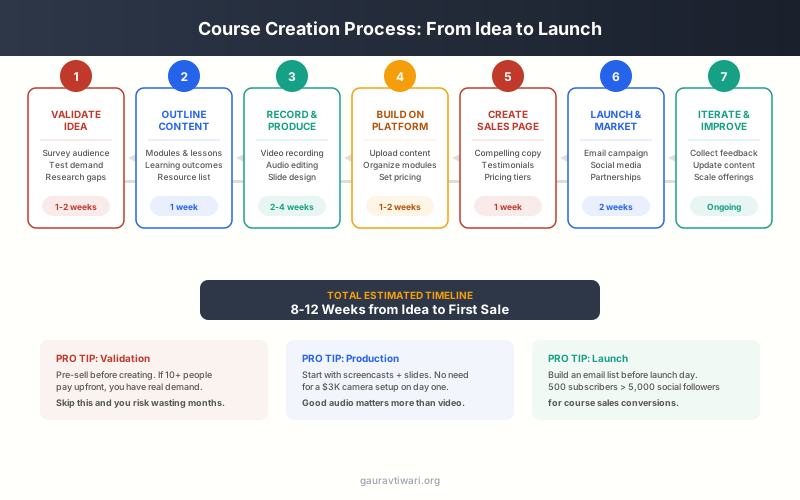
The fastest way to validate a course idea is to teach it live first. Run a free webinar or workshop on the topic. If people show up and engage, you have demand. If they don’t, you just saved yourself months of recording content nobody wants. I did this with my first course and pivoted the topic twice before finding what resonated.
Who Can Actually Teach Online?
Here’s something that holds a lot of people back: they don’t think they’re qualified. “I’m not a certified teacher.” “I don’t have a degree in this.” “There are people who know more than me.”
Stop. You don’t need credentials to teach online. You need two things:
- Knowledge or skill that someone else wants. Not everything. Not expert-level mastery. Just enough to help someone who knows less than you.
- The ability to explain it clearly. Some of the best teachers aren’t the most advanced practitioners. They’re people who recently learned something and remember what it was like to be confused.
Successful online teachers come from all backgrounds:
- A 23-year-old teaching Excel to beginners
- A retired accountant teaching personal finance to freelancers
- A home cook teaching meal prep to busy parents
- A software developer teaching programming basics
- A guitar hobbyist teaching absolute beginners their first three chords
The common thread? They all knew more than their target student. That’s the bar.
Let’s now see the actual process of doing just that.
Table of Contents
How to Start Teaching Online?
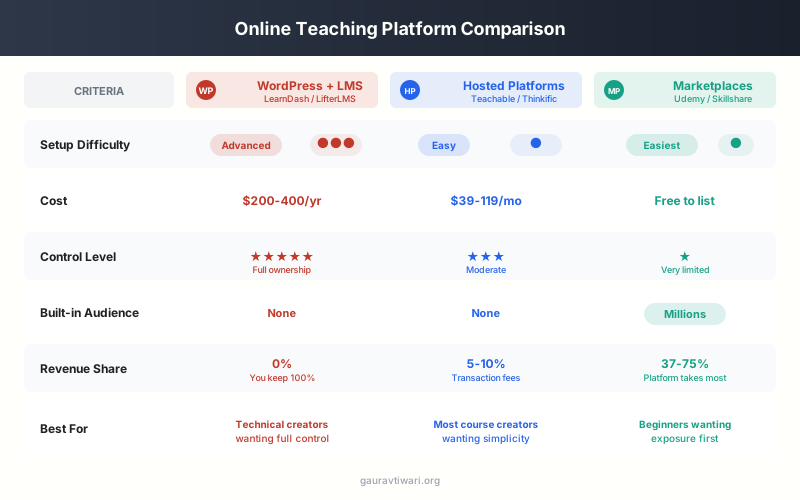
Currently, there are three main ways to start online teaching:
- Use a Learning Management System (LMS) plugin to offer courses through your own WordPress website.
- Use an online teaching platform.
- Use online course marketplaces.
If you require a solution that gives you complete control over every aspect of your business, then I advise you to offer courses on your own WordPress website. However, online teaching platforms and course marketplaces have their own advantages as well.
Let’s begin by discussing how to create courses on your own platform.
Using WordPress + LMS Plugin
Summary: Get a domain, hosting with WordPress installed, install an LMS plugin, and you are good to go. Complete guide is here →

WordPress is the free and flexible Content Management System (CMS) of choice for most entrepreneurs today. With the right Learning Management System (LMS) plugin, you can also use it as a teaching platform to deliver access-restricted learning resources and lessons to students.
An LMS plugin turns a standard WordPress site into a full-featured online school. You get student accounts, progress tracking, quizzes, certificates, and payment processing. Everything you need to run professional online classes.
See this detailed guide on how to start an online teaching website with WordPress.
I should mention that using WordPress to build and sell online courses on your own website is the only solution where you actually have absolute control over your teaching career.
Step 1: Pick a Hosting Provider
Your hosting matters more than most people realize. A slow site frustrates students. Videos buffer. Pages take forever to load. Go with a reputable host that can handle media-heavy content.
| Hosting | Starting Price/month | Starting Number of Websites | Starting Storage | Bandwidth | Signup Link | Free Domain |
|---|---|---|---|---|---|---|
| WPX Multi-Site | $20.83 | 5 | 15GB | 200GB | Signup | No |
| EasyWP Lowest Price | $1.44 | 1 | 10GB | ~50,000 visitors | Signup | No |
| Hostinger Best Value | $1.99 | 1 | 30GB | 100GB | Signup | Yes |
| Hostgator | $2.75 | 1 | Unlimited | Unlimited | Signup | Yes |
| Bluehost | $2.95 | 1 | 50GB | Unlimited | Signup | Yes |
| A2 Hosting | $2.99 | 1 | 100GB | Unlimited | Signup | No |
| Nexcess | $19 | 1 | 10GB | Unlimited | Signup | Yes |
| WP Engine | $25 | 1 | 20GB | ~25,000 visitors | Signup | No |
| Rocket.net High Traffic | $25 | 1 | 10GB | ~250,000 visitors | Signup | No |
| Kinsta | $25 | 1 | 30GB | ~25,000 visitors | Signup | No |
For teaching websites specifically, look for hosts with good CDN integration. Video delivery eats bandwidth, and you want your content loading fast for students regardless of their location.
Step 2: Choose a WordPress Theme
Don’t overthink this. A lightweight, fast theme matters more than fancy design. Most LMS plugins come with their own styling that works with any well-coded theme.
| Theme | Description | Original Price | Get Deal |
|---|---|---|---|
| Kadence | Build fast & beautiful websites with Kadence. Modern features & customization for all. | $149 | Get Deal on Kadence |
| Astra | Lightweight, fast theme with beautiful templates and page builder support. | $59-$699 | Get Deal on Astra |
| GeneratePress One | Premium theme bundle with GenerateBlocks and GenerateCloud access. | $149 | Get GeneratePress One |
| Themeforest | Marketplace for premium themes including Total, BeTheme, and more. | $13 - $199 | Get Themeforest Themes |
| WPZoom | Premium themes for education, news, magazines, and more. | $79 per theme | Visit WPZoom |
| TemplateMonster | Wide selection of themes & plugins across all web categories. | Variable | Get Deal on TemplateMonster |
| MonsterONE | Access to an extensive asset library for WordPress themes & design tools. | $529 (lifetime) | Get Deal on MonsterONE |
| Neve | Fast, mobile-first theme with customizable headers & footers. | Variable | Get Deal on Neve |
| Avada | Popular drag-and-drop theme for feature-rich websites. | Variable | Get Deal on Avada |
| Divi | Customizable theme with powerful design options and pre-made layouts. | Variable | Get Deal on Divi |
| Blocksy | Lightweight, customizable theme optimized for performance. | Variable | Get Deal on Blocksy |
| Total | Multipurpose theme with drag-and-drop functionality and flexible layouts. | Variable | Get Deal on Total |
Avoid heavy multipurpose themes loaded with features you won’t use. They slow down your site and create compatibility headaches with LMS plugins.
Step 3: Install an LMS Plugin
This is where the magic happens. Once you are done with hosting and theme, all you need now is to install and setup an LMS plugin. Here are the LMS plugins that I recommend:
- LearnDash (Premium) – The most feature-complete option. Strong WooCommerce integration, excellent quiz builder, and reliable course progression tracking. Starting at $199/year.
- LearnPress – Best free option. Core plugin handles the basics well. You’ll likely need some paid add-ons ($29-$49 each) for certificates, WooCommerce integration, and advanced features.
- Tutor LMS – Great middle ground between free and premium. Clean interface, solid quiz builder. Free version is surprisingly capable, pro starts at $149/year.
- Sensei LMS – Made by the WooCommerce team. If you’re already in the Woo ecosystem, this integrates smoothly. Free core with pro add-ons.
- MemberPress Courses (Premium) – Best if you want membership + courses combined. Handles subscriptions, drip content, and access control elegantly. Starts at $179/year.
- LifterLMS – All-in-one approach with memberships, courses, and community features. Free core is limited; the Universe bundle ($360/year) unlocks most useful features.
WordPress LMS plugins compared
| Feature | LearnDash | LifterLMS | Tutor LMS | Sensei LMS | MasterStudy LMS |
|---|---|---|---|---|---|
| Free Version | No | Yes (core) | Yes (core) | Yes (core) | Yes (core) |
| Pro Price | $199/yr | $149/yr | $199/yr | $99/yr | $199/yr |
| Course Builder Key Feature | Excellent (drag and drop) | Good | Excellent (frontend) | Good (block-based) | Good |
| Quiz Engine | Advanced (8 types) | Basic | Advanced (10 types) | Basic | Good |
| Drip Content | Yes (flexible) | Yes | Yes | No | Yes |
| Certificates | Yes | Yes | Yes | No | Yes |
| WooCommerce | Yes | Yes | Yes | Yes (native) | Yes |
| Gamification | Yes (badges, points) | Yes (achievements) | Basic | No | Yes |
| Marketplace Mode | No | No | Yes (Udemy-like) | No | Yes |
| Best For | Most feature-rich LMS | Flexible, great free tier | Multi-instructor sites | WooCommerce stores | Marketplace sites |
| Visit LearnDash | Visit LifterLMS | Visit Tutor LMS | Visit Sensei | Visit MasterStudy |
The full guide to setting up hosting, theme and LMS can be read here.
Quick Decision Framework
Choosing an LMS can feel overwhelming. Here’s a simple framework:
- Tight budget + willing to learn: LearnPress with key add-ons
- Want the safest, most supported option: LearnDash
- Already using WooCommerce: Sensei LMS
- Need courses + memberships together: LifterLMS or MemberPress
- Value clean design and UX: Tutor LMS
The other two methods are hosted Software as a Service solutions and you might not be in complete control of everything.
What You Control with WordPress
With WordPress, you’ll get to control:
- Who your courses are marketed to!
- How your courses are marketed!
- Your courses’ prices
- Course evaluation methods
- Drip scheduling course material
- Reporting and analytics
- Teaching on an individual basis or in cohorts
- The contact information for your students
- When to run discounts and sales
- Your course material’s format (audio, video, text, etc.)
- Your course website’s visual design
That point about student contact information matters most. With WordPress, you own your student list. You can email them directly, market future courses, and build a real relationship. On third-party platforms, that list often belongs to them.

- Full WordPress integration with any theme
- Advanced quiz builder with 8 question types
- Drip-feed content and course prerequisites
- WooCommerce and Stripe payment integration
- Starting at $199/year for 1 site
LearnDash is the most popular WordPress LMS plugin. Full control over your course content, student data, and pricing. WooCommerce integration for payments. Used by universities and Fortune 500 companies.
Use an online teaching platform

See: Best Online Teaching Platforms for Educators to Create & Sell Online Courses
Online teaching and tutoring platforms are growing larger by the day. They’ve given teachers of all experience levels an opportunity to make money online. Some of the most popular domains include secondary subject tutoring, language learning, and further education. These platforms also enable you to create an online teaching space, provide study materials, and offer regular feedback to improve your performance as a teacher.
If you’re seeking a straightforward way to become an online teacher without the trouble of setting up any tech, then joining a teaching platform could be the ideal option for you. To join, you must prove that you have strong teaching abilities and knowledge in your field. Also, you’ll likely have to do a live or recorded trial lesson to get approved.
Platforms like Teachable, Thinkific, and Podia handle all the technical complexity. Hosting, payments, student accounts, video delivery – they manage it so you can focus on content.
The upside: You can go from idea to published course in a weekend. No WordPress to configure, no plugins to troubleshoot, no server to maintain.
The downside: Monthly fees ($39-$199/month), potential transaction fees (0-10% depending on plan), and you don’t truly own the platform. If the platform changes their terms, you’re affected.
Below are some of the most reputable companies on the market:
| Platform | Monthly Cost | Annual Cost | Trial | Sign up |
|---|---|---|---|---|
| Thinkific Best Value | Free to $499 | Free to $4788 | Free Tier Forever | View Deal |
| Teachable | Free to $299 | Free to $2988 | Unlimited with Free Plan | View Deal |
| LearnWorlds | $29-$299 | $288-$2988 | Up to 14 days | View Deal |
| Podia | $39-$199 | $390-$1990 | Up to 14 days | View Deal |
| Kajabi | $149-$399 | $1428-$3828 | Up to 14 days | View Deal |
| Mighty Networks | $39-$119 | $390-$1190 | Up to 14 days | View Deal |
| Zenler | $67-$197 | $647-$1447 | Available | View Deal |
| Xperiencify | $49-$149 and custom plans | $504-$1404 | Available | View Deal |
| Uscreen | $99-$199 + $0.50 per subscriber | $948-$1908 + $0.50 per subscriber | - | View Deal |
| Graphy | $59-$349 | $648-$3840 | Available | View Deal |
| Pathwright | $99-$499 | $1068-$5388 | Available | View Deal |
| WizIQ | $25 to customized plans | $300 to customized plans | Available | View Deal |
| Udemy | Individuals: Free on commission base Business: $360 per user per year | Individuals: Free on commission base Business: $360 per user per year Higher plans available for enterprises and corporations | Unlimited with Free Plan | View Deal |
| Coursera | $399 per year | $399 per year | - | View Deal |
| Skillshare | Free to $159 per user per year to custom plans | Free to $159 per user per year to custom plans | Unlimited | View Deal |
| Simplero | $70.80-$178.80 | $708-$1788 | Up to 14 days | View Deal |
| Upwisy | Free to $99 | Free to $948 | Up to 20 learners | View Deal |
| Gumroad | Free + Commission based | Free + Commission based | Unlimited | View Deal |
| Moodle | Free | Free | Free | View Deal |
| LinkedIn Learning | Free (if you are selected) | Free (if you are selected) | Unlimited | View Deal |
When Platforms Make Sense
Teaching platforms aren’t wrong for everyone. They’re the right choice in specific situations:
- You’re testing an idea. Before investing in a WordPress setup, validate your course concept on a platform’s free plan. If nobody buys it, you haven’t wasted money on hosting and plugins.
- You’re not technical. If WordPress genuinely intimidates you and you don’t want to learn, platforms remove that barrier entirely.
- Speed matters more than control. Need to launch this week? A platform is faster than setting up WordPress properly.
- You want zero maintenance. Platforms handle updates, security, and uptime. With WordPress, that’s on you (or your host).
Although teaching platforms take care of the technical aspects of setting up a course, they have their disadvantages as well. For example, you will have limited control over the pricing and content of your services, potentially hindering your earnings and teaching style. Also, these platforms take a commission from your fees and significantly reduce your income.
Thus, I advise you to carefully consider these pros and cons before deciding to join a teaching platform.

- No transaction fees on paid plans
- Built-in payment processing and tax handling
- Custom domains and branded course pages
- Unlimited students on all paid plans
- Free plan available to get started
Teachable is the easiest platform for non-technical course creators. Upload your content, set pricing, connect payments, and launch. No coding required. Trusted by 100,000+ creators worldwide.
Teaching on online course marketplaces
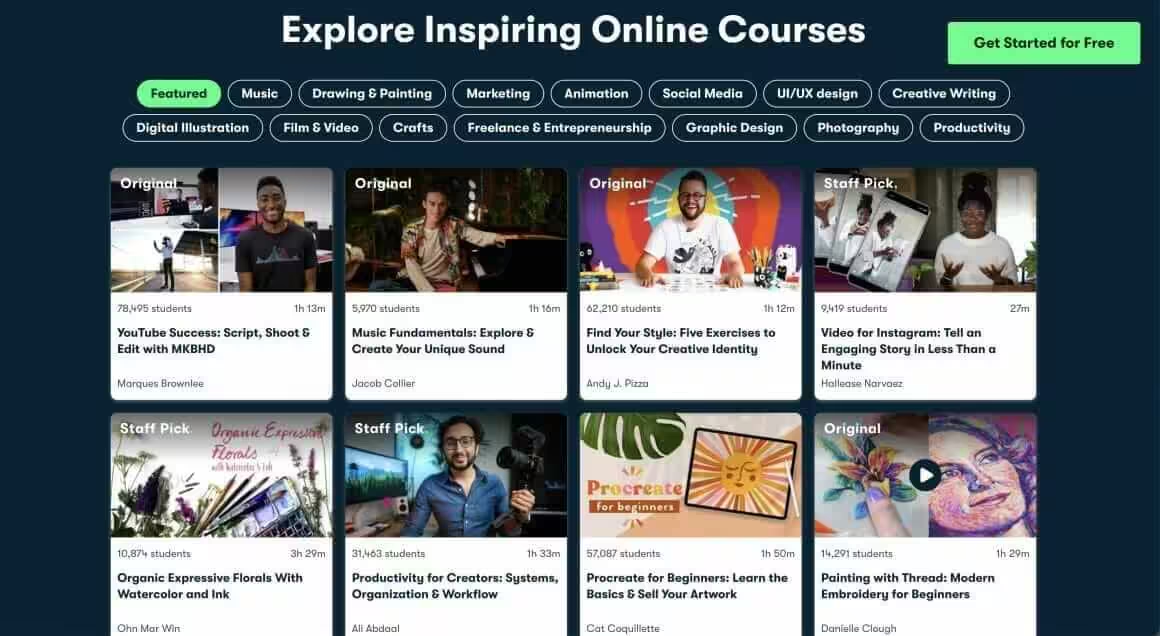
Let’s say you don’t want to work with an online teaching platform, either. In that case, you can choose to build and sell your courses through online course marketplaces such as Udemy, Udacity, and SkillShare.
These marketplaces are different from platforms like Teachable. With a marketplace, you’re listing your course alongside thousands of others – like selling products on Amazon instead of running your own shop.
Since these places offer a built-in audience, you needn’t build fancy marketing funnels to attract students. Udemy has over 70 million learners. Skillshare has 13 million. That’s a massive audience you don’t have to build yourself.
However, although these course marketplaces let you easily build and launch online courses, they could cause some significant problems for your online business as well.
The Marketplace Reality Check
For example, the marketplace gives you limited control over your course pricing. They can discount your courses as they want and always take a significant portion of your revenue for their help.
Pricing control is brutal on some platforms. Udemy runs sitewide sales almost constantly. Your $199 course might get listed at $9.99 during these sales. You often can’t opt out. This can devalue your content in students’ eyes.
Competition is fierce. In the marketplace, your courses must compete among hordes of competitors in your niche – all battling it out for customers with race-to-the-bottom pricing. Popular niches have dozens of courses competing for the same students.
You don’t own your students. Also, you won’t have access to your student email list, making it almost impossible to create a lasting and recurring revenue relationship with your course customers. You typically can only contact students through the platform’s messaging system for course-related communication.
Revenue models vary. On Skillshare, you’re paid based on minutes watched, not course sales. The per-minute rate fluctuates and can be unpredictable.
When Marketplaces Make Sense
Despite these drawbacks, marketplaces aren’t useless:
- Exposure and credibility. A course with 10,000 students and hundreds of reviews is social proof you can reference elsewhere.
- Lead generation. Use marketplace courses as top-of-funnel content. Teach the basics on Udemy, offer advanced training on your own platform.
- Testing topics. Before building a premium course, test the concept on a marketplace. Low commitment, quick feedback.
- Volume income. Some creators make decent money just from marketplace volume, even at lower prices.
Consider treating marketplaces as a marketing channel rather than your main business. Build your audience there, then migrate interested students to your own platform where you control everything.

Skillshare (for Marketplace Teaching)
- No cost to publish your course
- Royalties based on minutes watched
- Built-in audience of 12+ million members
- Strong in creative and business categories
- Teacher referral bonuses available
Teach on Skillshare and earn royalties based on minutes watched. No upfront cost to publish. 40,000+ classes in creative and business topics. Good for building an audience in creative niches.
Essential Equipment for Teaching Online
Before diving into teaching techniques, let’s talk gear. You don’t need a professional studio, but you do need some basics to look and sound competent.
Audio Equipment
Audio quality matters more than video quality. Students will tolerate a grainy image, but bad audio makes them click away fast.
Budget option ($50-100): A USB microphone like the Audio-Technica ATR2100x or Blue Yeti Nano. These plug directly into your computer and sound dramatically better than built-in laptop mics.
Mid-range option ($150-300): A condenser microphone with an audio interface. The Rode NT1 with a Focusrite Scarlett Solo is a popular combo.
Headphones: Any closed-back headphones for monitoring. Don’t use speakers while recording – you’ll get feedback.
Video Equipment
For screencasts and slides, you don’t even need a camera. For talking-head videos:
Budget option: A 1080p webcam like the Logitech C920 ($70-100). It’s been the standard recommendation for years because it just works.
Better option: Your phone. Modern smartphones shoot better video than most webcams. Use a phone mount and tripod. If you teach subjects that need handwriting or drawing, check out the best pen tablets for online teaching.
Best option: A mirrorless camera with clean HDMI out. The Sony ZV-E10 or Canon M50 are popular choices. Expect to spend $700-1200.
Lighting
Lighting makes more difference than camera quality. Bad lighting makes expensive cameras look cheap. Good lighting makes webcams look professional.
Minimum: Face a window. Natural light from in front of you (never behind) is free and looks great.
Better: A ring light ($30-50) or two softbox lights ($60-100 for a pair). Position them at 45-degree angles in front of you.
Software for Recording
You need software for recording and editing:
- Screen recording: Camtasia ($300 one-time) is the industry standard. OBS Studio (free) works but has a steeper learning curve.
- Video editing: Camtasia handles basic editing. For more control, DaVinci Resolve (free) or Filmora ($50-80/year).
- Presentations: Google Slides, PowerPoint, or Keynote. Canva for visuals.
- Live teaching: Zoom ($15/month for pro), Google Meet (free), or dedicated webinar tools.
Tips on How to Teach Online
Now that you’re acquainted with the basics of online teaching, you can follow the guidelines below to prepare for success effectively.
1. Plan your classes well
In a virtual classroom, class time is usually short, and students hold out hopes to learn as much as they can in that given time period. Therefore, it is crucial to plan your lessons well in advance so you can make the most of that limited time.
Good planning shows. Well-planned lessons flow logically, anticipate student questions, and waste no time on tangents. Consider spending 2-3 hours planning for every hour of final content.
Planning process that works:
- Define the outcome: What will students be able to do after this lesson?
- List the prerequisite knowledge they need
- Break the lesson into 5-10 minute chunks (attention spans online are shorter)
- Build in practice moments – don’t just lecture continuously
- Write a script or detailed outline
2. Prepare and master the relevant technology
Before you can confidently teach students online, you must prepare and master the technology involved in the process. Technical fumbling during a live session destroys your credibility. Technical glitches in recorded content make you look unprofessional.
Moreover, being tech-savvy in general will help you be more successful as an online teacher. Below are some things you should be able to do:
- Discover platform tricks. Know your LMS inside and out. Test every feature before students see it.
- Identify common technological issues. Know what breaks and how to fix it. Audio sync issues, video encoding problems, browser compatibility.
- Know how to get tech support. Have your hosting provider’s contact info handy. Know your LMS plugin’s support process.
- Understand if there’s mobile access or only desktop/laptop access. Test your course on mobile, tablet, and desktop. In multiple browsers.
3. Put together a reliable working station
Theoretically, you might be able to teach from anywhere. Nevertheless, you should always try to set up a working environment that feels comfortable and familiar to you and your students. It will make the entire online teaching experience much smoother. For that, you should:
- Have the required equipment. Mic, camera, lighting, backup power if you have unreliable electricity.
- Have a background that captivates students. Clean bookshelf, plain wall, or a virtual background. Messy rooms distract students.
- Ensure that your internet connection is strong enough. Aim for at least 10 Mbps upload for video calls. Have a mobile hotspot as backup.
- Try to soundproof your work environment as much as possible. Soft surfaces absorb echo. Close windows. Minimize background noise.
- Eliminate distractions. Close unnecessary apps. Put your phone in another room. Use website blockers if needed.
4. Initiate discussions
It’s challenging to learn how to teach an online course. Therefore, you must start discussions with your students promptly so they can get comfortable and acquainted with you. Many students tend to feel nervous when the class begins; by asking some light questions, you will make them feel more comfortable.
For asynchronous courses, create opportunities for discussion:
- Add a community forum or Facebook group
- Ask questions at the end of each lesson that prompt responses
- Hold periodic live Q&A sessions
- Respond to student comments and questions quickly – especially in the first few weeks
For live sessions, start with a warm-up question that’s easy and low-stakes. “What’s your biggest challenge with [topic] this week?” gets people engaging and breaks the ice.
5. Remember to communicate regularly
Regardless of the setting you’re teaching in, you need to communicate regularly with your students. Remember to always greet them at the beginning and end of each class. You should also communicate your expectations of the students throughout the lesson and remind them of the pending tasks and assignments.
For self-paced courses, build communication into the structure:
- Automated emails: Set up sequences that trigger as students progress. Congratulate them on completing modules. Nudge them if they’ve been inactive.
- Weekly updates: Send regular emails to active students with tips, answers to common questions, and encouragement.
- Office hours: Monthly or bi-weekly live sessions where students can ask anything.
6. Motivate your students
Naturally, some students will be eager to be in your classroom, while others will be distracted by something or the other. You can usually get them to be more interactive by finding ways to motivate them (and by keeping in mind their age and interests). You can do so using games, a points/reward system, or by promising time to talk about a topic of their choice after finishing the lesson.
Course completion rates for online courses average around 10-15%. That’s low, but it’s also an opportunity. Teachers who get students to actually finish see better reviews and more referrals.
Motivation tactics that work:
- Progress tracking: Visual progress bars, completion percentages, “you’re 70% done!” messaging
- Certificates: People love credentials. Offer a certificate on completion.
- Community: Students who engage with peers complete at higher rates
- Small wins early: Design your first lessons to be achievable quickly. Success breeds motivation.
- Real projects: Give them something tangible to build or accomplish.
7. Design your course content thoughtfully
When adapting a curriculum for online teaching, be as mindful as you can about designing the courses and organizing the content within them. Ensure that your content appeals to all learning styles and explain the material, expectations, and objectives as clearly as possible. This rule also applies to general things such as due dates on assignments.
Content design principles for online learning:
- Chunk everything. Break content into 5-15 minute segments. Nobody wants to watch a 60-minute video without breaks.
- Mix media types. Video + text summaries + downloadable resources. Different people learn differently.
- Show, don’t just tell. Screencasts beat slides. Demonstrations beat descriptions.
- Use clear structure. Every lesson should have: what you’ll learn, the content, a summary, and a call-to-action (what to do next).
- Preview the outcome. Show them what they’ll be able to do before teaching how. It creates motivation.
8. Make your class’ atmosphere fun and welcoming
If you are teaching synchronously, try your best to make the class atmosphere as inviting as you can by:
- Eliminating distractions
- Looking prepared and ready to teach
- Making students comfortable
- Providing relevant examples
- Using gestures and facial expressions when appropriate
- Using media and interactive tools
- Using visual aids and props
For recorded content, your personality still matters. Don’t be a robot. Add some humor where appropriate. Share relevant anecdotes. Let your enthusiasm show. Students notice when a teacher is genuinely interested in their subject.
9. Ensure that the lessons are age and level appropriate
Even if you have an advanced student, you must make sure that lessons are age appropriate. For example, if you teach English online and there’s a five-year-old in your class who already speaks English well, you shouldn’t be discussing 8th-grade-level science topics with them, even if they might be comfortable with the vocabulary.
More broadly, know your audience’s skill level and design for it:
- Define prerequisites clearly in your course description
- Don’t skip foundational concepts that beginners need
- Don’t waste advanced students’ time on basics they already know
- When in doubt, err on the side of explaining more, but make it easy to skip sections
10. Prepare homework and reading materials in advance
Students must work to accompany and supplement what they learn in an online lesson, just as they would when attending a physical class. Therefore, you should prepare homework and extra reading materials before starting the class.
Effective supplementary materials:
- Checklists: Step-by-step reference for procedures you taught
- Cheat sheets: Quick reference guides for key concepts
- Workbooks: Structured exercises that reinforce learning
- Templates: Starting points for projects
- Reading lists: For students who want to go deeper
- Practice projects: Hands-on assignments that apply what they learned
Create all supplementary materials before recording main lessons. This forces you to think through what students will actually need to succeed.
11. Ask for help and feedback
Consistently asking for help and feedback is one of the best ways of preparing to teach online, as well as one of the basics of teaching in general. Find a friendly way to ask your students for their opinions regarding your classes and the scope for improvement. You can also get in touch with other online teachers, mentors, or the company for help when required.
Feedback collection methods:
- End-of-lesson surveys: Quick 1-2 question polls embedded after key lessons
- Course completion surveys: Detailed feedback from students who finished
- Exit surveys: Why did students not finish? What stopped them?
- One-on-one interviews: Periodically offer short calls to students willing to give detailed feedback.
- Community discussions: Watch what questions come up repeatedly. That’s content you need to improve.
Your first version will have problems. Accept that. Use feedback to iterate and improve over time.
Do not spend months building a course before validating demand. I have seen creators invest 200+ hours recording content that generated zero sales. Start with a minimum viable course: a live workshop, a simple PDF guide, or a 3-lesson mini-course. If people buy it, expand it. If they don’t, pivot before you waste more time. Validation first, production second.
Common Mistakes New Online Teachers Make
Learn from the mistakes others have made:
- Perfectionism before launching. Your first course won’t be perfect. Launch it anyway and improve based on feedback.
- Building before validating. Don’t spend months creating a course nobody wants. Test the concept first. Get interest before you record.
- Underpricing. Low prices can signal low value. Don’t automatically race to the bottom.
- Ignoring production quality. Bad audio kills courses. Invest in at least a decent microphone.
- No marketing plan. Building the course is half the work. Marketing is the other half.
- Trying to teach everyone. Narrow your audience. A course for “everyone who wants to learn X” will struggle. A course for a specific audience with specific problems has better odds.
- No student support system. Students will have questions. Plan for how you’ll answer them.
- Giving up too early. Most courses don’t explode on day one. It takes time to build momentum and refine your approach.
AI Tools for Online Course Creators
AI is transforming how online courses are created, delivered, and improved. In 2026, course creators who use AI tools can produce content 2-3x faster without sacrificing quality. Here are the tools I recommend.
AI for Course Content Creation
- ChatGPT and Claude can help you outline course modules, generate quiz questions, write lesson summaries, and create supplementary materials. I use AI to draft my first outlines, then refine with my own expertise. It cuts planning time by 60-70%.
- Descript ($24/month) is an AI-powered video and podcast editor. Edit video by editing text. Remove filler words automatically. Generate transcripts and captions. It makes video editing accessible to non-editors.
- Synthesia ($22/month) generates AI avatar videos from text scripts. You type your lesson, pick an avatar, and get a professional-looking video without recording yourself. Useful for introductory and explainer content.
- Canva now includes AI features for generating slide decks, presentations, and course graphics. The Magic Design tool creates professional-looking course materials from a text prompt.
AI for Student Engagement
- Khanmigo (Khan Academy’s AI tutor) demonstrates where AI tutoring is heading. While not available for external course creators yet, its approach of personalized, Socratic-method tutoring is the model that all course platforms are moving toward.
- AI-powered quizzes and assessments can now adapt difficulty based on student performance. Platforms like LearnDash and Teachable are integrating AI features for personalized learning paths.
- AI chatbots for student support can answer common questions 24/7. Tools like Chatbase or CustomGPT let you train a bot on your course content to handle FAQ-level queries, reducing your support workload.
The key with AI tools: use them to amplify your expertise, not replace it. Your students are paying for your perspective, your experience, and your ability to teach clearly. AI handles the production grunt work so you can focus on what only you can provide. For more on using AI in education, see my guide on data science courses that use AI-driven learning.
- Screen recording + video editing in one tool
- Templates and pre-built assets for course videos
- Annotations, callouts, and zoom effects
- Export directly to YouTube, Vimeo, or LMS
- One-time purchase ($300) or subscription
Camtasia is the industry standard for screen recording and video editing for course creators. Record your screen, add annotations, transitions, and effects. One-time purchase.
- Free plan with 1 course and unlimited students
- No transaction fees on any plan
- Drag-and-drop course builder
- Built-in community and student engagement tools
- AI-powered course creation assistant
Thinkific is a hosted course platform with a generous free plan. Build, market, and sell courses without coding. Drag-and-drop course builder, built-in community features, and no transaction fees on any plan.
Conclusion
Teaching online can be a great way to make money online, whether as a full-time job or as a side source of income. I’ve discussed the different routes online teaching can take you down and explained the benefits and pitfalls you’ll face along the way for each of them.
Before a student attends your first lesson, you must decide which approach to teaching online suits you best. Ascertain whether you prefer the complete control of offering courses on your WordPress website, the convenience of a teaching platform, or the wide reach of an online course marketplace.
For maximum control and long-term business building, WordPress with an LMS plugin like LearnDash is worth considering. For easier setup, platforms like Teachable work well. Marketplaces like Udemy can generate students but come with tradeoffs on pricing and student relationships.
With that in mind, I hope you embark on a rewarding and successful journey of teaching online. For more resources, check out the best websites for online teaching jobs and my guide to content marketing for educators.
Frequently Asked Questions
How much money can you make teaching online?
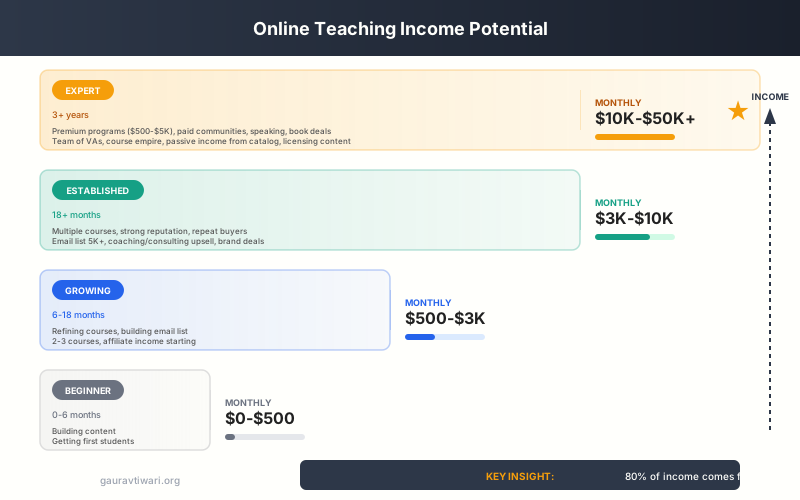
Income varies widely. Part-time course creators typically earn $200-$2,000/month. Established creators with multiple courses and an email list earn $3,000-$10,000/month. Top creators in high-demand niches (programming, business, data science) earn $20,000-$100,000+/month. Your niche, pricing strategy, audience size, and marketing skills all affect earnings. The average course creator earns about $1,000-$3,000/month after their first year.
Do I need a teaching degree to teach online?
No. For most online course platforms, no credentials are required. You need knowledge or skills that others want to learn and the ability to teach them clearly. Some academic tutoring platforms may require teaching credentials, but course creation platforms like Teachable and Thinkific have no such requirements. Results and student testimonials matter more than formal credentials.
What equipment do I need to start teaching online?
At minimum: a computer, internet connection, and a USB microphone ($50-100). Audio quality matters more than video. For video content, a 1080p webcam or your smartphone works fine to start. Good lighting (even just facing a window) dramatically improves quality. Camtasia ($300) handles screen recording and editing. Total startup budget: $100-$500 for decent quality.
What is the best platform for selling online courses?
For maximum control, WordPress with LearnDash ($199/year) gives you full ownership. For easier setup, Teachable or Thinkific handle the technical work. Marketplaces like Udemy provide built-in audiences but with less control over pricing. The right choice depends on your technical comfort and whether you prioritize control or convenience.
How long does it take to create an online course?
A mini-course (1-2 hours of content) takes 2-4 weeks working part-time. A comprehensive course (5-10 hours) typically takes 2-4 months. This includes planning, recording, editing, and platform setup. AI tools like Descript and Canva can cut production time by 30-50%. Your first course takes longer as you learn the process.
How should I price my online course?
Price based on the value of the transformation, not hours of content. Mini-courses: $29-$79. Standard courses: $99-$299. Comprehensive programs: $299-$999+. Research competitor pricing, but do not automatically go cheap. Low prices can signal low value. Platforms like Teachable let you test different price points easily.
Can AI help me create online courses faster?
Yes. AI tools can cut course creation time by 50-70%. Use ChatGPT or Claude for outlining, quiz generation, and writing supplementary materials. Descript handles AI video editing. Synthesia generates AI avatar videos from scripts. Canva creates course graphics with AI. Use AI for production, but keep your unique expertise as the core value.
Disclaimer: This site is reader-supported. If you buy through some links, I may earn a small commission at no extra cost to you. I only recommend tools I trust and would use myself. Your support helps keep gauravtiwari.org free and focused on real-world advice. Thanks. - Gaurav Tiwari