
How to Optimize Your Blog Posts for SEO? (14 Killer Ways)
Every blogger wants traffic from Google. But most blog posts never see page one. The gap between publishing and ranking comes down to one thing: optimization.
I’ve published over 1,800 articles since 2008. Some ranked on page one within days. Others disappeared into the void. The difference wasn’t luck. It was whether I took the time to optimize before hitting publish.
In 2026, SEO for blog posts has changed significantly. AI Overviews, E-E-A-T signals, and answer-first formatting now influence rankings more than old tricks like keyword density. But the fundamentals still matter. You still need solid keyword research, clean structure, and content that genuinely helps people.
This guide covers the 14 tactics I use to optimize every blog post before and after publishing. These aren’t theoretical. They come from years of testing, failing, and figuring out what actually moves the needle.
1. Start With Proper Keyword Research
You can’t optimize a blog post if you don’t know what you’re optimizing for. Keyword research is the foundation of everything.
I use Semrush for keyword research because it shows search volume, keyword difficulty, and competitor data in one place. Here’s my process:
- Start with a seed keyword – Type your topic into Semrush‘s Keyword Magic Tool
- Filter by difficulty – For newer sites, target keywords with a difficulty score under 40
- Check search intent – Look at the top 10 results. Are they blog posts, product pages, or tools? Your content type needs to match
- Find related keywords – Grab 5-10 semantically related terms to weave into your content naturally
- Look at “People Also Ask” – These questions become your subheadings and FAQ sections
The biggest mistake I see? Targeting keywords that are too competitive. A blog post targeting “best laptops” is competing against CNET, The Verge, and Wirecutter. You won’t win that fight. Target “best laptops for writers under $800” instead. Specific, lower competition, and high intent.
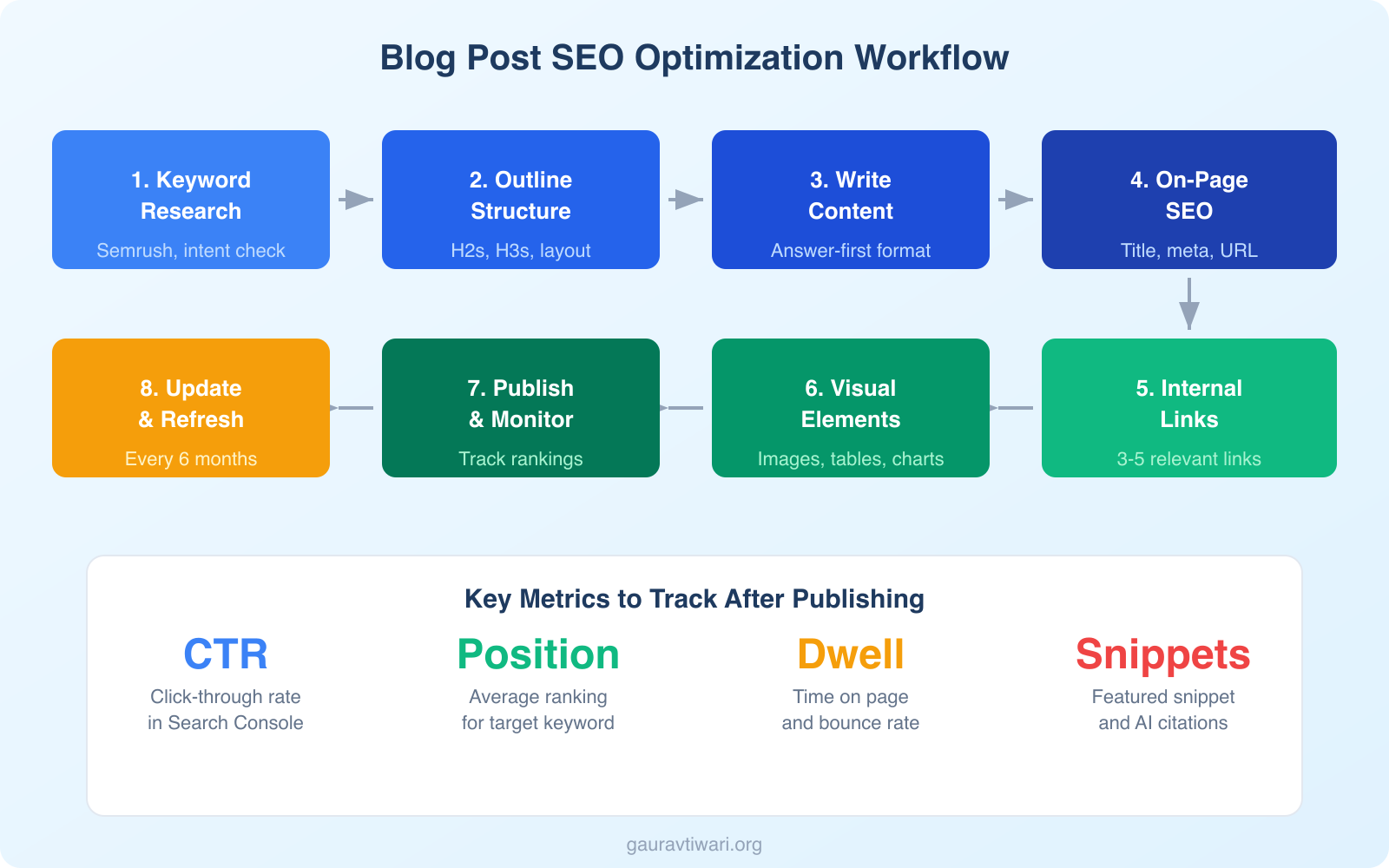
2. Craft a Proper Blog Post Layout
Never start writing without a layout. I learned this the hard way after years of rambling posts that went nowhere.
Before writing a single paragraph, I analyze the top 10-15 results on Google for my target keyword. I look at:
- What headings are they using?
- What subtopics do they cover?
- What’s missing from their content?
- What questions are left unanswered?
Then I build my outline. Every H2 is a clear section. Every H3 is a supporting point. The structure should make sense even if someone only reads the headings.
I also check Quora, Reddit, and “People Also Ask” for questions people are actually asking about the topic. These become subheadings in my outline. This alone has helped me rank for hundreds of long-tail keywords I didn’t specifically target.
3. Answer the Query Right Away
This is the tactic that changed everything for me. Answer your reader’s question in the first 100-150 words of your post.
Don’t save the good stuff for the end. Don’t build suspense. Give the answer immediately, then spend the rest of the post explaining, proving, and expanding on it.
Why? Two reasons:
- Featured snippets – Google pulls direct answers from content that answers the query concisely near the top of the page. Answering early increases your chances of winning the featured snippet
- AI Overviews – Google’s AI-generated summaries prefer content that provides clear, upfront answers. If your answer is buried in paragraph 15, the AI skips your content entirely
I’ve tested this across dozens of posts. Moving the core answer from mid-article to the introduction increased featured snippet captures by roughly 3x. It also improved dwell time because readers who get their quick answer stick around to read the detailed breakdown.
4. Optimize for AI Search and AI Overviews
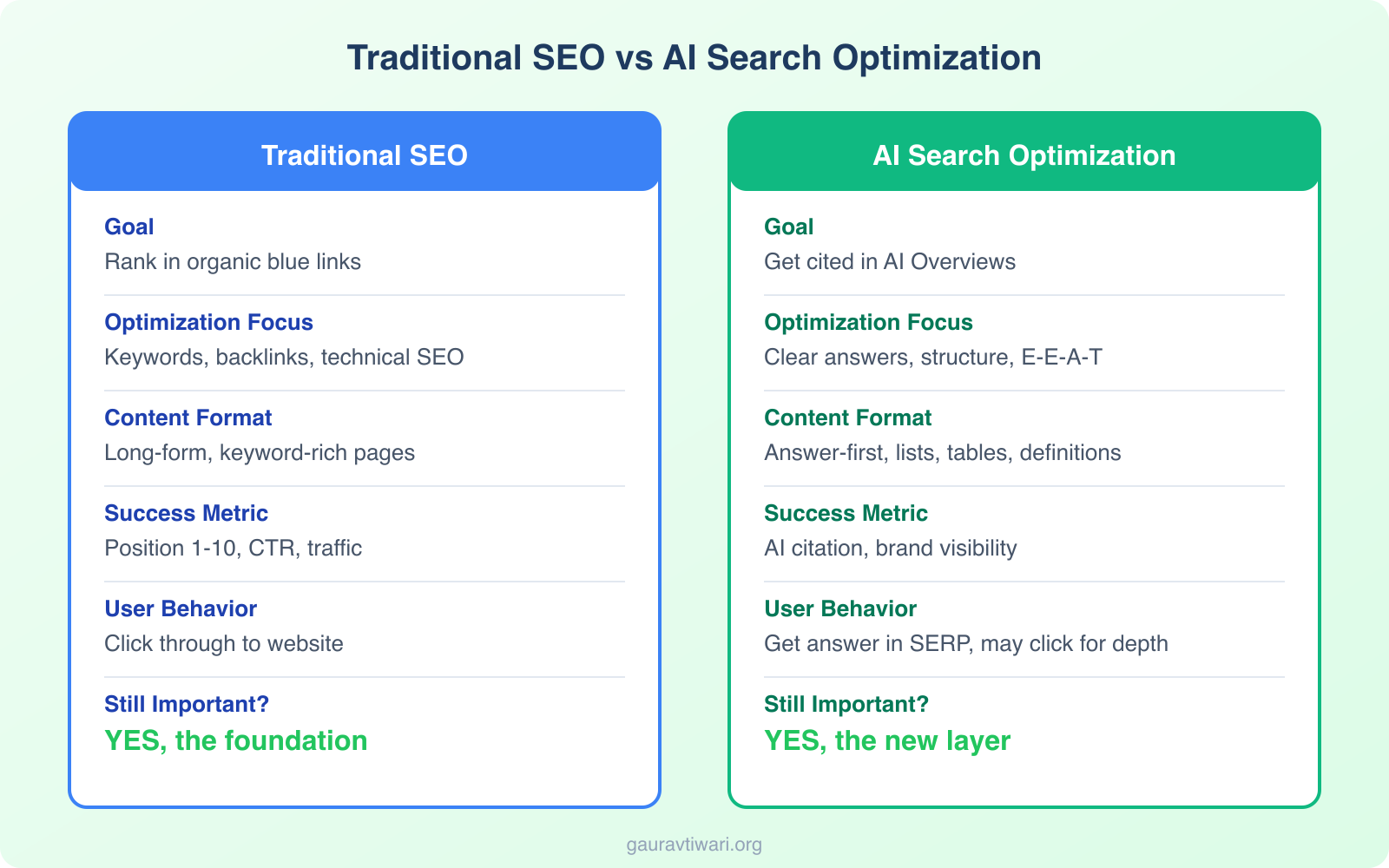
In 2026, Google’s AI Overviews appear for a growing percentage of informational queries. If you’re only optimizing for traditional blue links, you’re optimizing for yesterday’s search results.
Here’s what I’ve found works for getting cited in AI Overviews:
- Answer-first formatting – State the answer clearly, then elaborate. AI models prefer content structured this way
- Use structured lists and tables – AI Overviews frequently pull from numbered lists, bullet points, and comparison tables
- Include specific data – Numbers, percentages, and timeframes get cited more than vague statements
- Write clear definitions – When your content defines a concept in 1-2 sentences, it becomes prime AI citation material
- Cover topics comprehensively – AI Overviews synthesize information from multiple sections. The more complete your coverage, the more likely you are to be a source
Don’t write for AI. Write for humans in a way that AI can easily parse. That means clear structure, direct answers, and specific data. If a human can quickly find the answer they need, so can Google’s AI.
I’ve noticed that pages already ranking in positions 1-10 have the highest chance of being cited in AI Overviews. So traditional SEO still matters. AI optimization is an additional layer, not a replacement.
5. Build Strong E-E-A-T Signals
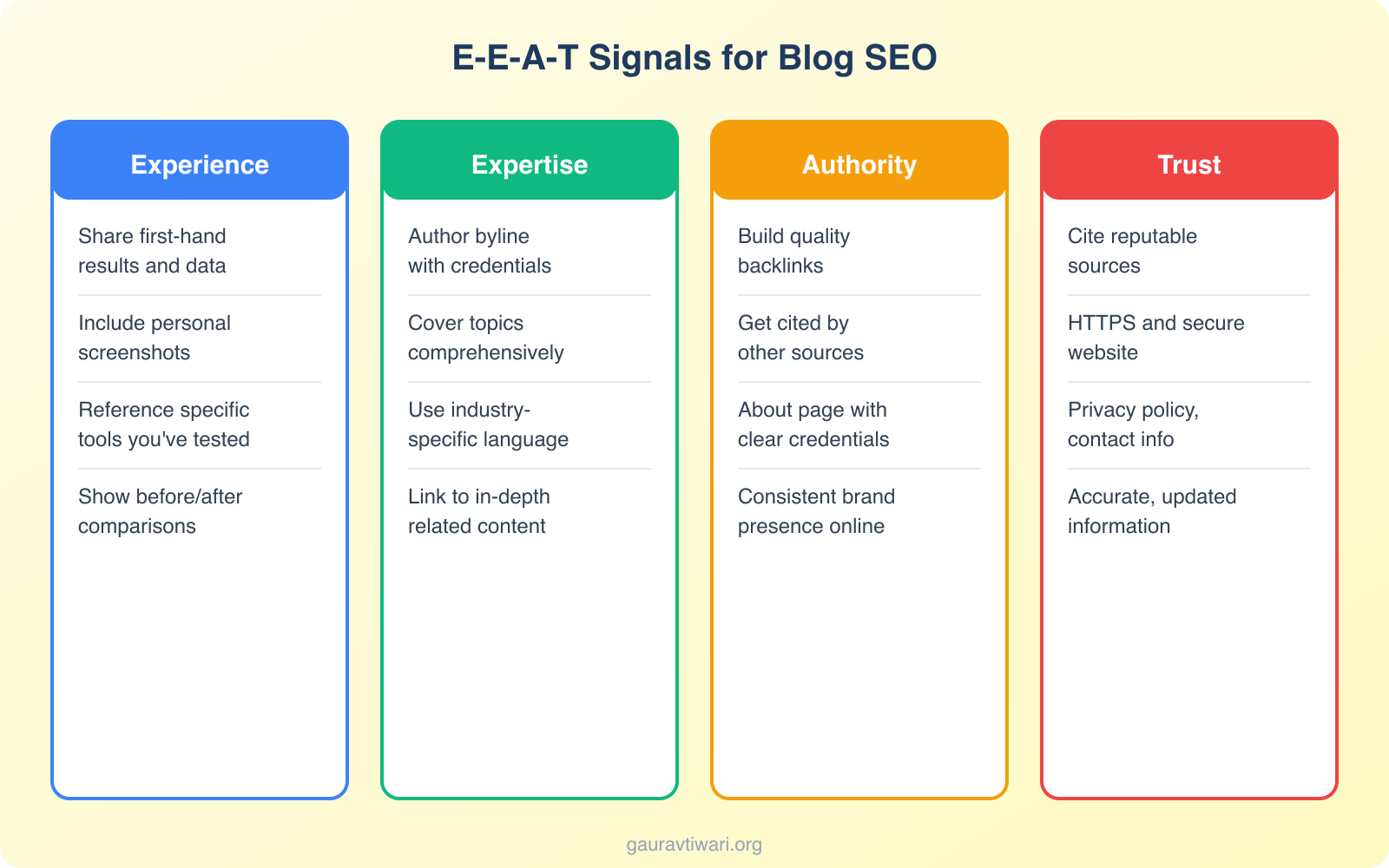
E-E-A-T stands for Experience, Expertise, Authoritativeness, and Trustworthiness. Google’s quality raters use these signals to evaluate content quality, and they influence rankings, especially for YMYL (Your Money, Your Life) topics.
Here’s how I build E-E-A-T into every blog post:
- Show first-hand experience – Don’t just list tips. Share what you’ve actually done, tested, or built. “I tested this on 12 client sites” beats “experts recommend” every time
- Author byline with credentials – Every post should have a visible author with a bio that establishes relevance
- Link to authoritative sources – Back your claims with data from reputable sources like Google, industry studies, or academic research
- Update regularly – Fresh content signals ongoing expertise. Posts updated in the last 6-12 months rank better
- About page matters – Google crawls your About page to understand who’s behind the content
The “Experience” part of E-E-A-T is what separates human-written content from AI slop in 2026. When I write about WordPress SEO, I can reference specific plugin configurations I’ve tested and real traffic changes I’ve measured. That’s something no AI can fabricate, and Google knows the difference.
6. Write Click-Worthy Title Tags
Your title tag is the first thing people see in search results. If it doesn’t get clicks, rankings don’t matter.
My formula for title tags:
- Include the primary keyword (ideally near the beginning)
- Add a power modifier (best, complete, proven, step-by-step)
- Include a number when it makes sense (14 ways, 7 steps)
- Keep it under 60 characters so it doesn’t get truncated
- Create curiosity without being clickbait
I use Rank Math to preview how my title tags appear in search results. It also scores your SEO setup in real-time, which keeps you from forgetting the basics. For on-page SEO management, it’s the best WordPress plugin I’ve used.
7. Optimize Meta Descriptions
Meta descriptions don’t directly affect rankings, but they directly affect click-through rates. And CTR does influence rankings indirectly.
A good meta description:
- Summarizes what the post delivers
- Includes the primary keyword naturally
- Stays under 155 characters
- Includes a benefit or outcome (what the reader gets)
- Has a soft call to action
I’ve rewritten meta descriptions for client sites and seen CTR jump 15-30% within weeks. Google highlights matching keywords in bold, so including your target keyword is essential.
8. Use Headings Strategically
Headings aren’t just formatting. They’re structural signals that tell Google what your content is about.
My heading rules:
- One H1 per page (your post title)
- H2s for main sections – Each should address a distinct subtopic
- H3s for subsections – Use under H2s for deeper detail
- Include keywords in H2s – But naturally, not forced
- Use question-format headings – These match “People Also Ask” queries and help win featured snippets
Someone skimming your post should understand the full picture just by reading the headings. If they can’t, your structure needs work.
9. Make Paragraphs Shorter
Wall-of-text blog posts kill engagement. I’ve seen bounce rates drop by 20% simply by breaking long paragraphs into 2-3 sentence chunks.
My rule: no paragraph longer than 4 lines on desktop. That’s roughly 2-3 sentences.
Short paragraphs create visual breathing room. They make content feel fast and easy to read. And on mobile, where most reading happens now, short paragraphs are essential.
Look at how I’m writing this article. Short paragraphs. Clear sentences. One idea per paragraph. It works.
10. Add Visual Elements to Your Posts
A blog post with no images feels incomplete. Visual elements break up text, illustrate concepts, and improve engagement metrics that Google watches.
I add a visual element every 300-400 words. This can be:
- Custom screenshots (with annotations)
- Infographics or charts
- Comparison tables
- Embedded videos
- Code snippets (for technical content)
One important detail: use custom images, not stock photos. A study by Reboot Online found that pages with original images ranked better than those with stock photos. Google can tell the difference.
Always add descriptive alt text to your images. It helps with accessibility and gives you another opportunity to include relevant keywords naturally.
11. Do Internal Linking the Right Way
Internal linking is one of the most underused SEO tactics. Most bloggers only link from new posts to old posts. That’s half the equation.
Here’s what you should do:
- Link new posts to relevant old posts – Standard practice
- Link old posts to new posts – This is the step most people skip. Go back to existing high-authority posts and add links to your new content. This passes link equity and helps Google discover new pages faster
- Use descriptive anchor text – “Click here” tells Google nothing. “getting started with SEO” tells Google exactly what the target page is about
- Eliminate orphan pages – Every post on your site should have at least 3 internal links pointing to it
I audit internal links monthly. When I publish a new post, I immediately add links to it from 3-5 related existing posts. This single habit has improved indexing speed and rankings for new content significantly.
12. Optimize Your URL Structure
Clean URLs help both users and search engines understand what your page is about.
My URL rules:
- Include the primary keyword
- Keep it short (3-5 words ideally)
- Use hyphens, not underscores
- Remove stop words (a, the, and, of)
- Make it descriptive – Someone should guess the topic from the URL alone
Bad URL: /p=12345 or /blog/2024/01/15/how-to-optimize-your-blog-posts-for-seo-complete-guide
Good URL: /optimize-blog-posts-for-seo
Once a post is published and indexed, never change the URL unless absolutely necessary. If you must, set up a 301 redirect.
13. Content Freshness Signals
Google favors fresh content, especially for topics that evolve. In 2026, content freshness is a real ranking factor for most informational queries.
Here’s how I keep my content fresh:
- Update statistics and data – Replace outdated numbers with current ones
- Add new sections – When a topic evolves (like AI search), add new H2 sections to existing posts
- Fix broken links – Dead links signal neglected content to Google
- Update screenshots – If a tool’s interface has changed, update the screenshots
- Revise the publication date – If the update is substantial, update the last-modified date
- Add a “Last Updated” notice – This builds trust with readers and signals freshness to Google
I revisit my top-performing posts every 6 months. A 30-minute update often recovers traffic that has dropped. Some of my oldest posts still rank on page one because I keep them current. Content that stagnates eventually drops.
14. Make Your Content Comprehensive
Comprehensive doesn’t mean long for the sake of being long. It means covering the topic thoroughly enough that a reader doesn’t need to go back to Google for more information.
A study by Backlinko found that longer content tends to rank higher. But length alone isn’t the factor. It’s completeness.
My approach:
- Cover every relevant subtopic – If the top 10 results all mention a subtopic, include it
- Answer related questions – Check “People Also Ask” and include those answers
- Add unique insights – Share something competitors don’t, whether it’s data, experience, or a contrarian take
- Use supporting content types – Tables, lists, embedded videos, and custom graphics all add depth
The goal is to be the last page someone visits for that query. If your post satisfies the search completely, Google rewards you with higher rankings and better engagement signals.
Bonus: Back Every Claim With Evidence
This tactic separates credible content from generic advice. Every claim you make should be backed by a source, whether that’s a study, your own data, or a screenshot.
When I write “short paragraphs reduce bounce rates,” I link to a source or reference my own data. This does three things:
- Builds trust with readers
- Strengthens your E-E-A-T signals
- Creates outbound links to authoritative sources, which Google appreciates
It takes extra time to find and link sources. But it’s the difference between content that Google trusts and content it doesn’t.
The Blog SEO Checklist
Before I hit publish on any blog post, I run through this checklist. If you’re using Rank Math, most of these are flagged automatically in the SEO analysis panel.
- Primary keyword in the title tag, H1, and first paragraph
- Meta description written with a benefit and keyword
- URL is short, descriptive, and contains the keyword
- Headings are structured properly (H2, H3) with keywords
- Images have descriptive alt text
- Internal links (3-5 minimum) to related posts
- External links to authoritative sources
- Query is answered in the first 150 words
- Content is comprehensive (covers all subtopics)
- Paragraphs are 2-3 sentences maximum
- Visual element every 300-400 words
- Mobile-friendly formatting
- FAQ section at the end
- Author byline with credentials
Treat this checklist as non-negotiable. Skip a step, and you leave ranking potential on the table.
SEO for New Blogs vs Established Blogs
The SEO playbook changes depending on where your blog is in its lifecycle.
New blogs (0-50 posts, under 6 months old): Focus on low-competition long-tail keywords. Target queries with fewer than 1,000 monthly searches where smaller sites rank on page one. Build topical clusters: write 10-15 articles around a single topic before moving to the next. Internal linking between these cluster articles builds authority faster than publishing randomly across topics. Do not chase high-volume keywords yet. You will not rank for them.
Established blogs (100+ posts, 1+ year old): Focus on updating and improving existing content. Check Google Search Console for keywords where you rank on positions 5-20 and improve those pages. Add internal links from high-authority pages to newer content. Target medium-competition keywords that your domain authority can now support. Content refreshes (updating data, adding new sections, improving structure) often produce faster ranking improvements than publishing new posts.
How to Update Old Blog Posts for SEO
Updating existing content is the highest-ROI SEO activity for established blogs. A refreshed post that already has backlinks and authority can jump from page 2 to page 1 with targeted improvements.
- Check Google Search Console. Find posts ranking on positions 5-20 that get impressions but few clicks. These are your best update candidates.
- Update the publish date. Change the date to the current date after making substantial updates. Google notices freshness signals.
- Add new sections. Cover subtopics that competitors have added since you originally published. Check what the current top 3 results cover that you do not.
- Improve the intro. Make the first 2-3 sentences directly answer the search query. Google often pulls featured snippets from the opening paragraph.
- Add internal links. Link to newer articles you have published since the original post went live. Link from your highest-traffic pages to the updated post.
- Update data and examples. Replace outdated statistics, screenshots, and pricing with current information. Outdated data signals to both readers and Google that the content is stale.
Image SEO: Naming and Optimizing Images for Search
Image SEO is one of the most overlooked on-page optimizations. Google Image Search drives meaningful traffic to many blogs, and properly optimized images improve your overall page SEO.
- File name matters. Rename images before uploading.
flyingpress-core-web-vitals-results.pngis better thanIMG_4382.png. Use hyphens between words, not underscores. Include the target keyword if it fits naturally. - Alt text is required. Every image should have descriptive alt text that explains what the image shows. “FlyingPress dashboard showing cache settings” is good. “Image” or “screenshot” is useless.
- Compress before uploading. Large images slow down your page. Use ShortPixel, Imagify, or FlyingPress’s built-in image optimization to compress images to WebP or AVIF format.
- Use descriptive captions when relevant. Google can read captions and uses them to understand image context. Captions are not required on every image, but they help on screenshots, charts, and data visualizations.
- Lazy load below-the-fold images. Only load images when they scroll into view. WordPress does this natively since version 5.5, and caching plugins like FlyingPress enhance it further.
How to Submit Your Website to Google
Google crawls and indexes most websites automatically, but submitting your site speeds up the process and gives you control over what gets indexed.
- Set up Google Search Console. Go to search.google.com/search-console, add your site, and verify ownership (DNS verification is the easiest method).
- Submit your XML sitemap. In Search Console, go to Sitemaps and enter your sitemap URL (usually
yoursite.com/sitemap_index.xmlif you use Rank Math or Yoast). This tells Google about all your pages. - Use URL Inspection for new pages. After publishing a new post, paste its URL into the URL Inspection tool in Search Console and click “Request Indexing.” Google typically indexes the page within hours instead of waiting days for a natural crawl.
- Check for indexing issues. The Coverage report in Search Console shows which pages are indexed, which have errors, and which are excluded. Fix errors (404s, redirect loops, noindex tags) to ensure Google can index your important pages.
Every WordPress blog should have Google Search Console connected from day one. It is free, takes 5 minutes to set up, and gives you direct data from Google about how your site performs in search.
Frequently Asked Questions
How long should a blog post be for SEO in 2026?
There is no magic word count. The right length is whatever it takes to cover the topic completely. That said, most posts ranking on page one are 1,500-3,000 words. For competitive topics, 2,500+ words is common. Focus on comprehensiveness, not hitting a word count target.
How often should I update old blog posts?
Review your top-performing posts every 6 months. For time-sensitive topics (tools, trends, statistics), update quarterly. For evergreen content, annual updates are usually sufficient. Focus updates on posts that have lost traffic, as these benefit most from refreshing.
Does AI-generated content rank on Google?
Google has said it does not penalize AI content specifically. What it penalizes is low-quality, unhelpful content regardless of how it was created. In practice, pure AI content without human editing, original insights, or first-hand experience struggles to rank for competitive keywords. The best approach is using AI as a drafting tool, then adding your own expertise, examples, and voice.
What is the best SEO plugin for WordPress?
I use and recommend Rank Math. It handles title tags, meta descriptions, schema markup, sitemaps, redirects, and on-page analysis in one plugin. The free version covers everything most bloggers need, and the pro version adds advanced schema types and rank tracking. It replaced Yoast on all my sites and I haven’t looked back.
How do I optimize for Google’s AI Overviews?
Focus on clear, structured answers at the top of your content. Use numbered lists, tables, and concise definitions that AI can easily parse. Include specific data points and cite credible sources. Pages that already rank in the top 10 have the highest chance of being cited in AI Overviews, so traditional SEO is still the foundation. Think of AI optimization as an additional layer on top of solid SEO fundamentals.
Final Word
Optimizing blog posts for SEO isn’t a one-time task. It’s a discipline. Every post you publish should go through these 14 steps. And your best-performing posts should be revisited and updated regularly.
The bloggers who rank consistently aren’t doing anything magical. They’re just more disciplined about optimization than everyone else. They research before writing. They structure content for both humans and search engines. They update what’s already working.
Start with keyword research. Build a solid outline. Answer the query early. Add E-E-A-T signals. Format for AI search. And never stop improving your published content.
That’s the formula. It works. If you have questions about any of these tactics, find me on X @wpgaurav.
Disclaimer: This site is reader-supported. If you buy through some links, I may earn a small commission at no extra cost to you. I only recommend tools I trust and would use myself. Your support helps keep gauravtiwari.org free and focused on real-world advice. Thanks. - Gaurav Tiwari