
 by
by
Beautiful notes can still be useless notes. If you copy a lecture, color every heading and never try to recall an idea with the notebook closed, the page looks tidy but the learning stays weak.
The five note-taking methods worth learning first are Cornell, outlining, mapping, charting and sentence notes. My default for an ordinary lecture is Cornell, because it turns one page into both a record and a review tool. Still, no single method wins everywhere, and the material you’re studying should pick the method.
Longer lists of 7 or 10 methods usually add three more names:
- the boxing method, a layout for revision pages
- Zettelkasten, for ideas you want to build on over years
- PARA, a filing system for files and projects
None of them is a fast way to capture a lecture, so I cover them separately below.
Five writable A4 template pages, one per method: Cornell, outline, mapping, charting and sentence notes. Import the PDF into GoodNotes, Notability or Noteful, duplicate a page per lecture or print it at 100% scale. Each of the five methods below also links to its own single-page template.
Which Note-Taking Method Should You Use?
You should choose a method by the shape of the information and what you’ll do with it later. Cornell is the safest general option. Switch only when another structure clearly saves work or makes the connections easier to see.
| Method | Best for | What it gives you | Main limitation |
|---|---|---|---|
| Cornell | Lectures and exam review | Notes, cues and a summary on one page | Needs a processing pass after class |
| Outline | Clear hierarchies | Main ideas with indented supporting points | Breaks when the speaker jumps around |
| Mapping | Processes and connected concepts | A visual network of relationships | Runs out of room for precise detail |
| Charting | Repeated categories and attributes | Fast side-by-side comparison | Requires predictable columns |
| Sentence | Fast or unstructured lectures | One captured point per line | Needs cleanup before it becomes useful |
The University of Tennessee at Chattanooga teaches the same five classic methods. What most guides leave out is a rule for choosing between them, so the graphic below gives you one.
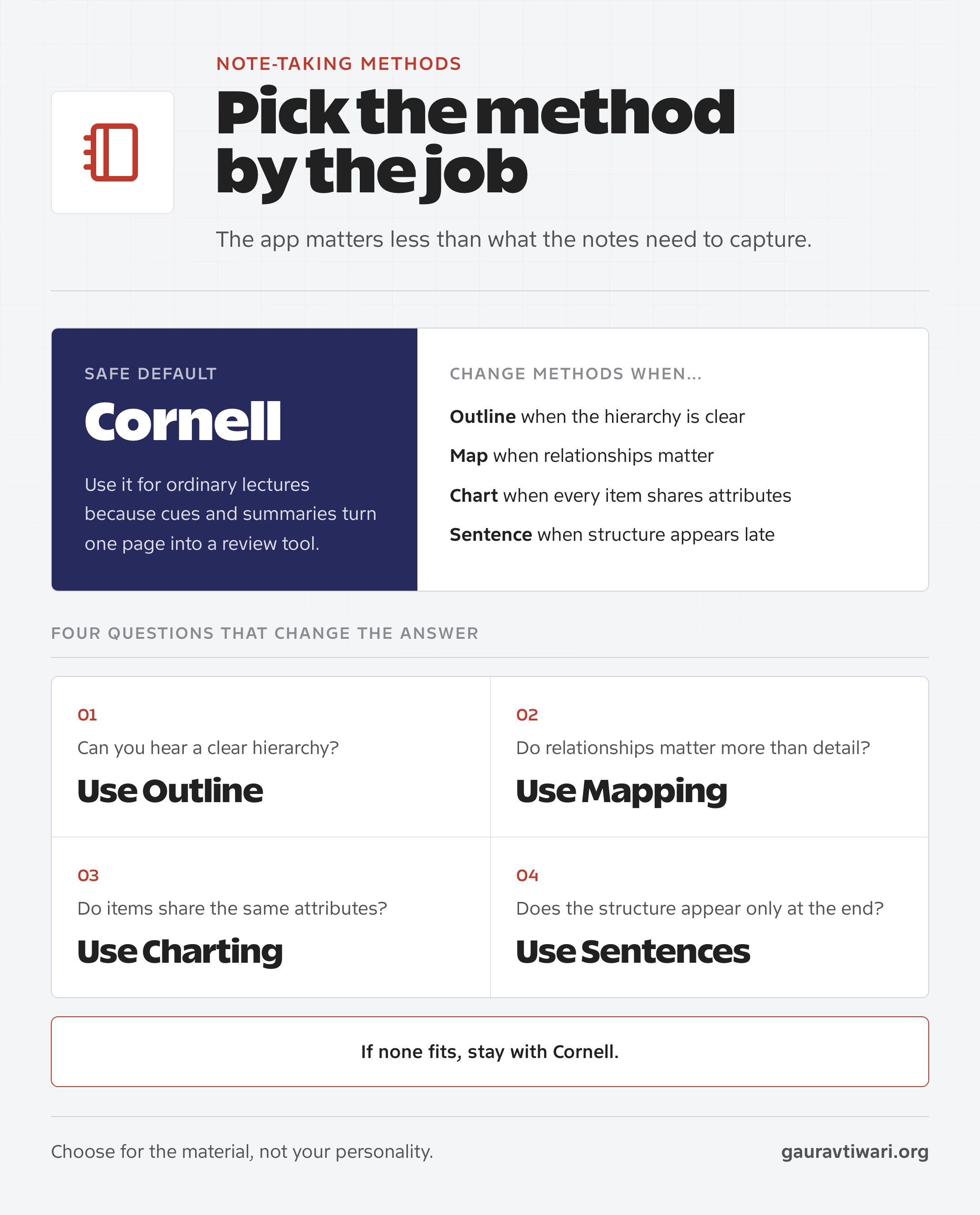
If you are still unsure, start with Cornell for one week. A boring method you process and review will beat an elaborate system you abandon after two classes.
Cornell Method
The Cornell Method works best when you need to capture a lecture and turn the same page into a study tool. Walter Pauk, a Cornell University education professor, developed the format and described it in How to Study in College.
Divide the page into a large notes area, a narrower cue column and a summary area at the bottom. Capture the lecture in the main area. After class, convert important points into questions or cue words, then write a short summary.
How to Use Cornell Notes
The format earns its keep only when you use the cue column. Otherwise, it is ordinary linear note-taking with two decorative lines drawn around it.
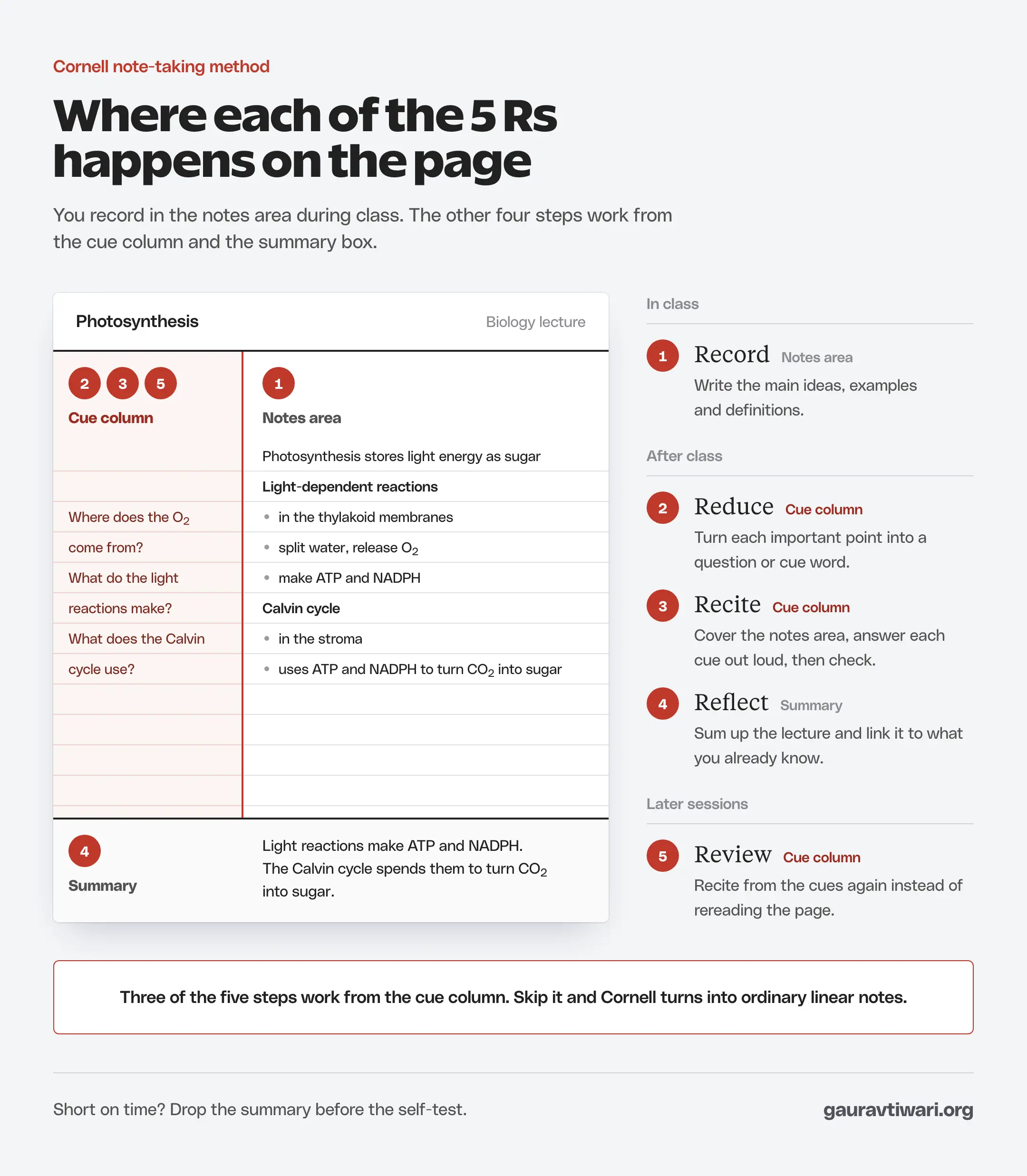
Pauk called the routine the 5 Rs, and each step has a job:
- Record: write the main ideas, examples and definitions in the large notes column during the lecture.
- Reduce: after class, turn each important point into a question or cue word in the left column.
- Recite: cover the notes column and answer each cue out loud in your own words, then check yourself.
- Reflect: write a short summary at the bottom and note how the lecture connects to what you already know.
- Review: come back to the cues in later sessions and recite again instead of rereading the page.
Recite is the step with the strongest research behind it. A large review of 10 study techniques by John Dunlosky and colleagues put practice testing among the 2 most useful. Summarizing landed in the low group, helpful for some students in limited conditions.
Reciting from cues is practice testing. So if time runs short, you should drop the summary before you drop the self-test.
Cornell’s Learning Strategies Center recommends trying different methods and deciding which work best in different situations. That is better advice than forcing Cornell onto every subject.
- Use Cornell for: lecture-heavy courses, exam preparation, definitions and material that can become self-test questions.
- Skip Cornell when: the content is mostly diagrams, comparisons, equations or a fast discussion with no visible structure.
- Common failure: filling the main column and never writing cues or a summary.
If you want the layout ready-made, download the Cornell notes template (PDF). It is a writable A4 page with the cue column, notes area and summary box already drawn, and it works in GoodNotes, Notability, Noteful or on paper.
Outline Method
Outlining is the fastest method when the lecturer or textbook already follows a clear hierarchy. You put the main idea at the left margin, indent supporting points under it and indent examples or details one level further.
It suits courses built around headings and subheadings, for example:
- history surveys
- law and business courses
- literature classes
- any textbook chapter with a clear heading structure
Review is easy too, because each top-level point can become a question.
Outline Example
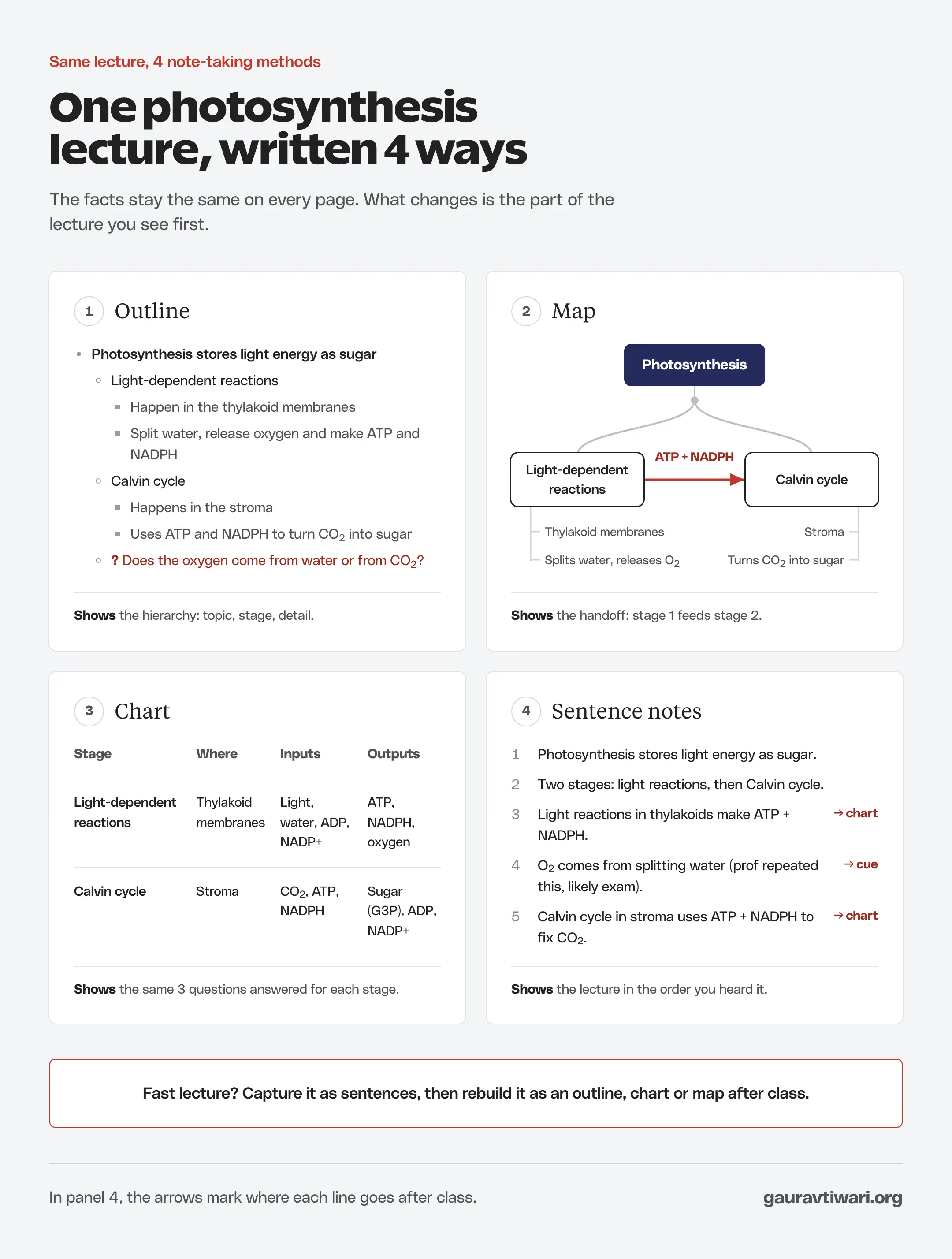
Here is a short stretch of a biology lecture on photosynthesis written as an outline. I’ll use the same lecture for the other methods, so you can see how each one changes the page.
- Photosynthesis stores light energy as sugar
- Light-dependent reactions
- Happen in the thylakoid membranes
- Split water, release oxygen and make ATP and NADPH
- Calvin cycle
- Happens in the stroma
- Uses ATP and NADPH to turn CO2 into sugar
- ? Does the oxygen come from water or from CO2?
- Light-dependent reactions
The question mark flags something you didn’t catch. It tells you where to start when you review, and in this case the answer is water.
The weakness is structural dependence. Say the professor moves from an example to a theory, back to a definition and then into a side story. You’ll spend more attention repairing the hierarchy than understanding the lecture, so switch to sentence notes and reorganize after class.
The outline notes template (PDF) adds three faint indent guides to the ruled page, so your levels stay consistent from lecture to lecture.
Mapping Method
Mapping works when the value sits in relationships rather than sequence. Put the central concept in the middle or at the top, connect major branches, then add examples, causes, effects, stages or exceptions around them.
I’d use mapping for topics where one change affects several other parts, for example:
- biological cycles
- economic systems
- schools of philosophy
- network architecture
For the photosynthesis lecture, a map would put photosynthesis in the center and the two stages on branches. An arrow would carry ATP and NADPH from the first stage into the second. That arrow carries the key idea of the lecture, and a map makes it hard to miss.
- Best use: systems, cycles, cause-and-effect chains, taxonomies and revision overviews.
- Limit: maps compress detail, so they are poor records of exact wording, formulas, dates or long examples.
- Practical rule: capture the lecture first if it moves quickly, then build the map as a review exercise.
If you want a digital canvas, my guide to the best mind-mapping apps compares tools for individual study and team work. But paper is enough to learn the method.
For handwritten maps, the mapping canvas template (PDF) gives you a full-page dot grid with a central concept node to branch from.
Charting Method
Charting is the right method when every item can be judged against the same attributes. Create the columns first, then add one item per row as the lecture or reading progresses.
The photosynthesis lecture fits a chart because both stages answer the same questions: where it happens, what goes in and what comes out.
| Stage | Where | Inputs | Outputs |
|---|---|---|---|
| Light-dependent reactions | Thylakoid membranes | Light, water, ADP, NADP+ | ATP, NADPH, oxygen |
| Calvin cycle | Stroma | CO2, ATP, NADPH | Sugar (G3P), ADP, NADP+ |
Other material that charts well:
- chemical elements by group and properties
- historical events by date, cause and consequence
- literary characters by motive and conflict
- theories by assumptions and limitations
A chart earns its columns only when you’ll read across them. If each row needs a different set of fields, an outline or sentence notes will serve you better.
- Best use: repeated categories, pros and cons, timelines with shared fields and exam questions that ask you to compare.
- Limit: a new category introduced halfway through can force you to redraw the chart.
- Setup trick: preview the chapter or lecture slides so you can choose the columns before class.
The charting grid template (PDF) has a writable header row and ten item rows, so you can set the columns during your pre-class preview.
Sentence Method
The Sentence Method captures one idea per line when you cannot yet see how the lecture fits together. It is deliberately temporary. You collect clean units first and impose structure after you understand the whole session.
Number each line or leave space between ideas. Use abbreviations, mark examples and flag questions. After class, group related sentences under headings, convert comparisons into a chart or move connected ideas into a map.
As sentence notes, the first minutes of that photosynthesis lecture might read like this:
- Photosynthesis stores light energy as sugar.
- Two stages: light reactions, then Calvin cycle.
- Light reactions in thylakoids make ATP + NADPH.
- O2 comes from splitting water (prof repeated this, likely exam).
- Calvin cycle in stroma uses ATP + NADPH to fix CO2.
After class, lines 3 and 5 belong in a chart, and line 4 becomes a cue question.
- Best use: fast lectures, discussions, guest talks and speakers who reveal the main structure late.
- Limit: the page is hard to review until you reorganize it.
- Failure mode: treating the rough capture as the finished study material.
The sentence notes template (PDF) numbers 25 capture lines and includes the question, exam and example marks for the cleanup pass after class.
Boxing Method
The boxing method puts each subtopic in its own box on the page, usually with a short label. Goodnotes says one of its users coined the name.
Boxing works best as a revision layout. You read your lecture notes, then rebuild each topic inside a box, so a whole unit fits on one page you can scan before an exam.
I wouldn’t use it for live capture, because drawing boxes while the lecturer keeps talking takes attention you need for listening. No study I know of tests boxing against other methods, so it is best treated as a layout choice.
- Best use: one-page unit reviews and exam revision sheets.
- Limit: slow to draw during a lecture, and boxes run out of room for detail.
Where Zettelkasten and PARA Fit
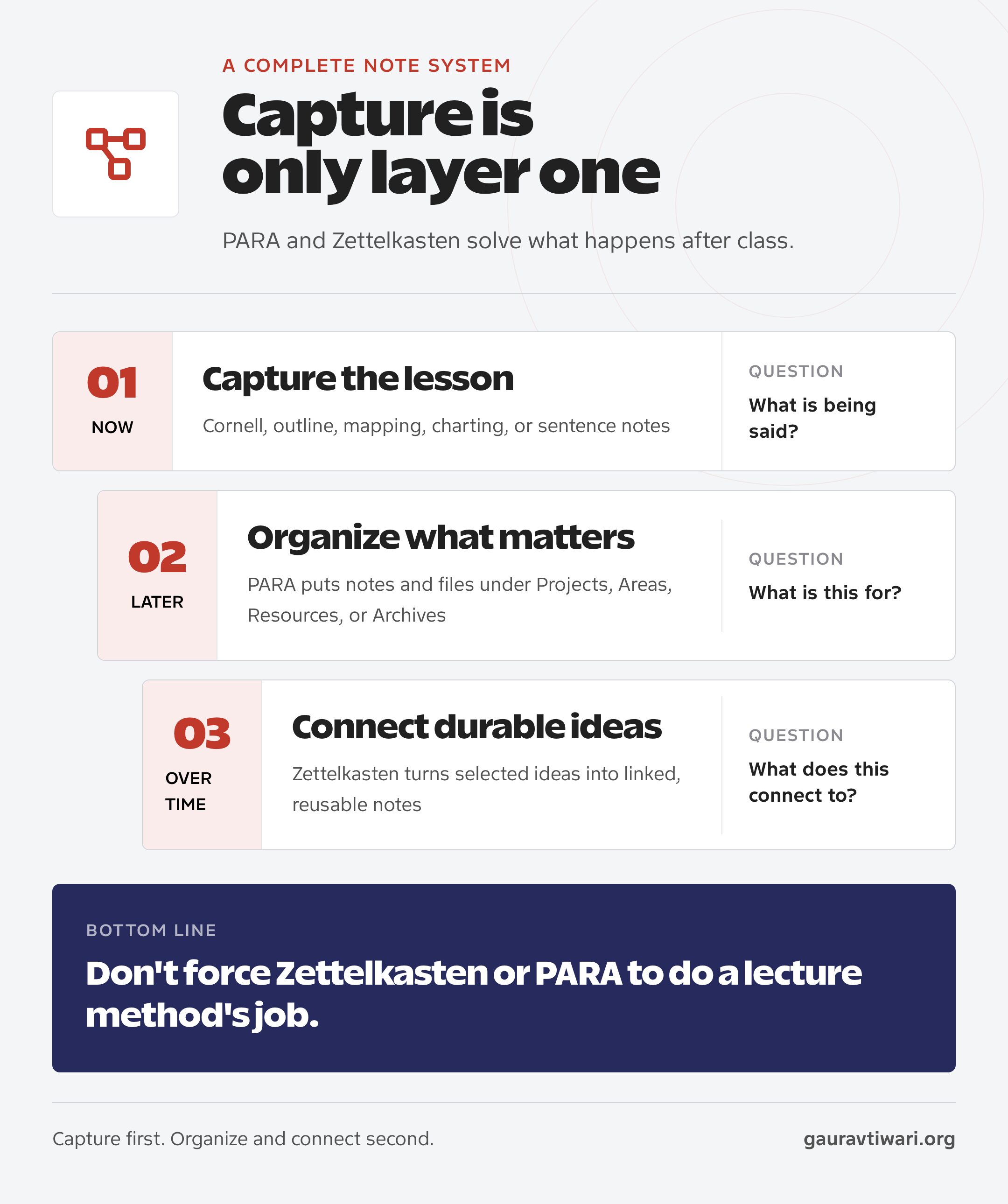
The five note-taking methods in this guide handle capture. Zettelkasten and PARA begin afterward. PARA answers where information belongs, while Zettelkasten answers how a durable idea connects to other durable ideas.
PARA for Organizing
Tiago Forte defines PARA as four top-level categories: Projects, Areas, Resources and Archives. For a student, it might look like this:
- Project: a term paper due this semester
- Area: your major, which needs ongoing attention
- Resource: optional reading on topics you like
- Archive: a finished semester you might revisit
PARA reduces file chaos, but it does not create understanding. You can keep Cornell pages, slides, readings and assignments inside the same project folder and still never test yourself once. If you prefer a database to folders, Notion can run PARA, but the four-category logic works in any file system.
Zettelkasten for Long-Term Thinking
Zettelkasten means slip box. Niklas Luhmann’s version became famous because he used linked paper notes as long-term research infrastructure. The official Niklas Luhmann Archive documents roughly 90,000 notes across 27 drawers, built from the early 1950s to 1997.
That scale is the clue. Zettelkasten is useful for a thesis, research field, book or career-long body of knowledge.
It is usually too slow for routine lecture capture. Take class notes first, then promote only the ideas worth keeping into short, linked notes.
Whether you use paper, Obsidian, Notion or an iPad in 2026, pick the method first and the tool second. My note-taking apps for students guide helps once you know which habit the app has to support.
Should You Type or Handwrite Notes?
Handwriting has a small edge in the newest research. Typing captures far more words. Since the edge is small, your class and your habits should decide the medium.
The research has gone back and forth, which is why you’ll see confident claims in both directions:
| Study | What it tested | What it found |
|---|---|---|
| Mueller and Oppenheimer (2014) | Laptop vs longhand notes, short quiz after a lecture | Laptop notes were more verbatim, and laptop users did worse on conceptual questions |
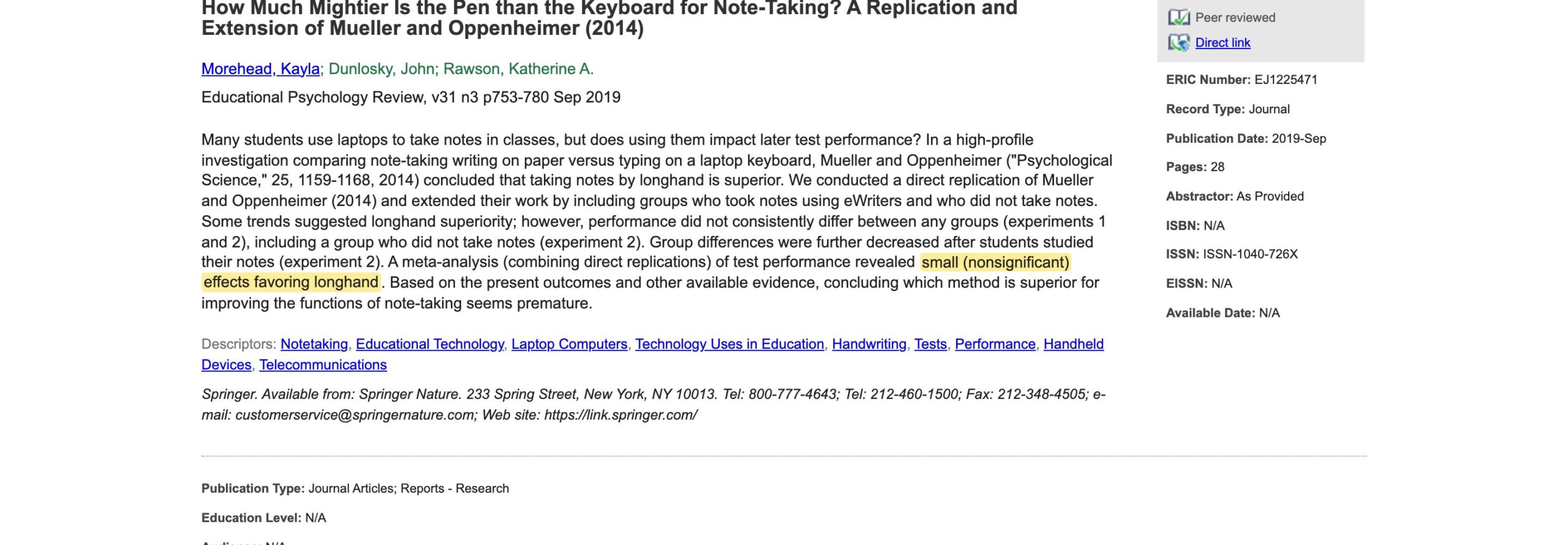
| Morehead, Dunlosky and Rawson (2019) | Two experiments, one with a study session before the test | No consistent difference; a small, nonsignificant edge for longhand that shrank after studying |
| Urry and colleagues (2021) | Direct replication with 142 students, no chance to review | Laptop notes had more words and more verbatim copying; quiz scores did not differ |
| Flanigan and colleagues (2024) | Meta-analysis of 24 studies with college students | A small advantage for handwriting (g = 0.25), larger when students reviewed; typing produced far more notes |
In the 2 replications, the medium made no reliable difference. The 2024 meta-analysis pooled far more studies and found a small, statistically significant advantage for handwriting.
Even the effect of review points both ways. The 2019 study saw the gap shrink after students studied their notes, while the meta-analysis found that review widened it.
So I’d pick the medium by the class:
- Handwrite when diagrams, equations or a distracting laptop are the problem.
- Type when speed, search, accessibility or rearranging matters more.
- Either way, paraphrase instead of copying, because verbatim notes went with worse quiz scores in the original study.
The 2024 meta-analysis covered only college students, and its studies didn’t look at students with disabilities. If handwriting is hard for you, typed notes in your own words are a sound choice.
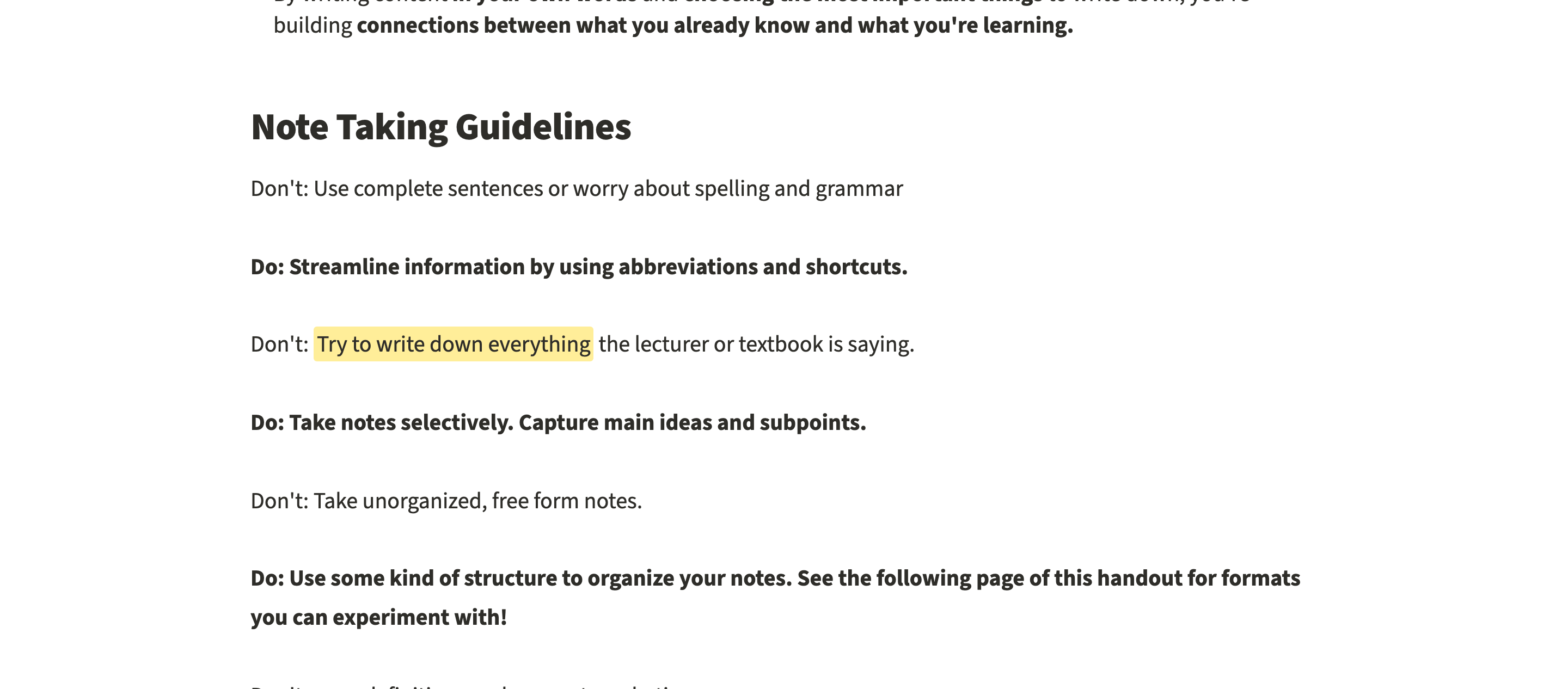
Stanford’s Center for Teaching and Learning puts the useful part plainly: don’t try to write everything, take notes selectively and use your own words.
Whatever you write on, the review step matters more than the pen or the keyboard. Turn headings into questions, cover the answers and explain the idea without looking. My guide to active recall for effective studying shows how to build that step, and the Feynman technique is a good test of whether you can explain it simply.
Note-Taking Workflow for Students
A useful system combines note-taking methods with three stages: capture selectively, process deliberately and recall without looking. Many students stop after the first stage, which is how a full notebook can still leave a blank mind in an exam.
- Before class: preview the topic for a few minutes and choose the page structure. Set up Cornell columns, chart headings or a blank map before the lecture begins.
- During class: capture main ideas, supporting points, examples, definitions and questions. Mark confusion instead of pretending to understand it.
- After class: add cues, summaries, headings, links or missing context while the session is still clear in your mind.
- During review: hide the notes and recall the idea from a cue, question, blank page or practice problem.
- At the end of the course: archive routine material and keep only durable ideas that will support future study, research or writing.
This workflow also explains why app switching rarely fixes bad notes. If you don’t process or recall the information, moving it from Apple Notes to Notion or Obsidian only changes where it is stored.
For the rest of your study system, pair this workflow with the study techniques that actually improve learning. My complete guide to studying effectively shows where notes fit next to spaced review and active recall.
Common Note-Taking Mistakes
Many note-taking failures come from confusing capture with learning. The page feels productive because it is visible. Understanding is harder to see, so students postpone the steps that would reveal gaps.
Trying to Record Everything
Transcription splits your attention and produces a document you could have downloaded. Capture what you can’t rebuild from context:
- the argument
- the structure
- the examples
- the points your professor stresses
Decorating Before Understanding
Color can mark categories, but elaborate headers and perfect lettering can turn into procrastination. Highlighting also rated low in the Dunlosky review. You should use one or two colors with fixed meanings, and if the notes take longer to decorate than to test, the priority is backward.
Collecting Notes Without Recall
A note is not proof that you know something. Test it from memory instead:
- cover the answer and say it
- solve the problem
- explain the process
- draw the map
The discomfort of doing this is useful, because it shows what the page alone can’t.
Switching Tools Instead of Fixing the Method
A new app can feel like progress for a week, but the habits that made the old notes weak come along with you. Change the method first. Move tools only when the current one blocks a real need, for example:
- handwriting on a tablet
- search across a semester of notes
- backlinks between ideas
- PDF annotation
- access across devices
FAQs on Note-Taking Methods
What are the five main note-taking methods?
The five classic methods are Cornell, outlining, mapping, charting and sentence notes. Cornell combines capture and review. Outlining shows hierarchy, mapping shows relationships, charting compares repeated attributes and sentence notes capture fast or unstructured lectures for later cleanup.
What are the 7 note-taking methods?
There is no fixed list of 7. Most lists start from the five classic methods and add names such as the boxing method, Zettelkasten, mind mapping or PARA. Boxing is a revision layout, Zettelkasten is for long-term research notes and PARA is a filing system, so the five classic methods remain the ones for live lectures.
Which note-taking method is most effective for students?
Cornell is the best general starting point because its cue column and summary create a built-in review process. It is not best for every class. Use outlining for clear hierarchies, mapping for connected systems, charting for comparisons and sentence notes when the structure is unclear during the lecture.
What are the 5 Rs of note-taking?
The 5 Rs come from Walter Pauk, who developed the Cornell system: Record, Reduce, Recite, Reflect and Review. You record the lecture and reduce it to cue questions. Then you recite answers with the notes covered, reflect on how the ideas connect to what you know and review the cues regularly instead of rereading.
Which note-taking method is best for STEM subjects?
Use mapping for cycles and connected processes, charting for comparing elements or formulas across fixed attributes and outlining for a well-structured explanation. For mathematics and physics, no note format replaces solving problems yourself. Keep worked examples beside the notes and recall the steps without looking.
Is handwriting better than typing notes?
Slightly, according to the newest evidence. A 2024 meta-analysis of 24 studies with college students found a small advantage for handwritten notes, larger when students reviewed them. Earlier direct replications found no reliable difference. Pick the medium that keeps you paraphrasing and reviewing.
How do people with ADHD take notes?
Start with the method that asks the least of you during class, such as sentence notes with one idea per line or a chart you set up before the lecture. Typing is fine if handwriting slows you down. If live note-taking is still hard, your school’s disability services office can tell you which note-taking accommodations it offers.
Is Zettelkasten useful for college students?
Zettelkasten is useful for a thesis, literature review, research program or subject you expect to study for years. It is usually too slow for live lecture capture. Take class notes first, then promote only durable ideas into linked permanent notes instead of turning every classroom detail into a Zettelkasten card.
Is PARA a note-taking method?
No. Tiago Forte’s PARA method organizes digital information into Projects, Areas, Resources and Archives. It can store Cornell pages, outlines, readings and assignment files, but it does not tell you how to capture a lecture or test your memory. Treat PARA as the filing layer.
How soon should students review their notes?
Do a short processing pass while the lecture is still clear in your mind, ideally the same day. Add cues, questions, a summary, missing context or links. Then revisit the material through active recall across later study sessions, because rereading alone can feel familiar without proving that you can recall the idea.
What is the best note-taking app for these methods?
Pick the method first. Paper works for every method in this guide. Digital tools help when you need search, rearrangement, links or syncing. Obsidian suits linked notes, Notion suits structured databases and general apps handle Cornell or outline templates. An app cannot rescue a method you never review.
What I Would Do Next
Use Cornell in your next ordinary lecture. If the material has an obvious hierarchy, network of connections or set of comparisons, switch to the matching method. Then spend a short session turning the page into questions you can answer without looking.
Do that for one week before changing apps. A note system proves itself when the notebook is closed and you can still explain what you learned.
Tell Google you want more of this.
Add Gaurav Tiwari as a preferred sourceOne tap, and this site shows up more often in your own Top Stories, AI Overviews and AI Mode. Remove it any time.