
 by
by
Fiber internet for business is worth it when upload capacity, predictable latency, repair commitment, or downtime cost matters more than the price difference. It is not an automatic upgrade for every office, and the word “fiber” does not guarantee symmetric speed, low latency, dedicated capacity, or a useful service-level agreement.
My decision rule is simple: price the work that stops when the line fails, measure the busiest simultaneous workload, read the actual upload number and SLA, and test the service at the address. A cheaper cable or fixed-wireless plan can be the better choice for a small or temporary site. A second independent path can matter more than upgrading one circuit from 1 to 2 Gbps.
Quick verdict: choose shared business fiber when your cloud, call, backup, or file-transfer workload needs its upload rate and the address already has service. Price dedicated internet access when you need a committed rate, stronger repair terms, public addressing, or routing control. Choose cable or fixed wireless when the workload fits and installation speed or budget wins. Add failover when one outage would stop the business.
What fiber changes, and what it does not
Fiber changes the access medium between the premises and provider network. Optical signaling supports high capacity over distance and avoids electromagnetic interference. The physics behind refraction is introduced in Snell’s law. The business result still depends on the product, provider design, local equipment, Wi-Fi, routing, peering, destination, and contract.
- Download throughput: how quickly the site can receive cloud data, updates, streams, and downloads.
- Upload throughput: how quickly the site can send backups, video, design files, code, and customer data.
- Latency, jitter, and loss: the delay, variation in delay, and missing packets that affect interactive work.
- Contention: whether the quoted access is shared, oversubscribed, best effort, or backed by a committed rate.
- Availability and repair: how the provider measures service, responds, restores it, and credits failure.
- Premises path: the firewall, switch, Wi-Fi, cabling, power, and endpoint can bottleneck a fast circuit.
The FCC’s fixed-broadband benchmark announcement raised the US fixed-broadband benchmark to 100 Mbps download and 20 Mbps upload in March 2024. That is an availability benchmark, not a business sizing rule. A ten-person office performing light browser work and a ten-person video studio can need completely different upload capacity.
A reproducible directional-link experiment
The useful advantage in this test came from upload, not the fiber label. I sent an 8,000,000-byte deterministic payload through three local TCP shaping profiles on macOS 27.0 arm64 with Python 3.14.5. Each direction ran three times.
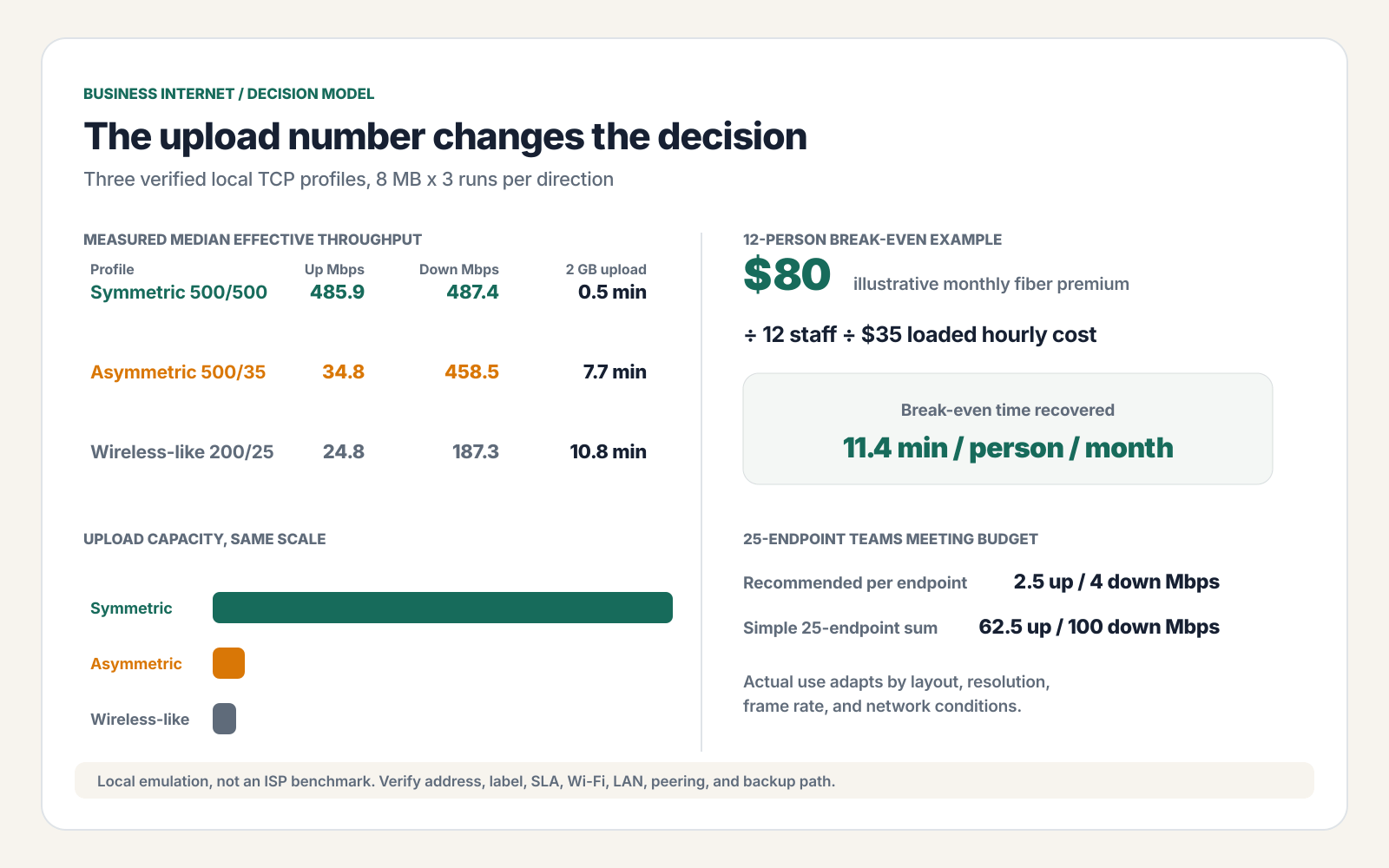
| Local profile | Configured Mbps down/up | Measured median Mbps down/up | 2 GB upload estimate |
|---|---|---|---|
| Symmetric high-capacity | 500 / 500 | 487.43 / 485.91 | 0.5 min |
| Asymmetric cable-like | 500 / 35 | 458.5 / 34.77 | 7.7 min |
| Wireless-like | 200 / 25 | 187.28 / 24.79 | 10.8 min |
- Symmetric result: median effective throughput was 485.91 Mbps up and 487.43 Mbps down.
- Asymmetric result: median effective throughput was 34.77 Mbps up despite 458.5 Mbps down.
- Wireless-like result: median effective throughput was 24.79 Mbps up and 187.28 Mbps down.
- Integrity: every normal run reproduced SHA-256 41d5d8b73695c7f40f6e46e0676765a7bf4c713ea8df045d58ef7b8392ffb5fc.
- Failure: the shaper deliberately dropped an upload after 2,000,000 bytes; the client caught the incomplete transfer and hash failure.
- Rollback: every shaping proxy was closed, all test ports were confirmed closed, and 1,000,000-byte direct upload and download retests reproduced the expected hashes.
The profiles keep rate and delay constant. They do not model radio variation, shared-node congestion, Wi-Fi, routing, peering, or packet loss. The 2 GB times are linear estimates from the measured median effective throughput. This experiment shows why directional rates matter; it does not rank an access technology or provider.
Size business internet from simultaneous work
Add the busiest simultaneous endpoints and background jobs, then leave headroom. Counting devices without counting their work produces a fake requirement.
- Video meetings: Microsoft’s current Teams network guidance lists 2.5 Mbps up and 4 Mbps down as the recommended per-endpoint rate for a meeting, and 4/4 Mbps for best performance. Actual use adapts to layout, resolution, frame rate, and conditions.
- Twenty-five meeting endpoints: a simple recommended-rate sum is 62.5 Mbps up and 100 Mbps down. That is a planning ceiling, not a promise that every endpoint consumes the maximum continuously.
- Cloud backup: divide file bits by effective upload bits per second. The local test estimated a 2 GB upload at 0.5 minutes on the symmetric profile, 7.7 minutes on the asymmetric profile, and 10.8 minutes on the wireless-like profile.
- Voice and point-of-sale: these may use little bandwidth but carry high outage cost. Availability and failover can matter more than gigabits.
- Guest Wi-Fi and updates: separate and rate-limit traffic that should not compete with calls, payment, or core work.
More capacity does not automatically fix contention inside the office. Microsoft’s Teams QoS guidance explains how QoS prioritizes delay-sensitive voice, video, and screen sharing over work that can wait. It must be applied consistently across managed endpoints and network devices.
For working patterns, see how to use video conferences in your business and where workplace collaboration is heading. If the network design is outside your team’s skill set, compare managed IT services that handle installation and maintenance with a clearly scoped installation and support contract.
Read the SLA as a failure contract
An uptime percentage without the measurement window and remedy is decoration. Availability arithmetic helps you compare numbers, but the contract decides what counts.
| Availability | Downtime budget per 30-day month | Per 365-day year |
|---|---|---|
| 99.9% | 43 min 12 sec | 8 hr 45 min 58 sec |
| 99.99% | 4 min 19 sec | 52 min 34 sec |
| 99.999% | 26 sec | 5 min 15 sec |
- Measurement: ask whether availability is measured at the demarcation point, provider core, or another boundary.
- Response and repair: distinguish response time, mean time to repair, restoration target, and a true guarantee.
- Exclusions: read planned maintenance, power, customer equipment, force majeure, construction, and upstream events.
- Remedy: service credits rarely equal lost payroll, sales, reputation, or contractual penalties.
- Diversity: ask whether primary and backup paths share conduit, pole, building entry, power, or upstream provider.
CISA’s backup-system and redundant-provider questions asks whether the backup depends on the same systems and whether a secondary provider is genuinely independent. That is the right question. Two invoices do not prove two failure paths.
Compare current offers without trusting the headline
Compare the rate after promotions, the upload, and the contract at the service address. National pages are only examples because availability, construction, taxes, equipment, term, and discount eligibility vary.
- Verizon Fios example: Verizon’s current Fios Business rate page displayed $69 for 300/300 Mbps, $99 for 500/500, and $149 for service up to 940/880 Mbps before the displayed mobile-bundle discounts on July 29, 2026. Taxes, fees, equipment, term, and address availability still apply.
- Spectrum example: Spectrum’s current business-plan specifications listed 500/20, 750/35, 1,000/50, and select-market 2,000/1,000 Mbps tiers. That table proves why the upload column belongs in every comparison.
- T-Mobile example: T-Mobile’s current business-internet page displayed Small Business Grow starting at $35 and Business Advanced starting at $50. The page also says speeds vary with local network characteristics and management.
- Retail-label check: FCC Broadband Consumer Labels require covered mass-market standalone plans to disclose price, fees, data allowance, typical upload and download speed, typical latency, and contract terms. Enterprise proposals still need their order form and SLA read line by line.
| Option | Best fit | Main limit | Question that decides it |
|---|---|---|---|
| Shared business fiber | Cloud-heavy office needing high upload at moderate price | May be best effort or shared; SLA can be light | What are typical and committed rates at my address? |
| Dedicated internet access | High outage cost, steady two-way traffic, routing needs | Higher price, term, and construction lead time | What failure is covered, how fast is repair, and what is the remedy? |
| Business cable | Strong download need with a modest upload workload | Upload can be much lower than download | Can peak simultaneous upload fit with headroom? |
| 5G fixed wireless | Temporary, light, remote, or backup use | Signal, capacity, and latency can vary | What did a week-long test show at the exact work location? |
Fiber is not a security control
Replace the claim “fiber is secure” with an actual control list. Optical media avoids electromagnetic interference, but physical taps, compromised routers, weak Wi-Fi, stolen credentials, malicious endpoints, and unencrypted traffic remain possible.
- Secure the edge: NIST small-business network-security guidance treats routers and modems as the on-ramp to the business network. Patch them, change defaults, restrict administration, and monitor configuration.
- Encrypt the traffic: use TLS, secure VPN or other appropriate encryption for sensitive data. The access medium does not replace transport or application security.
- Segment: separate staff, guest, payment, IoT, voice, and management networks according to risk.
- Protect identity: require phishing-resistant MFA where supported and remove dormant access.
- Test recovery: document the modem, router, DNS, failover, provider escalation, and restore sequence.
Use these steps with the wider practices to secure your business. A faster circuit can make good controls easier to operate, but it can also move compromised data faster. Capacity is not confidentiality.
The cost threshold: when the premium pays
Turn “worth it” into minutes. Divide the monthly price premium by the number of affected staff and their loaded hourly cost, then convert hours to minutes.
break-even minutes per person per month = monthly premium / (affected staff x loaded hourly cost) x 60
| Affected staff | Illustrative premium | Loaded hourly cost | Break-even time |
|---|---|---|---|
| 5 | $80/month | $35/hour | 27.4 min/person/month |
| 12 | $80/month | $35/hour | 11.4 min/person/month |
| 25 | $80/month | $35/hour | 5.5 min/person/month |
For the twelve-person example, recovering only 11.4 minutes per person per month covers an $80 premium at a $35 loaded hourly cost. That does not prove fiber causes the saving. Measure wait time, failed calls, transfer delay, and outages before and after the change.
A bootstrapped startup should be especially strict about this threshold. Do not buy a 2 Gbps logo when the real bottleneck is weak Wi-Fi, a 100 Mbps switch, a slow VPN, one remote SaaS region, or a process that does not need the capacity.
A procurement and acceptance checklist
Do not accept a circuit because one speed test looked good. Store the quote, label or specification, SLA, route, test evidence, and escalation contacts.
- Before order: record recurring price after promotion, one-time construction, term, early termination, equipment, static IP, taxes, download, upload, committed rate, latency, data policy, SLA, repair, and installation target.
- Before cutover: inventory public IPs, DNS, VPN, allowlists, firewall rules, voice, payment, guest Wi-Fi, and monitoring.
- Acceptance test: use wired endpoints at the demarcation, run multiple upload/download/latency/loss tests at business peaks, and verify the result against the contract.
- Failure test: disconnect the primary path and confirm the promised failover, DNS, payment, voice, VPN, and alerts work.
- Rollback: keep the old path until critical services pass, then document how to reverse route, DNS, and firewall changes.
When fiber internet is not worth it
Skip or defer fiber when the measured problem does not justify the full change. The right answer can be a LAN fix, a smaller plan, cable, fixed wireless, or redundancy.
- Light one-to-three-person office: email, browser, and occasional calls may fit a cheaper plan with tested headroom.
- Short lease or temporary site: construction and term can outlast the location.
- No service at the address: a quoted marketing footprint is not a construction commitment.
- Internal bottleneck: replace 100 Mbps links, bad Wi-Fi placement, overloaded routers, or incorrect QoS before buying more access capacity.
- Availability problem: if the current speed is adequate but outages stop work, buy an independent backup path and power protection before a faster single circuit.
Fiber internet for business: frequently asked questions
Is fiber internet always symmetric?
No. Fiber describes the access medium, not a universal product contract. Many business fiber plans advertise matching upload and download rates, while others use different tiers, best-effort language, or shared capacity. Record the quoted download, upload, typical speed, latency, and committed rate before signing.
How much business internet bandwidth do I need?
Add the simultaneous workloads, not every device’s maximum. Count video endpoints, cloud uploads, hosted voice, point-of-sale, guest traffic, off-site backups, and growth. Microsoft recommends up to 2.5 Mbps up and 4 Mbps down per Teams meeting endpoint, with actual use adapting to layout, resolution, frame rate, and conditions.
Does a 99.9% SLA mean the connection will be down 8.8 hours?
No. The 8 hours 46 minutes figure is the arithmetic downtime budget if availability equals exactly 99.9% over a 365-day year. An SLA is a contract with measurement rules, exclusions, and remedies. It does not schedule downtime or compensate the full business loss.
Is fiber internet secure by itself?
No. Fiber avoids electromagnetic interference and uses optical signaling, but the connection still carries business traffic over network equipment and public or provider infrastructure. Use TLS, VPN or other appropriate encryption, secure routers, segmentation, patching, MFA, monitoring, and tested recovery.
Should I buy dedicated internet access or shared business fiber?
Shared fiber is usually enough when price matters more than a committed information rate and strong repair commitment. Dedicated internet access makes more sense when downtime has a high measured cost, traffic is consistently heavy in both directions, public addressing or routing matters, and the SLA remedies justify the contract. Compare quotes at the same service address.
Can 5G fixed wireless replace fiber for a small business?
Sometimes. It can be fast to install and useful for temporary sites, light workloads, or failover. Capacity, latency, signal, network management, and performance can vary by address and time. Test it at the exact work location and keep a separate failure path if an outage would stop sales or operations.
The decision in one sentence
Buy business fiber when the verified upload, latency, availability, repair, and growth value exceeds the full contract cost, and buy an independent backup when failure matters more than speed.
Start with a wired baseline and a one-week workload inventory. Then request address-specific labels or specifications, compare the upload and SLA, calculate the break-even minutes, and test the failure path before retiring the old connection.
Tell Google you want more of this.
Add Gaurav Tiwari as a preferred sourceOne tap, and this site shows up more often in your own Top Stories, AI Overviews and AI Mode. Remove it any time.