
GT Page Blocks Builder Security
GT Page Blocks Builder security depends on who can edit code and which execution paths the site permits. Nonces protect requests, capabilities control access and PHP has its own opt-in gates.
These controls do not turn arbitrary code into safe content. Treat the builder as a code-authoring tool and keep untrusted code out of pages and library blocks.
Authentication and Authorization
Builder Access
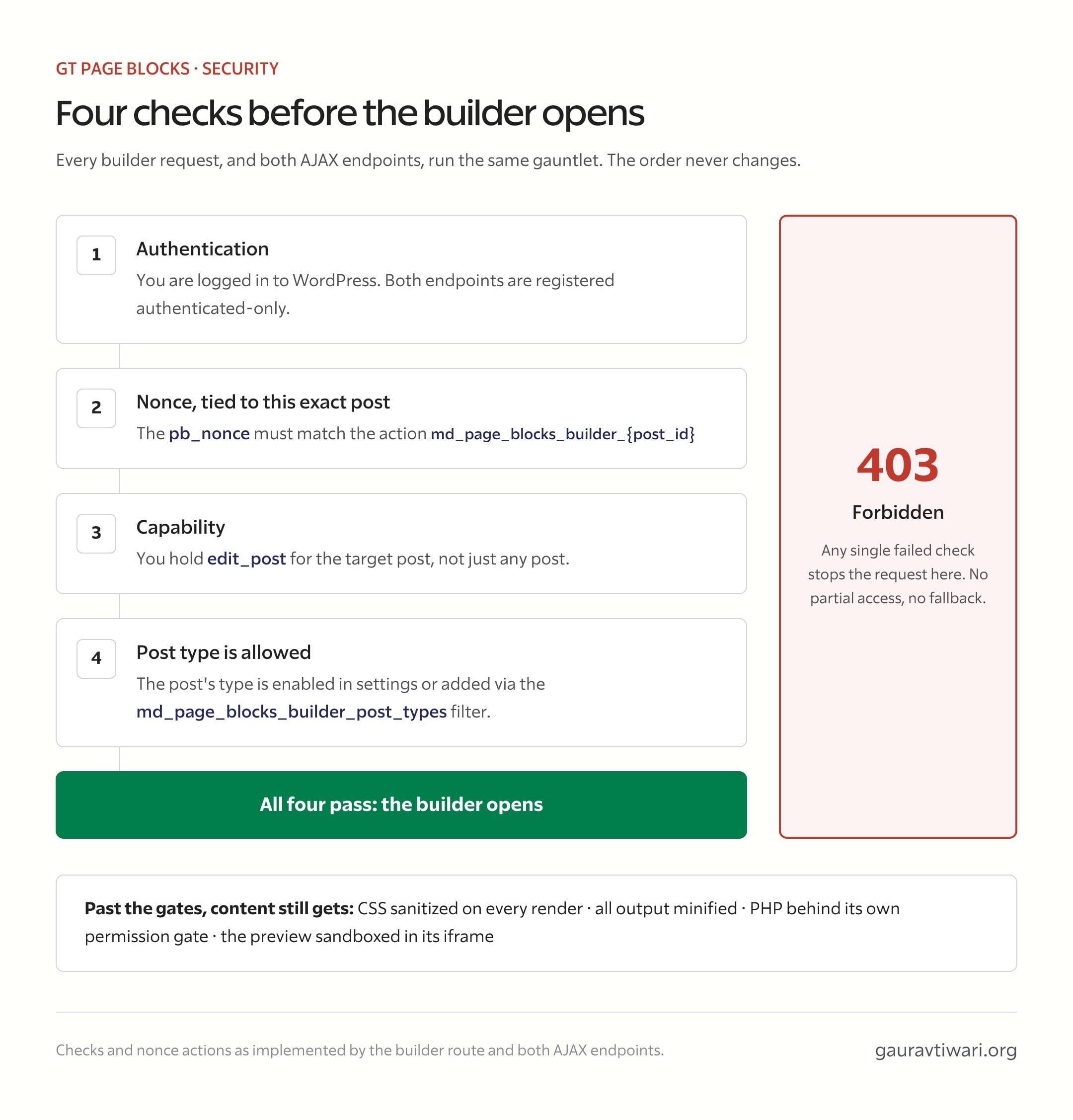
Every visual builder request is validated with three checks.
- Authentication. The user must be logged in to WordPress.
- Nonce verification. The
pb_nonceparameter must be a valid WordPress nonce for the specific post ID. Nonces are generated per-post using the action stringmd_page_blocks_builder_{post_id}. - Capability check. The user must have the
edit_postcapability for the target post.
If any check fails, the builder returns a 403 Forbidden response with a “You do not have permission” message.
AJAX Endpoints
Both AJAX endpoints (md_page_blocks_builder_apply and md_page_blocks_builder_preview) perform the same three checks: authentication, nonce verification, and capability check.
The apply endpoint uses the builder nonce. The preview endpoint accepts either the preview nonce or the builder nonce (since preview can be triggered from both the Gutenberg editor and the visual builder, which use different nonces).
Both endpoints are registered as authenticated-only (wp_ajax_ hooks). Unauthenticated requests never reach the handlers.
Post Type Restrictions
Even with valid authentication and nonce, the builder checks that the target post’s post type is in the allowed list (configured in plugin settings or via the gt_page_blocks_builder_post_types filter).
CSS Sanitization
All CSS output is sanitized to prevent XSS vectors. The sanitization runs on every block render and removes.
javascript:protocol references.expression()function calls (used in older IE for script injection).-moz-binding:declarations (Firefox XBL binding, a historical attack vector).behavior:declarations (IE HTC behavior, another historical attack vector).@import url()withjavascript:ordata:protocols.url()withdata:text/htmlcontent (used for HTML injection).
CSS is also stripped of all HTML tags via wp_strip_all_tags before these replacements.
Content Minification
Minification reduces output size; it is not a security boundary. Do not put secrets in HTML, CSS or JavaScript and rely on comments being removed.
The text transforms preserve significant literals, including CSS data URLs and JavaScript strings. Security still depends on the authoring permissions and execution gates, not on whether the output looks compact.
PHP Execution Security
PHP is off until the site permits it. Library execution uses a matching save-time checksum; inline execution requires a separate opt-in. Administrator permission is also required for PHP previews.
The current filter is gt_pb_can_execute_php. It should not be replaced with an unconditional allow callback. Read the PHP Execution lesson before enabling any gate.
Preview Iframe Sandboxing
The visual preview allows scripts and same-origin resources so the code and theme assets can work. Those allowances mean the iframe is not a safe place to execute hostile same-origin code.
A preview boundary is not a PHP sandbox, and it does not justify accepting scripts from untrusted authors. Keep the trust decision at the point where code is added.
Nonce Generation
The plugin uses two separate nonce actions.
- Builder nonce:
md_page_blocks_builder_{post_id}for builder access and the apply endpoint. - Preview nonce:
md_page_blocks_preview_{post_id}for the preview endpoint.
The preview endpoint accepts both nonce types for compatibility, since previews can be triggered from the Gutenberg editor (which uses the preview nonce) or from within the visual builder (which uses the builder nonce).
Input Sanitization
All input from requests is sanitized.
- Post IDs are cast to integers via
absint(). - Nonces are passed through
sanitize_text_field(). - Section data is JSON-decoded and then normalized through
normalize_builder_section(), which casts all fields to their expected types. - Post type slugs are sanitized with
sanitize_key(). - Template slugs are sanitized with
sanitize_file_name().
License Server Communication
License verification requests are made over HTTPS to the license server. The plugin sends the license key (or activation hash for subsequent checks), the site URL, and the current plugin version. No other site data is transmitted.
Review an Imported File
JSON is a container for code, not proof that the code is safe. The supplied course exports contain their section code in readable fields, matching the inline content described in the Gutenberg block lesson.
- Check
content,cssandjsbefore importing code from another author. - Confirm
phpExecis false for the supplied manual demos. - Look for outbound requests, form endpoints or unfamiliar scripts before adapting a third-party export.
- Keep API keys out of the JSON and page source.
The course demos embed photographs and fonts, so long data URLs are expected. That explains their size; it does not remove the need to review executable JavaScript.
Quick answers to common questions:
Can lower-role users inject scripts through the builder?
Do not assume that a user who can edit a Page Block cannot introduce JavaScript. The builder is a code-authoring surface. Restrict code-authoring access to trusted users, and apply the separate administrator and PHP execution gates described above.
What changed security-wise in the 2.x series?
The attack surface grew (REST API, library blocks, shortcodes), and each addition carries its own checks: pbb/v1 routes require authentication and capability, shortcode rendering respects block status, and migrations are admin-only. The principles from 1.x apply unchanged.