
GT Page Blocks Builder Hooks and Filters
GT Page Blocks Builder hooks and filters let a developer control where sections appear and how the builder behaves. The current public filters use the gt_ prefix; older md_ aliases remain for compatibility.
Keep a customization close to its purpose. A shared footer belongs in a library block, while an extra theme region needs a matching call in the theme.
gt_page_blocks_builder_post_types
Controls which post types the builder is available on.
add_filter( 'gt_page_blocks_builder_post_types', function( $post_types ) {
    $post_types[] = 'product';
    $post_types[] = 'landing_page';
    return $post_types;
} );
Parameters
$post_types(array) – Array of post type slugs. Default includes whatever is configured in the plugin settings (defaults to['post', 'page']).
Return value
An array of post type slugs. The array is sanitized after filtering: each value is passed through sanitize_key, empty values are removed, and duplicates are stripped.
When it runs
This filter runs every time the plugin needs to check allowed post types: when rendering the admin bar link, when validating builder access, and when checking if the Gutenberg block should be available for a post type.
gt_page_blocks_builder_preview_injection
Injects custom HTML, CSS, and JavaScript into the visual builder‘s preview iframe. This is useful for adding framework CSS, custom fonts, analytics scripts, or any other assets that your sections depend on but aren’t part of the theme.
add_filter( 'gt_page_blocks_builder_preview_injection', function( $injection, $post_id ) {
    // Add a custom meta tag to the preview head
    $injection['headHtml'] .= '<meta name="pb-preview" content="1">';

    // Add custom CSS
    $injection['css'] .= '.pb-preview-note { display: none; }';

    // Add a JavaScript variable available in the preview
    $injection['jsHead'] .= 'window.PB_PREVIEW = true;';

    // Load a custom stylesheet
    $injection['headHtml'] .= '<link rel="stylesheet" href="https://example.com/custom.css">';

    // Add HTML at the start of the preview body
    $injection['bodyStartHtml'] .= '<div class="preview-wrapper">';

    // Add HTML at the end of the preview body
    $injection['bodyEndHtml'] .= '</div>';

    // Add JavaScript that runs after all content
    $injection['jsFooter'] .= 'console.log("Preview loaded");';

    return $injection;
}, 10, 2 );
Parameters
$injection(array) – An associative array with these keys, all defaulting to empty strings.headHtml– Raw HTML injected into the<head>of the preview document.bodyStartHtml– Raw HTML injected at the start of the<body>.bodyEndHtml– Raw HTML injected at the end of the<body>.css– CSS injected as an inline<style>tag in the head.jsHead– JavaScript injected as an inline<script>in the head.jsFooter– JavaScript injected as an inline<script>at the end of the body.
$post_id(int) – The ID of the post being edited.
Return value
The modified injection array. All values are cast to strings.
When it runs
This filter runs when the visual builder loads and the injection data is passed to JavaScript as part of the localized script configuration.
gt_pb_can_execute_php
The current execution filter is gt_pb_can_execute_php. It receives the conservative decision, content, stored checksum and a trusted-context flag.
add_filter( 'gt_pb_can_execute_php', '__return_false' );This example disables block PHP execution. A filter that returns true unconditionally overrides the conservative decision and should not be used as a troubleshooting shortcut.
WordPress Standard Hooks
The plugin also interacts with several standard WordPress hooks.
block_categories_all
The plugin adds a “Marketers Delight” block category if it doesn’t already exist. If you’re using the Marketers Delight theme (which already registers this category), the plugin detects the existing category and doesn’t duplicate it.
theme_page_templates
The plugin registers its two page templates (“Page Blocks Builder” and “Full Page Builder”) so they appear in the template selector for all supported post types.
template_include
The plugin intercepts template loading at two levels.
- Priority 0: Checks for the builder route (
?build=page-blocks) and loads the builder shell template. - Default priority: Checks if the post uses a plugin-provided page template and loads it from the plugin’s
templates/directory.
admin_bar_menu
The plugin adds the “Page Blocks Builder” link to the admin bar at priority 80, nested under the “Edit” node when available.
wp_footer
The plugin outputs queued footer scripts during wp_footer at priority 99.
AJAX Actions
The plugin registers two AJAX actions.
md_page_blocks_builder_apply
Saves sections from the visual builder to the post content. Requires a valid builder nonce and edit_post capability.
md_page_blocks_builder_preview
Renders a server-side preview of sections. Requires a valid preview nonce and edit_post capability.
Both actions are authenticated-only (registered via wp_ajax_ hooks, not wp_ajax_nopriv_).
Place a Shared Block
A reusable footer should be maintained in the library when several pages share it. The original Form & Field portfolio and case study demonstrate two placements of the same source.
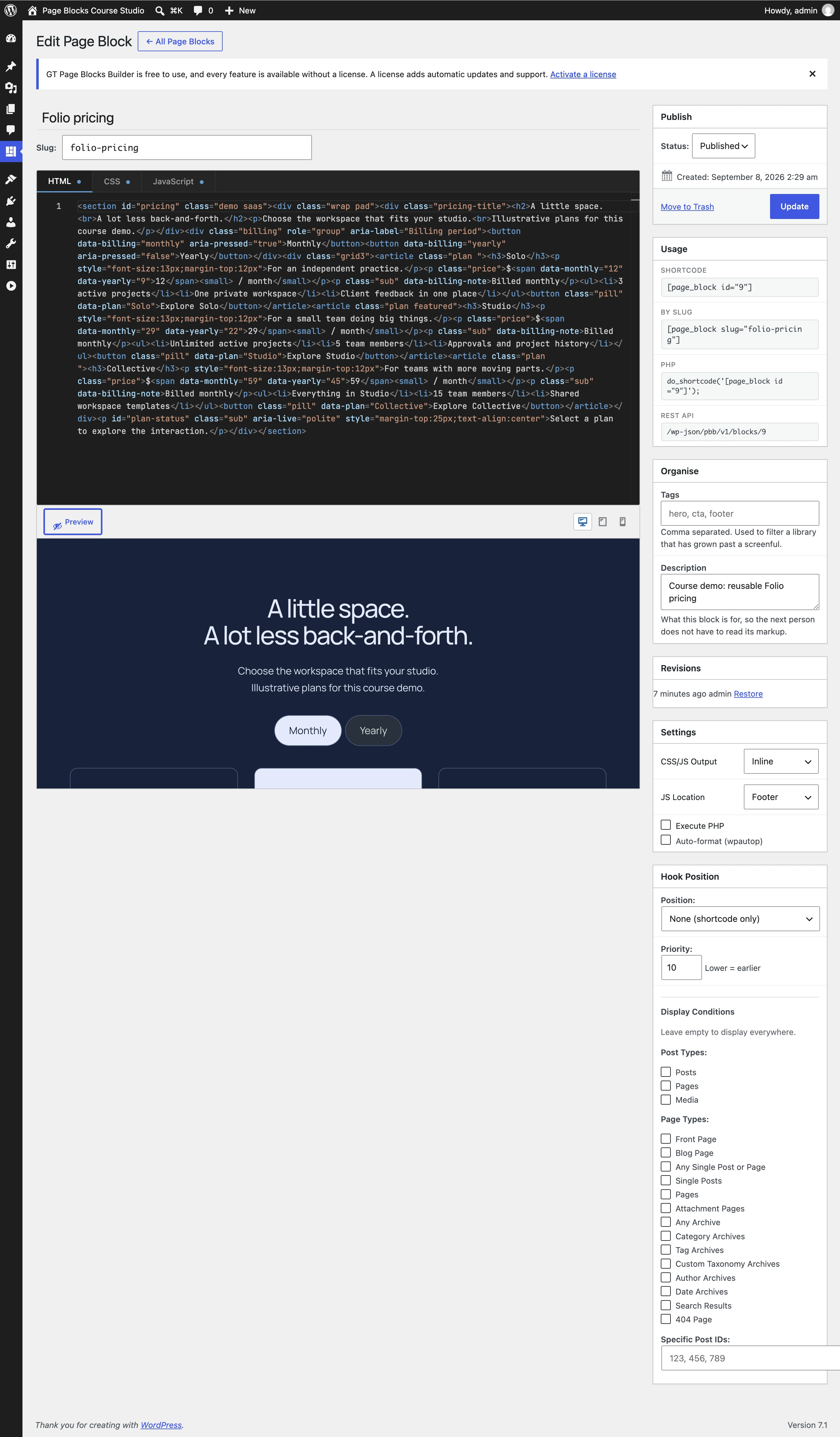
- Use a linked Page Block or shortcode for a placement inside page content.
- Use a hook position and display conditions for automatic placement.
- Use
gt_pb_region()only where the theme calls that region. Merely selecting a region does not add a call to a theme.
<?php
if ( function_exists( 'gt_pb_region' ) ) {
    gt_pb_region( 'footer' );
}
?>
The portable JSON files deliberately contain independent copies. Save the imported footer to your destination library before linking multiple pages to it.
Quick answers to common questions:
How do I enable the builder for a custom post type?
Use gt_page_blocks_builder_post_types to append the post type, or enable it in Page Blocks Settings. That controls frontend builder access. The Gutenberg block remains globally registered.
What are hook positions in 2.6.0?
Library blocks can be assigned to WordPress hooks (wp_head, wp_body_open, wp_footer, loop_start/end, before/after content and more) with priorities, and the plugin renders them there. It’s injection of managed blocks into theme flow without editing templates.