
How to Send Visitors to Their Local Amazon Store
A reader in India who clicks your amazon.com link lands on a store that won’t ship to them, at a price in dollars. Most close the tab, and the click that should have earned you a commission earns nothing on either store.
To send visitors to their local Amazon store, you keep one branded link in your posts and add country rules to it. Readers in India go to amazon.in, readers in the UK go to amazon.co.uk and everyone else goes to the main destination, all from the same /go/ address.
GT Link Manager has these country rules built in. It reads the visitor’s country from a header your CDN or server already sends, so there’s no GeoIP database to download and no lookup service to call on each click.
This guide sets up one link with 3 stores and tests it. Every country setting is described in Geolocation Targeting in GT Link Manager.
Before You Start
Check these first, because country rules depend on them:
- A country header on each request. Cloudflare, CloudFront, Vercel and App Engine send one, and so do nginx and Apache GeoIP modules. Without one, every visitor counts as “unknown” and gets the fallback.
- An Associates account in each store you link to. Amazon runs a separate program per marketplace, so an amazon.in link needs your amazon.in tag.
- An administrator account for the settings, and a branded link to add rules to. How to Cloak and Manage Amazon Affiliate Links in WordPress covers creating one.
On Cloudflare, the country header comes from IP Geolocation. Check that it’s turned on for your zone in the Cloudflare dashboard.
Turn On Country Routing
Country rules are off by default, and links ignore them until you turn the feature on.
- Go to GT Links → Settings.
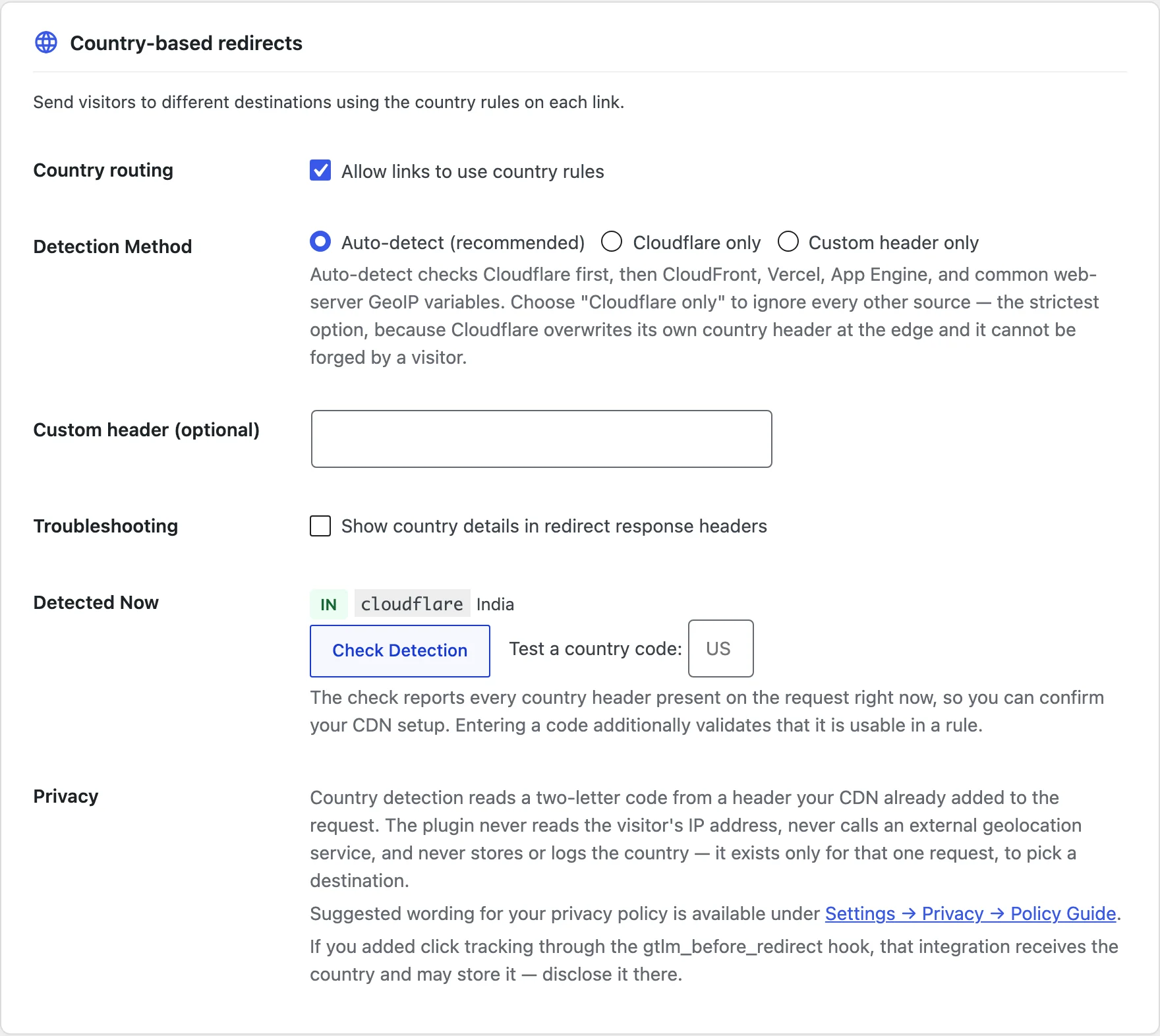
- In the Country-based redirects card, tick Country routing: “Allow links to use country rules”.
- Leave Detection Method on Auto-detect (recommended), or choose Cloudflare only if your site sits behind Cloudflare.
- Click Save settings.
Cloudflare only is the strictest choice. Cloudflare overwrites its own country header at the edge, so a visitor can’t fake it. Auto-detect also checks CloudFront, Vercel, App Engine and common server GeoIP variables, in that order after Cloudflare.
After saving, look at Detected Now in the same card. It should show your own country code and the header it came from. “No country detected” means no header reached WordPress, and the card explains the likely cause.
Add Country Rules to the Link
Open the link under GT Links → All Links → Edit. A new Geolocation row now sits under Category.
- Set Destination URL to the store most of your readers use, such as your amazon.com link. Everyone without a matching rule goes here.
- Change Redirect Type to
302. This step matters, and the next section explains why. - Tick Geolocation: “Send visitors to a different URL based on their country”.
- Click + Add Rule. In When the visitor is in…, pick India, either from the quick picks or by typing “India” in the country filter.
- Paste your amazon.in link, with your amazon.in tag, into Send them to.
- Add a second rule for UK with your amazon.co.uk link.
- Leave each rule’s Status on Inherit, so it uses the link’s 302.
- Under Everyone else, keep The main Destination URL.
- Click Save Link.
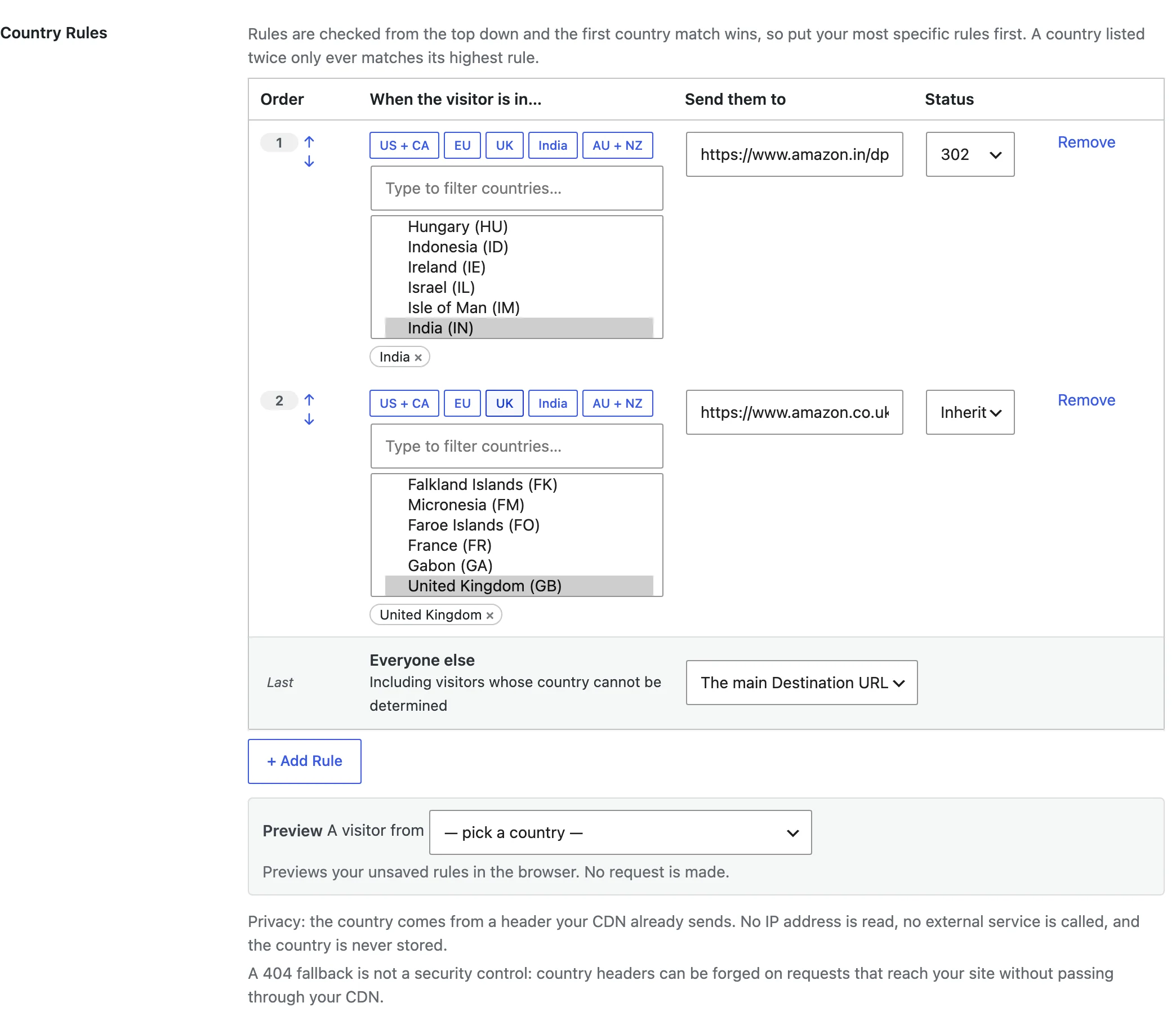
Rules run from the top down, and the first country match wins. One rule can hold several countries, and the EU group covers all 27 member states, which suits a link to amazon.de or amazon.fr.
Before saving, use Preview under the rules. Pick a country in A visitor from, and it shows where that visitor would land. It checks your unsaved rules in the browser and sends no request.
Why the Link Needs a 302
A 301 tells the browser the move is permanent, and browsers may remember it. A reader who first clicked from India could keep landing on amazon.in after moving to the US, because the browser skips your site and goes straight to the remembered address.
GT Link Manager sends no-cache headers with every redirect to discourage this. Still, a 302 is the safe choice for any link whose destination depends on the visitor. The link form warns you when a geo link uses a 301.
Check It Works
You can’t fly to India to test a link, so GT Link Manager gives you 3 checks:
- Preview on the link shows where each country lands, before you save.
- Check Detection in the Country-based redirects card lists every country header on your request and runs a self-test. Type a code in Test a country code first to also check that code works in a rule. “Self-test passed” means detection works end to end.
- Troubleshooting: “Show country details in redirect response headers” adds an
X-GTLM-Countryheader to each geo redirect. Turn it on, then runcurl -Ion your branded URL.
With Troubleshooting on, a response looks like this:
X-GTLM-Country: IN; source=cloudflare; rule=matchedrule=matched means a country rule fired. rule=fallback means the visitor got the main destination. Turn Troubleshooting off when you’re done, because it exposes the detected country in your headers.
Common Messages
| Message | What it means | Fix |
|---|---|---|
| No countries selected yet – this rule will be ignored. | A rule has no country in it | Pick at least one country, or remove the rule |
| A rule has countries but no destination URL, so it will be discarded on save. | Send them to is empty | Paste the store link for that rule |
| Listed more than once, so only the highest rule applies | The same country sits in 2 rules | Remove it from the lower rule |
| (off) next to the rules in All Links | Country routing is off in Settings | Turn it on and save |
| No country detected | No country header reached WordPress | Turn on IP Geolocation in Cloudflare, or forward your CDN’s header and name it in Custom header (optional) |
What It Won’t Do
Country rules route by country, and a few things fall outside that:
- It doesn’t convert links between stores. An amazon.com product URL doesn’t become an amazon.in one. You paste each store’s link yourself, and the same product may have a different ASIN there.
- It doesn’t look up countries itself. A visitor without a country header gets the fallback.
- It can’t beat an edge cache set to ignore your headers. If your CDN caches redirects regardless of
Cache-Control, one country’s redirect can reach everyone. Exclude your link prefix from edge caching. - The 404 fallback isn’t security. Nothing – show a 404 hides a link from other countries, but a request that skips your CDN can carry a fake country header.
Once the rules work, How to Change an Affiliate Link Everywhere with One Edit shows how to keep every store link current from one screen.