
Introduction to GT Link Manager
GT Link Manager is a free WordPress plugin for branded short links: instead of pasting a long, ugly affiliate URL into your content, you link to a clean URL on your own domain like yoursite.com/go/hubspot and the plugin handles the redirect. It stores links in custom database tables, resolves redirects before the template stack loads, and stays fast at thousands of links.
Every affiliate link on this site runs through it, and the screenshot below is my production link library. The plugin is 100 percent free on WordPress.org. No upsells, no premium tier, no feature gates.
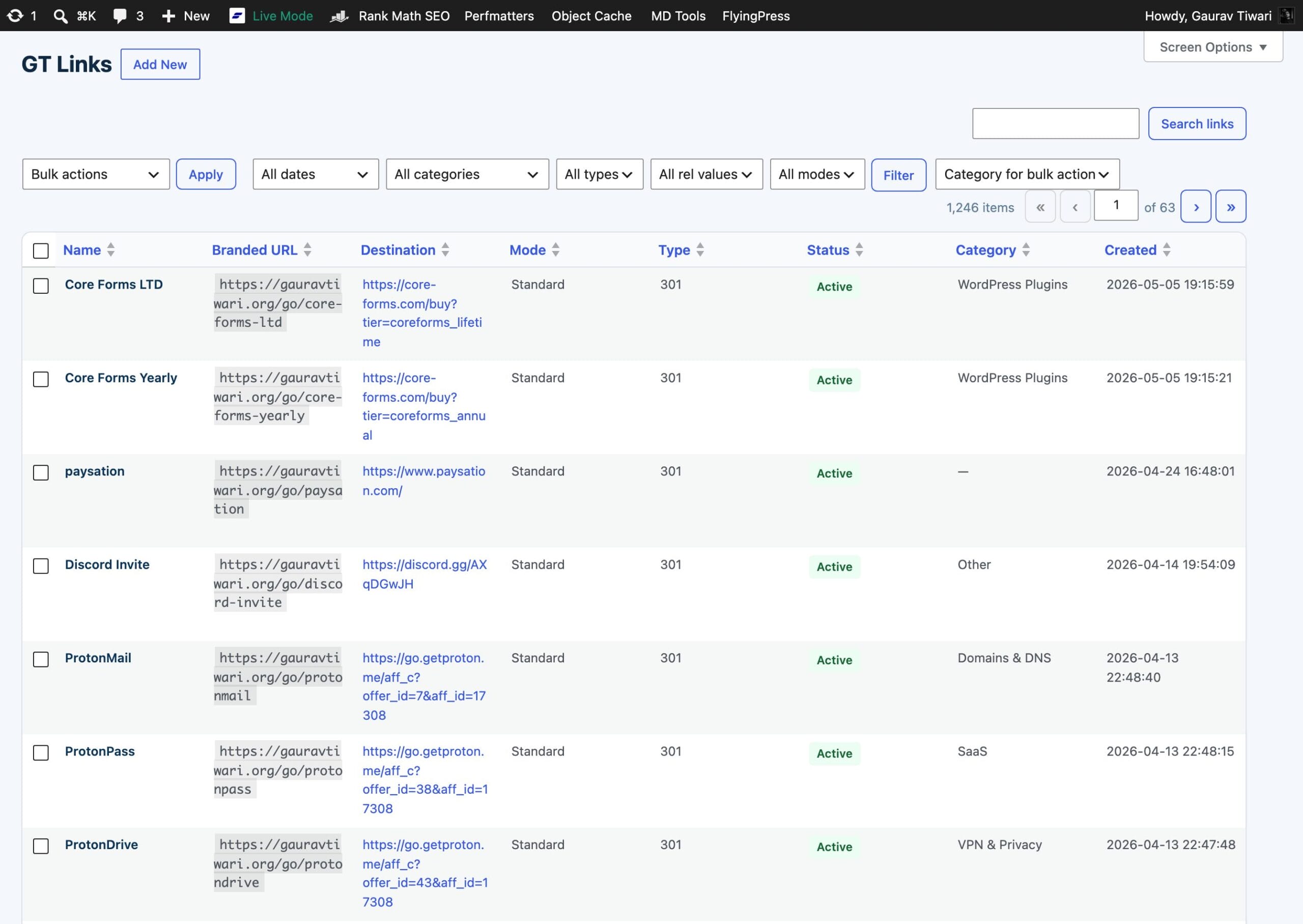
What GT Link Manager does
When someone visits a branded link on your site, the plugin intercepts the request early in the WordPress boot cycle (before any template loading), looks up the destination URL in its own database table, and redirects the visitor instantly. The whole thing is designed to add as little overhead as possible to each redirect.
Beyond redirects, the plugin gives you a full management layer in the WordPress admin. You can create and edit links, assign them to categories, set redirect types, control SEO signals like nofollow and noindex, and import/export your link library as CSV.
For developers, there’s a REST API covering every operation the admin UI can do, plus a set of actions and filters that let you hook into the redirect pipeline, override settings, and extend behavior without modifying plugin files.
Link modes
GT Link Manager supports three distinct link modes, giving you flexibility in how redirects are resolved:
Standard (default): The classic prefix-based redirect. Links live at yoursite.com/prefix/slug (e.g., yoursite.com/go/hubspot). This is the fastest path, a direct database lookup on a unique-indexed slug column.
Direct: Prefix-free redirects. The slug is the full path, so you can create a redirect from yoursite.com/any-path without the /go/ prefix. Useful for vanity URLs, migration redirects, or catching legacy paths. Reserved WordPress paths (wp-admin, wp-content, wp-json, etc.) are automatically blocked.
Regex: Pattern-based redirects using regular expressions. The slug is a regex pattern matched against the request path. Capture groups can be substituted into the destination URL using $1, $2, etc. A dedicated regex_replacement field supports preg_replace-style substitution for complex rewrites. Regex rules run in priority order (lowest number first).
Direct and regex modes require enabling Advanced Redirects in the plugin settings. When disabled, only standard prefix-based links are resolved, zero performance overhead from the advanced features.
Core capabilities
GT Link Manager creates a custom URL prefix on your site, go by default, but you can change it to anything you like. Every standard link you create lives at yoursite.com/your-prefix/your-slug. The slug is a short identifier you define (or let the plugin generate from the link name).
You can assign each link a redirect type. The default is 301 (permanent), which is appropriate for most affiliate and outbound links. You can also use 302 (temporary) or 307 (temporary, method-preserving) when the situation calls for it.
Each link supports rel attributes, nofollow, sponsored, and ugc, which get sent in response headers. You can also mark a link as noindex to append an X-Robots-Tag: noindex header on the redirect response.
Links can be organized into hierarchical categories, tagged with a comma-separated tag field, and annotated with private notes. Categories track a link count automatically so you always know how many links are assigned to each one.
Any link can also route by visitor country. Geolocation targeting (added in 1.7.0) lets one branded link send US visitors to amazon.com and Indian visitors to amazon.in, with rules evaluated in order and the first country match winning. The country comes from a header your CDN already sends, so there’s no GeoIP database and no external API call.
What it intentionally doesn’t do
By default, the plugin doesn’t log redirect events or store visitor data. It records or shares clicks only when you turn on one of these 3 options, and each one works on its own:
- Click counts keep one lifetime total per link, with no visitor details. You turn them on in settings.
- Advanced Analytics reports click trends and referring pages inside WordPress, with no visitor scripts or cookies. You turn it on under GT Links → Analytics → Settings.
- Analytics integrations send clicks to 20 analytics tools with no code, including Google Analytics 4, Plausible and Matomo. Version 1.12.0 adds this screen at GT Links → Integrations.
For custom work, the gtlm_before_redirect action still fires before every redirect, and you can use it to send data wherever you like. It is wise not to point it at a tool you’ve turned on under Integrations, because each click then gets sent twice.
There’s no branded domain mapping. All links live on your primary WordPress domain under the configured prefix (or at any path with direct/regex modes). If you need links on a separate short domain, that’s outside the scope of this plugin.
Technology baseline
GT Link Manager requires WordPress 6.4 or higher and PHP 8.0 or higher. It uses two custom database tables rather than WordPress posts and post meta, which eliminates the overhead of CPT-based approaches and keeps queries simple and fast.
The block editor integration is compiled with @wordpress/scripts and registers as a RichText format type, giving you a link search popover directly in the Gutenberg toolbar. The admin-side JavaScript is vanilla JS with no framework dependency.
Plugin version
This documentation covers GT Link Manager version 1.7.0.
Start with installation, or install it straight from the WordPress.org plugin page. The full feature rundown lives on the GT Link Manager product page.