
How to Put Dynamic Dates in Rank Math or Yoast SEO Titles
The title readers click in Google comes from your SEO plugin, not from the post title. So a post can show 2026 on the page and still carry 2025 in its search snippet. Someone typed the year into the Rank Math or Yoast field by hand last January, and nobody changed it since.
The fix is to use the same date shortcode in the SEO fields. Type [year] or [monthyear] into the SEO title and description, and the meta tags follow the calendar the same way the page title does.
Dynamic Month & Year into Posts is my free plugin that renders date shortcodes across WordPress. It hooks into Rank Math, Yoast SEO and SEOPress directly, so the shortcodes work inside their fields with no extra setup.
Before You Start
Check these first:
- Dynamic Month & Year into Posts 1.8.1 or newer is active.
- Your SEO plugin is Rank Math, Yoast SEO or SEOPress. All in One SEO and other SEO plugins have no integration, so a shortcode in their fields stays as typed.
- Settings → General → Timezone matches the market you write for.
Both Rank Math and Yoast have a current-year variable of their own: %currentyear% in Rank Math and %%currentyear%% in Yoast. Those work only inside the SEO plugin’s fields. The shortcode works in the post title, the content and the SEO fields alike, so one habit covers all of them.
What Each SEO Plugin Updates
The plugin filters each SEO plugin’s final output, so the shortcode renders wherever you put it in a field. Coverage differs by plugin:
| Output | Rank Math | Yoast SEO | SEOPress |
|---|---|---|---|
| Meta title | Yes | Yes | Yes |
| Meta description | Yes | Yes | Yes |
| Open Graph title and description | Yes | Yes | No |
| Twitter title and description | Yes | No | No |
| Schema (JSON-LD) | Every text value | WebPage name only | No |
| Breadcrumbs | Yes | No | No |
Rank Math gets the widest coverage. The plugin walks through every text value in Rank Math’s JSON-LD, so an Article headline built from a title with [year] comes out as the actual year.
With Yoast, keep the shortcode out of the Twitter fields. Leave them empty or type a plain title there.
Add Dates in Rank Math
- Open the post and click the Rank Math icon in the editor toolbar.
- Click Edit Snippet.
- In Title, type the title with the shortcode, for example
Best Laptops for Students in [year] %sep% %sitename%. - In Description, use
[monthyear]only if you refresh the post every month:Prices and picks checked in [monthyear]. - Open the Social tab if you set custom Facebook or Twitter titles, and use the same shortcode there.
- Update the post.
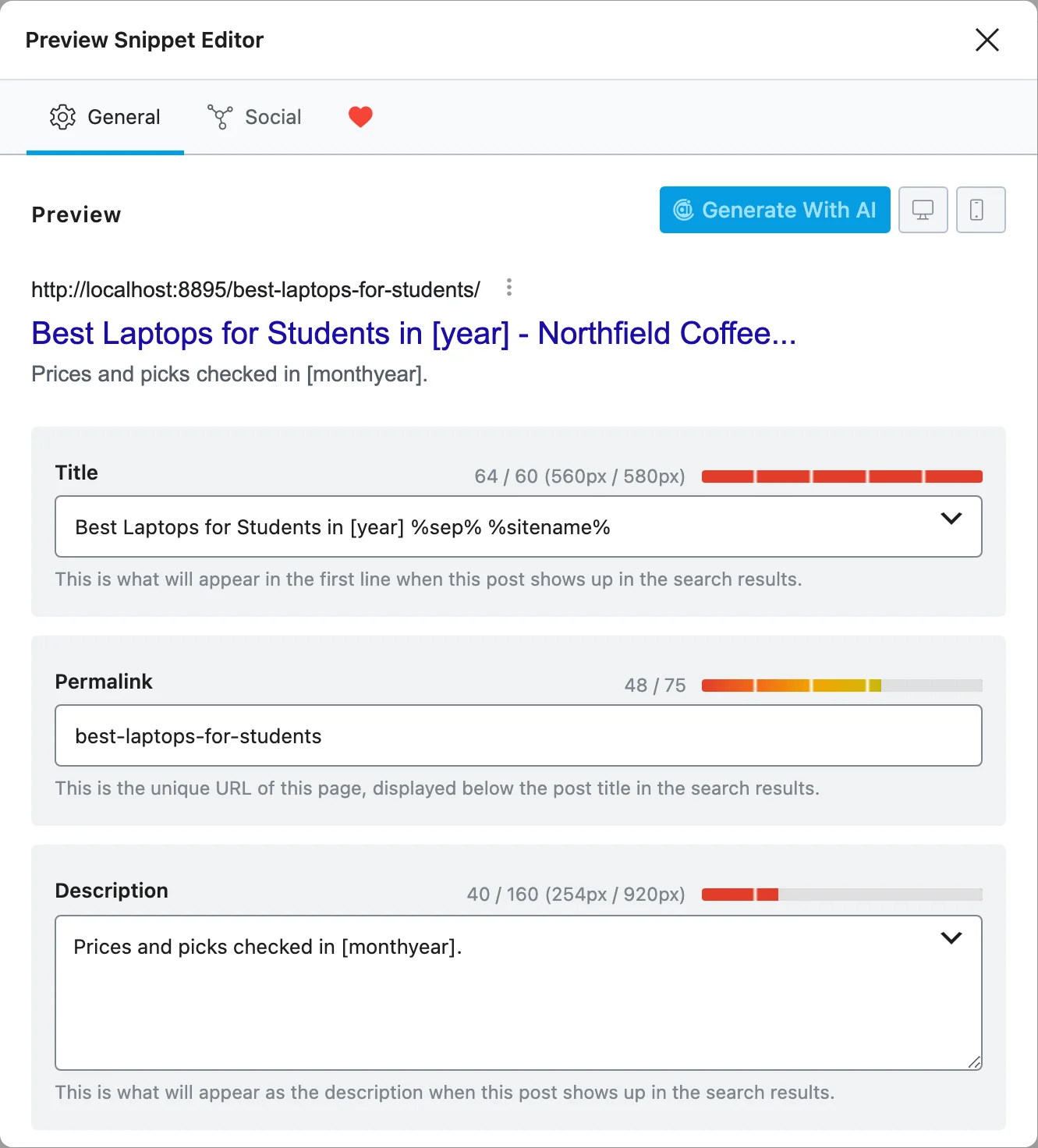
The snippet preview inside Rank Math shows [year] as typed. The rendered year appears on the front end, where the plugin’s filter runs.
Add Dates in Yoast SEO
- Open the post and the Yoast SEO panel in the editor sidebar.
- In SEO title, type
Best Laptops for Students in [year], then any Yoast variables you normally use after it. - In Meta description, add
[monthyear]or[year]where the date belongs. - In Social appearance, the Facebook title and description accept the shortcode. Leave the X (Twitter) fields without it.
- Update the post.
Add Dates in SEOPress
SEOPress covers the title and the meta description only. Put the shortcode in those 2 fields and keep social titles plain.
Check It Works
View the page source on the front end and search for these 3 things:
<title>, which should show the current year.name="description", which should show the rendered month or year.og:title, which should match for Rank Math and Yoast.
From a terminal, one line shows the title tag:
curl -s https://example.com/best-laptops-for-students/ | grep -o "<title>.*</title>"For schema, paste the URL into Google’s Rich Results Test and read the headline and name values. A raw [year] there means that part of the schema isn’t covered by your SEO plugin’s integration.
When a Shortcode Leaks
Where you see [year] | Cause | Fix |
|---|---|---|
| The SEO plugin’s snippet preview | The preview runs in the editor, before the front-end filter | Nothing to fix. Check the live page source instead |
twitter:title on a Yoast site | Yoast’s Twitter output isn’t filtered | Leave the Twitter title empty or plain |
Article headline in Yoast schema | Only the WebPage name is filtered for Yoast | Check it in the Rich Results Test; if it shows, keep the year in the visible title only |
| Every SEO field on an AIOSEO site | There’s no AIOSEO integration | Use the SEO plugin’s own date variable instead |
| Last month in the description | A cached page or a cached SERP snippet | Purge the page cache; Google refreshes its snippet on its next crawl |
What It Won’t Do
The SEO integration has firm edges:
- It doesn’t add variables to the SEO plugin.
%currentyear%and%%currentyear%%belong to Rank Math and Yoast. This plugin adds shortcodes and renders them in the final output. - It doesn’t change dates in schema.
datePublishedanddateModifiedstay exactly as WordPress stores them. - It doesn’t make Google re-crawl. Your snippet in search results updates when Google next fetches the page.
A description that says “checked in October 2026” on a page nobody checked in October is fake freshness. Google’s own guidance warns about it. When Not to Use Dynamic Years covers that before it costs you trust. The SEO plugin integrations reference lists every hook the plugin uses.