
Elementor Pro Coupon Code 2026: When Real Discounts Actually Happen

You’re searching for an Elementor Pro coupon code. I’ll save you time: there probably isn’t one right now.
Elementor doesn’t distribute coupon codes to third-party sites. The affiliate blogs claiming “exclusive 75% off codes” are either misleading you about what the discount applies to (usually hosting bundles, not the Pro plugin) or listing codes that redirect to standard pricing. WPMayor confirmed this. Elementor’s own documentation confirms it.
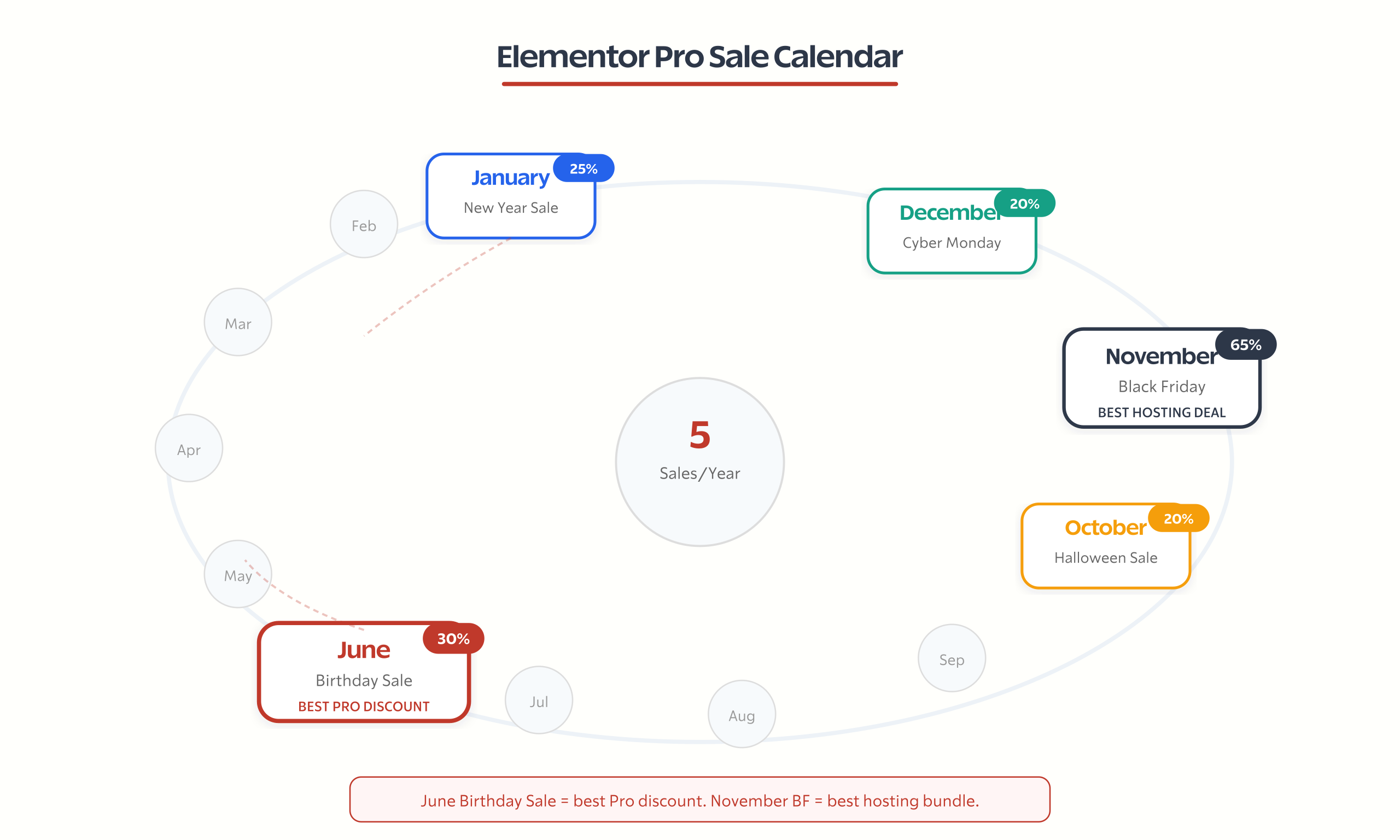
The real discounts on Elementor Pro come from seasonal sales that happen 5 times per year. Black Friday, Birthday Sale (June), Halloween, Cyber Monday, and New Year. Outside those windows, you’re paying list price. And honestly? That’s fine. Because Elementor Pro’s pricing is already reasonable compared to what you’d spend on alternatives.
I’ve built over 100 client sites with Elementor. I’ve also migrated sites away from it when performance mattered more than design flexibility. This page covers the actual deals available, when to buy, which plan to choose, and whether Elementor Pro is still worth the money in 2026.
Does Elementor Pro Have Coupon Codes?
No. Not the way most people expect.
Elementor does not provide coupon codes to affiliates, bloggers, or coupon aggregator sites. Every “exclusive code” you see on sites like CouponFollow or ReviewsNGuides either doesn’t work, applies the standard promotional rate, or refers to a completely different product (like Elementor Hosting, not the Pro plugin).
The codes you’ll find floating around (MUSIC, BUILDER30, CHIEF50) are either expired, unverified, or redirect to the regular checkout page with no additional discount applied.
What actually works:
- Seasonal sales. Elementor runs 5 major sales per year with genuine discounts on the Pro plugin (up to 20-30% off) and larger discounts on hosting bundles (up to 65% off).
- Renewal loyalty discount. Active subscribers who renew before their license expires get 25-30% off the renewal price. Let your license lapse? Full price.
- Elementor One introductory pricing. The newest plan at $14/mo (normally $19/mo) includes Pro plus 25,000 monthly credits for AI, image optimization, and accessibility tools.
That’s it. No secret codes. No hidden deals. Just seasonal sales and loyalty pricing.
Elementor Pro Sale Calendar
Timing your purchase around a sale event is the only way to get a genuine discount. Here’s the historical pattern based on the last three years:
| Sale Event | Typical Dates | Pro Plugin Discount | Hosting Discount | Notes |
|---|---|---|---|---|
| Birthday Sale | June 10-17 | Up to 30% | Up to 53% | Elementor’s anniversary. 10th Birthday expected June 2026 |
| Halloween Sale | Late October | 15-20% | Up to 40% | Shorter sale, smaller discounts |
| Black Friday | Nov 25 – Dec 3 | Up to 20% | Up to 65% | Deepest hosting discounts. Pro discounts modest |
| Cyber Monday | November 28-30 | Same as Black Friday | Same as Black Friday | Usually extends the BF deal |
| New Year Sale | Dec 26 – Jan 7 | 15-25% | Up to 50% | Good if you missed Black Friday |
The best time to buy Elementor Pro: Black Friday gives you the deepest hosting discounts (up to 65%), but the Birthday Sale in June typically offers the best Pro plugin discount (up to 30%). If you only need the plugin (not hosting), wait for the Birthday Sale.
Strategy if you need it now: Buy at list price and time your renewal to coincide with a sale event. Since Elementor doesn’t increase renewal pricing (unlike hosting companies), you’re not losing money by buying now. You’re just missing 15-30% off the first year.
Elementor Pro Plans and Pricing
Elementor’s pricing has evolved. Beyond the standard Pro tiers, they’ve introduced Elementor One and expanded into hosting, AI, and accessibility tools. Here’s what each plan costs in 2026:
| Plan | Annual Price | Sites | Best For | Per-Site Cost |
|---|---|---|---|---|
| Essential | $49-$60/year | 1 | Single-site bloggers, freelancers | $49-$60 |
| Advanced Solo | $84/year | 1 | Power users wanting AI credits | $84 |
| Advanced | $99/year | 3 | Freelancers with 2-3 client sites | $33 |
| Elementor One | $168/year ($14/mo) | 1 | All-in-one users (Pro + AI + tools) | $168 |
| Expert | $199/year | 25 | Agencies, high-volume freelancers | $8 |
| Studio | $499/year | 100 | Development companies | $5 |
| Agency | $999/year | 1,000 | Large agencies, whitelabel | <$1 |
The value sweet spots:
The Expert plan at $199/year for 25 sites works out to under $8 per site annually. If you’re a freelancer building 10+ WordPress sites per year, this is absurdly good value. No other page builder gives you 25 licenses for under $200.
The Essential plan at $49-$60/year makes sense if you genuinely have one site and don’t need AI tools. But at $60/year, you’re only $39 away from the Advanced plan covering 3 sites. If there’s any chance you’ll build a second site, jump to Advanced.
What about Elementor One? It bundles Pro features with 25,000 monthly credits for AI content generation, image optimization (via their Image Optimizer tool), email deliverability (Site Mailer), and accessibility scanning (Ally). At $168/year, it’s $108 more than Essential. Whether that’s worth it depends on whether you’d use those tools. If you’re already paying for separate AI writing tools and image optimization, the math might work.
What You Get with Elementor Pro (vs. Free)
Elementor’s free version has 8 million+ active installations. It’s a fully functional page builder with 30+ widgets. Most bloggers never need Pro.
Here’s what Pro adds that the free version can’t do:
Theme Builder. Build your entire site visually, including headers, footers, single post templates, archive pages, and 404 pages. This is the main reason agencies buy Pro. Without it, you’re editing content areas only.
Form Builder. Create contact forms, newsletter signups, multi-step forms, and conditional logic forms without a separate plugin like WPForms or Gravity Forms. One less plugin on your site.
Popup Builder. Design popups, slide-ins, bottom bars, and full-screen overlays with targeting conditions. Replaces plugins like OptinMonster for basic popup needs.
WooCommerce Builder. Customize product pages, cart, checkout, and my-account pages visually. Essential for WooCommerce stores that want branded checkout experiences.
60+ Pro Widgets. Posts, portfolio, price tables, countdown timers, share buttons, media carousel, animated headlines, and more. The free version has 30+ basic widgets.
Custom CSS. Add CSS to any element directly in the Elementor editor. Free version blocks this entirely. For developers and designers, this is often the single feature that justifies the upgrade. No more writing separate stylesheet overrides.
Dynamic Content. Pull content from custom fields (ACF, Toolset, Pods, JetEngine) and display it dynamically. This turns Elementor from a page builder into a full application builder for directories, listings, and membership sites.
What you keep if Pro expires: Your site stays exactly as you built it. Nothing breaks. You just lose access to updates, new features, and premium support. This is important. Letting your Pro license lapse for a few months while you wait for a sale event won’t destroy your site.
Is Elementor Pro Still Worth It in 2026?
Eight million installations don’t lie. Elementor is the most popular WordPress page builder by a wide margin. But popular doesn’t mean best for everyone.
Where Elementor Pro shines:
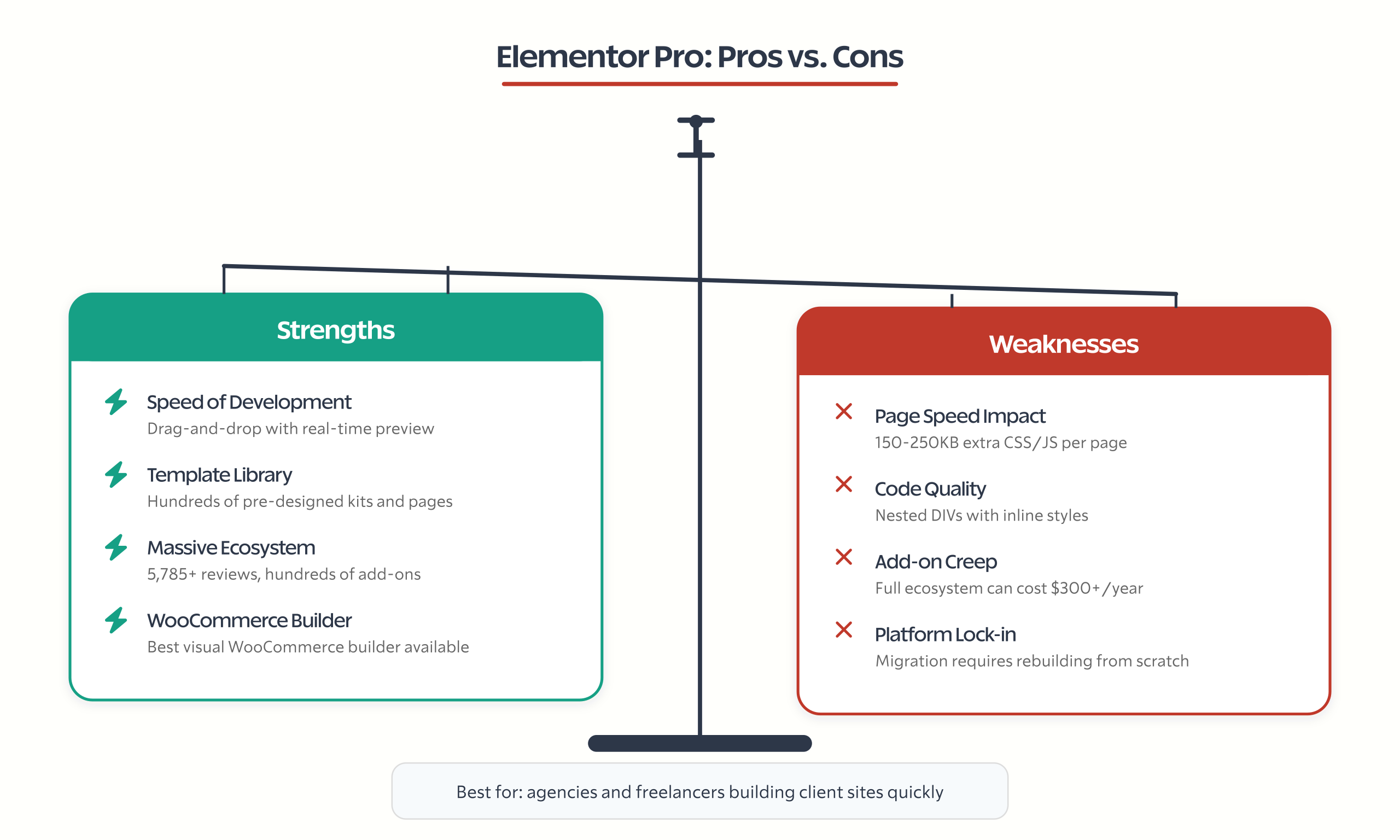
- Speed of development. Drag-and-drop with real-time preview. For non-developers, nothing is faster. I’ve watched clients with zero coding experience build professional-looking pages in under an hour.
- Template library. Hundreds of pre-designed templates, pages, and kits. Start with a template, customize, publish. This alone saves hours per project.
- Ecosystem. 5,785+ five-star reviews, massive community, hundreds of add-ons, YouTube tutorials for everything. If you get stuck, someone’s already solved it.
- WooCommerce integration. The best visual WooCommerce builder on the market. Period.
Where Elementor Pro falls short:
- Page speed. Elementor generates heavy inline CSS and JavaScript. A typical Elementor page loads measurably slower than the same layout built with Gutenberg blocks or Bricks Builder. On sites where Core Web Vitals scores matter for SEO, this is a real trade-off.
- Code output. Elementor produces deeply nested DIVs with inline styles. Compare that to Bricks Builder, which generates semantic HTML with CSS classes. For developers who care about code quality, Elementor’s output is painful.
- Add-on creep. Elementor now sells AI ($), Image Optimizer ($), Site Mailer ($), Ally ($), and hosting ($). The total ecosystem cost can snowball if you buy into everything. A year ago, Pro was the only paid product. Now it’s one of eight.
- Lock-in. Migrating away from Elementor means rebuilding pages from scratch. The shortcodes and data structures don’t transfer to other builders. This isn’t unique to Elementor (Divi has the same problem), but it’s worth considering before you invest years of content.
The performance numbers: I’ve benchmarked Elementor pages against the same layouts built with Gutenberg and Bricks. A typical Elementor page with a hero section, feature grid, testimonials, and CTA generates 150-250KB of extra CSS and JavaScript compared to Gutenberg. On mobile connections, that’s 0.5-1.5 seconds of additional load time. For a blog, this doesn’t matter. For an e-commerce product page where every 100ms of load time affects conversions, it matters a lot. Google’s Core Web Vitals thresholds don’t care which builder you used. They care about the output.
The ecosystem reality: Elementor is no longer just a page builder. It’s a platform. With hosting, AI, image optimization, email tools, accessibility scanning, and WooCommerce integration, Elementor wants to be your entire WordPress stack. That’s fine if you want a single vendor. It’s concerning if you prefer best-in-class tools for each function. A dedicated hosting provider plus a dedicated page builder plus a dedicated email service will almost always outperform an all-in-one platform on each individual function.
My honest take: If you’re a freelancer or agency building client sites quickly, Elementor Pro is still the most productive page builder available. The Expert plan at $8/site/year is hard to argue with. If you’re building your own site and care about long-term performance, look at Gutenberg-based options like Kadence Blocks or GenerateBlocks.
Elementor Pro vs. Alternatives: Cost Comparison
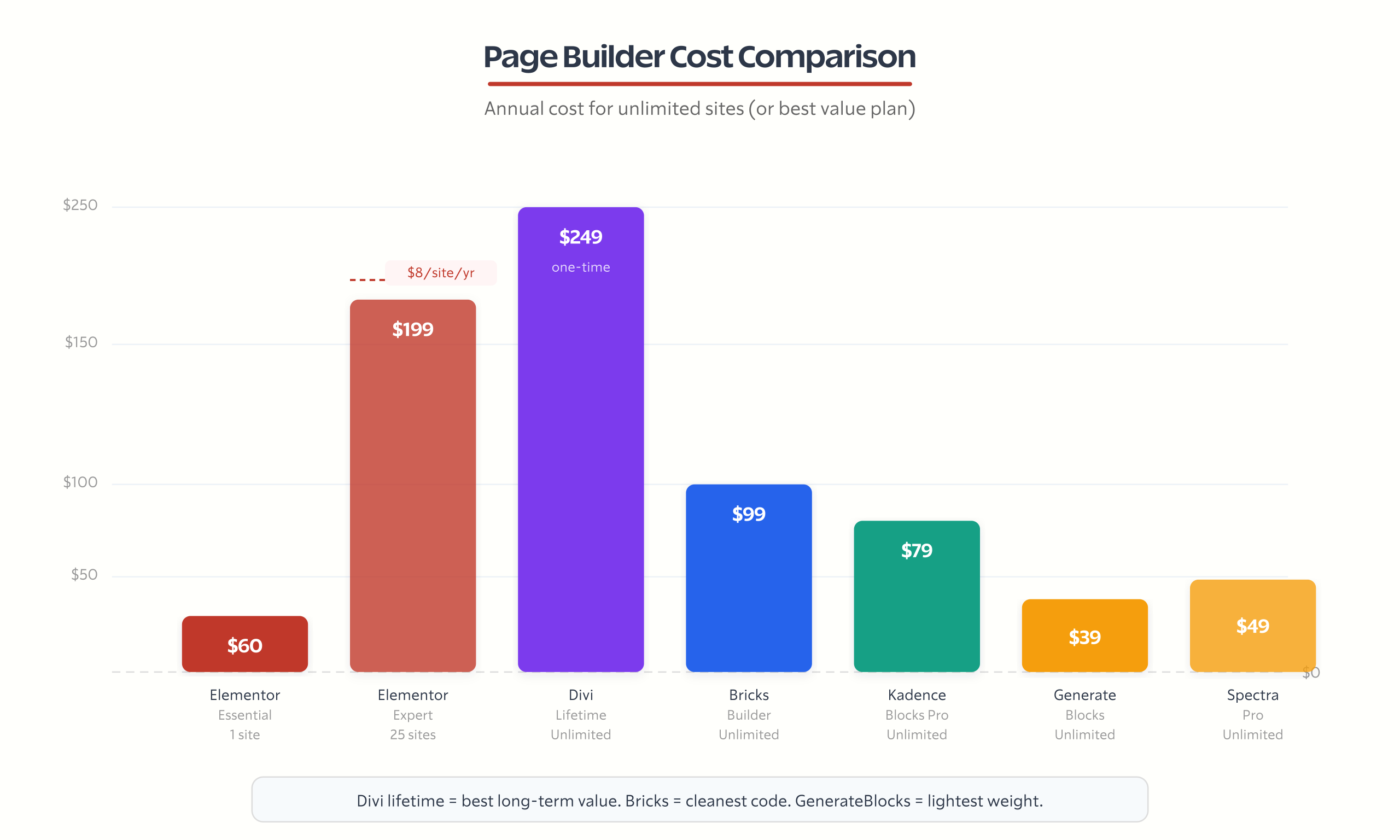
Before buying Elementor Pro, see what else is available at similar or better pricing:
| Builder | Annual Cost | Sites | Lifetime Option | Code Quality | Best For |
|---|---|---|---|---|---|
| Elementor Pro (Essential) | $49-$60 | 1 | No | Heavy | Non-developers, speed of building |
| Elementor Pro (Expert) | $199 | 25 | No | Heavy | Agencies, freelancers |
| Bricks Builder | $99 | Unlimited | No | Clean/semantic | Developers, performance-focused |
| Divi | $89 or $249 lifetime | Unlimited | Yes ($249) | Heavy | Budget-conscious, lifetime value |
| Kadence Blocks Pro | $79 | Unlimited | No | Light/native | Gutenberg-first users |
| GenerateBlocks | $39 | Unlimited | No | Lightest/native | Minimalists, developers |
| Spectra Pro | $49 | Unlimited | No | Light/native | Block editor with marketing features |
The Divi question: Divi offers a $249 lifetime license for unlimited sites. Elementor Essential costs $49-$60/year. After 4-5 years, Divi’s lifetime deal pays for itself. If you plan to use a page builder for 5+ years and don’t mind Divi’s heavier code output, the lifetime pricing is genuinely better value long-term.
The Bricks question: Bricks Builder at $99/year for unlimited sites generates cleaner code than Elementor, loads faster, and produces semantic HTML with CSS classes instead of inline styles. The trade-off: steeper learning curve, smaller template library, and a smaller community. For performance-focused developers, Bricks is the better tool. For quick client builds, Elementor is still faster.
The Gutenberg question: Kadence Blocks ($79/year) and GenerateBlocks ($39/year) are native Gutenberg extensions. They don’t replace the editor. They enhance it. The result: lighter pages, better Core Web Vitals, and no plugin lock-in since your content stays in standard blocks. The trade-off: less visual design freedom and no drag-and-drop layout canvas.
Total Cost of Ownership: The Full Picture
The Elementor Pro plugin isn’t the only cost. Elementor has expanded into a full ecosystem of paid products. If you buy into everything, here’s what a year looks like:
| Product | Annual Cost | What It Does | Free Alternative |
|---|---|---|---|
| Elementor Pro (Essential) | $49-$60 | Page builder with theme builder, forms, popups | Elementor Free (limited) |
| Elementor AI | ~$99/year | AI content, image, code generation | ChatGPT, Claude, free AI tools |
| Image Optimizer | ~$49/year | Compress and optimize images | ShortPixel free tier, Imagify |
| Site Mailer | ~$49/year | Transactional email delivery | WP Mail SMTP + free SMTP |
| Ally (Accessibility) | ~$49/year | WCAG accessibility scanning | Manual audit, WAVE tool |
| Total ecosystem | $295-$306 |
That’s $300/year if you buy everything. Compare that to Bricks Builder at $99/year with cleaner code and no add-on products pushing you toward more spending.
Or compare it over 3 years:
- Elementor Essential only: $150-$180
- Elementor full ecosystem: $885-$918
- Divi lifetime: $249 (one-time, forever)
- Bricks Builder: $297 (3 years)
- GenerateBlocks: $117 (3 years)
The lesson: Elementor Pro alone is competitive. Elementor’s full ecosystem is expensive. Buy only what you need. The AI, Image Optimizer, Site Mailer, and Ally tools all have free alternatives that work well enough for most sites. Don’t let the Elementor checkout page upsell you into an ecosystem you don’t need.
Elementor One’s value proposition: The Elementor One plan at $168/year bundles Pro with 25,000 monthly credits for AI, image optimization, email, and accessibility. That’s $168 vs $306 if you bought everything separately. If you genuinely need 3+ of those features, Elementor One saves money. But most single-site owners don’t need AI credits, image optimization credits, and accessibility scanning on a monthly basis.
Upgrading from Elementor Free to Pro
If you’re currently on Elementor Free and searching for coupon codes before upgrading, here’s what actually changes:
What you gain immediately:
- Theme Builder. Design your header, footer, single post template, and archive pages. This is the biggest unlock. Free Elementor only lets you edit page content areas. Pro lets you design the entire site.
- Form Builder. Replace Contact Form 7 or WPForms with built-in forms. One less plugin dependency.
- Popup Builder. Create exit-intent popups, slide-ins, and notification bars without OptinMonster.
- 60+ Pro widgets. Posts grid, pricing table, media carousel, animated headlines, share buttons, countdown timer, and more.
- Custom CSS on any element. Free Elementor blocks this entirely.
What stays the same:
- Your existing pages and layouts remain unchanged. Pro doesn’t alter anything you’ve already built.
- The editor interface looks the same. Pro widgets appear in the sidebar alongside free widgets.
- Page speed impact doesn’t change significantly. Pro widgets add weight only when used.
The upgrade process:
- Buy an Elementor Pro license from elementor.com.
- Download the Elementor Pro plugin from your account.
- Upload and activate it alongside the free Elementor plugin (don’t deactivate the free version).
- Connect your license in Elementor > License.
- Pro widgets and the Theme Builder appear immediately.
Do you need Pro? Ask yourself: do I need to customize my header, footer, or post templates? Do I need forms or popups? If both answers are no, Free is enough. If either answer is yes, Pro pays for itself in the plugins it replaces.
How to Get the Best Elementor Pro Deal
Here’s my recommended strategy:
If you need it now:
- Go to Elementor Pro’s pricing page.
- Choose Essential ($49-$60) for one site or Expert ($199) for agency use.
- Pay annually (there’s no monthly billing option for Pro plugin; monthly is only for Elementor One).
- Set a calendar reminder for the next sale event to time your renewal.
If you can wait:
- Check the sale calendar above.
- The Birthday Sale (June) typically offers the best Pro plugin discount (up to 30%).
- Black Friday (November) offers the deepest hosting discounts but only 20% off Pro.
- Buy during the sale, and your annual renewal will align with next year’s sale.
Renewal strategy:
- Renew before your license expires. Active customers get a 25-30% loyalty discount on renewal. That means an Essential plan could renew at $41-$44 instead of $60.
- If your license expires, you lose the loyalty discount and pay full price.
- Your site won’t break if the license expires. You just lose updates and support. If a sale is 2 weeks away, letting it lapse briefly is fine.
What NOT to do:
- Don’t buy from unauthorized resellers offering “lifetime” Elementor Pro for $20-$30. These are GPL redistributions without support or updates. They work technically (WordPress is open source under GPL), but you get no support, no automatic updates, and potentially security vulnerabilities from outdated versions. I’ve cleaned up hacked sites that were running pirated plugin versions missing critical security patches. It’s not worth the risk.
- Don’t stack multiple coupon codes. Elementor allows one promotional offer per order.
- Don’t buy Elementor Cloud Hosting thinking it includes Pro for free. It does bundle Pro, but at $99/mo for hosting, you’re paying far more than buying hosting and Pro separately.
Frequently Asked Questions
Does Elementor Pro offer coupon codes?
No. Elementor does not distribute coupon codes to third-party sites. All discounts come through official seasonal sales (Black Friday, Birthday Sale, Halloween, New Year). Affiliate sites claiming exclusive coupon codes are misleading. The discounts you see on aggregator sites either don’t work or redirect to standard pricing.
How much does Elementor Pro cost?
Elementor Pro starts at $49-$60/year for the Essential plan (1 site). The Advanced plan covers 3 sites for $99/year. The Expert plan covers 25 sites for $199/year. Elementor One, their all-in-one plan with AI and optimization credits, costs $168/year or $14/month at introductory pricing.
Is there a student discount for Elementor Pro?
No. Elementor does not currently offer a student or academic discount. The best strategy for budget-conscious users is to wait for the Birthday Sale in June (up to 30% off) or Black Friday in November (up to 20% off the Pro plugin). The Essential plan at $49-$60/year is already affordable for students.
What happens when Elementor Pro expires?
Your website stays exactly as you built it. Nothing breaks. You retain all design changes, layouts, and content. But you lose access to software updates, new features, premium support, and the ability to edit Pro-specific widgets. Your site continues to function; you just can’t modify Pro elements until you renew.
Does Elementor have a Black Friday sale?
Yes. Elementor runs a Black Friday and Cyber Monday sale annually, typically from November 25 through December 3. Discounts include up to 20% off the Pro plugin and up to 65% off hosting packages. The 2025 Black Friday sale included savings across AI tools, Image Optimizer, Site Mailer, and Ally accessibility tools.
Can you use multiple Elementor coupon codes?
No. Elementor allows only one promotional offer per order. You cannot combine a seasonal sale discount with an affiliate link or stack multiple codes. Since Elementor doesn’t issue third-party codes anyway, this is rarely relevant. The seasonal sale discount is applied automatically during the promotion period.
Does Elementor offer a lifetime deal?
No. Elementor Pro is annual subscription only. There is no lifetime licensing option. If lifetime pricing is important to you, Divi offers a $249 lifetime license for unlimited sites with lifetime updates. Oxygen Builder also offers lifetime pricing at $169. Both are viable Elementor alternatives with one-time payment models.
Is Elementor Pro worth it for a single blog?
For a simple blog, probably not. Elementor Free with a well-designed theme handles basic blogging well. Pro makes sense if you need custom headers/footers (Theme Builder), contact forms (Form Builder), or popups. If your blog is primarily text content with standard layouts, save the $49-$60/year and use the free version with Kadence or [GeneratePress](https://gauravtiwari.org/go/generatepress/) theme.
The Bottom Line
Stop searching for Elementor Pro coupon codes. They don’t exist in the way you expect.
What does exist: 5 seasonal sales per year with 15-30% off the Pro plugin, a 25-30% loyalty discount for renewing before expiration, and the Elementor One plan at introductory pricing ($14/mo) for users who want the full ecosystem.
If you’re buying for one site, the Essential plan at $49-$60/year is reasonable. If you’re a freelancer or agency, the Expert plan at $199/year for 25 sites is one of the best deals in the WordPress page builder market. And if code quality and performance matter more than drag-and-drop convenience, Bricks Builder at $99/year for unlimited sites deserves a serious look.
Time your purchase around the Birthday Sale (June) for the best Pro discount. Time it around Black Friday (November) for the best hosting bundle. And whatever you do, renew before your license expires to keep that 25-30% loyalty discount.
Disclaimer: This site is reader-supported. If you buy through some links, I may earn a small commission at no extra cost to you. I only recommend tools I trust and would use myself. Your support helps keep gauravtiwari.org free and focused on real-world advice. Thanks. - Gaurav Tiwari