
Best Laptops for Medical Students and Professionals
Medical school eats laptops alive. Between anatomy apps, 3D modeling software, hundreds of lecture recordings, and those massive pathology slide decks, you need a machine that can actually keep up. I’ve helped dozens of students pick the right laptop over the years, and most of them were overthinking it.
You don’t need the most expensive laptop on the market. You need one that’s light enough to carry between the library and the hospital, fast enough to run your study tools without stuttering, and durable enough to survive 4+ years of daily abuse. That’s it.
I’ve narrowed it down to 5 laptops that cover every budget and use case for medical students in 2026. Each one I’d be comfortable recommending to someone starting their first year.
5 Best Laptops for Medical Students in 2026

I picked these based on three things: portability (you’ll carry it everywhere), battery life (outlets aren’t always available in lecture halls), and enough processing power to run medical software without lagging.
1. Apple MacBook Air
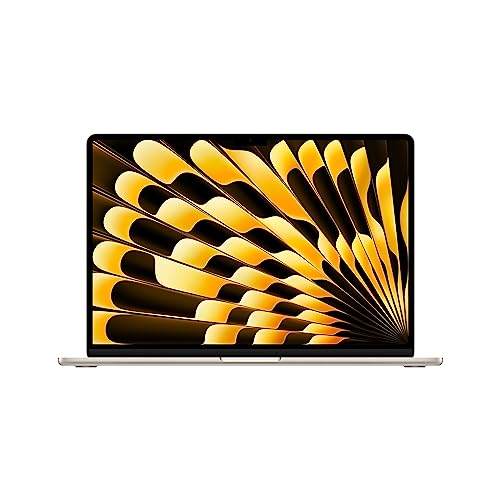
- IMPRESSIVELY BIG, IMPOSSIBLY THIN — The 15-inch MacBook Air makes room for more of what you love with a spacious Liquid Retina…
- SUPERCHARGED BY M2 — Get more done faster with a powerful 8-core CPU, 10-core GPU, and up to 24GB of unified memory.
If budget isn’t your biggest concern, the MacBook Air is the laptop I recommend most to medical students. At just 2.8 pounds, you’ll barely notice it in your backpack. And the M2 chip handles everything from Anki flashcard decks to 3D anatomy apps like Complete Anatomy without breaking a sweat.
The 15.3-inch Liquid Retina display is sharp enough for reading dense medical textbooks and reviewing imaging slides. You get 8GB of unified memory and 256GB of SSD storage in the base model, which is enough for most students. Battery life sits around 13+ hours, so you can make it through a full day of lectures and study sessions on a single charge.
The keyboard is comfortable for long typing sessions (think: clinical notes and research papers), and Touch ID is a nice convenience. If you’re already in the Apple ecosystem with an iPhone or iPad, the integration between devices is a real time-saver during clinical rotations. The only downside? It’s a premium price tag. But for a laptop that’ll last you through all 4 years of med school and into residency, I think it’s worth it.
Best for: Students who want the best overall experience and can stretch their budget. If you already own an iPhone or iPad, this is the obvious pick.
Also see: Best MacBooks for Students in 2026: Ranked
2. Dell Inspiron 15
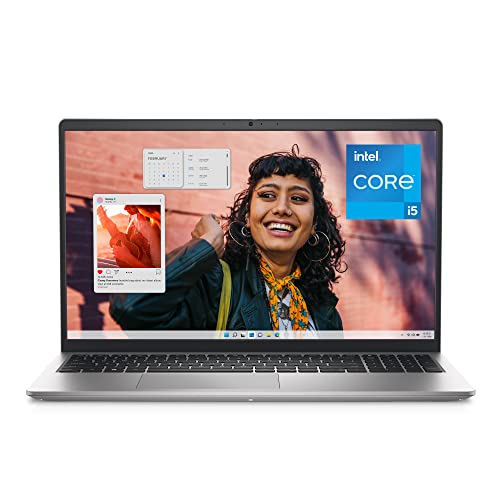
- PLENTY OF PORTS: Connect all your devices with a variety of ports.
- TYPE WITH EASE: Write and calculate quickly with roomy keypads, separate numeric keypad and calculator hotkey.
The Dell Inspiron 15 is where I point students who want solid performance on a Windows machine without overspending. It’s got 16GB of RAM and a 512GB SSD right out of the box, which means you can run multiple study apps, a browser with 30+ tabs, and a video lecture simultaneously without the thing choking on you.
The 15.6-inch FHD display at 120Hz is comfortable for long reading sessions, and the full-size backlit keyboard with a numeric keypad is a small detail that matters when you’re doing data entry or calculations. The Core i5-1335U processor handles day-to-day medical school workloads with no complaints.
I’ll be honest: at about 4.3 pounds, it’s not the lightest option. If you’re walking across campus all day, you’ll feel it. But if most of your study time happens at a desk (home, library, or dorm room), the Inspiron 15 gives you more screen and more power for less money than the MacBook Air. That’s a fair trade for a lot of students.
Best for: Windows users who want the best specs per dollar and don’t mind carrying a slightly heavier laptop. Great pick if you’re primarily studying at a desk.
Related: Dell Laptop Black Friday and Cyber Monday Deals
3. ASUS ZenBook Duo
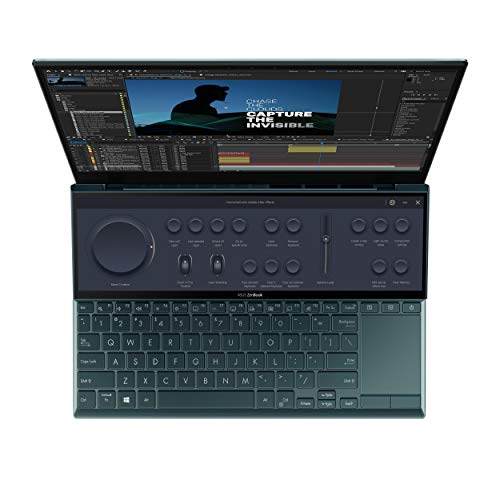
- Aspect Ratio:16:9
- Tilting ScreenPad Plus: 12.6 inch matte touchscreen, giving your endless way to optimize your multitasking experience by extending…
This is the most interesting pick on the list. The ASUS ZenBook Duo has two screens: a 14-inch FHD touchscreen main display and a 12.6-inch ScreenPad Plus right above the keyboard. For medical students, this dual-screen setup is a genuine productivity advantage. You can have your lecture notes on one screen and your anatomy app on the other. No alt-tabbing, no split-screen juggling.
Under the hood, you get an Intel Core i5-1155G7 processor, 8GB of RAM, and a 512GB PCIe SSD. It’s fast enough for everything a med student needs. The Thunderbolt 3 port and Wi-Fi 6E keep you connected to external displays and fast networks at the hospital or library. And the ErgoLift hinge tilts the keyboard to a comfortable typing angle, which matters when you’re typing for hours.
At about 2.6 pounds, it’s one of the lightest laptops on this list. But there’s a trade-off: battery life sits around 5 hours. That’s not great. If you’re studying away from an outlet all day, you’ll need to bring your charger. For students who mostly work at a desk or in places with power access, though, that second screen is worth the battery compromise.
Best for: Multitaskers who want two screens without carrying an external monitor. If you study with multiple resources open at once (and in med school, you will), this is a strong choice.
4. Acer Aspire 5
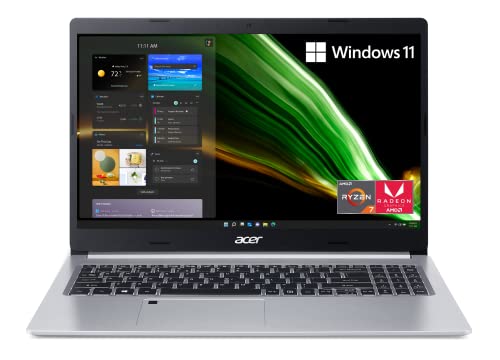
- Powerful Productivity: AMD Ryzen 7 3700U delivers desktop-class performance and amazing battery life in a slim notebook. With…
- Maximized Visuals: See even more on the stunning 15.6″ Full HD display with 82.58% screen-to-body/16:9 aspect ratio and narrow…
This is my budget pick, and I don’t say that as a consolation prize. The Acer Aspire 5 costs significantly less than the MacBook Air but still handles everything a med student does daily. You get an AMD Ryzen 7 3700U processor, 8GB of RAM, and a 256GB NVMe SSD. It’s not going to win speed benchmarks, but it’ll run Anki, your browser, a PDF reader, and a video call at the same time without issues.
The 15.6-inch Full HD IPS display is sharp and easy on your eyes during those 10-hour study marathons. Wi-Fi 6, a backlit keyboard, and a fingerprint reader are nice touches you don’t always find at this price. And at just under 4 pounds, it’s portable enough for daily campus carry.
The trade-off is battery life: you’ll get about 7 hours on a charge. That’s enough for a morning of lectures, but you’ll want your charger for all-day sessions. If you’re trying to save money for textbooks (or, let’s be real, rent), the Aspire 5 is the smartest move. Put the savings toward a good external monitor for home study.
Best for: Budget-conscious students who need a reliable daily driver. If you don’t want to spend $1,000+ on a laptop, start here.
5. Lenovo IdeaPad Gaming 3

- Boost your gaming performance with the latest generation AMD Ryzen 6000 Series processors and a 15.6″ FHD IPS screen with 120Hz…
- GeForce RTX 30 Series GPUs deliver the ultimate performance for gamers and creators, powered by Ampere – NVIDIA's 2nd gen RTX…
I know what you’re thinking: a gaming laptop for medical school? Hear me out. The Lenovo IdeaPad Gaming 3 packs an AMD Ryzen 5 6600H processor and an NVIDIA GeForce RTX 3050 GPU, which means it has more raw power than any other laptop on this list. That extra horsepower matters if you’re running heavy 3D anatomy software, editing video presentations for coursework, or working with large imaging datasets.
The 15.6-inch FHD display runs at 120Hz, which makes everything feel smooth, from scrolling through PDFs to watching recorded surgeries. At 3.3 pounds with DDR5 RAM and NVMe storage, it’s lighter and faster than you’d expect from a gaming-class machine.
And yes, when exams are over and you need to decompress, this laptop can actually run real games. Med school is stressful. Having a machine that doubles as your study partner and your stress-relief outlet is a genuine perk. The 256GB of base storage is tight, so budget for an external drive or plan to upgrade the internal SSD down the road.
Best for: Students who want power headroom for heavy apps and occasional gaming. If you don’t want a separate laptop and gaming setup, this handles both.
What Should a Medical Student Look for in a Laptop?
For a more in-depth guide, see Beginner’s Checklist for Buying a New Laptop.
Before you buy anything, run through these 7 factors. I’ve seen too many students grab whatever’s on sale and regret it within a semester.
1. Display
You’re going to stare at this screen for 8-12 hours a day. That’s not an exaggeration in med school. You need at least a 1920 x 1080 (Full HD) IPS panel. IPS gives you better colors and wider viewing angles, which matters when you’re reviewing medical images or watching procedure videos.
Screen size comes down to preference. I’d go with 13-15 inches. Anything smaller and you’ll squint at textbooks. Anything larger and portability suffers. A touchscreen is nice but not required, unless you want to annotate diagrams directly on screen.
2. Weight and Portability
You’ll carry this between lecture halls, the library, the hospital, and home. Every day. Aim for 4 pounds or less. Under 3 pounds is ideal. I’ve talked to students who bought a 5-pound laptop and left it at home most days because it was too heavy. That defeats the purpose.
If you’re a commuter or plan to study at the hospital during clinical rotations, weight should be near the top of your priority list.
3. Processor
For med school, an Intel Core i5 (or AMD Ryzen 5) is the sweet spot. It handles multitasking, study apps, and video playback without bottlenecks, and it won’t blow your budget like an i7 or Ryzen 7 would. An i3 or Ryzen 3 will work for basic tasks, but you’ll feel the limitation when you have 20+ browser tabs, a video lecture, and Anki all running at once.
If you’re going the Apple route, the M2 chip is in a league of its own for efficiency. It outperforms most Intel i7 processors in everyday tasks while using less power.
4. RAM
8GB is the minimum I’d recommend. You can get by with it, but 16GB is where things feel comfortable. Med students run a lot of apps simultaneously: Anki, a PDF reader, a browser with dozens of tabs, maybe a 3D anatomy app. With 8GB, you’ll notice slowdowns. With 16GB, you won’t.
Don’t spend extra for 32GB unless you’re doing research that involves data analysis or heavy multimedia work. But if you can get a laptop with upgradeable RAM slots, that’s a plus for future-proofing.
5. Storage Space
Get an SSD. Not an HDD. This isn’t negotiable. SSDs are 5-10x faster for boot times, file transfers, and app loading. Most laptops ship with SSDs now, but double-check before you buy.
256GB is the bare minimum. 512GB is comfortable. If you’re downloading a lot of lecture recordings and medical databases, you might fill up 256GB by second year. I’d recommend 512GB if your budget allows it, or 256GB plus a cheap external drive.
6. Battery Life
Aim for 8+ hours of real-world battery life. Manufacturer claims are usually optimistic by 20-30%, so if a laptop says 10 hours, expect about 7-8 in practice. You want enough juice to get through a morning of lectures without hunting for an outlet.
This is one area where MacBooks consistently beat Windows laptops. The M2 MacBook Air gets 13+ hours in real use. Most Windows laptops in this price range top out around 7-9 hours.
7. Budget
I’ll give you real numbers. For med school, you’re looking at $500 to $1,500 for a laptop that’ll last. Below $500, you’re making compromises that’ll frustrate you within a year. Above $1,500, you’re paying for features most med students won’t use.
Set your budget first, then find the best laptop in that range. Don’t stretch beyond what you’re comfortable spending, because you’ll also need money for textbooks, an external monitor (I recommend one for home study), and accessories. The Acer Aspire 5 around $500-600 and the MacBook Air around $1,000-1,200 cover most students’ needs.
My Recommendation
If I had to pick one laptop for a medical student starting in 2026, it’d be the MacBook Air with M2. The battery life, the weight, the performance, and the build quality make it the best all-around choice. You’ll use it from first year through residency.
If you’re on a budget, go with the Acer Aspire 5. It does everything you need at half the price. And if you want the most powerful machine for the money, the Lenovo IdeaPad Gaming 3 gives you GPU power that the others can’t match.
Don’t overthink it. Pick one that fits your budget and your workflow, and spend the saved decision-making energy on studying for boards.
Frequently Asked Questions
Is a MacBook or Windows laptop better for medical school?
Both work. MacBooks win on battery life, build quality, and portability. Windows laptops give you more choice at every price point and broader compatibility with medical software. Most medical schools don’t require a specific OS, so go with what you’re comfortable using. If you already own an iPhone, the MacBook ecosystem is a real productivity boost.
How much RAM do I need for medical school?
8GB is the minimum. 16GB is what I recommend. Med students typically run Anki, a browser with 20+ tabs, lecture videos, and a PDF reader all at the same time. With 8GB, you’ll hit slowdowns during heavy multitasking. 16GB keeps everything running without lag. You don’t need 32GB unless you’re doing research with large datasets.
Can I use a tablet instead of a laptop for medical school?
A tablet is a great supplement but not a full replacement. You’ll need a laptop for exam software (most proctoring tools require one), running certain medical applications, writing research papers, and handling clinical documentation. Many students use an iPad alongside their laptop for note-taking and reading, but the laptop stays the primary device.
What’s the best budget laptop for medical students under $600?
The Acer Aspire 5 is the best option under $600. It has an AMD Ryzen 7 processor, 8GB of RAM, a 256GB NVMe SSD, and a 15.6-inch Full HD IPS display. It handles all daily med school tasks without issues. Look for it during Prime Day or Black Friday sales when prices drop even lower.
How long should a medical school laptop last?
Plan for at least 4 years, which covers all of medical school. A well-built laptop with 16GB of RAM and an SSD should last that long without major performance drops. MacBooks tend to hold up well for 5-6 years. If you buy a budget laptop, it might need replacing after 3 years. Either way, get a protective case and take care of the battery.
Do medical schools require specific laptop specs?
Some do. Check with your school before buying. Common requirements include Windows 10/11 or macOS, at least 8GB of RAM, a webcam for proctored exams, and Wi-Fi capability. A few medical schools require Windows specifically for exam software like ExamSoft. Most are flexible, but you don’t want to buy a laptop and then find out it’s not compatible with your school’s testing platform.