
 by
byCreating a custom WordPress widget comes down to one PHP class with four methods. That part hasn’t changed in a decade. What has changed is everything around it: the widget screen now runs on blocks, block themes dropped widget areas entirely, and half the old tutorials on this topic (including, honestly, an earlier version of this one) ship code that no longer follows best practice.
So here’s the current, complete version: when custom widgets still make sense, a full working widget you can copy today, and what to build instead if your theme has no widget areas at all.
Do Custom WordPress Widgets Still Make Sense?
Yes, with one big condition: your site runs a classic theme. Classic themes (GeneratePress, Kadence, Astra, and most themes powering existing sites) still register sidebars and footer widget areas, and the WP_Widget API works exactly as it always has. Millions of sites run on it, and WordPress has committed to keeping it working.
Block themes are a different story. They have no widget areas at all; headers, footers and sidebars are built from blocks in the Site Editor. If that’s your setup, skip to the block alternative section at the end, because writing a WP_Widget class for a block theme is building a cassette deck for a car with no slot.
One more landscape note: since WordPress 5.8, the Appearance → Widgets screen itself is block-based. Your custom widget will appear there wrapped inside a Legacy Widget block. It works fine; it just looks different from the screenshots in old tutorials.
Plugin or functions.php: Where Should Widget Code Live?
You can register a widget from your theme’s functions.php or from a small plugin. Put it in a plugin. The reasoning is one sentence long: widgets carry functionality, and functionality should survive a theme switch. Code in functions.php dies the day you change themes, taking your widget (and its settings) with it.
The only case for functions.php is a widget so tied to one theme’s design that it’s meaningless elsewhere, and even then a child theme is the safer host. Everything below assumes the plugin route, which costs exactly one extra file header.
The Four Methods Every Widget Needs
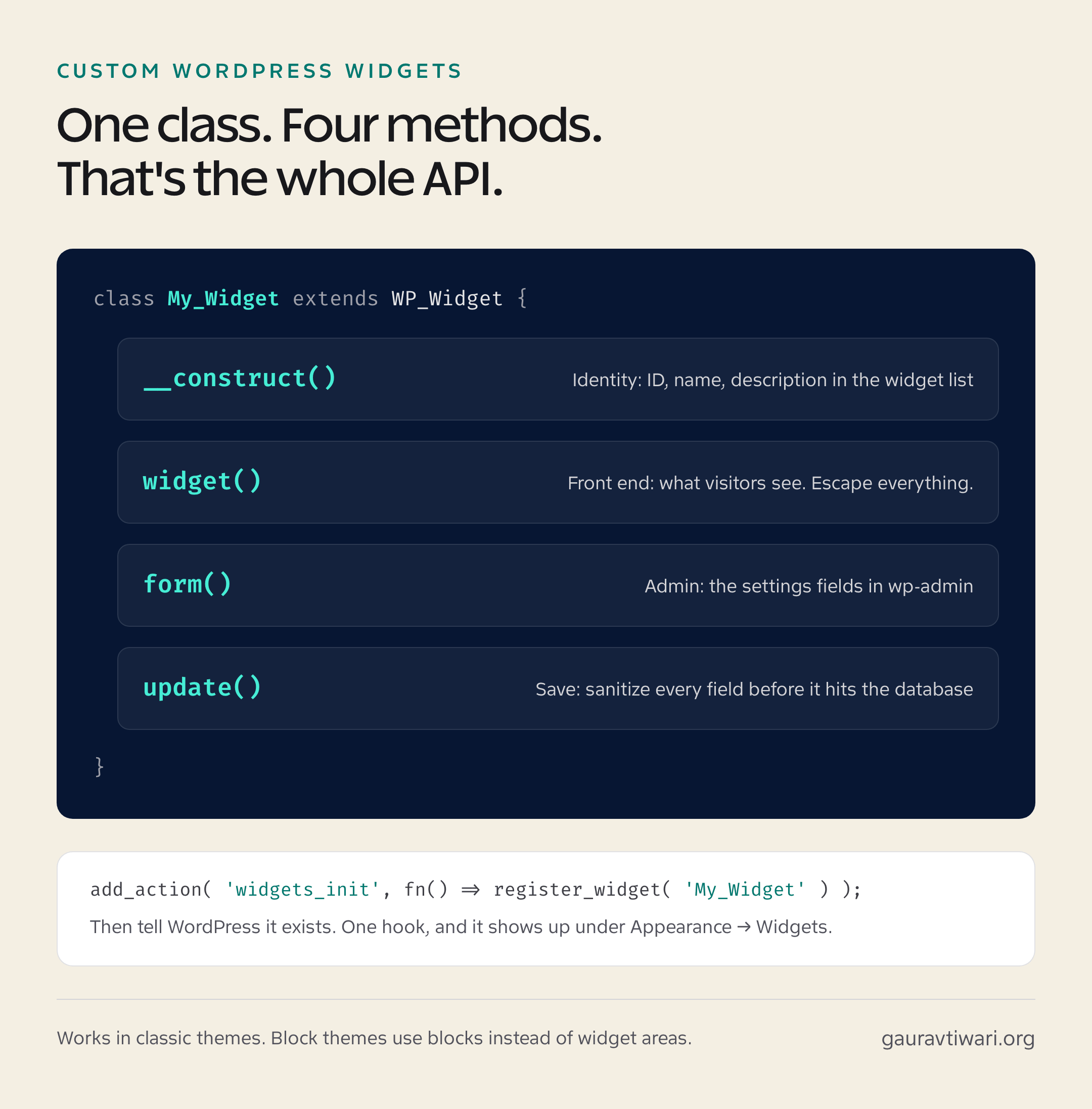
Every custom widget extends the WP_Widget class and fills in four methods. Each has one job:
- __construct() gives the widget its identity: base ID, the name shown in the widget list, and a description.
- widget() renders the front-end output your visitors see.
- form() renders the settings fields shown in wp-admin.
- update() sanitizes those settings before they’re saved to the database.
That’s the entire API surface. No build tools, no JavaScript, no REST endpoints. It’s one of the last corners of WordPress where plain PHP and fifteen minutes still produce something real.
A Complete Working Widget (Copy This)
Here’s a full, working plugin: a call-to-action widget with a title, a message and a button. Create the folder wp-content/plugins/gt-simple-cta/, save this as gt-simple-cta.php inside it, and activate it from the Plugins screen.
<?php
/**
 * Plugin Name:       GT Simple CTA Widget
 * Description:       A custom widget with a title, a short message and a button.
 * Version:           1.0.0
 * Author:            Gaurav Tiwari
 * License:           GPL-2.0+
 * Text Domain:       gt-simple-cta
 */

if ( ! defined( 'WPINC' ) ) {
	die;
}

class GT_Simple_CTA_Widget extends WP_Widget {

	public function __construct() {
		parent::__construct(
			'gt_simple_cta',                            // Base ID
			__( 'GT Simple CTA', 'gt-simple-cta' ),     // Name in the widget list
			array(
				'description' => __( 'Title, short message and a button.', 'gt-simple-cta' ),
			)
		);
	}

	// Front-end output: what visitors see.
	public function widget( $args, $instance ) {
		echo $args['before_widget'];

		if ( ! empty( $instance['title'] ) ) {
			echo $args['before_title']
				. esc_html( apply_filters( 'widget_title', $instance['title'] ) )
				. $args['after_title'];
		}

		if ( ! empty( $instance['message'] ) ) {
			echo '<p>' . esc_html( $instance['message'] ) . '</p>';
		}

		if ( ! empty( $instance['button_url'] ) ) {
			$label = ! empty( $instance['button_text'] )
				? $instance['button_text']
				: __( 'Learn more', 'gt-simple-cta' );
			echo '<a class="button" href="' . esc_url( $instance['button_url'] ) . '">'
				. esc_html( $label ) . '</a>';
		}

		echo $args['after_widget'];
	}

	// Admin form: the fields you fill in wp-admin.
	public function form( $instance ) {
		$title = $instance['title'] ?? '';
		?>
		<p>
			<label for="<?php echo esc_attr( $this->get_field_id( 'title' ) ); ?>">
				<?php esc_html_e( 'Title:', 'gt-simple-cta' ); ?>
			</label>
			<input class="widefat"
				id="<?php echo esc_attr( $this->get_field_id( 'title' ) ); ?>"
				name="<?php echo esc_attr( $this->get_field_name( 'title' ) ); ?>"
				type="text" value="<?php echo esc_attr( $title ); ?>">
		</p>
		<?php
		// Repeat the same pattern for message, button_text and button_url fields.
	}

	// Sanitize every field before it reaches the database.
	public function update( $new_instance, $old_instance ) {
		$instance                = array();
		$instance['title']       = sanitize_text_field( $new_instance['title'] ?? '' );
		$instance['message']     = sanitize_textarea_field( $new_instance['message'] ?? '' );
		$instance['button_text'] = sanitize_text_field( $new_instance['button_text'] ?? '' );
		$instance['button_url']  = esc_url_raw( $new_instance['button_url'] ?? '' );
		return $instance;
	}
}

add_action( 'widgets_init', function () {
	register_widget( 'GT_Simple_CTA_Widget' );
} );
Three details in that code that separate working widgets from support tickets:
- Everything echoed is escaped: esc_html() for text, esc_url() for links, esc_attr() inside form fields. Widgets render on every page, so one unescaped field is a sitewide XSS hole.
- update() sanitizes every field. Never trust what comes out of a form, even your own.
- before_widget and after_widget wrap the output. Skip them and your widget ignores the theme’s styling hooks, which is why “my widget looks broken” is usually this line missing.
Registering and Using Your Widget
The last three lines of the plugin do the registration. This is the part the old version of this article got wrong (it printed add action with a space, which is a fatal error, my apologies to anyone who copy-pasted it in 2019):
add_action( 'widgets_init', function () {
	register_widget( 'GT_Simple_CTA_Widget' );
} );
After activating the plugin, head to Appearance → Widgets. Your widget appears in the block inserter; search for its name, add it to a sidebar or footer area, fill the fields, and update. If you prefer the pre-5.8 widget interface, the official Classic Widgets plugin restores it with zero configuration.
Old tutorials warn that “blank space in the code generates errors.” The real rule: never leave whitespace after a closing ?> tag in a PHP file. Better yet, omit the closing tag entirely in pure-PHP files, like the plugin above does.
If You’re on a Block Theme: Build This Instead
No widget areas means no widgets, but the need (reusable content dropped into layouts) didn’t go anywhere. Block themes answer it three ways, in increasing order of effort:
- A synced pattern. Build your CTA once with core blocks, save it as a synced pattern, reuse it anywhere. Edit once, updates everywhere. This covers most “I need a widget” cases with zero code.
- A block plugin. Collections like the ones in my Gutenberg block plugins roundup ship ready-made CTA, post-list and info blocks.
- A custom block. The true successor to WP_Widget, with a real build step (npm, React). Worth it for product features, overkill for a sidebar promo.
If you’re mid-transition between the two worlds, my guide on migrating from classic to block themes covers what happens to your existing widgets (short version: WordPress converts them into blocks, mostly cleanly).
My honest position after building both: for classic-theme sites, a hand-rolled widget is still the fastest path from idea to sidebar. Fifteen minutes, one file, no build chain. Just don’t pour weeks into widget development on a site that’s one redesign away from having no place to put them.
FAQs: Custom WordPress Widgets
Are WordPress widgets deprecated?
No. The WP_Widget API still works and classic themes still register widget areas. What changed: the admin screen became block-based in WordPress 5.8, and block themes don’t have widget areas at all. Widgets are legacy technology, but supported legacy, like shortcodes.
Why can’t I find the Widgets menu in WordPress?
Your site runs a block theme. Block themes replace widget areas with the Site Editor, so Appearance → Widgets disappears entirely. Edit your header, footer, and sidebars through Appearance → Editor instead, using blocks and synced patterns where you’d previously use widgets.
What is the Legacy Widget block?
It’s the wrapper WordPress uses to show classic WP_Widget widgets inside the block-based widget editor. Your custom widget runs unchanged inside it, including its settings form. Visitors see no difference; it’s purely how the admin screen hosts pre-block widgets.
Should I put widget code in functions.php or a plugin?
A plugin, almost always. Widgets are functionality, and functionality should survive a theme switch. Code in functions.php disappears when the theme changes, and so do the widget’s saved settings. A plugin costs one file header and saves that whole failure mode.
How do I get the old widgets screen back?
Install the official Classic Widgets plugin from WordPress.org. It restores the pre-5.8 drag-and-drop widget interface with no configuration, and the WordPress team maintains it. Your widgets and their settings are untouched either way; only the editing interface changes.
Widget or custom block: which should I build in 2026?
For a classic-theme site you control, a widget is still the fastest path: one PHP file, no build tools. For block themes, products, or anything client-facing and long-lived, build a block; it works everywhere content is edited and won’t be orphaned by a theme switch.
Tell Google you want more of this.
Add Gaurav Tiwari as a preferred sourceOne tap, and this site shows up more often in your own Top Stories, AI Overviews and AI Mode. Remove it any time.