
 by
by
The mobile trading app on your phone is now more powerful than the desktop active trading platforms of a decade ago — if you pick the right one. Active traders moving meaningful size need a different feature set than casual investors who buy a few shares per month, and the gap between consumer-grade broker apps and professional mobile platforms has widened significantly in the past two years.
This guide is the practical feature checklist for picking a professional mobile trading platform in 2026. The capabilities that distinguish a serious tool from a glorified order pad, the security features that aren’t optional, the regulatory and infrastructure questions worth asking before you fund an account, and the specific characteristics that make a mobile platform actually usable when markets move.
Mobile-first design has become the differentiator. Apps built specifically for active traders — the OANDA Trading App is one example — have moved past porting desktop interfaces to small screens. Gesture-driven controls, synchronized layouts across devices, and execution speed that holds up during volatile sessions now define the category.
What makes a mobile platform “professional” (vs casual)
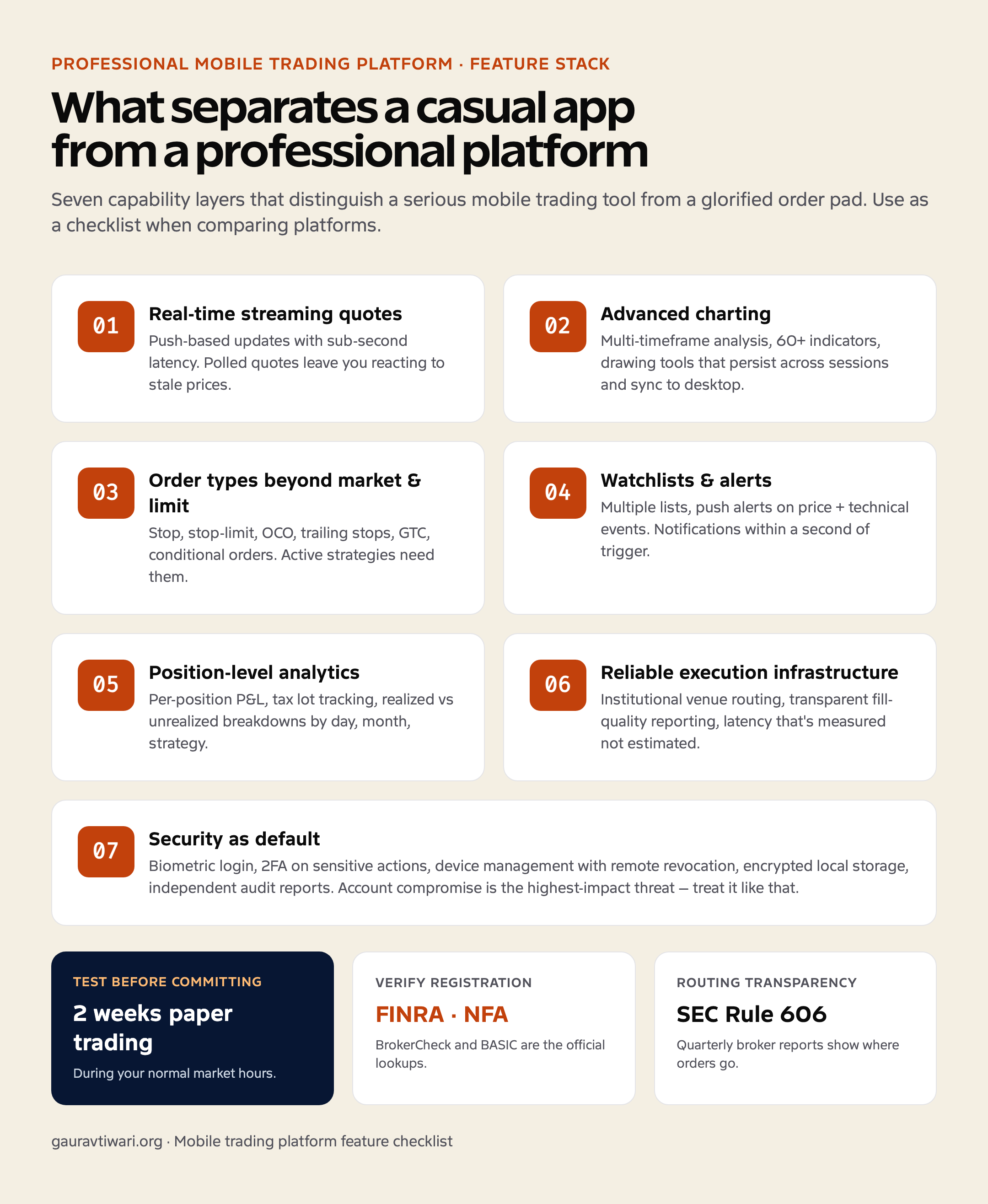
The line between a casual investing app and a professional trading platform isn’t marketing language — it’s a specific set of capabilities that determine whether you can actually do meaningful work from a phone. The seven that matter most:
- Real-time streaming quotes with low latency. Casual apps poll for quotes every few seconds. Professional platforms stream quotes through persistent connections so the prices you see are the prices that exist right now.
- Advanced charting with persistent layouts. Multi-timeframe analysis, 80+ indicators, drawing tools that save across sessions and sync to your desktop terminal.
- Order types beyond market and limit. Stop, stop-limit, OCO (one-cancels-other), trailing stops, GTC (good-till-cancelled), and conditional orders. Active strategies need them.
- Customizable watchlists with price alerts. Multiple watchlists, alert conditions on price, percent change, technical events. Push notifications that arrive within a second of the trigger.
- Order management and modification on the move. Adjust working orders, partial fills, modify stops — all without re-entering positions.
- Position-level analytics. P&L by position, by strategy, by day, by month. Tax lot tracking. Realized vs unrealized breakdowns.
- Reliable execution infrastructure. Order routing through institutional venues, transparent fill quality reporting, and latency that’s measured rather than estimated.
Execution quality: the feature most beginners ignore
Execution quality is the single most under-discussed feature when comparing platforms. Two apps can both show “$5,432.10” on a quote feed; the price you actually transact at on each can differ by cents per share or pips per lot. For active traders, that difference compounds quickly.
The execution-quality questions worth asking any platform you’re evaluating:
- What’s the median time between order entry and fill confirmation? Professional platforms publish this metric. If they don’t, ask.
- Where does the broker route my orders? Order flow can be routed to market makers, exchanges, or aggregated retail venues — each with different fill characteristics. The U.S. SEC requires brokers to publish quarterly Rule 606 reports detailing this; the SEC’s payment-for-order-flow page on Investor.gov explains what to look for.
- Does the platform offer Direct Market Access (DMA)? For traders who want explicit control over routing, DMA matters more than auto-routed broker fills.
- How are partial fills handled? Some platforms hide them; professional ones show every fill leg with the price and time.
- What’s the slippage profile during high-volatility events? Test during scheduled news releases (rate decisions, earnings, jobs reports) before committing real size.
Charting that’s actually usable on a phone
Charting on a 6-inch screen is fundamentally constrained — you can’t fit four timeframes side-by-side the way you can on a 27-inch monitor. Professional platforms work around this with smart UI choices instead of just shrinking the desktop chart:
- Single-tap timeframe switching. Cycle through 1m, 5m, 15m, 1h, 4h, daily without breaking analysis flow.
- Pinch-to-zoom that respects timeframe boundaries. Doesn’t snap to arbitrary intervals.
- Drawing tools that persist across sessions. Trendlines you draw at 9:30am should still be there at 3:30pm.
- Indicator stacking. Multiple indicators in separate panes (RSI, MACD, volume) without overlapping the price chart.
- Cross-device sync. Charts you set up on desktop appear on mobile with the same indicators, drawings, and timeframe.
- Trade-from-chart. Tap a price level on the chart to set a stop or limit order at that price.
Security features that aren’t optional
A trading account is one of the highest-value targets on your phone. Account compromise can be financially catastrophic in ways that most other app compromises aren’t. Non-negotiable security features:
- Biometric login (Face ID, Touch ID, fingerprint). Faster than passwords and harder to compromise via shoulder-surfing.
- Two-factor authentication (2FA) for sensitive actions. Withdrawals, password changes, device additions should all require a second factor — ideally hardware-key-compatible (FIDO2/WebAuthn).
- Session timeout controls. Configurable inactivity timeout that re-authenticates rather than just locking the screen.
- Device management. A list of every device logged into the account, with the ability to revoke any session remotely.
- Suspicious activity alerts. Login from a new location or device should trigger an immediate notification.
- Encrypted local storage. Your watchlists, preferences, and any cached data should be encrypted at rest using OS-provided secure storage.
- Independent security audits. Apps that have undergone third-party penetration testing and publish the results are preferable to those that simply claim “bank-grade security.”
The regulatory checks worth doing before funding an account
Different asset classes have different regulators in the United States. Verifying a broker’s registration takes a few minutes and is worth it before any meaningful funding:
- For stocks and ETFs: the broker should be registered with the SEC and a member of FINRA. Use FINRA BrokerCheck to confirm registration and review any disclosures.
- For futures and forex: the broker should be registered with the CFTC as a Futures Commission Merchant or Retail Foreign Exchange Dealer, and a member of the National Futures Association. NFA’s BASIC system is the official lookup.
- For all asset classes: check whether customer funds are segregated from the broker’s operating capital, and what investor-protection program (SIPC, NFA member protections) covers your account in the event of broker insolvency.
- Read the broker’s most recent regulatory filings. Customer complaints, enforcement actions, and capital adequacy reports are public records.
The professional mobile platform feature checklist
| Feature category | What to look for | Why it matters |
|---|---|---|
| Quote streaming | Push-based real-time updates, sub-second latency | Polled quotes leave you reacting to stale prices |
| Charting | Multi-timeframe, 60+ indicators, persistent drawings, cross-device sync | Mobile analysis depth determines whether you trust mobile entries |
| Order types | Market, limit, stop, stop-limit, OCO, trailing, GTC, conditional | Active strategies need order-type variety |
| Execution transparency | Published median fill time, Rule 606 reports, fill leg detail | You can’t improve what you can’t measure |
| Watchlists & alerts | Multiple lists, push alerts, technical-event triggers | You can’t watch the screen all day |
| Security | Biometric login, 2FA, device management, audit reports | Account takeover is the highest-impact threat |
| Account analytics | Per-position P&L, tax lot tracking, performance reports | Visibility drives improvement |
| Customer support | Phone support during market hours, documented SLA | Outages happen; response time matters |
| Regulation | Registered with SEC/FINRA/CFTC/NFA as appropriate | Non-negotiable baseline |
| Demo / paper trading | Free, full-featured, time-unlimited | Test before committing real capital |
How to test a platform before fully committing
- Open a demo / paper-trading account. Most professional platforms offer one. Spend at least two weeks using it during your normal market hours.
- Test order entry speed. Time the gap between tap and confirmation. Note how it varies during high-volatility periods (rate announcements, earnings releases).
- Verify alerts arrive promptly. Set price alerts on liquid instruments and check whether push notifications land within a few seconds of the trigger.
- Test the charting on the timeframe you actually use. If you trade on 5-minute charts, the 5-minute experience matters. Daily-chart performance is irrelevant if that’s not your timeframe.
- Reach out to support during market hours. Note response time. A 2-hour delay during a market event is the difference between a managed exit and an unmanaged one.
- Read the broker’s public regulatory filings. Customer complaints and enforcement actions are public; ten minutes of reading reveals patterns.
- Verify the funding and withdrawal process with a small test deposit and withdrawal before committing meaningful size. The friction here often reveals operational quality.
Features no platform can replace
The best mobile trading platform doesn’t make a strategy work that wouldn’t work on desktop. Tooling matters; it doesn’t substitute for the underlying decisions about position sizing, time-in-market, and the discipline to follow your plan when markets behave differently than expected. The questions worth asking before evaluating any specific platform are about what you’re trying to do, the timeframe you’re actually working on, and whether your current process produces decisions you’d feel confident defending.
For broader analytical context on related topics, see my notes on the mathematics of risk assessment, the Zerodha Kite review for an in-depth platform analysis from the Indian market, and investing basics for foundational concepts.
Frequently asked questions
What’s the difference between a basic mobile broker app and a professional trading platform?
Professional platforms ship with advanced charting (multi-timeframe, drawing tools, indicators), order types beyond market and limit, real-time streaming quotes with low latency, and customizable workspaces. Basic broker apps usually skip the charting depth and order-type variety in favor of simpler buy/sell flows for casual investors.
How important is execution speed on a mobile trading app?
For active trading, every 100–300ms of latency between tap and fill matters. Look for apps that publish median execution times and that route orders through institutional infrastructure rather than aggregated retail venues. The difference can be a few cents per share or pip per fill.
Can a mobile platform really replace a desktop trading station?
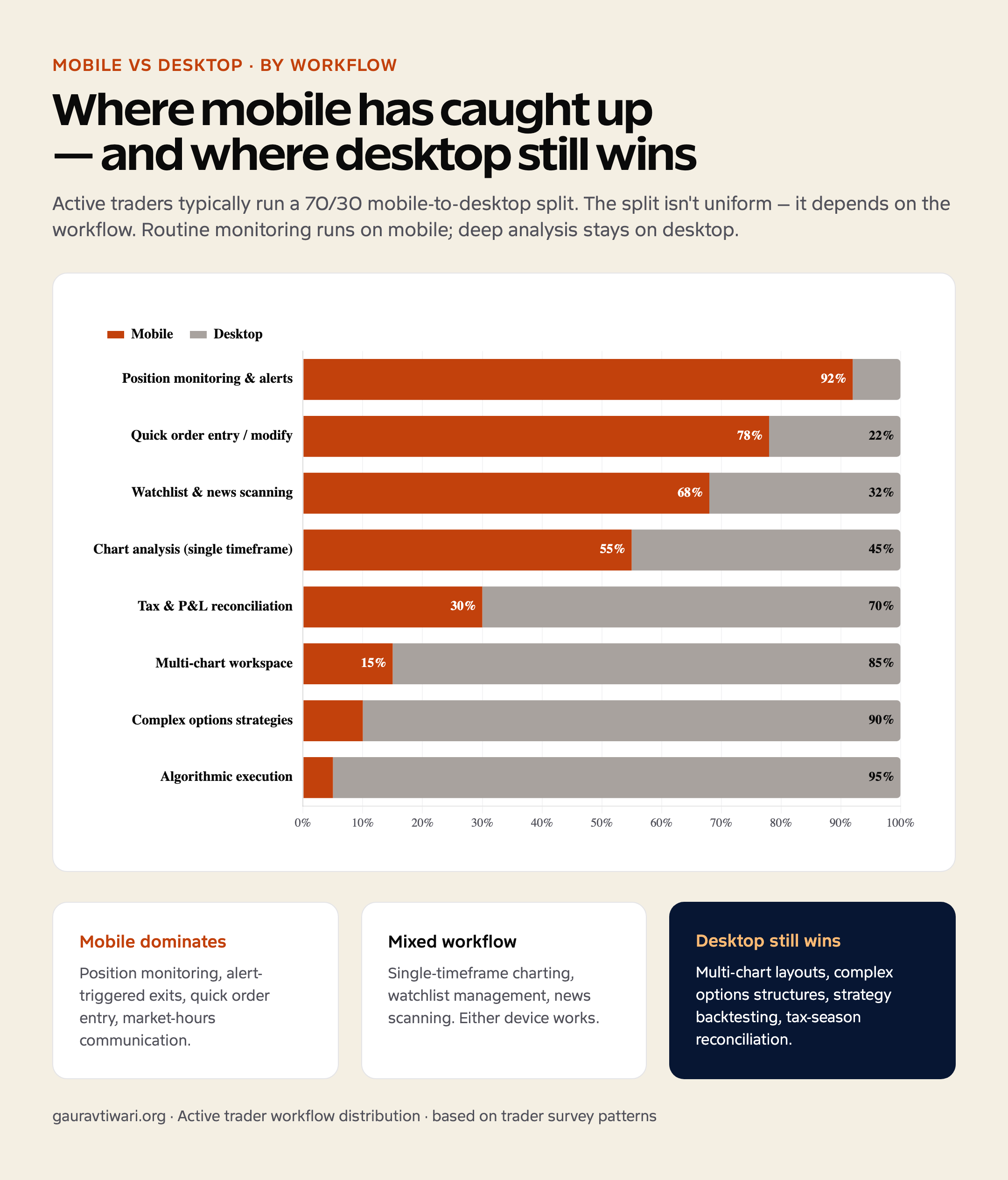
For position monitoring, alert-triggered exits, and routine order entry — yes. For multi-monitor analysis, complex options strategies, or automation, desktop still has the edge. Most professional traders use both, with mobile handling 60–80% of routine actions.
What security features should a professional mobile trading app include?
Biometric login, two-factor authentication, session timeout controls, device whitelisting, encrypted local storage of preferences, and the ability to remotely wipe a lost device. Apps that have undergone independent security audits and publish the results are preferable to those that just claim "bank-grade encryption."
Are mobile trading platforms regulated in the US?
Yes. Brokers offering trading services to US residents must register with the appropriate regulator depending on the asset class — the SEC for securities, FINRA for member-firm conduct, the CFTC and NFA for futures and forex. Always verify a broker’s registration on the official regulator's website before opening an account.
What’s the best way to test a professional mobile trading platform before committing?
Open a demo or paper-trading account first. Most professional platforms offer one. Test order placement speed, charting on the timeframe you actually trade, alert reliability, and the support response time during market hours. A two-week trial reveals more than any feature comparison sheet.
Tell Google you want more of this.
Add Gaurav Tiwari as a preferred sourceOne tap, and this site shows up more often in your own Top Stories, AI Overviews and AI Mode. Remove it any time.