
14 WordPress Website Examples Worth Stealing
You search “WordPress website examples” and get the same article 30 times. TechCrunch. The White House. Rolling Stone. Snoop Dogg. Great. None of those help you build YOUR site because they’re all running custom enterprise themes built by development teams you can’t afford.
I’ve built hundreds of WordPress sites across hundreds of brands in 16 years. The sites that actually helped me improve my own work weren’t the billion-dollar brands. They were mid-size sites with clever design patterns I could replicate using themes and plugins anyone can buy. That’s what this guide focuses on.
Every example below includes: what the site does well, the theme/builder it runs (when detectable), and the specific design pattern worth stealing. Not just “look how pretty.” Look how you can do this too.
How I Picked These Examples (Not Just Famous Brands)
Most “WordPress website examples” articles grab the same list of Fortune 500 sites and call it a day. Those articles prove that WordPress scales. They don’t help you design a better site.
My criteria:
- Design pattern worth stealing. Every site has at least one specific element you can replicate with available themes and plugins.
- Detectable stack. When possible, I identified the theme, page builder, and key plugins using BuiltWith, WhatWPThemeIsThat, and manual source inspection.
- Mix of budgets. From free themes to custom enterprise builds. You need to know what each budget tier looks like.
- Performance matters. A beautiful site that scores 25 on PageSpeed Insights isn’t an example to follow. I filtered for sites that balance design and performance.
- Categorized by what you want to build. Not by industry. By intent.
WordPress powers 43.2% of the entire internet. Over 810 million websites. The range is enormous. Let’s look at the ones worth studying.
Best WordPress Blog and Publication Examples
These are the content-driven WordPress sites with design patterns you can actually learn from and replicate.
TechCrunch (techcrunch.com)
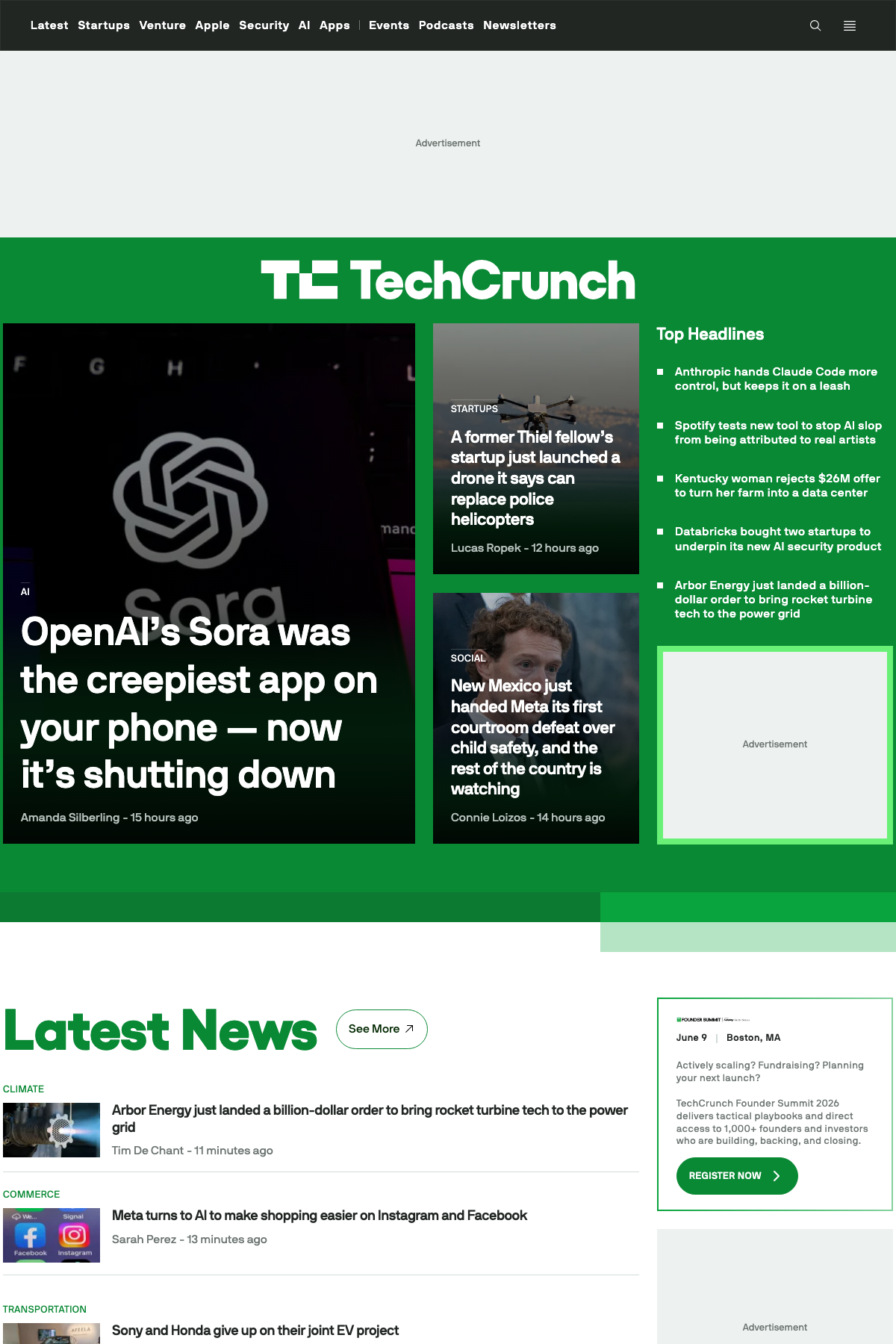
The gold standard for WordPress at scale. Acquired by AOL for $25 million in 2010. Runs on WordPress VIP hosting with a fully custom theme. Handles massive traffic without breaking.
What to steal: Their content hierarchy. The homepage is ruthlessly organized: breaking story at top, category streams below, sidebar for trending. Every element earns its space. No decorative clutter.
The reality check: You can’t replicate TechCrunch’s custom build. But you can replicate its layout logic using GeneratePress with GenerateBlocks or Kadence with header/footer builder. The principle is the same: lead with your best content, organize everything else into scannable streams.
Rolling Stone (rollingstone.com)
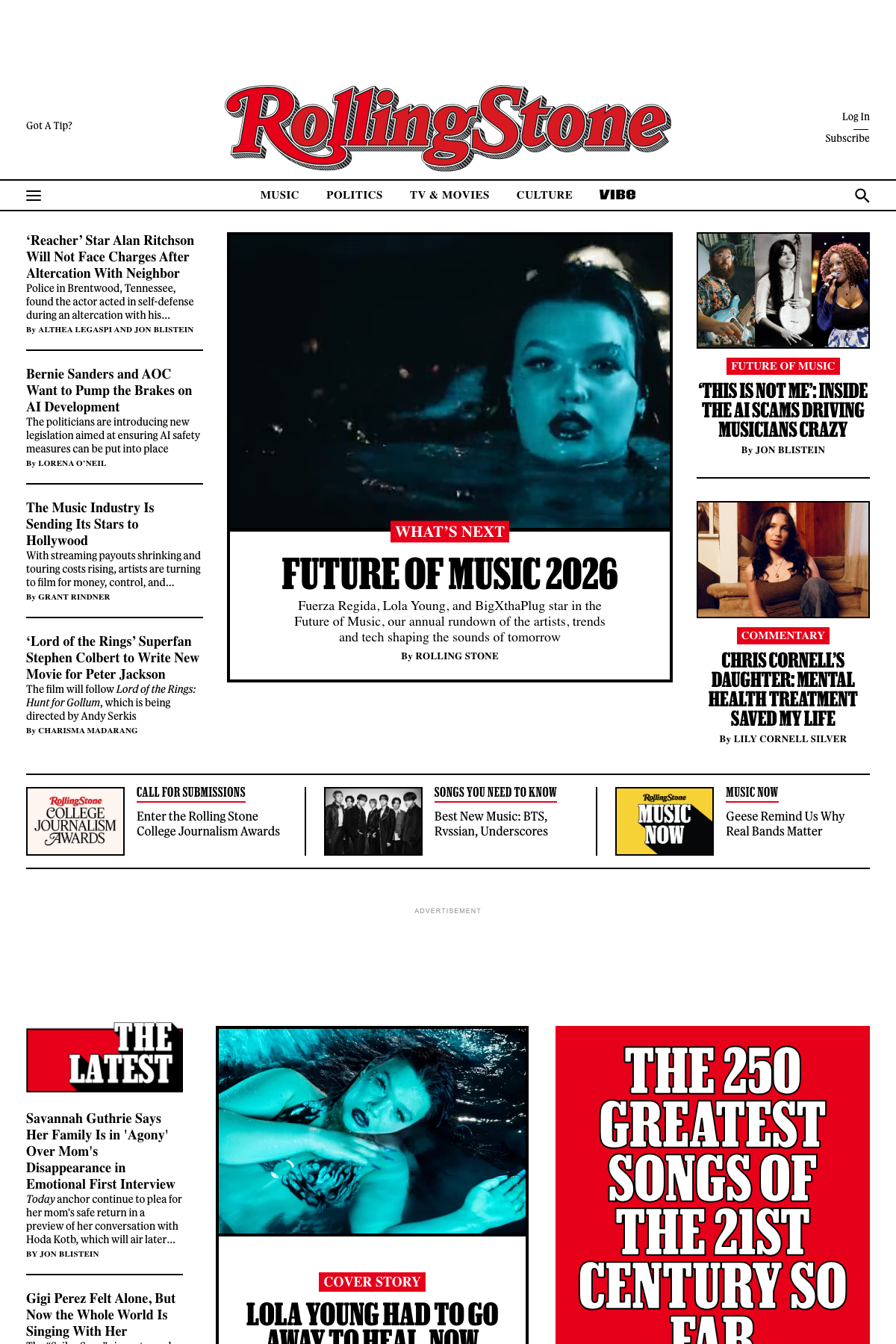
Migrated from a legacy CMS to WordPress in 2018. Featured in the official WordPress.org showcase. Full-bleed hero images, bold typography, and a magazine layout that translates perfectly to digital.
What to steal: Their hero section treatment. Every feature story gets a cinematic full-width image with overlay text. This pattern works for any content-heavy site and requires nothing more than a page builder with a cover/hero block.
Pinch of Yum (pinchofyum.com)
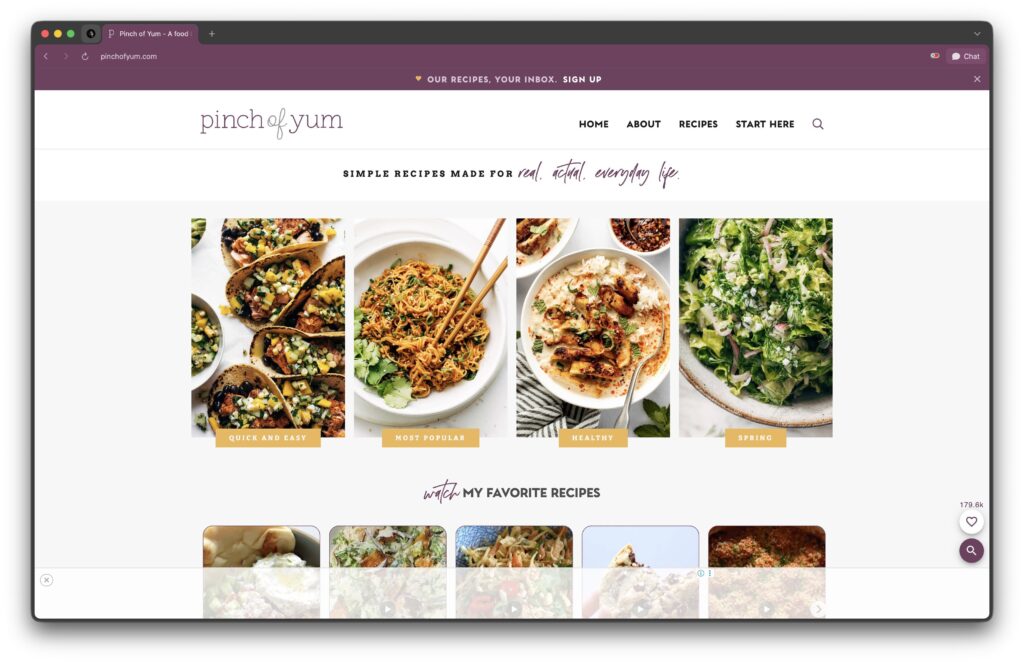
One of the most successful food blogs ever built. Photography-first design with a clean grid layout. Runs on the Flavor theme by Mediavine.
What to steal: Image-first card grids. Every post is represented by a beautiful photo with minimal text. This works for any visual niche: food, travel, photography, fashion. The grid layout gives visitors a visual browse experience instead of a text-heavy blog roll.
Matt Mullenweg (ma.tt)
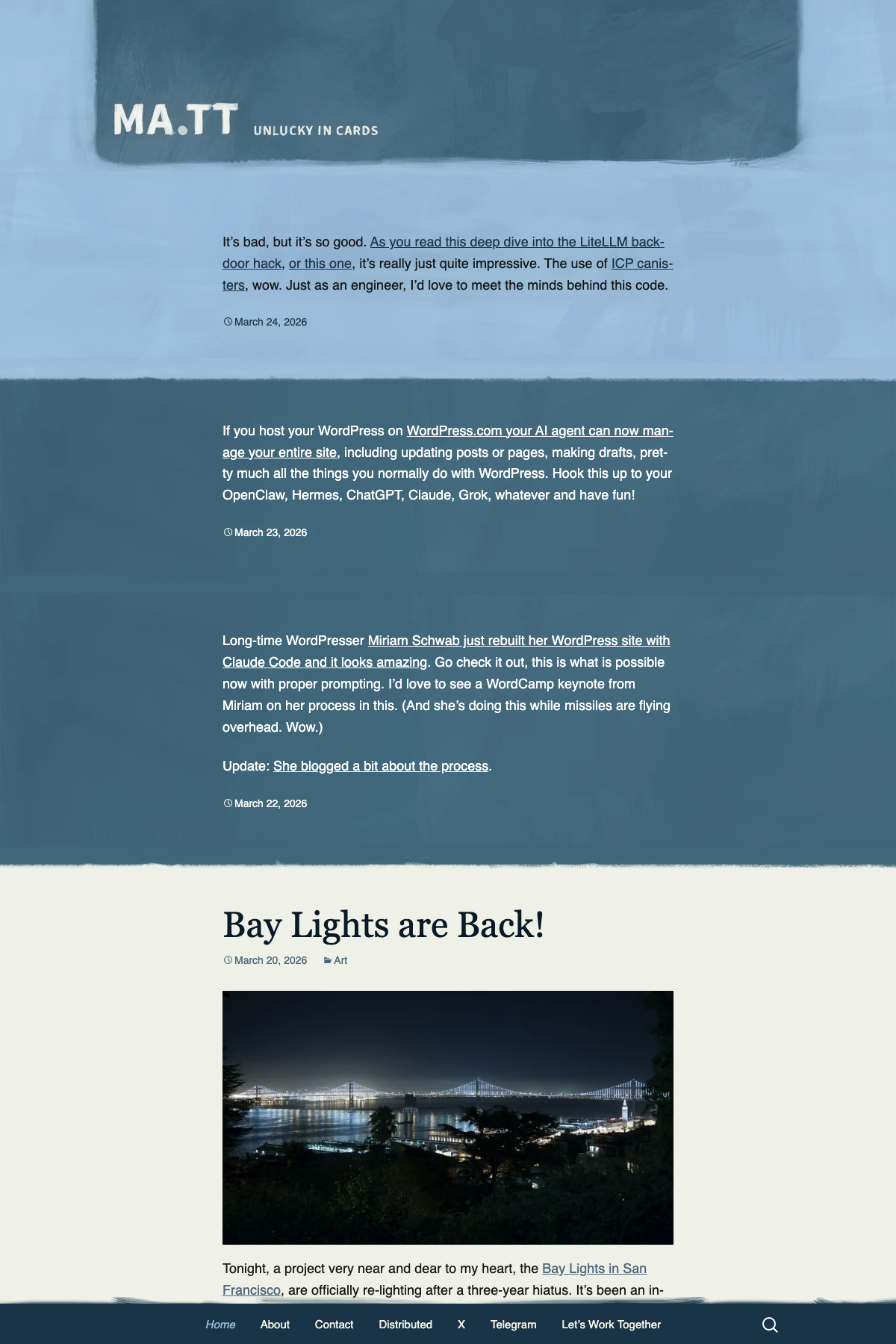
WordPress co-creator’s own site. The ultimate meta-example. Clean, minimal, focused on the writing. No sidebar. No visual noise. Just content.
What to steal: The courage to strip everything away. Most WordPress sites have too much going on. Matt’s site proves that a blog with good typography and nothing else is more compelling than a blog with 15 sidebar widgets.
NerdWallet (nerdwallet.com)

Not just a blog. A financial comparison engine that generates massive organic traffic. Built on WordPress with custom comparison tools, calculators, and structured data that dominate search results.
What to steal: Embedded tools within content. Comparison tables, calculators, and interactive elements that make content more useful than competitors. You can build simpler versions of this using ACF custom fields or plugins like Calculated Fields Form.
Best WordPress Ecommerce Examples
WordPress paired with WooCommerce runs some impressive online stores, and these four show different approaches to selling products.
Roberto Coin (robertocoin.com)
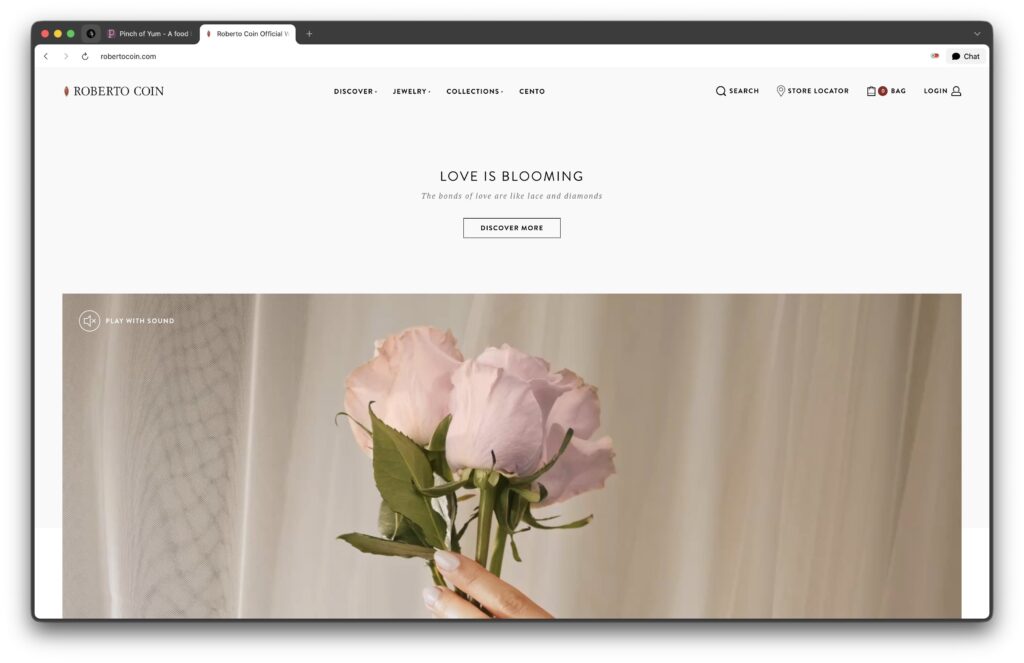
Luxury jewelry brand running WordPress with WooCommerce. Won the 2016 AVA Digital Awards for ecommerce. Full-bleed video on the homepage, shoppable editorial content, and product pages that feel more like magazine spreads than checkout flows.
What to steal: Shoppable editorial layouts. Products presented in lifestyle context, not just product grid. This approach works for any premium brand using WooCommerce. Use WooCommerce product blocks within editorial content instead of relying solely on the shop page grid.
Nalgene (nalgene.com)
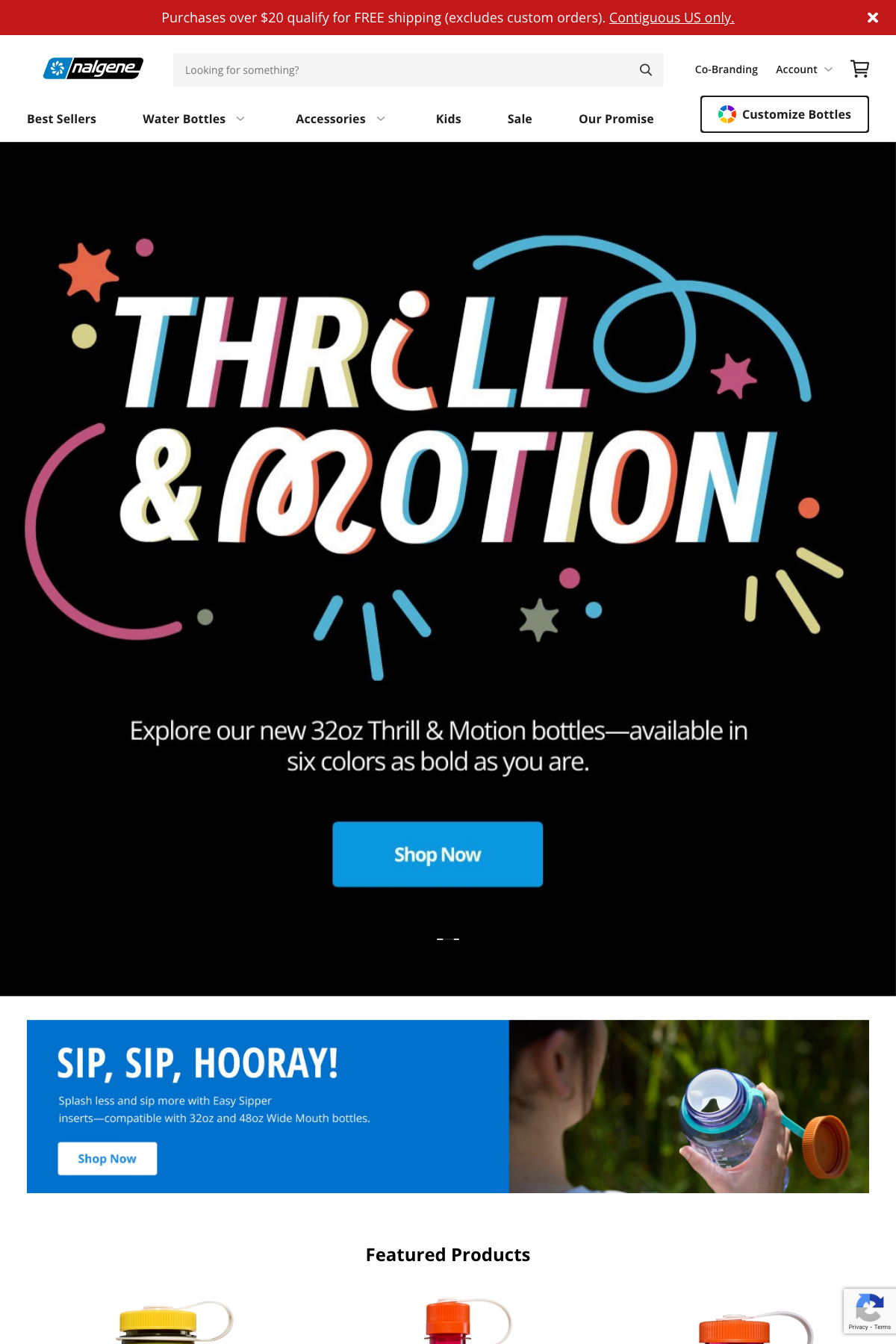
Simple product-focused design. Prominent product search, newsletter incentive popup, and featured items on the homepage. WordPress with WooCommerce.
What to steal: The newsletter incentive timing. Nalgene shows their email capture after brief scroll engagement, not on page load. This converts better because visitors have context before being asked for their email.
Beardbrand (beardbrand.com)

Strong brand identity with minimal homepage design. Clean hero, featured products, and a content section that feeds the top of their funnel. The design serves the brand story, not the other way around.
What to steal: Content-commerce integration. Beardbrand uses educational blog content to drive product discovery. The blog isn’t separate from the store. It’s the top of the funnel. This is how WordPress + WooCommerce should work together, not as separate silos.
Oura Ring (ouraring.com)
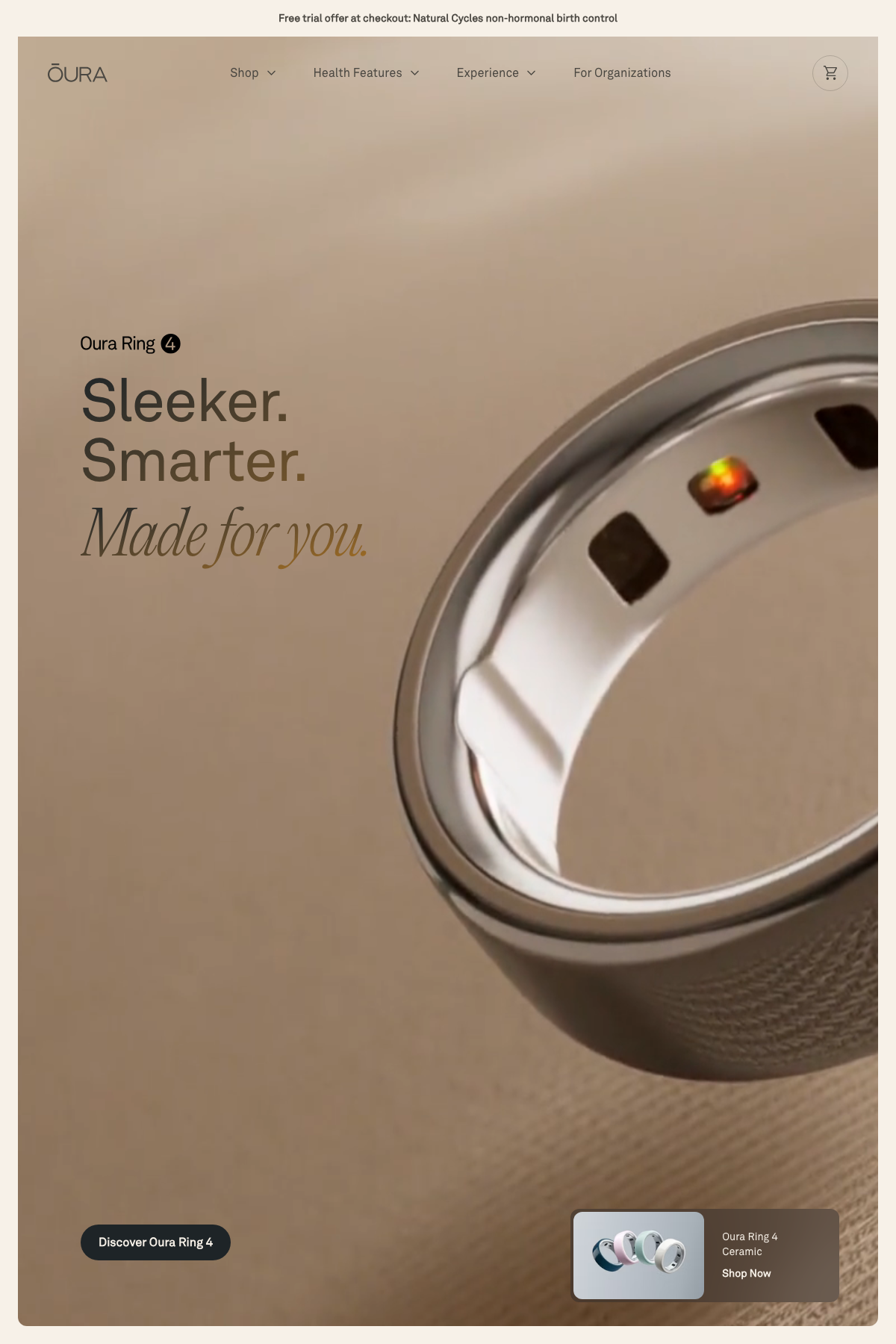
Health tech product showcase with premium design. Scroll animations, data visualizations, and product details that unfold as you scroll. Not your typical WooCommerce grid.
What to steal: Scroll-triggered product reveals. Instead of dumping all product info above the fold, Oura reveals features progressively as users scroll. This keeps engagement high and tells a story. Implementable with any modern page builder’s animation features. Elementor Pro has built-in scroll effects. Bricks Builder and Kadence Blocks also support scroll-triggered animations without custom code.
Best WordPress Portfolio and Agency Examples
Portfolio and agency sites live or die by first impressions, and these three handle it differently.
Kobu Foundry (kobufoundry.com)

Interactive design studio site with drag-and-drop elements, game mechanics, and experimental interfaces. Pushes WordPress well beyond typical corporate site territory.
What to steal: One interactive element. You don’t need the whole experience. But adding one unexpected interactive moment (a draggable element, a hover effect that reveals content, a scroll animation) makes your portfolio memorable. Bricks Builder or custom JavaScript can handle this.
Diggity Marketing (diggitymarketing.com)
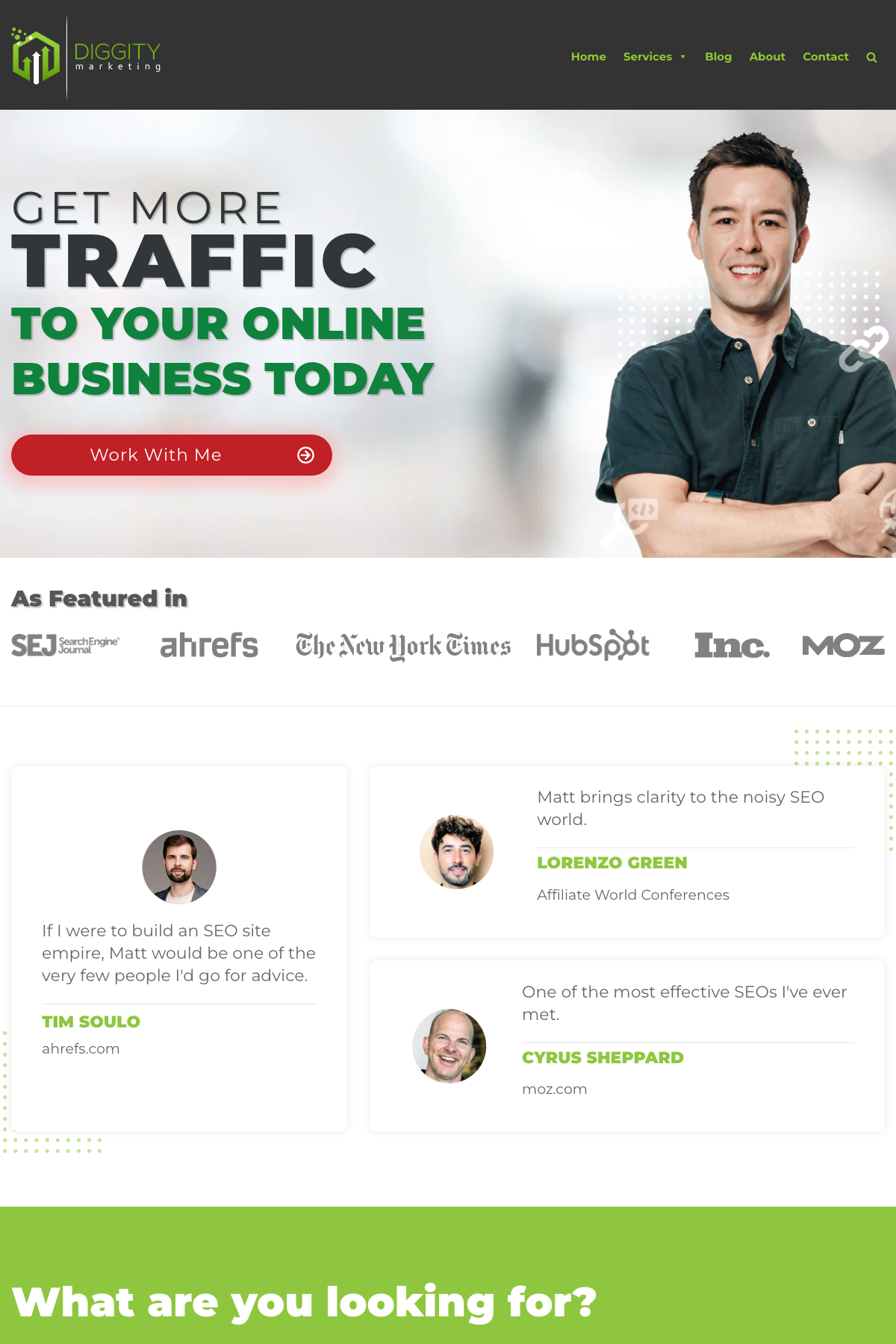
Marketing agency built on the Neve theme. Strategic color scheme (blue for trust), large readable text, testimonials above the fold, and a clear value proposition on every page.
What to steal: Above-the-fold testimonial placement. Most agency sites bury testimonials on a separate page. Diggity puts them right on the homepage, near the hero section. This builds trust immediately. Neve makes this easy with its starter template system.
Best WordPress SaaS and Corporate Examples
Enterprise and SaaS companies use WordPress for their public-facing content, and the design patterns here scale well.
Bloomberg Professional (bloomberg.com/professional)

Dark theme with colorful CTAs. Tile-based product layout that lets visitors self-select by interest. WordPress handles the content layer while Bloomberg’s data systems handle the financial tools.
What to steal: Dark mode with strategic color pops. A dark background makes colored CTAs stand out dramatically. This works for any SaaS or tech company site. Implement with a dark color scheme in your theme settings and bright accent colors for buttons.
Microsoft News (news.microsoft.com)
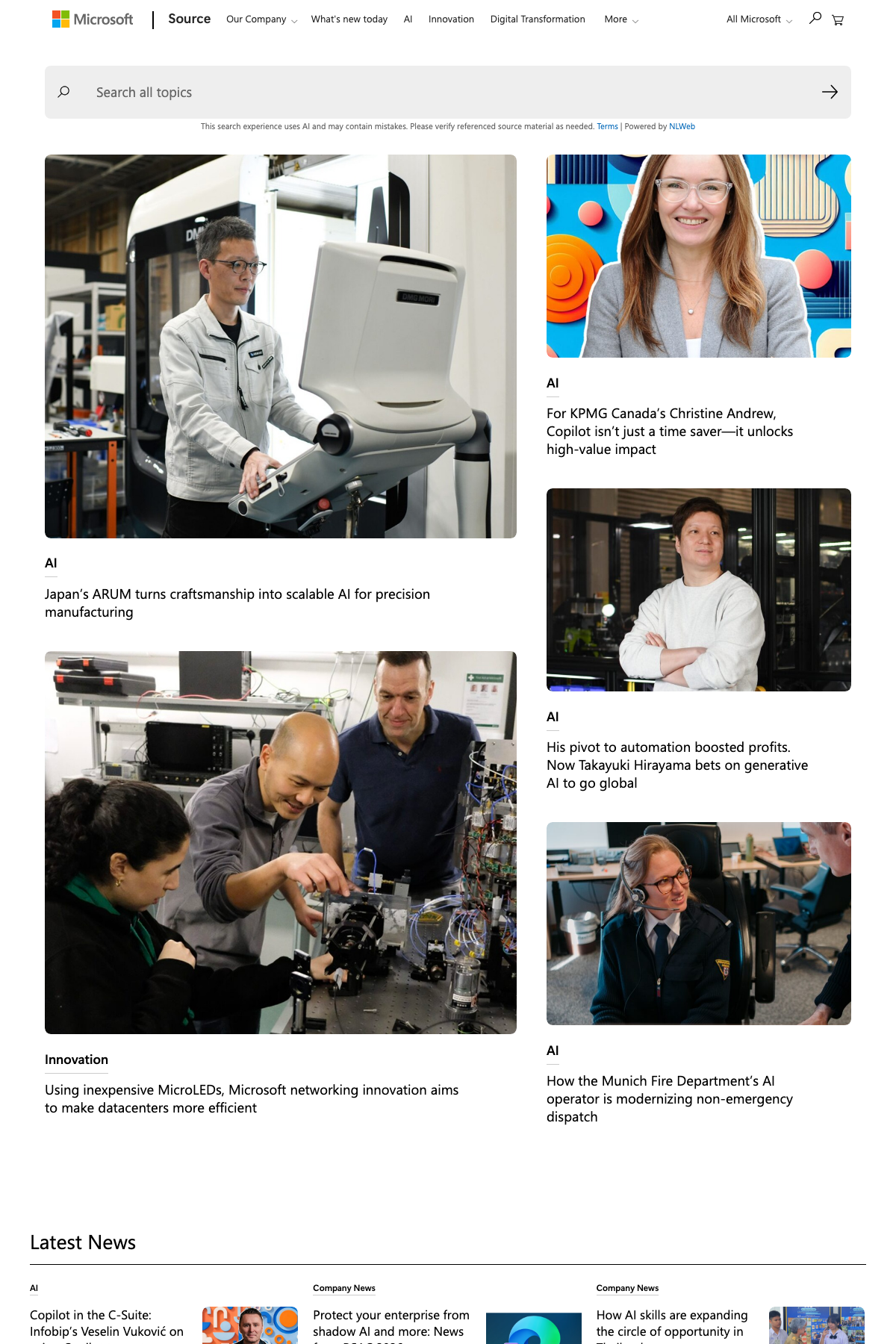
Masonry grid layouts for corporate news. Enterprise content management at scale. Clean, functional, and fast despite the volume of content.
What to steal: Masonry grids for content-heavy homepages. Instead of uniform rows, masonry layouts give visual weight to featured stories while maintaining a scannable overview. GenerateBlocks’ grid system or Kadence Blocks can produce this pattern.
Meta Newsroom (about.fb.com/news)
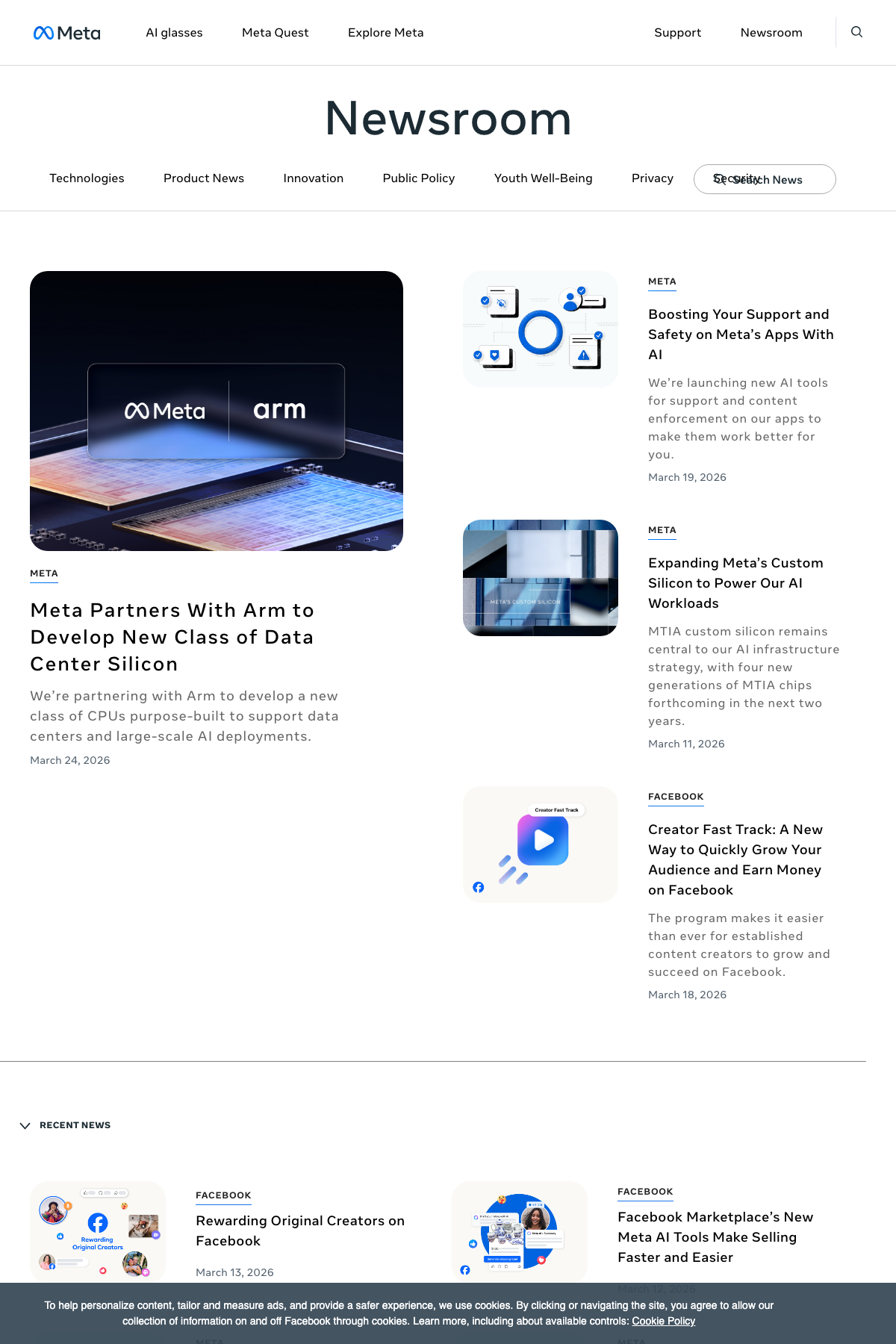
Featured in the WordPress.org showcase. Minimalist design with excellent article categorization. The content architecture is the star, not the visual design.
What to steal: Category-based content architecture. Meta uses clear content categories with visual differentiation (color coding, layout shifts). This is underrated for corporate blogs and news sections. WordPress’s built-in category system plus a theme with category template support is all you need.
WordPress Sites Built with Free Themes
This is the section most articles skip. Celebrity sites running custom themes don’t help you if your budget is $0. These sites prove that free WordPress themes produce professional results.
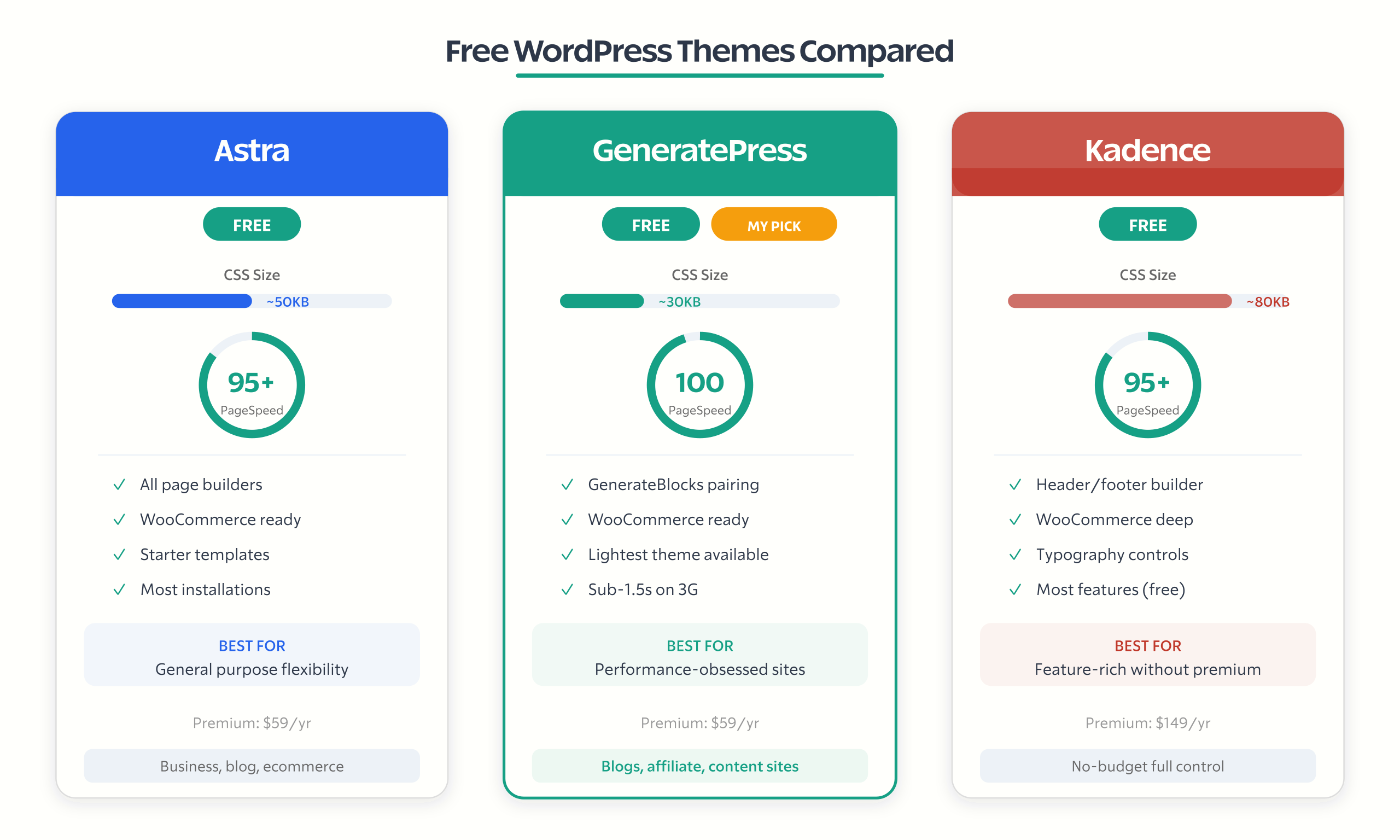
Sites Using Astra (Free)
Astra is the most popular WordPress theme by installations. It’s lightweight (under 50KB), fast, and works with every major page builder. The free version handles most use cases.
Best for: Business sites, blogs, and WooCommerce stores that need speed and flexibility. Astra’s starter templates give you a professional design in minutes, and the theme is fast enough that you’re not starting with a performance handicap.
Sites Using GeneratePress (Free)
My personal choice and what runs gauravtiwari.org. GeneratePress is the most performance-focused theme available. Sub-50KB total CSS. Perfect 100 PageSpeed scores on basic setups. When paired with GenerateBlocks, it’s the leanest full-featured WordPress stack you can run.
My own stack breakdown: GeneratePress Premium + GenerateBlocks Pro + custom CSS. No page builder. No unnecessary JavaScript. My site loads in under 1.5 seconds on 3G connections because the theme generates almost zero overhead. After testing every major theme across client projects, this is the stack I use for my own money sites.
Best for: Developers, performance-obsessed site owners, and anyone building content sites where speed directly impacts revenue (blogs, affiliate sites, media sites).
Sites Using Kadence (Free)
Kadence offers the most features of any free WordPress theme. Built-in header/footer builder, typography controls, and WooCommerce integration that competitors charge for. The free version is genuinely complete.
Best for: Users who want theme-level control without buying a premium theme or page builder. Kadence fills the gap between “basic free theme” and “premium theme with all the bells.”
Free Theme Comparison
| Theme | Size | Builder Support | WooCommerce | Best For | Premium Price |
|---|---|---|---|---|---|
| Astra | ~50KB | All builders | Yes | General purpose | $59/yr |
| GeneratePress | ~30KB | GenerateBlocks | Yes | Performance sites | $59/yr |
| Kadence | ~80KB | Kadence Blocks | Yes | Feature-rich free | $149/yr |
| Twenty Twenty-Five | ~40KB | Block Editor only | Limited | Block theme learning | Free only |
| Neve | ~30KB | All builders | Yes | Agency starter sites | $69/yr |
What Makes These Sites Fast (Performance Breakdown)
A beautiful WordPress site that takes 6 seconds to load is a failure. 53% of mobile users abandon sites taking longer than 3 seconds. Performance isn’t optional.
What the fastest WordPress sites have in common:
- Lightweight themes. Every fast site on this list uses either a custom lightweight theme or one of the performance-focused options (GeneratePress, Astra, Kadence). None of them use heavy multipurpose themes with 200 built-in features.
- Image optimization. Lazy loading, WebP/AVIF format, properly sized images. The biggest performance killer on WordPress sites is unoptimized images. Every example site worth studying handles this.
- Minimal plugins. Fast sites run fewer than 20 active plugins. Each plugin adds HTTP requests, database queries, and JavaScript. The enterprise sites (TechCrunch, Rolling Stone) have custom-built functionality instead of plugin stacks.
- Server-level caching. The enterprise examples run on WordPress VIP or dedicated servers with Varnish, Redis, or built-in object caching. For regular sites, good hosting with built-in caching (Cloudways, Kinsta, WP Engine) gets you 80% of the same benefit.
- CDN. Every fast site uses a content delivery network. Cloudflare’s free tier or a CDN bundled with managed hosting. Non-negotiable for sites with any global audience.
PageSpeed benchmark to aim for:
- 90-100: Good (green). Your site is fast.
- 50-89: Needs work (yellow). Common for sites with page builders.
- 0-49: Poor (red). You’re losing visitors and rankings.
Target a mobile PageSpeed score of 85+ for content sites and 75+ for WooCommerce stores. Anything below 50 needs immediate attention. My guide to passing Core Web Vitals covers the specific optimizations.
WordPress VIP vs. The Rest of Us
Here’s the elephant in the room that every “WordPress examples” article ignores: the most famous WordPress sites (TechCrunch, TIME, Fortune, Rolling Stone) run on WordPress VIP, which is a completely different hosting tier.
WordPress VIP starts at $2,000-$5,000/month. It includes dedicated infrastructure, enterprise security, and a development team on call. These sites have custom themes built by agencies charging six figures.
What this means for you: When an article shows you TechCrunch as a “WordPress example,” they’re technically correct. But it’s like showing a Ferrari as a “car example” when you’re shopping for a Honda. The platform is the same. Everything else is different.
The sites you can actually replicate are the ones running on standard hosting ($5-$100/month) with commercially available themes ($0-$99) and off-the-shelf plugins. That’s why I included the free theme section. Those examples are actionable.
The takeaway from enterprise sites isn’t their tech stack. It’s their design principles. Clean typography, clear content hierarchy, intentional whitespace, and fast loading times. You can apply these principles with a $59/year GeneratePress license.
How to Identify Any WordPress Site’s Theme and Plugins
Found a WordPress site you love? Here’s how to identify its stack:
Step 1: Confirm it’s WordPress. Add /wp-admin/ to the URL. If you get a login page, it’s WordPress. Or check the page source for “wp-content” in the code.
Step 2: Identify the theme. Use WhatWPThemeIsThat.com or IsItWP.com. These tools scan the site’s source code for the theme directory name. They work for about 70% of sites. Custom themes and heavily modified themes may not be identifiable.
Step 3: Check the source manually. View page source (Ctrl+U) and search for “wp-content/themes/”. The text after this path is the theme directory name. Search that name to find the theme.
Step 4: Identify plugins. Tools like BuiltWith and WPDetector show detected plugins. You can also check the page source for “wp-content/plugins/” paths.
Step 5: Check performance. Run the site through PageSpeed Insights. This tells you their Core Web Vitals scores and gives you a realistic performance benchmark to compare against.
Important caveat: Custom themes built for enterprise clients won’t be available for purchase. If a theme detector returns a name you can’t find in any marketplace, it’s a bespoke build. Look at the design principles instead and implement them with available themes.
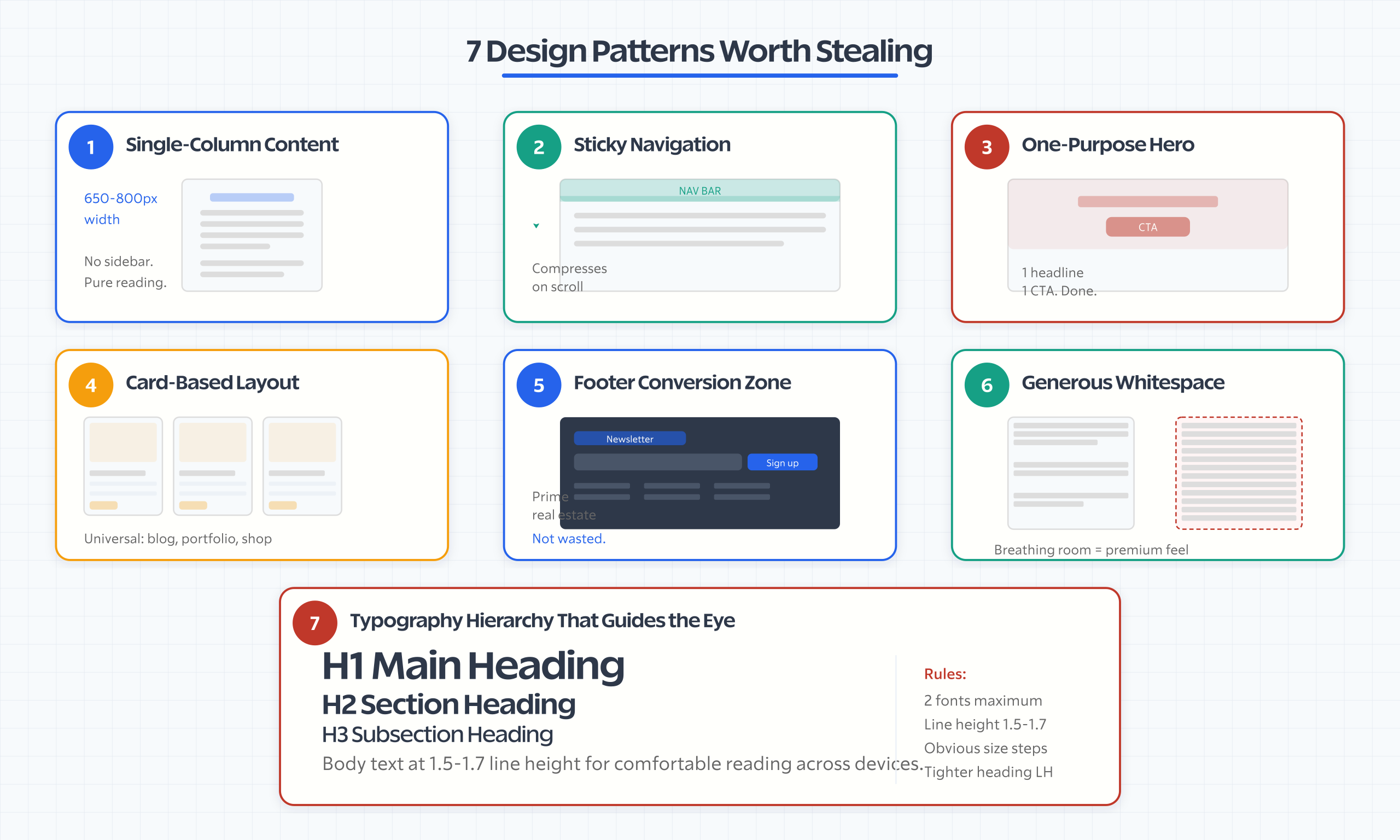
Design Patterns Worth Stealing (Regardless of Theme)
Across all these examples, certain design patterns consistently appear on the best sites:
1. Single-column content layouts. The best blog and content sites don’t use sidebars. They center content at a readable width (650-800px) with generous margins. This isn’t a trend. It’s readability science. Matt Mullenweg’s site does this. Pinch of Yum does this.
2. Sticky navigation with scroll behavior. The nav bar that compresses on scroll, hides on scroll-down but reappears on scroll-up, or changes background from transparent to solid. This keeps navigation accessible without dominating the reading experience.
3. Hero sections that do ONE thing. The best heroes have one headline, one image or video, and one CTA. Not three CTAs, two newsletter forms, and a chatbot. Roberto Coin’s full-bleed video hero converts because it focuses on a single emotional message.
4. Card-based content organization. Grid of cards with image, title, excerpt, and category tag. This pattern works for blogs, portfolios, product showcases, and news sites. It’s universal because it’s scannable and touch-friendly.
5. Footer as conversion zone. The best WordPress sites treat the footer as prime real estate: newsletter signup, popular content links, trust badges, and secondary CTAs. Most sites waste their footer on copyright text and link dumps.
6. Whitespace as a design element. The enterprise sites on this list use generous whitespace between sections, around text, and between navigation items. Whitespace isn’t wasted space. It’s the single most effective way to make content feel premium and readable. Most WordPress sites cram too much into every viewport.
7. Typography hierarchy that guides the eye. Two fonts maximum. One for headings, one for body. Size differentiation between H1, H2, H3 that’s immediately obvious. Line height of 1.5-1.7 for body text. Letter spacing slightly increased on uppercase subheadings. These small choices separate professional sites from amateur ones.
Great web design isn’t about following trends. It’s about applying proven patterns consistently.
I’ve tested and worked with these tools across 800+ client projects. The recommendations here come from real-world use, not spec sheets.

Build Yours
Every site on this list started as a blank WordPress install. Same dashboard. Same block editor. Same plugin directory. The difference between a generic WordPress site and the examples above is intentional design decisions, not expensive tools.
Pick one site from this list that matches what you want to build. Study the specific pattern I highlighted. Then implement it on your site using a theme and builder you can actually afford. Stop admiring enterprise sites you can’t replicate. Start stealing design patterns from sites built with the same tools available to you.
After 800+ WordPress projects, the lesson is always the same: constraints produce better design than unlimited budgets. A $99 GeneratePress One license with thoughtful configuration beats a $50,000 custom theme with no design direction. Every time.
Frequently Asked Questions
What famous websites are built with WordPress?
TechCrunch, Rolling Stone, TIME, Fortune, The Walt Disney Company, Sony Music, BBC America, Meta Newsroom, Bloomberg Professional, and the official White House website all run on WordPress. Most use WordPress VIP hosting with custom enterprise themes built by professional development agencies, starting at $2,000 to $5,000 per month for hosting alone.
What percentage of websites use WordPress?
WordPress powers 43.2 percent of all websites on the internet, translating to over 810 million sites. This includes everything from personal blogs to enterprise news publications to full ecommerce stores running WooCommerce. No other CMS comes close in market share, with the second-largest platform Shopify holding approximately 4 percent of the market.
What is the best free WordPress theme?
GeneratePress free version excels for performance-focused sites with sub-50KB total CSS. Astra free is best for general-purpose flexibility with the largest starter template library. Kadence free offers the most built-in features without paying, including header and footer builder and WooCommerce integration. All three score 95 or higher on Google PageSpeed Insights on clean installations.
How do I find what WordPress theme a website uses?
Use free detection tools like WhatWPThemeIsThat.com or IsItWP.com which scan source code for the theme directory name. Alternatively, view page source with Ctrl+U and search for wp-content/themes/ to find the theme directory name. BuiltWith and WPDetector can also identify plugins. Note that custom enterprise themes will not be available for purchase in any marketplace.
Can WordPress handle high-traffic websites?
Yes. TechCrunch, Rolling Stone, and Fortune handle millions of monthly visitors on WordPress. The key is hosting infrastructure, not WordPress itself. High-traffic sites typically run on WordPress VIP or dedicated servers with Varnish caching, Redis object cache, and CDN. For most sites, managed WordPress hosting from providers like Kinsta or Cloudways handles high traffic effectively.
Is WordPress good for ecommerce websites?
Yes, with WooCommerce which powers 36 percent of all online stores. Brands like Roberto Coin, Nalgene, and Beardbrand run WordPress plus WooCommerce successfully. For simple product catalogs and small-to-medium stores it excels. Pair with a lightweight theme like Astra or Kadence for performance. For stores with thousands of SKUs, additional optimization or a dedicated ecommerce platform may be needed.
How much does it cost to build a WordPress website?
Budget tier at $0 to $100 per year uses free themes like GeneratePress or Astra with shared hosting at $3 to $10 per month. Professional tier at $200 to $500 per year adds premium themes at $59 to $149 and managed hosting at $15 to $50 per month. Enterprise tier exceeds $10,000 per year with custom theme development at $5,000 to $50,000 plus WordPress VIP hosting.
What design patterns make WordPress sites look professional?
Seven proven patterns include single-column content layouts at 650 to 800 pixels readable width, sticky navigation with scroll behavior, hero sections with one focused CTA, card-based content grids, footer conversion zones with newsletter signups, generous whitespace between sections, and clear typography hierarchy using two fonts maximum with 1.5 to 1.7 line height for body text.
Disclaimer: This site is reader-supported. If you buy through some links, I may earn a small commission at no extra cost to you. I only recommend tools I trust and would use myself. Your support helps keep gauravtiwari.org free and focused on real-world advice. Thanks. - Gaurav Tiwari