
WordPress.com vs WordPress.org – What’s the Difference?
You search “start a WordPress website” and immediately hit a fork in the road. There’s WordPress.com and WordPress.org. Same name, same logo, completely different products. I’ve watched hundreds of people pick the wrong one and spend months trying to undo that decision.
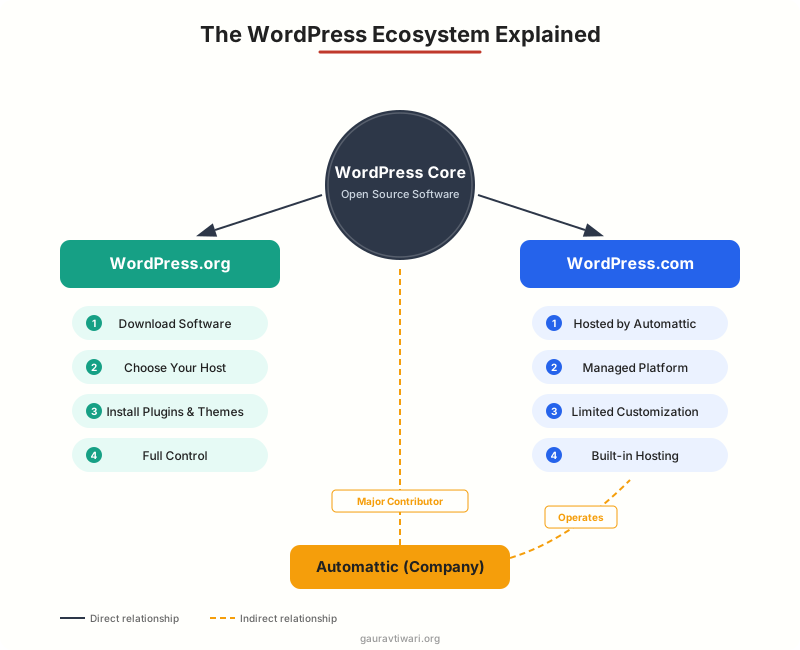
Here’s the short version: WordPress.org is free, open-source software you install on your own hosting. WordPress.com is a hosted platform run by Automattic that uses WordPress software under the hood. One gives you full control. The other handles everything for you, with limits.
I’ve built websites on WordPress.org since 2009 and tested every WordPress.com plan. This guide breaks down the real differences, updated for 2026, so you can pick the right one without second-guessing it later.
What Is WordPress.org?
WordPress.org is the official home of the WordPress open-source software. It’s not a service. It’s not a company. It’s a free content management system (CMS) that you download, install on your own web server, and run however you want.
WordPress powers over 43% of all websites on the internet, and the vast majority of those run the self-hosted WordPress.org version. Every theme, every plugin, every customization you’ve ever seen on a WordPress site? That’s WordPress.org at work.
What You Get
When you use WordPress.org, you get the full software with no restrictions. That means access to over 60,000 free plugins, thousands of free and premium themes, complete code access, and the ability to modify literally anything. You can build a blog, an online store with WooCommerce, a membership site, a learning platform, or a SaaS dashboard. There’s no ceiling.
What You Need
WordPress.org is free, but you need two things to run it: a domain name and web hosting. Think of WordPress as the engine and hosting as the garage where it lives. You can’t run the engine without the garage.
Most hosting providers offer one-click WordPress installation, so you don’t need to touch code to get started. A domain costs $10-$15 per year, and shared hosting starts at $3-$10 per month. For a business site, managed WordPress hosting from providers like Hostinger or Bluehost runs $5-$30 per month.
Who It’s For
WordPress.org is for anyone who wants full ownership of their website. Bloggers who want to monetize, businesses that need a professional site, developers building custom solutions, and anyone who plans to grow beyond a simple page. If you’re reading this blog, you’re probably the WordPress.org type.
What Is WordPress.com?
WordPress.com is a hosted platform built by Automattic, the company co-founded by WordPress creator Matt Mullenweg. It uses WordPress software under the hood, but wraps it in a managed service. You sign up, pick a theme, and start building. No hosting to buy, no software to install, no updates to manage.
Think of it this way: WordPress.org is like buying a house. WordPress.com is like renting an apartment. The apartment is easier to move into, but you can’t knock down walls or repaint without permission.
The Free Plan
WordPress.com offers a genuinely free tier. You get a subdomain (yoursite.wordpress.com), 1 GB of storage, and access to a limited selection of themes. The catch? WordPress.com displays its own ads on your site, you can’t install plugins, you can’t upload custom themes, and you can’t use a custom domain.
For a hobby blog or personal journal that you don’t plan to monetize, the free plan works fine. But the moment you want to look professional, you’ll hit walls.
Paid Plans
WordPress.com’s paid plans unlock more features as you go up. The Personal plan ($4/month) adds a custom domain and removes WordPress.com ads. Premium ($8/month) adds more themes and basic monetization tools. The Business plan ($25/month) is where things get interesting: it lets you install third-party plugins and themes, essentially giving you WordPress.org-level flexibility on a managed platform. Commerce ($45/month) adds full WooCommerce support.
Here’s the irony: by the time you’re paying $25-$45/month for WordPress.com Business or Commerce, you could run a self-hosted WordPress.org site on premium managed hosting for the same price, with more control.
Who Should Use It
WordPress.com is genuinely great for people who want a simple website with zero technical involvement. Personal bloggers, hobby sites, school projects, small portfolios. If you never plan to install a plugin or sell anything, WordPress.com saves you from ever thinking about hosting, security, or updates.
WordPress.com vs WordPress.org: Key Differences
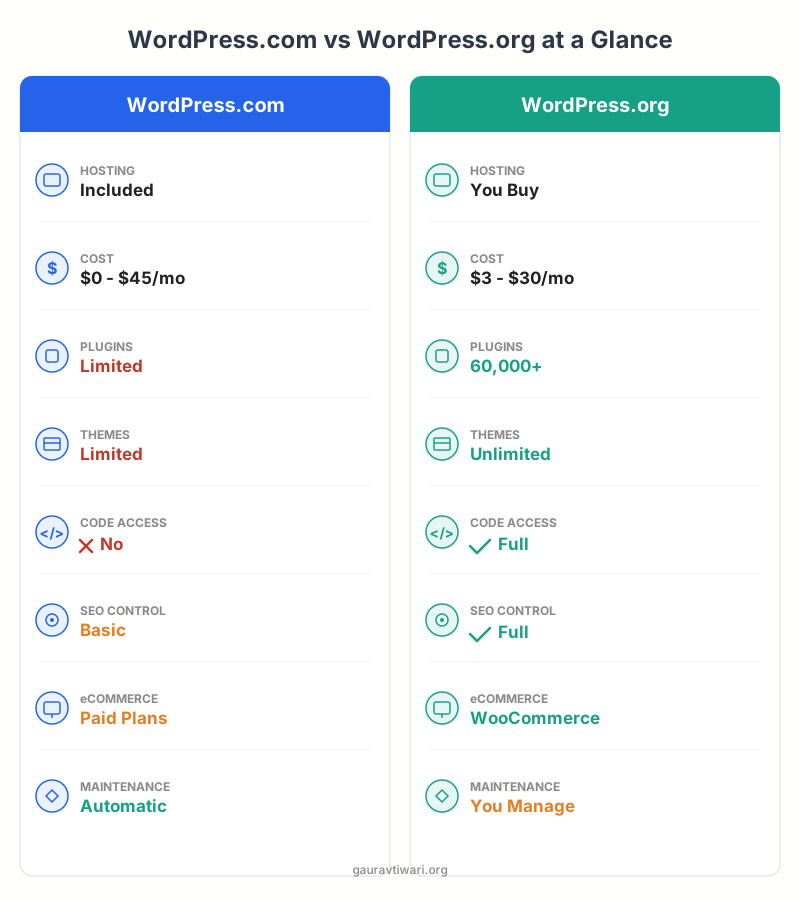
Here’s the full comparison. I’ve broken it down by every factor that matters when you’re choosing between the two platforms.
| Feature | WordPress.com (Free) | WordPress.com (Paid) | WordPress.org |
|---|---|---|---|
| Hosting | Included | Included | You buy separately |
| Monthly Cost | $0 | $4 – $45/mo | $3 – $30/mo (hosting) |
| Custom Domain | No (subdomain only) | Yes ($4+/mo plans) | Yes (you purchase) |
| Themes | Limited free themes | More themes, custom on Business+ | Unlimited (65,000+ free) |
| Plugins | None | Limited / Full on Business+ | Unlimited (60,000+ free) |
| Monetization | WordAds only | Yes (Business+) | Full control (any method) |
| SEO Control | Basic | Better with paid tools | Full (any SEO plugin) |
| eCommerce | No | Yes (Commerce plan, $45/mo) | Full (WooCommerce, free) |
| Code Access | No | Business+ only | Full access |
| Maintenance | Automatic | Automatic | You manage (or host does) |
| Support | Community forums | Priority support | Community + hosting support |
| Ads Shown | WordPress.com shows ads | No ads (Personal+) | No ads ever |
WordPress.com is like renting an apartment. Move-in is easy, maintenance is handled for you, but you can’t renovate, and the landlord makes the rules. WordPress.org is like owning a house. You handle the upkeep, but you can knock down walls, add rooms, paint whatever color you want, and nobody can kick you out. Most people start renting (WordPress.com) and eventually buy (WordPress.org) when they outgrow the limits.
When to Choose WordPress.com
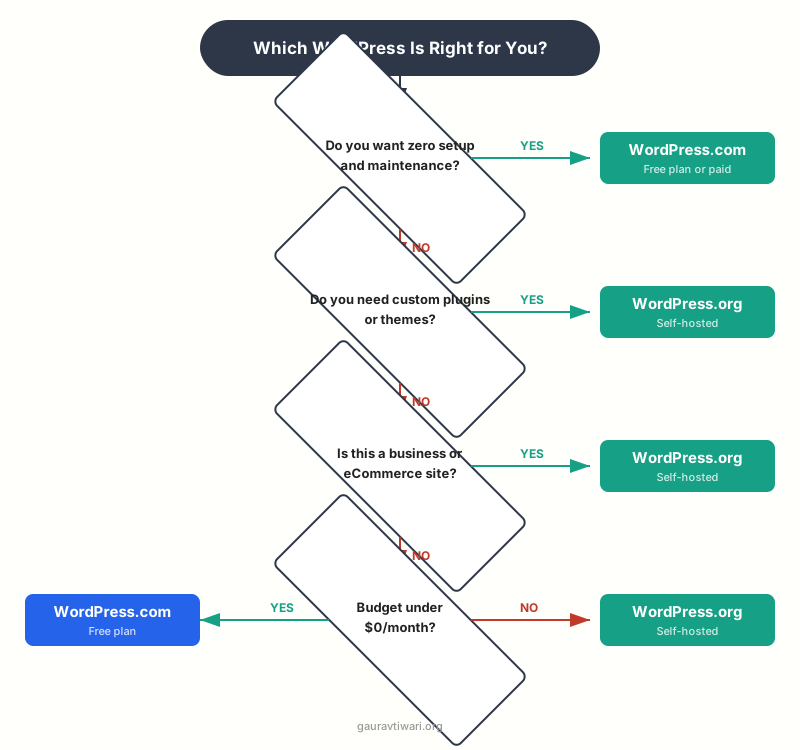
WordPress.com makes sense in specific situations. Don’t let anyone tell you it’s always the wrong choice. It’s the right tool for certain jobs.
Choose WordPress.com if:
- You want a personal blog and don’t care about plugins or custom design
- Your budget is literally $0 and you’re okay with a subdomain
- You don’t want to deal with hosting, updates, security, or backups
- You’re building a quick portfolio or school project
- You’re testing an idea before committing to a full website
The free plan is genuinely useful for personal projects. And if you upgrade to Personal ($4/month), you get a custom domain and ad-free experience, which is solid for a simple blog.
When to Choose WordPress.org
For most readers of this blog, WordPress.org is the answer. If any of the following apply to you, don’t waste time on WordPress.com’s free plan.
Choose WordPress.org if:
- You want to make money from your website (ads, affiliates, products, services)
- You need custom plugins like contact forms, SEO tools, caching, or analytics
- You’re building a business website, online store, or membership site
- SEO matters to you (and it should)
- You want full ownership and control of your content
- You plan to grow your site over time
Getting started is easier than most people think. Pick a host like Hostinger ($3-$5/month with a free domain), use the one-click WordPress installer, and you’ll have a fully functional site in under 10 minutes. No coding required.
If you’re starting a blog specifically, I’ve written a step-by-step guide on how to start a blog that walks through the entire process.
Can You Switch from WordPress.com to WordPress.org?
Yes. WordPress.com has a built-in export tool that lets you download all your content (posts, pages, comments, media) as an XML file. You then import that file into a fresh WordPress.org installation. The process takes 15-30 minutes for most sites.
There are some gotchas. Your WordPress.com subdomain won’t redirect automatically (you need to pay for a redirect or update links manually). Some formatting may shift during the import. And if you were using WordPress.com-specific features (like their built-in email subscriptions), you’ll need to find plugin alternatives.
I’ve helped dozens of clients make this switch. The content moves cleanly. The design doesn’t, because you’ll be starting with a new theme on your self-hosted site. But that’s usually a good thing since most people switch specifically because they want more design control.
WordPress.com’s Business plan ($25/month) now lets you install custom plugins and themes, essentially running the full WordPress.org software on their managed infrastructure. If you want the power of WordPress.org without managing your own hosting, this is a legitimate option, though it costs more than most self-hosted setups.
My Recommendation
I’ll give you the answer I give every client who asks me this question: start with WordPress.org.
Here’s why. The cost difference is negligible. Shared hosting runs $3-$5 per month. WordPress.com’s free plan costs $0 but limits you so heavily that you’ll upgrade within months anyway. And once you’re paying $4-$8/month for WordPress.com, you’re in the same price range as self-hosted WordPress with 10x the flexibility.
The only exception: if you genuinely want a zero-maintenance personal blog and you’re okay with a subdomain and WordPress.com branding, the free plan is a no-risk way to start writing today. No shame in that.
For business sites, eCommerce, portfolios, or anything you plan to grow? Get a hosting plan, install WordPress.org, and give yourself the full toolkit from day one. You’ll thank yourself in six months when you need a feature that WordPress.com’s free plan doesn’t support.
If you’re still unsure which website builder fits your situation, I’ve reviewed all the major options. But for most people reading this, the answer is WordPress.org plus a good host.
Frequently Asked Questions
Is WordPress.com really free?
Yes, WordPress.com has a free tier that includes a subdomain (yoursite.wordpress.com), 1 GB of storage, and basic themes. The tradeoff is that WordPress.com displays ads on your site, you can’t install plugins, and you can’t use a custom domain. Paid plans start at $4 per month and remove these limitations progressively.
Can I move my site from WordPress.com to WordPress.org?
Yes. WordPress.com includes an export tool that creates an XML file of all your content. You import this into a WordPress.org installation on your own hosting. The process takes 15-30 minutes. Your posts, pages, and media transfer cleanly, though you’ll need to set up a new theme and find plugin replacements for any WordPress.com-specific features you were using.
Which is better for SEO: WordPress.com or WordPress.org?
WordPress.org gives you significantly more SEO control. You can install dedicated SEO plugins like Rank Math or Yoast, customize your sitemap, control your robots.txt, add schema markup, and optimize every technical SEO element. WordPress.com’s free plan offers only basic SEO settings. The paid plans improve this, but still don’t match the flexibility of a self-hosted WordPress.org site with a proper SEO plugin.
Do I need coding skills for WordPress.org?
No. Most hosting providers offer one-click WordPress installation. Once installed, you manage everything through a visual dashboard. The block editor lets you build pages without touching code. Thousands of plugins add functionality without coding. You only need coding skills if you want to build custom themes or plugins from scratch, which most website owners never do.
Can I make money with WordPress.com?
On the free plan, your only monetization option is WordAds, WordPress.com’s shared advertising program. You need a paid plan (Business at $25/month or higher) to install third-party ad networks, affiliate tools, or eCommerce plugins. WordPress.org, by contrast, lets you monetize however you want from day one with no restrictions and no revenue sharing.
What hosting do I need for WordPress.org?
Any web hosting that supports PHP and MySQL works with WordPress. For beginners, shared hosting from providers like Hostinger ($3-$5/month) or Bluehost ($3-$6/month) is more than enough. As your site grows, you can upgrade to managed WordPress hosting ($15-$50/month) for better performance, automatic backups, and dedicated support.
Why are there two versions of WordPress?
WordPress started as open-source software in 2003. Matt Mullenweg, one of its co-founders, later started Automattic, the company behind WordPress.com. WordPress.com uses the WordPress open-source software but packages it as a managed hosting service. WordPress.org remains the home of the free, open-source software that anyone can download and use. They share the same core code but serve different audiences: WordPress.com targets people who want simplicity, WordPress.org targets people who want control.
Disclaimer: This site is reader-supported. If you buy through some links, I may earn a small commission at no extra cost to you. I only recommend tools I trust and would use myself. Your support helps keep gauravtiwari.org free and focused on real-world advice. Thanks. - Gaurav Tiwari