
Wise Review 2026: The Best Multi-Currency Account for International Transfers?
I’ve been using Wise for every international payment since 2019. Client invoices from the US, supplier payments to Europe, receiving project fees in GBP. Six years and hundreds of transfers later, I can tell you exactly where Wise excels and where it falls short.
The short version: Wise uses the real mid-market exchange rate (the one you see on Google) with no hidden markup. Fees start at 0.41% depending on the corridor. You can hold 40+ currencies in one account, earn interest on idle balances, and spend worldwide with their debit card. Over 16 million people use it, and they process more than $12 billion in transfers every month.
But is it the best option for you? That depends on how much you send, which currencies you use, and whether you need business features. This review breaks down everything with real numbers and honest comparisons against PayPal, Revolut, and Payoneer.
Wise Review: Quick Verdict
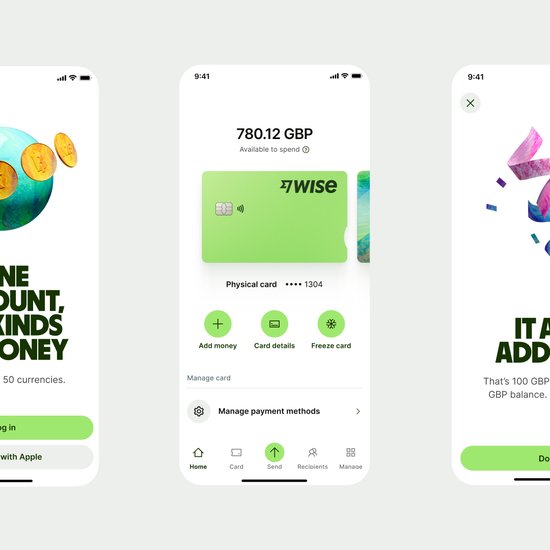
Wise
Pros
- Real mid-market exchange rate with zero markup. You see the exact rate Google shows.
- Hold and convert 40+ currencies in one account with local bank details.
- Earn interest on GBP, USD, EUR, and other currency balances (up to 5%+ APY).
- Wise debit card works in 200+ countries with low ATM fees.
- 60%+ of transfers arrive in under 24 hours. Many routes are instant.
- Regulated by FCA, FinCEN, ASIC, MAS, and 6 other financial authorities.
Cons
- No cash deposit option. You can't fund your account with physical cash.
- Fees vary widely by currency corridor. Some exotic routes cost 1.5%+.
- Not ideal for large transfers ($50K+). Currency brokers offer better rates at volume.
- No phone support in most regions. Chat and email only.
- ATM withdrawals above monthly limit ($100-200 free) incur 1.75% fee.
Summary
Wise is the international money transfer service I’ve used for every cross-border payment since 2019. It uses the real mid-market exchange rate with no hidden markup, charges transparent fees starting at 0.41%, and lets you hold 40+ currencies in one account. The Wise debit card works in 200+ countries, and you earn interest on idle balances. Over 16 million people use it, processing over $12 billion monthly. It’s regulated by the FCA, FinCEN, and 8 other jurisdictions. For freelancers, remote workers, and small businesses that deal in multiple currencies, nothing else comes close.
Wise
- Real mid-market exchange rate, zero markup
- Hold and convert 40+ currencies
- Wise debit card for 200+ countries
- Interest on idle balances (up to 5%+ APY)
- 60%+ transfers arrive under 24 hours
- Regulated by FCA, FinCEN, ASIC, and more
International money transfer with the real mid-market rate. Hold 40+ currencies, earn interest on balances, and spend worldwide with the Wise debit card. Free to open, fees from 0.41%.
What is Wise?
Wise (formerly TransferWise) is a London-based fintech company founded in 2011 by Taavet Hinrikus and Kristo Kaarmann, two Estonian entrepreneurs frustrated with paying 5%+ fees on cross-border bank transfers. The idea was simple: match people sending money in opposite directions so the money never actually crosses borders. Your GBP stays in the UK, the recipient’s EUR stays in Europe. Wise handles the matching internally.

That peer-matching model has since evolved. Today, Wise holds local bank accounts in dozens of countries and uses its own payment infrastructure to move money faster and cheaper than the SWIFT banking network. They went public on the London Stock Exchange in July 2021 (ticker: WISE) and are now valued at over $8 billion. They’re regulated by the FCA in the UK, FinCEN in the US, ASIC in Australia, MAS in Singapore, and financial authorities in 9+ countries.
What started as a money transfer service now includes multi-currency accounts, a debit card, business banking, interest-earning features, and a platform API. It’s no longer just “cheap transfers.” It’s a full international banking alternative for people who deal in multiple currencies.
How Wise Transfers Actually Work
Understanding why Wise is cheaper requires understanding what banks do wrong. When you send $1,000 from the US to a friend in Germany through your bank, here’s what happens: your bank charges a wire fee ($25-50), routes the transfer through 1-3 intermediary banks via SWIFT (each taking a cut), and applies their own exchange rate which typically includes a 2-4% markup over the mid-market rate. By the time your friend gets their euros, $40-80 has disappeared in fees and markups.
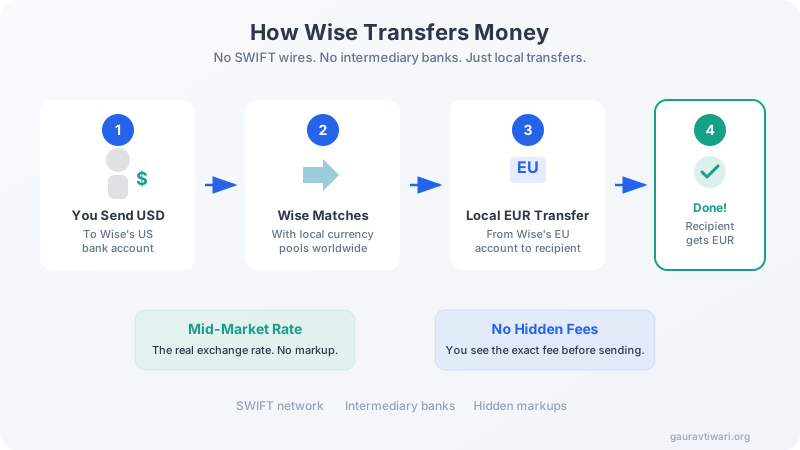
Wise skips the SWIFT network entirely. When you send USD to EUR, your dollars go into Wise’s US bank account. Simultaneously, Wise sends euros from their European bank account to your recipient. The money doesn’t cross borders. There are no intermediary banks. No SWIFT fees. And Wise uses the real mid-market exchange rate (the one Reuters and Google display) with zero markup.
The only fee is Wise’s transparent transfer fee, which varies by corridor but typically runs 0.41% to 1.5%. You see the exact fee, the exchange rate, and how much the recipient will get before you confirm. No surprises.
Wise Fees and Exchange Rates in 2026
Wise’s pricing model has two components: a small fixed fee plus a variable percentage of the transfer amount. The variable fee depends on the currency pair, the payment method, and the transfer amount. Here’s what real transfers look like.
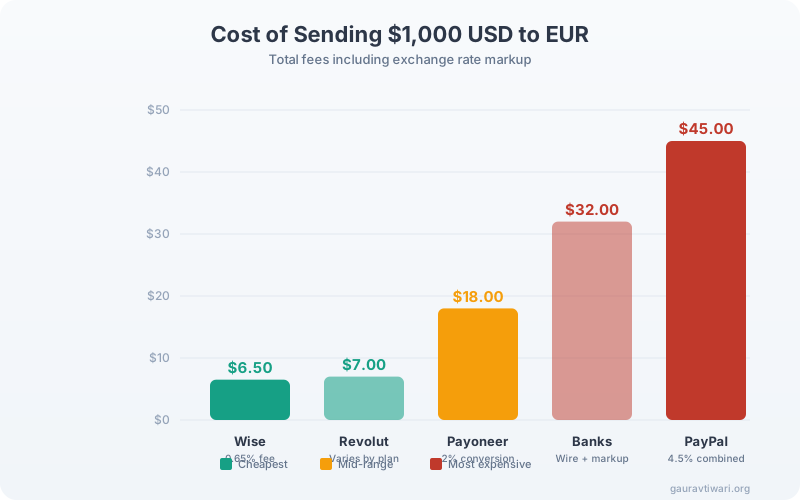
Popular corridor examples (sending $1,000 equivalent):
USD to EUR: ~$6.50 total fee (0.65%). Recipient gets the full mid-market equivalent minus that fee. Delivery: usually under 24 hours.
GBP to EUR: ~$4.30 fee (0.43%). One of the cheapest corridors. Often instant delivery.
USD to INR: ~$5.70 fee (0.57%). Delivery to Indian bank accounts typically takes 1-2 business days. This is the corridor I use most for receiving client payments.
USD to PHP: ~$11 fee (1.1%). Less common corridors cost more. Still cheaper than banks.
The key difference versus banks and PayPal isn’t just the explicit fee. It’s the exchange rate. Banks typically add a 2-4% markup on the mid-market rate. PayPal adds 3-4%. Wise uses the actual mid-market rate with zero markup. On a $5,000 transfer, that hidden markup alone can cost you $100-200 at a bank. Wise’s total fee on that same transfer might be $30-40.
If you’re a freelancer receiving payments from international clients, set up local account details in Wise. You’ll get a US routing number, UK sort code, EU IBAN, and Australian BSB, all linked to one account. Your clients pay you like a local bank transfer, you avoid incoming wire fees entirely, and you convert to your home currency only when the rate is favorable.
Wise Multi-Currency Account
The multi-currency account is what turned Wise from a transfer service into an actual banking alternative. You open one account and get local bank details in multiple currencies:

What you get: a US routing and account number (ACH), UK sort code and account number, European IBAN, Australian BSB, Canadian transit number, Singapore account number, Turkish IBAN, Hungarian account number, and more. All linked to one Wise account.
This means your US client can pay you via a regular domestic ACH transfer (no wire fees for them), your European client sends to your IBAN, and your Australian client sends to your BSB. The money arrives as USD, EUR, or AUD in your Wise account. You convert to your home currency when you want, at the mid-market rate.
I’ve been using this exact setup since 2019 for receiving client payments. Before Wise, I’d lose 3-4% on every PayPal conversion from USD to INR. Now I lose 0.57%. On a $5,000 invoice, that’s a difference of $170 saved every single time.
You can hold balances in 40+ currencies simultaneously. There’s no monthly fee for the account. You only pay when you convert between currencies or send money out.
Wise Debit Card

The Wise debit card (Visa or Mastercard depending on your region) lets you spend directly from your multi-currency balances. If you’re in Japan and have JPY in your Wise account, the card spends your JPY with no conversion fee. If you don’t have the local currency, Wise auto-converts from your chosen balance at the mid-market rate with the standard low fee.
Card features:
ATM withdrawals: Free up to a monthly limit ($100-200 depending on region). After that, a 1.75% fee applies. Enough for occasional cash needs, but not ideal if you rely heavily on ATMs.
Contactless + mobile pay: Works with Apple Pay and Google Pay in most markets. Tap to pay up to local contactless limits.
Security: Instant card freeze/unfreeze in the app. Real-time transaction notifications. No CVV printed on the card (view it in-app only).
Card issuance: One-time fee varies by region ($7-9 typically). Digital card available instantly while you wait for the physical card.
I’ve used the Wise card across 8 countries. It’s particularly useful in Europe where contactless is everywhere and you can avoid the 3% foreign transaction fee that most US credit cards charge. The auto-conversion means you never have to think about which currency to use.
Interest on Balances
Wise now offers interest on idle balances through Wise Assets. Your money is invested in low-risk government bonds (money market funds), and you earn a variable return. This isn’t a savings account. It’s an investment product, which means returns aren’t guaranteed.
Current rates (approximate, varies with market conditions):
GBP: ~4.8-5.2% APY
USD: ~4.5-5.0% APY
EUR: ~3.0-3.5% APY
You can opt in or out at any time. Funds remain accessible (not locked), though it may take 1-2 business days to withdraw from Assets back to your main balance. The rates are competitive with the best high-yield savings accounts, which makes Wise surprisingly useful as a place to park money you’ll eventually transfer internationally.
One caveat: these balances are NOT covered by deposit insurance (FDIC, FSCS). Your money is invested in government bonds through BlackRock and Vanguard funds, which is low-risk but not zero-risk.
Wise Features Overview
Beyond basic transfers, Wise has built out a surprisingly complete feature set for international finance.
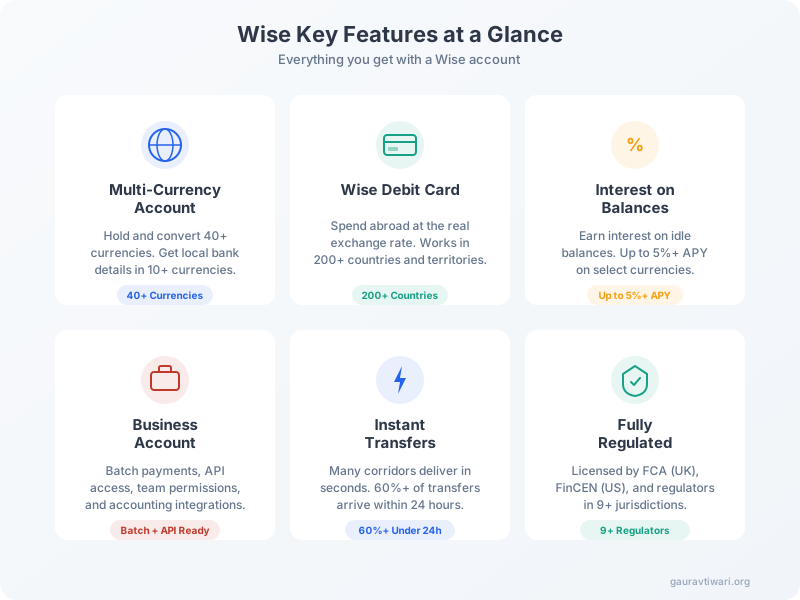
Recurring transfers: Set up automated transfers on a schedule. Useful for rent payments, regular supplier invoices, or salary disbursements to international team members.
Rate alerts: Set a target exchange rate and Wise notifies you when it hits. I use this when I have a large conversion to make and want to time it for a favorable rate.
Direct debits: In supported regions (UK, EU), you can set up direct debits from your Wise account just like a traditional bank account.
Wise Platform (API): For businesses that want to embed Wise’s infrastructure into their own products. Banks, neobanks, and fintech companies use this to offer international transfers under their own brand. Monzo, N26, and others are built on Wise Platform.
Wise Business Account
Wise Business is the same multi-currency infrastructure, built for companies. If you run a business with international clients or suppliers, this is where Wise really shines.
Batch payments: Upload a CSV and send up to 1,000 payments at once. Pay international contractors, suppliers, or team members in different currencies from a single file upload. Each payment converts at the mid-market rate.
Team access: Add team members with role-based permissions. Let your accountant view transactions, your operations manager approve payments, and your CFO control everything.
Accounting integrations: Native integrations with Xero, QuickBooks, FreshBooks, and others. Transactions sync automatically, categories map to your chart of accounts.
API access: Full REST API for automating transfers, checking rates, managing accounts programmatically. Useful for platforms, marketplaces, and any business that needs to automate international payments.
Pricing: Business account opening is free. Transfer fees are the same as personal accounts. No monthly subscription for the basic plan. A premium Wise Business plan exists for high-volume senders with dedicated support.
Wise vs PayPal vs Revolut vs Payoneer
I’ve used all four for different purposes. Here’s how they compare for international transfers.
| Feature | Wise | PayPal | Revolut | Payoneer |
|---|---|---|---|---|
| Exchange rate | Mid-market (no markup) | 3-4% markup | Mid-market (weekdays) | ~2% markup |
| Transfer fee | 0.41-1.5% | 2.9% + fixed | Free (limits apply) | Up to 2% |
| Sending $1,000 USD to EUR | ~$6.50 | ~$45 | ~$5-8 | ~$18 |
| Multi-currency account | 40+ currencies | 25 currencies | 30+ currencies | 4 currencies |
| Debit card | Yes (Visa/MC) | No (US only) | Yes (Visa/MC) | Yes (MC) |
| Interest on balances | Yes (up to 5%+) | No | Yes (paid plans) | No |
| Business account | Yes (free) | Yes ($0-30/mo) | Yes ($0-100/mo) | Yes (free) |
| API | Yes | Yes | Yes (Business) | Yes |
| Regulation | FCA, FinCEN, ASIC+ | Multiple | Multiple (banking license) | Multiple |
| Best for | Transparent transfers | Consumer payments | Budgeting + travel | Freelancer payouts |
Wise vs PayPal: PayPal is convenient for e-commerce and consumer payments but terrible for currency conversion. Their 3-4% exchange rate markup plus transaction fees make it one of the most expensive ways to move money internationally. Use PayPal for buying on eBay. Use Wise for actual money transfers.
Wise vs Revolut: Revolut offers similar multi-currency features and sometimes cheaper transfers (free on weekdays within limits). However, Revolut’s free tier has transaction limits, weekend exchange rate markups, and the free plan offers less customer support. Wise is more transparent and predictable on pricing. Revolut is better if you want an all-in-one banking app with budgeting tools.
Wise vs Payoneer: Payoneer is popular with freelancers on platforms like Fiverr and Upwork, but their exchange rate includes a ~2% markup, and they only support 4 currencies for holding balances. Wise offers better rates, more currencies, and a superior multi-currency account. However, Payoneer has deeper integration with freelance marketplaces.
What I Don’t Like About Wise
I’ve used Wise heavily for six years. Here are the real downsides.
No cash deposits. You can’t walk into a branch and deposit cash. Wise is entirely digital. This is fine for most people, but if your business handles cash, it’s a limitation.
Exotic corridor fees are steep. Sending money to less common destinations (certain African or Central Asian countries) can cost 1.5%+ in fees. Wise is cheapest on popular routes like USD/EUR/GBP. Niche corridors narrow the advantage over banks.
Not ideal for large transfers. If you’re moving $50,000+ regularly, a dedicated currency broker (like OFX or Moneycorp) can negotiate better rates. Wise doesn’t do forward contracts or hedging. For high-volume businesses, that’s a real gap.
Customer support is slow. No phone support in most regions. Chat and email can take hours during peak times. If you have an urgent payment stuck, this is frustrating. Enterprise and high-volume accounts get priority support.
ATM limits are tight. The free ATM withdrawal limit ($100-200/month depending on region) is low. Heavy cash users will hit the 1.75% fee quickly. Revolut offers higher free limits on paid plans.
KYC can be slow. Account verification sometimes takes days, especially for business accounts. I’ve had clients wait a week for document verification. Once approved, everything is smooth, but the initial setup can test your patience.
Wise is not a bank. Your money is held in safeguarded accounts at partner banks (like J.P. Morgan, Barclays, and Deutsche Bank), which means it’s protected if Wise ever goes under. However, Wise deposits are NOT covered by deposit insurance schemes like FDIC (US) or FSCS (UK). If you need deposit protection on large sums, keep only working balances in Wise and store the rest in a traditional bank.
Who Should Use Wise?
Wise isn’t for everyone. Here’s who gets the most value.
Freelancers and remote workers: If you invoice international clients, Wise’s local bank details let you receive payments without wire fees. Convert when the rate is good. I’ve saved thousands in conversion fees over six years.
Small businesses with international suppliers: Pay invoices in the supplier’s currency at the mid-market rate. Batch payments handle payroll for distributed teams. Accounting integrations keep your books clean. See my tips for avoiding cash flow killers in international business.
Digital nomads and frequent travelers: The Wise card with multi-currency balances means you’re always spending at the real rate. No foreign transaction fees. Top up in any currency.
Expats sending money home: Regular transfers to family at transparent rates. Set up recurring transfers so you never miss a payment.
E-commerce sellers on international marketplaces: Receive payouts from Amazon, Shopify, or other platforms in local currencies, then convert when you want.
For payment processing needs on your website, check out the best Stripe alternatives or read the Pay.com review.
Final Verdict: Is Wise Worth It in 2026?
After six years and hundreds of transfers, Wise remains the single best tool for international money transfers under $50,000. The mid-market rate with no markup is the foundation. The multi-currency account with local bank details is genuinely useful. The card works worldwide. Interest on balances is a nice bonus.
It’s not perfect. Customer support is slow, ATM limits are tight, and exotic corridors aren’t cheap. If you move very large sums, talk to a currency broker instead. If you want an all-in-one banking app with budgeting tools, Revolut might suit you better.
But for freelancers, remote workers, small businesses, and anyone who regularly moves money across borders, Wise is the default choice. I’ve tried the alternatives. Nothing matches Wise’s combination of transparency, pricing, and multi-currency functionality.
Opening an account is free and takes minutes. You don’t pay until you actually transfer. There’s no reason not to try it.
Frequently Asked Questions
Is Wise safe and legitimate?
Yes. Wise is a publicly traded company on the London Stock Exchange (ticker: WISE) with a market cap of over $8 billion. It’s regulated by the FCA (UK), FinCEN (US), ASIC (Australia), MAS (Singapore), and financial authorities in 9+ jurisdictions. Customer funds are held in safeguarded accounts at major banks. Over 16 million people use Wise globally.
How much does Wise charge for transfers?
Wise fees vary by currency corridor but typically range from 0.41% to 1.5% of the transfer amount. For popular routes like USD to EUR or GBP to USD, fees are usually under 0.7%. Wise always uses the real mid-market exchange rate with no hidden markup. You can check exact fees for any corridor on their pricing page before sending.
How fast are Wise transfers?
Over 60% of Wise transfers arrive in under 24 hours. Many popular corridors (like GBP to EUR, USD to GBP) are near-instant. Delivery time depends on the payment method (bank transfer vs card), the currency pair, and the receiving country’s banking infrastructure. Some routes to developing countries can take 2-4 business days.
Does Wise offer a debit card?
Yes. The Wise debit card is a Visa or Mastercard (varies by region) that lets you spend in 150+ currencies at the mid-market rate. You get free ATM withdrawals up to a monthly limit ($100-200 depending on region), after which a 1.75% fee applies. The card supports Apple Pay and Google Pay in most markets.
Can I earn interest on my Wise balance?
Yes. Wise offers interest on balances held in several currencies including GBP, USD, and EUR. Rates vary by currency and market conditions. GBP balances have earned up to 5%+ APY through Wise Assets (invested in low-risk government bonds). Interest is not guaranteed and rates fluctuate. You can opt in or out at any time.
How does Wise compare to PayPal for international payments?
Wise is significantly cheaper. PayPal charges a currency conversion fee of 3-4% above the mid-market rate plus transaction fees, which can total 4.5%+ on international transfers. Wise uses the real mid-market rate with transparent fees of 0.41-1.5%. On a $1,000 transfer, you’d save $30-40 using Wise instead of PayPal.
Is Wise good for business use?
Yes. Wise Business offers multi-currency accounts, batch payments (up to 1,000 at once), team member access with role-based permissions, an API for automation, and integration with accounting software like Xero, QuickBooks, and FreshBooks. Business account opening is free. Transaction fees are the same as personal accounts.
Disclaimer: This site is reader-supported. If you buy through some links, I may earn a small commission at no extra cost to you. I only recommend tools I trust and would use myself. Your support helps keep gauravtiwari.org free and focused on real-world advice. Thanks. - Gaurav Tiwari