
uCalc Review 2026: Build Calculators Without Code (But Is It Worth It?)
Most calculator plugins for WordPress are either too basic or require a developer to customize. uCalc sits in an interesting middle ground: powerful enough for complex calculations, simple enough that you won’t need to touch code.
I’ve been recommending uCalc to clients who need interactive pricing calculators, quote generators, and booking forms. It’s one of the few tools that actually delivers on the “no code required” promise without sacrificing functionality. But it’s not perfect for everyone.
If you need a cost calculator for your service business, a booking form for your event, or a quote generator for your agency, uCalc can handle it. The interface is straightforward. The learning curve is about 30 minutes. And the pricing won’t break a small business budget.
The catch? Limited integrations compared to competitors. And if you need advanced conditional logic or complex multi-step forms, you might hit walls.
uCalc
Pros
- Drag-and-drop builder with 30-minute learning curve. No coding required.
- Reliable formula engine handles complex conditional logic and nested calculations.
- Cross-platform: works on WordPress, Wix, Squarespace, and any HTML site.
- Competitive pricing starting at $7.20/month. Pro plan offers unlimited forms.
- Calculator leads convert at roughly 2x the rate of regular contact forms.
- 24-48 hour email support. Live chat available for Pro users.
Cons
- No Stripe integration. PayPal only for payment collection.
- Most third-party integrations require Zapier. No native CRM connections except amoCRM.
- Design customization is limited. Built-in themes look professional but samey.
- No permanent free tier. 14-day trial only.
- File attachments restricted to Pro plan.
Summary
uCalc is a no-code calculator builder that actually delivers on its promise. I’ve used it on 4 client sites over 3 years, and leads from calculator submissions convert at roughly double the rate of regular contact forms. The formula engine handles complex conditional pricing without breaking, and setup takes 30-60 minutes for standard calculators. The catch: no Stripe integration (PayPal only), and most third-party connections require Zapier. Best fit for service businesses that need pricing calculators, quote generators, or booking forms without touching code.
Price: USD 7.20 /month
Try uCalc Free for 14 Days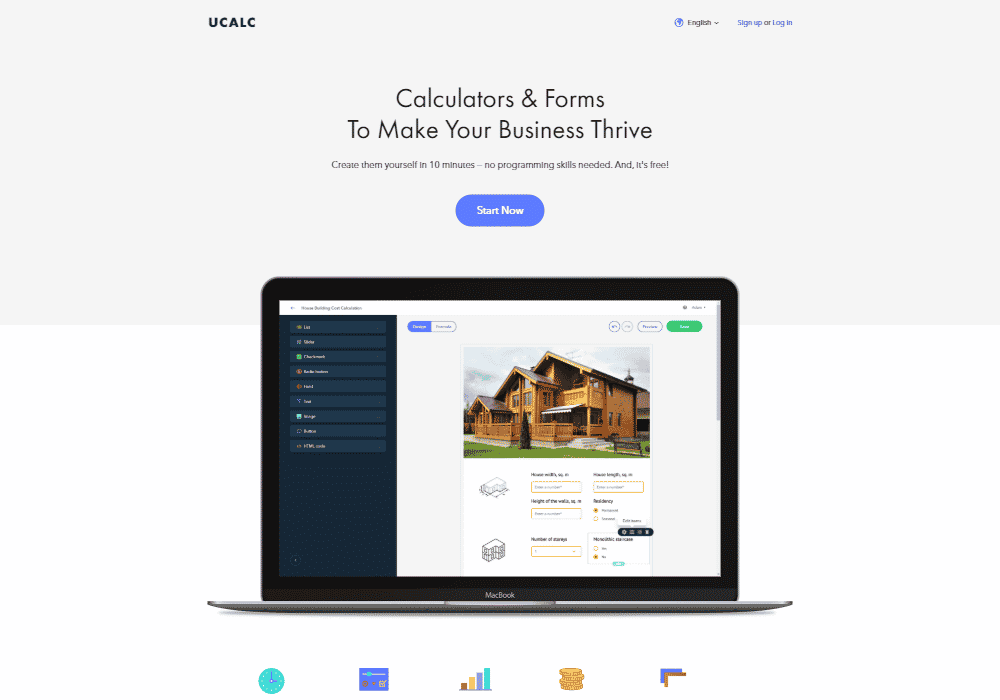
What uCalc Actually Does
uCalc is a web-based calculator and form builder that works with any website platform. WordPress, Wix, Squarespace, custom HTML sites, even landing pages hosted on third-party services. You build your calculator in uCalc’s visual editor, then embed it on your site with a simple code snippet.
The core use case is price estimation. A moving company can let visitors calculate costs based on distance, apartment size, and number of boxes. A web design agency can generate instant quotes based on page count and feature requirements. An event planner can offer booking forms with automatic total calculations.
What sets uCalc apart from basic form builders like Contact Form 7 or WPForms is the formula engine. You’re not just collecting data. You’re performing calculations, applying discounts, handling conditional pricing, and displaying results in real time. The visitor sees their total update as they adjust sliders and checkboxes.
The platform supports three main content types: calculators (with formulas and pricing logic), forms (for lead capture and data collection), and booking systems (with date/time selection). Most users combine all three, creating a calculator that generates a quote and captures contact details in one flow.
My Experience with uCalc
I’ve used uCalc on 4 client sites over the past 3 years. Two are service businesses (a local cleaning company and a custom furniture shop), one is a consulting agency, and one is an event venue.
The cleaning company sees about 200 calculator submissions monthly. The furniture shop gets maybe 50. Both report that calculator leads convert at roughly double the rate of regular contact form submissions. Makes sense. Someone who’s already seen a price estimate and still submits their details is a warmer lead.
Setup time varies. A simple price calculator with 5-6 variables took about 45 minutes including design tweaks. The event venue’s complex booking system with multiple room options, add-on services, and seasonal pricing took closer to 4 hours over two sessions.
The furniture shop’s calculator is the most complex one I’ve built. It handles custom dimensions (length, width, depth), material choices (different price per square foot), finish options (flat rate add-ons), and delivery zones (distance-based pricing). uCalc handled all of that without breaking a sweat.
Key Features That Matter
uCalc includes dozens of features, but these are the ones that actually make a difference for most users.
Drag-and-Drop Builder
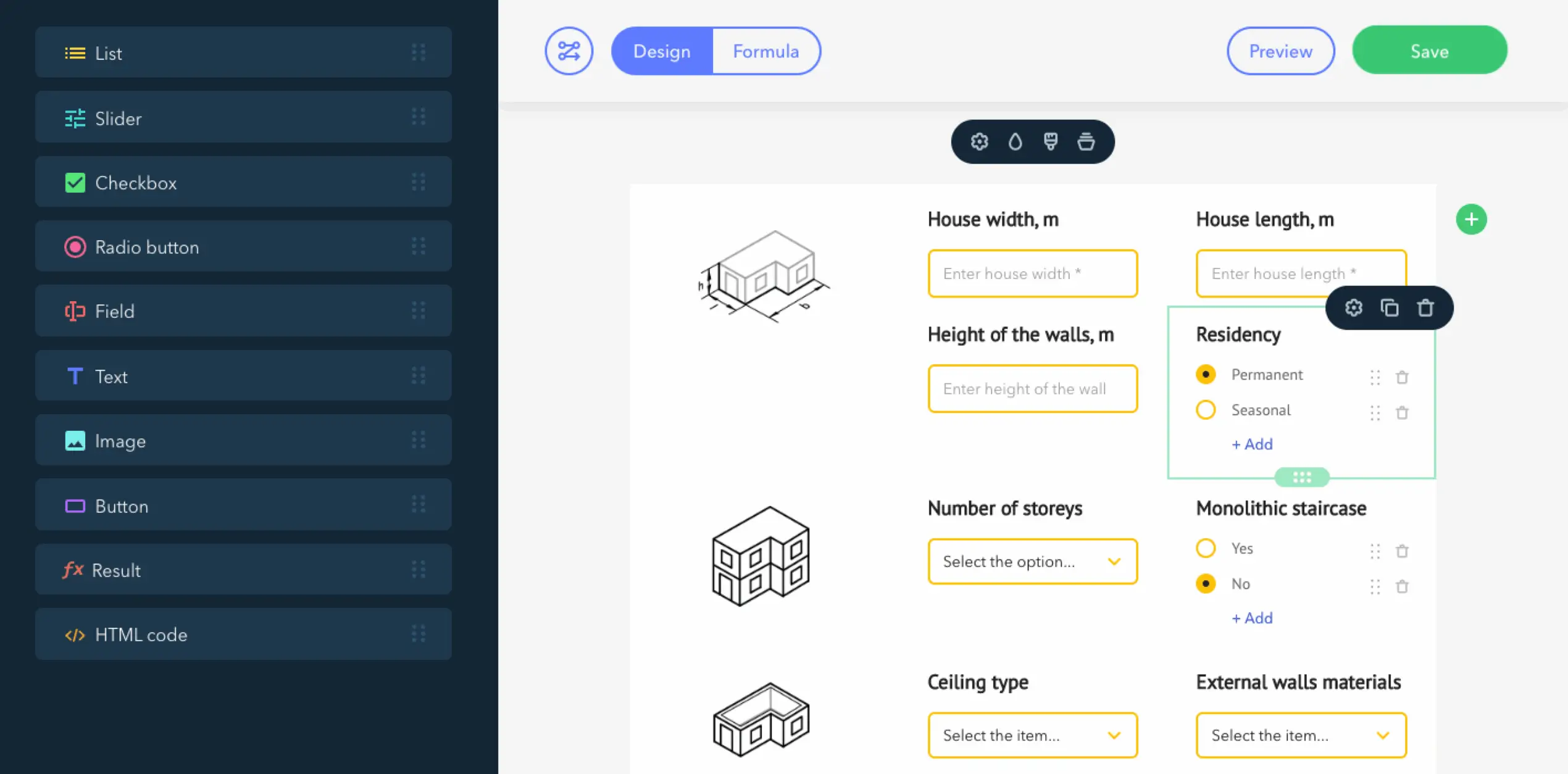
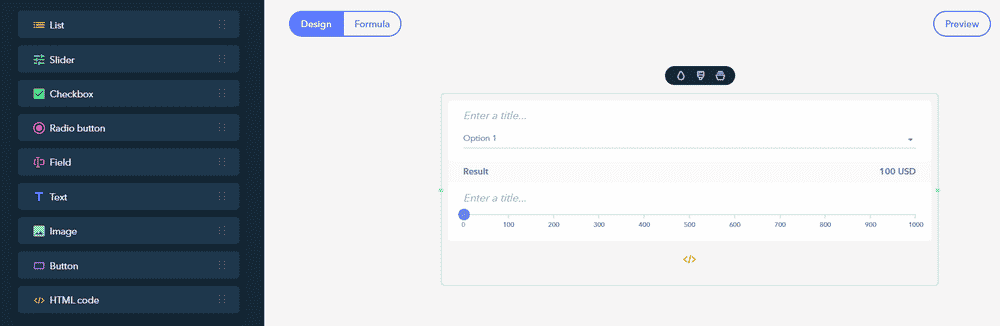
The visual editor is genuinely intuitive. You drag widgets onto a canvas, configure their properties, and see results in real time. No saving and refreshing to check changes.
Available widgets include sliders, dropdowns, radio buttons, checkboxes, text fields, image selectors, and text blocks. Each widget can be customized for appearance (colors, fonts, sizes) and behavior (default values, min/max limits, visibility conditions).
The builder has three modes: Design (for layout and styling), Formula (for calculation logic), and Preview (to test on different screen sizes). Switching between modes is instant. I often toggle to Preview after every major change to catch issues early.
Formula Engine
This is where uCalc earns its keep. The formula editor supports basic math (addition, subtraction, multiplication, division), conditional logic (if/then statements), and variable references (pulling values from other widgets).
Creating a formula looks like this: you name a calculation (like “total_price”), then write the logic using widget IDs as variables. If your slider is named “square_feet” and your dropdown is “material_type”, your formula might be: square_feet * material_type.
The system handles conditional pricing well. For example, you can create rules like “if total exceeds $1,000, apply 10% discount” or “if rush delivery selected, add $50 flat fee.” I’ve built calculators with 15+ nested conditions without performance issues.
You can create multiple formulas that reference each other. A “subtotal” formula, a “discount” formula that uses subtotal, and a “final_price” formula that combines both. The dependency chain works correctly as long as you don’t create circular references.
Templates
uCalc offers around 40 pre-built templates covering common use cases: home renovation calculators, shipping cost estimators, loan calculators, event registration forms, and more.
Templates are starting points, not finished products. Every element can be modified, removed, or extended. I usually start from a template when building something new because it’s faster than starting blank, even if I end up replacing 80% of the original.

The template library leans heavily toward service businesses. You’ll find good options for construction, cleaning, moving, beauty services, and consulting. E-commerce templates are limited, though WooCommerce users have better options anyway.
Notifications and Lead Capture
Calculators can send email notifications to you (the business owner) and the visitor. You configure notification templates with variables that pull from form fields and calculation results.
For the cleaning company client, their notification email includes: customer name, address, selected services, estimated square footage, and calculated price. Their internal notification adds a source URL so they know which landing page generated the lead.
SMS notifications are available on paid plans. The furniture shop uses these for high-value estimates (over $2,000) to ensure fast follow-up. SMS credits cost extra, and the allocation varies by plan.
Telegram notifications work the same as email notifications but deliver to a Telegram chat. Useful if your team prefers messaging apps over email.
Payment Collection
uCalc integrates with PayPal for direct payments. You can accept deposits, full payments, or let customers choose. The payment widget displays the calculated total and processes the transaction without leaving your site.
The PayPal integration supports over 20 currencies. Setup is straightforward: connect your PayPal account, set payment amount (fixed or formula-based), and configure success/failure messages.
No Stripe integration yet, which is the main limitation here. PayPal works fine for small businesses, but growing companies often prefer Stripe’s better reporting and lower fees for high volumes.
Integrations
uCalc connects with Zapier, which opens up thousands of potential integrations. Every calculator submission can trigger a Zapier workflow that creates a CRM contact, adds a Google Sheets row, sends a Slack notification, or whatever else your workflow requires.
The native amoCRM integration handles lead management without Zapier. If you’re already using amoCRM for sales, this is a clean solution.
For WordPress sites, uCalc offers a dedicated plugin that simplifies embedding. Instead of copying HTML code, you connect your uCalc account and insert calculators via a button in the editor. The plugin handles authentication and displays your calculator list.
What uCalc Does Well
Here’s where the platform genuinely excels.
The formula system works reliably. I’ve tested complex calculations with conditional logic, multiple variables, and nested formulas. Results are consistent across browsers and devices. No weird rounding errors or calculation bugs that plague some competitors.
Cross-platform compatibility is excellent. Build once, embed anywhere. The same calculator works on WordPress, Wix, Squarespace, Webflow, and static HTML sites. Responsive design adapts to mobile screens without manual adjustment.
Performance is solid on the embed side. Calculators load quickly (under 2 seconds in my tests) and don’t noticeably slow down page load times. The script footprint is reasonable.
Customer support responds within 24-48 hours on email. For Pro plan users, live chat support is available during business hours. The knowledge base covers most common questions with clear instructions and screenshots.
Pricing is competitive for what you get. At $7.20/month (annual billing) for the Basic plan, it’s cheaper than most alternatives offering similar functionality. The unlimited forms on the Pro plan make it economical for agencies managing multiple clients.
What uCalc Doesn’t Do Well
Now the honest limitations.
The Zapier integration is your only option for most third-party tools. No native HubSpot, Mailchimp, Salesforce, or Google Sheets integration. Every automation requires Zapier, which adds cost and complexity for high-volume use cases.
No Stripe payment processing. PayPal only. This is a dealbreaker for some businesses. PayPal’s checkout experience isn’t great, and their fees are higher than Stripe for many transaction types.
The design customization has limits. You can change colors, fonts, and layouts, but creating truly custom designs (gradient backgrounds, custom animations, unique widget styles) requires injecting custom CSS through the HTML widget. The built-in themes look professional but samey.
Documentation could be better. The knowledge base covers basics but lacks depth on advanced use cases. If you’re building complex conditional logic or troubleshooting formula errors, you’re mostly on your own.
File attachments only work on the Pro plan. Basic and Standard plans don’t support file uploads, which limits use cases like insurance quote calculators that need document uploads.
Some users report occasional loading slowness. I haven’t experienced this personally, but reviews mention calculators sometimes taking 20-30 seconds to load. Could be regional server performance or specific configuration issues.
uCalc Pricing
uCalc offers three paid plans plus a 14-day trial. Pricing shown is for annual billing:
| Plan | Monthly (Annual) | Forms | Pages/Form | Email Notifications | SMS |
|---|---|---|---|---|---|
| Basic | $7.20 | 5 | 3 | 300 | 0 |
| Standard | $17.60 | 15 | 10 | 1,000 | 10 |
| Pro | $40 | Unlimited | Unlimited | 3,000 | 30 |
- All paid plans include: Zapier integration, payment collection, booking features, no ads, statistics and goals, and the ability to clone forms.
- Pro-only features: live chat support, file attachments, custom HTML widget.
If you pay for 6 months at once, you get 10% off. Annual billing saves 20%. There’s also a “Forever” option for lifetime access, though pricing varies.
Comparison context: Calconic starts at $5/month but limits you to 500 impressions. ConvertCalculator is $20/month minimum. Outgrow’s calculator plans start at $14/month. For unlimited forms with decent notification limits, uCalc’s Pro plan at $40/month is competitive.

uCalc vs Alternatives
Several other tools compete in this space. Here’s how uCalc compares.
uCalc vs Calconic
Calconic offers a free plan (500 impressions/month) that uCalc doesn’t match. For testing or low-traffic sites, Calconic wins on price.
Calconic’s paid plans scale by impressions, not forms. If you have one high-traffic calculator, Calconic might cost more. If you need many low-traffic calculators, Calconic is usually cheaper.
Feature-wise, they’re similar. Calconic has slightly better template variety. uCalc has stronger notification options. Both support Zapier. Neither supports Stripe.
Choose Calconic if: You need free tier or have high-traffic single calculators.
Choose uCalc if: You need multiple calculators or more notification options.
uCalc vs ConvertCalculator
ConvertCalculator positions itself as premium. Pricing starts at $20/month and goes up quickly. The interface is more polished, and the calculation engine handles more complex formulas.
ConvertCalculator supports Stripe payments, which is a significant advantage. It also has better native integrations (Google Sheets, Mailchimp, HubSpot) without needing Zapier.
The learning curve is steeper. ConvertCalculator’s power comes with complexity. Simple calculators are actually faster to build in uCalc.
Choose ConvertCalculator if: You need Stripe, native CRM integrations, or very complex calculation logic.
Choose uCalc if: You want simpler setup, lower cost, or primarily need PayPal payments.
uCalc vs Outgrow
Outgrow is more than calculators. It includes quizzes, assessments, surveys, and interactive content. If you need a full interactive marketing toolkit, Outgrow offers more.
Outgrow’s calculator functionality is comparable to uCalc. Pricing is similar for basic plans but scales higher for advanced features.
The main difference: Outgrow focuses on lead generation and marketing. uCalc focuses on practical business tools (pricing, booking, quotes). Different use cases.
Choose Outgrow if: You want quizzes and assessments alongside calculators.
Choose uCalc if: You specifically need pricing/quote calculators without the marketing bloat.
Who Should Use uCalc
uCalc works best for specific use cases and business types.
Service businesses that quote custom prices. Cleaning companies, contractors, moving services, event planners, consultants, and similar businesses where pricing depends on multiple variables. The formula engine handles this well.
Small agencies managing client calculators. The Pro plan’s unlimited forms let you build calculators for multiple clients under one account. The WordPress plugin makes embedding simple across different sites.
Non-technical business owners. If you can use Canva or build a Squarespace site, you can use uCalc. No coding required for standard use cases. The visual builder is genuinely accessible.
Businesses using PayPal for payments. If you already accept PayPal and don’t need Stripe, uCalc’s payment integration works smoothly.
Companies already using Zapier. If Zapier is part of your workflow, uCalc’s integration makes automation straightforward.
Who Should NOT Use uCalc
Skip uCalc if these scenarios apply.
You need Stripe payments. Full stop. No workaround. If Stripe is mandatory, look at ConvertCalculator or build something custom.
You require native CRM integration. Connecting uCalc to HubSpot, Salesforce, or most CRMs requires Zapier. If you want direct integration without middleware, other tools serve you better.
You need complex multi-step forms. uCalc handles multi-page forms, but advanced conditional branching (where the entire path changes based on answers) gets complicated. Typeform or Jotform do this better.
You’re building for high enterprise traffic. If you expect millions of calculator views monthly, uCalc’s pricing and infrastructure might not scale efficiently. Enterprise solutions exist for that volume.
You want free forever. uCalc has no permanent free tier. The trial ends, and you pay or lose access. Calconic’s free plan works for simple low-traffic use cases.
Verdict
uCalc delivers exactly what it promises: an easy way to build calculators and forms without touching code. The formula engine is reliable, the builder is intuitive, and the pricing is fair.
For service businesses that need pricing calculators, uCalc is a solid choice. Setup takes an hour or less for standard use cases. The Pro plan at $40/month covers most small business needs with room to grow.
The missing Stripe integration hurts. The reliance on Zapier for most third-party tools adds friction. And the design options, while professional, won’t win any awards for creativity.
If those limitations don’t affect your use case, uCalc works well. I’ve recommended it to multiple clients, and none have regretted the choice.
Start with the 14-day trial. Build your calculator. Test it on your site. You’ll know within an hour whether it fits your needs.
Frequently Asked Questions
Is uCalc worth the price in 2026?
For service businesses needing pricing calculators, yes. The Basic plan at $7.20/month handles most simple use cases. The Pro plan at $40/month is competitive for unlimited calculators with good notification limits. If you only need one calculator and get low traffic, Calconic’s free plan might be a better starting point.
Does uCalc work with WordPress?
Yes. uCalc offers a dedicated WordPress plugin that lets you embed calculators without copying code. Install the plugin, connect your uCalc account, and insert calculators directly from the post editor. It works with both Classic Editor and Gutenberg.
Can I accept payments through uCalc?
Yes, but only through PayPal. Connect your PayPal account, configure the payment amount (fixed or formula-based), and visitors can pay directly within the calculator. Stripe is not currently supported, which is the main limitation for payment collection.
What happens after the trial ends?
Your calculators and forms are preserved but become inactive. You can view them in your dashboard but they won’t function on your website. Once you subscribe to a paid plan, everything reactivates immediately. No data is lost during the gap.
Does uCalc integrate with my CRM?
Native integration exists only for amoCRM. For HubSpot, Salesforce, Pipedrive, or other CRMs, you need to use Zapier. Every calculator submission can trigger a Zap that creates or updates records in your CRM. This adds cost (Zapier pricing) and complexity but works reliably.
Is there a free plan?
No. uCalc offers a 14-day trial with Basic plan features, but no permanent free tier. After the trial, you must subscribe to continue using your calculators. If you need a free calculator builder, Calconic offers 5 active calculators with 500 monthly impressions at no cost.
How hard is it to learn uCalc?
Not very. The visual builder uses drag-and-drop with clear labels. Building a simple calculator takes 30-60 minutes including formula setup. Complex calculators with conditional logic and multiple formulas require more time, but the learning curve is manageable for non-technical users.
Disclaimer: This site is reader-supported. If you buy through some links, I may earn a small commission at no extra cost to you. I only recommend tools I trust and would use myself. Your support helps keep gauravtiwari.org free and focused on real-world advice. Thanks. - Gaurav Tiwari