
Proper Guide to Creating SEO-Friendly URL Structures
URLs are one of the first things search engines evaluate when crawling your site. They’re also one of the first things users see in search results. A clean, descriptive URL signals relevance and builds trust. A messy, cryptic URL raises questions before anyone even clicks.
URL structure decisions you make today affect your site for years. Changing URLs after they’ve been indexed risks traffic loss, broken links, and ranking disruption. Getting URL structure right from the start saves headaches and creates a foundation for long-term SEO success.
I’ve seen sites tank their traffic by changing URL structures without proper redirects. I’ve also watched sites with clean, logical URLs consistently outperform messy competitors in the same niche. SEO-friendly URLs are foundational infrastructure that affects everything built on top.
Google’s 2026 URL Guidelines Update
Google updated its official URL structure documentation in June 2025 with significant clarifications. The most important change: sites must now comply with IETF STD 66 instead of the previous RFC 3988 standard. This sounds technical, but the implications are practical.
What this means for you: certain characters reserved for URL syntax must be percent-encoded. Spaces and special symbols can’t appear literally—they need proper encoding. Sites not complying may experience crawling issues.
Google also clarified that URL fragments (the # part of a URL) should not be used to deliver content. If you’re using JavaScript to change page content based on fragments, Google won’t reliably crawl it. Use the History API instead.
These aren’t suggestions. These are the requirements if you want Google to crawl your site properly.
Why URLs Matter for SEO
URLs influence multiple ranking and user experience factors.
- Keyword relevance. Keywords in URLs help signal topic relevance to search engines. Google explicitly states that URLs help gauge page relevance. It’s a minor factor, but every signal adds up.
- User trust. Readable URLs tell users what to expect before clicking. In search results, users scan URLs almost as much as titles. A URL like
/guides/email-marketing-best-practicestells users exactly what they’ll get. - Click-through rates. Descriptive URLs can improve clicks from search results. Users skip cryptic URLs with long parameter strings. This behavioral signal affects rankings indirectly through engagement.
- Link sharing. Clean URLs get shared more easily and look better when shared. A URL that makes sense when pasted into Slack or Twitter gets clicked. A URL that looks like database output gets questioned.
- Site architecture. URL structure reflects site organization to crawlers. Folder paths show hierarchy. Google uses this to understand content relationships and topical clusters.
- Backlink anchor text. When people link using just the URL, the URL becomes anchor text. A descriptive URL provides contextual relevance even in bare links.
URLs are small but influential. Good URL hygiene compounds into long-term SEO benefits.
Anatomy of a URL
Understanding URL components helps you optimize each part.
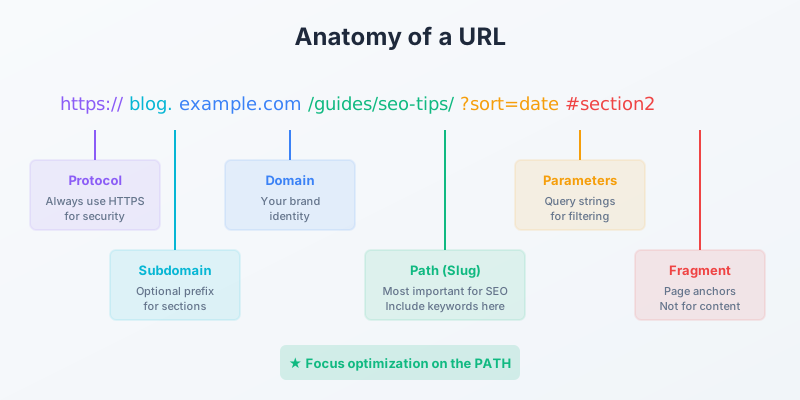
- Protocol. https:// (always use HTTPS—no exceptions for security and SEO)
- Domain. yourdomain.com (your brand, keep consistent)
- Subdomain. blog.yourdomain.com (optional, creates separate subdomain)
- Path. /category/page-name/ (what you control most and should optimize. Also known as slug.)
- Parameters. ?sort=price (query strings, often for filtering)
- Fragment. #section (anchors within a page—don’t rely on these for content delivery)
Most SEO focus goes to the path portion—the descriptive part after your domain. That’s where you have the most control and where optimization matters most.
URL Length
“Keep URLs short” is common advice, but how short?
A study analyzing 11.8 million search results found pages with short, concise slugs rank slightly higher across the board. The sweet spot is keeping the entire URL—including domain—under 50-60 characters. For the slug specifically (the path portion), aim for 3-5 meaningful words, roughly 25-30 characters.
Here’s what I recommend:
- Full URL: Under 60 characters when possible
- Slug portion: 3-5 words maximum
- Clarity over brevity: Don’t sacrifice understanding for length
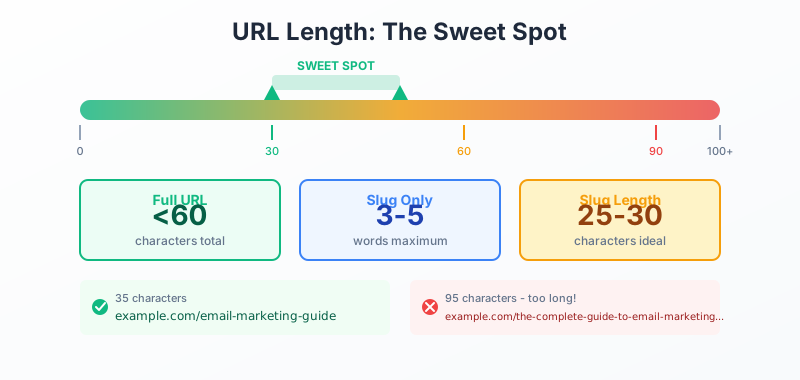
Short URL: example.com/email-marketing-guide (35 characters)
Too long: example.com/the-complete-and-comprehensive-guide-to-email-marketing-strategies-for-beginners (95 characters)
The first URL works. The second gets truncated in search results, looks spammy, and adds no value from the extra words.
URL Best Practices That Actually Matter
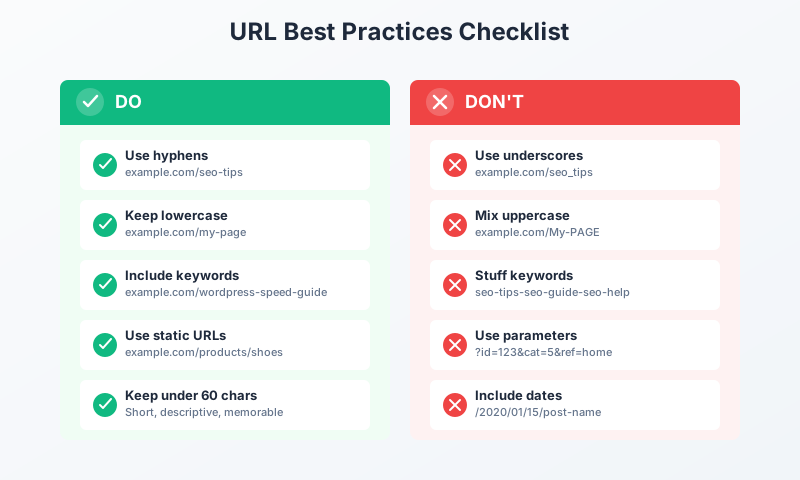
Guidelines based on data and experience, not just theory.
Use Hyphens to Separate Words
Google treats hyphens as word separators but treats underscores as word joiners. The URL best-seo-tips registers as three words. The URL best_seo_tips registers as one compound word.
This matters for keyword matching. If someone searches “SEO tips,” the hyphenated version matches better than the underscored version.
Never use spaces. They become %20 when encoded, which looks broken: best%20seo%20tips. Ugly and unprofessional.
Lowercase Only, Always
URLs are case-sensitive. Website.com/SEO-Guide and website.com/seo-guide are technically different pages. This creates problems:
- Duplicate content if both versions exist
- Split link equity between versions
- User confusion when copying URLs
- Canonical issues that waste crawl budget
Set up redirects to force lowercase. Most CMS platforms handle this automatically, but verify. I’ve audited sites where mixed-case URLs created hundreds of duplicate pages without anyone noticing.
Include Keywords, But Don’t Stuff
Your primary keyword should appear in the URL, placed naturally. Google confirms URLs help with relevance assessment. Users also scan for keywords when deciding what to click.
Good: example.com/internal-linking-strategy
Stuffed: example.com/internal-linking-strategy-internal-links-linking-guide
Keyword stuffing in URLs violates Google’s spam policies. Beyond penalties, it looks desperate and reduces user trust. One mention of your primary term is sufficient.
Remove Stop Words
Stop words like “the,” “and,” “or,” “of,” “a,” “to,” and “for” add length without value. Remove them when they’re not essential to meaning.
With stop words: /the-complete-guide-to-email-marketing-for-beginners
Without: /email-marketing-beginners-guide
The second URL is shorter, cleaner, and equally clear. Users don’t miss the stop words. Neither does Google.
Exception: sometimes stop words matter for meaning. “How to start a business” vs “start business” mean different things. Use judgment.
Avoid Dates in URLs
Dates in URLs make content appear outdated even when regularly updated.
Problem: example.com/2020/01/seo-tips/ screams “old content” in 2025, even if you update it annually.
Better: example.com/seo-tips/ stays evergreen forever.
I only use dates for genuinely time-specific content: event coverage, news articles, annual reports. For everything else—guides, tutorials, product pages—keep URLs dateless.
If you inherited a date-based structure, consider migrating. Yes, it requires redirects. But the long-term benefit of evergreen URLs outweighs the migration pain for content you’ll maintain.
Use Static URLs, Not Dynamic Parameters
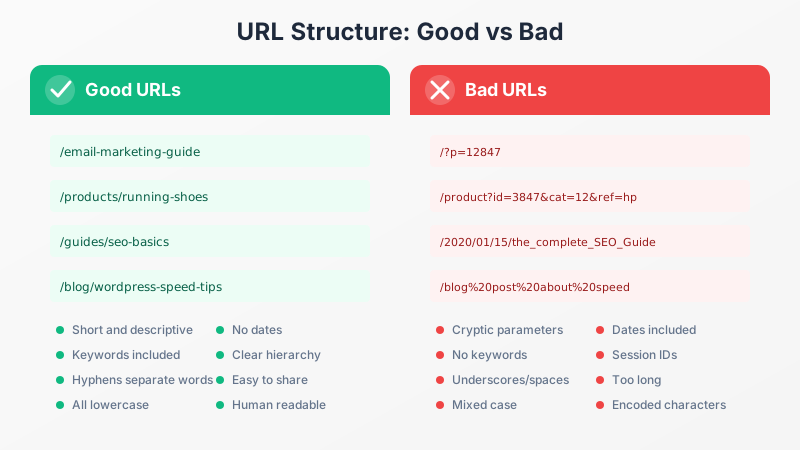
Static URLs outperform dynamic ones for clarity and SEO. This has become even more important with AI Overviews and answer engines prioritizing clean content structures.
Static: example.com/products/running-shoes
Dynamic: example.com/product?id=3847&cat=12&ref=homepage
The static URL describes the content. The dynamic URL reveals nothing to users or search engines without additional context.
Most modern CMS platforms generate static URLs by default. WordPress does with proper permalink settings. Ecommerce platforms like Shopify and WooCommerce handle this automatically.
If you must use parameters (for sorting, filtering, session tracking), at minimum:
- Keep parameters short and relevant
- Use
?key=valueformat, not?valuealone - Implement canonical tags pointing to the base URL
- Consider noindexing filtered pages with no SEO value
Folder Structure and Hierarchy
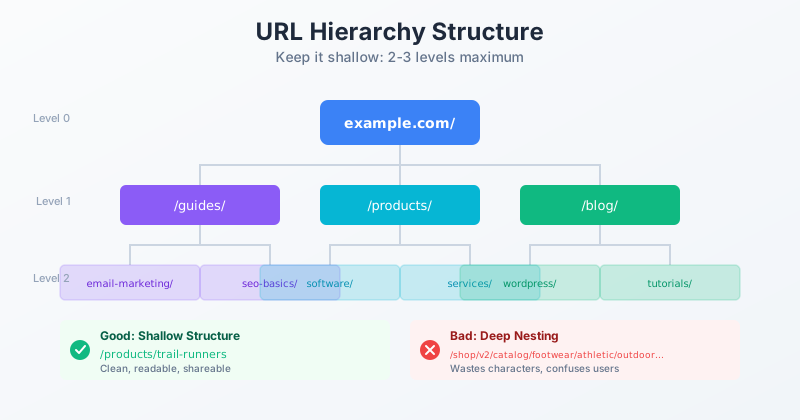
URL paths should reflect site organization. This helps both crawlers and users understand your content structure.
Logical Hierarchy
Structure URLs to show content relationships:
example.com/
      /guides/
           /guides/email-marketing/
           /guides/seo-basics/
      /products/
          /products/software/
          /products/services/
This structure tells Google that email-marketing and seo-basics are both guides.
Also those products contain software and services. The hierarchy is self-documenting.
Keep It Shallow
Every folder level adds to URL length and complexity. Deep nesting creates problems:
Deep: example.com/shop/v2/catalog/items/footwear/athletic/outdoor/products/trail-runners
Shallow: example.com/products/trail-runners
Both reach the same product. The shallow version is readable, shareable, and doesn’t waste characters on meaningless folder layers.
I aim for a maximum of two or three folder levels. If you need more, reconsider your information architecture.
Match Navigation to URLs
URL structure should reflect how users navigate your site. If your navigation shows Products > Running Shoes > Trail Runners, your URL should mirror that: /products/running-shoes/trail-runners.
Mismatched structures confuse both users and crawlers. Users expect the URL to match their navigation path. When it doesn’t, they feel lost.
WordPress URL Settings
Getting URLs right is foundational, but it’s just the start. Pair clean URLs with Rank Math for on-page optimization and a proper technical SEO audit to catch issues like redirect chains and canonicalization problems. For WordPress specifically, the text to slug converter helps when you’re batch-creating URL-friendly slugs.
WordPress makes SEO-friendly URLs straightforward with correct configuration.
Permalink Settings
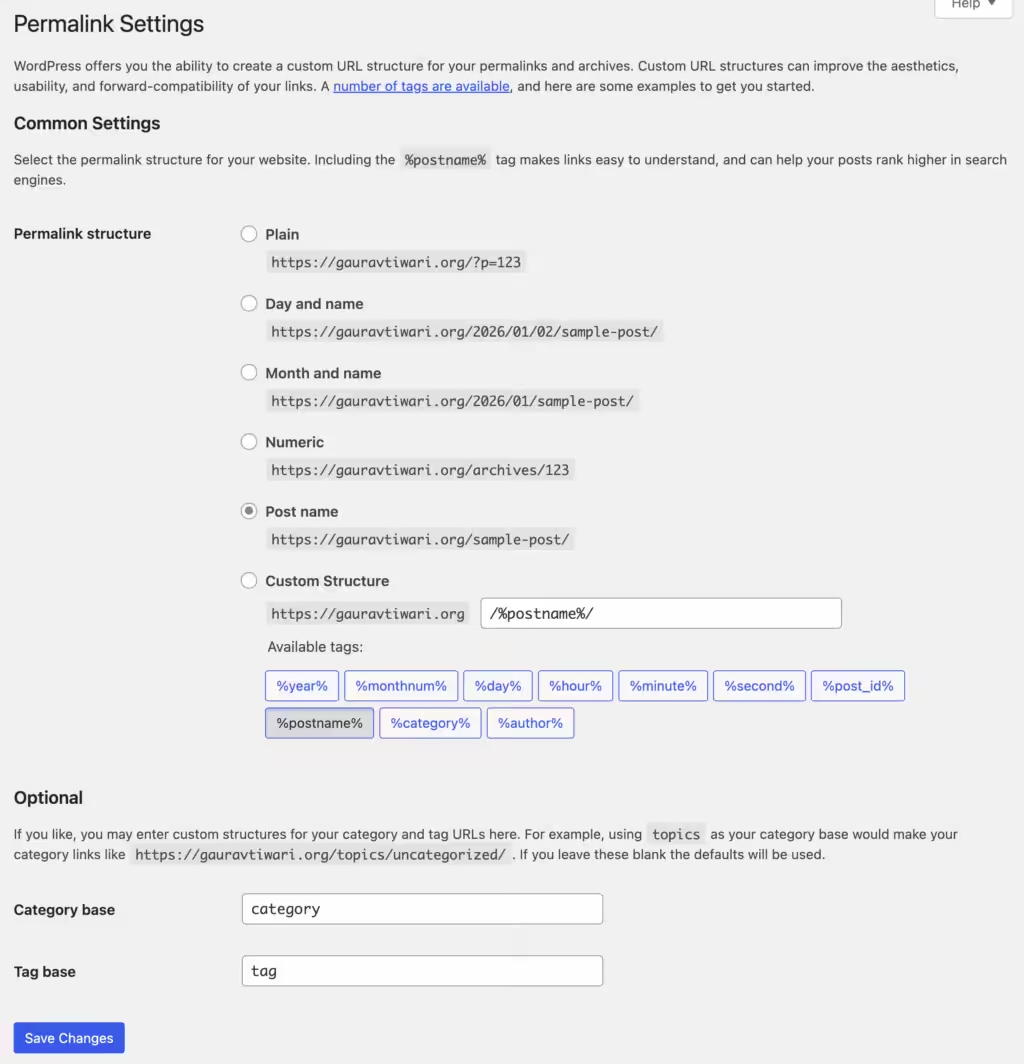
Go to Settings > Permalinks and select “Post name” for the cleanest URLs:
example.com/your-post-name/
Avoid the default option with dates and post IDs:
example.com/?p=123(default in WordPress but the worst)example.com/2025/01/post-name/(includes dates)
If you want category hierarchy visible:
/%category%/%postname%/givesexample.com/guides/post-name/
Edit Slugs Manually
WordPress auto-generates slugs from post titles, but auto-generated slugs are often too long. A title like “The Complete Beginner’s Guide to Email Marketing in 2026” becomes an unwieldy URL.
Edit every slug before publishing:
- Remove stop words
- Trim to 3-5 keywords
- Check for keyword inclusion
- Verify lowercase
Plugin Configuration
Some plugins add unwanted URL elements. Translation plugins might add language codes. E-commerce plugins add shop prefixes. Review plugin settings to ensure they’re not bloating your URLs unnecessarily.
Rank Math and AIOSEO both include URL analysis in their SEO recommendations, flagging slugs that are too long or missing keywords.
E-commerce URL Considerations
Product pages and category structures require special attention. Google published specific e-commerce URL guidance worth following.
Product Page URLs
Each product needs a unique, descriptive URL. Include:
- Product name
- Primary category (optional but helpful)
- Brand name (if relevant)
Good: example.com/products/nike-air-max-90-white
Problem: example.com/p?id=4738293
The good URL is shareable, searchable, and meaningful. The parameter-based URL is none of those.
Category and Filtering URLs
Faceted navigation creates URL variations for every filter combination. Size, color, price range, brand—each filter creates new URLs. This can generate thousands of indexable pages that provide no unique value.
Solutions:
- Noindex filtered pages that don’t deserve standalone SEO value
- Use canonical tags pointing filtered pages to base category URLs
- Implement JavaScript-based filtering that doesn’t create new URLs
- In Google Search Console, specify parameter handling
Google’s e-commerce guidance explicitly warns against duplicate parameters and temporary session parameters. Clean them up.
Avoid Parameter Sprawl
E-commerce platforms often append tracking and session parameters:
Bad: example.com/product?id=123&session=xyz789&ref=email&utm_source=newsletter
Users see this mess. Crawlers process unnecessary variations. Link equity splits across parameter combinations.
Use canonical tags aggressively. Point all parameter variations to the clean base URL.
International URL Strategies
Multi-language and multi-region sites need URL decisions that affect global SEO.
Three Main Approaches
Subdirectories (most common):
- example.com/fr/ for French
- example.com/de/ for German
- Shared domain authority, simpler management
Subdomains:
- fr.example.com
- de.example.com
- Treated as separate sites by Google, more independence
Country-code TLDs:
- example.fr
- example.de
- Strongest local signals, but separate domains entirely
For most sites, subdirectories win. You maintain one domain’s authority while targeting multiple languages. Subdomains and ccTLDs make sense for large operations with dedicated local teams.
Translate the Slugs
Don’t just translate page content—translate URLs too.
Wrong: example.com/fr/products/running-shoes
Right: example.com/fr/produits/chaussures-course
Users in France expect French URLs. Localized slugs also help with local keyword matching.
Hreflang Tags Are Mandatory
Tell search engines about language relationships using hreflang tags. Without them, Google might show the wrong language version or treat translations as duplicate content.
This is essential for international SEO. Misconfigured hreflang is one of the most common technical issues I find on multilingual sites.
URL Changes: When and How
Sometimes URL changes are unavoidable. Site redesigns, rebranding, or fixing inherited mistakes all create change requirements.
When to Change URLs
Change URLs if:
- Current structure is fundamentally broken (all dynamic parameters)
- You’re consolidating duplicate content
- URL contains outdated information (old brand name, dates)
- Site architecture is being rebuilt
Don’t change URLs for:
- Minor optimization (“maybe a slightly better keyword”)
- Cosmetic preference
- Following trends without clear benefit
Every URL change risks traffic loss. Even with perfect redirects, some equity is lost in transition. The improvement needs to clearly outweigh this cost.
Implementing Changes Correctly
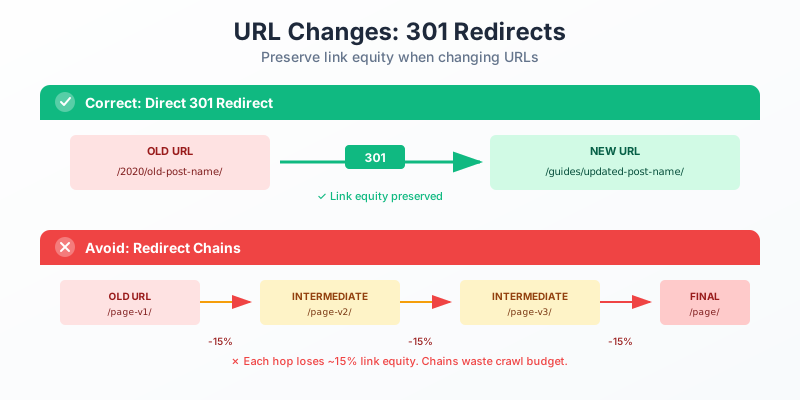
- Map every old URL to its new destination. Create a complete redirect map before changing anything.
- Use 301 redirects. Permanent redirects pass link equity. Never use 302 temporary redirects for permanent moves.
- Avoid redirect chains. Old URL → intermediate URL → final URL wastes crawl budget and loses equity. Go directly to the final destination.
- Update internal links. Don’t rely on redirects for internal navigation. Update all internal links to point to new URLs directly.
- Monitor for errors. Watch Search Console for crawl errors. Some URLs will be missed. Fix them quickly.
- Preserve high-value URLs. Pages with significant backlinks or traffic deserve extra attention. Verify redirects are working and equity is transferring.
For WordPress, Rank Math includes a redirect manager. Redirection is a dedicated free option. Either works.
URL Audit Checklist
Use this to evaluate your current URLs.
Structure check:
- Are URLs consistently lowercase?
- Are words separated by hyphens (not underscores)?
- Are URLs under 60 characters total?
- Do slugs contain 3-5 words maximum?
- Are stop words removed where appropriate?
Content check:
- Does each URL include the primary keyword?
- Does the URL accurately describe page content?
- Are URLs free of dates (unless necessary)?
- Are URLs static rather than parameter-heavy?
Technical check:
- Are all URLs properly encoded (no spaces, special characters)?
- Do all parameter variations have canonical tags?
- Are redirects working correctly?
- Is the URL structure consistent across content types?
Usability check:
- Can users understand the page content from the URL alone?
- Do URLs look trustworthy in search results?
- Are URLs easy to share and type?
Run this audit quarterly. URL problems creep in as sites grow.
Tools for URL Analysis
Resources to audit and improve URLs.
- Screaming Frog. Crawl your site to analyze all URLs. Identify length issues, parameter problems, duplicate paths, and redirect chains. Free up to 500 URLs.
- Google Search Console. See how Google views your URLs. Monitor for crawl errors, indexing issues, and duplicate content flags.
- Semrush or Ahrefs. Site audit features flag URL issues alongside other technical problems. Useful for large-scale analysis.
- Redirect checkers. Verify redirect chains and final destinations. HTTPStatus.io and Redirect Checker both work.
- Browser developer tools. Network tab shows actual URL requests and redirects. Useful for debugging specific pages.
Regular audits catch problems before they impact rankings.
Getting Started
Implement better URL practices today.
For new sites:
- Plan URL structure before building
- Configure CMS permalink settings
- Document conventions for consistency
- Review every slug before publishing
For existing sites:
- Audit current URLs with Screaming Frog
- Identify critical issues (duplicates, parameters, errors)
- Prioritize fixes by traffic and importance
- Implement changes with proper redirects
- Update internal links to point to new URLs
For ongoing maintenance:
- Check slugs before publishing new content
- Monitor Search Console for crawl errors
- Audit quarterly for creeping issues
- Resist unnecessary changes
URLs are foundational infrastructure. Getting them right from the start supports everything you build on top—content, links, and long-term organic visibility. Clean, descriptive, consistent URLs won’t transform your rankings alone, but they contribute to the cumulative signals that help search engines understand and trust your site.
They’re also one of the few SEO elements you fully control. Use that control wisely.
FAQs
What Is a Permalink?
A permalink is the permanent URL for a specific page, post, or piece of content on your website. When someone bookmarks your blog post or shares it on social media, they are sharing the permalink.
The term “permanent link” is the key. Unlike temporary URLs or session-based links, a permalink is designed to stay the same forever. Changing a permalink after publishing breaks all existing links, bookmarks, and search engine references to that page. This is why getting your URL structure right from the start matters.
In WordPress, you set your permalink structure in Settings > Permalinks. The recommended structure for most blogs is “Post name” which creates URLs like yoursite.com/your-post-title/. Avoid date-based structures (yoursite.com/2026/04/10/post-title/) because they make content look outdated and create unnecessarily long URLs.
What Is a URL and How Does It Work?
A URL (Uniform Resource Locator) is the address of a specific resource on the internet. Every web page, image, PDF, and file has a unique URL. When you type an address into your browser, you are entering a URL.
A URL has several parts:
- Protocol:
https://(secure) orhttp://(not secure). Always use HTTPS. - Domain:
gauravtiwari.org— the website’s address. - Path:
/flyingpress-review/— the specific page or post. - Parameters:
?ref=social— optional tracking or filtering data (everything after the ?). - Fragment:
#pricing— optional anchor link to a specific section on the page.
For SEO, the parts that matter most are the domain and the path. Keep paths short, descriptive, and keyword-relevant. Avoid parameters in URLs that you want Google to index.
Do keywords in URLs still matter for SEO in 2026?
Yes, but as a minor factor. Google confirms URLs help gauge page relevance. Keywords in URLs also improve click-through rates when users see them in search results, and they become anchor text when people link using bare URLs. Don’t stuff keywords, but including your primary topic naturally in the URL path is still worthwhile.
Should I include dates in my blog post URLs?
Generally no. Dates in URLs make content appear outdated even when regularly updated. A post at example.com/2020/tips becomes dated in 2025, even if content is current. Use dateless URLs for evergreen content that you’ll maintain over time. Dates are only appropriate for genuinely time-specific content like news coverage or event announcements.
What’s the ideal URL length for SEO?
Keep the full URL (including domain) under 50-60 characters when possible. For the slug specifically, aim for 3-5 meaningful words, roughly 25-30 characters. A study of 11.8 million search results found pages with short, concise slugs rank slightly higher. However, clarity matters more than strict length—a slightly longer descriptive URL beats a confusing short one.
Should I use hyphens or underscores in URLs?
Always use hyphens. Google treats hyphens as word separators but treats underscores as word joiners. ‘best-seo-tips’ is read as three words; ‘best_seo_tips’ is read as one compound word. This affects how keywords are parsed and matched to queries. Spaces become %20 when encoded, which looks broken. Hyphens are the standard for SEO-friendly URLs.
What should I do if I need to change existing URLs?
Implement 301 redirects from old URLs to new ones—this passes link equity and prevents broken links. Update internal links to point directly to new URLs rather than relying on redirects. Avoid redirect chains (old to intermediate to new). Monitor Search Console for crawl errors. For high-traffic pages, expect temporary ranking fluctuations. Only change URLs when benefits clearly outweigh disruption.
What changed in Google’s 2025 URL guidelines?
Google updated its URL structure documentation in June 2025. The major change: sites must now comply with IETF STD 66 instead of RFC 3988. This means reserved characters must be percent-encoded, and spaces or special symbols need proper encoding rather than appearing literally. Google also clarified that URL fragments (#) should not deliver content—use the History API instead for JavaScript-based content changes.
Do URL parameters affect SEO negatively?
They can create problems. Each parameter combination generates a potential duplicate page, splitting link equity and wasting crawl budget. Google’s e-commerce guidelines warn specifically against duplicate and temporary parameters. Use canonical tags to point parameter variations to the base URL. Consider noindexing filtered pages with no unique SEO value. If you must use parameters, keep them short, use key=value format, and clean up session or tracking parameters.
Disclaimer: This site is reader-supported. If you buy through some links, I may earn a small commission at no extra cost to you. I only recommend tools I trust and would use myself. Your support helps keep gauravtiwari.org free and focused on real-world advice. Thanks. - Gaurav Tiwari