
PWA vs Native Apps and How to Make a Right Choice between them?
You’ve got a solid app idea, a limited budget, and two paths forward: build a Progressive Web App or go native. Pick wrong and you burn $50K+ and six months before realizing users won’t install another app from the store. Pick right and you launch in weeks at a fraction of the cost.
I’ve shipped both PWAs and native apps for clients over the past decade. The pattern I keep seeing: businesses default to native because it sounds “more professional,” then watch the project balloon past budget while a PWA would’ve solved 90% of their requirements. That frustration is real, and it’s avoidable.
I’m going to walk you through the actual 2026 capabilities of PWAs, real performance benchmarks, cost breakdowns with specific numbers, and a decision framework that removes the guesswork. By the end, you’ll know exactly which approach fits your project, your budget, and your users.
What Is a Progressive Web App (PWA)?
A Progressive Web App is a website that behaves like a mobile app. It’s built with standard web technologies, HTML, CSS, and JavaScript, but uses modern browser APIs like Service Workers, Web App Manifest, and the Cache API to deliver app-like experiences directly in the browser.
You can install a PWA to your home screen, use it offline, receive push notifications, and interact with device hardware like the camera and GPS. The key difference from a regular website: PWAs work without an internet connection, load instantly on repeat visits because assets are cached locally, and skip the app store entirely.
The progressive web app market is projected to surpass $10.4 billion by 2027 according to Allied Market Research, and that estimate keeps climbing as browser capabilities expand. Companies like Starbucks, Pinterest, Uber, Twitter (now X), and Spotify have all shipped PWAs alongside their native apps. These aren’t experimental side projects. They’re production-grade tools handling millions of users.
What Is a Native App?
A native app is built specifically for a single platform using platform-specific languages and frameworks. For iOS, that means Swift or Objective-C with Xcode. For Android, it’s Kotlin or Java with Android Studio. Users download and install native apps from the Apple App Store or Google Play Store.
Native apps have direct access to every piece of device hardware and every operating system feature. They can use the NFC chip, access health data through HealthKit or Google Fit, integrate with Siri or Google Assistant, use ARKit or ARCore for augmented reality, and deliver buttery-smooth 60fps animations with full GPU access.
The tradeoff: you need separate codebases for iOS and Android (or use a cross-platform framework like React Native or Flutter), the development cost is significantly higher, and you’re subject to app store review processes along with their 15% to 30% revenue cut on in-app purchases. If your business model relies on online marketing strategies that drive traffic through search engines, native apps also can’t be indexed by Google the way web content can.
2026 PWA Capabilities: What Can They Actually Do?
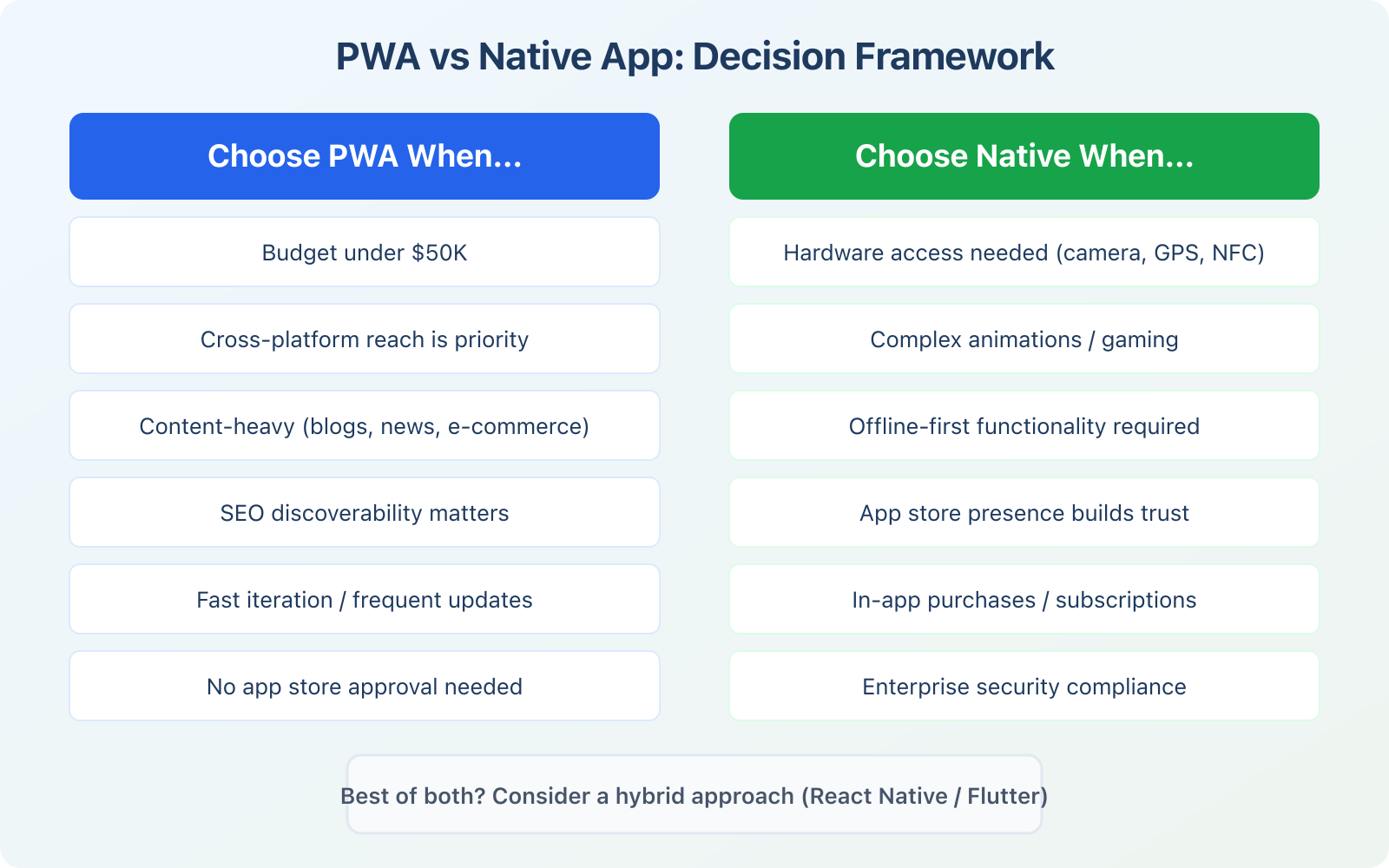
This is where things have changed dramatically. A few years ago, PWAs had serious limitations, especially on iOS. In 2026, the gap between PWA and native capabilities has narrowed to the point where most businesses don’t need native at all.
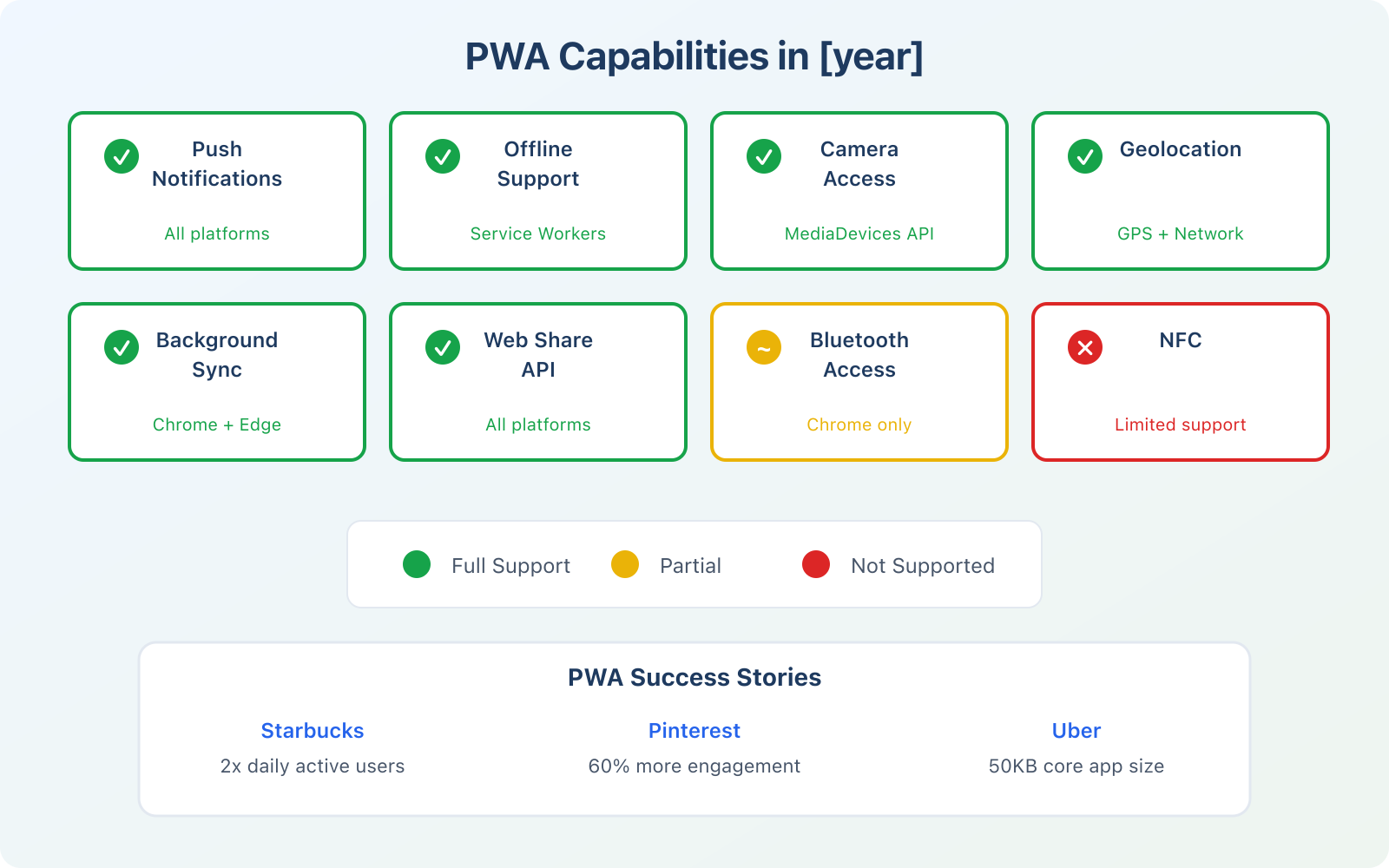
Here’s what PWAs can do right now:
- Push notifications: Fully supported on Android, Chrome, Edge, Firefox, and now iOS (added in iOS 16.4). This was the last major holdout, and Apple finally delivered
- Offline functionality: Service Workers cache assets and data, allowing full offline-first applications. You can read content, fill forms, and queue actions that sync when connectivity returns
- Camera and microphone: Full access through the MediaDevices API on all major browsers including Safari
- Geolocation: GPS and network-based location tracking on all platforms
- Payment Request API: Native payment sheets (Apple Pay, Google Pay) without any app store involvement
- Background sync: Queue data and sync automatically when connectivity returns (Chrome and Edge)
- File System Access: Read and write local files through the File System Access API (Chromium browsers)
- Web Share API: Triggers the native sharing dialog on all platforms
- Badging API: Shows notification badges on the installed app icon
- Screen Wake Lock: Prevents the screen from dimming during active use (useful for recipes, workouts, presentations)
What PWAs still can’t do well: Bluetooth access is limited to Chromium browsers. NFC is experimental. There’s no access to HealthKit or Google Fit data. In-app purchases through app stores aren’t available. Complex 3D graphics and AR are possible but perform noticeably worse than native implementations. If your app’s core value depends on any of these, native remains the only viable path.
Real Performance Benchmarks: PWA vs Native
Vague claims like “native is faster” don’t help you make a decision. Here are actual numbers compiled from Google’s Web Vitals reports, published case studies, and Lighthouse audits I’ve run on production PWAs.
Load Time and Responsiveness
Well-optimized PWAs load in 1.0 to 1.5 seconds on repeat visits because Service Workers serve cached content nearly instantly. Native apps typically load their main screen in 1.5 to 2.5 seconds after the cold start animation. For first-time loads, native wins because the app is already installed. But on subsequent visits, PWAs are often faster because cached assets load without any network round-trip.
App Size
This is where PWAs dominate. The Starbucks PWA is roughly 233KB. Their native iOS app is around 150MB. That’s a 600x difference. The Twitter Lite PWA takes under 1MB of storage compared to the native app at 100MB+. For users on limited storage or slow mobile connections in emerging markets, this gap matters enormously.
Animation and GPU Performance
Native apps consistently hit 60fps for complex gesture-driven animations, 3D rendering, and GPU-intensive operations. PWAs can match this for CSS-based animations and simple interactions, but struggle with complex touch gestures and heavy canvas/WebGL workloads. If smooth 60fps animation across complex interactions is your app’s primary differentiator, native wins.
Memory Usage
Native apps are more memory-efficient because they compile to machine code. PWAs run inside a browser context with a JavaScript engine, which adds overhead. For simple apps (news readers, e-commerce, dashboards), the difference is negligible. For resource-intensive apps like photo editors or video players, native uses 30% to 50% less RAM.
Twitter Lite PWA achieved a 65% increase in pages per session, 75% increase in tweets sent, and a 20% decrease in bounce rate. All with an app that’s 1% the size of the native version.
PWA Success Stories with Real Numbers
Theory is one thing. Results are another. These are documented case studies from companies that deployed PWAs at scale.
Twitter Lite: +65% pages per session, +75% tweets sent, -20% bounce rate. The PWA is under 1MB versus 100MB+ for the native app. Twitter built this specifically for users in emerging markets with slow connections and limited storage.
Starbucks: 2x daily active users after launching their PWA ordering system. The 233KB PWA works on any device, any connection speed. Customers in areas with poor cellular coverage can still browse the menu and customize orders offline.
Pinterest: +60% engagement, +44% ad revenue, +40% time spent when they rebuilt their mobile web experience as a PWA. Their previous mobile site was slow and clunky. The PWA fixed both problems without requiring users to install anything.
Uber: Their PWA loads in 3 seconds on 2G networks. It’s designed for users in markets where native app installation isn’t practical due to device constraints. The entire ride-booking flow works in a 50KB payload.
Forbes: 43% increase in sessions, 100% increase in engagement, 6x completion rate compared to their previous mobile site. The PWA loads in 0.8 seconds on repeat visits.
Development Cost and Timeline Comparison
Cost is often the deciding factor, especially for startups and small businesses. If you’re trying to create a business budget for your app project, these numbers will help you plan realistically.
PWA development: $5,000 to $30,000 for a medium-complexity application. You build one codebase that works everywhere. Development timeline is typically 4 to 12 weeks. Updates deploy instantly, no store review required.
Native iOS + Android: $50,000 to $200,000+ for both platforms combined. You need two separate teams (Swift/Kotlin) or one team using a cross-platform framework. Timeline: 4 to 9 months. Every update goes through Apple’s 1-7 day review process.
Cross-platform (React Native/Flutter): $30,000 to $100,000 for a single codebase that compiles to native code. Faster than pure native, but you still deal with app store submissions, platform-specific bugs, and framework-imposed limitations. Timeline: 3 to 6 months.
Annual maintenance: PWAs have one codebase and one deployment pipeline. Maintenance runs 10% to 15% of the initial build cost per year. Native apps require maintaining 2-3 codebases, ensuring compatibility with new OS versions annually, and handling app store policy changes. Annual maintenance is typically 20% to 30% of the initial build cost. Over 3 years, maintenance alone can exceed the original PWA development cost.
WordPress PWA Options
If your site runs on WordPress, turning it into a PWA is straightforward. You don’t need to rebuild anything. There are several approaches depending on how much control you need.
Plugin Options
SuperPWA is the most popular option with 60,000+ active installations. It generates a Web App Manifest, registers a Service Worker, adds an “Add to Home Screen” banner, and handles offline caching. The free version covers most use cases. The pro version ($99/year) adds push notifications through OneSignal, app shortcuts, and analytics.
PWA for WP & AMP by developer Magazine3 offers more granular control. It supports multiple caching strategies (cache-first, network-first, stale-while-revalidate), custom offline pages, UTM tracking for installed app usage, and data analytics. It also integrates with AMP if you’re using that.
Custom implementation is worth considering if you need fine-grained control. You’ll create a manifest.json file, write a Service Worker with your exact caching strategy, and register both through your theme’s functions.php. This takes 2-4 hours for a basic setup and gives you complete control over the caching logic.
Hosting Matters for PWA Performance
Your PWA is only as fast as your server. A Service Worker can cache assets locally, but the initial load still depends on server response time. I run my WordPress sites on Cloudways managed cloud hosting because it consistently delivers sub-500ms TTFB (Time to First Byte) with built-in Varnish caching, PHP 8.3 support, and one-click server scaling. That fast initial load means the Service Worker can take over quickly, and every subsequent visit is near-instant from cache.

Cloudways Managed Cloud Hosting
- Sub-500ms TTFB with Varnish + Redis caching
- PHP 8.3, HTTP/3, and Brotli compression
- One-click server cloning and scaling
- Free SSL, CDN integration, staging environments
- 24/7 expert support with 10-min avg response
When You Should Choose a PWA
Based on building apps across different industries and use cases, here’s when a PWA is the clear winner:
- Content-driven apps: News sites, blogs, e-commerce catalogs, documentation portals. PWAs are perfect because the content is the product, and SEO discoverability through search engines is a massive advantage native apps don’t have
- E-commerce: Faster load times directly correlate with higher conversion rates (every 100ms delay costs 1% in conversions according to Akamai). No app store commission on purchases. Reach users who won’t install another app
- Internal business tools: Dashboards, CRMs, inventory management, field service apps. These don’t need app store distribution and benefit from instant deployment of updates
- Emerging markets: If your audience is in regions with slower internet, expensive data plans, and limited device storage, PWAs’ small size and offline capabilities are genuine game-changers
- MVPs and startups: When you need to validate an idea fast, a PWA gets you to market in weeks at a fraction of the cost. Prove demand first, then invest in native if the numbers justify it
- WordPress sites: If you already have a WordPress site and want app-like functionality, a PWA plugin takes 30 minutes to set up. Building a native app that mirrors your WordPress content takes months
When Native Is Still the Only Option
I’m not anti-native. There are specific scenarios where it’s the only viable choice. If your app falls into any of these categories, don’t fight it. Go native or cross-platform.
- Hardware-intensive features: Bluetooth connectivity, NFC, ARKit/ARCore augmented reality, health sensors (HealthKit, Google Fit), advanced camera controls like manual exposure and RAW capture. The web APIs for these either don’t exist or are too limited
- Gaming: Anything beyond casual 2D games needs native GPU access. The rendering pipeline in Metal (iOS) and Vulkan (Android) is far superior to WebGL for complex 3D scenes
- Heavy offline data sync: While PWAs handle offline well, apps that need to sync large datasets (medical records, field inspection data, large media libraries) work better with native SQLite databases and platform-specific sync frameworks
- In-app monetization: If subscriptions or in-app purchases are your business model, you need a native app (or at least a native wrapper) to access Apple and Google’s payment systems. The Payment Request API can’t handle app store billing
- Regulated industries: Some healthcare (HIPAA), financial (PCI DSS Level 1), and government compliance frameworks mandate native apps for specific data handling, encryption, and audit requirements
The Hybrid Approach: Start PWA, Add Native Later
There’s a third path that many businesses overlook, and it’s the one I recommend most often: build a PWA first, then wrap it in a native shell later if you need app store presence.
Tools like Capacitor (from the Ionic team) and TWA (Trusted Web Activity) for Android let you publish your existing PWA to app stores without rewriting anything. You keep your single codebase, add a thin native wrapper, and submit to the App Store and Google Play. The wrapper gives you access to native APIs you couldn’t reach from the browser alone.
This approach works well because it lets you validate your product with real users at PWA cost ($5K-$30K), build an audience, and then invest in native-specific features only after you’ve confirmed demand. It’s the lowest-risk path. If your idea doesn’t gain traction, you’ve lost $10K instead of $100K.
React Native and Flutter represent another hybrid approach where you write once and deploy to both iOS and Android with near-native performance. Building an MVP with these frameworks takes about 40% less time than pure native development. If you’re still exploring whether you even need a website or an app, a PWA lets you test both simultaneously since it is a website.
The businesses that get this wrong are the ones that build a $200K native app before validating whether anyone wants their product. Don’t be that business. Start lean, prove demand, then invest in the premium experience.
Would you install a PWA for a website you visit regularly?
PWA SEO Advantages Over Native Apps
This is a massive and frequently underestimated advantage. PWAs are indexable by Google, Bing, and every other search engine because they’re websites at their core. Native apps live in an app store silo.
When someone searches “order coffee near me,” the Starbucks PWA can appear in Google’s regular search results. Their native app can’t. Google does index some app content through Firebase App Indexing, but the coverage is limited and unreliable compared to standard web indexing.
For businesses that depend on organic search traffic, this difference alone can justify choosing a PWA. You get full control over meta titles, descriptions, structured data, canonical URLs, and internal linking. You can run Semrush audits, track keyword rankings, and optimize content the same way you would for any website.
PWAs also support Open Graph and Twitter Card meta tags, which means shared links render with rich previews on social media. Native app deep links often break or show generic “Open in App Store” prompts that kill click-through rates.

- Site audit to catch PWA performance issues
- Keyword tracking for PWA content pages
- Competitor analysis for app vs web traffic
- Core Web Vitals monitoring built-in
- Backlink analytics and content gap analysis
Security Comparison: PWA vs Native
Both approaches can be secure when implemented properly, but the mechanisms differ in ways that matter for certain industries.
PWA security strengths: HTTPS is mandatory (it’s a PWA requirement), which provides strong transport-layer encryption. The browser sandbox isolates PWA code from the rest of the device. Content Security Policies (CSP) prevent XSS attacks. Modern Service Workers only run over secure origins.
Native security strengths: Platform-level features like Keychain (iOS) and Keystore (Android) provide hardware-backed key storage. Biometric authentication through Face ID, Touch ID, and fingerprint APIs. Certificate pinning prevents man-in-the-middle attacks. App-level encryption uses hardware security modules. App store review processes catch many vulnerabilities before publication.
For most applications, e-commerce, content, productivity tools, social platforms, PWA security is perfectly adequate. For banking, healthcare records, government systems, or anything handling financial transactions with stored payment credentials, native security features provide a critical additional layer. If you’re building something that needs to be ADA compliant and meet specific regulatory standards, evaluate the compliance requirements before choosing.
Technical Implementation: Building Your First PWA
If you’ve decided a PWA is the right move, here’s what the technical implementation actually involves. It’s simpler than most people expect.
The Three Required Components
1. Web App Manifest (manifest.json): A JSON file that tells the browser your app’s name, icons, theme colors, start URL, and display mode. This is what enables the “Add to Home Screen” prompt. It takes about 10 minutes to write.
2. Service Worker: A JavaScript file that runs in the background, intercepts network requests, and manages caching. This is the engine behind offline functionality and fast repeat loads. A basic cache-first Service Worker takes 50-100 lines of code.
3. HTTPS: Your site must be served over HTTPS. No exceptions. Service Workers won’t register on insecure origins. If you’re on Cloudways, free SSL certificates are included and configured automatically.
Testing PWA Quality
Google’s Lighthouse audit tool (built into Chrome DevTools) is the standard for measuring PWA quality. Run a Lighthouse audit and check the PWA section. It validates your manifest, Service Worker registration, HTTPS, offline capability, and installability. Aim for a score of 90+ across all categories.
Also test with PWABuilder from Microsoft. It grades your PWA on manifest completeness, Service Worker functionality, and store-readiness. It can also package your PWA for the Microsoft Store, Google Play, and Meta Quest store.
Collaboration and Productivity for App Teams
Whether you’re building a PWA or native app, your development team needs reliable collaboration tools. I use Google Workspace for all project communication, documentation, and file sharing across distributed teams. The real-time collaboration in Google Docs and Sheets makes sprint planning, spec writing, and QA tracking seamless, and it works beautifully as a PWA itself (Google Docs is one of the best PWA implementations available).
- Gmail, Docs, Sheets, Drive in one subscription
- Real-time collaboration for distributed teams
- 15GB-5TB storage per user depending on plan
- Admin controls, security center, and audit logs
- Works as a PWA itself with full offline support
Making Your Decision: A 5-Question Framework
Here’s the decision framework I walk clients through. Five questions, and your answers point you to the right approach every time.
- Do you need hardware access beyond camera, GPS, and payments? If yes (Bluetooth, NFC, AR, health sensors), go native. If no, PWA works
- Is your budget under $50K? If yes, PWA is likely your only viable option. Native done properly on both platforms costs more than that
- Is organic search traffic important for discovery? If yes, PWA has a significant advantage because Google indexes your content like any other website
- Do you need in-app purchases or subscriptions through Apple/Google? If yes, you need a native app or native wrapper for app store payment systems
- How fast do you need to launch? If speed matters, a PWA gets you to market 2x to 3x faster with a single codebase and no app store review delays
If you answered “no” to questions 1 and 4, a PWA should be your default choice. You’ll save money, launch faster, and reach a wider audience. If you need app store presence later, wrap the PWA using Capacitor or build a native version after you’ve validated product-market fit.
The technology has matured past the point where “should we go native?” is the default question. The real question in 2026 is: “Do we have a specific, documented reason to go native?” If you can’t name the exact native-only API your core feature depends on, start with a PWA. You can always add native later. You can’t get back the $150K and 9 months you spent building something a PWA could’ve handled.
Are PWAs as fast as native apps in 2026?
For most use cases, yes. PWAs with Service Workers load cached content in under 1.5 seconds, which matches or beats many native apps on repeat visits. Native still wins for complex GPU-intensive tasks, 3D rendering, and gesture-driven animations. For content apps, e-commerce, dashboards, and business tools, the performance difference is negligible.
Can PWAs work completely offline?
Yes. Service Workers cache assets and data locally, enabling full offline functionality. You can browse content, fill forms, and queue actions that sync automatically when connectivity returns via the Background Sync API. This works on all major browsers including Safari on iOS.
Do PWAs work properly on iOS and Safari?
Yes, and support has improved significantly. Apple added push notification support for PWAs in iOS 16.4, which was the last major missing feature. PWAs install to the home screen, work offline, access the camera and GPS, and support the Badging API on iOS. Some features like Background Sync and Web Bluetooth remain limited compared to Android, but for most applications, iOS PWA support is now production-ready.
How much does it cost to build a PWA vs a native app?
A medium-complexity PWA costs $5,000 to $30,000 and takes 4-12 weeks. An equivalent native app for iOS and Android costs $50,000 to $200,000+ and takes 4-9 months. Cross-platform frameworks like React Native or Flutter fall in between at $30,000 to $100,000. Annual maintenance adds 10-15% for PWAs and 20-30% for native. Over three years, the total cost of ownership for native can be 5-10x higher.
Can I publish a PWA to the Apple App Store and Google Play?
Yes. For Google Play, use TWA (Trusted Web Activity) to wrap your PWA and publish it directly. For the Apple App Store, use Capacitor to create a native shell around your PWA. Microsoft’s PWABuilder can also package your PWA for multiple stores. Note that Apple may reject apps that are purely website wrappers with zero native functionality, so you may need to add at least one native feature.
Can I turn my WordPress site into a PWA?
Yes. Plugins like SuperPWA (60,000+ active installs) and PWA for WP handle the technical setup automatically: manifest generation, Service Worker registration, offline caching, and install prompts. Setup takes about 30 minutes. For more control, you can manually create a manifest.json and Service Worker in your theme. Either approach works without rebuilding your site.
Do PWAs affect SEO and search rankings?
PWAs positively impact SEO because they improve Core Web Vitals scores (faster load times, better interactivity, reduced layout shift). They are fully indexable by Google and Bing since they are standard websites. Native apps are not indexable through regular search. PWAs also support structured data, Open Graph tags, and canonical URLs, giving you the same SEO toolkit as any website.
What is the best approach for a startup with a limited budget?
Build a PWA first. It costs 5-10x less than native, launches 2-3x faster, and works on every device with a browser. Use the PWA to validate your idea with real users. If you confirm product-market fit and your metrics justify it, wrap the PWA in a native shell using Capacitor for app store presence, or build a dedicated native app with the revenue your validated product generates. This is the lowest-risk path.
Disclaimer: This site is reader-supported. If you buy through some links, I may earn a small commission at no extra cost to you. I only recommend tools I trust and would use myself. Your support helps keep gauravtiwari.org free and focused on real-world advice. Thanks. - Gaurav Tiwari