
How to Prevent Duplicate Content? (6-SEO Checks)
Duplicate content sounds like a simple problem until you realize it can quietly tank your rankings for months without you noticing. Google has gotten smarter about handling it, but “smarter” doesn’t mean “perfect.” I’ve seen sites lose 30% of their organic traffic because of duplicate content issues they didn’t even know existed. URL parameter variations, HTTP/HTTPS mismatches, syndication gone wrong, and now AI-generated content creating cross-site duplication at a scale we’ve never dealt with before.
Here’s the thing most people get wrong: duplicate content isn’t just about someone copying your blog posts. It’s about all the technical ways your own site can accidentally create multiple versions of the same page. And if Google has to choose which version to index, it doesn’t always pick the one you want.
What Duplicate Content Actually Means for SEO
Duplicate content exists when substantially similar content appears at multiple URLs, either on your own site (internal duplication) or across different sites (external duplication). Google defines it as “substantive blocks of content within or across domains that either completely match other content or are appreciably similar.”
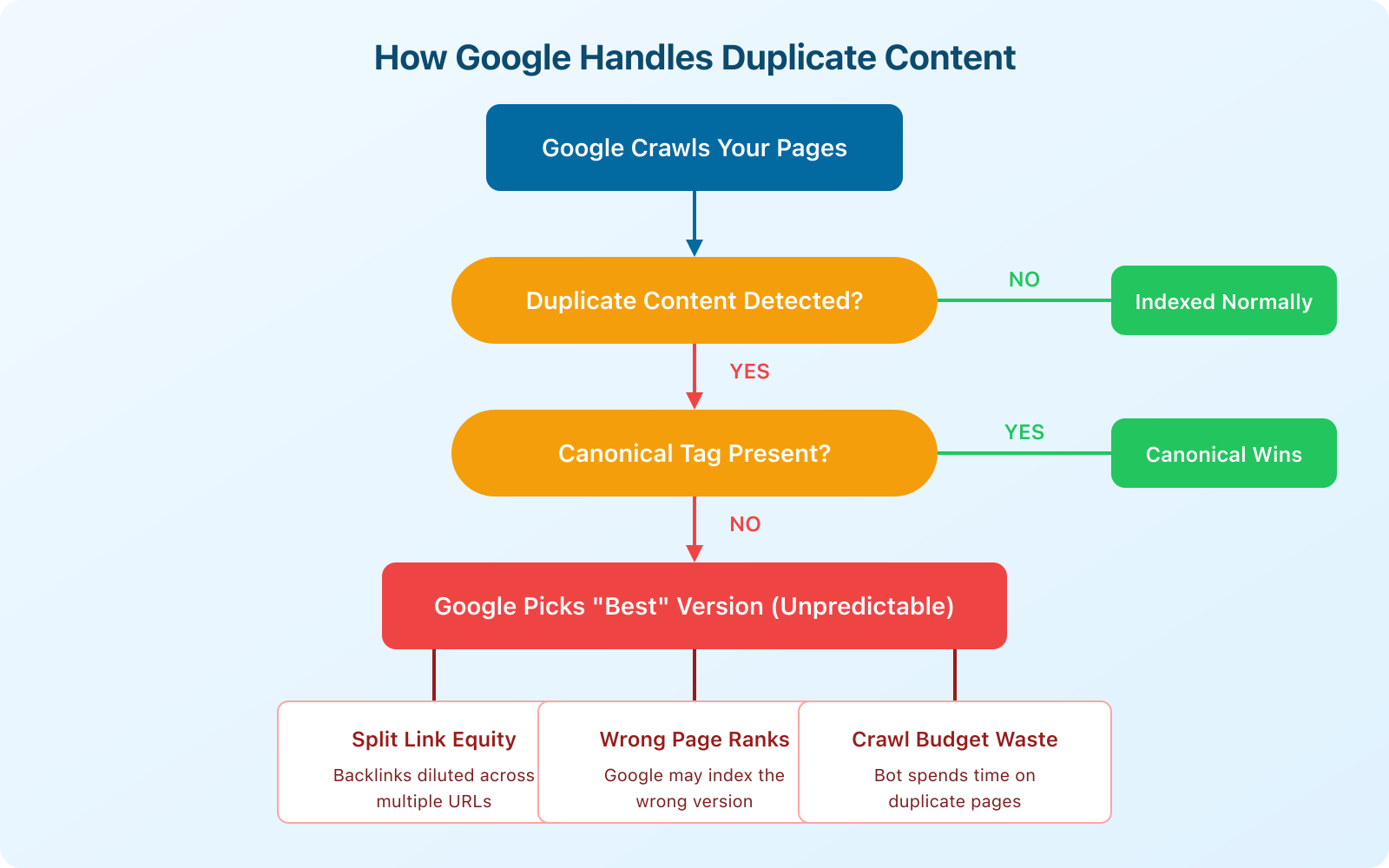
The consequences aren’t dramatic. Google won’t penalize you with a manual action for duplicate content (that’s a common myth). But the indirect effects are real and measurable:
- Link equity gets split. If five URLs have the same content, backlinks get distributed across all five instead of consolidated on one. Your strongest page gets weaker.
- Google picks the wrong version. Without clear signals, Google’s algorithm decides which URL to show in search results. It might choose the HTTP version instead of HTTPS, or a parameterized URL instead of the clean one.
- Crawl budget gets wasted. Googlebot spends time crawling duplicate pages instead of discovering your new content. On large sites with thousands of pages, this matters a lot.
- Keyword cannibalization. Two similar pages targeting the same keyword compete against each other in search results, usually meaning neither ranks as well as one strong page would.
I’ve worked with sites where fixing duplicate content issues alone (without adding any new content) improved organic traffic by 15-25% within 2-3 months. It’s one of the highest-ROI technical SEO fixes you can make.
The Canonical Tag: Your Primary Defense
Before I get into specific duplicate content types, you need to understand canonical tags. They’re the single most important tool for preventing duplicate content issues.
A canonical tag is a piece of HTML code in the <head> section of a page that tells search engines: “This is the preferred version of this content. If you find duplicates, treat this URL as the original.”
It looks like this:
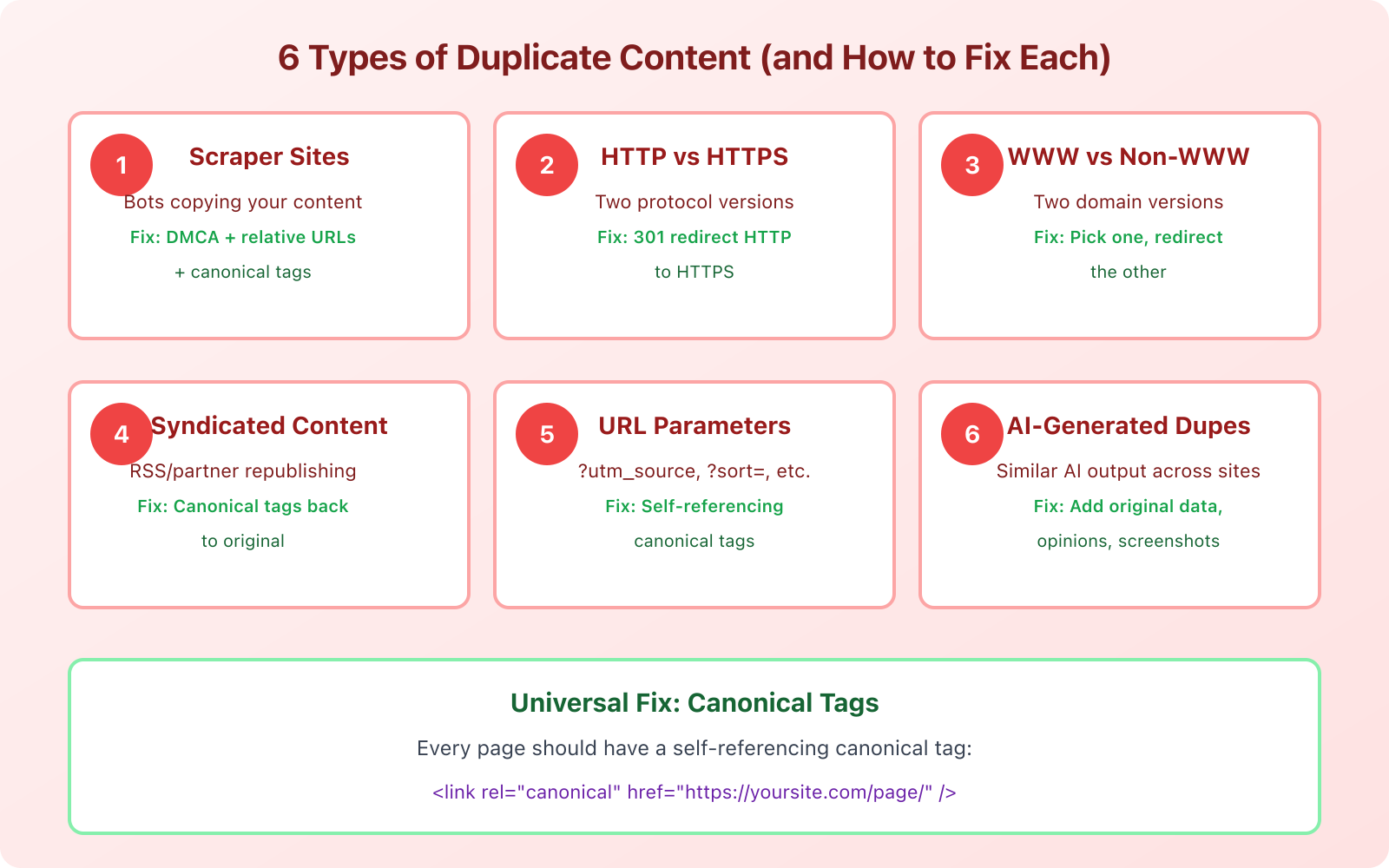
<link rel="canonical" href="https://yoursite.com/your-page/" />Every single page on your site should have a self-referencing canonical tag. This means the canonical URL points to the page itself. Even if no duplicate exists right now, the self-referencing canonical prevents future problems when URL parameters or other technical issues create unintended duplicates.
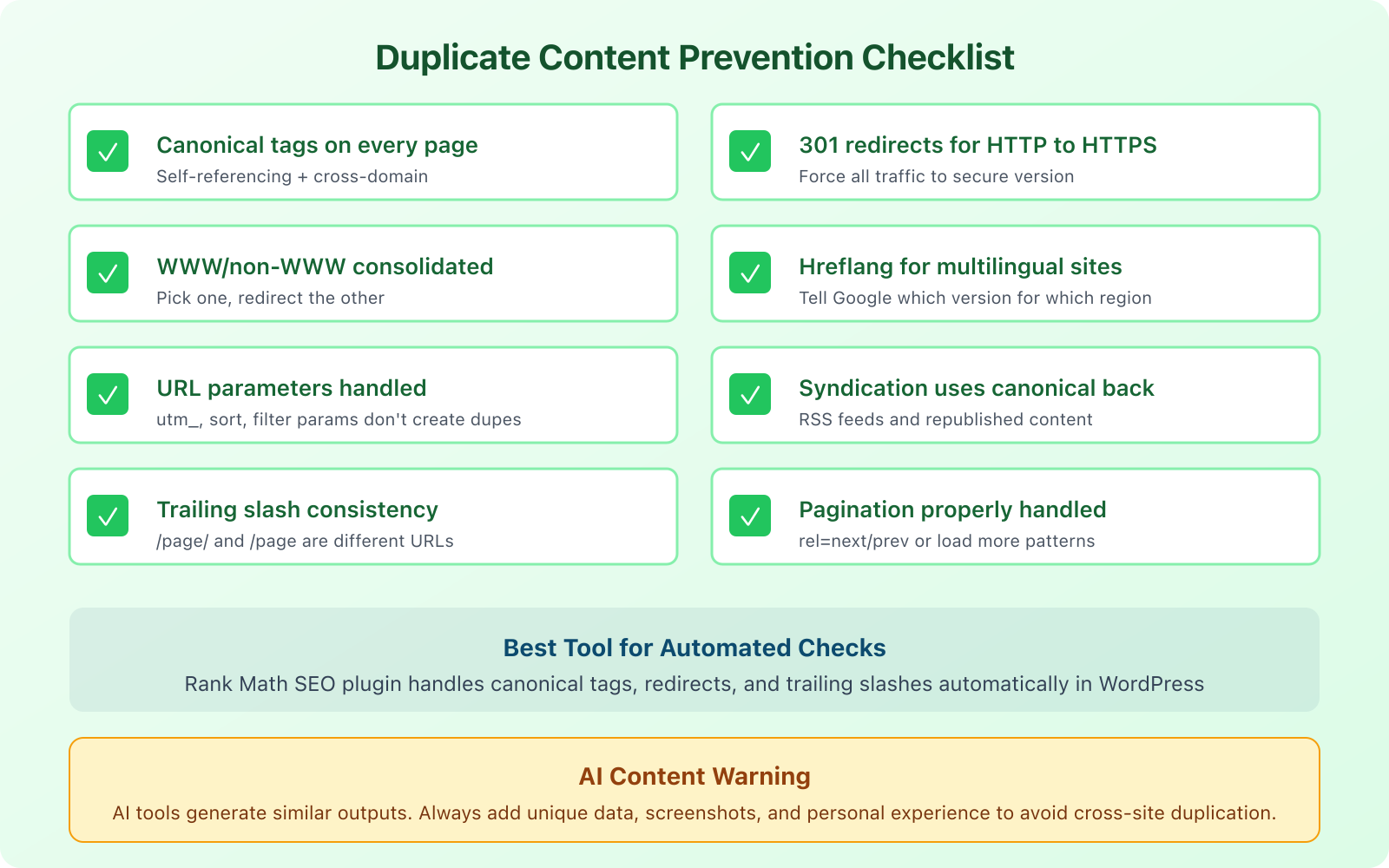
If you’re on WordPress, Rank Math handles canonical tags automatically. It adds self-referencing canonicals to every page and gives you the option to set custom canonicals when needed. This is one of the reasons I recommend it as my go-to WordPress SEO plugin.
A canonical tag is a hint, not a directive. Google usually respects it, but not always. If your canonical tag points to URL A but Google finds URL B more useful, it may override your canonical. Pair canonical tags with 301 redirects for the strongest signal.
Scraper Sites and Content Theft
Scraper sites use automated bots to copy your content and republish it on their own domains. Most are low-quality spam sites, and Google’s algorithms typically identify them and deprioritize them in search results. But “typically” isn’t “always.”
I’ve seen cases where a scraper site with higher domain authority actually outranked the original content. It’s rare, but it happens, especially if the scraper site is older or has more backlinks than yours.
Here’s how to protect yourself:
Use self-referencing canonical tags. When a scraper copies your HTML, they often copy the canonical tag too. This tells Google that your URL is the original source.
Publish and index fast. The faster Google crawls and indexes your content after publishing, the better. Submit new URLs through Google Search Console’s URL inspection tool immediately after publishing.
Set up Google Alerts for your content. Create alerts for unique phrases from your articles. When a scraper copies your text, you’ll get notified.
File DMCA takedown requests. If a scraper site is outranking you with your own content, file a DMCA takedown with Google. You can do this through Google’s legal removal request form. It takes 1-2 weeks, but it works.
Add internal links. When scrapers copy your content, they often copy your internal links too. Those links point back to your site, which actually helps you. Make sure every post includes 3-5 internal links to your other content.
HTTP vs. HTTPS and WWW vs. Non-WWW
This is one of the most common duplicate content issues, and it’s entirely self-inflicted. Your website can potentially be accessed via four different URLs:
http://example.comhttps://example.comhttp://www.example.comhttps://www.example.com
If all four resolve and serve the same content, Google sees four separate websites with identical content. That’s a mess.
The fix is simple: pick one version (I recommend https://example.com without www) and 301 redirect all other variations to it.
In your .htaccess file (Apache) or server config (Nginx), set up rules that force all traffic to your preferred version. If you use Cloudflare, you can do this with their “Always Use HTTPS” setting and a page rule for the www redirect.
Then verify in Google Search Console that your preferred domain is set correctly. Add both the www and non-www versions as properties, and set your preferred domain.
URL Parameters and Duplicate Pages
URL parameters are the sneaky duplicate content creators. Every time you add a tracking parameter, sorting option, or session ID to a URL, you potentially create a duplicate page.
For example, these URLs all show the same content:
yoursite.com/blog-post/yoursite.com/blog-post/?utm_source=twitteryoursite.com/blog-post/?utm_source=newsletter&utm_medium=emailyoursite.com/blog-post/?ref=sidebar
Google is generally smart enough to handle UTM parameters, but custom parameters and e-commerce filtering parameters (like ?color=red&size=large) can create thousands of duplicate pages on larger sites.
The fix: self-referencing canonical tags on every page (which strip parameters automatically if set up correctly) and, for e-commerce sites, use the URL Parameters tool in Google Search Console to tell Google how to handle specific parameters.
Syndicated and Republished Content
If you syndicate your content to Medium, LinkedIn, or industry publications, you’re creating duplicate content by design. That’s not necessarily a problem, as long as you handle it correctly.
The golden rule of content syndication: the republished version must include a canonical tag pointing back to your original article. This tells Google that your version is the original source and should receive the ranking credit.
Medium supports canonical imports natively. When you import a story, Medium automatically adds a canonical tag back to the original URL. LinkedIn articles don’t support canonical tags, so keep your LinkedIn posts as summaries with links back to the full article on your site.
For RSS feed syndication, truncate your feed to show only excerpts. If your full RSS feed is available, scrapers and directories can republish your entire articles. WordPress lets you change this under Settings > Reading, where you can switch from “Full text” to “Excerpt.”
Hreflang Tags for Multilingual Sites
If you run a multilingual website or target multiple countries with similar content, hreflang tags prevent Google from treating your localized versions as duplicates.
An hreflang tag tells Google: “This page in English is the same content as this page in Spanish, and this page in French.” Without hreflang, Google might see three versions of the same page and pick only one to show in search results, potentially showing the English version to Spanish speakers.
The implementation looks like this in your HTML head:
<link rel="alternate" hreflang="en" href="https://example.com/page/" />
<link rel="alternate" hreflang="es" href="https://example.com/es/page/" />
<link rel="alternate" hreflang="fr" href="https://example.com/fr/page/" />
<link rel="alternate" hreflang="x-default" href="https://example.com/page/" />
The x-default tag tells Google which version to show when there’s no specific match for the user’s language or country.
Hreflang implementation is notoriously tricky. If you use WordPress with Rank Math, the plugin handles hreflang tags when paired with a multilingual plugin like WPML or TranslatePress. This saves you from manual implementation errors that can actually make things worse.
AI-Generated Content Duplication
This is the duplicate content problem nobody talked about 3 years ago, but it’s massive now. When you and 50 other website owners use the same AI tool to write about the same topic with similar prompts, the output is going to be strikingly similar. It’s not identical (so plagiarism checkers won’t flag it), but it’s similar enough that Google can recognize the pattern.
I’ve tested this myself. I generated articles on the same topic using the same AI tool with slightly different prompts. The resulting articles shared about 40-60% of the same talking points, examples, and even sentence structures. Now multiply that across thousands of websites all using ChatGPT or similar tools to write about “best CRM software” or “how to start a blog.” You get a sea of sameness.
The fix isn’t to avoid AI tools entirely. It’s to add what AI can’t generate on its own:
- Original data. Run your own surveys, tests, or experiments. Share specific numbers from your experience.
- Personal screenshots. Show your actual dashboard, your real setup, your genuine results.
- Opinions and recommendations. AI hedges. You shouldn’t. Pick a side. Say “I recommend X over Y because…”
- Case studies and stories. Share what happened when you actually implemented the advice you’re giving.
This is what Google means by “helpful content.” Content that adds something unique to the conversation. If your article could’ve been written by anyone with access to an AI tool, it’s not unique enough.
Use plagiarism checkers like Copyscape or Originality.ai to check your content before publishing. Originality.ai also detects AI-generated content, which is useful if you’re working with freelance writers and want to verify their work is original.
Lost Subdomains and Old Site Versions
Here’s a scenario I’ve encountered more than once: you had a blog on blog.example.com, moved everything to example.com/blog/, but forgot to properly redirect or deindex the subdomain. Now Google has two indexed versions of every article.
The same thing happens with staging sites. If your staging environment (staging.example.com or dev.example.com) is accessible to search engines, Google will crawl and index it. Suddenly you have a complete duplicate of your entire site.
To fix this:
- Set up 301 redirects from every old URL to its new equivalent
- Add a noindex meta tag or robots.txt disallow rule to staging environments
- Use Google Search Console’s Removals tool to deindex any leftover pages
- Password-protect staging sites so search engines can’t access them at all
Check for this by searching site:blog.yoursite.com or site:staging.yoursite.com in Google. If results appear, you’ve got a problem that needs fixing immediately.
Pagination and Archive Page Duplication
WordPress generates archive pages, category pages, tag pages, and paginated lists automatically. Each of these can create duplicate content issues if not handled properly.
Your blog listing page might show the first paragraph of each post. Your category page does the same. Your tag page does the same. Now you have the same excerpt appearing on 3+ URLs.
The fixes:
- Noindex tag and category archives if they don’t serve a real purpose for users. Rank Math lets you bulk-noindex these with one setting.
- Use canonical tags on paginated pages to point to the first page of the series.
- Display excerpts only on archive pages, not full content.
- Add unique intro text to category pages so they have original content beyond just post listings.
How to Check for Duplicate Content on Your Site
You can’t fix what you don’t know about. Here’s how to find duplicate content issues on your site right now.
Google Search Console: Check the Coverage report (now called Pages in the updated interface). Look for pages marked as “Duplicate without user-selected canonical” or “Duplicate, Google chose different canonical than user.” These are pages where Google found duplicates and made its own decision about which version to index.
Screaming Frog: Crawl your site and check the “Duplicate” tab. It identifies pages with duplicate titles, duplicate meta descriptions, and near-duplicate content. The free version handles 500 URLs.
Site search operator: Search site:yoursite.com "exact phrase from your article" in Google. If multiple pages from your site appear for the same phrase, you might have internal duplication.
Copyscape: Enter your URL at copyscape.com to find external sites that have copied your content. The free version checks one URL at a time. The premium version ($0.03/search) can batch-check your entire site.
Regularly Remove and Redirect Outdated Content
Content decay is real. Articles about “best tools in 2020” are not just outdated, they can create a form of internal duplication when you publish a new “best tools in 2026” article covering the same topic.
Instead of letting old versions sit alongside new ones, set up a content maintenance routine:
- Update existing articles rather than publishing new ones on the same topic. Keep the same URL and update the content in place.
- If you must publish a new version, 301 redirect the old URL to the new one.
- Run a content audit every 6 months to identify overlap and cannibalization.
- Consolidate thin posts. If you have 5 short articles about related subtopics, merge them into one comprehensive guide.
The goal is one URL per topic. One definitive version of each piece of content. Everything else either gets updated, merged, or redirected.
Frequently Asked Questions
Disclaimer: This site is reader-supported. If you buy through some links, I may earn a small commission at no extra cost to you. I only recommend tools I trust and would use myself. Your support helps keep gauravtiwari.org free and focused on real-world advice. Thanks. - Gaurav Tiwari