
How to Fix Orphan Pages in WordPress (And Why They Hurt Your SEO)
An orphan page is a page on your website with zero internal links pointing to it. Google can still find it through your sitemap, but your own site architecture treats it like it doesn’t exist. This disconnect creates measurable SEO problems that compound over time.
I’ve audited hundreds of WordPress sites over the past decade. The pattern is consistent: sites with high orphan page percentages underperform in search rankings relative to their content quality. The correlation is strong enough that orphan page analysis is now one of the first things I check when diagnosing ranking problems.
This guide covers exactly why orphan pages damage SEO performance, how to systematically identify them on WordPress sites, and the specific fixes that restore their ranking potential. I’ll walk through the best tools available right now, including Rank Math’s new AI Link Genius, the AI-native approach with WP-MCP, and several other proven methods. For a deep look at linking best practices, see our internal linking strategy guide.
Defining the Orphan Page Problem
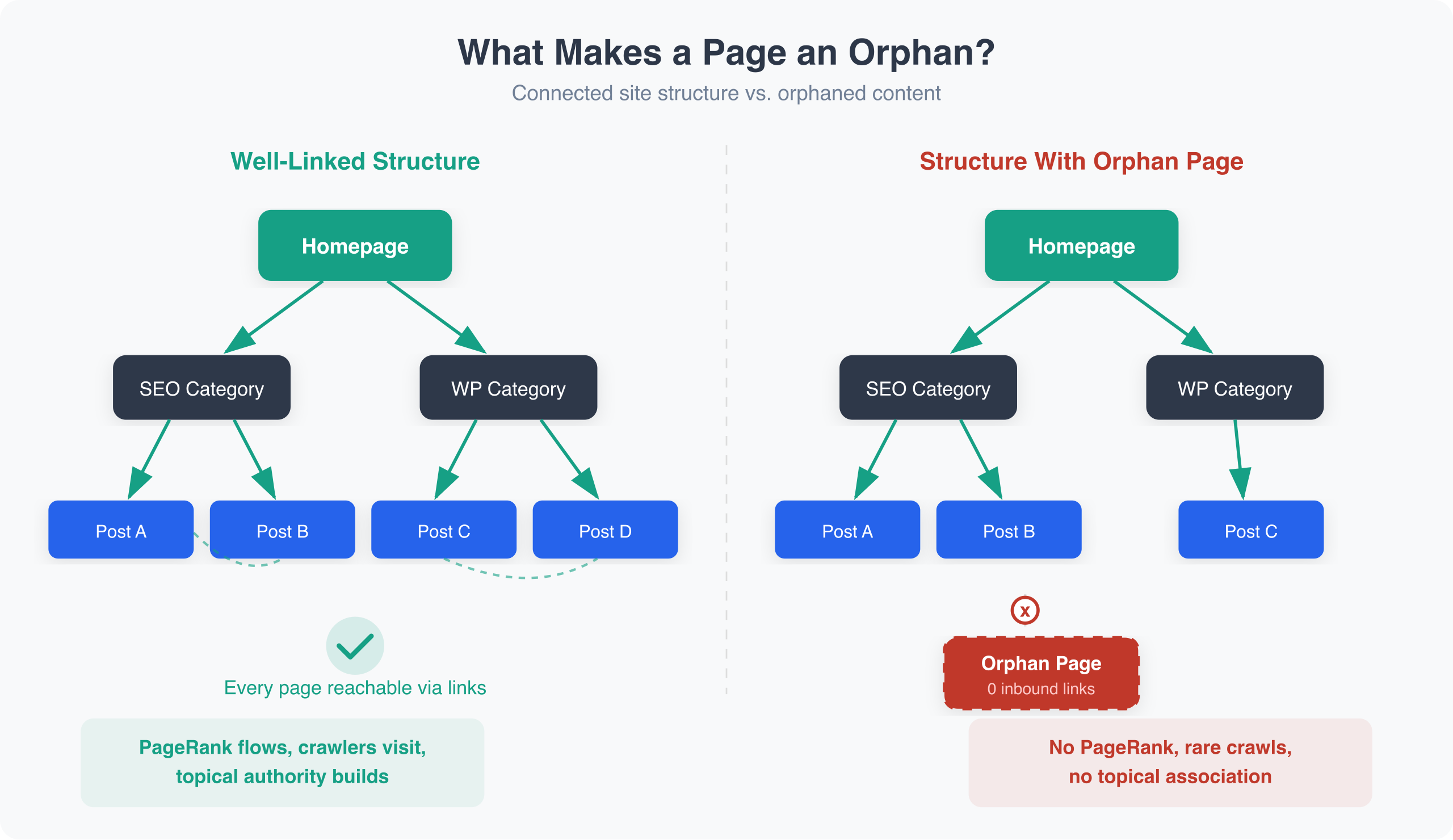
An orphan page meets these criteria:
- The page is indexed (or intended to be indexed) by search engines
- The page has zero internal links from other pages on the site
- The page is accessible via direct URL or sitemap, but not through site navigation
Pages in this state exist in a structural vacuum. They’re part of your domain but disconnected from your site’s information architecture.
What Orphan Pages Are Not
Clarifying what doesn’t qualify prevents misdiagnosis:
Pages with only footer or sidebar links aren’t orphan pages. While contextual body links carry more weight, navigation links still count as internal links for crawling and PageRank purposes.
Pages with reciprocal but no incoming links aren’t orphans. If Page A links to Page B, and Page B links back to A but nothing else links to B, Page B still has one internal link. It’s weakly linked but not orphaned.
Intentionally unlinked pages might be orphans by design. Thank-you pages, PPC landing pages, or staging content you haven’t published yet shouldn’t receive internal links from your main site. These are exceptions, not problems.
Noindexed pages are outside this analysis. If a page has noindex, you’ve already told Google not to rank it. Internal linking to noindexed pages is a separate consideration.
The SEO Impact: A Technical Analysis
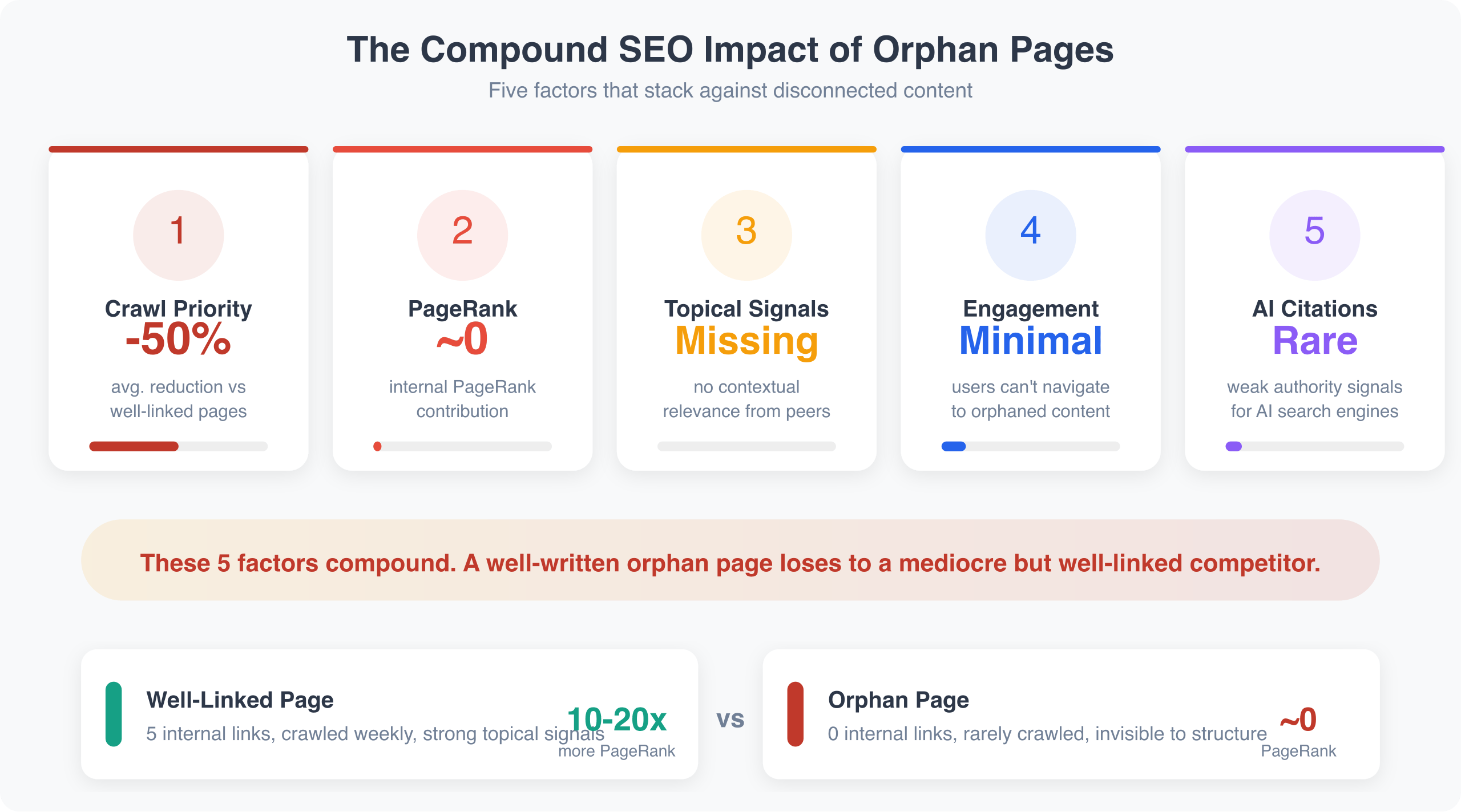
Orphan pages suffer from multiple compounding disadvantages. Understanding the mechanisms helps prioritize fixes.
Problem 1: Reduced Crawl Priority
Googlebot discovers pages primarily by following links. When crawling your homepage, it follows links to category pages, which link to posts, which link to related content. This creates a natural crawl path through your site.
Orphan pages exist outside this path. Google finds them only via your XML sitemap, external backlinks (if any exist), or direct URL discovery through other means.
Sitemap-only discovery is less reliable than link-based discovery. Google doesn’t treat sitemap URLs as directives but as hints. Pages discovered through crawling receive more consistent attention.
For large sites with crawl budget constraints, orphan pages are particularly problematic. Google allocates crawl resources based on signals of importance. Pages with no internal links signal low importance, reducing crawl priority even when found.
Problem 2: Zero PageRank Transfer
PageRank flows through links. Every page on your site accumulates PageRank from external backlinks, internal links from other pages, and original PageRank assigned to the page.
Internal links redistribute PageRank throughout your site. When your high-authority homepage links to a category page, some PageRank transfers. When that category links to posts, more transfers. This cascade distributes authority to content that needs it for ranking.
Orphan pages receive zero internal PageRank. They start with only whatever minimal authority the page inherently has and any external backlinks (typically none for orphan pages). They’re competing for rankings with only a fraction of the resources other pages receive.
Consider a page receiving links from 5 internal pages with moderate authority versus a page receiving 0 internal links. The linked page might have 10-20x more effective PageRank for ranking purposes. For competitive keywords, this difference is decisive.
Problem 3: Missing Topical Association
Internal links establish topical relationships. When your “Email Marketing Guide” links to “Subject Line Best Practices,” you’re telling Google these topics are related. This builds topical authority for your domain.
Orphan pages lack these associations. Google must infer topic relevance from page content alone, without reinforcing signals from related pages. This weakens the page’s topical authority compared to competitors who have better-linked content ecosystems.
For WordPress sites built around topic clusters (pillar pages linking to supporting content), orphan pages represent breaks in the cluster model. The orphan page doesn’t contribute to the cluster’s collective authority, and relevant connections don’t exist.
Problem 4: User Experience Gaps
The SEO impact compounds with user experience problems. Visitors can’t navigate to orphan pages through your site. There’s no opportunity for users reading related content to discover the orphan page, leading to lower engagement metrics on the orphan page and reduced overall session depth and pages per visit.
Google increasingly uses engagement signals as ranking factors. Pages that users can’t find through normal navigation rarely perform well on these metrics.
Estimating the Compound Effect
These factors don’t operate independently. An orphan page faces:
| Factor | Impact |
|---|---|
| Crawl frequency | 30-70% reduction vs. well-linked pages |
| PageRank | Near-zero internal contribution |
| Topical signals | Missing contextual relevance |
| User engagement | Minimal due to discoverability |
| Ranking potential | Severely constrained |
A well-written orphan page competing against a mediocre but well-linked competitor page will often lose. The structural disadvantage overwhelms content quality.
Orphan pages don’t just hurt traditional SEO. AI search engines like Google’s AI Overviews, ChatGPT search, and Perplexity also rely on link structure to understand content relationships and authority. Pages disconnected from your site’s architecture are less likely to be cited in AI-generated answers. Fixing orphan pages improves your visibility across both traditional and AI-powered search results.
How Orphan Pages Happen in WordPress
Understanding causes helps prevent future orphans.
Content Created Without Linking Strategy
The most common cause. Writers publish posts without considering internal links. There are no links to the new post from existing content, no links from the new post to establish it in the site structure, and the post only appears in chronological feeds, which older posts quickly fall out of.
WordPress’s default publishing workflow doesn’t prompt for internal linking. Without deliberate effort, orphans accumulate.
Removed or Restructured Navigation
Site redesigns often orphan content. Category restructuring leaves posts in old categories with no links. Menu changes remove previously linked pages. Sidebar or footer updates remove archive links. Tag pages get decommissioned without redirects.
Any navigation change should trigger an orphan page audit.
Category and Tag Misuse
WordPress category and tag archives can mask orphan problems. A post in a category technically appears on the category archive page. But if that category page has no internal links, both are orphans. Tag pages often become orphans themselves when tags aren’t linked anywhere.
Archive pages don’t substitute for deliberate internal linking. They’re organizational, not strategic.
Content Migration Problems
Migrating from other platforms often creates orphans. Content imported without preserving link structures, internal links break if URL structures change, and redirects fix user access but don’t recreate internal links.
Post-migration, sites frequently have 20-40% orphan content until deliberately addressed.
Scale Without Process
Growing sites accumulate orphans faster. Multiple authors without linking guidelines, high publishing volume without link auditing, and legacy content forgotten as new content dominates attention.
A site publishing 10 posts monthly without linking processes creates 120 potential orphans annually.
Finding Orphan Pages: The Best Tools for 2026
Identification requires comparing two datasets: all pages on your site versus all internally linked pages. The difference reveals orphans.
I’ve tested every major method. Here’s what actually works, ranked by effectiveness for 2026.
Method 1: Rank Math AI Link Genius (Best All-in-One Solution)
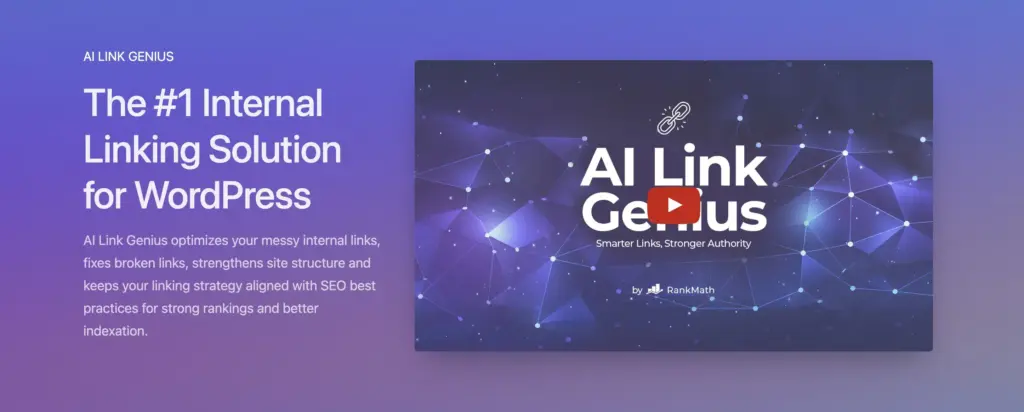
Rank Math has been my go-to SEO plugin for years. Their Link Counter feature was already useful for spotting orphans at a glance. Now, with AI Link Genius, they’ve built a complete internal linking solution directly into the SEO plugin you’re already running.
What AI Link Genius brings to the table:
AI Link Genius is Rank Math‘s advanced AI-powered linking engine. It goes far beyond the basic link suggestions Rank Math offered before. The system analyzes your entire site’s content, identifies orphan pages, suggests contextually relevant internal links with appropriate anchor text, and can automate link insertion across your site. It also detects and helps fix broken internal links.
This is a significant upgrade from what Rank Math previously offered (basic link suggestions by title or keyword matching). AI Link Genius uses artificial intelligence to understand content semantically, making its suggestions substantially more relevant.
Why I recommend Rank Math as the primary tool:
- Everything in one plugin. SEO optimization, link monitoring, orphan detection, and AI-powered link building all live inside Rank Math. No need for a separate linking plugin.
- Link Counter columns. On your Posts or Pages list in WordPress, Rank Math adds columns showing internal links out, external links, and incoming links. A page with 0 in the “Incoming” column is an orphan. Sort by this column to find all orphans instantly.
- Pillar Content feature. Mark your most important pages as “Pillar Content” in Rank Math’s SEO meta box. When you write new content, Rank Math prioritizes suggesting links to your pillar pages. This prevents orphans by design.
- AI-powered anchor text. AI Link Genius suggests semantically relevant anchor text, not just keyword matches. The suggestions understand what your content is actually about.
- Site-wide analysis. Unlike per-post tools, AI Link Genius analyzes your entire site structure and identifies linking patterns, gaps, and orphans comprehensively.
- Broken link detection. Finds and flags broken internal links that could be creating orphan-adjacent problems.
How to access AI Link Genius:
AI Link Genius is available in Rank Math PRO. If you’re already a PRO user, make sure you’re running the latest version. You can also sign up for early access at Rank Math’s AI Link Genius page if you want to be first in line for new features as they roll out.
Rank Math Pricing:
- Free version includes Link Counter and basic Link Suggestions
- Pro: $6.99/month (billed annually) for AI Link Genius and advanced features
- Business: $20.99/month for agencies managing multiple sites
My take: If you’re using Rank Math (and you should be), AI Link Genius makes a dedicated internal linking plugin optional for most sites. The combination of monitoring, detection, and AI-powered fixing in one SEO plugin is hard to beat. Check our best WordPress SEO plugins guide for more context.
Method 2: WP-MCP + AI Tools (The AI-Native Approach)
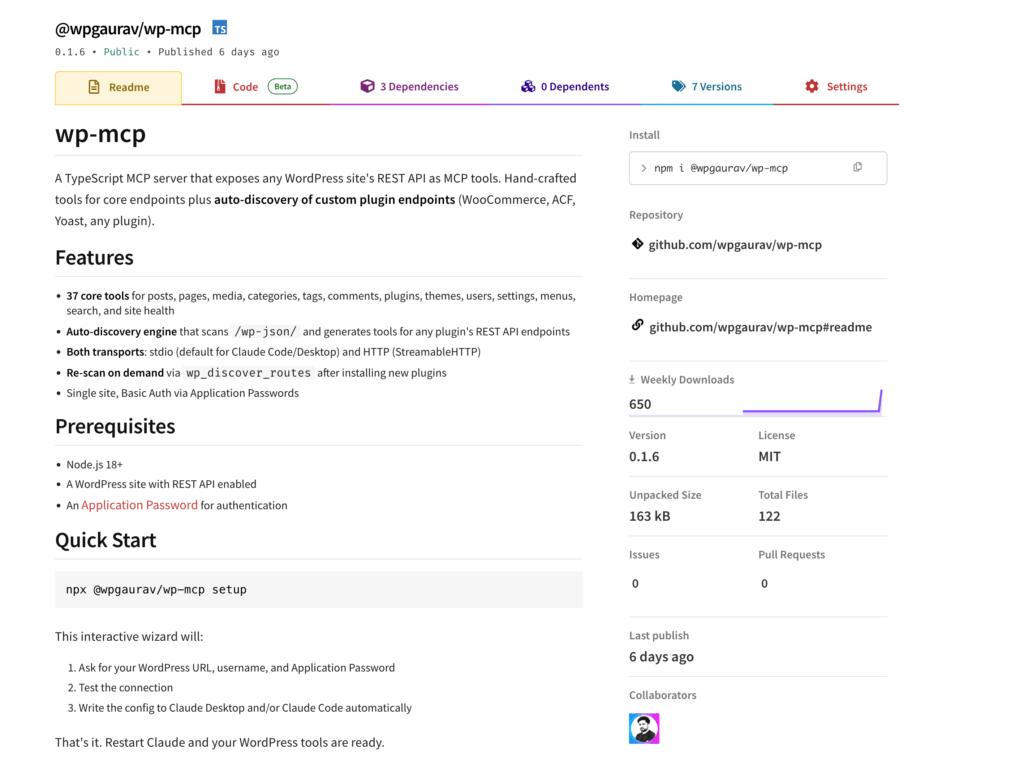
This is the method I use for large-scale internal linking operations. WP-MCP is an open-source MCP (Model Context Protocol) server that connects your WordPress site directly to AI tools like Claude, making your entire site’s content accessible to AI agents.
How it works:
@wpgaurav/wp-mcp
WordPress MCP Server — expose any WordPress site's REST API as MCP tools with auto-discovery of custom plugin endpoints
WP-MCP exposes your WordPress REST API as MCP tools. This means AI assistants can read your posts, analyze content semantically, identify linking opportunities, and push updates, all through natural language instructions. No plugin installation on WordPress. No PHP. Just your existing REST API, made AI-accessible.
The AI-powered orphan fix workflow:
- Fetch all posts. The AI agent uses WP-MCP to pull your entire post catalog with internal link data.
- Identify orphans. The AI compares the complete post list against posts that have zero inbound internal links. It builds an orphan inventory automatically.
- Semantic matching. For each orphan, the AI reads the content and finds contextually relevant posts that should link to it. This isn’t keyword matching. The AI understands the actual topic relationships between your articles.
- Generate natural anchor text. The AI crafts anchor text that fits the surrounding paragraph naturally. It can even rewrite sentences slightly to accommodate links without breaking readability.
- Push updates. Using WP-MCP’s post update tools, the AI inserts the links and pushes the changes back to WordPress.
Why this approach is powerful:
- Scale. I’ve processed 600+ posts in a single session. Try doing that manually or even with a WordPress plugin that requires clicking through each post.
- Context awareness. The AI reads the full content of both the orphan page and the potential linking page. It understands nuance. A post about “email marketing for SaaS” gets linked from relevant SaaS content, not a generic marketing post.
- No WordPress plugin bloat. WP-MCP runs outside WordPress. Nothing installed on your server. Nothing slowing down your site.
- Customizable logic. You control the rules. Want to limit links per post? Exclude certain categories? Only link to posts published after a specific date? Tell the AI, and it follows your rules.
Setup:
- Install WP-MCP:
npx @wpgaurav/wp-mcp setup - Configure your WordPress URL and Application Password
- Open Claude Code or Claude Desktop
- Ask the AI: “Fetch all my posts, find orphan pages with zero inbound internal links, and suggest contextual links from related content”
Cost: WP-MCP is free and open-source. You pay only for the AI tool usage (Claude, for example). For a 500-post site, an orphan audit and fix session costs a few dollars in API usage.
My take: This is the future of WordPress content management. AI agents that can read, analyze, and update your content at scale are fundamentally more powerful than any single plugin. If you’re comfortable with the command line, WP-MCP + Claude is the most capable orphan-fixing setup available. Read more about the shift toward AI-powered SEO.
Method 3: Link Whisper (Best Dedicated Linking Plugin)
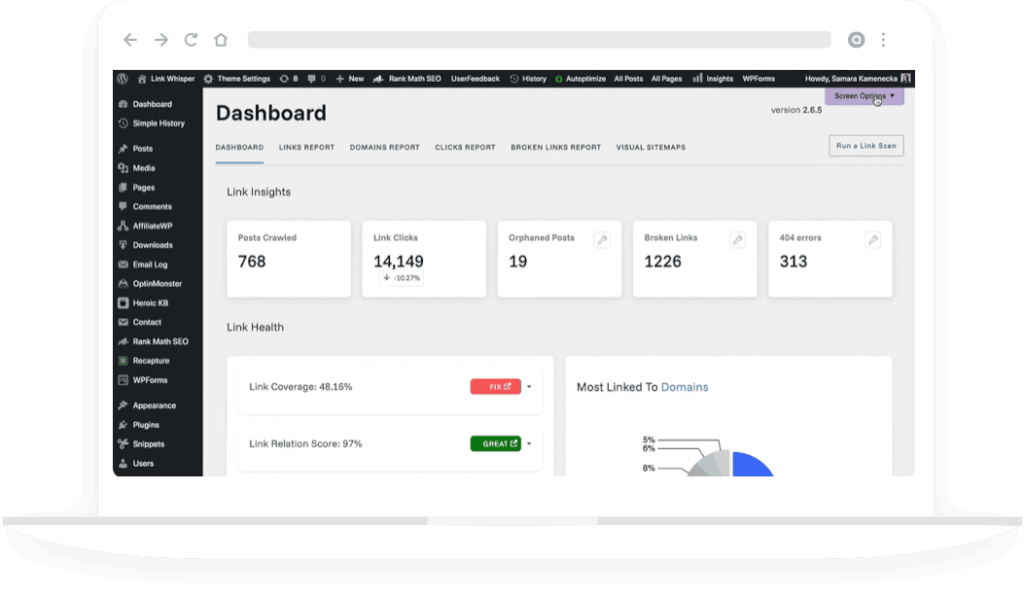
Link Whisper remains a solid choice if you want a WordPress plugin specifically built for internal linking. It’s been around for years and does the job well.
The Orphan Content Report:
- Go to Link Whisper > Report in your WordPress dashboard
- View the Orphan Content section
- Posts with 0 inbound internal links are listed with one-click fix options
You see the orphan, click “Add Inbound Links,” and Link Whisper shows you every post on your site that could contextually link to it. Check the boxes, hit save. It’s straightforward and visual.
AI-Powered Suggestions:
Link Whisper uses LLM technology for smarter suggestions. It also integrates with OpenAI for enhanced matching. The AI analyzes your content contextually, not just by keyword matching. You can edit anchor text inline without leaving the suggestion panel.
Auto-Linking Feature:
For sites with 100+ orphan pages, Link Whisper’s auto-linking creates rules based on keyword-to-URL matches. It scans your entire site and offers to automatically insert links. I recommend using the “Human Review” option here. Let the AI identify opportunities, but approve each one manually.
Link Whisper Pricing:
- $77/year for 1 site
- $117/year for 3 sites
- $167/year for unlimited sites
- 30-day money-back guarantee
My take: Link Whisper is the best dedicated WordPress linking plugin. If you prefer an in-dashboard GUI over AI tools and command lines, Link Whisper is your pick. For most sites, though, Rank Math’s AI Link Genius now covers the same ground without needing a separate plugin.
Method 4: Screaming Frog (Most Comprehensive for Audits)
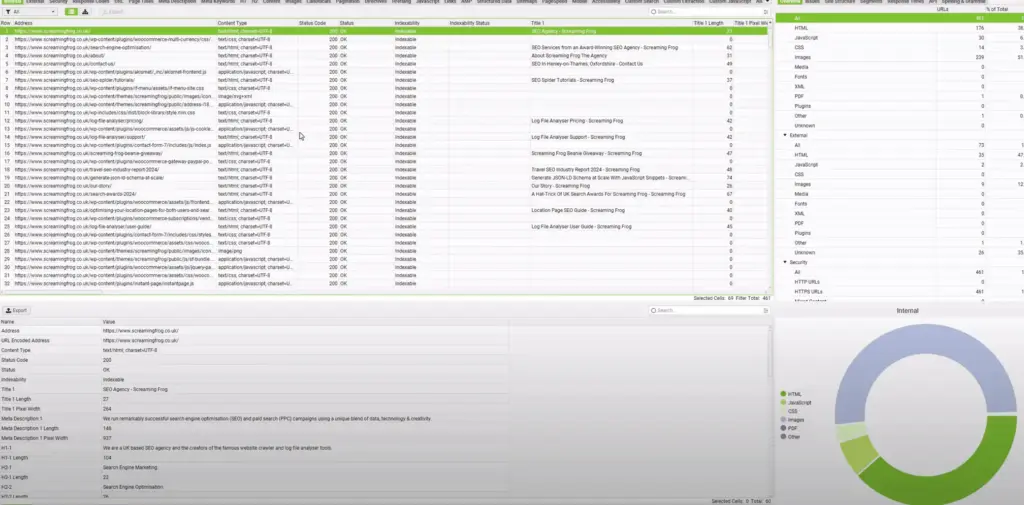
Screaming Frog crawls your site like a search engine and reports on internal link structure. It’s overkill for ongoing monitoring but perfect for periodic deep audits.
Setup:
- Enter your URL and crawl the entire site
- Go to Internal > Inlinks
- Sort by “Inlinks” column ascending
- Pages with 0 inlinks are orphans
For thorough analysis:
- Connect your XML sitemap (Configuration > Sitemap)
- Screaming Frog shows pages in sitemap but not discovered during crawl
- These sitemap-only pages are likely orphans
Limitation: Free version crawls only 500 URLs. Premium ($259/year) crawls unlimited. For sites over 500 pages, you need premium or alternative methods.
I run Screaming Frog audits quarterly on client sites. For day-to-day work, Rank Math and WP-MCP handle everything.
Method 5: AIOSEO Link Assistant
AIOSEO – The #1 SEO Plugin for WordPress
THE #1 SEO PLUGIN FOR WORDPRESS Stop Guessing. Start Ranking. While competitors struggle to understand what Google wants, you’ll have a step-by-step blueprint to higher rankings, more traffic, and increased revenue. No SEO experience or coding needed. Start Ranking Higher Today Trusted by 3,000…
AIOSEO offers a Link Assistant feature in their premium version that provides detailed internal link reports, orphan page identification, and smart link suggestions.
If you’re already using AIOSEO instead of Rank Math, their Link Assistant is solid. It shows link counts per post, identifies orphaned pages, and suggests internal links with anchor text recommendations.
Pricing: Part of AIOSEO Pro ($49.60/year basic, $99.60/year plus)
Method 6: Semrush or Ahrefs Site Audit
Both SEO platforms include orphan page detection in their site audit tools.
In Semrush:
- Create a project and run Site Audit
- Under Issues, look for “Orphan pages” or “Pages with no internal links”
- Export the list for processing
In Ahrefs:
- Run Site Audit
- Check the Links report
- Filter for pages with 0 inlinks
These are good if you already have subscriptions, but expensive just for orphan detection. For the same cost, Rank Math PRO with AI Link Genius gives you detection plus automated fixing. For a deeper look at Semrush’s capabilities, see our Semrush review.
Creating an Orphan Page Inventory
Whichever method you use, create a working document:
| Page URL | Title | Topic/Cluster | Priority | Fix Action | Status |
|---|---|---|---|---|---|
| /old-email-tips | Email Marketing in 2019 | Low | Redirect to updated guide | Done | |
| /pricing-strategy | Pricing Your Services | Business | High | Add links from related posts | Pending |
This inventory becomes your fix tracking system. With WP-MCP, you can have the AI generate this inventory automatically by scanning all your posts and categorizing orphans by topic cluster and priority.
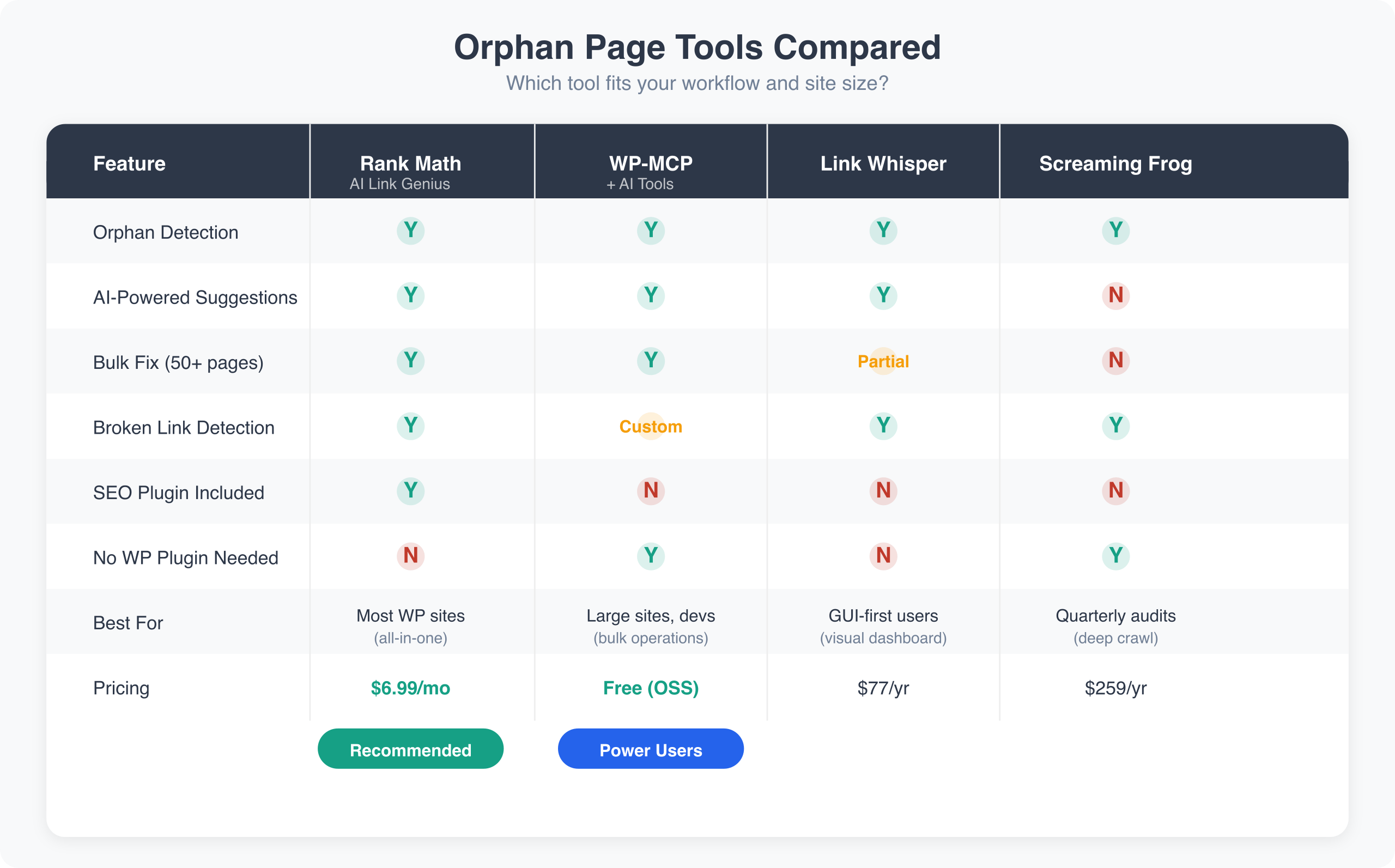
Rank Math AI Link Genius is best for sites already using Rank Math (most WordPress sites should be). WP-MCP + AI tools is best for large sites needing bulk operations or developers comfortable with the command line. Link Whisper is best for users who prefer an in-dashboard GUI. For most WordPress sites in 2026, Rank Math PRO with AI Link Genius is the strongest starting point because it combines SEO + linking in one tool.
My Recommended Setup: Rank Math + WP-MCP
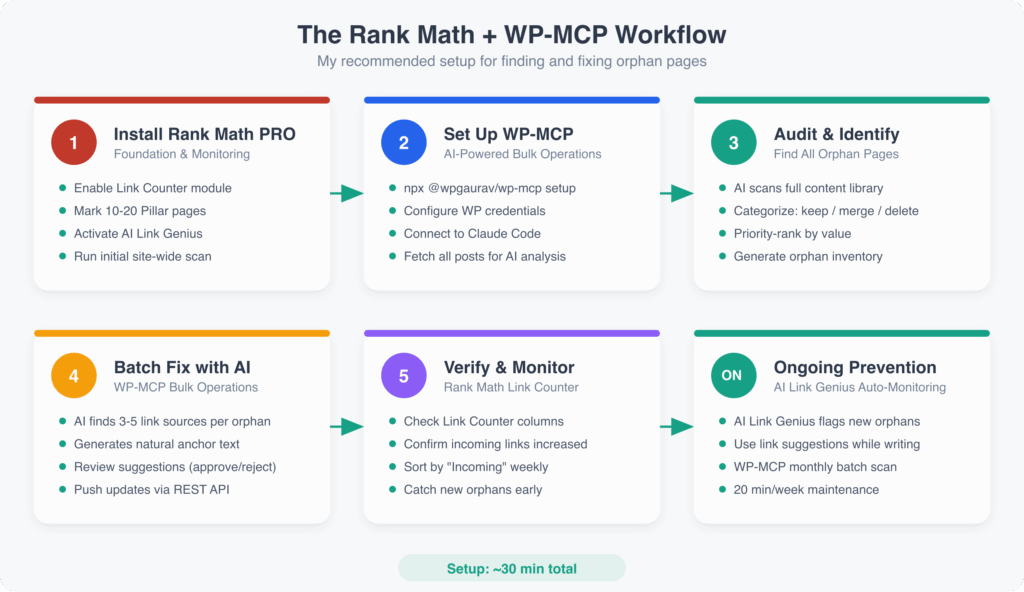
Here’s the workflow I use on every site I manage:
Step 1: Rank Math for Foundation and Monitoring
Install Rank Math PRO. Enable the Link Counter and Link Genius modules (Rank Math > Dashboard > Modules). This adds link count columns to your Posts list immediately.
Set up Pillar Content. Mark your 10-20 most important pages as Pillar Content in the Rank Math meta box. Enable Link Suggestions so you get prompts for these pages when writing new content.
Enable AI Link Genius for site-wide analysis. Let it scan your content library and surface orphan pages, weak internal links, and broken link issues.
Step 2: WP-MCP for Bulk Operations
Set up WP-MCP once: npx @wpgaurav/wp-mcp setup. Point it at your WordPress site with Application Password authentication.
When Rank Math identifies orphan pages, use WP-MCP with an AI assistant to fix them in bulk. The AI reads each orphan’s content, finds the best linking candidates from your existing posts, generates natural anchor text, and pushes the updates. What takes hours manually takes minutes with AI.
Step 3: Daily Workflow
When writing new content, Rank Math suggests internal links in the editor sidebar. AI Link Genius surfaces the most relevant opportunities based on your content’s actual meaning, not just keyword overlaps.
After publishing, use WP-MCP to find existing posts that should link to your new content. Ask the AI: “Find 5 posts that should link to [new post URL] and add contextual internal links.” The AI handles the rest.
Step 4: Weekly Maintenance
Check Rank Math’s Link Counter columns. Sort posts by “Incoming” to find pages with low link counts. Pages under 3 incoming links need attention. Use AI Link Genius suggestions or WP-MCP batch operations to add links.
Step 5: Monthly Audit
Run a full orphan audit. Use Rank Math’s internal reports or have WP-MCP scan the entire site. Fix any new orphans. Check for broken internal links that could be creating new orphan problems.
This takes maybe 20 minutes per week for a 200-post site. The AI handles the heavy lifting. Manual linking the same site would take 5-10x longer.
Fixing Orphan Pages: A Decision Framework
Not every orphan page needs the same fix. Assess each against these criteria.
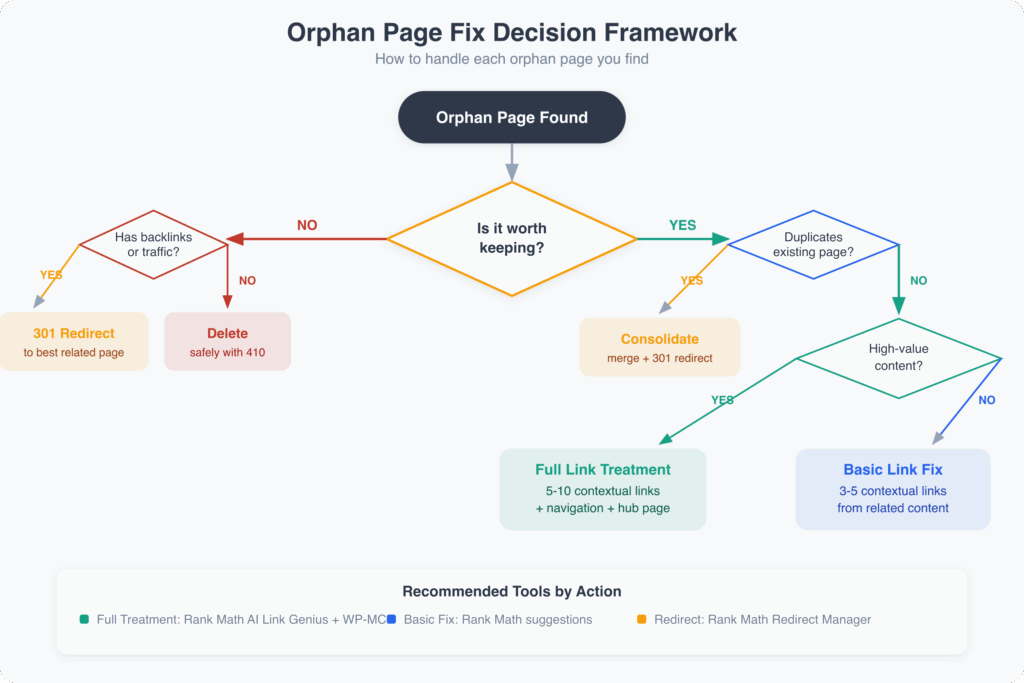
Decision 1: Is This Page Worth Keeping?
Before fixing orphan linkage, evaluate if the page should exist:
Keep if:
- Content is current and accurate
- Content is unique (not duplicated elsewhere on site)
- Topic is relevant to your site’s focus
- Content has potential search demand
- Content converts or engages users
Consider removing if:
- Content is severely outdated
- Topic is no longer relevant to your business
- Content is thin (under 300 words with no unique value)
- Content duplicates another, better page
- Content targets keywords with zero search volume
For pages not worth keeping, redirect to the most relevant existing page rather than investing in fixing orphan status.
Decision 2: What Link Structure Makes Sense?
For pages worth keeping, determine appropriate linking:
Identify the parent topic:
- What broader topic does this page support?
- What pillar content should link here?
- What cluster does this belong to?
Find related content:
- What other pages cover adjacent topics?
- What pages a reader of this content might also want?
- What pages would naturally reference this topic?
Decision 3: How Many Links Does It Need?
There’s no universal number, but consider:
Minimum viable linking: At least one contextual link from a related, regularly crawled page. This ensures discoverability and some PageRank transfer.
Optimal linking: 3-10 internal links from relevant pages, depending on site size and topic importance. Important pages warrant more links.
Over-linking concerns: If you’re adding 20+ internal links to a single page, something is wrong with your content structure. Either the page is too broad or you’re linking excessively.
Practical Fix Strategies
Fix 1: Use Rank Math AI Link Genius Suggestions
The fastest in-dashboard method for most orphan fixes.
Process:
- Open Rank Math’s AI Link Genius dashboard
- Review the orphan pages and low-link pages it identifies
- Accept the AI-suggested internal links that make contextual sense
- Review anchor text and adjust if needed
- Apply changes
Since AI Link Genius understands content semantically, its suggestions are generally more relevant than keyword-only matching tools. Still review each suggestion. Automated doesn’t mean blind.
Fix 2: Batch Fix with WP-MCP and AI
For large-scale orphan fixing (50+ pages), the AI-native approach is faster.
Process:
- Connect WP-MCP to your site
- Ask the AI to fetch all posts and identify orphans (0 inbound internal links)
- For each orphan, have the AI find 3-5 contextually relevant posts to link from
- Review the AI’s suggestions (it will show you the proposed anchor text and surrounding context)
- Approve, and let WP-MCP push the updated posts to WordPress
I fixed 679 posts with orphan or near-orphan status on one of my sites in a single afternoon using this method. A plugin-based approach would have taken a week of clicking.
Fix 3: Add Contextual Links from Related Content
When you want full manual control:
Process:
- Search your site for the orphan page’s topic
- Review each result for linking opportunities
- Add contextual links where they help the reader
- Ensure anchor text is descriptive and natural
Example: Orphan page: “How to Write Email Subject Lines” Related content to link from: “Email Marketing Guide,” “Newsletter Best Practices,” “Open Rate Optimization”
Each related post should include at least one contextual mention of email subject lines, linking to the orphan page.
Fix 4: Add to Navigation or Sidebars
If the orphan page is important enough for regular access:
- Menu links for cornerstone content
- Sidebar widgets for popular or recent posts
- Footer links for important evergreen pages
Navigation links are less contextually strong than body links but still count for crawling and PageRank. They’re appropriate for pages that warrant site-wide visibility.
Fix 5: Create Hub Pages
If you have multiple orphaned pages on related topics, create a hub page linking to all of them:
Example: Create “WordPress Security Guide” as a hub page linking to orphaned posts:
- “Hardening WordPress”
- “Two-Factor Authentication Setup”
- “Security Plugin Comparison”
- “Backup Strategies”
The hub page solves orphan status for all linked posts while creating a valuable new resource.
Fix 6: Consolidate and Redirect
For orphan pages that overlap with better content:
- Identify the stronger page on the topic
- Merge any unique information from the orphan into the strong page
- 301 redirect the orphan URL to the consolidated page
- Update any external links pointing to the orphan if possible
WordPress redirect options:
- Rank Math includes a redirect manager
- AIOSEO offers redirect features
- Redirection plugin (free, dedicated to redirects)
Fix 7: Delete Carefully
If an orphan page has no value and no external backlinks:
- Check Search Console for any impressions or clicks
- Check Ahrefs or Semrush for backlinks
- If truly worthless with no equity, delete
- Either 301 redirect to related content or let it 404
Don’t 404 URLs that have backlinks or search impressions. Redirect them.
Preventing Future Orphan Pages
Fixes address existing orphans. Prevention stops new ones from forming.
Publishing Workflow Changes
Before publishing any new content:
- Identify at least 3 existing pages to link from. If you can’t find 3 related pages, the new content might not fit your site’s focus.
- Add links TO the new content from identified pages. Do this before or immediately after publishing. Rank Math AI Link Genius or WP-MCP makes this a 2-minute task.
- Add links FROM the new content to establish it in the site structure. New posts should link to pillar content and related resources.
- Verify the category or tag page has internal links. If posting to a category with no links to it, the post inherits orphan-adjacent status.
Regular Auditing
Schedule periodic orphan audits:
- Monthly for high-volume publishers: Sites publishing 10+ posts monthly should check orphan status monthly.
- Quarterly for moderate publishers: Most blogs can audit quarterly.
- Biannually for low-volume sites: Even slow-publishing sites should check twice yearly.
AI-Powered Monitoring
Rank Math AI Link Genius runs site-wide analysis continuously. It flags new orphan pages as they appear and suggests fixes proactively. This is the easiest prevention method because it’s automatic.
Rank Math’s Link Counter shows incoming link counts on your Posts list. Sort by this column weekly to catch new orphans early.
WP-MCP scheduled audits. You can set up periodic scans with WP-MCP where an AI agent checks your entire site for new orphan pages and generates a report. Run it monthly for sites with frequent publishing.
Content Structure Planning
Before publishing sprees, plan link structures:
- Map new content to existing pillars
- Plan which existing pages will link to new content
- Design content clusters rather than isolated posts
- Create hubs before creating spoke content
Structural planning prevents orphans at the architectural level. For more on optimizing your blog posts for SEO, including internal linking best practices, check our detailed guide.
Measuring Fix Impact
Track whether orphan fixes improve performance.
Metrics to Monitor
Crawl statistics: In Search Console, check crawl stats for the fixed pages. Increased crawl frequency indicates Google found the new links.
Indexing: Confirm fixed pages remain indexed. Check for faster indexing of new content.
Rankings: Track positions for orphan pages’ target keywords. Expect gradual improvement over 4-12 weeks.
Traffic: Compare traffic before and after fixes. Account for seasonal variations.
AI search citations: Monitor whether your pages start appearing in AI Overviews, ChatGPT results, and Perplexity answers. Better internal linking improves your site’s topical authority signals, which AI search engines use when selecting sources to cite.
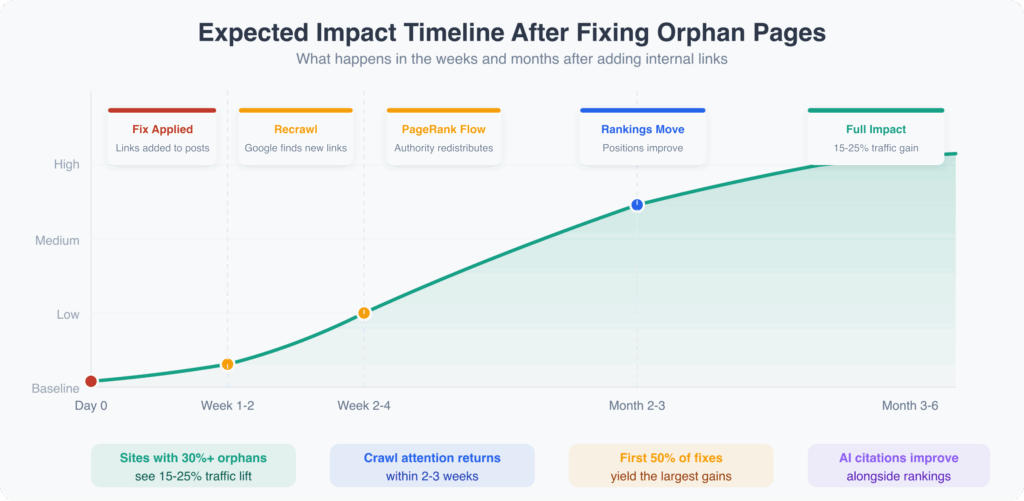
Expected Timeline
Week 1-2: Google recrawls pages linking to former orphans
Week 2-4: Google reprocesses PageRank flow, recrawls orphan pages
Month 2-3: Ranking changes become visible if orphan pages target viable keywords
Month 3-6: Full impact measurable; assess whether further optimization needed
Orphan fixes alone rarely cause dramatic ranking jumps. They remove a handicap rather than adding a boost. Pages still need quality content and appropriate on-page optimization to rank well.
What I’ve Seen in Practice
Sites with 30%+ orphan pages typically see 15-25% organic traffic improvement over 6 months after systematic fixes. The improvement comes from previously invisible pages becoming rankable.
Google Search Console shows increased Googlebot visits to former orphans within 2-3 weeks of adding internal links. The correlation between linking and crawl attention is direct and fast.
The first 50% of orphans fixed yield the largest gains. Subsequent fixes improve less dramatically, suggesting a threshold effect where basic linking captures most value.
Orphan pages with thin content rarely improve rankings even after proper linking. Fixes enable ranking potential; they don’t guarantee it. Good content plus good linking produces results.
One pattern I’ve noticed since AI search became mainstream: sites with strong internal linking get cited more often in AI-generated answers. AI models trained on web data pick up on topical authority signals, and a well-linked site sends clearer authority signals than one with orphaned content scattered across disconnected URLs.
The Orphan Page Fix Checklist
- Set up your tools: Install Rank Math PRO for AI Link Genius, Link Counter monitoring, and orphan detection. Optionally set up WP-MCP for AI-powered bulk operations.
- Run initial audit: Use Rank Math’s AI Link Genius or WP-MCP to identify all orphan pages.
- Categorize: Separate orphans into keep, consolidate, and delete groups.
- Prioritize: Focus on high-value orphans first (commercial pages, high-potential content).
- Fix systematically: Use AI Link Genius suggestions for individual fixes. Use WP-MCP for batch operations across 50+ pages.
- Verify: Check Rank Math’s Link Counter columns to confirm incoming links increased.
- Prevent: Use Rank Math’s link suggestions while writing. Use AI Link Genius for ongoing monitoring.
- Monitor: Check orphan count monthly. Sort by incoming links in Rank Math weekly. Track AI search citations alongside traditional rankings.
The investment is one-time with ongoing returns. Fixed pages stay fixed with proper maintenance.
Orphan Pages in WordPress FAQs
How many internal links does a page need to not be orphaned?
Technically, one internal link removes orphan status. But a single link from a low-authority or rarely crawled page provides minimal benefit. Aim for at least 3-5 internal links from contextually relevant pages for meaningful improvement. Rank Math’s Link Counter shows incoming link counts on your Posts list, making it easy to spot pages that need more links. Rank Math AI Link Genius or WP-MCP can find and suggest those additional links quickly.
Do sidebar and footer links count for fixing orphan pages?
Yes, navigation links in sidebars and footers technically count as internal links and remove orphan status. They help with crawling and pass some PageRank. But they carry less contextual relevance than body content links. Google understands that sidebar links appear site-wide without specific topical relationship to surrounding content. For best results, supplement navigation links with contextual body links.
Will fixing orphan pages immediately improve my rankings?
Not immediately. Fixing orphan pages removes a structural handicap rather than providing a ranking boost. After adding internal links, Google needs to recrawl the linking pages, discover the new links, recrawl the formerly orphaned pages, and reprocess PageRank. This typically takes 4-12 weeks before ranking changes become visible. The page must also have quality content and target achievable keywords to rank well even after proper linking.
Are category and tag archive pages potential orphans?
Yes. Category and tag pages can become orphans if they’re not linked from your site’s navigation or content. Posts appearing on these archive pages don’t automatically create inbound links to the archive itself. If you’ve removed a category from your menu and no content links to it, that category page is orphaned. Rank Math’s Link Counter tracks archive pages too. Either link to them appropriately or noindex them if they don’t warrant standalone SEO value.
Can a page in my XML sitemap still be an orphan?
Absolutely. XML sitemaps and internal linking are independent. A page can be listed in your sitemap but have zero internal links pointing to it. Google will find the page through the sitemap, but it won’t receive PageRank from other pages and won’t benefit from topical association. Sitemaps help with discovery but don’t substitute for internal linking.
What percentage of orphan pages is acceptable?
Aim for under 5% of your indexable pages. Sites with 20-30% orphan content typically show measurable ranking underperformance. Zero percent is ideal but impractical for sites with hundreds of pages. Some intentional orphans (landing pages, thank-you pages) are acceptable. For content meant to rank in search, no orphans is the goal.
Should I add links to orphan pages all at once or gradually?
Either approach works. Unlike external link building, internal linking changes don’t trigger manipulation concerns. You can add internal links to fix 50 orphan pages in one day without issue. Google expects sites to update their internal structure. With WP-MCP, you can fix hundreds of orphans in a single batch operation. There’s no benefit to artificially slowing the process.
How do I prevent content imports from creating orphans?
When migrating content, plan for internal linking as part of the process. First, export and preserve any existing internal link structure from the source. Second, verify URL structures match or set up redirects. Third, run search-replace to update internal links if URLs changed. Fourth, immediately after import, run an orphan audit with Rank Math or WP-MCP. Finally, use AI-powered tools to systematically add links before considering the migration complete.
Do orphan pages affect my site’s overall authority?
Orphan pages represent missed opportunities more than active damage to site authority. They don’t negatively affect other pages, but they fail to contribute to your site’s topical authority and PageRank ecosystem. A well-linked 100-page site outperforms a 200-page site where half are orphaned, assuming content quality is equal. The orphan pages aren’t hurting you; they’re just not helping. Fixing them converts idle content into contributors.
Can Rank Math and WP-MCP work together for internal linking?
Yes, and I recommend using both. They complement each other perfectly. Rank Math’s Link Counter gives you at-a-glance monitoring of link counts across all posts. AI Link Genius handles in-editor suggestions and site-wide analysis. WP-MCP handles the heavy lifting: bulk operations, AI-powered content analysis across hundreds of posts, and automated link insertion at scale. Rank Math spots the problems; WP-MCP fixes them efficiently. Together they cover monitoring, prevention, and fixing across any site size.
Does fixing orphan pages help with AI search engines like ChatGPT and Perplexity?
Yes. AI search engines evaluate site structure and topical authority when deciding which sources to cite. A page disconnected from your site’s internal link network sends weaker authority signals than one that’s well-integrated into a topic cluster. Fixing orphan pages strengthens these signals across both traditional search (Google rankings) and AI-powered search (citations in ChatGPT, Perplexity, and Google AI Overviews). The same internal linking work improves your visibility in both channels.
Disclaimer: This site is reader-supported. If you buy through some links, I may earn a small commission at no extra cost to you. I only recommend tools I trust and would use myself. Your support helps keep gauravtiwari.org free and focused on real-world advice. Thanks. - Gaurav Tiwari