
Effective Study Techniques for Visual Learners
You spent 4 hours reading the same textbook chapter and retained almost nothing. The information went in through your eyes and straight out the back of your head. Next day’s quiz? Blank. It’s not that you didn’t study hard enough. It’s that the study method didn’t match how your brain processes information.
Visual learners make up roughly 65% of the population, according to research from the Social Science Research Network. Yet most study advice revolves around reading and re-reading text, taking linear notes, and highlighting random sentences. These methods are built for read/write learners. If you’re a visual learner, they’ll always feel like pushing a boulder uphill. The techniques that actually work, mind maps, color-coded flashcards, diagrams, convert information into spatial patterns your brain naturally processes faster.
This guide covers 7 proven study techniques built specifically for visual learners, the tools that make each one easier, and a practical weekly schedule you can start using today.
What Makes You a Visual Learner?
Visual learners process information most effectively when it’s presented as images, diagrams, charts, graphs, or spatial layouts. If you’ve ever found yourself sketching a concept to understand it, preferring infographics over articles, or remembering faces better than names, you’re likely a visual-spatial learner.
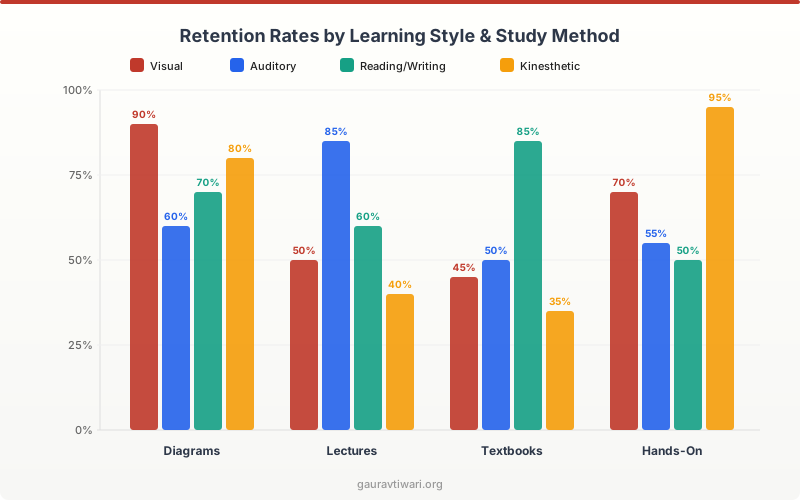
The VARK model (developed by Neil Fleming in 1987) identifies four primary learning styles: Visual, Auditory, Read/Write, and Kinesthetic. Visual learners tend to think in pictures. They recall information by visualizing where it appeared on a page, what color it was, or how a diagram was structured. This isn’t just preference. fMRI studies show that visual learners activate their occipital cortex (the brain’s visual processing center) more heavily during memory tasks.
Here’s what sets visual learners apart:
- Spatial memory is strong. You remember where information was positioned on a page or whiteboard.
- Charts click faster than lectures. A single diagram conveys what 500 words of text can’t.
- Color triggers recall. Highlighting and color-coding aren’t decoration. They’re memory anchors.
- Doodling helps focus. Drawing while listening actually improves retention by 29%, per a study in Applied Cognitive Psychology.
The challenge? Most classrooms and textbooks are designed for read/write learners. Long paragraphs, linear notes, bullet-heavy handouts. If those methods haven’t worked for you, the techniques below will.
Mind Mapping
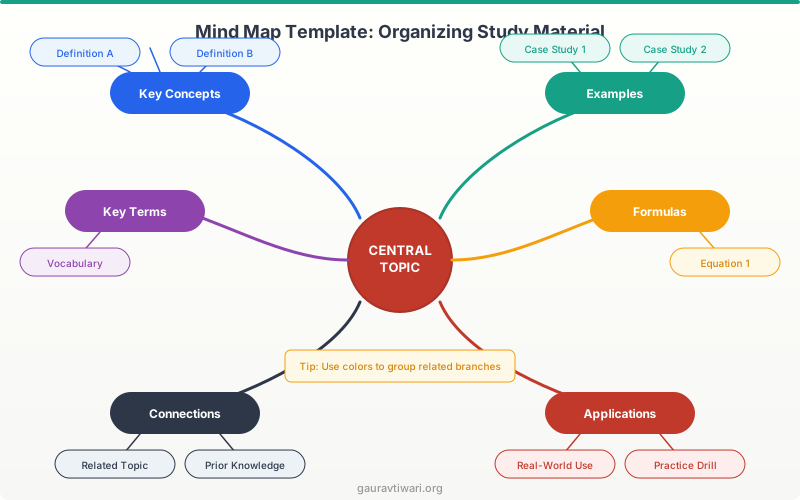
Mind mapping is the single most effective study technique I’ve used as a visual learner. It converts linear information into a radial, color-coded diagram that mirrors how your brain actually organizes ideas. Instead of reading point A, then B, then C in sequence, you see the entire concept landscape at once.
A mind map starts with a central topic in the middle of the page. Main ideas branch outward like tree limbs. Supporting details, examples, and connections extend from each branch. Colors and icons distinguish different categories. The result looks nothing like traditional notes, and that’s exactly why it works.
Here’s how I create mine:
- Write the core topic in the center of a blank page (landscape orientation works best).
- Draw 4-6 main branches for key subtopics. Use a different color for each.
- Add secondary branches for supporting details, examples, and definitions.
- Include small icons or sketches wherever possible. A tiny beaker icon next to “chemistry” takes 2 seconds and boosts recall significantly.
- Draw connector lines between related ideas on different branches.
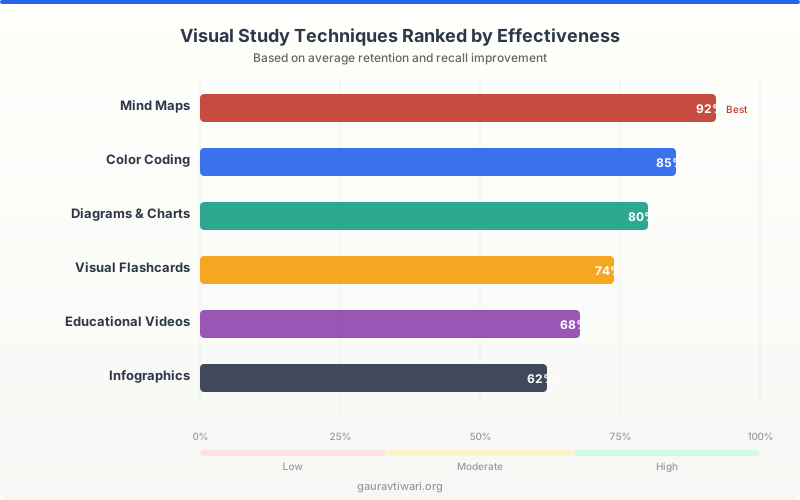
Digital tools make this faster. MindMeister and XMind are both solid for quick mind maps. Notion works well if you want to combine mind-mapping with note databases. I’ve used all three, and for pure visual study, XMind’s auto-layout saves the most time. For a deeper comparison, check my list of the best mind mapping apps.
Flashcards with Visual Elements
Plain text flashcards are mediocre for visual learners. Flashcards with images, diagrams, and color coding are powerful. The difference matters. A 2019 study in the Journal of Educational Psychology found that dual-coded flashcards (text + image) improved recall by 37% compared to text-only versions.
I make my flashcards with three rules:
- One concept per card. Never cram multiple ideas onto a single flashcard.
- Image on the front, explanation on the back. Force your brain to recall the concept from a visual cue, not text.
- Color-code by subject. Blue borders for biology, green for history, red for math. Your brain starts associating the color with the domain before you even read the card.
For digital flashcards, Quizlet lets you add images to cards and has built-in spaced repetition. Anki is more powerful for long-term retention with its customizable spaced repetition algorithm. For hand-drawn flashcards on a tablet, I use Kyoku 2 on iPad with Apple Pencil. The tactile drawing process adds another layer of encoding. Check out my guide on AI-designed flashcards for newer approaches.
Color Coding System
Color coding isn’t just highlighting random sentences in yellow. Effective color coding is a systematic method that creates visual categories across all your study materials. Done right, your brain starts retrieving information by color association before you consciously recall the content.
Here’s the system I use and recommend:
- Red — Definitions and key terms
- Blue — Examples and evidence
- Green — Connections to other topics
- Yellow — Questions and areas needing review
- Orange — Dates, numbers, and formulas
The critical part: use the same color system everywhere. Your textbook highlights, notebook margins, flashcards, and digital notes should all follow identical color assignments. When you open your notebook and see a cluster of red, you instantly know “those are definitions” without reading a word. This consistency trains your visual memory to categorize information spatially and chromatically.
Physical tools matter here. I’ve tested dozens of highlighter sets and colored pens. Mildliner highlighters give the cleanest results because they’re dual-tipped (broad for highlighting, fine for underlining) and the colors don’t bleed through pages. For digital, Notion and note-taking apps like GoodNotes support custom color palettes you can standardize across all your notes.
Visual Mnemonics
Visual mnemonics convert abstract information into memorable mental images. They’re the reason you probably still remember “My Very Educated Mother Just Served Us Nachos” for the planets, decades after learning it. The technique works because your brain stores images in a different (and more durable) memory system than text.
Three visual mnemonic techniques I use regularly:
Method of Loci (Memory Palace). Associate items on a list with specific locations in a familiar place, like your house. To remember the stages of mitosis, I placed Prophase at my front door (a “prophet” knocking), Metaphase at the kitchen table (items lined up in the “middle”), Anaphase at the stairs (things pulling “apart”), and Telophase in the bedroom (the “end” of the day). Ridiculous images stick better than sensible ones.
Image Association. Link the information to a vivid, exaggerated image. To remember that the capital of Australia is Canberra (not Sydney), picture a can of beer sitting on a map of Australia. Absurd, but it works. The more bizarre and specific the image, the stronger the recall.
Acronym Visualization. Instead of just memorizing the acronym, visualize it as a scene. VIBGYOR (rainbow colors) becomes a vibrant gymnast doing yoga on a rainbow. Converting the acronym into a visual story makes it stick in long-term memory, not just short-term.
Diagrams and Flowcharts
Diagrams and flowcharts break complex processes into visual steps your brain can follow like a map. Whenever I encounter a multi-step process, a cause-and-effect chain, or a decision tree, I immediately convert it into a flowchart. The act of creating the flowchart forces you to understand the logic, not just memorize the steps.
Different diagram types serve different purposes:
| Diagram Type | Best For | Example |
|---|---|---|
| Flowchart | Sequential processes, decisions | How a bill becomes law, debugging code |
| Venn Diagram | Comparing/contrasting two concepts | DNA vs RNA, capitalism vs socialism |
| Timeline | Historical events, project phases | World War II events, product development |
| Concept Map | Relationships between ideas | Ecosystem interactions, literary themes |
| Cycle Diagram | Repeating processes | Water cycle, cell division, business cycles |
For creating diagrams digitally, Canva has excellent diagram templates that look polished without design skills. For more complex flowcharts, I’ve used Lucidchart and Miro. But honestly, hand-drawn diagrams on paper or tablet work just as well for studying. The creation process itself is half the learning.
Video-Based Learning
Video combines visual and auditory channels simultaneously, making it one of the most efficient study methods for visual learners. But passively watching videos is barely better than re-reading a textbook. The technique matters more than the medium.
Here’s how I extract maximum value from video learning:
- Pause and sketch. Every 3-5 minutes, pause the video and sketch what you just learned. A quick diagram, a mini mind map, or even a doodle that represents the concept.
- Use 1.5x speed with subtitles on. Faster pace keeps your attention. Subtitles add a visual text layer that reinforces retention.
- Screenshot key frames. Capture important diagrams, equations, or summary slides. Compile these into a visual study sheet.
- Watch before reading. Visual overview first, detailed text second. This creates a mental framework that makes the text easier to absorb.
Best video learning platforms I’ve tested:
- Khan Academy — Free, covers K-12 through college. The visual explanations with digital whiteboard are perfect for visual learners.
- Coursera — University-level courses with video lectures, visual aids, and interactive assignments. I’ve completed 6 courses on Coursera and the production quality is consistently high.
- Skillshare — Best for creative and practical skills. Short, project-based classes with lots of visual demonstrations.
- TED-Ed — Short animated lessons on science, history, and critical thinking. Great for quick visual overviews of complex topics.
- Crash Course — YouTube series covering dozens of subjects with engaging animations and graphics.
Visual Summaries and One-Pagers
A visual summary condenses an entire chapter or topic onto a single page using diagrams, icons, color coding, and minimal text. It’s the ultimate review tool for visual learners because it forces you to identify what actually matters and represent it spatially.
I create one visual summary per chapter or major topic. The process itself is a study session. You can’t summarize what you don’t understand, so the act of creating the summary reveals gaps in your knowledge.
My visual summary process:
- Use a single A4 or letter-size sheet (landscape orientation).
- Divide the page into 4-6 zones, one per major subtopic.
- Use icons and small diagrams instead of full sentences. A tiny graph icon represents “data showed X” faster than writing it out.
- Apply your color coding system consistently.
- Add arrows to show relationships between zones.
- Review the summary 3 times: immediately after creating it, the next day, and one week later.
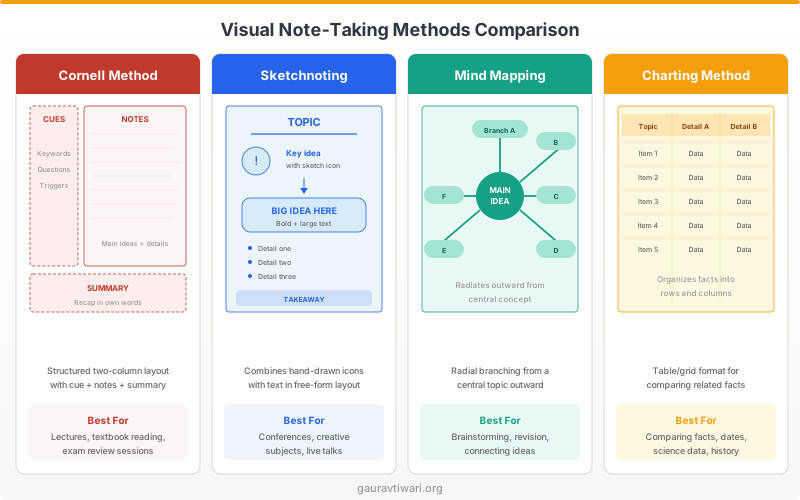
For digital visual summaries, Canva templates are excellent. GoodNotes and Notability on iPad let you hand-draw summaries with Apple Pencil. Notion works if you prefer a more structured, database-style approach with embedded images.
Best Tools for Visual Learners
The right tools amplify every technique above. Here are the four I recommend most, based on years of testing them myself and seeing student results.

Notion
- Visual databases with gallery and board views
- Templates for mind maps, Cornell notes, and study trackers
- Embed images, diagrams, and videos directly in notes
- AI-powered summaries of long study materials
- Sync across all devices with offline access
Canva
- Thousands of diagram, flowchart, and infographic templates
- Drag-and-drop editor requires zero design skills
- Real-time collaboration for group study projects
- Export as PDF, PNG, or shareable links
- Free plan covers most student needs

Coursera
- Video lectures from Stanford, Yale, and 200+ institutions
- Visual quizzes and interactive assignments
- Downloadable slides and supplementary materials
- Professional certificates and degree programs
- Mobile app with offline video downloads
Skillshare
- Visual, hands-on classes in design, illustration, and tech
- Project-based format with downloadable resources
- Short 15-60 minute lessons fit into study breaks
- Community projects for feedback and collaboration
- Offline access on mobile for studying anywhere
Building Your Visual Study Schedule
Having 7 techniques is useless if you don’t use them systematically. I structure my visual study sessions using a weekly rotation that prevents burnout and ensures each technique gets adequate practice time.
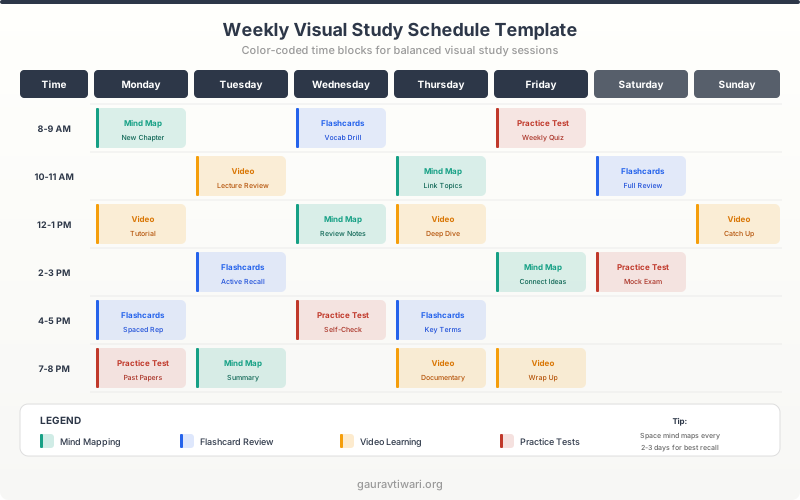
Here’s my recommended weekly structure:
- Monday + Wednesday: Mind mapping for new material. Create maps during or immediately after lectures.
- Tuesday + Thursday: Flashcard review with spaced repetition. 20-30 minute sessions using Anki or Quizlet.
- Wednesday + Friday: Video learning sessions. Watch 1-2 relevant videos, take visual notes.
- Saturday: Create visual summaries for the week’s material. One page per subject.
- Sunday: Review all visual summaries and mind maps. Light practice with diagrams.
Apply the Pomodoro Technique within each session: 25 minutes of focused work, 5-minute break, repeat. Visual learners especially benefit from breaks because they reduce eye strain and let your brain consolidate visual information. I wrote a full guide on how to create a digital study routine with apps if you want the complete system.
Setting Up Your Study Environment
Your physical environment matters more for visual learners than any other learning type. Visual clutter literally competes with your study materials for processing bandwidth in the occipital cortex. A Princeton Neuroscience Institute study confirmed that physical clutter reduces focus and information processing capacity.
Optimize your space:
- Lighting. Bright, natural light is ideal. If studying at night, use a daylight-spectrum desk lamp (5000-6500K color temperature). Warm yellow lights cause eye fatigue faster.
- Desk setup. Clear everything except current study materials. One subject at a time on the desk.
- Wall space. Use a blank wall or whiteboard near your desk for pinning mind maps, visual summaries, and diagrams. Passive exposure to study visuals reinforces retention.
- Screen position. If studying on a laptop or tablet, elevate the screen to eye level. Looking down at a screen reduces reading speed by 15-20%.
- Second monitor. If available, use one screen for source material and one for your visual notes. Switching between tabs breaks the visual flow.
For a deeper dive on workspace optimization, check out my study tools for college students guide.
Combining Visual Techniques with Active Recall
The biggest mistake visual learners make is treating visual techniques as passive. Creating a beautiful mind map means nothing if you just stare at it. The real power comes from combining visual methods with active recall, the scientifically proven method of testing yourself on material rather than re-reading it.
Here’s how to combine them:
- Cover and redraw. After creating a mind map, cover it and redraw it from memory. Compare. The gaps reveal exactly what you don’t know yet.
- Blank diagram fill-in. Print blank versions of your diagrams and flowcharts. Fill in the labels and connections from memory.
- Visual summary quiz. Look at your visual summary for 30 seconds, then turn it over and write down everything you remember. Compare.
- Whiteboard teaching. Teach the material to an imaginary student using only a whiteboard. No notes allowed. If you can’t draw and explain it, you don’t know it.
This combination of visual creation + active recall + spaced repetition is the most effective study system I’ve ever used. It’s backed by research and it’s how I prepare for every certification or exam I take.
Visual Study Setup Checklist
Which visual study technique has helped you the most?
Frequently Asked Questions
What percentage of people are visual learners?
Research estimates that approximately 65% of the population are visual learners to some degree. The VARK model identifies four learning styles (Visual, Auditory, Read/Write, Kinesthetic), and most people show a preference for one while using a mix of all four. If you find yourself gravitating toward diagrams, charts, and color-coded notes, you likely have a strong visual learning preference.
How do I know if I’m a visual learner?
Common signs include: preferring maps over written directions, remembering faces better than names, thinking in pictures rather than words, needing to see information to understand it, and naturally doodling or sketching during lectures. You can take the free VARK questionnaire at vark-learn.com to get a formal assessment of your learning style preferences.
Can visual learning techniques work for non-visual learners?
Yes. While visual techniques are most effective for people with a visual learning preference, they benefit all learners. Creating mind maps and diagrams engages active processing regardless of your dominant learning style. The dual-coding theory (Allan Paivio, 1971) shows that combining visual and verbal information improves recall for everyone. Think of visual techniques as a supplement, not a replacement, for your primary study methods.
What’s the best app for visual note-taking?
It depends on your workflow. Notion is best for structured visual databases and linked notes. GoodNotes is best for hand-drawn visual notes on iPad with Apple Pencil. Canva is best for creating polished diagrams and infographics. For mind mapping specifically, XMind and MindMeister are the top options. I personally use Notion for organizing and XMind for mind mapping.
How long does it take to see results from visual study techniques?
Most students notice improved retention within 1-2 weeks of consistently using visual techniques. Mind mapping and color coding show the fastest results because they immediately change how information is encoded. Spaced repetition with visual flashcards takes 2-3 weeks to build momentum but produces the strongest long-term retention. The key is consistency, not perfection.
Are digital or physical visual study tools better?
Both work, but research suggests hand-drawing activates more memory-encoding pathways than typing or clicking. A 2014 study in Psychological Science found that students who took handwritten notes retained more than those who typed. My recommendation: hand-draw during initial learning (mind maps, flashcards), then digitize for review and organization. Use physical tools for creation, digital tools for storage and spaced repetition.
How do I use visual techniques for math and science?
Math and science are actually ideal for visual techniques. Create flowcharts for problem-solving steps. Use color-coded diagrams for chemical reactions or physics formulas. Draw concept maps connecting related equations. For math specifically, sketch the problem before solving it. Visualizing word problems as diagrams increases accuracy significantly. Khan Academy’s visual approach to math instruction is an excellent model to follow.
Can visual learning help with test anxiety?
Yes. Visual study techniques reduce test anxiety by creating stronger, more accessible memory traces. When you’ve mind-mapped a topic and practiced redrawing it from memory, you walk into the exam with a mental image you can reconstruct. This visual anchor reduces the blank-mind panic that causes anxiety. The cover-and-redraw technique is especially effective because it simulates test conditions during study sessions, so the actual exam feels familiar.
Start Studying Visually
Visual learning isn’t a limitation. It’s an advantage, but only when you use techniques designed for how your brain actually works. The 7 methods in this guide (mind mapping, visual flashcards, color coding, visual mnemonics, diagrams, video learning, and visual summaries) cover every study scenario you’ll encounter.
Don’t try to implement all 7 at once. Start with mind mapping for your next study session. Add color coding in week two. Layer in flashcards and visual summaries by week three. Within a month, you’ll have a complete visual study system that makes traditional note-taking feel primitive.
The tools are ready. Notion for organizing, Canva for creating, Coursera for learning. Pick one technique, one tool, and start today. Your exam scores will thank you.
Disclaimer: This site is reader-supported. If you buy through some links, I may earn a small commission at no extra cost to you. I only recommend tools I trust and would use myself. Your support helps keep gauravtiwari.org free and focused on real-world advice. Thanks. - Gaurav Tiwari