
eCommerce: The Definitive Guide
I’ve built ecommerce stores for clients since 2011. WordPress shops, Shopify stores, custom checkout flows. Some made six figures in their first year. Others burned through their budget before a single sale.
The difference wasn’t the platform or the product. It was how they approached the fundamentals. This guide covers everything I’ve learned from building 50+ online stores: what ecommerce actually is, which platform fits your situation, and how to grow once you’re live.
What Is eCommerce?
eCommerce (electronic commerce) is buying and selling products or services online. That’s the textbook answer. The practical one: it’s any transaction where money changes hands through a website, app, or digital platform.
Global ecommerce sales crossed $6.3 trillion in 2024 and are projected to hit $8.1 trillion by 2027. If you’re selling anything, physical or digital, you need an online channel.
Four Types of eCommerce Models
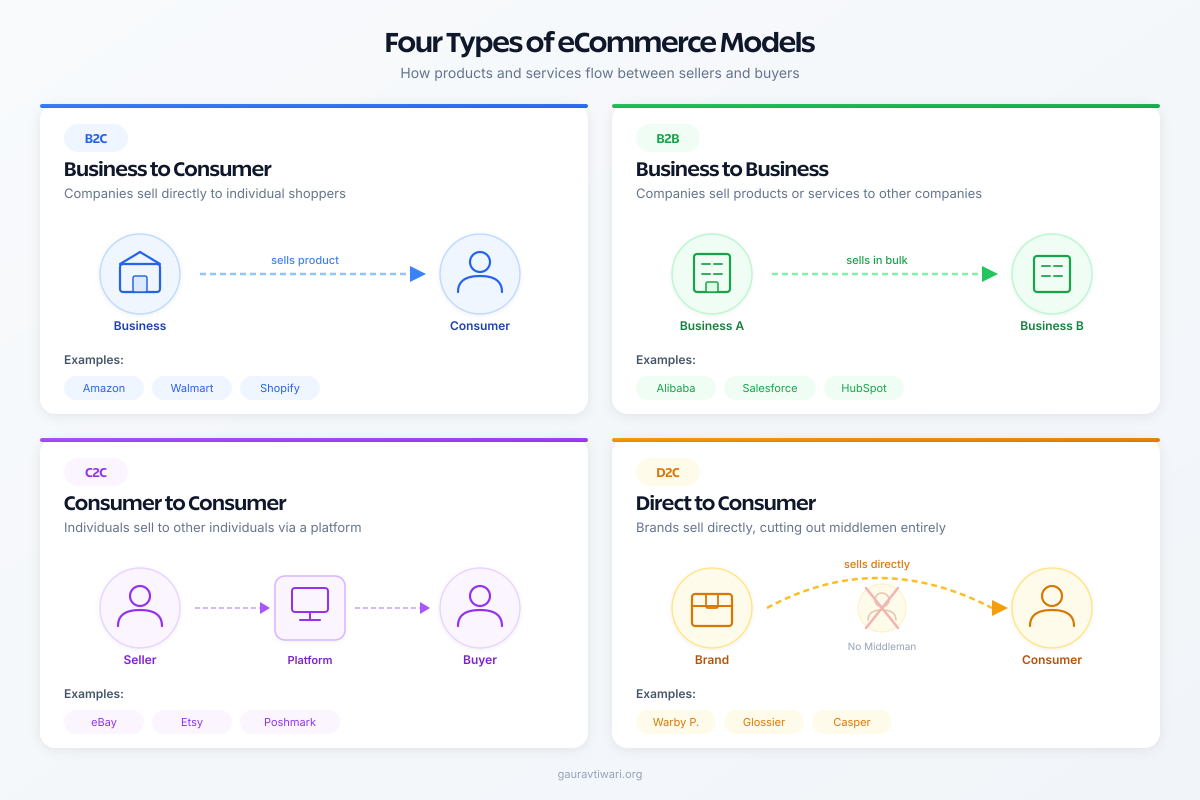
Every online store falls into one of these categories:
- B2C (Business to Consumer) is the most common model. You sell directly to individual buyers. Think Amazon, your local bakery’s online store, or a WordPress theme shop.
- B2B (Business to Business) involves selling to other companies. Wholesale suppliers, SaaS tools, and raw materials distributors operate here. Order values are higher, sales cycles are longer.
- C2C (Consumer to Consumer) is peer-to-peer selling. eBay, Etsy, and Facebook Marketplace are classic examples. You don’t need inventory management because individuals handle their own stock.
- D2C (Direct to Consumer) skips retailers entirely. Brands like Warby Parker and Dollar Shave Club proved that cutting out the middleman works. You control pricing, branding, and the customer relationship.
Most people reading this will build a B2C or D2C store. Both models work with every platform I’ll recommend later.
Why Start an Online Store Now
I get asked this question constantly. “Is it too late to start selling online?” No. Here’s why the timing still works in your favor.
Low startup costs. A physical retail space costs $2,000-$10,000/month in rent alone, plus inventory, staff, and insurance. An online store? You can launch for under $300 with hosting, a domain, and a WooCommerce setup. I’ve helped clients go from zero to live store in a single weekend.
Sell globally from day one. A physical store in Delhi serves Delhi customers. An online store serves anyone with a credit card and an internet connection. I’ve worked with Indian sellers shipping to 40+ countries through a single WordPress site.
24/7 revenue. Your store doesn’t close at 9 PM. Doesn’t take sick days. Doesn’t need night shift employees. One of my clients generates 35% of their revenue between 10 PM and 6 AM because their target audience shops after work.
Lower operating costs. No rent, minimal staff, no physical inventory if you dropship. Even if you hold inventory, you’re looking at warehouse costs rather than prime retail space. The margins are better by default.
Data-driven decisions. Every click, every abandoned cart, every purchase creates data. You’ll know exactly which products sell, where buyers drop off, and what marketing channels bring revenue. Physical stores can’t match this level of insight.
Hosted vs Self-Hosted: The First Decision
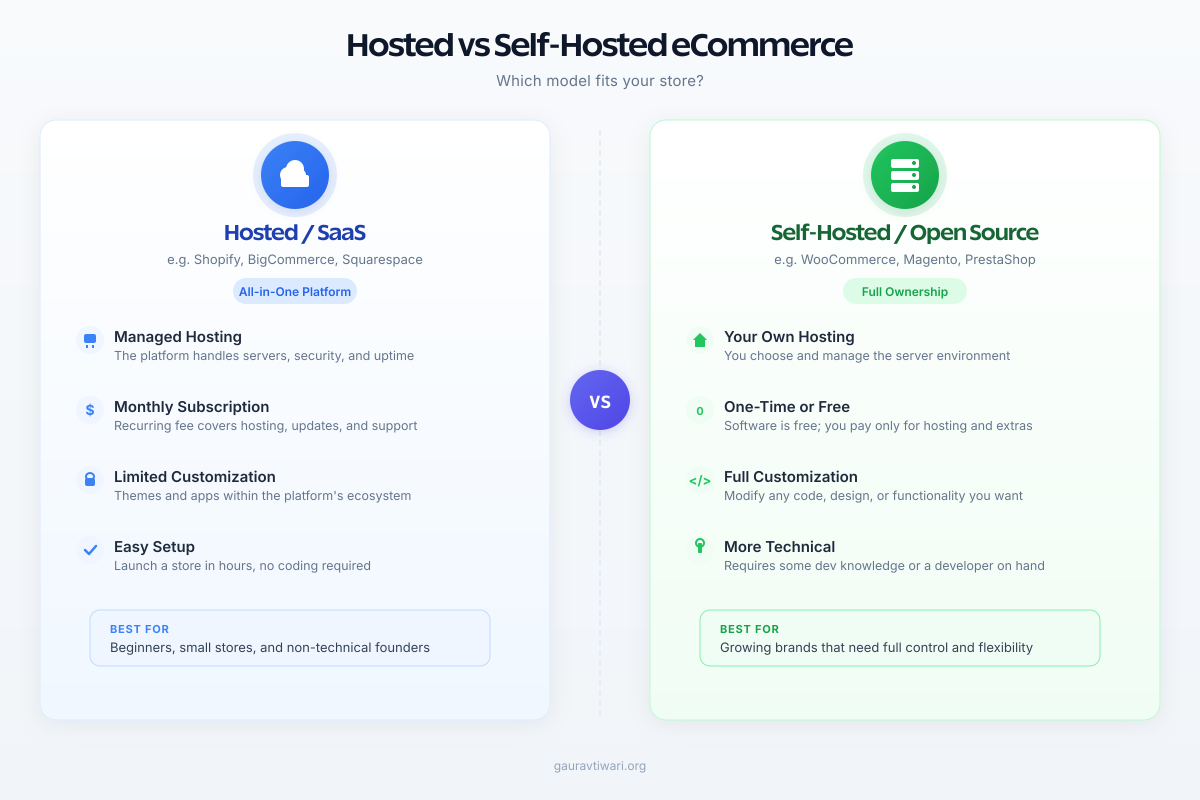
Before you compare features or pricing, you need to answer one question: do you want someone else to handle the technical infrastructure, or do you want full control?
Hosted (SaaS) Platforms
Hosted platforms run on the provider’s servers. You pay a monthly fee and get everything bundled: hosting, security, updates, and support. Shopify is the obvious example. You sign up, pick a theme, add products, and you’re live.
Pros: Zero server management, automatic updates, built-in SSL, 24/7 support, and fast setup. You can go from sign-up to live store in under two hours.
Cons: Monthly fees add up ($39-$399/month for Shopify). You’re locked into their ecosystem. Customization has limits. Transaction fees eat into margins unless you use their payment processor.
Self-Hosted Platforms
Self-hosted platforms give you the source code. You install it on your own server and control everything. WooCommerce on WordPress is the most popular option here, powering over 36% of all online stores worldwide.
Pros: Complete control over design and functionality. No transaction fees beyond your payment gateway. Thousands of plugins and extensions. You own the platform and your data.
Cons: You handle hosting, security, backups, and updates. Requires more technical knowledge (or a developer). The initial setup takes longer than a SaaS platform.
Here’s my rule of thumb: if you’re non-technical and want to sell physical products quickly, go hosted. If you already run a WordPress site, have a developer available, or want maximum flexibility, go self-hosted.
How to Choose the Right eCommerce Platform
I’ve seen businesses waste months on this decision. Don’t overthink it. Answer these five questions and you’ll narrow your options to one or two platforms.
What Are You Selling?
Physical products with sizes, colors, and shipping requirements? WooCommerce or Shopify. Digital downloads like ebooks, courses, or software? SureCart or Easy Digital Downloads. A mix of both? WooCommerce handles that natively.
How Many Products Will You Carry?
Selling 5-50 products? Any platform works. Selling 500+? You need robust inventory management, bulk editing, and category filtering. WooCommerce and Shopify scale well here. Lightweight solutions like SureCart or FluentCart work better for smaller catalogs with digital or subscription products.
What Payment Methods Do You Need?
Stripe and PayPal cover most markets. But if you’re selling in India, you’ll want Razorpay or Paytm integration. Selling in Southeast Asia? GrabPay and GCash matter. Check that your platform supports the gateways your customers actually use.
What’s Your Technical Comfort Level?
Be honest. If SSH, FTP, and PHP mean nothing to you, a hosted platform saves you from headaches. If you can install a WordPress plugin, you can run WooCommerce. If you’ve never logged into a hosting dashboard, start with Shopify.
What’s Your Budget?
Shopify costs $39/month minimum (the $5 Starter plan doesn’t give you a real store). WooCommerce costs whatever your hosting costs ($5-$30/month to start) plus any premium plugins you add. Factor in themes, payment gateway fees, and marketing tools too.
Best eCommerce Platforms I Recommend
I’ve built stores on nearly every platform out there. Here are the ones I actually recommend to clients in 2026.
FluentCart (My Top Pick for WordPress)
If you’re on WordPress, FluentCart is what I recommend to most clients right now. It’s a modern ecommerce plugin built by the same team behind FluentCRM and FluentForms, and it fixes the biggest pain points I’ve hit with WooCommerce over the years.
The checkout is fast. Not “fast for WordPress” fast. Actually fast. FluentCart stores order and product data in its own custom tables instead of the bloated WordPress post meta system. That means your store doesn’t slow down as your catalog grows, which is a real problem I’ve seen with WooCommerce sites hitting 500+ products.
It handles physical products, digital downloads, subscriptions, and license keys natively. No stacking 8 different plugins to get basic functionality. Stripe and PayPal work out of the box, and the Gutenberg-based checkout builder lets you design your checkout flow without touching code.
The integration with the Fluent ecosystem is what seals it. FluentCRM for email marketing, FluentForms for lead capture, FluentBoards for order management. Everything talks to everything without zapier hacks or third-party connectors. I’ve set up stores where the entire marketing automation runs inside WordPress, no external tools needed.
Best for: WordPress users who want a modern, lightweight ecommerce solution. Anyone frustrated with WooCommerce’s plugin dependency and database bloat. Stores selling a mix of physical and digital products.
WooCommerce (Best for Large Catalogs)
WooCommerce still powers 36%+ of all online stores. It’s free, open-source, and the sheer size of its plugin ecosystem is unmatched. If you need a niche feature (wholesale pricing, auction bidding, appointment booking), there’s probably a WooCommerce plugin for it.
I’ve used WooCommerce for everything from a 12-product artisan soap store to a 3,000-SKU electronics retailer. For large catalogs with complex product variations and multi-vendor setups, it’s still the most flexible option on WordPress.
The tradeoffs are real though. WooCommerce relies heavily on wp_postmeta, which gets slow at scale. You’ll need a solid host like Hostinger or Cloudways, and you’ll end up buying premium extensions for features that FluentCart includes by default. Budget $200-$500/year for essential add-ons.
Best for: Stores with 500+ SKUs. Multi-vendor marketplaces. Projects requiring niche extensions that only exist in the WooCommerce ecosystem.
Shopify (Best for Non-Technical Founders)
Shopify is the easiest way to get an online store running. I’ve set up 15+ Shopify stores for clients, and the setup process never takes more than a few hours. Everything is included: hosting, SSL, payment processing, and a drag-and-drop store builder.
The tradeoff is cost. The Basic plan starts at $39/month, and you’ll likely spend $50-$150/month on apps for features WordPress-based solutions offer for free or at a one-time cost. Transaction fees (2.9% + 30 cents) apply unless you use Shopify Payments. You also don’t own your store data the way you do with a self-hosted WordPress setup.
Best for: Non-technical founders. Physical product sellers who don’t want to manage hosting. Anyone who values simplicity over flexibility.
SureCart (Best for Digital Products)
If you’re exclusively selling digital downloads, courses, or memberships, SureCart is worth considering. I reviewed SureCart in detail and compared it against WooCommerce. It handles Stripe, PayPal, and subscription billing natively.
That said, FluentCart now covers most of what SureCart does while also handling physical products. I’d pick SureCart only if you specifically need its hosted checkout infrastructure or its tight integration with SureMembers and SureTriggers.
Best for: Course creators and plugin/theme sellers already in the SureCart ecosystem.
Adobe Commerce / Magento (Enterprise)
Magento (now Adobe Commerce) is built for large catalogs and complex B2B operations. If you’re processing 10,000+ orders monthly with multi-warehouse inventory, it’s worth considering. For everyone else, it’s overkill. The learning curve is steep, development costs are high, and you’ll need dedicated hosting.
Best for: Enterprise businesses with dedicated development teams and high-volume B2B operations.
Setting Up Your First Online Store
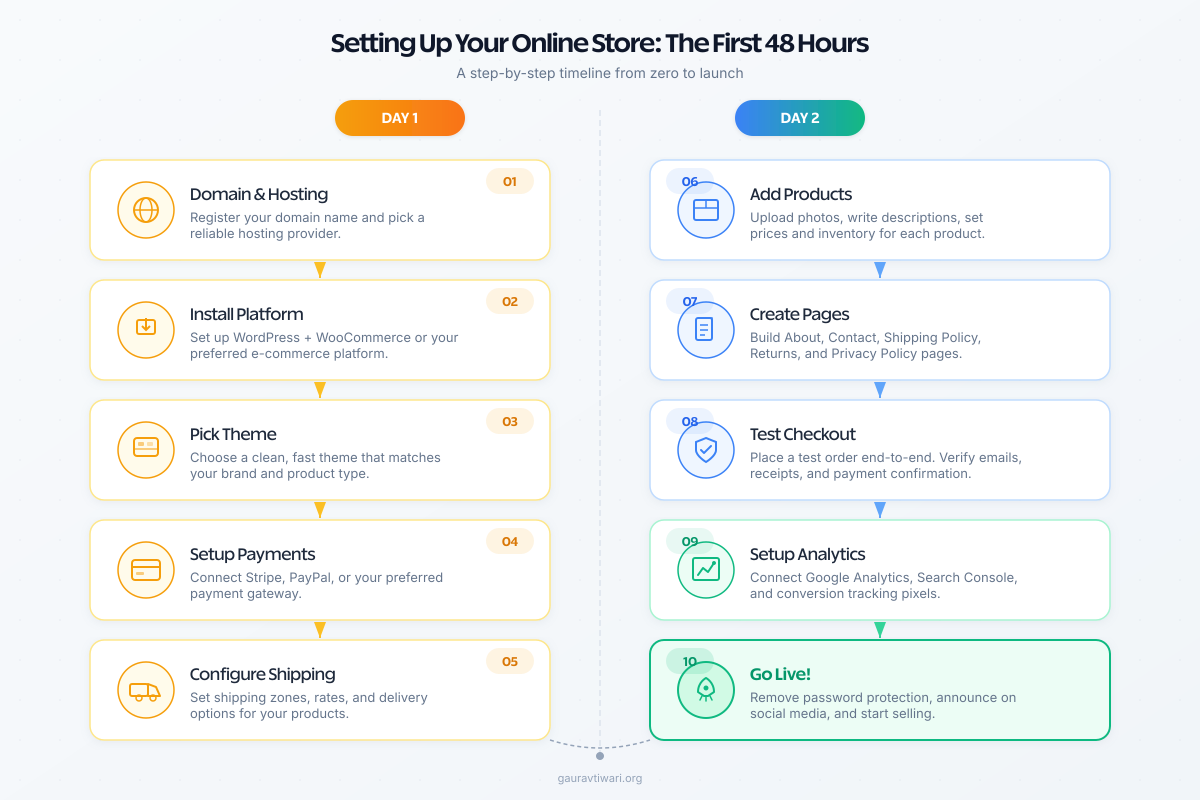
You’ve picked a platform. Now comes the part most guides overcomplicate. Here’s what the first 48 hours should look like.
Day 1: Foundation
- Get your domain and hosting. For WooCommerce, grab hosting from Hostinger ($3-7/month) and register your domain. For Shopify, the domain is included in the setup flow.
- Install your platform. WordPress + WooCommerce takes 15 minutes with one-click installers. Shopify is instant after signup.
- Pick a theme. Don’t spend three weeks choosing. Pick a clean, fast theme that matches your product type. For WooCommerce, Storefront (free) or Astra works. Shopify has Dawn (free) and 100+ paid options.
- Configure payment processing. Connect Stripe or PayPal. Both take under 10 minutes. Enable the payment methods your target market uses.
- Set up shipping zones. Define where you ship, what it costs, and whether you offer free shipping above a threshold. Free shipping over $50 is a conversion booster I recommend to every client.
Day 2: Products and Launch
- Add your products. Write clear descriptions, upload high-quality photos (at least 3 per product), set prices, and define variations (size, color). Product photography matters more than design at this stage.
- Create essential pages. About, Contact, Shipping Policy, Returns Policy, and Privacy Policy. These build trust and are legally required in most markets.
- Test your checkout. Place a test order yourself. Go through the entire flow: add to cart, enter shipping info, complete payment. Fix anything that feels clunky. If checkout takes more than 3 clicks, simplify it.
- Set up Google Analytics. Install GA4 and connect your ecommerce tracking. You need data from day one. Without analytics, you’re guessing.
- Go live. Remove the “Coming Soon” page. Share the link. Your store doesn’t need to be perfect to launch. It needs to be functional.
That’s it. Two days. I’ve seen people spend three months “preparing” to launch and never actually do it. A live store with 5 products teaches you more than 6 months of planning.
Growing Your eCommerce Business
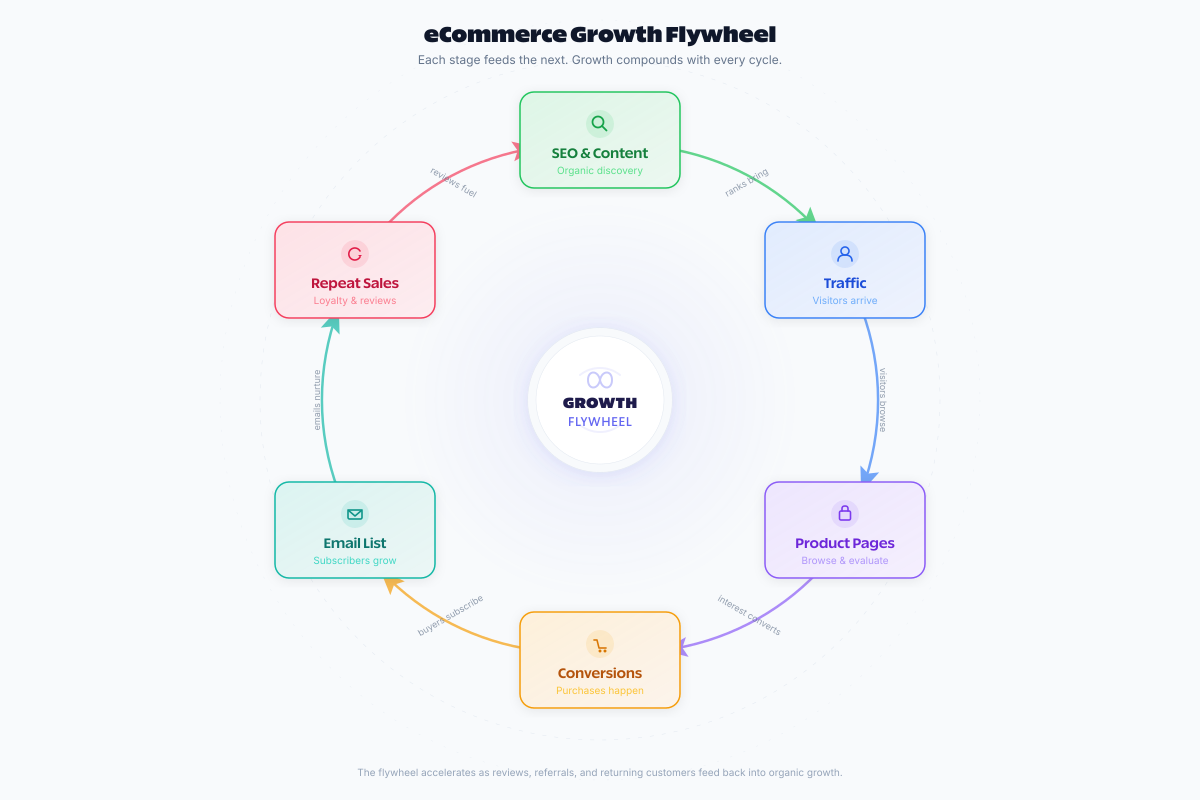
Getting the store live is step one. Growth is where the real work begins. Here’s what I focus on with clients after launch.
Optimize Your Product Pages
Your product pages are where buying decisions happen. Every element matters: the headline, photos, description, price display, and call-to-action button.
Write product descriptions that answer objections, not just list features. “Waterproof to 50 meters” is a feature. “Wear it in the pool without worrying” is what sells. Include customer reviews prominently. Products with reviews convert 270% better than those without.
Invest in eCommerce SEO
Paid ads bring traffic while you pay. SEO brings traffic forever. eCommerce SEO involves optimizing product titles, descriptions, category pages, and building content around buying keywords.
The basics: use descriptive product titles (not SKU codes), write unique descriptions for each product (don’t copy manufacturer text), and build collection pages around categories your customers actually search for.
Reduce Cart Abandonment
The average cart abandonment rate sits around 70%. That means 7 out of 10 people who add something to their cart leave without buying. Three things reduce this significantly:
- Show total costs upfront. Hidden shipping fees are the #1 reason for abandonment. Display shipping costs on the product page, not at checkout.
- Enable guest checkout. Forcing account creation kills conversions. Let people buy without signing up.
- Send abandonment emails. A simple 3-email sequence (1 hour, 24 hours, 72 hours after abandonment) recovers 5-10% of lost sales. Most platforms support this natively or through plugins.
Build Your Email List
Social media algorithms change. Ad costs rise. Your email list is the one marketing channel you fully own. Offer a 10% first-purchase discount in exchange for an email address. Send weekly or biweekly updates with new products, restocks, and exclusive deals.
Email marketing generates an average of $36 for every $1 spent. No other channel comes close to that ROI for ecommerce businesses.
Use Analytics to Find Leaks
Install Google Analytics 4 and check it weekly. Look for patterns: which products get views but no purchases? Where do people drop off in the checkout flow? Which traffic sources bring buyers, not just browsers?
I’ve seen stores double their conversion rate by fixing a single checkout step that confused users. Data tells you exactly where to focus your effort.
Retarget Visitors Who Didn’t Buy
Most first-time visitors won’t buy. That’s normal. Retargeting ads on Facebook, Instagram, and Google Display show your products to people who already visited your site. These ads convert 2-3x better than cold traffic because the audience already knows your brand.
Start with a small daily budget ($5-$10) targeting people who viewed specific product pages. Scale what works.
Frequently Asked Questions
How much does it cost to start an ecommerce store?
With WooCommerce, you can launch for $100-$300 (hosting + domain + a premium theme). Shopify starts at $39/month. Both require a payment gateway (Stripe or PayPal) which charges per-transaction fees, typically 2.9% + 30 cents. Budget an additional $50-$200 for your first batch of product photography.
Which is better: WooCommerce or Shopify?
For WordPress users, I’d pick FluentCart over both. It’s faster than WooCommerce, handles physical and digital products, and integrates natively with FluentCRM for marketing. WooCommerce is still the right choice for massive catalogs with niche plugin requirements. Shopify is better if you’re non-technical and want everything managed for you.
Can I run an ecommerce store without inventory?
Yes. Dropshipping lets you sell products without holding stock. When a customer orders, your supplier ships directly to them. Print-on-demand works similarly for custom merchandise. Digital products (ebooks, courses, templates) require no inventory at all.
How long does it take to set up an online store?
A basic Shopify store can go live in 2-4 hours. A WooCommerce store typically takes 1-2 days including theme customization. The store setup itself is fast. What takes longer is product photography, descriptions, and policy pages.
Do I need a business license to sell online?
Requirements vary by country and state. In most places, you don’t need a license to start selling, but you’ll need one before you scale. In India, a GST registration is required for interstate sales. In the US, check your state’s business registration requirements. Consult a local accountant before your first $1,000 in sales.
What’s the best way to drive traffic to a new store?
Start with three channels: SEO (long-term organic traffic), social media (Instagram and Pinterest for visual products), and paid ads (Google Shopping or Facebook ads for immediate traffic). Email marketing becomes your strongest channel once you build a list. Focus on one channel first, get it working, then add the next.
Starting an online store is simpler than most people think. The platform decision matters, but not as much as actually launching. Pick FluentCart if you’re on WordPress and want the best modern experience, Shopify if you want everything managed, or WooCommerce if you need a massive plugin ecosystem. Then launch, test, and iterate. The stores that succeed aren’t the ones with the best design on day one. They’re the ones that keep improving after launch.
Disclaimer: This site is reader-supported. If you buy through some links, I may earn a small commission at no extra cost to you. I only recommend tools I trust and would use myself. Your support helps keep gauravtiwari.org free and focused on real-world advice. Thanks. - Gaurav Tiwari