
 by
by
Buying a WordPress theme looks like a design decision. It isn’t. It’s a maintenance decision wearing a design costume, and the only question that matters a year after launch is the one no roundup asks: will this theme still be getting security and compatibility updates in five years? That single filter eliminates 80 percent of what you’ll find in “best theme” lists.
I’ve installed and uninstalled enough themes across client projects to know where the regret comes from, and it’s never the color scheme. This guide is the exact framework I use before buying a WordPress theme for any client: five criteria, applied in priority order, with hard pass/fail thresholds. By the end you’ll have a confident shortlist of two or three themes, or a clear reason to skip the bought-theme route entirely.
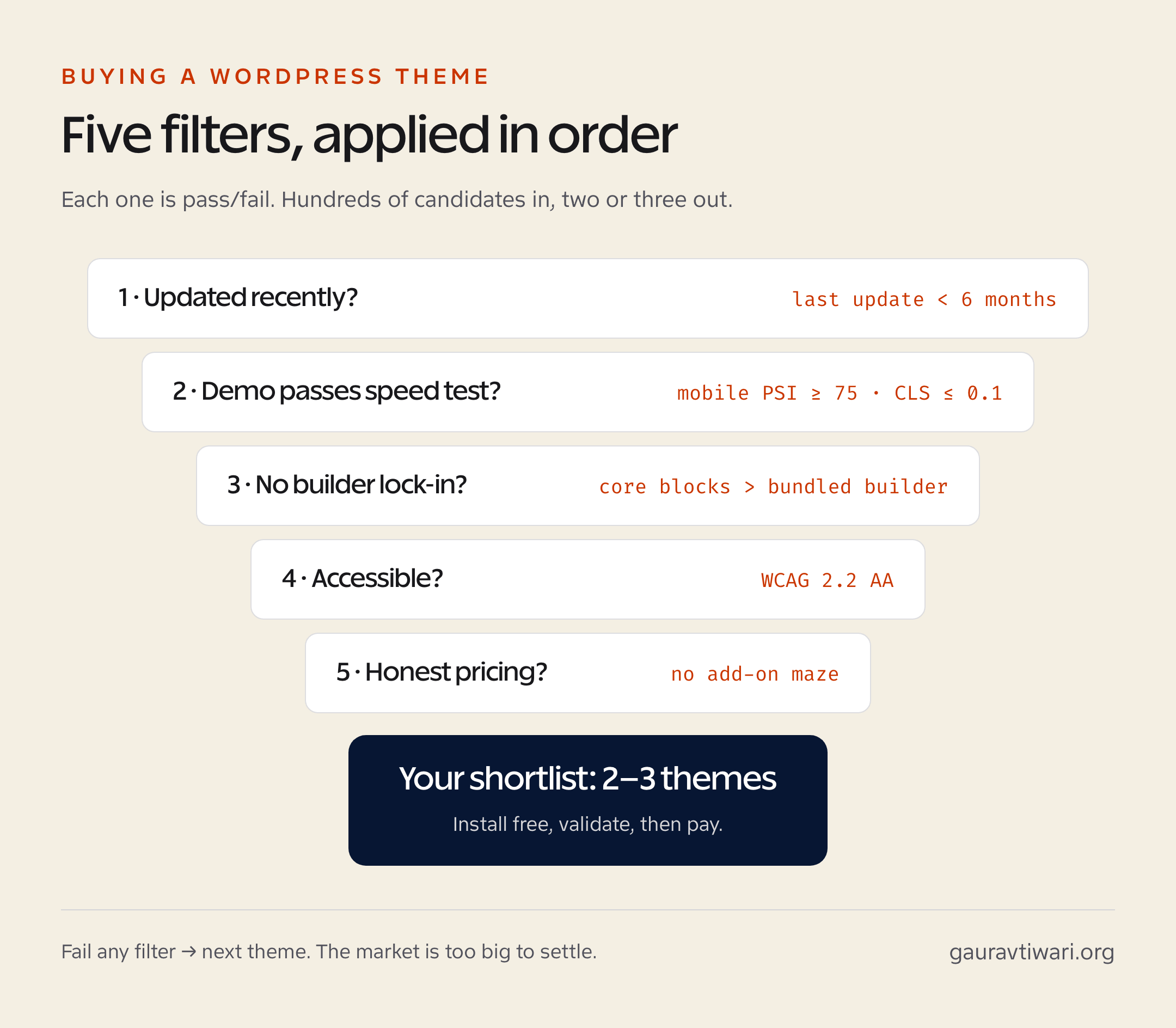
The five-year question (filter 80% of themes immediately)
Open the theme’s WordPress.org listing or its sales page on ThemeForest. Find the “last updated” date. If it’s more than 6 months old, walk away. If the developer’s other themes are also stale, definitely walk away. The WordPress ecosystem changes too fast for unmaintained themes: PHP version compatibility, block editor changes, security patches, browser API shifts all break things every quarter.
The themes I’d bet still exist and ship updates in 2030 (and the ones I currently install for new client projects):
| Theme | Why it survives | Best for | Cost |
|---|---|---|---|
| Kadence | Backed by Stellar (acquired 2023), aggressive update cadence, FSE-native | Business sites, blogs, e-commerce | Free + Pro from $99/yr |
| Blocksy | Indie team, exceptional FSE support, fast loading | Blogs, portfolios, agencies | Free + Pro from $69/yr |
| GeneratePress | 9-year track record, founder-owned, performance-obsessed | Anything. the safest default | Free + Premium $59/yr |
| Astra | Brainstorm Force's flagship, huge user base, well-funded | Business sites, e-commerce | Free + Pro from $59/yr |
| Bricks | Theme + builder hybrid, modern, growing developer base | Custom designs, agency work | $79 lifetime |
I run my own site on Marketers Delight (a niche premium theme), but for client projects I default to Kadence or GeneratePress 80% of the time. Both are fast, accessible, and work cleanly with the WordPress block editor without forcing you into a proprietary builder. Blocksy and Astra fill the gaps when those two don’t fit.
Performance test the theme before buying
Every theme demo lies. They run on optimized hosting with zero plugins, perfectly compressed images, and a curated demo content set. Real-world performance is what counts.
The pre-purchase performance test:
- Find the theme’s official demo URL. Run it through PageSpeed Insights (mobile + desktop) and WebPageTest.
- Mobile PageSpeed score < 75? Skip. The theme will be even slower with your real content and plugins.
- Cumulative Layout Shift (CLS) > 0.1? Skip. The theme has structural problems you can’t fix.
- Total page weight > 2.5MB on demo? Skip. The theme is asset-bloated.
- Render-blocking resources > 5? Skip. The theme isn’t optimized for modern web.
If the theme passes the demo test, you’ve got a fighting chance. If the demo fails, your real site will be worse. There’s no version of “we’ll optimize it later” that actually works for a structurally heavy theme.
The lock-in risk most buyers ignore
Themes that bundle a proprietary page builder (Avada with Fusion Builder, Divi with Divi Builder, BeTheme with Muffin Builder) are a one-way door. Once you’ve built 50 pages with the bundled builder, switching themes means rebuilding all 50 pages from scratch. The “save 200 hours of design time” pitch becomes “lose 400 hours migrating off this theme in 2030”.
The lock-in scale, from worst to best:
- Avoid: themes that ship a proprietary page builder you must use (Divi, Avada, BeTheme, Bridge).
- Tolerable: themes that recommend but don’t require a third-party builder (Astra + Elementor, Hello Theme + Elementor).
- Preferred: themes that work natively with the WordPress block editor / Site Editor (Kadence, Blocksy, GeneratePress).
- Modern alternative: theme + builder hybrids built around modern web (Bricks, Breakdance) where the builder output is clean enough to migrate later.
If you’ve already bought a builder-locked theme and want out, the migration path usually requires rebuilding pages with the block editor or Bricks. Budget 2–6 hours per page for the rebuild. Yes, it’s painful. Yes, it’s worth it on a multi-year horizon.
Accessibility audit the theme (WCAG 2.2 AA)
Most premium themes still ship with accessibility failures. Run the demo through axe DevTools or Lighthouse Accessibility before buying. Specifically check:
- Color contrast on body text and buttons. needs to hit the WCAG 4.5:1 minimum.
- Heading hierarchy. many themes use H1 multiple times or skip levels.
- Keyboard navigation. can you Tab through the menu and reach every interactive element?
- Focus indicators. many themes strip browser focus rings without replacing them.
- Skip-to-content link. should appear when you press Tab on page load.
An accessible theme isn’t a nice-to-have. Lawsuits over inaccessible WordPress sites have multiplied since 2020 (Domino’s vs Robles, Winn-Dixie cases). EU’s European Accessibility Act enforcement started June 2025. Building on an inaccessible theme creates legal and remediation debt that’s harder to fix than starting accessible.
Customization scope without paid add-ons
The free version of most premium themes is intentionally crippled to push you to the paid tier. That’s fine if the paid tier is reasonable. It’s not fine when the paid tier is itself crippled and pushes you to add-on bundles, “modules”, and per-feature upsells.
Before buying, list the customizations you actually need. Then check whether they’re in the base license or behind another paywall:
- Header/footer builder
- Mega menu
- WooCommerce integration (full, not just basic)
- Custom post-type templates
- Hooks for header scripts, ad code, custom CSS per page
- Mobile menu customization
- Page transition / animation control (if needed)
- Multilingual support (RTL, WPML, Polylang compatibility)
If half of these require add-ons, your real cost isn’t the headline price. It’s the headline price plus 2–5 add-on subscriptions, totaling $200–$500/year for a “premium” theme advertised at $69. Factor that in before buying.
When to skip buying a theme entirely
Two situations where the right answer is “don’t buy a theme”:
- You have a strong custom design. Build with a block-based starter (Kadence Starter Templates, Blocksy Companion) or a custom theme using the WordPress Site Editor. Premium themes constrain your design more than they help when you have a brand to honor.
- You’re a developer. Use a starter framework like Sage, Underscores, or build a block theme from scratch. The maintenance and customization control is worth the extra setup time.
For most non-developers shipping a content or business site, the right answer is still: pick one of the 5 themes from the table above, install it free, validate the fit, then upgrade to Pro if needed. That’s the path with the lowest commitment cost and the highest long-term flexibility.
For broader site-build context, see my web design power tips and essential pre-launch tests.
For a writing or review site, Osmium is a free block-theme option with reading layouts and reusable editorial patterns. Try it with a real article and your existing plugins before switching; free software still needs hosting and maintenance.
Where You Buy Matters Almost as Much as What
The same theme can be a different product depending on where you buy it. Three channels, three very different deals:
- The developer’s own site (GeneratePress, Kadence, Blocksy). Best support, cleanest licensing, renewal discounts. My default.
- ThemeForest and marketplaces. Huge selection, but support runs through marketplace tickets, licenses are per-site, and “6 months of support included” means exactly that. Fine for design-led picks like Bridge or Oshine; read the support terms first.
- Bundled with hosting or “free premium theme” promos. Check who owns the license. If it’s tied to the hosting account, the theme dies when you migrate, which is a strange thing to discover during a migration.
And wherever you buy: pay annually the first year, not lifetime. You’re testing the relationship, not just the product. The 8-point pre-install checklist in my guide on choosing a WordPress theme pairs with this framework for the evaluation itself.
Frequently asked questions
What should I check before buying a WordPress theme in 2026?
Five things: page-speed score on the live demo (mobile PageSpeed 75+), update frequency (last update under 6 months), customization scope without paid add-ons, accessibility compliance (WCAG 2.2 AA), and the support team’s response time on the theme’s forum.
Are free WordPress themes good enough?
For personal blogs, portfolio sites, and MVP projects, absolutely: Astra Free, Kadence Free, and Blocksy Free are all production-ready. For e-commerce, membership, or anything with custom layouts, the time saved by a $50 to $100 premium theme pays back in the first weekend.
What’s the most overrated theme feature?
Built-in page builders bundled with the theme. They lock you into the theme forever; switch themes and your pages break. Use a theme that plays well with the block editor, or pair one with Bricks, GenerateBlocks, or Kadence Blocks instead.
How often should I switch WordPress themes?
A major design refresh every 3 to 5 years is long enough to amortize the design effort and short enough to stay current. Switch immediately if your theme stops getting updates, ships accessibility failures, or lags behind WordPress core releases.
Will switching themes break my site?
Content stays. Custom CSS, theme-specific shortcodes, header and footer customizations, and page-builder layouts often don’t. Always stage a theme switch on a clone first, and budget half a day for cleanup even on a simple switch.
Tell Google you want more of this.
Add Gaurav Tiwari as a preferred sourceOne tap, and this site shows up more often in your own Top Stories, AI Overviews and AI Mode. Remove it any time.
