
Best Chromebooks for Students + Buying Guide
Chromebooks have been the go-to budget laptops for students since Google launched them over a decade ago. Fast boot times, zero viruses, automatic updates, and prices that don’t make you wince. For students who live in Google Docs, take notes in class, and submit assignments online, they’re hard to beat.
But I need to be upfront with you about something before you spend your money.
Here’s my honest take on Chromebooks in 2026: if you’re a student who lives in the browser (Google Docs, research, email, video calls), a Chromebook Plus is the best $300-500 you can spend. You’ll get better battery life, faster performance, and less hassle than any Windows laptop at the same price. But if your courses need specialized software, look at a proper laptop instead. Don’t force a Chromebook to be something it’s not.

A Word of Caution: The Future of ChromeOS
Google has officially confirmed that ChromeOS is merging with Android. At Qualcomm’s Summit in September 2025, Google’s president for the Android ecosystem announced that Android will absorb ChromeOS into a unified platform, internally called “Aluminium OS.” The full release is expected sometime in 2026-2028.
What does this mean for you as a student buying a Chromebook right now?
- Your Chromebook won’t suddenly stop working. Google will continue supporting existing ChromeOS devices through their Auto Update Expiration (AUE) dates, which are typically 8-10 years from release.
- The transition should be an upgrade. The merged OS means native Android apps will run directly on your device without emulation, full access to the Android app ecosystem, and deeper integration with Google’s AI features including Gemini.
- But there’s uncertainty. Google’s track record with platform mergers (remember Fuchsia?) isn’t spotless. The timeline keeps shifting, and nobody knows exactly what the transition experience will look like for existing hardware.
My advice? Buy a Chromebook Plus model with a long AUE date (2032 or later). These have the hardware specs (8GB RAM, modern processors) that are most likely to receive the new unified OS when it arrives. Avoid buying the cheapest Celeron-based Chromebooks with short update windows. You want a device that’s built for where the platform is going, not where it’s been.
With that context, here are the best Chromebooks for students right now.
Quick Picks
Short on time? Here’s who should buy what:
- Best overall: ASUS Chromebook Plus CX34 (i3) – solid specs, great display, long update support
- Best value: Acer Chromebook Plus 514 – touchscreen, fast processor, 11-hour battery
- Best convertible: HP Chromebook Plus x360 14 – 360-degree hinge for tablet mode
- Best performance: ASUS Chromebook Plus CX34 (i5) – fastest Chromebook in its class
- Most portable: Lenovo Chromebook Duet – tablet + keyboard combo, ultra-lightweight
- Tightest budget: HP Chromebook 14 – gets the job done under $200
7 Best Chromebooks for Students in 2026
1. ASUS Chromebook Plus CX34 (Intel Core i3, 8GB RAM)
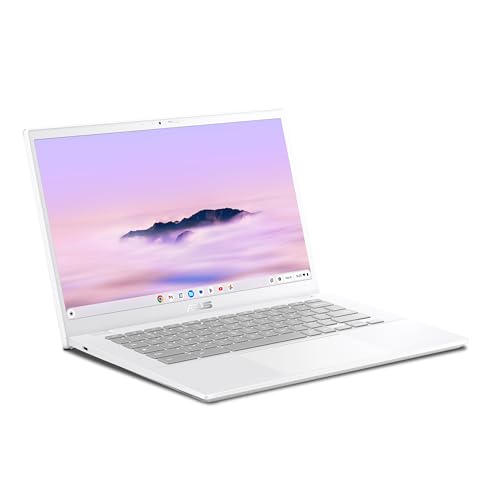
ASUS Chromebook Plus CX34 (14", Intel Core i3, 8GB RAM)
- Runs ChromeOS with Google AI — Write like a pro, design unique backgrounds, and reimagine photos with generative AI. Includes 12 months of Google One AI Premium plan.
- Powered by Intel Core i3-1215U processor, 8GB RAM and 256GB UFS storage, Wi-Fi 6 + Bluetooth 5.3 for fast, responsive performance.
- 14-inch Full HD (1920×1080) NanoEdge anti-glare display with up to 10 hours of battery life.
The ASUS Chromebook Plus CX34 is my top pick because it hits every checkbox a student needs. The Intel Core i3-1215U is a real processor, not the anemic Celerons you’ll find in cheaper models. Combined with 8GB RAM and 256GB UFS storage, this machine handles multitasking with 20+ Chrome tabs, Google apps, and a video call running simultaneously without stuttering.
The 14-inch Full HD NanoEdge display is sharp enough for reading dense documents and watching lectures. Anti-glare coating means you can use it in bright classrooms without squinting. Battery life hits around 10 hours, which gets you through a full day of classes.
What really sells this model is the “Chromebook Plus” designation. Google requires these to meet minimum hardware specs (8GB RAM, at least 128GB storage, modern processor), which means they get exclusive AI features: Magic Eraser for photos, noise cancelation on video calls, and 12 months of Google One AI Premium with Gemini Advanced included. For students, that’s a genuinely useful bonus for research and writing.
The AUE date extends to 2032, giving you nearly a decade of updates and making this a safe purchase even with the ChromeOS-Android merger on the horizon.
2. Acer Chromebook Plus 514 (14″ FHD Touch)
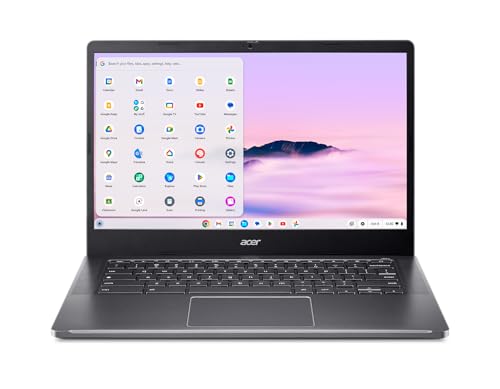
Acer Chromebook Plus 514 (14" FHD Touch, Intel i3-N305)
- Intel Core i3-N305 processor with 8GB LPDDR5 RAM and 128GB SSD for 2x faster performance compared to standard Chromebooks.
- 14-inch Full HD IPS touchscreen display with up to 11 hours of battery life and Wi-Fi 6E connectivity.
- Built-in Google AI with Gemini, Magic Eraser, noise cancelation for video calls, and advanced apps including Microsoft 365 and Adobe Photoshop.
The Acer Chromebook Plus 514 delivers the best bang-for-buck in the Chromebook Plus category. The Intel i3-N305 is an 8-core processor that’s roughly twice as fast as the Celerons in budget Chromebooks. You’ll feel the difference when switching between apps, loading web pages, and running Google Workspace.
The touchscreen is a nice addition at this price. It makes navigating, annotating PDFs, and using Android apps from the Play Store feel more natural. The 14-inch Full HD IPS panel has good viewing angles, and 11 hours of battery life means you can leave the charger in your dorm most days.
Acer includes Wi-Fi 6E, which is important if your campus has upgraded its network infrastructure. You’ll get faster, more reliable connections in crowded lecture halls. The FHD camera is decent for video calls and online classes.
One thing I appreciate: Chromebook Plus models can now run Microsoft 365 and Adobe Photoshop (web versions) with full functionality. For students who occasionally need Word or Excel for assignments, that’s a real convenience.
3. HP Chromebook Plus x360 14 (Convertible)

HP Chromebook Plus x360 14 (FHD Touch, i3-N305, 2024)
- Full HD IPS touchscreen display with vibrant colors and intuitive touch control in a versatile 360-degree convertible design.
- Intel Core i3-N305 processor with 8GB LPDDR5 RAM and 128GB UFS storage for fast, power-efficient performance.
- Intel UHD graphics support 4K content streaming and 720p gaming. Chrome OS with automatic updates and built-in virus protection.
If you want a Chromebook that doubles as a tablet, the HP x360 14 is the way to go. The 360-degree hinge lets you fold it flat for reading, prop it up in tent mode for watching videos, or flip it all the way around for tablet use with the touchscreen. It’s genuinely versatile.
The specs match the Acer 514: Intel Core i3-N305, 8GB LPDDR5 RAM, and 128GB UFS storage. The UFS storage is slightly faster than eMMC while consuming less power, which helps with both performance and battery life. The Full HD IPS touchscreen delivers vibrant, accurate colors.
HP’s build quality has always been reliable, and the x360 feels solid despite being a convertible. The hinges are firm enough that the screen doesn’t wobble when you tap it but smooth enough for easy one-handed flipping. Chrome OS with automatic updates means you’ll never have to worry about security patches or driver installations.
For students who take handwritten notes (especially with a USI stylus and a good note-taking app) or like reading in tablet mode between classes, the convertible form factor is a real advantage over standard clamshell designs.
4. Acer Chromebook Plus 14 (512GB SSD)
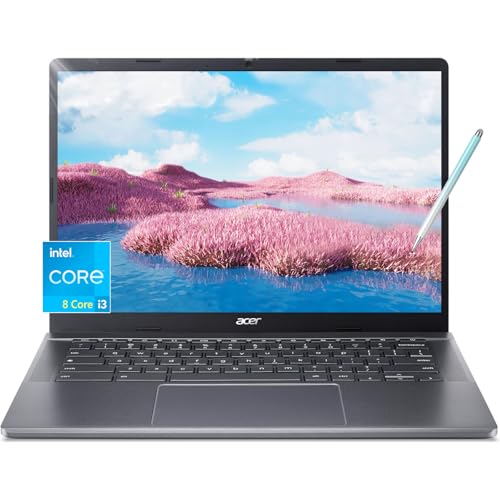
Acer Chromebook Plus 14 Touchscreen (i3-N305, 512GB SSD)
- 14-inch FHD IPS touchscreen display with narrow bezels for crisp, vibrant visuals. Bundled with stylus pen and protective sleeve.
- 8-core Intel i3-N305 processor with 8GB RAM and 512GB PCIe SSD for quick boot-ups and responsive multitasking.
- Wi-Fi 6E, USB-C, FHD webcam with privacy shutter, and long battery life in an ultralight design perfect for students.
Most Chromebooks ship with 64-128GB of storage, which is fine for cloud-based work. But if you download a lot of Android apps, keep offline files, or just hate the constant “storage almost full” warnings, the 512GB PCIe SSD in this Acer model is a game-changer.
The SSD isn’t just bigger, it’s faster than eMMC. Boot times are noticeably quicker, apps launch faster, and file transfers don’t make you wait. Combined with the same Intel i3-N305 processor and 8GB RAM, this is one of the more capable Chromebooks you can buy.
It comes bundled with a stylus pen and protective sleeve, which is a nice touch for students. The FHD touchscreen with narrow bezels looks modern, and the FHD webcam includes a physical privacy shutter. Wi-Fi 6E ensures you’re getting the fastest wireless speeds your campus can offer.
The extra storage is especially valuable for students who use Linux (yes, ChromeOS supports it) for coding or development work. If you’re a computer science student who wants a lightweight Linux-capable machine, this is an excellent choice.
5. ASUS Chromebook Plus CX34 (Intel Core i5, Premium)
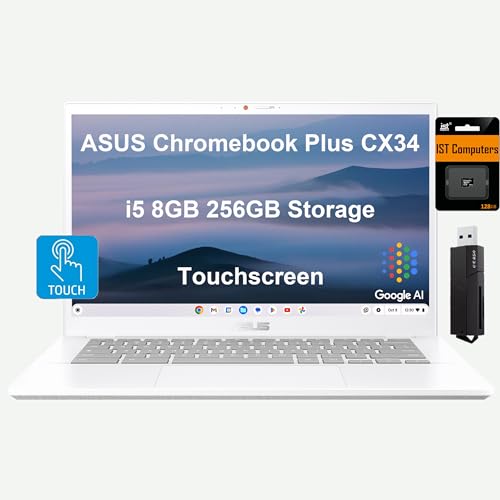
ASUS Chromebook Plus CX34 (i5-1335U, 256GB, Touchscreen)
- Intel Core i5-1335U processor (up to 4.6 GHz, 10 cores) with 8GB LPDDR5 RAM and 256GB storage. US MIL-STD 810H durability rated.
- 14-inch FHD (1920×1080) anti-glare touchscreen with 80% screen-to-body ratio, FHD 1080p webcam with privacy shutter, and support for external 4K displays.
- Comprehensive ports: 2x USB 3.2 Type-A, 2x USB 3.2 Type-C, HDMI 1.4, Wi-Fi 6E, Bluetooth 5.3. Auto Update Expiration: June 2032.
If you want the fastest Chromebook money can buy, this is it. The Intel Core i5-1335U is a 10-core processor that turbos up to 4.6 GHz. That’s serious horsepower for a Chromebook. Running Linux apps, multiple Android apps, dozens of browser tabs, and a video stream simultaneously? No problem.
ASUS built this thing to MIL-STD 810H military durability standards. That’s not just marketing. It means the laptop has been tested for drops, vibrations, humidity, and temperature extremes. For students who toss their laptop into a backpack every day, that’s real peace of mind.
The port selection is excellent: two USB-A, two USB-C, and HDMI 1.4. You can connect an external 4K monitor at 60Hz through the USB-C or HDMI ports, which is great for having a proper workspace at your desk. The FHD touchscreen with 80% screen-to-body ratio looks clean, and the 1080p webcam with privacy shutter is a step above most Chromebook cameras.
With an AUE date of June 2032, this machine will receive updates and (likely) the ChromeOS-Android merger transition whenever it arrives. It’s the premium choice for students who plan to use their Chromebook intensively for years.
6. Lenovo Chromebook Duet (2025, Tablet + Keyboard)
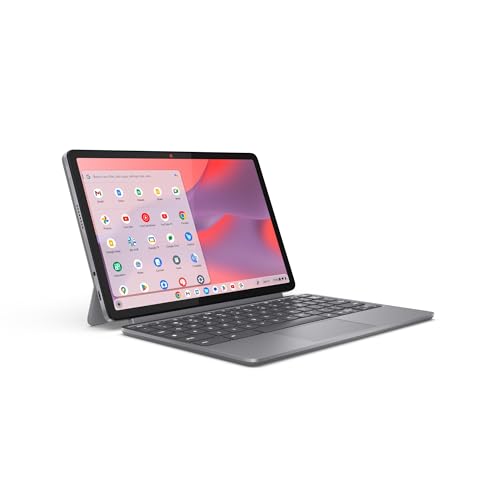
Lenovo Chromebook Duet (2025, 10.95" Convertible Tablet)
- 2-in-1 convertible laptop-tablet with folio keyboard, full-metal chassis, and Corning glass protection in an ultra-portable design.
- MediaTek Kompanio 838 processor, 4GB RAM, 64GB storage, and all-day battery life for on-the-go productivity.
- Dual USB Type-C ports for fast data transfer and external display connection. Front camera with physical privacy shutter.
The Lenovo Chromebook Duet is a tablet first, laptop second, and it’s perfect for students who value portability above all else. Weighing just over two pounds with the keyboard and kickstand attached, you’ll barely notice it in your bag. The folio keyboard magnetically snaps on and off, converting between laptop and tablet mode in seconds.
The full-metal chassis with Corning glass protection feels premium and durable. It’s the kind of device you can toss on your bed, read in the library, and prop up in the kitchen. The 10.95-inch display is sharp and bright enough for comfortable reading and note-taking.
I won’t pretend it’s a powerhouse. The MediaTek Kompanio 838 with 4GB RAM is fine for web browsing, Google Docs, email, and streaming. It’s not going to handle 30 Chrome tabs or heavy Android apps gracefully. But for basic student work, it’s more than sufficient.
Battery life is excellent, easily lasting 12-13 hours on a charge. If you’re a student who mostly needs something for taking notes in class (also check out the best tablets for students if you want a pure tablet experience), reading textbooks, and writing papers, the Duet does all of that at a price and size that’s hard to argue with.
7. HP Chromebook 14 (2025, Budget)
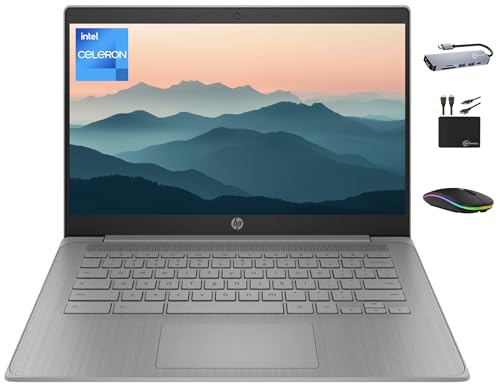
HP Chromebook 14 (2025, Intel Celeron N4120, Budget)
- 14-inch HD (1366×768) anti-glare display with HP True Vision 720p HD camera and integrated microphone for online classes and video calls.
- Intel Celeron N4120 quad-core processor (up to 2.6 GHz) with 4GB DDR4 RAM and 64GB eMMC plus 128GB storage card for 192GB total storage.
- SuperSpeed USB Type-A and Type-C ports, HDMI, Wi-Fi 802.11ac, Bluetooth, and lightweight 3.35 lb design for easy daily carry.
Sometimes the budget is the budget, and there’s no shame in that. The HP Chromebook 14 is the cheapest option on this list, and it’s honest about what it is: a basic, reliable Chromebook for web-based learning.
The Intel Celeron N4120 is a quad-core processor that handles Chrome, Google Docs, and a handful of tabs without issues. 4GB RAM is the minimum I’d recommend for anyone, and it works fine for ChromeOS since the operating system is light on resources. The included 128GB storage card bumps total storage to 192GB, which is generous for the price.
The 14-inch HD (1366×768) display is the main compromise. It’s not Full HD, so text and images won’t be as sharp. For writing papers and attending online classes, it’s adequate. For anything visual-heavy, you’ll notice the difference. The webcam and microphone work well enough for Google Meet and Zoom calls.
I should be transparent: this is not a Chromebook Plus model, which means it won’t get the exclusive AI features and may have a shorter update timeline. If you can stretch your budget to the Acer Chromebook Plus 514, you’ll get a meaningfully better experience. But if you genuinely can’t, the HP Chromebook 14 will get you through your coursework.
What to Look for in a Student Chromebook
Not all Chromebooks are created equal. Here’s what actually matters when you’re shopping:
Get a Chromebook Plus if You Can
Google’s “Chromebook Plus” branding means guaranteed minimum specs: at least 8GB RAM, a modern processor, and 128GB+ storage. These models also get exclusive features like Google AI tools, better update support, and are the most likely to receive the upcoming ChromeOS-Android unified platform. If your budget allows, always choose a Chromebook Plus over a regular Chromebook.
RAM: 8GB Is the Sweet Spot
ChromeOS is efficient, but Chrome the browser isn’t. Each tab consumes memory, and students tend to have many open at once. 4GB works for light use, but 8GB gives you comfortable headroom for multitasking. Don’t bother with more than 8GB on a Chromebook. It won’t make a noticeable difference.
Check the Auto Update Expiration Date
Every Chromebook has an AUE date, which is when Google stops providing Chrome OS updates. Buy a model with an AUE date at least 5-6 years out. Given the ChromeOS-Android merger, models with AUE dates of 2032 or later are ideal. You can check any Chromebook’s AUE date at Google’s support page before buying.
Display Quality Matters More Than You Think
You’ll stare at this screen for hours every day. A Full HD (1920×1080) IPS display makes text sharper, colors more accurate, and overall use more comfortable than the 1366×768 HD panels on budget models. If you’re choosing between two similarly priced Chromebooks, always pick the one with the better display.
Battery Life: 10+ Hours or Bust
One of the best things about Chromebooks is their battery life. Most good models last 10-13 hours, meaning you can leave your charger at home for a full day of classes. Don’t settle for less than 10 hours of real-world battery life.
Conclusion
Chromebooks remain the smartest choice for students who primarily work in the browser. They’re fast, secure, affordable, and require zero maintenance. The Chromebook Plus models in particular offer genuinely impressive hardware with Google AI features that make them useful productivity tools.
My top recommendation is the ASUS Chromebook Plus CX34 (i3). It balances performance, display quality, build quality, and update longevity better than anything else at its price. For budget-conscious students, the Acer Chromebook Plus 514 delivers nearly the same experience for less.
Just keep in mind: ChromeOS is heading for a major transition. Buy a Chromebook Plus with a long AUE date, and you’ll be well-positioned regardless of what Google does next. Avoid the cheapest Celeron models with 4GB RAM unless your budget truly demands it. And if you decide a Chromebook isn’t right for your needs, check out the best budget laptops for students instead.
Disclaimer: This site is reader-supported. If you buy through some links, I may earn a small commission at no extra cost to you. I only recommend tools I trust and would use myself. Your support helps keep gauravtiwari.org free and focused on real-world advice. Thanks. - Gaurav Tiwari