
Content Optimization: Definitive Guide & Strategy

Publishing content without optimizing it is like opening a restaurant on a dead-end street. The food might be great, but nobody’s finding you. I’ve published over 1,800 articles on this site since 2008. The ones that rank aren’t always the best written. They’re the ones I optimized properly before and after hitting publish.
Content optimization is the difference between an article that sits at position 47 collecting dust and one that pulls 5,000 organic visits per month. It’s not a single technique. It’s a system that covers everything from the keyword you target to how you structure your headings to when you go back and update what you’ve already published.
I’m going to break down the entire process I use. Not 19 vague “strategies.” Specific steps, in the order they matter, with the tools and thinking behind each one.
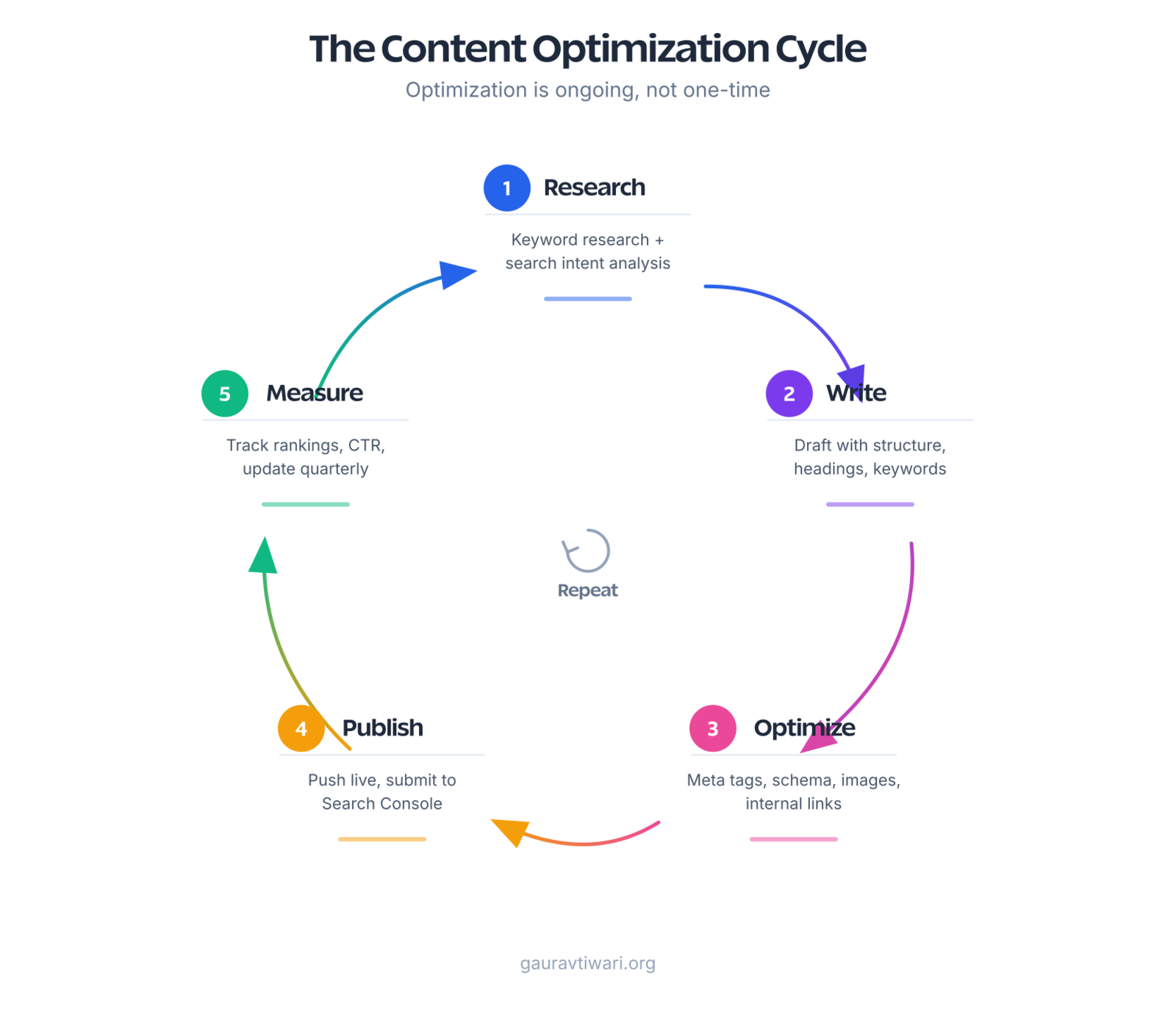
What Content Optimization Actually Means
Content optimization is making your content findable, readable, and actionable. That’s it. Three things.
Findable means search engines can discover, index, and rank your content for the right queries. This covers keyword targeting, meta tags, schema markup, and technical SEO basics. Readable means real humans actually want to consume what you’ve published. Short paragraphs, clear headings, scannable structure. Actionable means the reader does something after reading: clicks a link, signs up, buys, or bookmarks for later.
Most guides treat content optimization as just SEO. It’s not. SEO gets you the traffic. But if visitors land on your page and bounce in 8 seconds because the content is a wall of text with no structure, that traffic is worthless. You need both sides: the technical foundation that search engines reward and the reading experience that humans stick around for.
Start with Search Intent, Not Keywords
Before you write a single word, you need to understand why someone is searching. The same topic can have completely different intent depending on the query. “Content optimization” could mean someone wants to learn what it is, find tools to do it, or hire someone to handle it. Each intent needs different content.
There are four types of search intent, and every query falls into one:
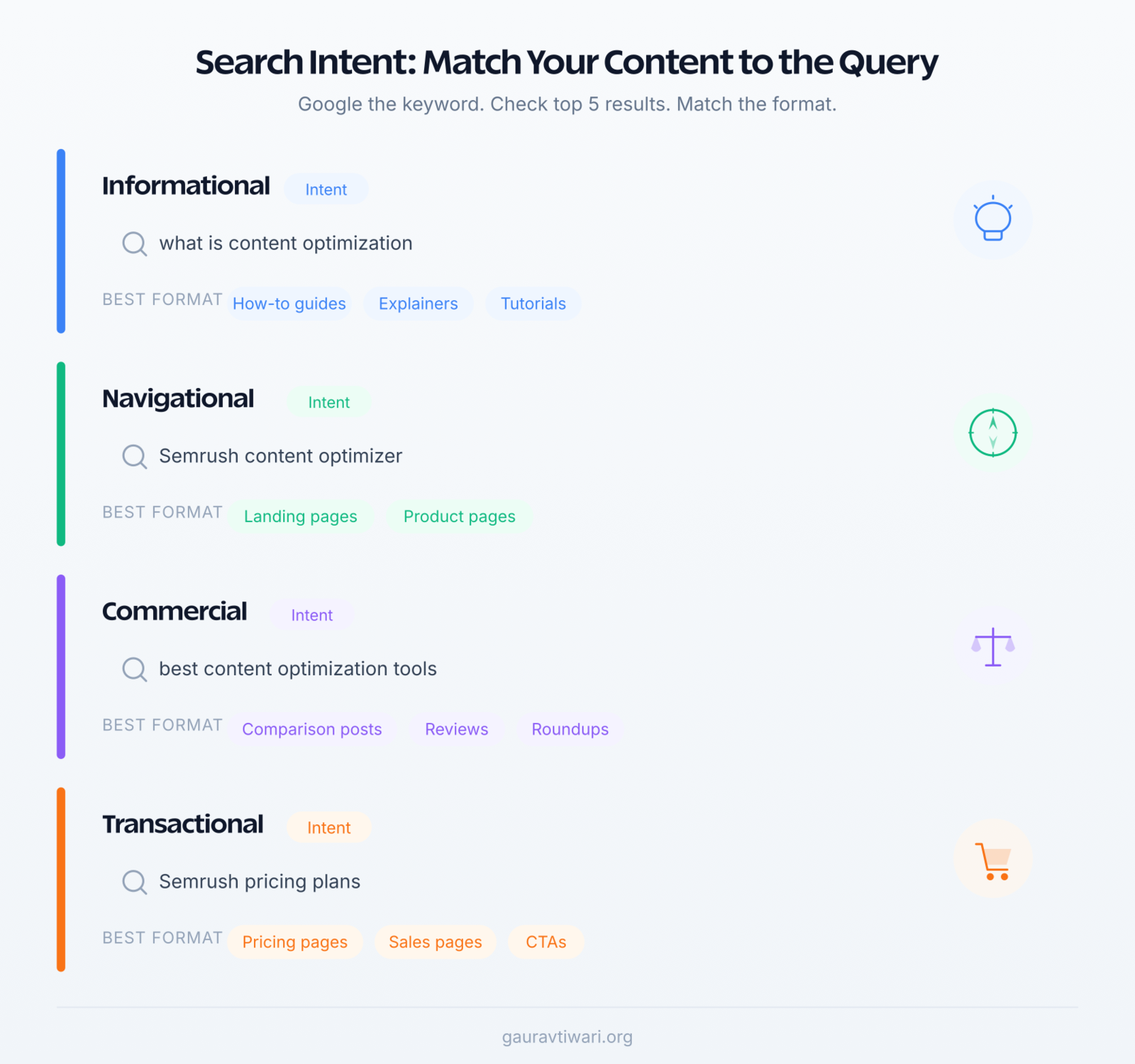
- Informational: “What is content optimization?” The searcher wants to learn. Give them a clear explanation with examples.
- Navigational: “Semrush content optimizer.” They’re looking for a specific tool or page. Don’t get in the way.
- Commercial: “Best content optimization tools.” They’re comparing options before buying. Give them an honest comparison.
- Transactional: “Semrush pricing.” They’re ready to purchase. Clear CTAs, pricing info, and a direct path to buy.
The fastest way to check intent? Google your target keyword and look at the top 5 results. If they’re all how-to guides, Google has decided this is an informational query. Don’t try to rank a product page there. If they’re all comparison posts, write a comparison. Match the format Google is already rewarding.
I check search intent before every article I write. It takes 2 minutes: Google the keyword, study the top results, note the format (list, guide, review, tool page), and match it. This single step prevents more wasted content than any other technique I know.
Keyword Research That Actually Informs Your Writing
Keyword research isn’t about stuffing phrases into your content. It’s about understanding what language your audience uses so you can meet them where they are. The goal is finding keywords with enough search volume to be worth targeting, low enough difficulty that you can actually rank, and clear enough intent that you know what to write.
My keyword research process for every article:
- Start with a seed keyword: The broad topic you want to cover. For this article, it was “content optimization.”
- Expand with tools: Semrush shows related keywords, questions people ask, and what your competitors rank for. Google’s “People also ask” section is free and surprisingly useful.
- Pick one primary keyword: One URL, one topic, one primary keyword. Every page should have a clear focus.
- Collect 3-5 secondary keywords: Related phrases that you’ll naturally incorporate. For this article: “content optimization strategy,” “optimize content for SEO,” “content optimization checklist.”
- Check difficulty vs. domain authority: A keyword with 50,000 monthly searches and a difficulty of 85 is useless if your site has a domain authority of 20. Target keywords you can actually win.
Place your primary keyword in five places: the title tag, the URL slug, the first 100 words of your content, at least one H2 heading, and the meta description. This isn’t gaming the system. It’s confirming to Google that your content matches the query. If your article is about content optimization but the phrase doesn’t appear until paragraph 6, you’ve confused both Google and your readers.
Headlines and Title Tags That Earn Clicks
Your title tag is the most important piece of text on your page. It appears in search results, browser tabs, and social shares. A great article with a weak title will underperform a decent article with a compelling one. I’ve A/B tested titles on my own posts and seen CTR differences of 40-60% between versions.
What works in title tags:
- Numbers: “10 Ways to Optimize Content” outperforms “Ways to Optimize Content” almost every time. Specific numbers signal structured, scannable content.
- Brackets: “[Full Guide]” or “(With Examples)” in a title tag increases CTR by 33% according to HubSpot’s data.
- Power words with restraint: “Definitive,” “Complete,” or “Proven” work when they’re accurate. “Mind-Blowing” and “Unbelievable” don’t.
- Under 60 characters: Google truncates longer titles. Front-load your keyword so it’s visible even if the title gets cut.
Your H1 (post title) and title tag can differ. The H1 can be longer and more descriptive. The title tag needs to be concise and click-worthy. Most SEO plugins like Rank Math let you set these independently.
On-Page SEO: The Technical Foundation
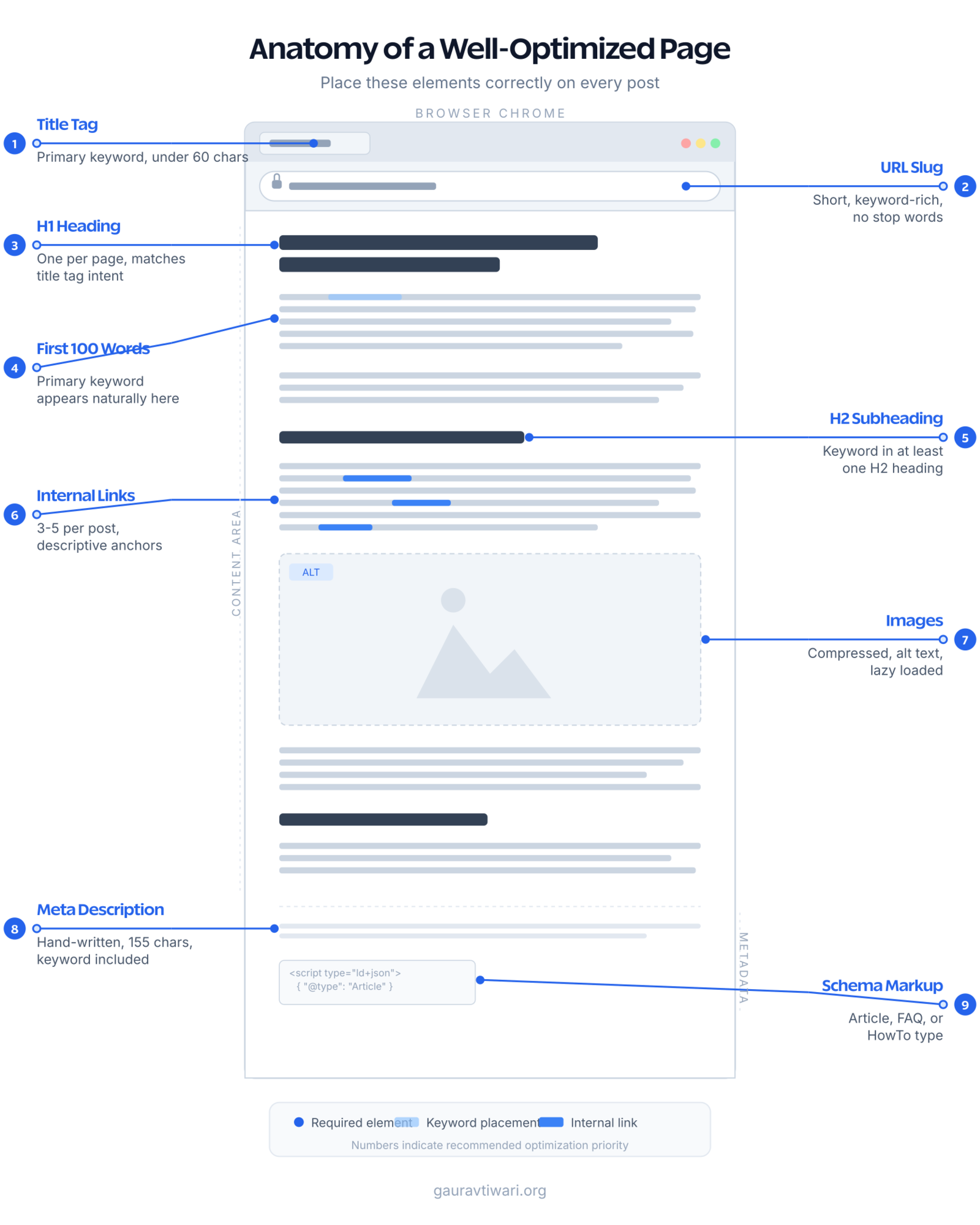
On-page SEO is the set of signals on your actual page that tell search engines what it’s about and how to rank it. Get these right, and you’ve handled 60% of the optimization work.
Meta Descriptions
Meta descriptions don’t directly affect rankings. But they directly affect click-through rate, which affects rankings indirectly. A compelling meta description can double your CTR at the same position. Write one manually for every post. Keep it under 155 characters. Include your primary keyword naturally, and give the reader a reason to click.
Auto-generated meta descriptions from SEO plugins are almost always worse than a hand-written version. They grab the first paragraph of your content, which rarely makes a good sales pitch for your article.
Heading Hierarchy
One H1 per page (your post title). H2s for major sections. H3s for subsections within those H2s. Never skip levels. This hierarchy helps both screen readers and search engines understand your content structure. Include your primary keyword in at least one H2. Use related keywords in other H2s and H3s naturally.
URL Structure
Short, keyword-rich URLs outperform long ones. /content-optimization/ beats /the-definitive-guide-to-content-optimization-strategy-for-better-reach/. Strip out stop words. Keep it under 5 words if possible. Once a URL is published and indexed, don’t change it without setting up a 301 redirect.
Schema Markup
Schema tells Google exactly what type of content you’ve published. Article schema, FAQ schema, HowTo schema. Each one can trigger rich results in SERPs, which take up more visual space and increase click-through rates. If you’re using Rank Math, schema is built in. For FAQ sections, I use an ACF accordion block that outputs JSON-LD automatically.
Content Structure and Readability
The best content in the world won’t perform if people bounce after 3 seconds because it looks like a wall of text. Readability isn’t about dumbing down your content. It’s about respecting your reader’s time and attention span.
The formatting rules I follow on every post:
- Paragraphs: 1-4 sentences max. I aim for 2-3 on most paragraphs. Single-sentence paragraphs for emphasis.
- Subheadings every 200-300 words: These are scannable anchors. Most readers skim before deciding whether to read fully. Give them clear signposts.
- Bullet points and numbered lists: Use them for any list of 3+ items. They’re easier to scan than inline text.
- Bold key phrases: Not whole sentences. Just the 2-4 word phrase that captures the point. This helps skimmers find what they need.
- Short sentences mixed with longer ones: Monotonous sentence length puts readers to sleep. Vary it. A 5-word sentence hits differently after a 20-word one.
Target an 8th-grade reading level. Tools like Hemingway Editor score your readability for free. If Hemingway says “Grade 12,” you’re not writing for experts. You’re writing content that’s unnecessarily hard to read.
Readability doesn’t mean shallow. Some of the most complex topics I’ve written about score at a 7th-grade reading level. The trick is short sentences that explain one thing at a time. You can cover advanced material in simple language. Technical jargon isn’t a sign of expertise. Clarity is.
Internal and External Linking Strategy
Internal links are the most underrated optimization lever. They distribute authority across your site, help Google discover new content, and keep readers engaged longer. I’ve seen internal linking improvements alone move posts from position 12 to position 5 within weeks.
My linking rules:
- 3-5 internal links per post: Link to related articles using descriptive anchor text. “Content marketing strategy” is better than “click here.”
- Update old posts when you publish new ones: This is the step everyone skips. When I publish a new article, I find 3-5 existing posts on related topics and add links to the new piece. This signals to Google that the new content is connected to your existing topical authority.
- Hub and spoke model: Your most important pages (pillar content) should link to all related posts, and those posts should link back. My content marketing strategy guide links to every related piece I’ve written.
- External links with purpose: Link out to authoritative sources when they add value. Linking to a study that supports your claim makes your content more credible. Add
rel="nofollow"to links you don’t want to pass authority to.
Audit your internal links quarterly. Posts with zero incoming internal links are “orphans.” Google treats them as low-priority. A quick crawl every few months finds and fixes these gaps.
Image and Visual Optimization
Images serve two SEO functions: they improve engagement metrics (time on page, scroll depth) and they create ranking opportunities in Google Image Search. But unoptimized images are the most common reason WordPress sites fail Core Web Vitals.
The optimization checklist I run on every image:
- Resize before uploading: No blog image needs to be wider than 1200px. Most content areas are 700-800px wide.
- Compress: ShortPixel reduces file sizes by 60-80% with zero visible quality loss and auto-converts to WebP.
- Descriptive alt text: Every image needs alt text that describes what the image shows. Not keyword-stuffed. Descriptive. Google Image Search drives real traffic, and alt text is how Google understands your images.
- Lazy load below the fold: WordPress has native lazy loading. Make sure your theme isn’t disabling it.
- Use SVGs for diagrams and charts: They’re infinitely scalable, tiny in file size, and render perfectly on every screen. I use them for all explanatory graphics on this site.
Custom visuals outperform stock photos. An original diagram that explains your concept is worth more than a generic Unsplash image of someone typing on a laptop. It gets shared, linked to, and bookmarked. Stock photos get ignored.
Content Freshness: When to Update, Rewrite, or Delete
Google rewards fresh content. But “fresh” doesn’t mean publishing new articles every day. It means keeping your existing content accurate, relevant, and updated. I spend about 30% of my content time updating old posts. It consistently delivers more traffic growth than publishing new ones.
The decision framework I use:

- Update: The article ranks between position 5-20, the core content is solid, but facts or tools mentioned are outdated. Add new sections, update screenshots, refresh data. This is the highest-ROI content work you can do.
- Rewrite: The topic is still relevant but the article is thin, poorly structured, or doesn’t match current search intent. Strip it down and rebuild from scratch, keeping the same URL so you preserve any existing backlinks.
- Consolidate: You have 3 articles covering overlapping topics, each pulling weak traffic. Merge the best content from all three into one comprehensive piece, redirect the other URLs to it.
- Delete (or noindex): The topic is irrelevant, the article has zero traffic and zero backlinks, and updating it wouldn’t be worth the time. Noindex it or redirect to a relevant page.
I review my content library in Google Search Console every quarter. Sort by impressions, find posts that are getting shown but not clicked (low CTR), and posts that are getting clicked but not ranking well (position 8-20). These are your optimization targets. They have existing search demand. A focused update can push them to page 1.
Measuring What Works: Analytics That Matter
You can’t optimize what you don’t measure. But most people track the wrong metrics. Page views alone tell you nothing useful. Here are the metrics that actually indicate whether your content optimization is working:
- Organic traffic by page: Which specific pages are pulling search traffic? In Google Search Console, sort pages by clicks. The top 20% of your pages probably drive 80% of your organic traffic.
- Click-through rate (CTR): Average CTR for position 1 is about 27%. If your page ranks #3 but gets a 2% CTR, your title tag and meta description need work.
- Average position over time: Is a page trending up or down? A post that dropped from position 4 to position 9 over three months needs an update.
- Bounce rate by entry page: If people land on your article and immediately leave, the content isn’t matching their search intent. Either you’re targeting the wrong keyword or the content doesn’t deliver on the promise of your title.
- Scroll depth and time on page: Long time on page with deep scroll depth means people are actually reading. Short time with shallow scroll means they scanned and left. Google Analytics 4 tracks engagement time, which is more useful than the old “session duration” metric.
Set up a monthly review. 30 minutes. Open Search Console, check your top 20 pages, note any significant position changes, and add content updates to your calendar for anything that’s slipping. This routine compounds. After a year of monthly reviews and updates, your organic traffic will look completely different.
The Content Optimization Checklist
I use this checklist before hitting publish on every article. It takes 10 minutes and catches 90% of optimization gaps.
- Primary keyword in title tag, URL, first 100 words, at least one H2, and meta description
- Title tag under 60 characters with the keyword front-loaded
- Meta description under 155 characters, hand-written, with a clear value proposition
- Heading hierarchy is clean: H1 > H2 > H3, no skipped levels
- 3-5 internal links with descriptive anchor text
- External links to authoritative sources with
rel="nofollow"where appropriate - All images compressed, alt text written, lazy loading enabled
- Paragraphs are 1-4 sentences. Subheadings every 200-300 words
- Content matches the search intent of the target keyword
- FAQ section with schema markup (for informational posts)
- Readability score at 8th-grade level or below
Content optimization isn’t about tricking search engines. It’s about making your content easier for Google to understand and easier for humans to read. Those two goals align perfectly. The sites that rank consistently are the ones that do both, article after article, month after month. Start with the checklist. Build the habit. The traffic follows.
What is content optimization in SEO?
Content optimization is the process of making your content findable by search engines, readable by humans, and actionable for your business goals. It covers keyword targeting, meta tags, heading structure, readability formatting, internal linking, and image optimization. The goal is matching your content to search intent while delivering genuine value to readers.
How often should I update existing content?
Review your top-performing content quarterly in Google Search Console. Prioritize updating articles that rank between position 5-20 (close to page 1 but not there yet) and articles with declining traffic. A focused update to a post with existing search demand often delivers more traffic than publishing a new article from scratch.
What tools do I need for content optimization?
At minimum: Google Search Console (free, tracks your search performance), an SEO plugin like Rank Math (handles meta tags and schema), and an image optimizer like ShortPixel (compresses images automatically). For keyword research, Semrush or Ahrefs give you search volume, difficulty scores, and competitor analysis. Hemingway Editor checks readability for free.
How many keywords should I target per page?
One primary keyword per page. You can include 3-5 secondary (related) keywords naturally in your content, but every URL should have a single clear focus. Trying to rank one page for multiple unrelated keywords dilutes your relevance signal and typically results in ranking for none of them.
Does content length matter for SEO?
Length itself isn’t a ranking factor. Comprehensiveness is. A 1,500-word article that fully answers the query will outrank a 5,000-word article padded with filler. That said, competitive keywords typically require more depth. Most topics that rank on page 1 have content between 1,500-3,000 words. Write as much as the topic requires and not a word more.
What is the difference between content optimization and SEO?
SEO is broader and includes technical factors like site speed, mobile-friendliness, backlinks, and crawlability. Content optimization is a subset of SEO focused specifically on individual pages: keyword targeting, heading structure, meta tags, readability, internal linking, and content freshness. You can have perfect technical SEO and still fail if your content isn’t optimized for the queries you want to rank for.
How long does content optimization take to show results?
For existing content that you’re updating, expect to see ranking changes within 2-4 weeks after Google recrawls the page. New content typically takes 3-6 months to reach its ranking potential. Internal linking improvements can show movement within 1-2 weeks. The compound effect matters most: consistent optimization over 6-12 months produces dramatically better results than a one-time effort.
Disclaimer: This site is reader-supported. If you buy through some links, I may earn a small commission at no extra cost to you. I only recommend tools I trust and would use myself. Your support helps keep gauravtiwari.org free and focused on real-world advice. Thanks. - Gaurav Tiwari