
Automation in Identity Proofing: All You Need to Know
Manual identity verification takes 30 minutes per customer. Automated identity proofing takes 5. When your business processes hundreds or thousands of new signups per day, that difference isn’t just about efficiency. It’s the difference between a smooth onboarding experience and one that sends potential customers to your competitors before they even get started.
I’ve implemented identity verification technology for client projects across e-commerce, fintech, and SaaS. The shift from manual to automated identity proofing is one of the highest-impact changes a business can make. Here’s everything you need to understand about how it works, what solutions are available, and how to implement it the right way.
What Is Identity Proofing?
Identity proofing is the process of verifying that a person is who they claim to be. It’s the foundation of KYC (Know Your Customer) compliance, account security, and fraud prevention. Every time someone opens a bank account, signs up for a regulated service, or accesses a restricted system, identity proofing happens.
The traditional process involves a human reviewer examining submitted documents (government ID, utility bills, bank statements), comparing them against databases, and making a judgment call. This is slow, error-prone, and expensive. A single reviewer can process 15-20 verifications per hour. An automated system processes thousands.
NIST (National Institute of Standards and Technology) defines three levels of identity proofing assurance: IAL1 (self-asserted, no verification), IAL2 (remote or in-person verification with evidence), and IAL3 (in-person verification with physical presence). Most online businesses need IAL2, which can be fully automated.
How Automated Identity Proofing Works
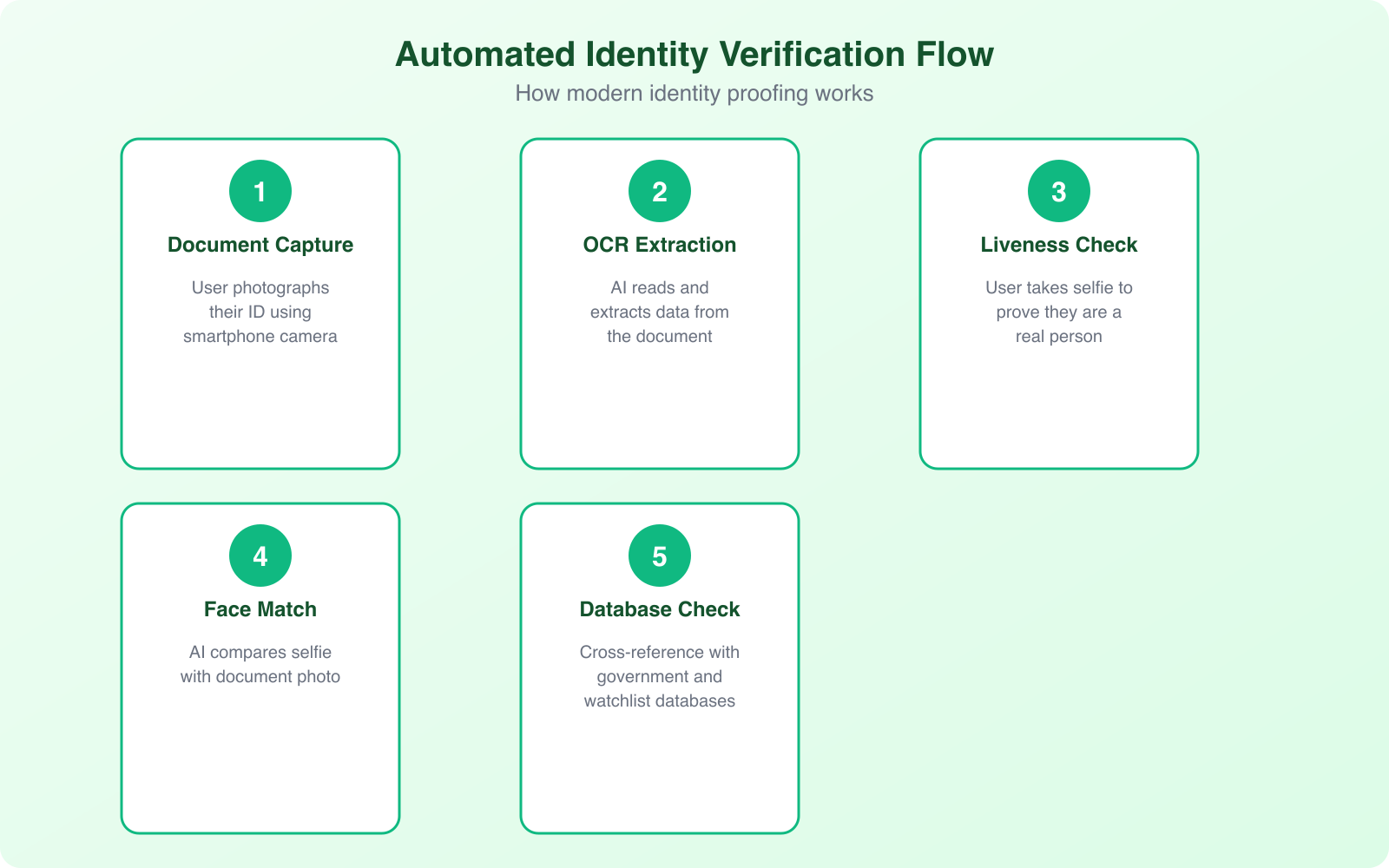
Automated identity proofing combines multiple verification methods into a single, seamless flow. The user’s experience takes 30-90 seconds. The technology behind it is sophisticated but invisible to the end user.
Document Verification
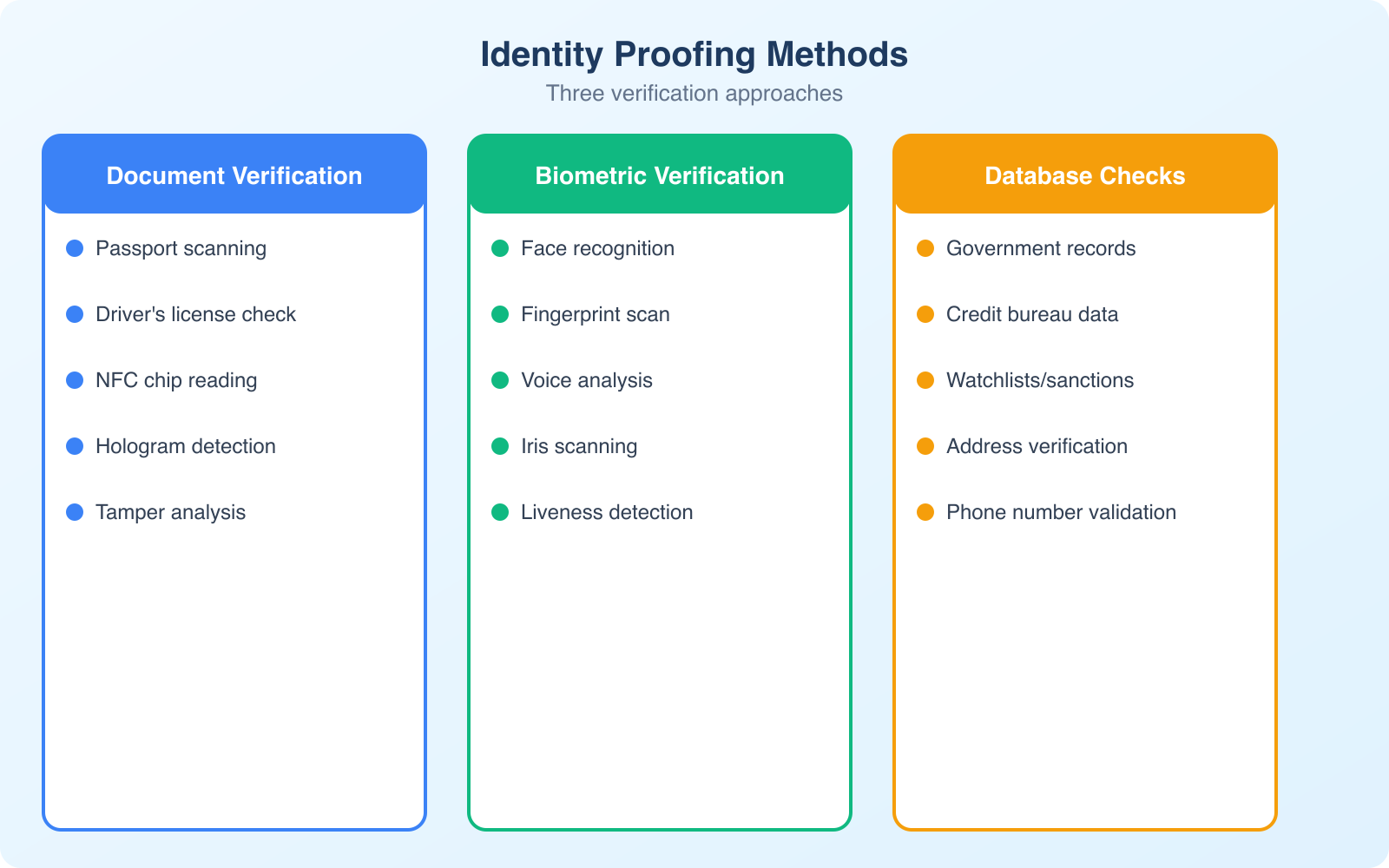
The user photographs or uploads their government-issued ID (passport, driver’s license, national ID card). AI models analyze the document for authenticity by checking security features (holograms, microprinting, UV elements via smartphone flash), font consistency, data formatting, and whether the document matches known templates for the issuing country. The system can detect tampered documents, expired IDs, and fakes with accuracy rates exceeding 95%.
Biometric Verification
After document capture, the user takes a selfie or short video. The system compares the face in the selfie to the photo on the ID document using facial recognition algorithms. Advanced systems also perform liveness detection, checking that the person is physically present (not holding up a photo or wearing a mask) by analyzing 3D depth, skin texture, eye movement, and micro-expressions. This prevents the most common spoofing attempts.
Database Cross-Referencing
The extracted information (name, date of birth, document number) is checked against government databases, watchlists (sanctions lists, PEP lists), and commercial data sources. This step catches stolen identities, people on regulatory watchlists, and identity data that doesn’t match across sources.
Risk Scoring
All verification results feed into a risk scoring engine that produces a single confidence score. Low-risk verifications are approved automatically. Medium-risk cases get flagged for human review. High-risk cases are rejected with specific reasons. This tiered approach balances security with user experience by only adding friction where the risk justifies it.
The best identity proofing systems use adaptive verification. Low-risk transactions (small payments, free accounts) get minimal verification. High-risk transactions (large transfers, account changes) trigger enhanced verification. This reduces friction for the majority of users while maintaining strong security where it matters most.
KYC Solutions and Platforms
The identity proofing market has matured significantly. You don’t need to build verification systems from scratch. Several platforms offer API-based solutions that integrate into your existing onboarding flow.
Jumio: One of the pioneers in automated ID verification. Their Jumio KYX Platform handles document verification, biometric matching, and AML screening. Strong coverage for international documents (supports 5,000+ ID types from 200+ countries). Pricing is per-verification, typically $1-$3 depending on volume.
Onfido: Popular with fintech companies and gig economy platforms. Their Real Identity Platform combines document verification with biometric analysis and fraud signals. The SDK integration for mobile apps is particularly well-designed. Used by companies like Revolut and Zipcar.
Persona: Developer-friendly platform with flexible verification flows. You can build custom verification journeys that combine different checks (document, selfie, database, phone, address) based on risk level. Particularly good for startups that need to iterate on their verification flow quickly.
Sumsub: Strong for global businesses that need to handle multiple jurisdictions simultaneously. Their all-in-one platform covers KYC, KYB (Know Your Business), and AML compliance. Good for marketplaces and platforms that onboard both individuals and businesses.
Biometric Verification Deep Dive
Biometrics are the most secure form of identity verification because they verify something you are, not something you know (like a password) or something you have (like a phone). Here’s how the main biometric methods work in practice.
Facial recognition: The most widely deployed biometric for remote identity proofing. Modern algorithms achieve 99.5%+ accuracy in controlled conditions. The technology has improved dramatically in handling variations in lighting, angle, aging, and facial hair. It’s non-invasive and works on any device with a camera.
Fingerprint scanning: Common for in-person verification (airports, banking) and device authentication (smartphone unlock). Not typically used for remote identity proofing because it requires specialized hardware on the user’s end.
Voice recognition: Emerging for phone-based verification. Analyzes vocal patterns, pitch, cadence, and accent to create a unique voiceprint. Useful for call centers and phone banking where visual verification isn’t practical.
Liveness detection: Not a biometric itself, but a critical anti-spoofing measure used alongside facial recognition. Active liveness asks the user to perform actions (blink, turn head, smile). Passive liveness analyzes the video feed for signs of a real person without requiring any actions. Passive liveness provides better user experience with comparable security.
Fraud Prevention and Risk Management
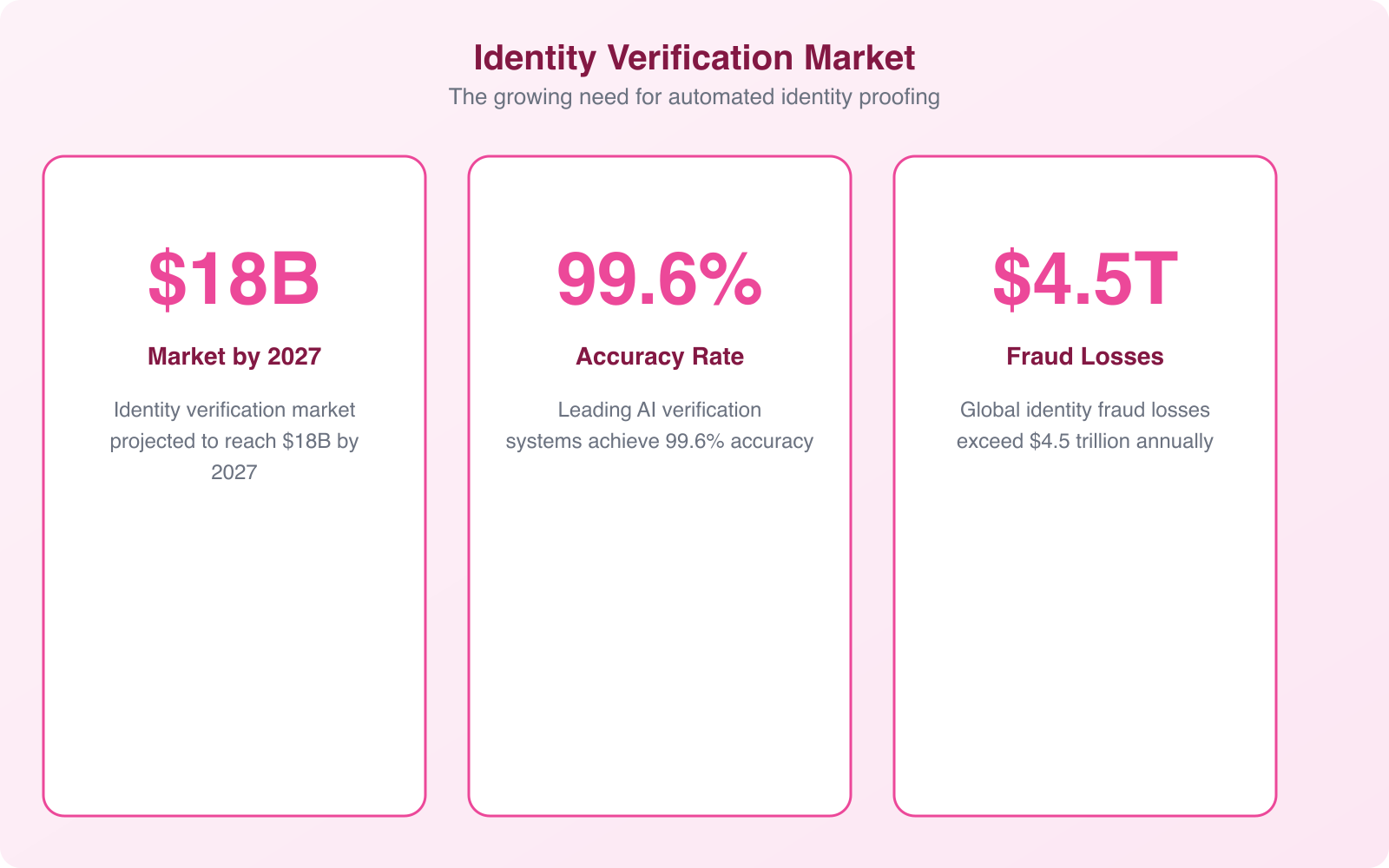
Identity fraud costs businesses $56 billion annually in the US alone. Automated identity proofing is your first line of defense, but it needs to be part of a broader fraud prevention strategy.
Synthetic identity fraud is the fastest-growing type of identity fraud. Criminals combine real and fake information (a real Social Security number with a fake name and address) to create entirely new identities. These synthetic identities pass basic verification checks because the underlying data is partially real. Detecting them requires cross-referencing multiple data sources and looking for inconsistencies in the identity’s history.
Account takeover happens when fraudsters gain access to legitimate accounts using stolen credentials. Continuous authentication (re-verifying identity at key moments, not just at signup) catches account takeover attempts by flagging when behavior patterns change suddenly.
Document fraud ranges from crude forgeries to sophisticated reproductions using high-quality printers and commercially available templates. AI-powered document verification detects fraud signals that human reviewers miss: micro-font inconsistencies, wrong paper texture patterns, and metadata anomalies in digital images.
The cost of not verifying identities is always higher than the cost of verification. A single fraudulent account in a financial service can cost $15,000+ in losses, investigation time, and regulatory penalties. At $1-$3 per automated verification, the ROI on identity proofing is enormous.
Privacy and Compliance Considerations
Collecting biometric data and identity documents comes with significant privacy obligations. Get this wrong and you face regulatory fines, lawsuits, and catastrophic reputational damage.
GDPR (EU): Biometric data is classified as “special category” data under GDPR, requiring explicit consent and a lawful basis for processing. You must provide clear information about what data you collect, how long you retain it, and how to request deletion. Data minimization applies: collect only what you need for verification and delete it when verification is complete.
BIPA (Illinois, US): The Illinois Biometric Information Privacy Act requires written consent before collecting biometric data and prohibits selling or profiting from it. Violations carry damages of $1,000-$5,000 per incident. Several other US states have similar laws.
Data retention: Don’t keep identity documents longer than necessary. Most regulations require a specific retention period for KYC records (typically 5 years after the business relationship ends), but biometric data should be deleted as soon as verification is complete unless there’s a specific legal requirement to retain it.
Implementation Best Practices
Implementing identity proofing well means balancing security with user experience. Overly strict verification loses legitimate customers. Overly lax verification invites fraud. Here’s how to find the right balance.
Start with your risk profile. Not every user or transaction needs the same level of verification. A social media platform registering free accounts has different needs than a cryptocurrency exchange processing large transfers. Map your risk tiers and apply appropriate verification to each.
Optimize for mobile. Most identity verification happens on smartphones. Your verification flow needs to work flawlessly on mobile devices: camera access, auto-capture of ID documents, selfie capture with guidance overlays, and clear error messages when capture quality is insufficient.
Provide clear instructions. Users who’ve never done digital identity verification need guidance. Show them exactly how to hold their ID, where to position their face for the selfie, and what to do if verification fails. Good UX reduces failed verification attempts by 30-40%.
Plan for edge cases. Some users have IDs that are difficult to verify (damaged documents, expired temporary IDs, non-standard formats). Build a manual review queue for these cases instead of simply rejecting them. The goal is to verify legitimate users, not to create barriers.
Frequently Asked Questions
What is the difference between identity proofing and identity verification?
Identity proofing is the initial process of establishing that a person is who they claim to be, typically during account creation or onboarding. Identity verification is the broader category that includes both initial proofing and ongoing authentication (verifying a returning user is the same person who was originally proofed). Proofing is a one-time event per customer. Verification is continuous.
How much does automated identity proofing cost?
Automated identity proofing costs $0.50-$3.00 per verification depending on the provider, volume, and verification methods used. Basic document verification is at the lower end, while comprehensive checks (document + biometric + database) are at the higher end. Compare this to manual verification at $5-$15 per check. Most providers offer volume discounts, and costs decrease significantly at scale.
Is biometric verification safe and private?
When implemented correctly, yes. Biometric verification is more secure than password-based verification because biometrics cannot be shared, forgotten, or easily stolen. Privacy concerns are addressed through regulations like GDPR and BIPA that require explicit consent, limited data retention, and strict security measures. Reputable providers encrypt biometric data, process it in secure environments, and delete it after verification is complete.
What industries require automated identity proofing?
Financial services (banking, lending, insurance) require KYC compliance. Cryptocurrency exchanges must comply with AML regulations. Healthcare needs HIPAA-compliant patient verification. Government services require identity proofing for benefits and tax filings. Gig economy platforms verify drivers and service providers. Any business handling sensitive data or high-value transactions benefits from automated identity proofing.
How accurate is AI-powered identity verification?
Modern AI-powered identity verification achieves 95-99% accuracy for document authentication and 99.5%+ for facial recognition in controlled conditions. This exceeds human reviewer accuracy of 85-92%. The remaining edge cases (damaged documents, unusual lighting, very similar-looking relatives) are typically routed to human reviewers for manual decision. The combination of AI primary verification with human escalation delivers the best overall accuracy.
Final Thoughts
Automated identity proofing isn’t a nice-to-have anymore. If your business verifies customer identities and you’re still doing it manually, you’re slower, more expensive, and less accurate than competitors who’ve automated. The technology has matured to the point where implementation takes weeks, not months, and the per-verification cost is a fraction of manual review.
Start by evaluating your current verification process: how long does it take, what does it cost, and where are the friction points? Then explore API-based providers like Jumio, Onfido, or Persona that integrate with your existing stack. The ROI is immediate in reduced costs, faster onboarding, and better fraud detection. For more on protecting your business and customers, see my guides on critical IT business issues and modern 2FA for businesses.