
How to Use AI to Summarize Text from Documents
I read 50-100 documents a week. Research papers, competitor analyses, client reports, legal agreements, product specs. Most of them are 10-30 pages long, and most of them contain about 2-3 pages of information I actually need.
AI document summarization has completely changed how I handle this. Instead of skimming through a 25-page whitepaper hoping to catch the important parts, I drop the PDF into an AI tool, ask specific questions, and get the key points in 30 seconds. I’ve been doing this daily for over a year now, and it’s saved me roughly 5-8 hours per week.
This guide covers exactly how AI text summarization works, the tools I’ve tested that actually deliver accurate results, and the workflow I use to summarize documents without losing critical details.
How AI Document Summarization Works
AI summarization isn’t just shortening text. It’s identifying which sentences carry the most meaning, understanding how ideas connect across paragraphs, and producing a coherent shorter version that preserves the original intent.
Modern AI summarizers are built on large language models (LLMs) like GPT-4, Claude, and Gemini. These models have been trained on billions of documents, which means they understand context, syntax, semantic relationships, and domain-specific terminology. When you feed a document into an LLM-powered summarizer, it doesn’t just count word frequencies. It reads the document the way a well-read human would, identifies the thesis, supporting arguments, data points, and conclusions, then generates a summary that captures the substance.
There are two fundamental approaches:
- Extractive summarization pulls the most important sentences directly from the original text and stitches them together. The output uses the author’s exact words. This is more faithful to the source but can feel choppy.
- Abstractive summarization reads the full document and generates new sentences that capture the same meaning. This produces more natural, readable summaries but introduces a small risk of hallucination (the AI adding information that wasn’t in the original).
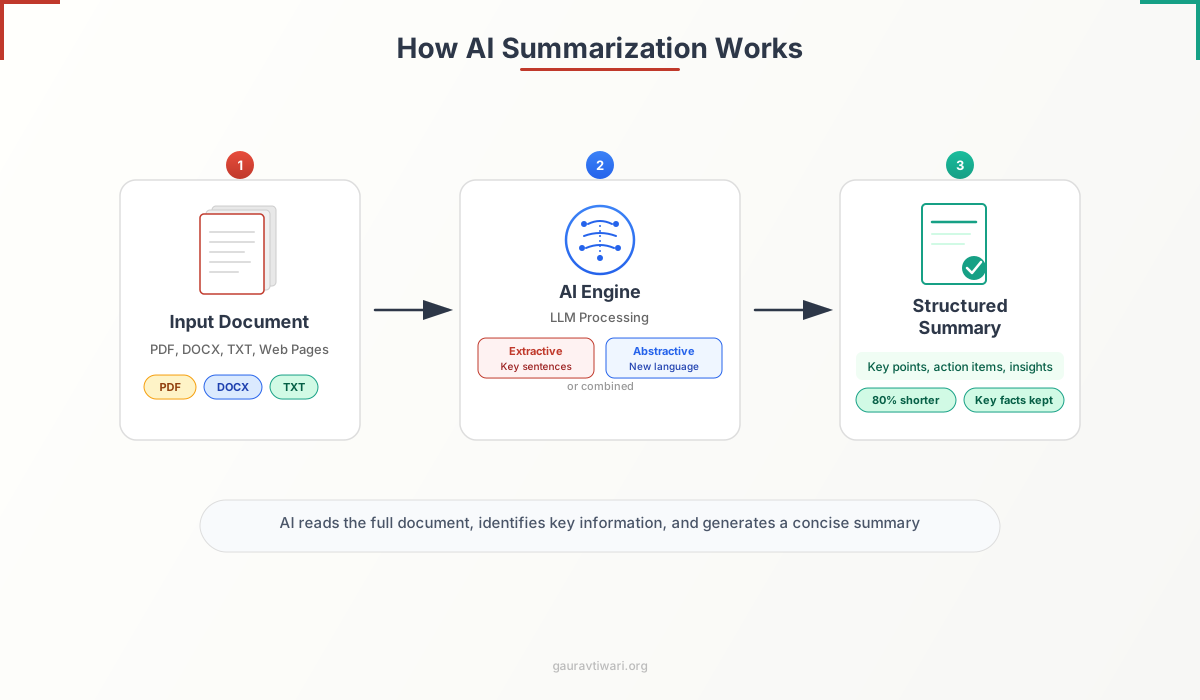
Most modern AI tools use abstractive summarization because it produces better results. The best ones let you switch between both modes depending on how much creative liberty you want the AI to take.
Best AI Tools for Summarizing Documents
I’ve tested dozens of AI summarization tools over the past year. Some are standalone apps, some are browser extensions, and some are features inside larger AI platforms. Here are the ones that consistently produce accurate, useful summaries.
ChatGPT (with File Upload)
ChatGPT handles document summarization well, especially with GPT-4o. Upload a PDF, Word document, or text file directly into the chat, and ask it to summarize. You can request different summary lengths, ask follow-up questions about specific sections, or have it extract only the data points and statistics.
What I like: the conversational follow-up is excellent. Summarize first, then ask “what are the three strongest arguments in this paper?” or “extract all statistics mentioned.” It handles multi-step analysis better than most dedicated summarizers.
The free tier has limited file uploads. ChatGPT Plus ($20/month) gives you GPT-4o with generous file handling. For heavy research work, it’s worth it.
Claude by Anthropic
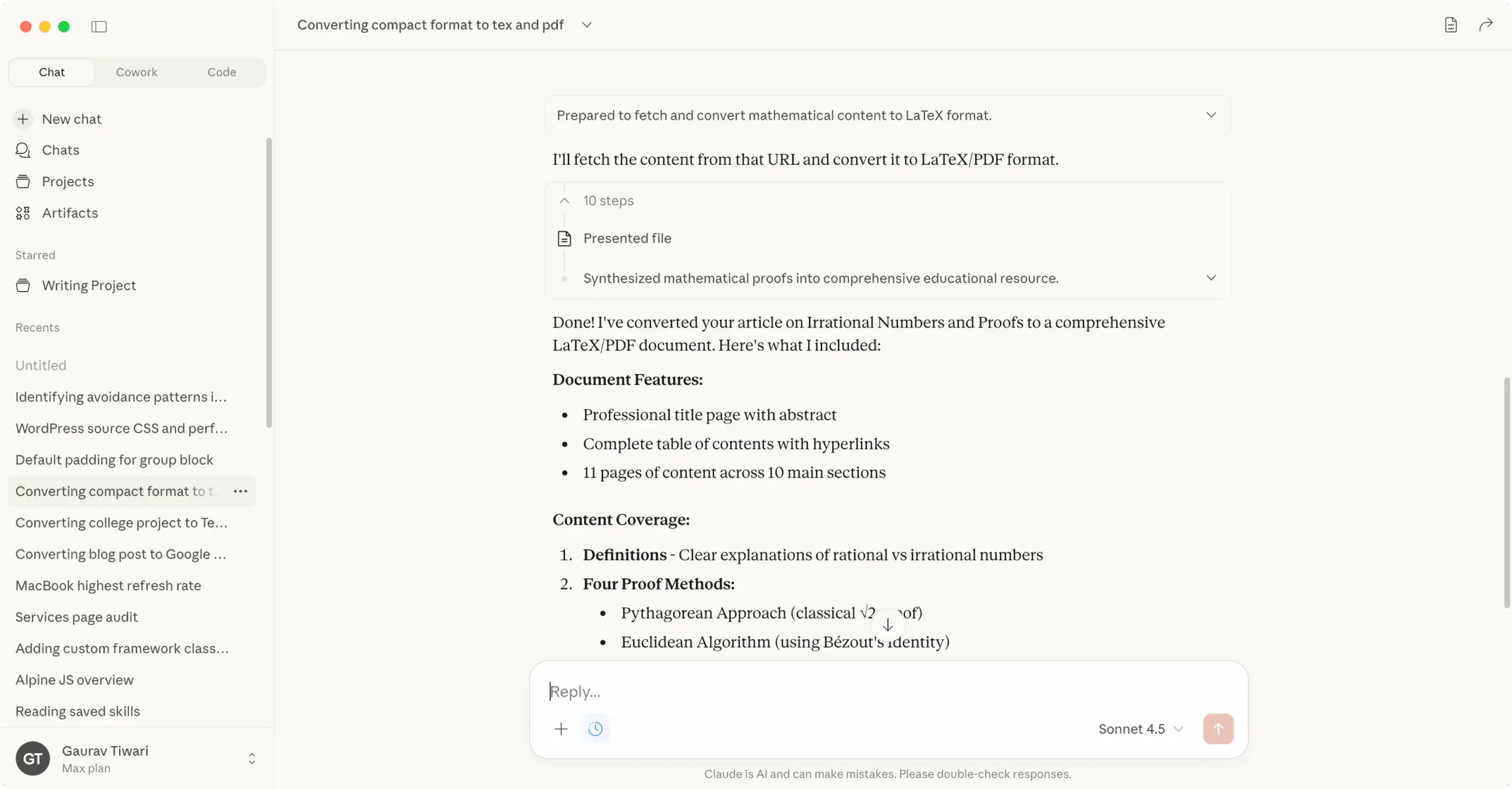
Claude is my go-to for long documents. It has a 200,000-token context window, which means it can process documents up to roughly 150,000 words in a single conversation. That’s an entire book. Most other AI tools max out at 10,000-50,000 words before they start losing context.
Upload a PDF, paste a long article, or drop in multiple documents, and Claude will summarize with remarkable accuracy. I’ve tested it against my own manual summaries on research papers and it catches details I miss. The free tier is generous. Claude Pro ($20/month) gives you priority access and higher usage limits.
Google Gemini

Google Gemini integrates directly with Google Workspace. If your documents live in Google Drive, this is the most frictionless option. Upload a PDF or point it at a Google Doc, and Gemini summarizes it within the Google ecosystem. It also handles YouTube video transcripts, which is useful for summarizing video content.
The summarization quality is solid but slightly behind Claude and GPT-4o for nuanced academic content. Where it excels: speed, Google Drive integration, and handling documents you’ve already stored in Google’s ecosystem.
Dedicated PDF Summarizers
If you work primarily with PDFs, dedicated tools like PDF summarizer platforms are designed specifically for document processing. These tools handle complex PDF layouts (tables, charts, multi-column formats, scanned documents) better than general-purpose AI chatbots. You upload the file, get a summary, and can interact with the document through follow-up questions.
The advantage over ChatGPT or Claude: they’re optimized for PDF parsing. A general AI chatbot sometimes struggles with PDFs that have complex formatting, headers, footers, or embedded images. Dedicated PDF tools handle these edge cases more reliably.
Notion AI
If you already use Notion for note-taking and project management, Notion AI can summarize any page or database entry in your workspace. Paste a long document into a Notion page, select the text, and ask Notion AI to summarize. It’s not as powerful as Claude or ChatGPT for standalone document analysis, but it’s unbeatable for summarizing content that’s already in your Notion workspace.
Grammarly
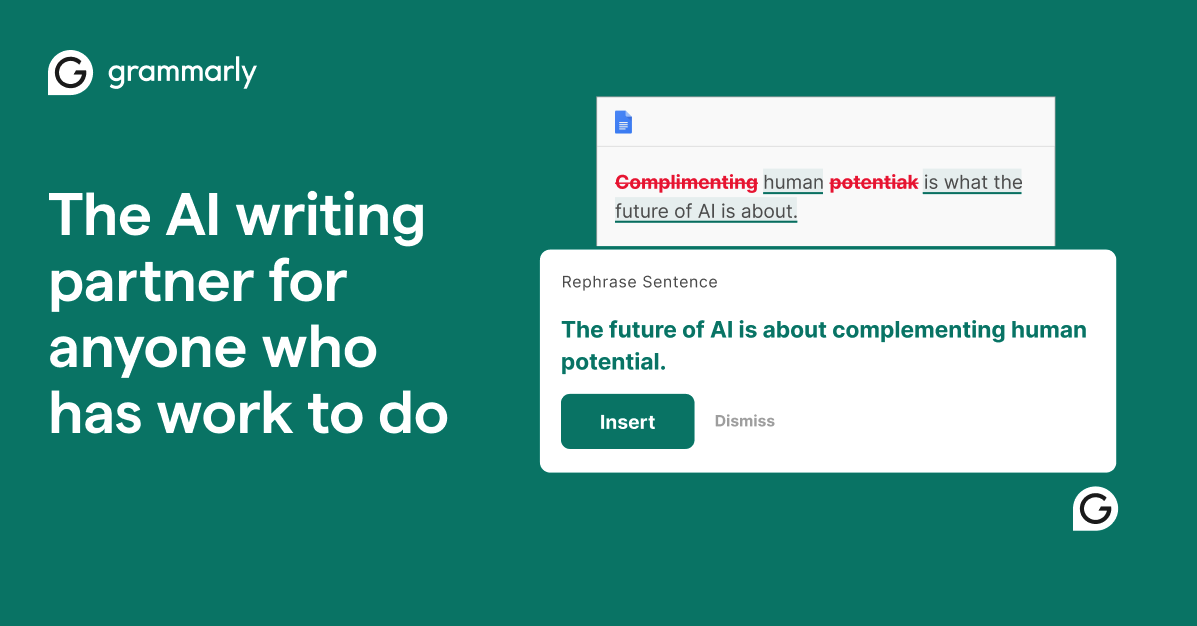
Grammarly now includes AI summarization alongside its writing assistant features. Paste any text and Grammarly can summarize it, rephrase paragraphs, adjust tone, and highlight key points. It’s not a dedicated summarizer, but if you already use Grammarly for writing, the summarization feature is a useful bonus. Read my full Grammarly review for more on what it can do.
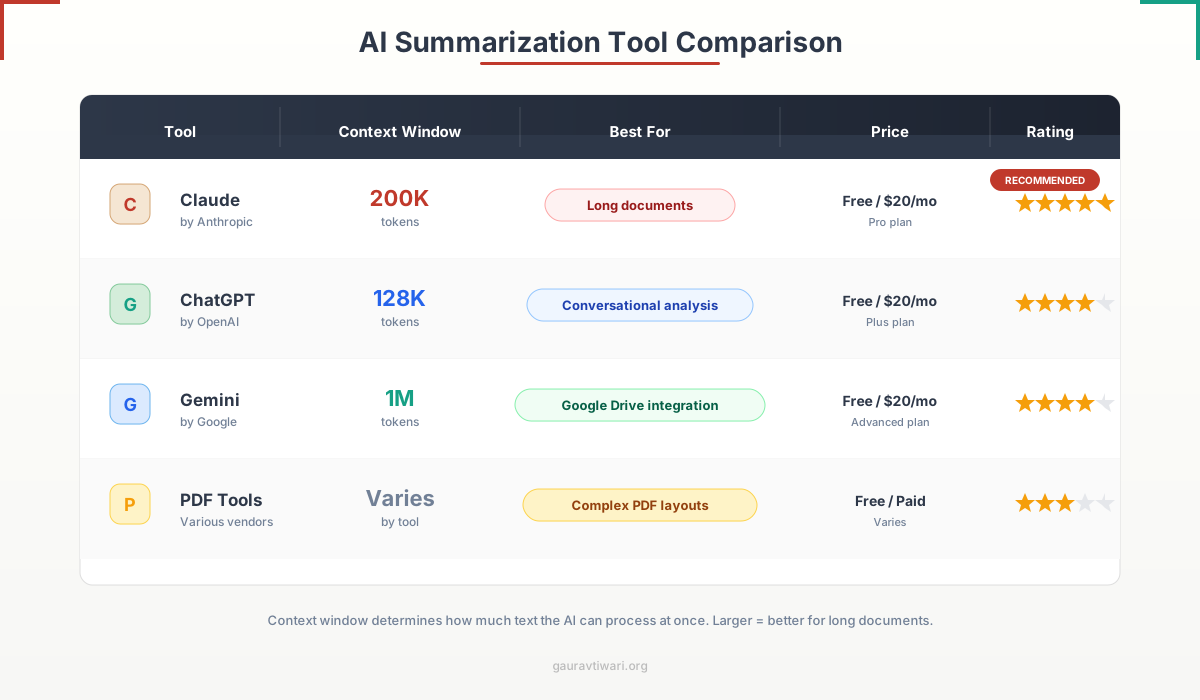
For most people, Claude is the best overall choice for document summarization because of its massive context window (200K tokens). For PDF-heavy workflows, use a dedicated PDF summarizer alongside Claude. For documents already in Google Drive, Gemini is the path of least resistance.
Step-by-Step: How to Summarize a Document with AI
Here’s the exact workflow I use. It works with any AI summarizer, but I’ll use Claude as the example since that’s what I use most.
Step 1: Prepare Your Document
Upload the PDF, Word doc, or text file directly. If the tool doesn’t support file uploads, copy-paste the full text. For scanned PDFs, run OCR first (most modern PDF tools do this automatically).
If the document is extremely long (100+ pages), consider splitting it into logical sections and summarizing each separately. Even with Claude’s 200K context window, shorter inputs produce more focused summaries.
Step 2: Write a Specific Prompt
This is where most people go wrong. They upload a document and type “summarize this.” That gives you a generic summary. Instead, tell the AI exactly what you need.
Good prompts I use regularly:
- “Summarize this research paper in 300 words. Focus on methodology, key findings, and limitations.”
- “Extract the 5 most important data points from this report with their page numbers.”
- “Summarize this legal agreement. Highlight any clauses that involve liability, termination, or payment terms.”
- “Give me a bullet-point summary of this whitepaper that I can share with my team in under 2 minutes.”
- “Compare the arguments in sections 3 and 5 of this paper. Where do they contradict each other?”
The more specific your prompt, the more useful the output. Always mention the desired length, format (bullets vs. paragraphs), and what aspects to focus on.
Step 3: Review and Iterate
Read the summary. Check it against the original for accuracy, especially for numbers, dates, and proper nouns. AI occasionally gets these wrong.
If the summary misses something important, follow up: “You didn’t mention the cost analysis in section 4. Summarize that specifically.” This conversational refinement is where AI summarization beats traditional tools. You’re not starting over. You’re drilling deeper.
Step 4: Export or Use the Summary
Copy the final summary into your notes, project management tool, or email. If you use note-taking apps, paste it alongside the original document link so you have both the source and the summary in one place.
Advanced Tips for Better AI Summaries
After summarizing hundreds of documents, I’ve learned what separates a useful summary from a generic one. Here’s what works:
Specify the Audience
Tell the AI who the summary is for. “Summarize this for a CEO who has 2 minutes” produces a very different output than “Summarize this for a technical team lead who needs implementation details.” The AI adjusts depth, jargon, and emphasis based on the audience you specify.
Summarize in Stages for Long Documents
For documents over 50 pages, don’t ask for one summary. Ask the AI to summarize each major section first, then ask it to create an executive summary from those section summaries. This two-pass approach catches details that a single-pass summary misses.
Use “Chat with Document” for Research
Instead of just getting a summary and moving on, treat the AI as a research assistant. After the initial summary, ask follow-up questions: “What evidence supports the main claim?” “Are there any logical gaps in the argument?” “What would a critic say about this methodology?” This turns a passive summary into an active analysis.
Always Verify Critical Information
AI summaries are remarkably good, but they’re not perfect. I’ve seen Claude misattribute a statistic to the wrong section, and ChatGPT occasionally merge data points from two different paragraphs into one claim. For anything going into a published article, client report, or academic work, verify the key facts against the original document. The AI saves you time on the first pass. Your eyes handle the final check.
One more thing to consider: if you’re using AI summaries in published content, academic papers, or client deliverables, the output will read like AI-generated text, because it is. Tools like AI detector platforms can flag this. Always rewrite AI summaries in your own words before publishing. Use the summary as raw material for your own writing, not as the final product. This also forces you to engage with the content, which improves comprehension and catches errors the AI missed.
Never use an AI summary of a legal, medical, or financial document as a final decision-making resource without reading the relevant sections yourself. AI can miss critical nuances in contracts, regulatory language, and medical findings. Use the summary for orientation, not as a substitute for careful reading of high-stakes documents.
What AI Summarization Can and Can’t Do
Setting the right expectations matters. Here’s an honest assessment based on my daily use.
AI summarization is excellent for:
- Reducing a 30-page report to a 1-page executive summary
- Extracting key data points, statistics, and conclusions from research papers
- Quickly scanning multiple documents to decide which ones deserve a full read
- Creating meeting prep notes from lengthy background materials
- Translating and summarizing documents in foreign languages simultaneously
- Organizing digital documents by generating tagged summaries for filing
AI summarization struggles with:
- Highly technical documents with domain-specific jargon it wasn’t trained on
- Documents with heavy visual content (charts, graphs, diagrams) where the meaning is in the image, not the text
- Nuanced legal language where a single word changes the entire meaning of a clause
- Preserving the author’s argumentative structure when the argument spans many sections
- Scanned PDFs with poor OCR quality (garbage in, garbage out)
The technology improves with every model update. What Claude and GPT-4o handle today would have been impossible 18 months ago. But it’s still a tool, not a replacement for reading.
My Daily Document Summarization Workflow
Here’s exactly how I process documents every day. This workflow handles everything from quick article scans to deep research paper analysis.
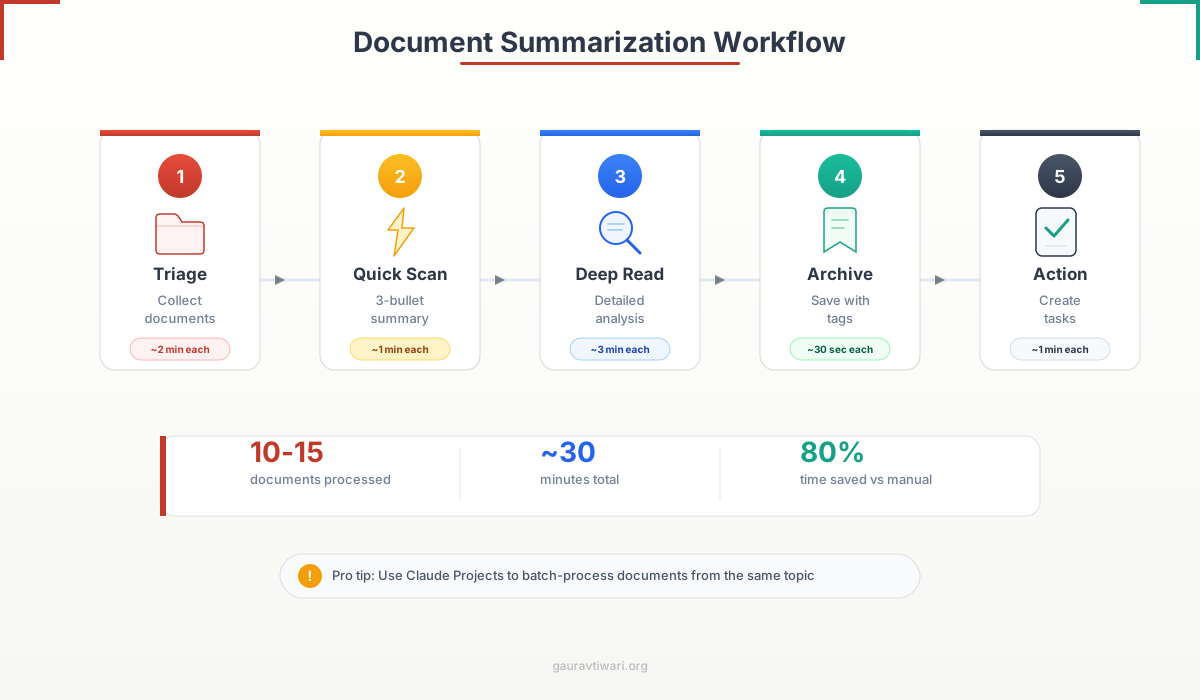
- Triage: I drop all incoming documents (PDFs, reports, articles) into a single folder. Once a day, I batch-process them.
- Quick scan: I upload each document to Claude and ask: “Summarize this in 3 bullet points. Is there anything in here I need to read in full?” This takes about 30 seconds per document.
- Deep read: For documents flagged as important, I do a detailed summary with specific prompts targeting the sections I care about.
- Archive: The summary goes into my notes app with the original document linked. I tag it by topic so I can find it later.
- Action: If the document requires action (reply, share with team, incorporate into my writing), I create a task immediately.
This workflow processes 10-15 documents in about 30 minutes. Without AI, the same batch would take 3-4 hours of reading and note-taking. That’s not an exaggeration. I tracked it for two weeks before and after adopting AI summarization. The time savings are real and they compound.
For broader productivity tools and software I use alongside AI summarization, I’ve written a separate guide. And if you’re a student working with PDF apps for academic research, the same workflow applies with minor adjustments.
Frequently Asked Questions
What is the best AI tool for summarizing documents?
Claude by Anthropic is the best overall choice because of its 200,000-token context window, which lets it process documents up to 150,000 words without losing context. For PDF-heavy workflows, dedicated PDF summarizer tools handle complex layouts better. ChatGPT with GPT-4o is a strong alternative, especially for conversational follow-up analysis. Google Gemini is best if your documents are already in Google Drive.
Can AI accurately summarize long documents?
Yes, modern AI models handle long documents well. Claude can process up to 200,000 tokens (roughly 150,000 words) in a single conversation. ChatGPT handles documents up to about 128,000 tokens. For best results with very long documents (100+ pages), summarize each major section separately, then ask the AI to create an executive summary from those section summaries.
Is AI summarization accurate enough for academic research?
AI summaries are accurate enough for initial research triage, identifying which papers to read in full, and extracting key findings. However, always verify specific statistics, citations, and methodology details against the original paper. AI occasionally misattributes data points or merges claims from different sections. Use AI for the first pass and your own reading for verification.
Can AI summarize PDFs with tables and charts?
General AI chatbots like ChatGPT and Claude handle text-based PDFs well but can struggle with complex tables, charts, and multi-column layouts. Dedicated PDF summarizer tools are optimized for these edge cases and generally produce better results with visually complex documents. For scanned PDFs, ensure the OCR quality is good before summarizing.
Is it safe to upload confidential documents to AI summarizers?
It depends on the tool and your organization’s data policy. Claude and ChatGPT both offer enterprise plans with data privacy guarantees where your uploads are not used for training. For sensitive documents, use tools that process locally or offer explicit data deletion. Never upload confidential client data, health records, or classified materials to free-tier AI tools without checking the privacy terms first.
What is the difference between extractive and abstractive summarization?
Extractive summarization pulls the most important sentences directly from the original text and combines them. The output uses the author’s exact words. Abstractive summarization reads the document and generates new sentences that capture the same meaning in different words. Most modern AI tools like ChatGPT, Claude, and Gemini use abstractive summarization because it produces more natural, readable summaries.
How much time does AI document summarization actually save?
In my tracked testing, AI summarization saved 5-8 hours per week when processing 50-100 documents. A batch of 10-15 documents that previously took 3-4 hours of reading and note-taking now takes about 30 minutes with AI-assisted triage and summarization. The actual savings depend on document complexity and how many documents you process regularly.
Disclaimer: This site is reader-supported. If you buy through some links, I may earn a small commission at no extra cost to you. I only recommend tools I trust and would use myself. Your support helps keep gauravtiwari.org free and focused on real-world advice. Thanks. - Gaurav Tiwari