
Sapling Review 2026: Is It Really Better Than Grammarly?
I switched from Grammarly to Sapling about two years ago, and I haven’t looked back. Not because Grammarly is bad. It’s a solid tool. But because Sapling fits how I actually work: writing across multiple platforms, managing client communications, and needing autocomplete that doesn’t slow me down.
Most grammar tool reviews compare feature lists without actually using the products daily. I’ve used Sapling Pro on three different sites, across Gmail, Google Docs, and Slack, for over 700 days straight. This review is what I’ve learned.
I’ll cover what Sapling does well, where it falls short, how it compares to Grammarly alternatives, and whether the Pro plan at $25/month (or $12/month annual) is worth your money in 2026.
Sapling Review: Quick Verdict
Sapling

Pros
- Autocomplete Everywhere predicts sentences in real-time across all platforms.
- 60+ native integrations including Zendesk, Salesforce, HubSpot, Intercom.
- Team-shareable snippets with usage analytics for consistent messaging.
- Full developer API with Python and JavaScript SDKs. Free tier: 50K chars/day.
- 20+ language support. Grammarly and ProWritingAid are English-only.
- Enterprise self-hosting option for privacy-sensitive organizations.
Cons
- No Safari browser extension. Chrome, Firefox, Edge, Opera, Brave only.
- No desktop app. Browser extension only, unlike Grammarly and ProWritingAid.
- No plagiarism checker. Both competitors include this in premium plans.
- Small user base (40K+ Chrome users vs Grammarly's 10M+). Less community support.
- Free tier is very limited: 20 snippets, basic suggestions, 2K char AI detection.
Summary
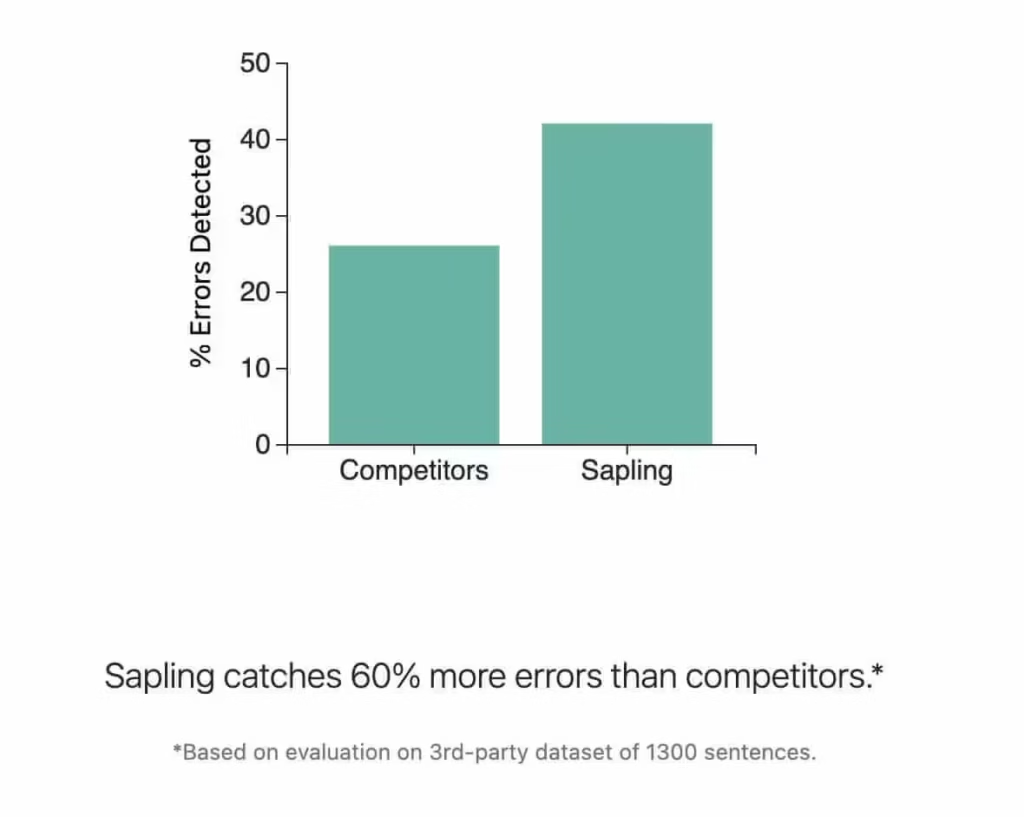
Sapling is the writing assistant I switched to after three years on Grammarly, and I haven’t looked back. Built by former Google engineers, it catches 60% more grammar errors than competitors (their claim, but my experience backs it up). The real differentiator is 60+ native integrations with CRM and helpdesk platforms like Zendesk, Salesforce, and Intercom. Autocomplete Everywhere predicts your next sentence as you type. Snippets let teams share canned responses. The API opens doors Grammarly keeps locked. Best fit for customer-facing teams who write across multiple platforms daily.
Price: USD 25 /month
Try Sapling FreeSapling is an AI-powered writing assistant that checks grammar, predicts your next sentence, and expands text snippets across 60+ platforms. It’s built by former Google engineers and trained on massive language datasets. The free plan covers basic grammar. The Pro plan ($25/month, or $12/month annually) unlocks Autocomplete Everywhere, unlimited snippets, and AI detection up to 100,000 characters.
Where Sapling really separates itself from Grammarly and ProWritingAid is integrations. It works natively inside Zendesk, Salesforce, Intercom, HubSpot, Freshdesk, and dozens of other CRM and helpdesk tools. If your team writes customer-facing messages all day, Sapling was designed specifically for you.
What is Sapling?
Sapling is an AI-powered grammar and autocomplete tool built for customer-facing teams. Founded in 2019 by Sapling Technologies Inc., it focuses on helping support agents and sales reps write faster and more accurately. Unlike Grammarly, which started as a tool for students and individual writers, Sapling was built from day one for professional communication at scale.
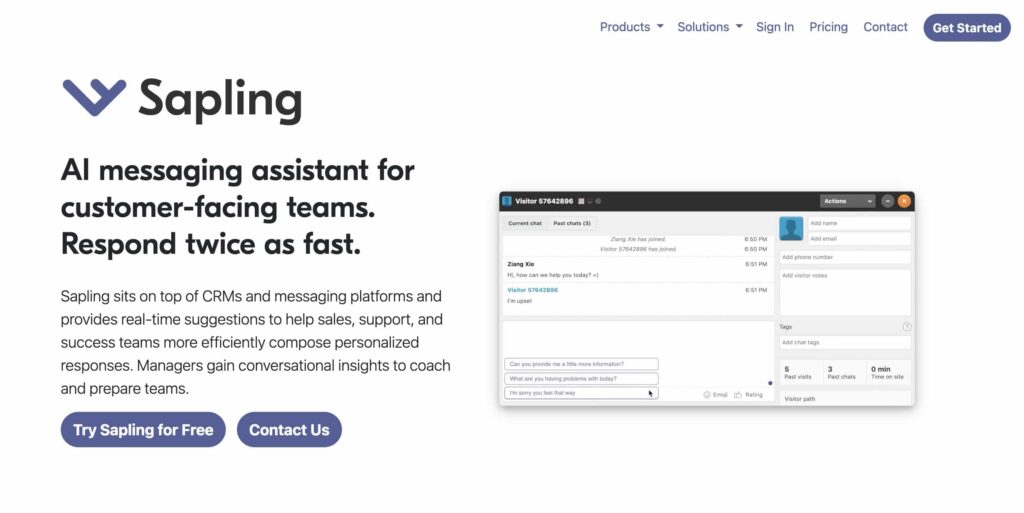
The core engine uses deep learning models trained on billions of sentences. Sapling claims it catches 60% more grammar and spelling errors than competing tools. I can’t verify that exact number, but in my experience, it does catch things Grammarly misses, especially in longer, complex sentences with multiple clauses.
Sapling supports 20+ languages, which was a big deal for me when working with international clients. Grammarly is still primarily English-only. ProWritingAid is the same. Sapling handles Spanish, French, German, Portuguese, and many others without needing a separate tool.
Sapling Features: What You Actually Get
Sapling’s core features are real-time grammar correction, AI autocomplete, snippet library, and team analytics. I’ve tested every major feature over 700+ days of daily use. Here’s what matters and what’s just marketing.
Grammar and Spelling Check
The foundation. Sapling underlines errors in real-time and suggests fixes with a single click. It handles the obvious stuff (their/there/they’re, its/it’s) and the subtle stuff (dangling modifiers, subject-verb agreement in complex sentences, comma splices).
What I notice most: Sapling rarely gives false positives. Grammarly used to flag my intentional sentence fragments as errors. Sapling understands conversational writing style better, which matters when you write blog posts or marketing copy where fragments are a stylistic choice.
Autocomplete Everywhere
This is Sapling’s killer feature. As you type, it predicts the rest of your sentence in gray text. Hit Tab to accept, or keep typing to ignore. It works everywhere the extension is active: Gmail, Slack, Google Docs, Zendesk, even LinkedIn messages.
The predictions are context-aware. If I’m writing a support reply about a refund, it’ll suggest complete sentences about refund policies. If I’m drafting a blog intro, it suggests topic-relevant phrases. The underlying deep learning model is genuinely impressive. I accept maybe 30-40% of its suggestions, which saves me roughly 15-20 minutes per day of typing.
Grammarly added GrammarlyGO for similar functionality, but it’s more of a generative AI tool (write me an email about X) than a real-time autocomplete. Sapling’s approach feels more natural because it completes what you’re already writing rather than generating from scratch.
Snippets and Text Expansion
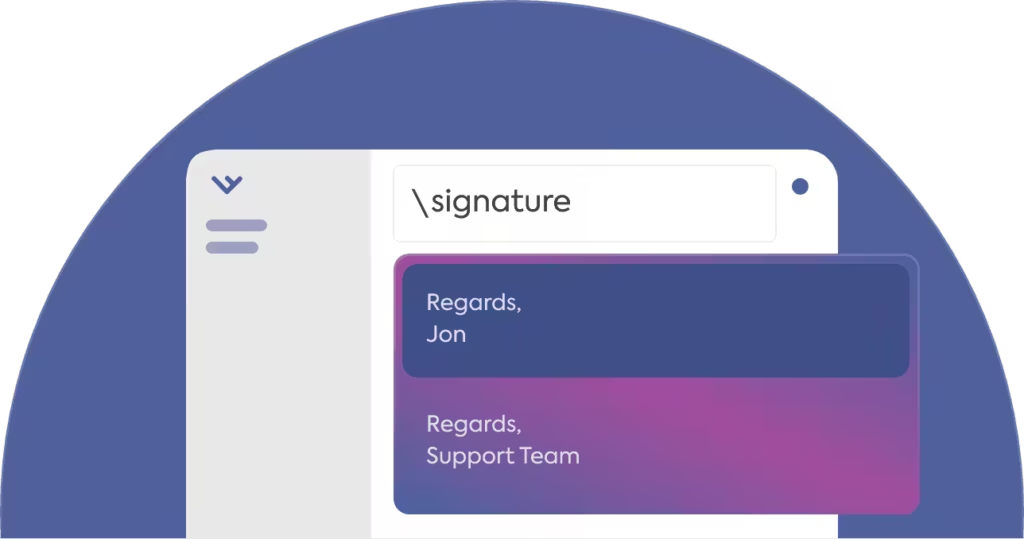
Snippets let you assign short trigger codes to longer text blocks. Type “/refund” and it expands into a full refund policy response. Type “/intro” and it drops in your standard email introduction. The free plan gives you 20 snippets. Pro is unlimited.
The team aspect is what makes this valuable for businesses. You can create shared snippet libraries that everyone on your support or sales team can access. New hires get instant access to approved response templates. Consistency improves overnight.
I personally use Alfred for text expansion on macOS because it’s faster for my solo workflow. But for teams of 5+, Sapling’s shared snippet libraries with analytics are worth it. You can see which snippets get used most and refine your templates based on data.
AI Content Detector
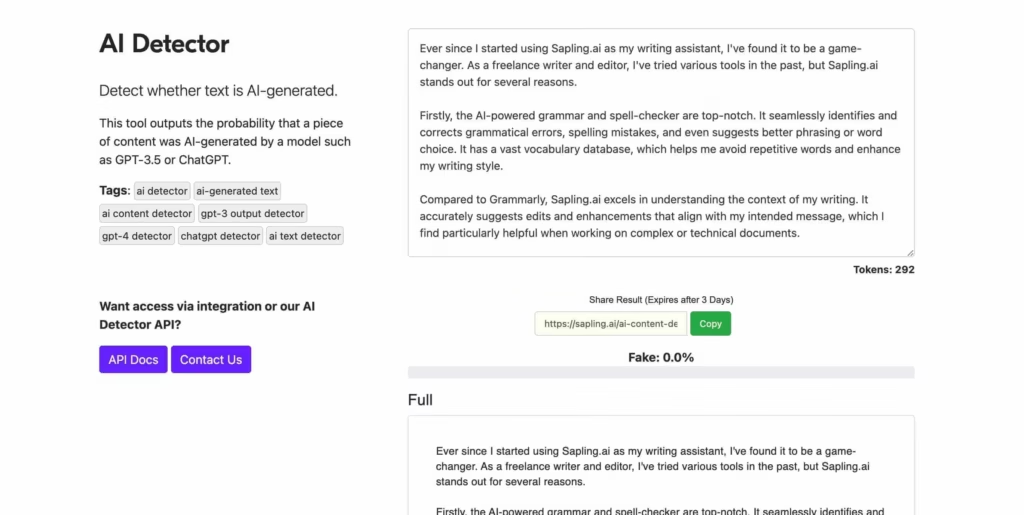
Sapling’s AI detector identifies content generated by GPT-5, Claude 4.5, Gemini 2.5, Qwen3, DeepSeek-V3, and older models. The free plan limits detection to 2,000 characters. Pro handles up to 100,000 characters per query.
Sapling claims 97%+ accuracy on longer texts with under 3% false positives. I’ll be honest: independent tests show mixed results across all AI detectors. No tool is 100% reliable here. I use Sapling’s detector as a quick sanity check, not as definitive proof. If you’re an editor screening freelancer submissions, combine it with your own reading judgment.
Rephrase and Sentence Rewriter
Select any text and Sapling offers alternative phrasings. It’s useful for tightening wordy sentences or finding a clearer way to express an idea. The quality is comparable to what you’d get from a good thesaurus combined with grammar awareness.
I use it mostly when editing client deliverables. When a sentence is technically correct but feels clunky, Sapling’s rephrase suggestions often give me a starting point for a better version. It won’t replace a human editor, but it speeds up the revision process.
Integrations: Where Sapling Really Shines
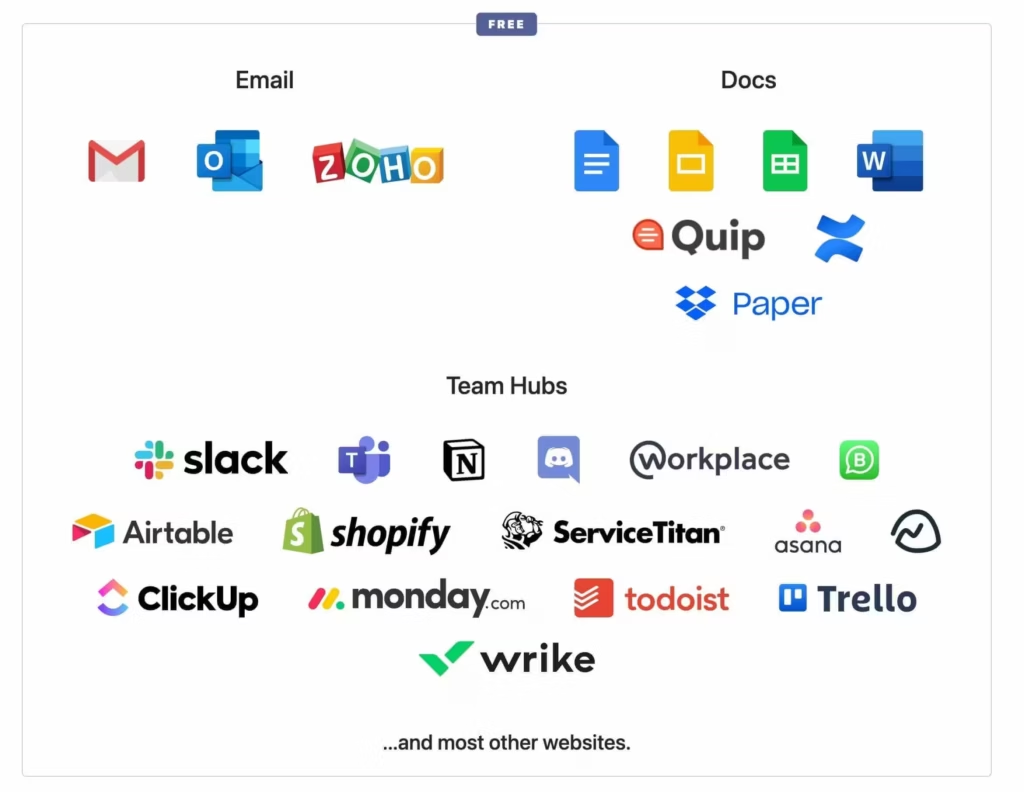
This is where Grammarly and ProWritingAid can’t compete. Sapling integrates natively with 60+ platforms:
- CRM and Sales: Salesforce, HubSpot, Pipedrive, Outreach, SalesLoft, Mixmax, LinkedIn, Mailchimp, Klaviyo.
- Support and Helpdesk: Zendesk, Intercom, Freshdesk, Drift, ServiceNow, LiveChat, Talkdesk, Gorgias, Jira Service Management, Amazon Connect.
- Team Tools: Slack, Microsoft Teams, Notion, Discord, Asana, Monday.com, ClickUp, Trello, Figma.
- Browsers: Chrome, Firefox, Edge, Opera, Brave. No Safari (more on this limitation later).
Grammarly works great in Gmail and Google Docs, but try using it inside Zendesk or Salesforce and you’ll hit walls. Sapling was designed for these platforms first. The extension loads faster, the suggestions appear inline, and the snippets work smoothly inside CRM text fields.
Developer API
Sapling offers a full REST API with endpoints for grammar checking, autocomplete, rephrase, summarize, AI detection, tone detection, and semantic search. Grammarly has no public API. ProWritingAid has no direct API either.
API pricing starts at $0.025 per 1,000 characters for edits, with volume discounts at 10M and 50M characters/month. There’s a free tier of 50,000 characters per day for testing. SDKs are available for Python (sapling-py) and JavaScript.
If you’re building a product that needs grammar checking or AI detection, Sapling’s API is one of the few commercially available options. This alone makes it valuable for developer teams.
Sapling vs Grammarly vs ProWritingAid: Feature Comparison
Sapling wins on speed and CRM integration, Grammarly wins on polish and UI, ProWritingAid wins on long-form analysis. I’ve used all three tools extensively. Here’s how they compare across the features that actually matter for daily writing work.
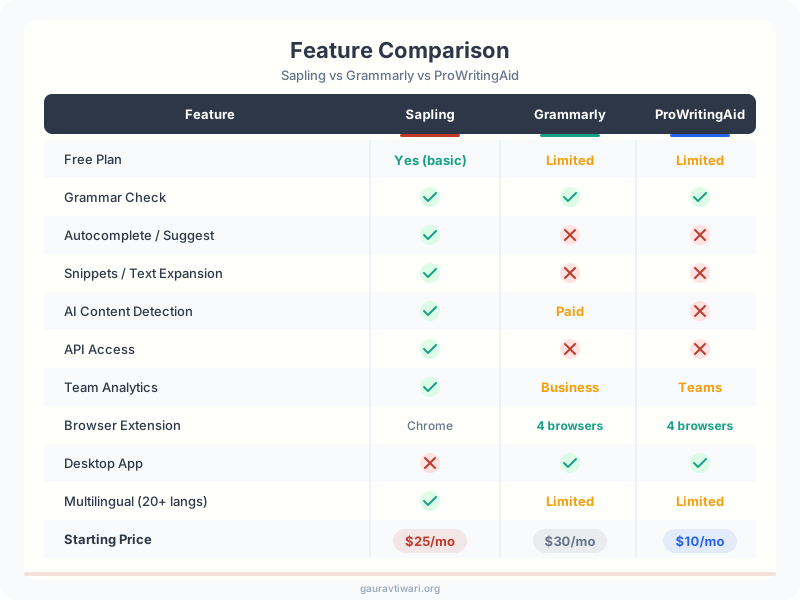
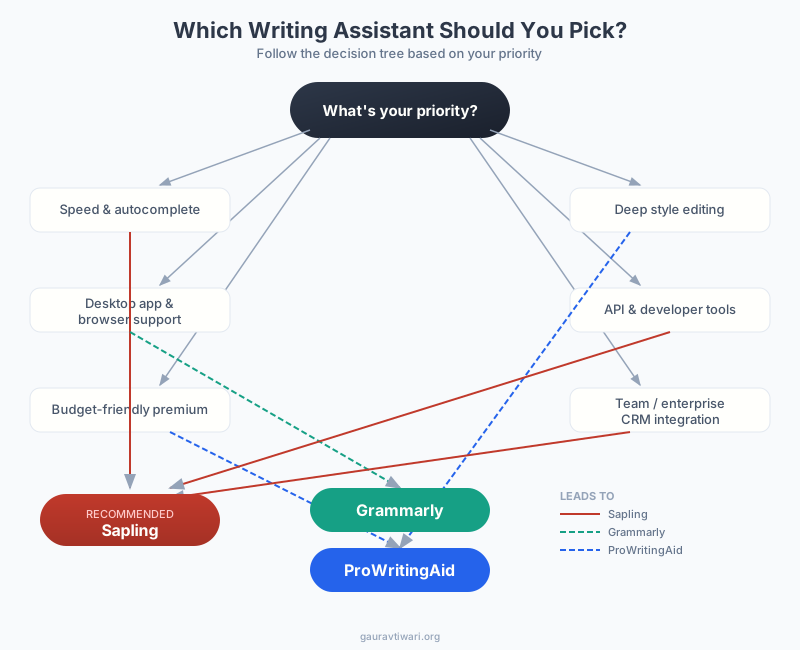
The takeaway is clear: Sapling dominates in team and enterprise features (API, integrations, snippets). ProWritingAid wins for deep writing analysis. Grammarly sits in the middle with the most polished user experience and widest browser support.
Sapling Pricing in 2026
Sapling pricing starts free, with Pro at $25/month ($12/month annual) and Enterprise on custom quotes. Three tiers, no hidden upsells. No hidden upsells, no feature gates that force you to upgrade mid-task.
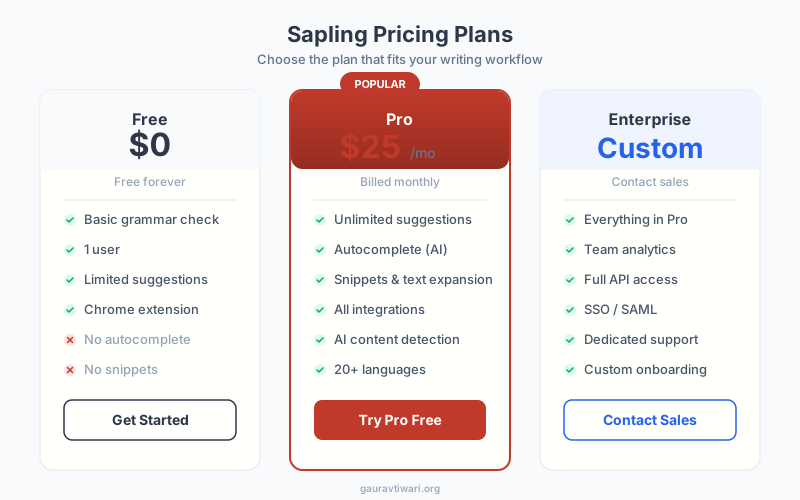
Free Plan ($0/month): Basic grammar and spelling suggestions, 20 snippets, AI detection limited to 2,000 characters, works on free domains only. Good enough to test whether Sapling’s approach works for you.
Pro Plan ($25/month or $12/month billed annually): Everything in Free plus Autocomplete Everywhere, Rephrase, unlimited snippets, Chat Assist, conversational insights, AI detection up to 100,000 characters, and unlimited domain usage. The annual plan saves 52%, bringing it to roughly $144/year.
Enterprise ($15/seat/month, minimum 10 seats): Everything in Pro plus team analytics, domain administration, SSO (Azure AD, Google OAuth, Okta), SCIM provisioning, self-hosted deployment option, and dedicated support.
For comparison: Grammarly Pro costs $12/month annually ($144/year), same as Sapling. ProWritingAid Premium is cheaper at $10/month annually ($120/year) and offers a $399 lifetime deal that Sapling and Grammarly don’t match.
If you run a customer support or sales team, Sapling’s Snippets feature alone can save hours per week. Create shared snippet libraries with your team and assign short trigger codes (like “/refund” or “/shipping”) to expand into full, polished responses. I use a similar workflow with Alfred on macOS, but Sapling’s team sharing makes it better for collaborative environments.
Sapling vs Grammarly: Where Each Tool Wins
Grammarly is better for solo writers. Sapling is better for teams handling customer messages. I used Grammarly Premium for three years before switching. Here’s my honest take on where each tool is stronger.
Sapling wins on: CRM integrations (60+ vs Grammarly’s handful), developer API (Grammarly has none), team snippet sharing, self-hosted deployment for privacy-sensitive organizations, multilingual support (20+ languages vs English-only), and real-time autocomplete that actually feels natural.
Grammarly wins on: Browser support (includes Safari), desktop app availability, plagiarism checker, more generous free tier, better UI polish, and sheer brand recognition (10M+ Chrome users vs Sapling’s 40,000+). Grammarly’s onboarding is also smoother for non-technical users.
My recommendation: if you’re an individual blogger or student who writes primarily in English and wants a simple, polished tool, Grammarly is fine. If you work on a team that handles customer communication across Zendesk, Salesforce, or similar platforms, Sapling is the better investment. The snippet sharing and CRM-native autocomplete save real time at scale.
For a deeper comparison with more alternatives, check out my Grammarly vs ProWritingAid vs Sapling breakdown.
Sapling vs ProWritingAid
ProWritingAid targets a different audience than Sapling. It’s built for long-form writers: novelists, academics, bloggers who want detailed writing reports that break down readability, sentence variety, pacing, and style patterns.
ProWritingAid
- 20+ writing reports (style, readability, grammar)
- Plagiarism checker (Premium Plus)
- Word Explorer and contextual thesaurus
- Integrations with Scrivener, Google Docs, MS Word
- Lifetime deal available ($399 one-time)
Deep writing analysis tool with 20+ writing reports, style suggestions, and a plagiarism checker. Best for long-form writers who want detailed feedback. Starts at $10/month.
ProWritingAid offers 20+ writing reports that Sapling doesn’t. It has a plagiarism checker (60 checks/year on Premium Plus). It integrates with Scrivener, which matters for fiction writers. And it’s cheaper: $10/month annually or $399 for lifetime access.
Sapling wins on speed (real-time autocomplete), team features (shared snippets, analytics), CRM integrations, API access, and multilingual support. If you’re choosing between the two, ask yourself: “Do I need deep writing analysis, or do I need fast, accurate suggestions across many platforms?” That’s the deciding factor.
Read my full ProWritingAid review for more details.
What I Don’t Like About Sapling
Sapling’s biggest weaknesses are its limited offline mode, basic mobile support, and smaller style guide options compared to Grammarly. Here are the real downsides I’ve experienced.
No Safari extension. This is my biggest frustration as a Mac user. I use Chrome for work, but when I’m writing in Safari (which I prefer for battery life), Sapling simply doesn’t work. Extensions are available for Chrome, Firefox, Edge, Opera, and Brave, but not Safari. If Apple’s browser is your daily driver, this is a dealbreaker.
Small user base. Sapling has 40,000+ Chrome users. Grammarly has 10 million+. A smaller user base means less community feedback, slower iteration on edge cases, and fewer third-party tutorials when you get stuck.
No desktop app. Grammarly and ProWritingAid both offer native desktop apps. Sapling is browser-extension only. If you write in apps like Ulysses, Bear, or even VS Code, Sapling won’t help you there.
No plagiarism checker. Both Grammarly (Premium) and ProWritingAid (Premium Plus) include plagiarism detection. Sapling doesn’t offer this at all.
Free tier is limiting. Twenty snippets, basic suggestions only, and AI detection capped at 2,000 characters. Grammarly’s free plan is noticeably more generous for individual users.
Customer support mixed reviews. I’ve seen reports of slow response times and templated replies. My own experience has been fine, but . Enterprise customers get dedicated support, which helps.
Sapling doesn’t have a Safari extension. If Safari is your primary browser, you’ll need to switch to Chrome, Firefox, or Edge to use Sapling’s browser features. The Chrome extension has 40,000+ users and works reliably, but the Safari gap is a real limitation for Mac users who prefer Apple’s browser.
Who Should Use Sapling?
Sapling is best for customer support teams, sales reps, and anyone writing across CRM or helpdesk platforms. It isn’t for everyone, and that’s fine. Here’s who gets the most value from it.
Customer support teams: If your agents write 50+ responses per day in Zendesk, Intercom, or Freshdesk, Sapling’s autocomplete and shared snippets will measurably speed things up. The conversational insights dashboard helps managers spot quality issues early.
Sales teams: Writing personalized outreach in Salesforce, HubSpot, or LinkedIn? Sapling’s autocomplete learns your communication patterns and helps you draft faster without sounding robotic.
Developers: If you need grammar checking, AI detection, or autocomplete inside your own product, Sapling’s API is one of the few commercial options with proper documentation and reasonable pricing. The free tier (50,000 chars/day) is generous enough for prototyping.
Multilingual teams: Twenty-plus language support is a genuine differentiator. If your team communicates across languages, Sapling handles it. Grammarly and ProWritingAid are English-first tools.
Privacy-sensitive organizations: Enterprise self-hosting means your data never leaves your infrastructure. No other major grammar tool offers this.
Final Verdict: Is Sapling Worth It in 2026?
Yes, with a caveat. Sapling is the best grammar tool for teams that write customer-facing messages across CRM and helpdesk platforms. The autocomplete is genuinely useful (not gimmicky), the snippet sharing saves hours, and the API opens doors that Grammarly and ProWritingAid keep locked.
For individual writers who want deep style analysis, ProWritingAid is a better fit at a lower price. For casual writers who want the simplest possible experience, Grammarly’s free tier is hard to beat.
But if you’re running a business where written communication quality directly affects revenue, whether that’s customer support, sales outreach, or client management, Sapling at $12/month (annual) is one of the smartest investments you can make. I’ve been using it daily for two years, and it’s earned its spot in my workflow.
Looking for more writing tools? Check out my list of the best AI writing tools or read my content writing tips for improving your writing process overall.
Frequently Asked Questions
Is Sapling really better than Grammarly?
For customer-facing teams, yes. Sapling offers 60+ CRM and helpdesk integrations (Zendesk, Salesforce, Intercom), team-shareable snippets, and a full developer API that Grammarly doesn’t match. Sapling also claims 60% more grammar catches than competitors. However, Grammarly has a better free tier, a desktop app, Safari support, and a built-in plagiarism checker. For individual writers, Grammarly is often the simpler choice.
How much does Sapling cost in 2026?
Sapling offers three plans: Free ($0, basic grammar, 20 snippets, 2,000-character AI detection), Pro ($25/month or $12/month billed annually), and Enterprise ($15/seat/month, minimum 10 seats). The Pro plan includes unlimited suggestions, Autocomplete Everywhere, Rephrase, unlimited snippets, and AI detection up to 100,000 characters.
Does Sapling have an API?
Yes. Sapling’s API supports grammar checking, autocomplete, rephrase, summarize, AI detection, tone detection, and semantic search. Pricing starts at $0.025 per 1,000 characters for edits, with a free tier of 50,000 characters per day. SDKs are available for Python (sapling-py) and JavaScript.
What integrations does Sapling support?
Sapling integrates with 60+ platforms including Gmail, Slack, Microsoft Teams, Google Docs, Zendesk, Salesforce, HubSpot, Intercom, Freshdesk, LinkedIn, and more. Browser extensions are available for Chrome, Firefox, Edge, Opera, and Brave. No Safari extension is available.
Is Sapling safe for enterprise use?
Sapling offers AES-256 and TLS encryption on all plans. Enterprise customers get additional options including self-hosted/on-premises deployment, SSO via Azure AD, Google OAuth, or Okta, SCIM user provisioning, and dedicated support. This makes it suitable for organizations with strict data handling requirements.
How accurate is Sapling’s AI detector?
Sapling claims a 97%+ detection rate on longer texts with less than 3% false positives. It supports detection of content from GPT-5, Claude 4.5, Gemini 2.5, Qwen3, and DeepSeek-V3. However, independent reviews have found mixed results, and no AI detector is 100% reliable. Use it as one signal among many, not as definitive proof.
Should I choose Sapling or ProWritingAid?
Choose Sapling if you work in customer support, sales, or need team collaboration features like shared snippets and CRM integrations. Choose ProWritingAid if you’re a long-form writer who values detailed writing reports, plagiarism checking, and deep style analysis. ProWritingAid is also cheaper at $10/month annually and offers a $399 lifetime deal.
Disclaimer: This site is reader-supported. If you buy through some links, I may earn a small commission at no extra cost to you. I only recommend tools I trust and would use myself. Your support helps keep gauravtiwari.org free and focused on real-world advice. Thanks. - Gaurav Tiwari