
How to Create a Reliable eCommerce Website (12 Things to Implement)

An eCommerce site that crashes during a sale, leaks customer data, or takes 6 clicks to complete checkout isn’t just frustrating. It’s a revenue killer. Baymard Institute research shows that 70.19% of shopping carts get abandoned, and slow load times, security concerns, and clunky checkout flows are among the top reasons.
Most online stores are built for launch day, not for reliability. They handle the first 50 orders fine, then buckle under a Black Friday spike, get hacked because nobody updated the plugins, or bleed customers through a payment flow that asks for the same information twice. With Shopify powering 4.8 million stores and WooCommerce running on 6.5 million sites, the platform options are excellent. But the platform is only 20% of the equation. The other 80% is how you build, secure, and maintain it.
This guide covers the 12 essential things every eCommerce website needs to be genuinely reliable, from infrastructure decisions to checkout optimization, with specific tools and real numbers at every step.
Choose the Right eCommerce Platform
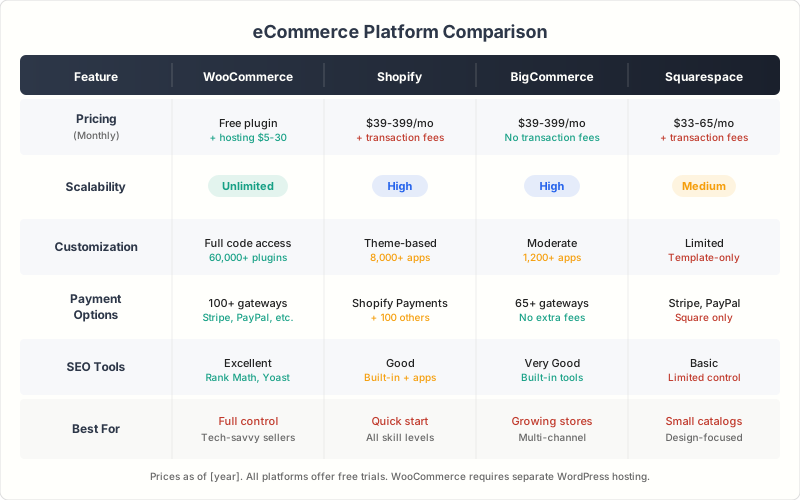
Your platform choice determines your ceiling for reliability, performance, and scalability. I’ve worked extensively with all the major options, and each fits a different business profile. The wrong choice here creates problems that no amount of optimization can fix later.
Shopify is the safest choice for most businesses. It handles hosting, security, PCI compliance, and uptime for you. You don’t manage servers. You don’t patch security vulnerabilities. Shopify’s infrastructure processes over $1 billion in sales during peak events like Black Friday without breaking a sweat. Plans start at $39/month (Basic) and scale to Shopify Plus for enterprise ($2,300/month).
WooCommerce gives you maximum control if you’re comfortable with WordPress. You own everything: the code, the data, the hosting relationship. But you’re also responsible for everything: server performance, security patches, plugin compatibility, and backups. WooCommerce itself is free; your costs come from hosting ($20-100/month for managed WordPress hosting), premium plugins ($50-300/year each), and payment gateway fees.
BigCommerce sits between Shopify and WooCommerce. It’s a hosted platform (no server management) but offers more built-in features without apps, including multi-channel selling, B2B capabilities, and advanced SEO tools. Plans start at $39/month. It’s a strong choice for businesses that need enterprise features without enterprise pricing.
Squarespace works well for smaller stores (under 500 products) where design aesthetics matter as much as functionality. Their Commerce plans start at $33/month with beautiful templates and integrated marketing tools. Not the right choice for high-volume stores or complex product catalogs.

- 99.99% uptime with fully managed infrastructure
- Built-in PCI DSS compliance and SSL
- 8,000+ apps in the Shopify App Store
- Handles massive traffic spikes without intervention
- Shopify Payments eliminates third-party gateway fees

- Free core plugin with unlimited customization
- Full ownership of code, data, and hosting
- 55,000+ WordPress plugins for any functionality
- Built-in REST API for headless commerce
- Works with any payment gateway worldwide
- No transaction fees on any plan
- Built-in multi-channel selling (Amazon, eBay, social)
- Native B2B features with custom pricing and quote requests
- Headless commerce via API for custom frontends
- Advanced SEO with customizable URLs and auto-sitemaps

- Award-winning design templates included
- Integrated email marketing and analytics
- Built-in appointment scheduling and subscriptions
- Zero transaction fees on Commerce plans
- Domain, SSL, and hosting included
Prioritize Website Speed and Performance
Page speed directly impacts revenue. Amazon calculated that every 100ms of latency costs them 1% in sales. For a store doing $100K/month, a 1-second delay could mean $7,000/month in lost revenue. That’s not theoretical. I’ve measured it across client sites, and the correlation between load time and conversion rate is consistent.
Your target: under 2.5 seconds for Largest Contentful Paint (LCP), under 100ms for Interaction to Next Paint (INP), and under 0.1 for Cumulative Layout Shift (CLS). These are Google’s Core Web Vitals thresholds, and they directly affect both search rankings and user experience.
Speed Optimization Essentials
Image optimization. Product images are the biggest performance killer on eCommerce sites. Use WebP or AVIF format, compress to 80% quality (visually imperceptible), implement lazy loading for below-the-fold images, and serve responsive sizes with srcset. A single unoptimized hero image can add 2-3 seconds to your load time.
Content Delivery Network (CDN). A CDN caches your static assets (images, CSS, JavaScript) on servers worldwide, so a customer in Tokyo loads from a nearby server instead of your origin server in Virginia. Cloudflare’s free tier handles most stores. For high-traffic sites, Cloudflare Pro ($20/month) or Bunny CDN ($0.01/GB) offer more control.
Minimize render-blocking resources. Combine and minify CSS/JavaScript files. Defer non-critical scripts. Use critical CSS inlining for above-the-fold content. On WooCommerce, plugins like WP Rocket ($59/year) handle most of this automatically.
Database optimization. WooCommerce stores accumulate database bloat: expired transients, post revisions, orphaned metadata. Run monthly cleanups. On Shopify and BigCommerce, the platform handles this for you.
Use Google PageSpeed Insights or GTmetrix to identify bottlenecks. Fix the biggest issues first. Diminishing returns kick in after the first 3-4 optimizations.
Implement Responsive Mobile-First Design
Mobile commerce accounts for 73% of global eCommerce sales in 2026. If your store isn’t built mobile-first, you’re designing for the minority of your customers. Responsive design isn’t enough anymore. You need mobile-optimized design, meaning the mobile experience is designed first and the desktop version is an enhancement.
Touch-friendly targets. Buttons and links need minimum 44x44px tap targets. Product variant selectors, quantity inputs, and “Add to Cart” buttons should be easily tappable without zooming. I test every client site with my thumb. If I accidentally tap the wrong element, the target is too small.
Thumb-zone navigation. Place critical CTAs (cart, checkout, primary navigation) within the bottom third of the screen where thumbs naturally rest. Sticky bottom navigation bars outperform traditional hamburger menus for mobile eCommerce.
Mobile checkout. This is where most stores lose mobile customers. Auto-fill must work. Payment fields must expand properly. The keyboard should switch to numeric for phone/card inputs. Apple Pay and Google Pay buttons should be prominent. One-tap checkout reduces mobile abandonment by 20-30%.
Test on real devices, not just browser emulators. Chrome DevTools can’t simulate slow cellular connections, touch precision issues, or the actual feel of navigating your store on a phone.
Ensure Robust Security Measures
Security is non-negotiable in eCommerce. Customers share credit card numbers, home addresses, and personal details with your store. A single breach doesn’t just cost money in fines and remediation, it destroys trust permanently. 60% of small businesses that suffer a data breach close within 6 months.
Must-Have Security Layers
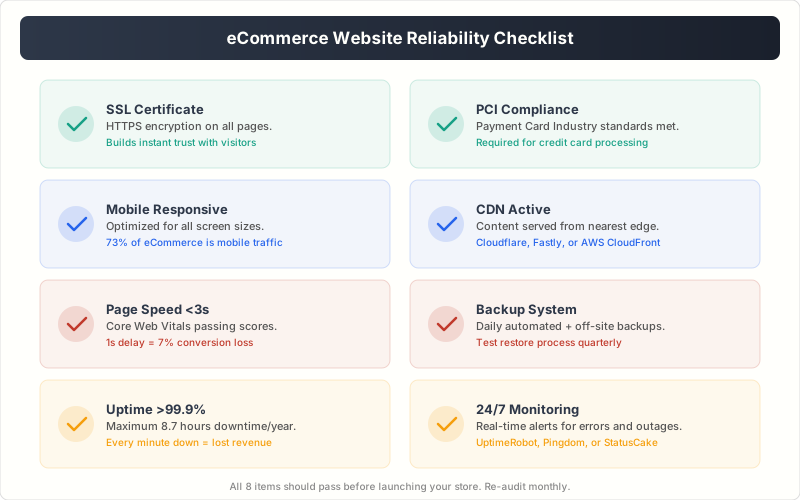
SSL/TLS certificate. Every page on your store must load over HTTPS. Not just checkout. Every page. Google flags non-HTTPS sites as “Not Secure,” and customers won’t enter payment info on an unsecured page. Shopify and BigCommerce include SSL automatically. For WooCommerce, your host should provide a free Let’s Encrypt certificate.
PCI DSS compliance. If you process credit card payments, you must comply with Payment Card Industry Data Security Standards. Shopify, BigCommerce, and Squarespace handle PCI compliance for you. WooCommerce store owners need to ensure their hosting environment meets PCI requirements, or use a payment gateway like Stripe or PayPal that handles card data externally so your server never touches raw card numbers.
Web Application Firewall (WAF). A WAF blocks SQL injection, cross-site scripting, and brute force attacks before they reach your store. Cloudflare (free tier) provides basic WAF protection. For WooCommerce, Sucuri ($199/year) or Wordfence (free + premium) add WordPress-specific threat detection.
Two-factor authentication. Require 2FA for all admin and staff accounts. A compromised admin account gives attackers full control of your store, customer data, and payment settings. Every platform supports 2FA. Enable it today.
Regular updates. Keep your CMS, plugins, themes, and dependencies updated. 56% of WordPress hacks exploit outdated plugins. Set a weekly update schedule and test in a staging environment before pushing to production.
Focus on User Experience (UX)
A seamless shopping experience is what separates stores that convert at 1% from stores that convert at 3-4%. Every friction point, confusing navigation, missing product info, unclear pricing, costs you sales. The best eCommerce UX feels invisible. Customers find what they want, understand the product, and checkout without thinking about the process.
Navigation and Search
If a customer can’t find a product in under 10 seconds, you’ve already lost. Implement faceted search with filters for price, size, color, brand, and ratings. Use predictive search that shows results as the user types. Algolia and Searchspring are the gold standard for eCommerce search. For WooCommerce, FiboSearch (free) handles predictive search well.
Category structure should mirror how customers think, not how your inventory is organized. “Women’s Running Shoes” is a category. “Footwear > Athletic > Women’s > Running” is a filing system. Keep your main navigation to 5-7 top-level categories maximum.
Product Pages That Convert
High-quality product images from multiple angles (minimum 4-5 per product), zoom functionality, and video where possible. Clear pricing with any discounts shown as struck-through original price. Specific, benefit-focused descriptions. Real customer reviews with photos. Size guides and comparison charts. Estimated delivery dates. Stock status. Trust badges near the “Add to Cart” button.
The product page is where the buying decision happens. Every missing piece of information is an objection you haven’t answered, and unanswered objections kill conversions.
Choose a Reliable Hosting Provider
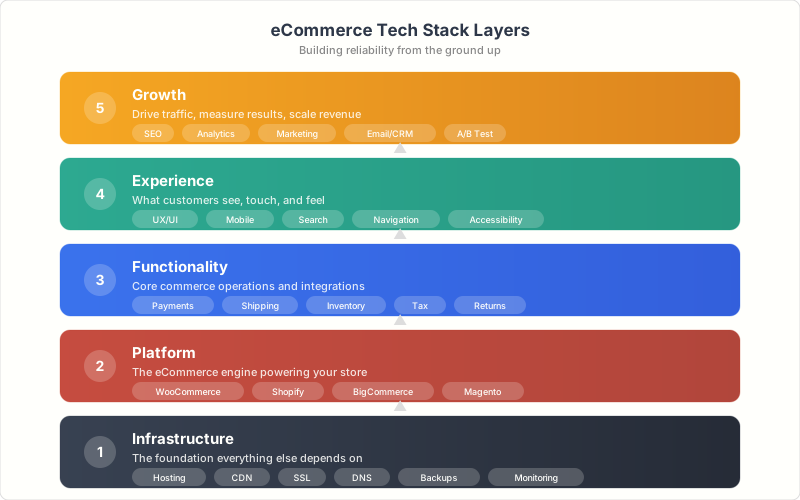
Your hosting provider is the foundation your entire store sits on. If the foundation is shaky, nothing you build on top will be reliable. For self-hosted platforms like WooCommerce, hosting choice matters enormously. For Shopify and BigCommerce, hosting is included and managed for you.
What to Look for in eCommerce Hosting
Uptime guarantee. Accept nothing less than 99.9% uptime SLA. That’s still 8.7 hours of downtime per year. For a store doing $50K/month, every hour of downtime costs roughly $68. Premium hosts like Cloudways, WPX, and Kinsta offer 99.99% uptime guarantees.
Scalability. Can the server handle a 10x traffic spike during a flash sale? Shared hosting buckles under pressure. Managed cloud hosting (Cloudways on DigitalOcean/AWS, or dedicated VPS hosting) scales resources on demand. Test your hosting under load before your first major promotion.
Server-side caching. Redis or Memcached object caching, full-page caching, and opcode caching should be included or easily configurable. These reduce database queries by 80-90% and dramatically improve response times for WooCommerce stores.
Automatic backups. Daily automated backups with one-click restore. Keep at least 30 days of backup history. Test your restoration process quarterly. A backup you’ve never tested is not a backup.
24/7 support. When your store goes down at 2 AM on a Saturday, you need live support, not a ticket system. Choose hosts with 24/7 live chat or phone support staffed by actual engineers.
Streamline the Checkout Process
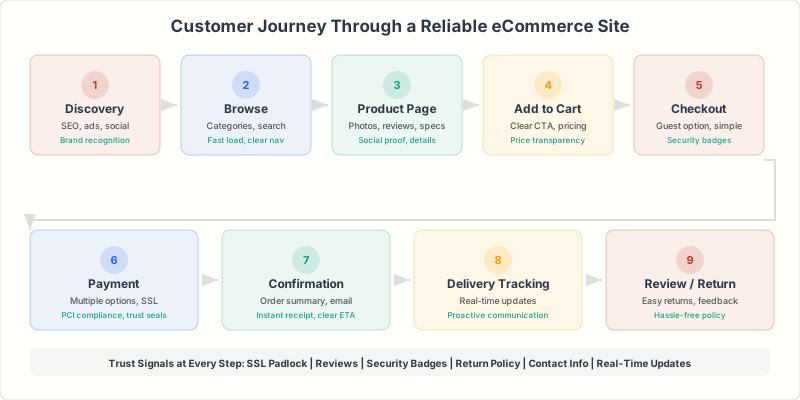
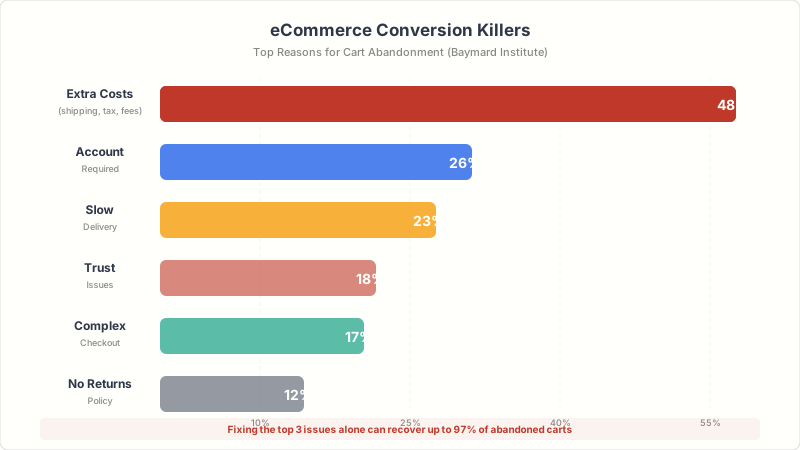
Cart abandonment averages 70% across all eCommerce. That means 7 out of 10 people who add a product to their cart leave without buying. The checkout process is the biggest controllable factor. Every additional step, field, or moment of confusion bleeds customers.
Checkout Optimization That Works
Guest checkout. 26% of cart abandoners leave because they’re forced to create an account. Always offer guest checkout. Offer account creation after the purchase is complete, when the customer has already committed.
Single-page checkout. Consolidate shipping, billing, and payment into one page. Multi-step checkouts increase abandonment by 14% compared to single-page. Shopify’s new checkout does this well. For WooCommerce, CartFlows or FunnelKit create optimized single-page checkouts.
Transparent pricing. Show shipping costs, taxes, and fees on the product page or cart, before checkout. 48% of abandoners cite unexpected extra costs as the reason. No surprises. Ever.
Multiple payment methods. Credit/debit cards, PayPal, Apple Pay, Google Pay, Shop Pay, and buy-now-pay-later options like Klarna or Affirm. Every missing payment method is a segment of customers you’re excluding. At minimum, offer cards + PayPal + one digital wallet.
Progress indicators. If you use a multi-step checkout, show customers where they are: “Step 2 of 3: Shipping.” Uncertainty about how much longer the process takes is a major anxiety trigger.
Leverage Analytics for Continuous Improvement
You can’t optimize what you don’t measure. Every reliable eCommerce site needs a clear analytics stack that tracks the metrics that actually matter for revenue, not vanity metrics like total page views.
Essential eCommerce Metrics
| Metric | What It Tells You | Target Benchmark |
|---|---|---|
| Conversion rate | % of visitors who purchase | 2-4% (varies by niche) |
| Cart abandonment rate | % who add to cart but don’t buy | Below 65% |
| Average order value (AOV) | Revenue per transaction | Varies (aim to increase) |
| Customer lifetime value (CLV) | Total revenue per customer | 3x+ acquisition cost |
| Bounce rate (product pages) | % who leave without interacting | Below 40% |
| Page load time | User experience quality | Under 2.5 seconds (LCP) |
| Return rate | Product/description accuracy | Below 10% |
Set up Google Analytics 4 with enhanced eCommerce tracking from day one. It tracks the full purchase funnel: product views, add-to-cart events, checkout steps, and purchases. Layer Hotjar or Microsoft Clarity (free) on top for heatmaps and session recordings. Watching real customers struggle with your checkout is more valuable than any metric dashboard.
Provide Exceptional Customer Support
Customer support isn’t just a cost center. It’s a reliability signal. When a customer has a question about sizing, shipping, or returns, the speed and quality of your response directly determines whether they buy. 73% of customers say that valuing their time is the most important thing a company can do.
Live chat. Real-time support during business hours is table stakes for eCommerce in 2026. Tidio (free tier available), LiveChat ($20/month), and Zendesk Chat integrate with all major platforms. Place the chat widget on product pages and checkout, the two places customers most need help.
AI chatbots. For after-hours support and common queries (order tracking, return policy, shipping times), AI chatbots handle 60-80% of inquiries without human intervention. Tidio, Zendesk, and Gorgias all offer AI-powered chatbot builders trained on your store data.
Self-service knowledge base. A well-organized FAQ and help center reduces support tickets by 30-40%. Cover shipping policies, return process, sizing guides, payment methods, and account management. Update it every time you get a repeated question.
Post-purchase communication. Order confirmation, shipping notifications with tracking links, delivery confirmation, and a follow-up email asking for a review. These automated touchpoints reduce “Where’s my order?” inquiries by 50% and build confidence in your brand.
Optimize for SEO and Visibility
A reliable website should be discoverable. Organic search drives 33% of eCommerce traffic on average, and it’s the highest-converting channel after direct/branded traffic. eCommerce SEO has specific requirements beyond standard website SEO.
eCommerce SEO Essentials
Product page SEO. Unique titles and meta descriptions for every product. Include the product name, key attributes (size, color, material), and a benefit. “Men’s Waterproof Hiking Boots – Lightweight, Gore-Tex, Size 7-14” outranks “Hiking Boots” every time. Use keyword research to target long-tail product keywords your customers actually search for.
Schema markup. Product schema (price, availability, reviews, SKU) makes your listings eligible for rich snippets in Google search results. Rich snippets with star ratings and pricing get 30% higher click-through rates than plain listings. Shopify adds basic product schema automatically. For WooCommerce, use Rank Math or Yoast SEO Premium.
Internal linking. Connect related products, categories, and content pages. “Customers also bought” sections, breadcrumb navigation, and related products widgets serve dual purposes: better UX and stronger internal link architecture.
Technical SEO. Clean URL structure (/product/product-name, not /p?id=12345). Canonical tags to prevent duplicate content from filtered/sorted pages. XML sitemap including all products. Proper handling of out-of-stock products (keep the page, mark as unavailable, suggest alternatives).
Local SEO matters too if your eCommerce business has physical locations or serves specific geographic areas. Google Business Profile, local schema markup, and location-specific landing pages can drive significant foot traffic and local online orders.
Regular Maintenance and Updates
An eCommerce site is a living system. Neglect it for 3 months and you’ll have outdated plugins with security vulnerabilities, broken links to discontinued products, expired SSL certificates, and slowly degrading performance. Schedule maintenance like you schedule inventory, because your website is your storefront.
Monthly eCommerce Maintenance Checklist
For WooCommerce stores, use a staging environment for all updates. Test plugin updates against your live theme and other plugins before pushing to production. A single incompatible plugin update can break your checkout and cost you sales for hours before you notice.
Build Trust Through Transparency
Trust is the currency of eCommerce. Customers are handing money to a website they’ve never physically visited, buying products they’ve never physically touched. Every element of your store either builds or erodes that trust. The stores that convert best don’t just sell well. They reassure well.
Clear return policy. Display your return policy prominently on product pages, in the footer, and during checkout. “30-Day No-Questions-Asked Returns” removes buying anxiety better than any sales copy. Make the return process as simple as the purchase process.
Authentic reviews. Real customer reviews with photos and verified purchase badges. Don’t hide negative reviews. Respond to them professionally. A store with 4.3 stars and visible negative reviews is more trustworthy than a store with 5.0 stars and no reviews.
Trust badges. SSL badge, payment provider logos (Visa, Mastercard, PayPal), security certification badges, and any industry certifications. Place them near the “Add to Cart” button and in the checkout footer. Tests consistently show 10-15% conversion lifts from trust badge placement.
Contact information. A real phone number, email address, and physical address (if applicable). A “Contact Us” page buried 4 clicks deep signals you don’t want to hear from customers. Make it prominent.
Transparent shipping. Show estimated delivery dates on the product page, not just at checkout. “Arrives by Thursday, March 13” converts better than “Ships in 3-5 business days.” Customers want to know when they’ll receive their order, not when you’ll ship it.
Offer Personalization and AI-Powered Experiences
Personalization is no longer a nice-to-have for eCommerce. Personalized shopping experiences drive 40% higher conversion rates and 25% higher average order values compared to generic one-size-fits-all stores. AI makes this accessible to stores of all sizes.
Product recommendations. “Customers also bought,” “Frequently bought together,” and “You might also like” sections increase AOV by 10-30%. Shopify and BigCommerce include basic recommendation engines. For WooCommerce, plugins like Product Recommendations by WooCommerce or third-party tools like Nosto and Clerk.io provide AI-powered suggestions.
Personalized email marketing. Abandoned cart emails recover 5-10% of lost sales on average. Post-purchase recommendation emails drive 15-20% of repeat revenue. Increasing eCommerce sales through email personalization is one of the highest-ROI activities you can invest in. Klaviyo and Omnisend are the best platforms for eCommerce email personalization.
Dynamic content. Show different homepage banners based on traffic source, past purchase history, or browsing behavior. A returning customer who bought running shoes last month should see running accessories, not a generic “Welcome” banner. AI-driven tools make this automatic once configured.
AI-powered search. Smart search that understands natural language queries, corrects typos, and returns relevant results even when the customer doesn’t use exact product names. “Red dress for wedding” should return cocktail dresses and formal wear, not just items with “red dress” in the title.
Common Mistakes That Kill eCommerce Reliability
I’ve audited hundreds of eCommerce sites. These are the mistakes I see most often, and they’re all avoidable.
Cheap shared hosting. A $3/month shared host cannot reliably serve an eCommerce store. You’re sharing server resources with hundreds of other sites. When one of them gets traffic, your store slows down. When one gets hacked, your server is compromised. Invest in managed hosting. It pays for itself in the first month through reduced downtime and faster load times.
No staging environment. Pushing untested plugin or theme updates directly to your live store is gambling with your revenue. A staging environment takes 10 minutes to set up and prevents hours of emergency fixes. Every managed WordPress host offers one-click staging.
Ignoring mobile checkout. Desktop checkout might work perfectly while mobile checkout is broken. Test both. Monthly. On real devices. 73% of your customers are shopping on phones.
No monitoring or alerts. If your store goes down at 3 AM, would you know before morning? Tools like UptimeRobot (free for 50 monitors), Pingdom, or Better Uptime send instant alerts when your site goes down. Set up monitoring on day one.
Over-installing plugins. Every WooCommerce plugin adds database queries, JavaScript, and CSS. More plugins means slower pages and more potential security vulnerabilities. Audit quarterly and remove anything you’re not actively using. 20-25 plugins is a reasonable maximum for most WooCommerce stores.
The most reliable eCommerce sites I’ve worked on share one trait: they invest 20% of their time in maintenance, monitoring, and optimization rather than just building new features. Reliability isn’t a feature you ship once. It’s a practice you maintain.
What’s the biggest reliability challenge for your eCommerce store?
Frequently Asked Questions
What’s the best eCommerce platform for beginners?
Shopify is the best choice for beginners. It handles hosting, security, SSL, PCI compliance, and updates automatically. You can launch a professional store in a weekend without any technical knowledge. The app ecosystem covers almost any feature you need. Plans start at $39/month, which includes everything except premium apps and your domain name.
How much does it cost to build a reliable eCommerce website?
A basic but reliable store costs $50-150/month total: platform ($39/month for Shopify or $29/month hosting for WooCommerce), domain ($12-15/year), essential apps or plugins ($20-50/month), and email marketing ($0-30/month). For a custom-designed store with premium features, budget $5,000-15,000 for initial development plus $200-500/month in ongoing costs. The key expense isn’t the build, it’s the ongoing maintenance and optimization.
Should I use WooCommerce or Shopify?
Use Shopify if you want a hands-off, reliable platform where everything just works. Use WooCommerce if you need maximum customization, already have a WordPress site, or want to avoid monthly platform fees (you’ll pay for hosting instead). Shopify is better for most businesses. WooCommerce is better for developers and businesses with unique requirements that Shopify’s ecosystem can’t handle.
How do I reduce cart abandonment on my eCommerce site?
Focus on the top three causes: show all costs upfront (shipping, taxes, fees) on the product page, offer guest checkout without forcing account creation, and provide clear delivery estimates. Beyond those, add multiple payment options (cards, PayPal, digital wallets, buy-now-pay-later), use a single-page checkout, and send automated abandoned cart recovery emails. These changes typically reduce abandonment by 20-35%.
How important is page speed for eCommerce?
Extremely important. Every additional second of load time reduces conversions by 7% on average. Amazon found that 100ms of added latency costs 1% in revenue. Your target is under 2.5 seconds for Largest Contentful Paint (LCP). Optimize images (WebP format, lazy loading), use a CDN, enable caching, and minimize render-blocking scripts. Page speed also directly affects Google search rankings.
Do I need PCI compliance for my online store?
Yes, if you accept credit card payments. Hosted platforms like Shopify, BigCommerce, and Squarespace handle PCI compliance automatically. For WooCommerce and self-hosted stores, the simplest approach is using a payment gateway like Stripe or PayPal that processes card data on their servers, so your store never handles raw card numbers. This reduces your PCI compliance scope significantly.
How often should I update my eCommerce website?
Security updates should be applied within 48 hours of release. Feature updates and plugin updates should be tested on a staging environment and deployed weekly or biweekly. Content updates (product descriptions, pricing, images) should happen as needed. A full site audit covering speed, security, SEO, and UX should be done quarterly. Monthly maintenance including backup verification, broken link checks, and performance testing is the minimum for a reliable store.
What hosting do I need for a WooCommerce store?
At minimum, managed WordPress hosting with SSD storage, PHP 8.1+, server-side caching (Redis or Memcached), daily backups, staging environment, and 99.9% uptime SLA. Shared hosting is not suitable for eCommerce. Good options include Cloudways ($14/month+), WPX ($24.99/month), and Kinsta ($35/month). Budget $20-100/month depending on traffic. For stores with over 50K monthly visitors, consider dedicated cloud hosting on AWS or DigitalOcean via Cloudways.
Building a reliable eCommerce website isn’t a one-time project. It’s an ongoing commitment to speed, security, user experience, and continuous optimization. The 12 elements in this guide cover the full stack: from platform selection and hosting to checkout optimization, SEO, and personalization.
Start with the fundamentals: pick the right platform, invest in proper hosting, secure your store, and optimize your checkout. Then layer on analytics, personalization, and ongoing maintenance. The eCommerce businesses that thrive aren’t the ones with the fanciest features. They’re the ones that execute the basics reliably, every single day.
Disclaimer: This site is reader-supported. If you buy through some links, I may earn a small commission at no extra cost to you. I only recommend tools I trust and would use myself. Your support helps keep gauravtiwari.org free and focused on real-world advice. Thanks. - Gaurav Tiwari