
Personalization in eCommerce: How to Tailor Experiences for Consumers in 2026
Your eCommerce store shows the same bestsellers to every visitor. The returning customer who bought running shoes last week sees the same homepage as the first-time browser looking for cookware. That generic experience costs you money. A split test on a Shopify store showed that AI-driven product recommendations converted 31% higher and increased average order value by $14.60 compared to the same-for-everyone approach.
Personalization in eCommerce has moved far beyond “Hi [First Name]” in emails. In 2026, it means AI engines predicting what a customer wants before they search, dynamic pricing that adjusts in real time, and privacy-first data strategies that build trust while delivering hyper-relevant experiences. McKinsey reports that companies excelling at personalization generate 40% more revenue than average players. Yet most store owners treat personalization as an afterthought.
This guide breaks down how modern eCommerce personalization works, which tools actually deliver results, and how to implement it without violating privacy regulations. You’ll get specific techniques across 10 categories, real metrics to benchmark against, and a step-by-step implementation roadmap for Shopify, WooCommerce, or custom platforms.
Why Personalization Is Non-Negotiable in 2026
Consumers don’t just prefer personalized experiences anymore. They expect them. A Salesforce study found that 73% of customers expect companies to understand their unique needs, and 56% expect every offer to be personalized. That expectation gap is where revenue lives or dies.
The numbers tell a clear story. Personalized product recommendations drive 31% of eCommerce revenue on average, according to Barilliance. Personalized email campaigns see 26% higher open rates and 41% higher click-through rates than generic blasts. Dynamic content on landing pages lifts conversion rates by 20-30%. These aren’t marginal improvements. For a store doing $500K/year, a 25% conversion lift means $125K in additional revenue from the same traffic.
But here’s what most guides won’t tell you: personalization done poorly is worse than no personalization at all. I’ve seen stores recommend products customers already bought, show “personalized” deals that are actually higher than the regular price, and send SMS messages so aggressively that customers unsubscribe in droves. The key isn’t just implementing personalization. It’s implementing it with precision, relevance, and respect for the customer’s intelligence.
The Personalization Maturity Model: Where Are You?
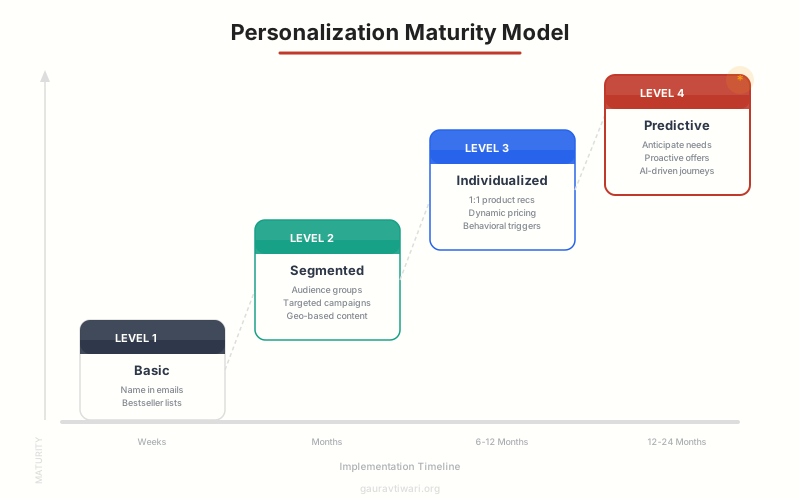
Not every store needs bleeding-edge AI personalization on day one. I use a four-level maturity model to assess where a business sits and what to implement next. Jumping to Level 4 when you haven’t nailed Level 1 wastes money and creates a disjointed customer experience.
Level 1: Basic Personalization
This is where most small stores start, and it’s perfectly effective. Use the customer’s name in emails. Show bestsellers and “trending now” sections. Display recently viewed products. Segment your email list by purchase history (buyers vs. browsers). Implement basic abandoned cart emails with the specific products left behind. These tactics are table stakes, but I still see stores doing $1M+ in revenue that haven’t set them up properly.
Level 2: Segmented Personalization
At this level, you’re grouping customers into meaningful segments and tailoring experiences for each group. Common segments include: new visitors vs. returning customers, high-value vs. average customers (RFM analysis), geographic location, device type, and traffic source. A returning customer who’s bought running shoes three times should see a different homepage than a first-time visitor from a Facebook ad for yoga mats. Omnisend and Klaviyo both handle segmented email/SMS personalization exceptionally well at this level.
Level 3: Individualized Personalization
This is where AI kicks in. Instead of segments, you’re personalizing for each individual customer. Product recommendations use collaborative filtering (“customers who bought X also bought Y”) and content-based filtering (matching product attributes to user preferences). Dynamic pricing adjusts based on demand, inventory, and customer loyalty tier. On-site search results reorder based on individual browsing patterns. Tools like Dynamic Yield (by Mastercard) and Nosto power this level for mid-market stores.
Level 4: Predictive Personalization
The most advanced level uses AI to anticipate customer needs before they express them. Predictive models forecast when a customer is likely to repurchase (and send a perfectly timed email), which customers are at risk of churning (and trigger win-back campaigns), and what products a customer will want next based on lifecycle patterns. Bloomreach and Salesforce Commerce Cloud operate at this level, but the investment starts at $1,000-5,000+/month. Worth it only after you’ve maximized Levels 1-3.
Personalization done poorly is worse than no personalization at all. I’ve seen stores recommend products customers already bought, show ‘deals’ that are higher than regular prices, and send messages so aggressively that customers unsubscribe in droves.
AI-Powered Product Recommendations That Convert
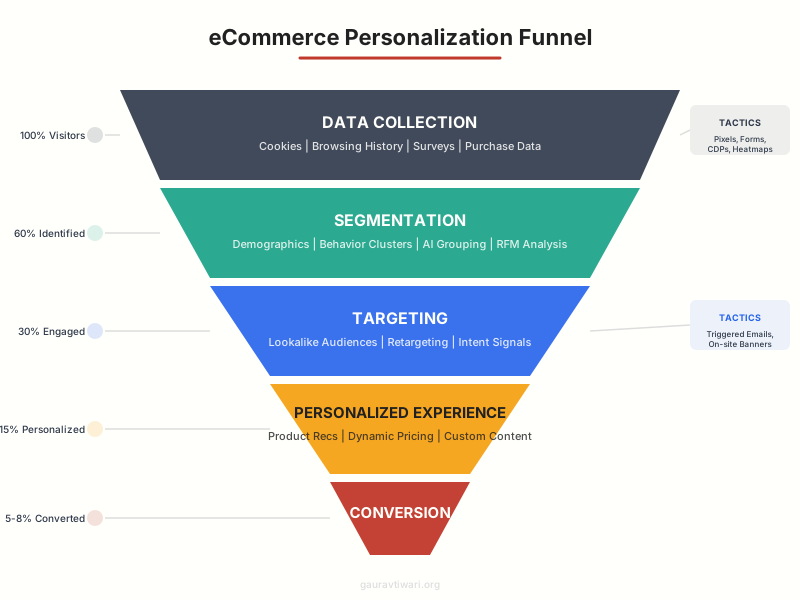
Product recommendations are the highest-ROI personalization tactic. Amazon attributes 35% of its revenue to its recommendation engine. You don’t need Amazon’s budget to implement effective recommendations, but you do need to understand the different algorithms and where to deploy them.
Recommendation Algorithms Explained
Collaborative filtering analyzes behavior patterns across your entire customer base. “Customers who viewed/bought this also viewed/bought that.” It works well with large catalogs and traffic volumes but struggles with new products (cold start problem) and niche items with few interactions.
Content-based filtering matches product attributes (color, size, brand, price range, category) to individual user preferences. If a customer browses three blue dresses under $50, the algorithm surfaces more blue dresses in that price range. It works immediately for new products but can create “filter bubbles” where customers never discover new categories.
Hybrid approaches combine both methods and add contextual signals: time of day, device, weather, trending products, and inventory levels. This is what most modern AI engines use. I recommend starting with collaborative filtering (it’s what Shopify’s built-in recommendations use) and adding content-based signals as you collect more data.
Where to Place Recommendations
- Product pages: “Frequently bought together” and “Customers also viewed.” These drive the highest conversion because the customer is already in buying mode. Average lift: 10-15% increase in add-to-cart rate.
- Cart page: Cross-sell and upsell widgets. “Complete the look” for fashion. “You might also need” for electronics (cables, cases, screen protectors). Average lift: 8-12% increase in AOV.
- Homepage: “Recommended for you” based on browsing history for returning visitors. “Trending now” for new visitors. Personalized hero banners based on segment.
- Post-purchase emails: Recommend complementary products 3-7 days after purchase. This is where I see the best ROI because the customer has already demonstrated trust by buying. Average lift: 15-20% repeat purchase rate.
- Search results: Reorder search results based on individual preferences. If a customer always buys Nike, surface Nike products first in “running shoes” results.
Email and SMS Personalization Strategies
Email remains the highest-ROI marketing channel for eCommerce at $36-42 per $1 spent. But generic batch-and-blast emails are dying. The stores winning at email in 2026 are sending fewer emails that are more relevant. Here’s what that looks like in practice.
Behavioral Email Triggers
Triggered emails based on customer behavior outperform scheduled campaigns by 3-5x on revenue per email. The essential triggers every store should have:
- Abandoned cart: Send 3 emails over 24-72 hours. First email (1 hour): product reminder with images. Second (24 hours): add social proof (reviews, ratings). Third (72 hours): limited-time discount (5-10%). Average recovery rate: 5-15% of abandoned carts.
- Browse abandonment: Customer viewed a product 2+ times without adding to cart. Send a “still interested?” email with the specific product and similar alternatives. Less aggressive than cart abandonment since the customer hasn’t committed.
- Post-purchase flow: Day 1: order confirmation + “what to expect.” Day 3: delivery update + care instructions. Day 7: review request. Day 14: cross-sell recommendations. Day 30: replenishment reminder (for consumables).
- Win-back campaigns: Trigger when a previously active customer hasn’t purchased in 60-90 days. “We miss you” with a personalized incentive based on their AOV and purchase history.
- Price drop alerts: Notify customers when products they’ve viewed or wishlisted drop in price. High intent, high conversion. Easy to set up with Klaviyo or Omnisend.
SMS Personalization
SMS has a 98% open rate compared to email’s 20-25%. But SMS personalization requires more discipline because the tolerance for irrelevant messages is much lower. One bad text and customers unsubscribe.
I recommend SMS for three scenarios only: time-sensitive offers (flash sales, back-in-stock alerts), high-value transactional updates (shipping, delivery), and abandoned cart recovery (the third touch, after two emails). Keep messages under 160 characters, always include an opt-out, and never send more than 4-6 SMS per month. Omnisend handles combined email+SMS flows particularly well, letting you build automations that switch channels based on engagement.

Klaviyo
- AI-powered product recommendations in emails
- Advanced segmentation with 500+ pre-built segments
- Predictive analytics: CLV, churn risk, next order date
- Combined email + SMS automation flows
- Native Shopify, WooCommerce, BigCommerce integrations
- Free up to 250 contacts and 500 email sends/month
Privacy-First Personalization: The 2026 Playbook
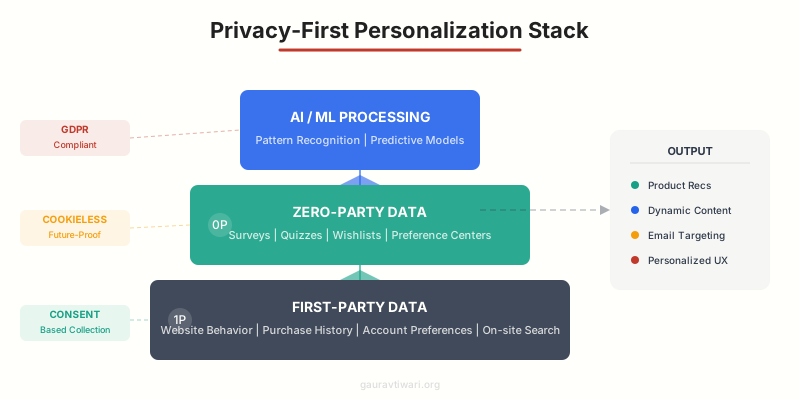
Third-party cookies are dead. Google finally deprecated them in Chrome, Apple’s Intelligent Tracking Prevention blocks cross-site tracking by default, and regulations like GDPR and CCPA impose heavy fines for non-compliant data collection. But personalization doesn’t require invasive tracking. The smartest stores have shifted to privacy-first approaches that actually build more trust and better data.
First-Party Data: Your Most Valuable Asset
First-party data is information customers share directly with your store: purchase history, browsing behavior on your site, email interactions, wishlist items, and account preferences. It’s more accurate than third-party data, completely compliant with privacy regulations, and you own it. Every interaction on your website generates first-party data. The question is whether you’re capturing and using it effectively.
Start with these first-party data collection points: on-site behavior tracking (pages viewed, products clicked, time spent), purchase and return history, email engagement (opens, clicks, product interactions), search queries on your site, and customer service interactions. Tools like Semrush can help you understand what search terms drive visitors to your store, giving you context for personalizing their on-site experience.
Zero-Party Data: Customers Tell You What They Want
Zero-party data is information customers intentionally and proactively share. It’s the gold standard for personalization because there’s no inference or guessing involved. The customer explicitly tells you their preferences.
Effective zero-party data collection methods include: onboarding quizzes (“Help us find your style” — fashion brands see 4-5x higher conversion from quiz-driven recommendations), preference centers in email settings, product fit finders, wishlists and “save for later” features, post-purchase surveys, and interactive polls. Typeform and tools like Octane AI (for Shopify) make quiz building straightforward. The key is making the exchange feel valuable. Customers share data when they believe it’ll improve their experience, not when they feel surveilled.
Server-Side Tracking
With browser-side tracking increasingly blocked by ad blockers and privacy features, server-side tracking has become essential. Instead of relying on browser cookies, you send data directly from your server to analytics and marketing platforms. This bypasses ad blockers, provides more accurate data, and gives you complete control over what information is shared.
Shopify’s Customer Events API and Google Tag Manager’s server-side container are the two most common implementations. The setup is more technical than traditional tracking, but the data quality improvement is significant. I’ve seen stores recover 20-30% of “lost” conversion data by switching to server-side tracking.
Dynamic Content and On-Site Personalization
Your website shouldn’t look the same to every visitor. Dynamic content adapts page elements, product displays, and messaging based on who’s browsing. This is where personalization becomes visible and where I’ve seen the biggest conversion lifts.
Personalized Homepage
The homepage is your highest-traffic page and the biggest opportunity for personalization. For returning customers, show recently viewed products, personalized recommendations, and relevant categories based on purchase history. For new visitors, display bestsellers, social proof (review counts, “X people bought this today”), and a compelling value proposition. For customers arriving from specific campaigns, match the hero banner to the ad they clicked.
I tested personalized vs. generic homepages on a fashion store. The personalized version showed different hero images based on gender and style preferences (detected from browse history). Result: 23% higher click-through to product pages and 18% more add-to-carts.
Dynamic Pricing and Offers
Dynamic pricing adjusts product prices based on demand, inventory, customer segment, or competitive positioning. Airlines and hotels have done this for decades. eCommerce is catching up. This doesn’t mean showing different prices to different people (that creates trust issues). It means strategically adjusting offers: showing free shipping thresholds based on a customer’s average cart value, offering loyalty discounts to repeat buyers, and running flash sales for segments most likely to convert.
A smarter approach: personalized incentives based on customer value. High-value customers get early access to sales. At-risk customers get exclusive discounts. New visitors get a welcome offer. The discount amount scales with the customer’s predicted lifetime value, so you’re investing marketing spend where it generates the highest return.
Personalized Search and Navigation
On-site search is the most underrated personalization opportunity. Customers who use search convert at 2-3x the rate of browsers, yet most stores use a basic keyword-match search. AI-powered search reranks results based on individual preferences, understands synonyms and intent (searching “sneakers” shows “running shoes” too), and auto-completes with personalized suggestions.
Algolia and Searchspring are the two tools I recommend for eCommerce search personalization. Algolia’s free tier handles up to 10K search requests/month, which is enough for small-to-medium stores. The conversion lift from personalized search typically pays for the tool within the first month.
Nosto
- AI product recommendations across all touchpoints
- Dynamic content personalization for homepage, category, and product pages
- Personalized search with NLP and visual AI
- A/B testing and segmentation engine built-in
- Native integrations with Shopify, Magento, BigCommerce
- Category merchandising with automated rules
AI and Machine Learning in eCommerce Personalization
AI has transformed eCommerce personalization from rule-based (“if customer is in segment X, show Y”) to genuinely intelligent systems that learn and adapt in real time. Here’s how the technology actually works and which implementations deliver measurable ROI.
Natural Language Processing (NLP)
NLP powers conversational commerce and intelligent search. AI chatbots can understand customer queries in natural language (“I need a waterproof jacket for hiking in cold weather under $200”), extract intent and attributes (product type: jacket, feature: waterproof, use: hiking, climate: cold, budget: under $200), and return highly relevant results. This is dramatically better than keyword search, which would struggle with a query this complex.
ChatGPT-powered shopping assistants are becoming common on larger stores. They can answer product questions, compare options, handle objections, and guide customers through the purchase decision. AI tools for marketers have matured to the point where implementing a conversational shopping assistant is a matter of days, not months.
Predictive Analytics
Predictive models analyze historical data to forecast future behavior. The most valuable predictions for eCommerce include: customer lifetime value (CLV) prediction at the point of first purchase, churn probability scoring (who’s likely to stop buying), next purchase timing (when to send replenishment reminders), product affinity (what they’ll want next), and optimal discount sensitivity (the minimum incentive needed to convert).
Klaviyo now offers predictive analytics on its paid plans, including predicted CLV, expected next order date, and churn risk scoring. This was enterprise-only technology five years ago. Now it’s accessible to stores with as few as 500 customers.
Visual AI and Image Recognition
Visual search lets customers upload a photo and find similar products in your catalog. Pinterest, Google Lens, and ASOS have popularized this feature, and it’s becoming table stakes for fashion, home decor, and lifestyle brands. Syte and ViSenze offer visual AI for eCommerce that integrates with most platforms. The conversion rate for visual search is typically 2-3x higher than text search because the customer is showing you exactly what they want.
Social Proof and Behavioral Personalization
Social proof is personalization’s quieter cousin, but it’s equally powerful. Showing that other people, especially similar people, bought, liked, or reviewed a product reduces purchase anxiety and accelerates decisions. The best social proof is personalized: “42 people in your area bought this week” hits harder than “10,000+ sold.”
Real-Time Activity Notifications
“Sarah from London just purchased this item” notifications create urgency and social validation. They work particularly well for limited-inventory products, fashion, and trending items. Tools like Nudgify and Fomo automate this with real purchase data (never fake it, customers notice). I’ve measured a 12-18% conversion lift from well-placed activity notifications on product pages, but they can feel manipulative if overused. Show them selectively on high-consideration products, not on every page.
Personalized Reviews and UGC
Reviews mentioning specific attributes that match a customer’s concerns are more persuasive than generic 5-star reviews. If a customer has been browsing size-related content, surface reviews that mention fit and sizing. If they’ve compared prices, show reviews mentioning value for money. Tools like Yotpo and Loox allow review filtering and sorting by relevance, which is a lightweight form of personalization that directly addresses purchase objections.
Personalization Tools and Platforms Compared
The tools you choose depend on your platform, budget, and maturity level. I’ve categorized the best options by store size and complexity to make selection straightforward.
For Small Stores ($0-50K/month)
Start with your platform’s built-in features. Shopify’s native product recommendations, Omnisend for email/SMS automation (free up to 250 contacts), and basic segmentation. Add a social proof app (Nudgify has a free tier) and personalized search if your catalog exceeds 100 products. Total cost: $0-50/month. These tools handle Levels 1-2 of the maturity model effectively.
Omnisend
- Email + SMS + push notifications in one platform
- Pre-built eCommerce automation workflows
- Product recommendation blocks in emails
- Advanced segmentation based on shopping behavior
- Free plan: 250 contacts, 500 emails, 60 SMS/month
- Native Shopify, WooCommerce, BigCommerce integrations
For Mid-Market Stores ($50K-500K/month)
Upgrade to Klaviyo for email/SMS (predictive analytics included in paid plans). Add Nosto or Clerk.io for AI-powered product recommendations and on-site personalization. Implement server-side tracking with Google Tag Manager. Consider Rebuy for Shopify-specific AI merchandising. Total cost: $200-1,500/month. These tools unlock Level 3 personalization with measurable ROI.
For Enterprise Stores ($500K+/month)
At enterprise scale, consider Dynamic Yield (by Mastercard) for comprehensive personalization across web, mobile, email, and in-store. Bloomreach for AI-powered search, merchandising, and content personalization. Salesforce Commerce Cloud or Adobe Commerce for fully integrated personalization stacks. Total cost: $2,000-10,000+/month. These platforms deliver Level 4 predictive personalization but require dedicated team resources to operate effectively.

Dynamic Yield by Mastercard
- Omnichannel personalization (web, mobile, email, in-store)
- Deep learning recommendation engine
- Advanced A/B and multivariate testing
- Predictive targeting with 50+ audience attributes
- Real-time behavioral segmentation
- Server-side rendering for zero latency
Measuring Personalization ROI
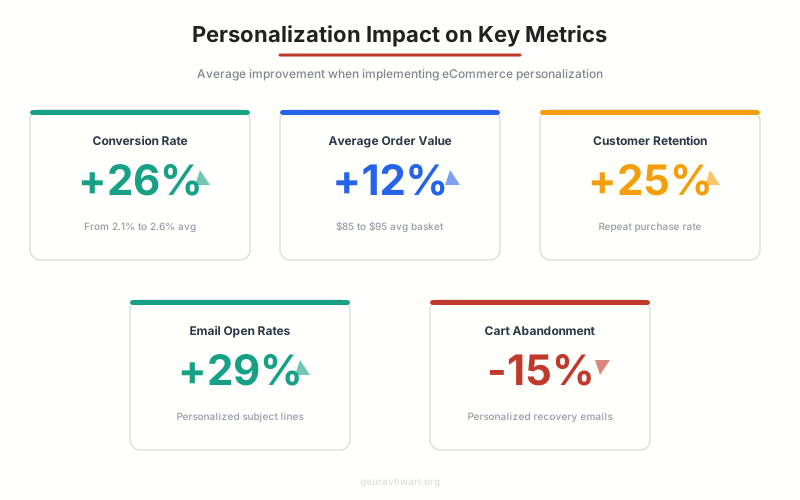
You can’t improve what you don’t measure. Most stores implementing personalization track the wrong metrics or don’t track at all. Here are the metrics that actually matter, with benchmarks to compare against.
Primary Metrics
| Metric | Benchmark (Personalized) | Benchmark (Generic) | Expected Lift |
|---|---|---|---|
| Conversion Rate | 3.5-5.0% | 2.5-3.0% | +20-40% |
| Average Order Value | Varies by niche | Varies by niche | +10-15% |
| Revenue Per Visitor | Varies by niche | Varies by niche | +25-35% |
| Email Click-Through Rate | 3.5-5.0% | 2.0-2.5% | +40-60% |
| Cart Abandonment Rate | 55-65% | 70-75% | -10-15% |
| Customer Retention (90-day) | 35-45% | 25-30% | +25-40% |
A/B Testing Your Personalization
Every personalization change should be A/B tested before full rollout. Show personalized experiences to 50% of traffic and generic experiences to the other 50%. Run the test for at least 2 full business cycles (14 days minimum for most stores). Use statistical significance calculators (Google’s free Optimize alternatives or AB Test Calculator) to confirm results aren’t random.
I test personalization changes in this order: product recommendations (highest impact, easiest to measure), email subject line personalization (fast to test, clear metrics), homepage dynamic content (high traffic, visible results), and search personalization (technical but high-converting). Test one change at a time. Stacking multiple personalization changes makes it impossible to attribute results.
Implementation Roadmap: 90-Day Plan
Here’s the exact 90-day implementation plan I use with eCommerce clients. It prioritizes quick wins first, builds data infrastructure in parallel, and layers advanced personalization as data accumulates.
Days 1-30: Foundation
- Week 1: Audit current personalization (most stores have none). Set up Klaviyo or Omnisend. Import customer data. Configure basic segments (buyers, browsers, VIPs, at-risk).
- Week 2: Launch abandoned cart email sequence (3 emails). Set up post-purchase flow. Implement “recently viewed” on homepage.
- Week 3: Add product recommendation widgets to product pages and cart. Enable social proof notifications. Set up browse abandonment triggers.
- Week 4: Measure baseline metrics. Compare personalized vs. non-personalized performance. Identify top-performing segments.
Days 31-60: Optimization
- Week 5-6: A/B test recommendation algorithms. Optimize email send times per segment. Launch win-back campaign for churned customers. Implement personalized landing pages for top ad campaigns.
- Week 7-8: Add SMS to key flows (cart abandonment, back-in-stock). Implement zero-party data collection (product quiz or preference survey). Refine segments based on 30 days of data.
Days 61-90: Advanced
- Week 9-10: Implement personalized search (Algolia or equivalent). Launch dynamic homepage content for returning visitors. Set up predictive analytics (CLV scoring, churn prediction).
- Week 11-12: Create VIP loyalty program with personalized rewards. Test dynamic pricing/offers by segment. Implement server-side tracking. Full ROI analysis and plan for next quarter.
eCommerce Personalization Essentials
Common Personalization Mistakes
I’ve audited personalization setups for dozens of stores. The same mistakes come up repeatedly, and they’re all avoidable.
Over-Personalizing Too Early
Stores with 100 orders/month don’t need a $2,000/month AI personalization platform. The data volume isn’t there to train models effectively, and the ROI won’t justify the cost. Start with Level 1-2 tactics (email segmentation, basic recommendations, social proof) and upgrade as revenue grows. I’ve seen stores waste $20K+ on enterprise tools when a $50/month Omnisend plan would have delivered better results at their scale.
Recommending Already-Purchased Products
Nothing screams “our personalization is broken” like recommending a product a customer bought last week. Unless it’s a consumable that needs replenishing, exclude recent purchases from recommendation algorithms. This seems obvious, but I see it on major retail sites constantly. Check your recommendation logic monthly.
Creepy vs. Helpful
There’s a fine line between helpful personalization and surveillance-feeling personalization. “Based on your recent purchase of running shoes, you might like these socks” feels helpful. “We noticed you spent 4 minutes and 23 seconds looking at this item yesterday at 11:47 PM” feels creepy. The rule: personalize based on what customers did, not how you tracked them doing it. Never reveal the mechanics of your data collection.
Ignoring Mobile
Over 70% of eCommerce traffic is mobile. Personalization that works on desktop but breaks on mobile (recommendation carousels that can’t be swiped, pop-ups that cover the screen, personalized elements that push content below the fold) actively hurts conversion. Test every personalization feature on mobile first. If it doesn’t work on a 375px-wide screen, it doesn’t ship.
What level of personalization does your eCommerce store currently use?
Frequently Asked Questions
How much does eCommerce personalization cost?
It ranges from $0 to $10,000+/month depending on your scale. Small stores can start free with Omnisend’s free tier (250 contacts) and Shopify’s built-in recommendations. Mid-market stores typically spend $200-1,500/month on tools like Klaviyo and Nosto. Enterprise solutions like Dynamic Yield and Bloomreach start at $2,000-5,000/month. The ROI typically justifies the investment within 30-60 days through higher conversion rates and AOV.
What’s the difference between personalization and segmentation?
Segmentation groups customers into categories (e.g., ‘repeat buyers’ or ‘high spenders’) and shows the same content to everyone in that group. Personalization goes further by tailoring experiences to individual customers based on their unique behavior, preferences, and predicted needs. Think of segmentation as ‘one-to-many’ and personalization as ‘one-to-one.’ Most stores should master segmentation before investing in individual-level personalization.
Is eCommerce personalization GDPR compliant?
Yes, if you do it correctly. Use first-party data (collected directly on your site) and zero-party data (explicitly shared by customers). Always obtain consent before tracking, provide clear privacy policies, offer opt-out mechanisms, and avoid sharing personal data with third parties without consent. Server-side tracking helps maintain compliance while preserving data quality. The key principle: be transparent about what data you collect and how you use it.
How long does personalization take to show results?
Basic personalization (abandoned cart emails, product recommendations) shows measurable results within 2-4 weeks. AI-powered personalization needs 30-60 days of data to train models effectively. Predictive analytics requires 90+ days of historical data for accurate forecasting. Start with quick wins (email flows, cart page cross-sells) while building the data foundation for advanced techniques.
What’s the best personalization tool for Shopify?
For email/SMS: Klaviyo (best AI features) or Omnisend (best value). For on-site recommendations: Rebuy or Shopify’s built-in recommendations (adequate for most stores). For comprehensive personalization: Nosto integrates well with Shopify and covers recommendations, search, and dynamic content in one platform. For search: Algolia’s Shopify integration is excellent. Start with Klaviyo + Shopify’s built-in features and expand as needed.
Can small stores benefit from personalization?
Absolutely. Some of the highest-ROI personalization tactics are free or nearly free. Abandoned cart emails recover 5-15% of lost sales. Product recommendations on product pages lift add-to-cart rates by 10-15%. Segmented email campaigns outperform generic blasts by 3-5x. You don’t need AI or enterprise tools to start. A free Omnisend account and Shopify’s built-in features are enough for a store under $50K/month.
How do I personalize without cookies?
Focus on first-party data (purchase history, on-site behavior, email interactions) and zero-party data (quizzes, preference surveys, wishlists). Use server-side tracking instead of browser-based cookies. Implement logged-in experiences that incentivize account creation. Google’s Privacy Sandbox offers cookie alternatives like Topics API and Attribution Reporting. The stores building on first-party data now will have a significant competitive advantage as third-party tracking continues to decline.
What personalization metrics should I track?
Focus on revenue metrics: conversion rate (personalized vs. generic), average order value, revenue per visitor, and customer lifetime value. For email, track open rates, click-through rates, and revenue per email. For recommendations, track click-through rate and conversion rate of recommended products. For overall personalization health, measure customer retention rate at 30, 60, and 90 days. Avoid vanity metrics like page views or session duration unless they correlate with revenue in your data.
eCommerce personalization in 2026 is equal parts technology, strategy, and restraint. The tools have never been more powerful or accessible. AI can predict what your customers want, dynamic content can deliver it in real time, and privacy-first data strategies let you do it all without compromising trust.
But the stores that win aren’t the ones with the most sophisticated AI. They’re the ones that get the fundamentals right: relevant product recommendations, well-timed emails, and experiences that make customers feel understood, not surveilled. Start with Level 1, measure everything, and upgrade when the data justifies it. Your customers will tell you exactly what they want. You just need to listen, and now you have the tools to respond at scale.
Disclaimer: This site is reader-supported. If you buy through some links, I may earn a small commission at no extra cost to you. I only recommend tools I trust and would use myself. Your support helps keep gauravtiwari.org free and focused on real-world advice. Thanks. - Gaurav Tiwari