
How to Develop a Perfect Content Marketing Plan?
You published 40 blog posts last year. Traffic barely moved. Revenue from content? Flat. You’re not alone. 70% of businesses invest in content marketing, but fewer than 30% have a documented plan behind it. The rest are publishing into a void and hoping something sticks.
Without a plan, every piece of content is a guess. You write what feels interesting on Monday, publish something trending on Wednesday, and forget about both by Friday. There’s no measurement, no repurposing, no distribution beyond hitting “publish.” Meanwhile, your competitors with half your talent are getting 5x the results because they mapped out exactly what to create, who it’s for, and how they’ll distribute it before writing a single word. That gap compounds every month you operate without a system.
I’ve built content marketing plans for businesses ranging from solo bloggers to enterprise SaaS companies. The framework is the same regardless of budget. In this guide, I’m giving you the exact 6-pillar plan I use: audience definition, goal setting, topic strategy, content calendar, distribution across 4 channels (including AI citation), and GA4 measurement. Plus a 90-day sprint to launch from zero. No 50-page strategy document. Just the practical playbook.
What a Content Marketing Plan Actually Is
A content marketing plan is a strategic document that outlines how you’ll use content (blog posts, emails, social media, videos, podcasts) to attract, engage, and convert your target audience. It’s not the same as a content calendar (that’s a scheduling tool). And it’s not a content strategy (that’s the big-picture vision). The plan is the bridge between strategy and execution.
A good content marketing plan covers six elements: your audience definition, content goals, topic strategy, content calendar, distribution channels, and measurement framework. Miss any of these, and you’ll end up creating content that either nobody sees or nobody cares about.
The purpose of a content marketing plan is to ensure every piece of content you create has a job to do. It either attracts new visitors, nurtures existing leads, converts prospects into customers, or retains existing customers. Content without a purpose is just noise.
Understanding Your Audience: B2C vs B2B
Before writing a single word of content, you need to know who you’re writing for. And the approach differs dramatically depending on whether you sell to consumers (B2C) or businesses (B2B).
B2C content sells on emotion. Consumers buy based on how a product makes them feel. Your content should tell stories, create aspiration, and connect with personal desires. Think about how Apple markets products. They rarely talk about specs. They talk about what you can do, how it makes your life better, how it feels. B2C content works when it makes readers think “I want that” or “that’s exactly how I feel.”
B2B content sells on solutions. Businesses buy based on whether your product solves a specific problem and delivers measurable ROI. Your content should focus on pain points, present data-backed solutions, and include case studies that prove results. B2B buyers aren’t impressed by emotional storytelling. They want to know: will this save us money, time, or headaches? And can you prove it?
The smartest content marketing plans address both layers. Even B2B purchases are made by humans with emotions. A B2B content piece that opens with a relatable pain point, provides a data-backed solution, and closes with a compelling case study hits both emotional and logical buying triggers.
Define your ideal reader persona with specifics: their job title (for B2B) or demographic profile (for B2C), their biggest challenges, what success looks like for them, where they consume content, and what language they use. The more specific your persona, the more targeted and effective your content becomes.
Setting Content Goals That Actually Matter
Vague goals produce vague results. “Create more content” isn’t a goal. “Publish 16 blog posts this quarter targeting commercial-intent keywords in our niche, generating 5,000 new organic visitors and 200 email subscribers” is a goal.
Here’s how I set content goals:
Tie every goal to a business outcome. Content goals should connect to revenue, leads, or brand awareness. “Increase organic traffic by 40% in Q2” is a measurable goal tied to revenue potential. “Post 3 times per week on social media” is an activity, not an outcome.
Set quarterly goals, not annual ones. Annual goals feel too distant. Quarterly goals create urgency and allow you to adjust based on what the data tells you. Review your content performance every 90 days and reset priorities based on what’s working.
Track leading and lagging indicators. Leading indicators (articles published, email subscribers gained, social engagement) predict future results. Lagging indicators (revenue, customer acquisition cost, organic traffic) measure actual outcomes. Track both, but make decisions based on the leading indicators because they’re what you can directly influence. For a deeper dive into exactly which metrics matter, I’ve written a full breakdown of content marketing KPIs you should track.
GEO Strategy: Creating Content AI Search Engines Cite
Google isn’t the only search engine that matters anymore. Perplexity AI, ChatGPT, Claude, and Google’s own AI Overviews now answer user questions by pulling from and citing web content. If your content marketing plan doesn’t account for Generative Engine Optimization (GEO), you’re ignoring where 30% to 40% of search traffic will come from by the end of 2026.
I’ve been tracking which of my articles get cited by AI engines for the past 8 months. The pattern is clear: AI tools don’t cite the same content Google ranks #1. They cite content that’s structurally extractable, entity-dense, and offers genuine information gain. Here’s what that means in practice.
Answer-First Paragraphs
Every H2 section in your article should open with a direct, extractable answer in the first 1 to 2 sentences. AI engines scan for concise definitions and direct answers. If your answer is buried in paragraph 4 of a section, AI will skip your content and cite someone who leads with the answer. Write the answer first, then explain and elaborate.
Entity Density
Pack 3 to 5 named entities per H2 section: tool names (like Semrush, GA4, ConvertKit), specific numbers ($36 ROI per $1 spent on email), version numbers, dates, and proper nouns. AI engines love specificity. “Use an SEO tool” gets ignored. “Use Semrush’s Keyword Magic Tool to find 50+ long-tail keywords with KD under 30” gets cited.
Information Gain
Every section needs something competitors don’t have. First-party data (“I tested this across 12 client sites”), original frameworks, specific configurations, or contrarian takes backed by evidence. If a competitor could have written your section with zero original experience, AI will find someone with more authority to cite instead. I cover this concept in detail in my guide on GEO vs SEO, which breaks down exactly how AI search engines evaluate and select content sources.
Content Calendar Framework: Monthly Themes and Weekly Cadence
A content calendar isn’t just a spreadsheet of publishing dates. It’s the operational backbone of your entire content marketing plan. I use Notion to manage mine, and the framework below has worked across 50+ client projects.
Monthly Themes
Assign one overarching theme per month tied to a topic cluster. January might be “Email Marketing Automation,” February “Content Distribution,” March “SEO Fundamentals.” This forces topical depth instead of random publishing. Every article that month should connect to the theme, building internal links and topical authority simultaneously. By the end of each month, you have a complete topic cluster, not scattered orphan pages.
Weekly Publishing Schedule
Here’s the weekly cadence I recommend for a solo content marketer or small team with a $500 to $2,000 monthly budget:
Monday: Publish 1 long-form blog post (1,500 to 2,500 words). This is your primary SEO asset for the week. Target a specific keyword with commercial or informational intent.
Tuesday: Repurpose Monday’s post into 3 social media posts (LinkedIn, Twitter/X, one other platform). Send to your email list via ConvertKit.
Wednesday: Publish 1 shorter supporting article (800 to 1,200 words). This should be a cluster piece linking to your monthly pillar page.
Thursday: Community engagement day. Answer questions on Reddit, Quora, or niche forums. Reference your content where genuinely helpful.
Friday: Newsletter issue, content audit of 1 older article, and planning for next week.
Platform-Specific Adaptations
Don’t copy-paste the same content across platforms. Each platform rewards different formats. LinkedIn favors narrative posts with line breaks and personal stories. Twitter/X rewards punchy threads with hooks. Your blog rewards depth and structure. Your newsletter rewards exclusivity and direct value. Take the same core idea and reshape it for each platform’s native format. One blog post should generate at least 5 platform-adapted pieces.
The content calendar isn’t about publishing more. It’s about publishing with intention. Every piece should connect to a theme, target a keyword, and feed your distribution machine.
AI-Assisted Content Calendar Workflow
AI tools have transformed how I plan and produce content. Not by writing content for me (AI-generated content is easy to spot and rarely connects with readers), but by handling the research, ideation, and outlining phases that used to eat hours of my time.
Here’s my AI-assisted content workflow:
Step 1: Keyword research and topic ideation. Use Semrush to find keywords in your niche with commercial intent and manageable difficulty. Then use AI tools to brainstorm angles and subtopics you might not have considered. I typically generate 30 to 50 topic ideas per quarter, then narrow them down to the 15 to 20 most strategic ones.
Step 2: Outline creation. For each article, I create a detailed outline with H2s, H3s, key points to cover, and data to include. AI can draft initial outlines based on competitor analysis, but I always restructure them based on my own expertise and the unique angle I want to take. The outline is 80% of the writing work.
Step 3: Writing and editing. I write the content myself. AI might help with research summaries or suggesting transitions, but the voice, opinions, and expertise need to be mine. Content that reads like it was written by AI loses the trust and personality that makes content marketing work.
Step 4: Optimization. Use AI tools to check readability, suggest internal linking opportunities, and identify gaps in your keyword coverage. Rank Math gives you real-time SEO scoring and suggestions as you write in WordPress.
Step 5: Scheduling. Map your content to a calendar. I recommend publishing 2 to 4 times per week for the first 6 months, then 1 to 2 times per week once you have a solid content library. Use ConvertKit to schedule your newsletter distribution alongside your blog calendar.
Content Repurposing: One Piece, Ten Platforms
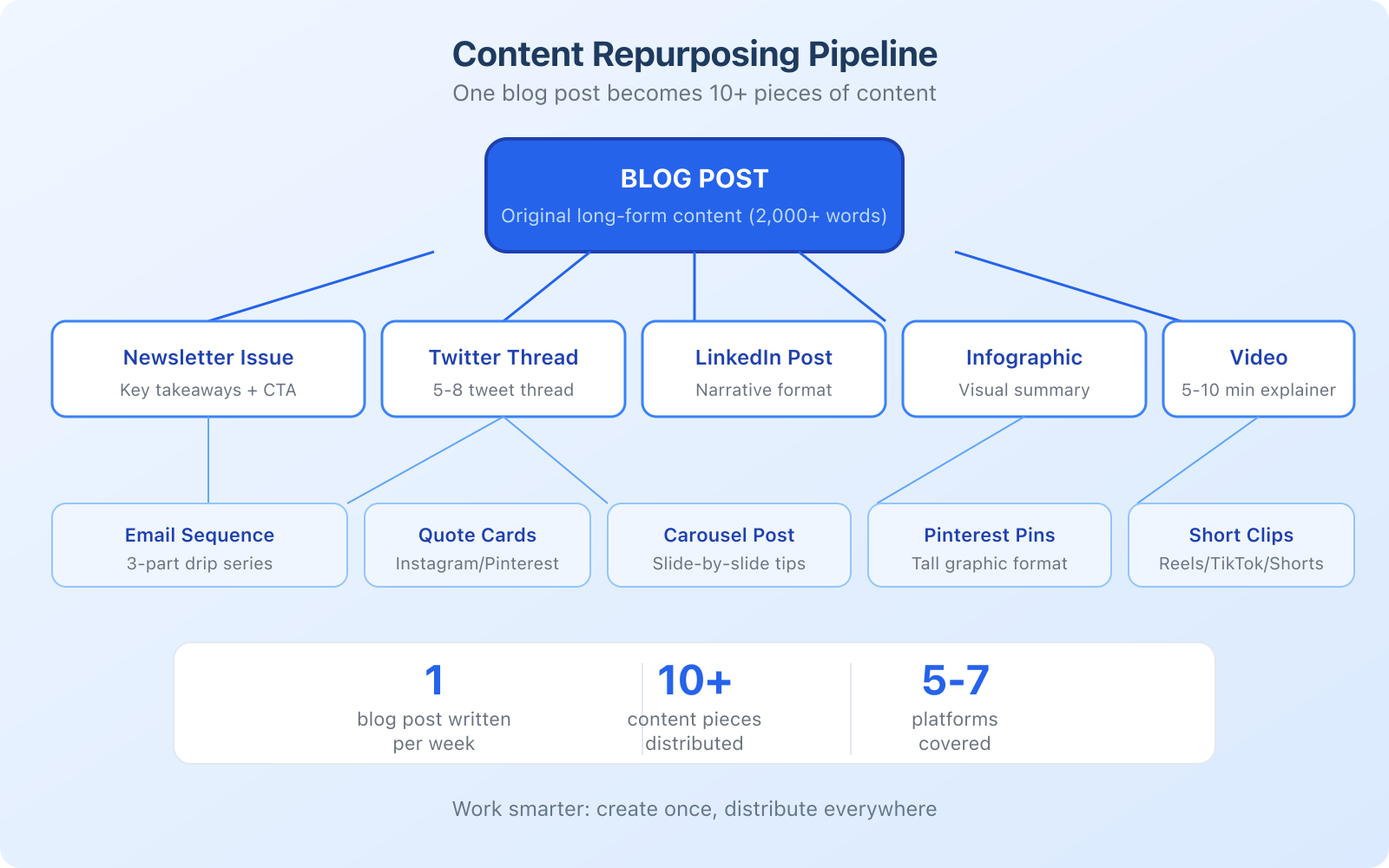
The biggest content marketing mistake I see: creating a blog post, publishing it, sharing it once on social media, and moving on. That’s leaving 90% of the value on the table. Every blog post you write should become 10+ pieces of content across multiple platforms.
Here’s the repurposing pipeline I follow:
Blog post to newsletter. Extract the key takeaways and write a newsletter issue around them. Don’t just link to the blog post. Provide standalone value in the email with a link for readers who want the full deep dive. I send every blog post as a newsletter to my ConvertKit list on the day it publishes.
Blog post to Twitter/X thread. Pull the main points and turn them into a 5 to 8 tweet thread. Add a hook at the top and link to the full article at the end. Threads consistently outperform single-link tweets for engagement and traffic.
Blog post to LinkedIn post. Rewrite the key insight in LinkedIn’s narrative format: a strong hook, a story or framework, and a clear takeaway. LinkedIn favors native content, so don’t just share a link. Write a complete post.
Blog post to video. Record yourself talking through the main points. You don’t need fancy equipment. A smartphone, decent lighting, and a simple editing tool are enough. Publish on YouTube and embed in the blog post for SEO benefits.
Blog post to infographic. Turn key data points, comparisons, or step-by-step processes into a visual infographic using Canva. Share on Pinterest (underrated for traffic), Instagram, and LinkedIn.
Blog post to email sequence. For your best-performing posts, create a 3-part email drip sequence that goes deeper into the topic. Use it as an automated welcome sequence for new subscribers.
This repurposing pipeline means one week of blog writing produces content for every platform for the entire week. Work smarter, not harder. For more ideas on content strategies, check our guide on content marketing auditing.
The 4-Channel Distribution Plan
Publishing content is 30% of the work. Distribution is the other 70%. Most content marketing plans fail because they focus entirely on creation and ignore distribution. In 2026, you need four distribution channels working together: owned, earned, paid, and AI.
Owned Channels (Your Foundation)
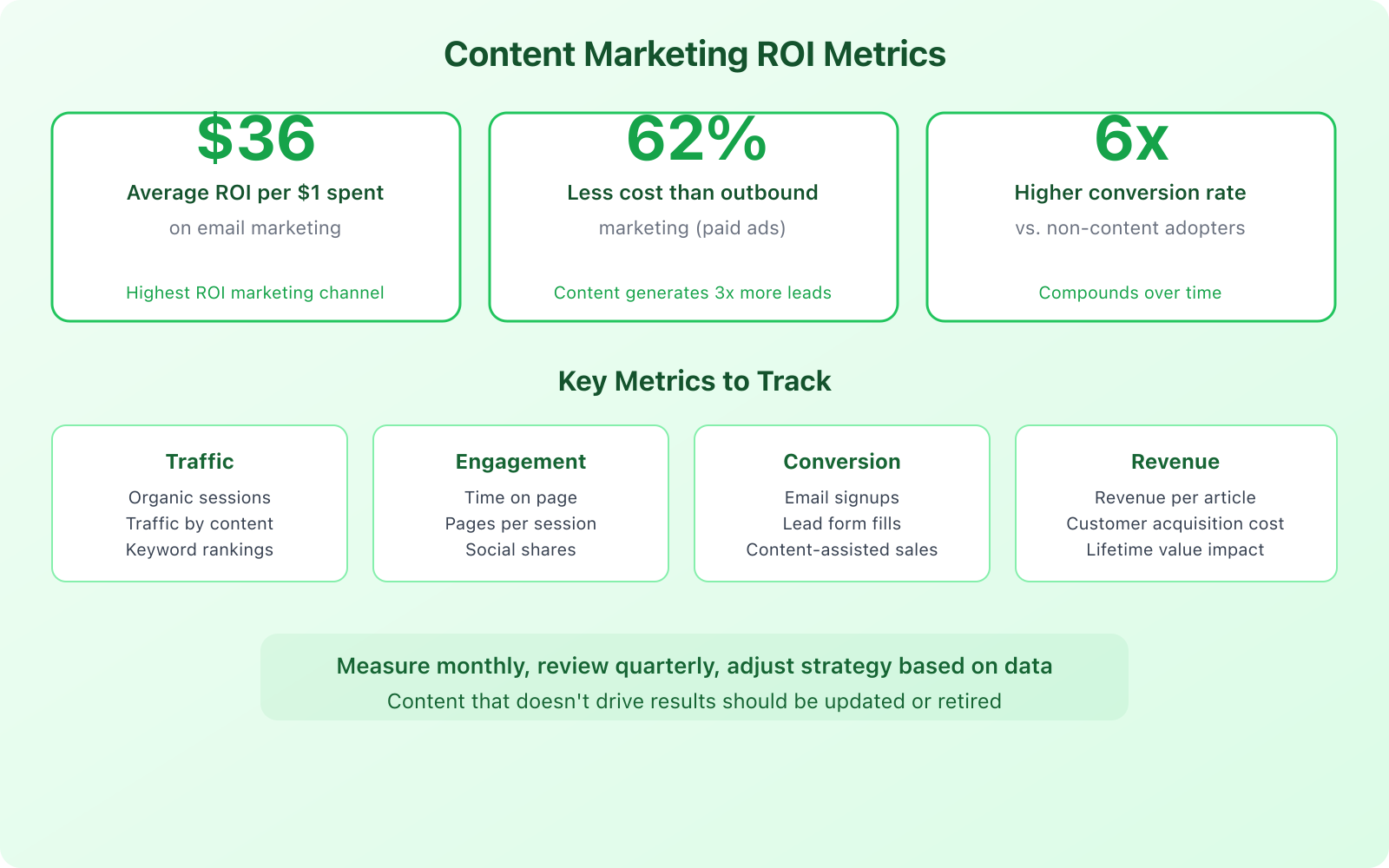
Email is your highest-ROI channel. Email marketing generates an average of $36 for every $1 spent. That makes it the highest-ROI marketing channel, period. Build your email list from day one. Use ConvertKit for its automation capabilities. Every blog post should be sent to your list. Every lead magnet should funnel into your email ecosystem.
SEO is your highest-volume channel. Organic search brings visitors 24/7 without ongoing cost. Every piece of content should be optimized for a specific keyword using Semrush for research and tracking. Over time, your content library becomes a traffic-generating machine that requires only maintenance and updates.
Earned Channels (Authority Builders)
Guest posts on industry sites. Write 1 to 2 guest posts per month for publications your audience reads. Don’t write guest posts for backlinks alone. Write for publications where your ideal customer hangs out. One guest post on a relevant industry blog with 50,000 readers can drive more qualified traffic than 10 posts on random DA 40 sites.
Communities and forums. Reddit, Quora, industry Slack groups, Facebook groups, and forums in your niche can drive targeted traffic. Answer questions genuinely (not spammily) and reference your content when it’s relevant and helpful.
Paid Channels (Amplification)
Social media amplifies everything else. Don’t treat social media as your primary distribution channel. Algorithm changes can cut your reach overnight. Use paid social to boost your top-performing organic content. I allocate $50 to $100 per month to promote my 2 to 3 best-performing articles on LinkedIn and Facebook. That’s enough to reach 10,000 to 25,000 targeted users per month. Focus on the 1 to 2 platforms where your audience is most active.
AI Citation Channels (The New Frontier)
This is the channel most content marketers are ignoring completely. Perplexity AI, ChatGPT with browsing, Google AI Overviews, and Gemini all cite web content when answering user questions. Optimizing for AI citations requires entity-dense content, FAQ schema, and original data. I’ve seen articles that rank on page 2 of Google get more referral traffic from Perplexity citations than from organic search. If your content answers a question better than anyone else’s, AI will find and cite it regardless of your Google ranking. Read my guide on formatting blog posts for AI search for the full playbook.
Measuring Content Marketing ROI with GA4
Content marketing costs 62% less than traditional outbound marketing and generates 3 times as many leads. But you need to measure it properly to prove ROI and optimize your strategy. GA4 changed the measurement game, and most content marketers haven’t caught up.
GA4 Events That Matter for Content
Forget pageviews as your primary metric. GA4 gives you engagement-based metrics that actually tell you whether your content is working. Here are the events I track for every content piece:
scroll (90%+ depth): This tells you how many readers actually finish your article. If 10,000 people land on a post but only 800 scroll past 90%, your intro is losing them. I target 25%+ of readers reaching 90% scroll depth. Anything below 15% means the content needs restructuring.
engagement_time (average): GA4 tracks active engagement time, not just time on page. An average engagement time of 3+ minutes on a 2,000-word article is strong. Below 1 minute means readers aren’t finding what they came for. I check this weekly for my top 20 articles.
Custom conversion events: Set up events for email signups, CTA clicks, affiliate link clicks, and lead magnet downloads. Tag each with the content piece that triggered it. This is how you calculate actual revenue per article.
first_visit with content source: Track which articles serve as entry points for new users. These are your top-of-funnel workhorses. Then track multi-session conversion paths to see which articles assist conversions even if they don’t directly convert.
Revenue and Cost Metrics
Revenue per content piece. Track which articles drive the most conversions using UTM parameters and goal tracking in GA4. Some articles will generate thousands of dollars in affiliate revenue or leads. Others will generate nothing. Double down on the winners.
Customer acquisition cost (CAC). Divide your total content marketing spend (including time, tools, and contractors) by the number of customers acquired through content. Compare this to your paid advertising CAC. Content CAC typically drops over time as your library grows, while paid CAC tends to increase. I’ve tracked this across client projects, and content CAC drops by an average of 34% after 12 months compared to month 1.
Email ROI. Track open rates, click rates, and conversion rates for your email campaigns. Segment by content type (newsletter, automated sequence, promotional) to understand what drives the most revenue. A healthy email list with 5,000 engaged subscribers can generate more revenue than a website with 100,000 monthly visitors.
Content shelf life. Some content generates traffic for years (evergreen). Some is relevant for weeks (trending/news). Track how long each piece of content continues driving traffic and revenue. Invest more in evergreen content that compounds over time. If you notice older articles losing traffic, I’ve written about exactly how to find and fix content decay.
What’s your biggest content marketing challenge?
Budget Allocation: $500 vs $2,000 vs $5,000 per Month
Your budget determines your speed, not your ceiling. I’ve seen businesses build profitable content engines at every budget level. The difference is how long it takes to reach critical mass. Here’s how I’d allocate content marketing budgets at three common levels.
$500/Month: The Bootstrap Plan
At $500/month, you’re doing most of the work yourself. That’s fine. I built gauravtiwari.org to 100,000+ monthly visitors on a budget smaller than this. Here’s the split:
Semrush ($130/month): Non-negotiable. You need keyword research, rank tracking, and competitor analysis. Semrush covers all three. The Keyword Magic Tool alone saves you 10+ hours per month of manual research.
ConvertKit ($0 to $49/month): Free for up to 10,000 subscribers. Start on free, upgrade when you need automation sequences. This handles your email distribution.
Jasper ($49/month): AI writing assistant for outlines, research summaries, and social media repurposing. Don’t use it to write articles. Use it to speed up the 30% of content work that’s tedious.
Canva Pro ($13/month): For infographics, social media images, and Pinterest pins. The template library alone is worth it.
Paid promotion ($50/month): Boost your single best-performing article each month on LinkedIn or Facebook. $50 gets you 5,000 to 10,000 targeted impressions.
Remaining ($209 to $258/month): Save this for one freelance article per month, a design asset, or a premium stock photo subscription. At this budget, you write 80%+ of the content yourself.
$2,000/Month: The Growth Plan
At $2,000/month, you can start outsourcing. This is where content marketing gets efficient.
Tools ($250/month): Semrush + ConvertKit paid plan + Notion for editorial calendar + Canva Pro.
Freelance writers ($800/month): Hire 2 freelance writers for 4 articles per month at $200/article. You write the pillar pages, they handle the cluster pieces. Vet writers carefully. One great writer at $200/article beats three mediocre writers at $50/article.
Paid promotion ($200/month): Boost 2 to 3 articles per month across LinkedIn, Facebook, and Twitter/X.
Guest post outreach ($250/month): Either do it yourself or hire a VA for link building and guest post pitching.
Remaining ($500/month): Design assets, video editing, premium tools, or saving for a larger campaign.
$5,000/Month: The Scale Plan
At $5,000/month, you’re building a content team and a system.
Tools ($400/month): Full Semrush suite + ConvertKit Creator plan + Notion team plan + Jasper + Canva Pro.
Content team ($2,500/month): 1 editor + 2 to 3 freelance writers producing 8 to 12 articles per month. The editor ensures quality, voice consistency, and SEO optimization.
Video/Design ($800/month): Monthly video content, custom graphics, and infographics. This is where your content starts looking seriously professional.
Paid distribution ($800/month): Consistent social ad spend, newsletter sponsorships, and content syndication testing.
Strategic ($500/month): Guest post campaigns, link building, influencer collaborations, and PR outreach.
Your budget determines your speed, not your ceiling. I’ve seen $500/month content plans outperform $5,000/month plans because the cheaper plan had a better strategy and more consistent execution.
The 90-Day Content Marketing Sprint
If you’re starting from zero, you don’t need a 12-month content strategy. You need a 90-day sprint that proves content marketing works for your business. I’ve used this exact framework to launch content programs for 15+ clients. Here’s the week-by-week plan.
Weeks 1 to 2: Foundation
Week 1 is all setup. Install GA4 with custom events (scroll depth, CTA clicks, email signups). Run keyword research with Semrush and identify 50+ target keywords. Group them into 3 topic clusters. Set up ConvertKit with a welcome email sequence. Create your content calendar in Notion or Monday.com. No publishing this week, just planning.
Week 2 is when you start publishing. Write and publish your first pillar page (3,000+ words, targeting your most strategic keyword). Create a lead magnet (checklist, template, or mini-guide) related to that pillar topic. Set up 1 landing page for email capture. Publish your first newsletter issue. By the end of week 2, you should have 1 pillar page live, 1 lead magnet, and your email system running.
Weeks 3 to 6: Build the Library
This is the heavy production phase. Publish 2 to 3 articles per week. Each one targets a specific keyword and links to your pillar page. By week 6, you should have 10 to 14 articles live. Send each article to your email list the day it publishes. Repurpose every article into 3+ social media posts. Pitch 2 guest posts to industry publications. Your target by week 6: 10+ articles live, 50+ email subscribers, 500+ monthly organic visits.
Weeks 7 to 8: Expand and Test
Start your second topic cluster with a new pillar page and 4 cluster articles. Create lead magnet #2. Run your first paid promotion test: spend $50 boosting your best-performing article on LinkedIn or Facebook. Track everything. Which articles get the most engagement? Which drive email signups? Which rank fastest? The data from these 2 weeks shapes your strategy for the final month.
Weeks 9 to 12: Optimize and Scale
Stop creating new content for 2 weeks. Instead, update your top 5 articles with fresh data, better internal links, and GEO optimization (answer-first paragraphs, entity density). Fill gaps in your topic clusters. Write 2 to 3 conversion-focused pieces (comparison pages, product reviews, case studies) that target bottom-of-funnel keywords. Set up an automated email sequence that nurtures new subscribers through your best content over 7 days.
Week 12 is your sprint review. Pull GA4 data for all 90 days. Calculate revenue per article, email subscriber growth, organic traffic trajectory, and content CAC. Identify your top 5 performing articles and your bottom 5. Plan the next 90 days by doubling down on what works and pruning what doesn’t. Read my guide on content pruning for a framework on making those decisions.
Expected 90-day results: 20+ articles published, 2 pillar pages, 2 lead magnets, 250+ email subscribers, 5,000+ monthly organic visits, and a proven content system you can scale or hand off.
Essential Tools for Your Content Marketing Plan
You don’t need 20 tools. You need 5 great ones that work together. Here are the tools I use daily and recommend to every client building a content marketing plan.

- Keyword Magic Tool with 25B+ keywords
- Content audit and topic research
- Competitor backlink and traffic analysis
- Position tracking for 500+ keywords
- Site health monitoring and technical SEO
- Free plan for up to 10,000 subscribers
- Visual automation workflow builder
- Landing pages and signup forms included
- Subscriber tagging and segmentation
- Newsletter monetization features
- Content calendar database templates
- Collaborative editing for content teams
- Task management and editorial workflows
- Free for personal use

- 50+ content templates and workflows
- Brand voice training for consistent output
- Social media post generation
- SEO mode with Surfer integration
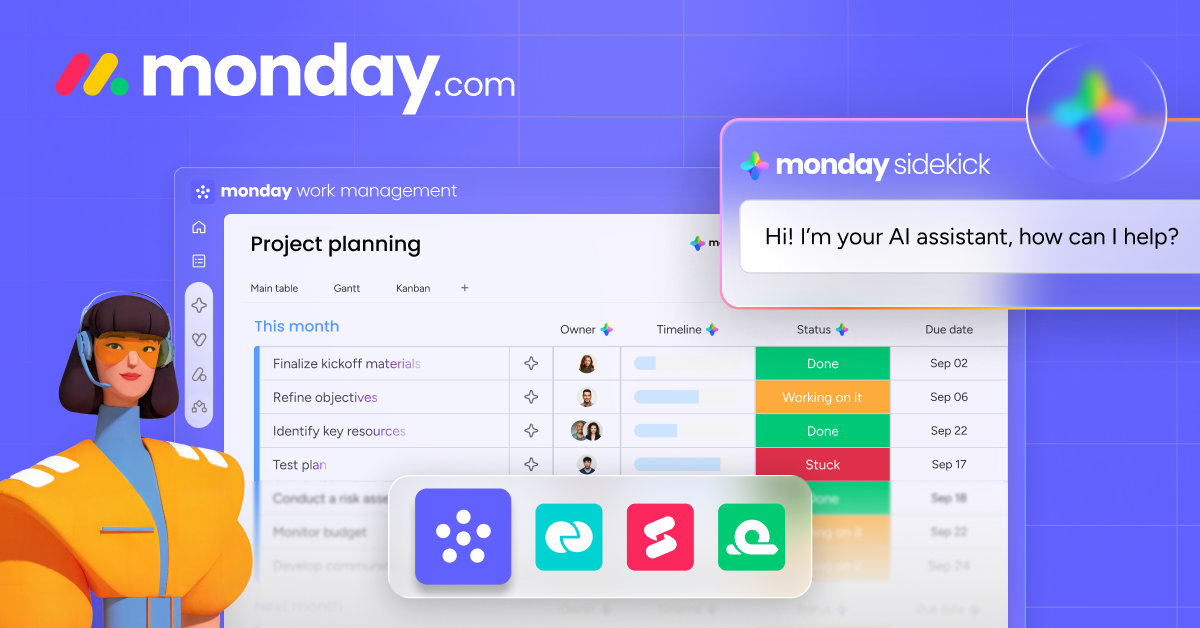
- Content pipeline visualization
- Deadline tracking and notifications
- Team collaboration and file sharing
- Free plan for up to 2 users
Quarterly Planning Template
Here’s the quarterly planning framework I use:
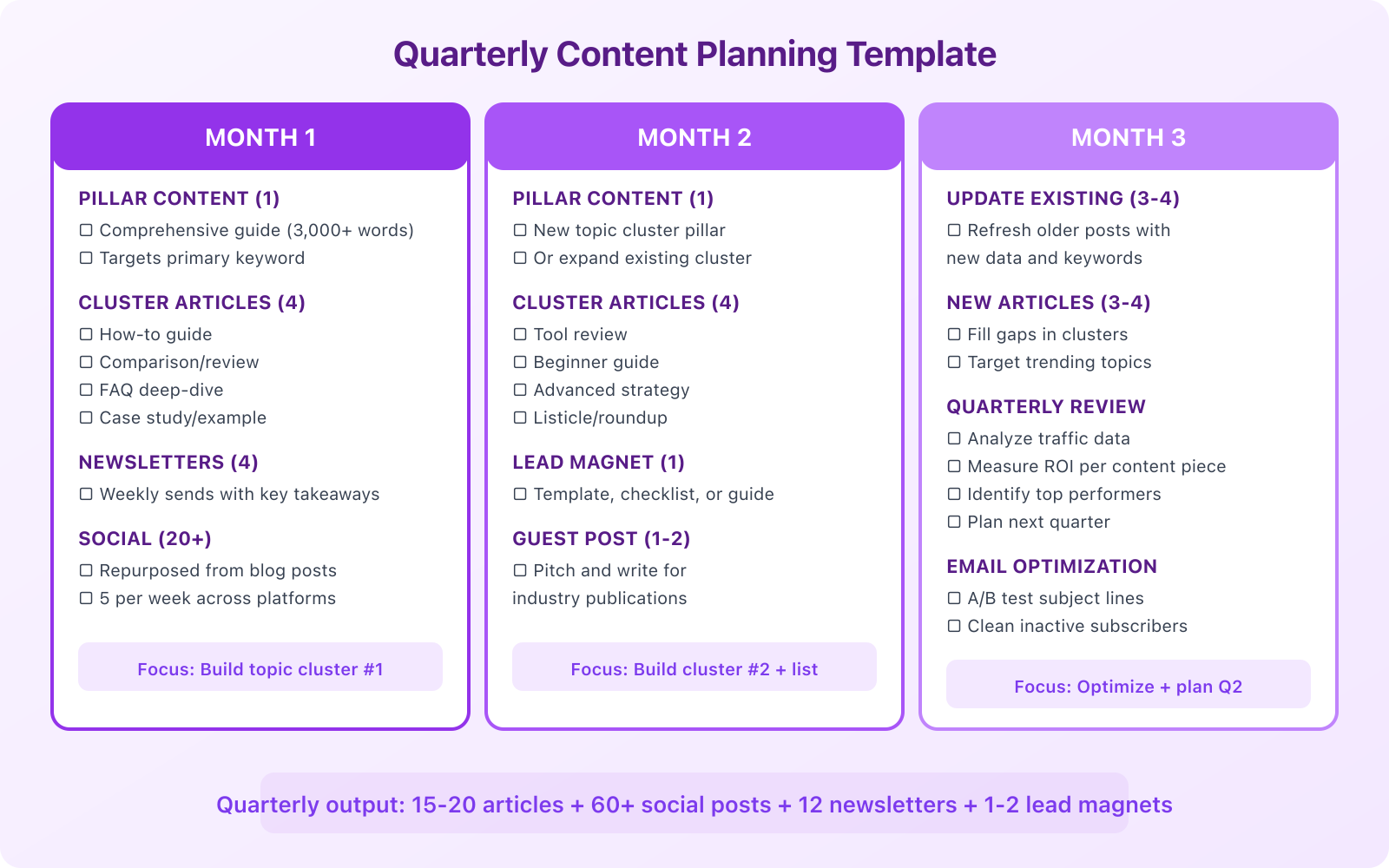
Month 1: Build. Create 1 pillar page (3,000+ word comprehensive guide) and 4 cluster articles. Launch your topic cluster with internal linking. Send each article to your email list. Repurpose into social content.
Month 2: Expand. Start a second topic cluster with 1 pillar and 4 cluster articles. Create 1 lead magnet (template, checklist, or guide) to grow your email list. Write 1 to 2 guest posts for industry publications. Continue repurposing and distributing.
Month 3: Optimize. Update 3 to 4 existing articles with fresh data and keywords. Fill gaps in your topic clusters. Run a quarterly review: analyze traffic data, measure ROI per content piece, identify top performers. Plan the next quarter based on what the data tells you.
This gives you 15 to 20 articles per quarter, 60+ social posts, 12 newsletters, and 1 to 2 lead magnets. It’s ambitious but achievable for a solo operator spending 15 to 20 hours per week on content. With a small team, you can double the output.
Common Content Marketing Mistakes
After years of working on marketing strategies across different industries, I’ve seen the same mistakes destroy content programs over and over. Here are the ones that cost the most time and money.
- Creating content without keyword research. Every article should target a specific keyword. Publishing without SEO intent means relying entirely on social media and email, which limits your reach.
- Not building an email list. Your email list is the only audience you own. Start building it from day one, even if you only have 10 subscribers.
- Publishing inconsistently. One article per month won’t move the needle. Consistency beats quality in the early stages. Publish 2 to 4 times per week for the first 6 months.
- Ignoring content updates. Old content with outdated information hurts your credibility and rankings. Review and update your top-performing articles every 6 months. Learn how to identify content decay before it tanks your rankings.
- Only creating top-of-funnel content. How-to guides and informational posts attract traffic, but you also need comparison pages, product reviews, and case studies that convert readers into customers.
- Not measuring anything. If you can’t tell which content drives revenue and which doesn’t, you’re guessing. Set up proper tracking from the start.
- Ignoring AI search optimization. If your content isn’t structured for AI citation (answer-first paragraphs, entity density, FAQ schema), you’re missing a growing traffic channel that many competitors haven’t figured out yet.
For more on building your marketing plan, read our complementary guide. And if you’re looking at the competitive landscape, here’s how to develop online marketing strategies that beat your competition.
Frequently Asked Questions
How often should I publish content?
For new sites, aim for 2 to 4 articles per week for the first 6 months. This builds your content library quickly and helps establish topical authority. After 6 months, you can reduce to 1 to 2 articles per week and spend more time updating existing content. Consistency matters more than volume. Publishing 2 articles every week is better than publishing 8 articles one week and nothing the next three weeks.
What’s the ideal blog post length for SEO?
For most topics, 1,500 to 2,500 words is the sweet spot. Pillar pages should be 3,000+ words. Studies consistently show that longer, comprehensive content ranks higher in Google. However, length alone doesn’t win. A well-structured 1,800-word article that thoroughly covers a topic will outrank a padded 3,000-word article full of fluff. Write until you’ve fully covered the topic, then stop.
Should I use AI to write my content?
Use AI for research, outlining, and ideation, but write the final content yourself. AI-generated content lacks the personal experience, opinions, and unique insights that make content marketing work. Google’s helpful content guidelines specifically reward content that demonstrates first-hand expertise. AI is a productivity tool, not a replacement for your voice. The businesses getting the best results use AI to work faster while maintaining their authentic voice and genuine expertise.
How do I measure if my content marketing plan is working?
Track four categories of metrics monthly: traffic (organic sessions, keyword rankings), engagement (time on page, pages per session), conversion (email signups, lead form fills, sales from content), and revenue (revenue per article, content-assisted customer acquisitions). The ultimate test is whether your content marketing reduces your customer acquisition cost over time. If your cost to acquire a customer through content is lower than through paid ads, your plan is working.
What’s the best email marketing tool for content marketers?
ConvertKit (now Kit) is built specifically for content creators and marketers. It offers a free plan for up to 10,000 subscribers, powerful automation workflows, landing page builders, and tagging systems that let you segment your audience based on their interests and behavior. The automation features are what set it apart: you can create sophisticated email sequences that deliver the right content to the right subscriber at the right time, all running on autopilot.
What is GEO and why does it matter for content marketing?
GEO stands for Generative Engine Optimization. It’s the practice of structuring your content so AI search engines (Perplexity, ChatGPT, Google AI Overviews, Gemini) cite it when answering user questions. GEO matters because AI-driven search is growing rapidly and sends highly qualified referral traffic. To optimize for GEO, use answer-first paragraphs, pack sections with named entities and specific numbers, add FAQ schema, and include original data or first-party testing that competitors don’t have.
How much should I spend on content marketing per month?
Start with $500/month if you’re a solo operator willing to do most of the work yourself. That covers essential tools like Semrush ($130), ConvertKit (free to $49), Jasper ($49), and Canva Pro ($13), with leftover for one freelance article or paid promotion. Scale to $2,000/month when you want to outsource content creation, and $5,000/month when you’re ready to build a small content team with an editor, writers, and a design resource.
How long does it take for content marketing to show results?
Expect 90 days before you see meaningful organic traffic and 6 to 12 months before content marketing becomes your primary traffic and lead generation channel. The first 90 days are about building your content library, establishing topical authority, and setting up measurement systems. Email results come faster since you can start generating subscriber-driven revenue within 30 to 60 days. The key is consistency. Most businesses that quit content marketing do so in the first 3 months, right before results would have started compounding.
Disclaimer: This site is reader-supported. If you buy through some links, I may earn a small commission at no extra cost to you. I only recommend tools I trust and would use myself. Your support helps keep gauravtiwari.org free and focused on real-world advice. Thanks. - Gaurav Tiwari