
7 Must-Have Tools for Freelancers Managing Their Business
The freelance economy has been booming since 2020 and more so in 2025, as more professionals choose the freedom and flexibility of working for themselves. But that freedom comes with responsibility—freelancers handle everything on their own, from scheduling meetings to filing taxes.
The good news? The right tools help you stay organized, get paid faster, and grow your brand with less stress.
Whether you’re just getting started or ready to take your business to the next level, these seven tools can make a real difference.
Table of Contents
1. Bonsai
Bonsai is a favorite among freelancers for a reason. It offers a complete suite of tools for managing proposals, contracts, time tracking, invoicing, and even taxes. Its simple interface and automation features help you save time and look professional when dealing with clients. You can track billable hours, auto-generate invoices using a professional invoice template, and set up reminders so nothing slips through the cracks.
Why it’s essential: Streamlines your entire workflow from pitch to payment.
2. Toggl Track
Most freelancers don’t realize just how much time they spend on certain tasks until it’s too late—they either burn out or miss out on income. Toggl Track makes it easy to keep tabs on your time across different projects and clients. You just hit start, get to work, and stop the timer when you’re done. You can tag each entry, review your hours, and spot where your time is going each week.
Why it’s essential: You stay in control of your time and make sure you’re getting paid for all of it.
3. Notion
Freelancers love Notion because it adapts to just about anything. You can use it to plan projects, write drafts, save client notes, build databases, and track personal or business goals—all in one place. Want a content calendar? A task list? A space to onboard new clients? You can build all of that with a few clicks.
Why it’s essential: It keeps everything—from your notes to your goals—organized in one spot, so nothing gets lost in the shuffle.
4. Calendly
Coordinating meetings with clients across time zones can get messy. Calendly makes it seamless by letting clients book appointments based on your real-time availability. You can integrate it with Zoom, Google Meet, and your calendar so everything stays in sync.
Why it’s essential: Saves hours of back-and-forth and prevents scheduling conflicts.
5. QuickBooks Self-Employed
Handling finances is often the least favorite part of freelancing. QuickBooks Self-Employed simplifies it by tracking income, expenses, mileage, and tax deductions. Whether you’re managing a creative business or doing WordPress freelancing, it’s beneficial at tax time, offering estimates and helping you prepare for quarterly payments.
Why it’s essential: Makes financial compliance and planning manageable, even if you hate math.
6. Grammarly
Whether you’re writing proposals, reports, or marketing content, your writing reflects your brand. Grammarly catches grammar mistakes, suggests better phrasing, and helps maintain a professional tone. The premium version even checks for clarity, consistency, and engagement—perfect for client communications.
Why it’s essential: Helps you sound polished and credible, no matter your industry.
7. Invoice Generator (Any)
Getting paid on time starts with sending invoices that are simple, professional, and reflect your brand. A good invoice generator with customizable templates makes it easy to create clean, polished invoices in just a few minutes. Look for features like automatic tax calculations, due date reminders, and the option to save client info for recurring billing.
Any invoice generator out there can offer free invoice templates made for freelancers. They’re easy to personalize, work with common file types like PDF and Excel, and are designed for all sorts of industries—from design and writing to consulting and web development.
Why it’s essential: It keeps you on top of payments with minimal effort and no stress.
Why Freelancers Need Powerful Tools
| Tool | What It Does | Why It’s Essential | Ideal For |
|---|---|---|---|
| Bonsai | All-in-one platform for proposals, contracts, time tracking, invoicing, and taxes | Streamlines the entire workflow from pitching to getting paid | Full-time freelancers & consultants |
| Toggl Track | Simple, powerful time tracking across projects | Ensures you bill accurately and avoid time-wasting tasks | Freelancers juggling multiple clients |
| Notion | All-in-one workspace for notes, databases, planning | Keeps everything organized and accessible in one place | Freelancers managing complex tasks |
| Calendly | Smart meeting scheduler with calendar integration | Eliminates email back-and-forth and prevents double-booking | Client-based freelancers & coaches |
| QuickBooks Self-Employed | Bookkeeping, tax tracking, and mileage logging | Makes tax season painless and keeps your finances in check | Solopreneurs & side hustlers |
| Grammarly | AI-powered writing assistant | Helps you sound polished, professional, and clear in every client interaction | Writers, marketers, consultants |
| Invoice Generator + Templates | Customizable invoice creation tool | Sends branded, professional invoices in minutes—no design skills required | All freelancers needing fast payment |
Freelancing gives you the freedom to work on your own terms, but it also comes with its challenges. The good news is, you don’t have to handle everything alone. With the right tools, you can free up time, stay organized, and present yourself as the professional you are. These tools help with everything from tracking projects to handling invoices and taxes.
Whether you’re looking to grow your business or just need a better work-life balance, investing in systems that work for you lets you focus on what you do best—your craft. And for invoicing? Start with templates that do the heavy lifting for you. Your future self—and your finances—will thank you.
Hardware Every Freelancer Needs
Software tools are half the equation. Your hardware is the other half. I’ve been freelancing for over a decade, and my productivity jumped 30% when I upgraded from a single laptop screen to a dual-monitor setup with a proper keyboard and mouse.
The Dell 27″ 4K USB-C monitor connects to your laptop with a single cable (power and video). No dongles, no adapters. The INNOCN 27″ 4K is the budget pick at $279. Both are color-accurate enough for design work. For the full freelancer workspace, see my home office setup guide.
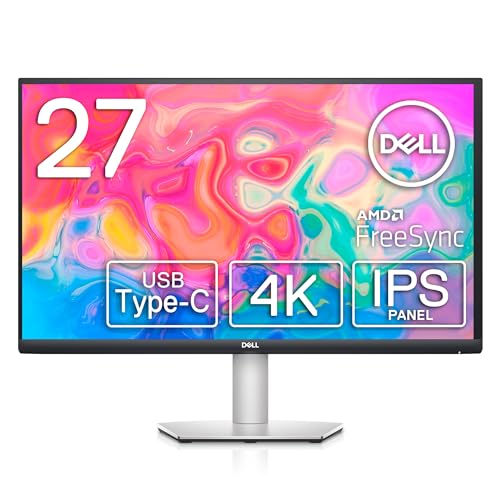
- SUPERIOR SCREEN: With a three-sided ultrathin bezel design that lets you to see more without interruptions, high functionality meets superb style. Enjoy crisp visuals with an impressive 4.0ms response time. Specific uses for product – Business. Pixel per inch (PPI) : 163. Operating Temperature: 0°C to 40°C (32°F to 104°F)
- COMFORT COMES FIRST: Customize your views with a height-adjustable stand and a monitor that tilts, swivels and pivots so you look your best and feel your best during work sessions or movie binges.
- VERSATILE CONNECTIVITY: Easily charge and connect your laptop on this USB-C monitor. This single-cable solution reduces clutter on your desktop and transmits power, video, audio and data—all at once.
- INTEGRATED SPEAKERS: This usb-c monitor comes equipped with everything you need including built-in dual 3W integrated speakers.
- PERSONALIZED COMFORT: Customize your views with a height-adjustable stand that tilts, swivels and pivots allowing you to view at your most optimal position.
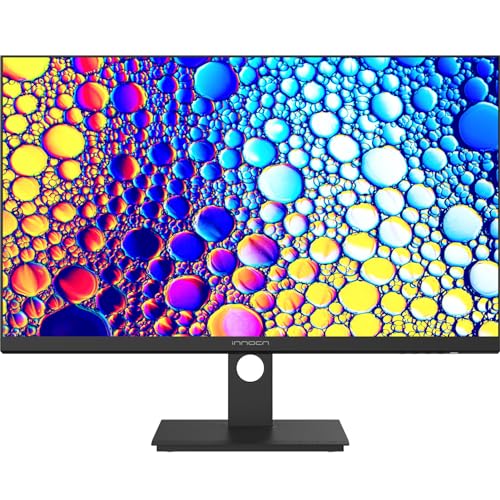
- 【27 Inch 4K Computer Monitor & Stunning Color Performance】INNOCN 27" 4K UHD 3840*2160p monitor provide you top picture/video qulaity viewing experience, it delivers advanced IPS panel with LED Backlit Technology, 178° wide viewing angle and a frameless design, (Max)400nits brightness,1000:1 contrast ratio,1.07B(8bits+FRC)colors, 60hz refresh rate, ∆E<2
- 【Powerful USB C, DP and HDMI Ports】27C1U-D USB computer monitor have richful interfaces: 1 x DP, 1 x USB C, 1 x HDMI, 1 x 3.5MM Audio Jack. We take away the traditional DVI/VGA ports and adopt much powerful USB Type C and DP interface, you can directly connect your USB C devices such as laptop, Mac, Phones, Tablets and more, It's much more convenient
- 【HDR 400 】INNOCN computer monitor adopt high dynamic range (HDR) technology with professional color gamut delivers contrast and color performance that meets the Display HDR 400, bring smooth images and video viewing experience
- 【Swivel & Height & Pivot Adjustment】INNOCN 27C1U-D 4K UHD computer monitor come with pivot adjustable stand: left/right: 45°, up/down±5",Forward: 5°, Backward: 20°, Pivot: ±90°, Ergonomic design for daily usage. VESA wall mountable: 75*75
- 【4K USB Type-C Monitor】 A real plug and play monitor. INNOCN monitor focus on color, provide excellent viewing experience when you're working from home, office duty, design, photo/video editing and gaming.All the accessories are included in the package.
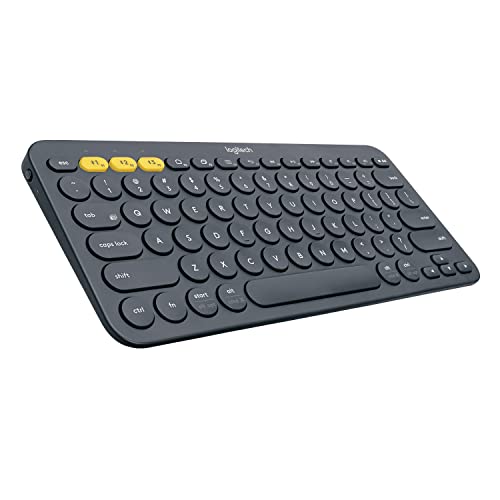
- Multi-device Bluetooth keyboard: The Logitech K380 Pebble keyboard is a universal keyboard for typing on all your computing devices: Windows, Mac, Chrome OS, Android, iPad, iPhone, Apple TV 2nd or 3rd generation
- Easy-switch: Connect up to 3 devices simultaneously and switch between them at the touch of button. Wireless range 10 meter
- Logitech flow cross-computer typing: Use as a regular keyboard or combine with a compatible Logitech flow mouse (sold separately) to type, copy, paste and move files seamlessly between computers
- Compact mobile keyboard: Easy to carry around your home for familiar typing in any room and Logitech options for Windows (Windows 7, Windows 8, Windows 10 or later), Logitech options for Mac (OS X 10.8 or later)
- OS adaptive: Automatically recognizes each device and maps keys to give you a familiar layout, including shortcuts. Battery life (not rechargeable) – 24 months. Connection type: Bluetooth classic (3.0)
Krisp is the AI noise cancellation app every freelancer needs. It works system-wide on Mac and Windows, removing noise from Zoom, Meet, and Teams calls. The meeting assistant records transcripts and creates summaries too.
Gamma turns a text brief into a polished proposal or pitch deck in seconds. It handles all the layout, typography, and visuals. I send Gamma-generated proposals to clients and they always think I spent hours on design.
Trafft replaces back-and-forth scheduling emails. Share your booking link, clients pick a time, and both get calendar invites with Zoom links automatically. Trafft pricing is cheaper than Calendly for freelancers who need payment collection.
signNow handles freelance contracts and proposals with legally binding e-signatures. Create reusable templates for your standard agreements and send them for signing in seconds.
Frequently Asked Questions
What tools does a freelancer actually need to start?
A portfolio website, an invoicing tool, and a way to communicate with clients. That’s it. You don’t need 15 tools on day one. Start with a simple WordPress site, Wave (free invoicing), and whatever messaging platform your clients prefer. Add tools only when you hit a real bottleneck.
How much should freelancers spend on tools?
Keep it under 5% of your monthly revenue. If you’re earning $3,000/month, that’s $150 maximum on tools. Many essential tools are free or have generous free tiers. The biggest trap is subscribing to tools you barely use because they looked useful during a free trial.
Should freelancers use free or paid project management tools?
Free tools work fine until you’re juggling 5+ clients simultaneously. Notion’s free plan handles most solo freelancer needs. Trello is another solid free option. Only upgrade to paid when you need client portals, time tracking integration, or team collaboration features.
Disclaimer: This site is reader-supported. If you buy through some links, I may earn a small commission at no extra cost to you. I only recommend tools I trust and would use myself. Your support helps keep gauravtiwari.org free and focused on real-world advice. Thanks. - Gaurav Tiwari