
Hostinger vs Namecheap: Which Hosting Gives Better Value for the Price?
Hostinger vs Namecheap is a closer fight than most people think. One gives you a cleaner beginner experience. The other gives you more obvious value once you look past the flashy landing page.
If the only question is value for the price, Namecheap wins. If the question is which host I would put under a beginner’s first WordPress site so they make fewer mistakes, Hostinger still has a real case. That difference matters more than most comparison articles admit.
Table of Contents
Quick Verdict
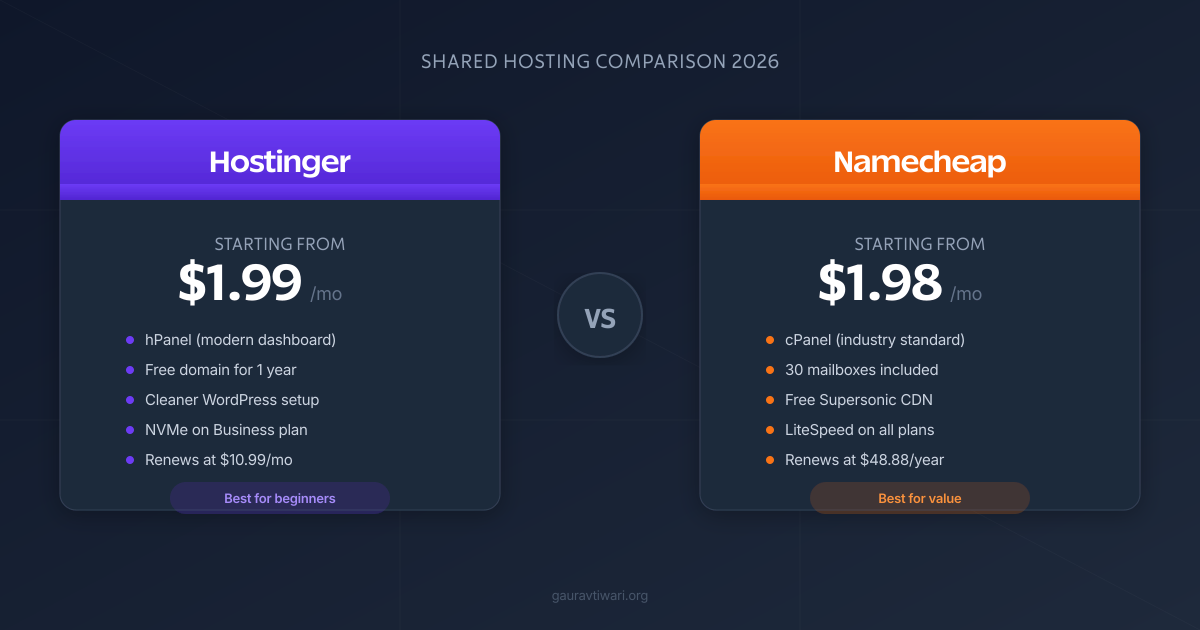
Namecheap gives you better raw value in 2026. Its shared hosting is cheaper on both first term and renewal, includes more mailboxes, and still checks the boxes most small sites need. Hostinger is easier to recommend to beginners because the dashboard is cleaner, the upgrade path makes more sense, and the overall experience feels less old-school.
My blunt take? Namecheap wins the spreadsheet. Hostinger wins the onboarding. If you want the better deal per dollar, buy Namecheap. If you want fewer setup headaches and a smoother WordPress experience, pay a bit more for Hostinger.
| Category | Winner | Why |
|---|---|---|
| Cheapest overall value | Namecheap | Lower first-term and renewal pricing on shared hosting |
| Beginner-friendliness | Hostinger | Cleaner dashboard, simpler setup, better first impression |
| Email included | Namecheap | More mailboxes included on shared plans |
| Backups on higher tiers | Tie | Hostinger Business and Namecheap Stellar Plus both improve a lot |
| Best for first WordPress site | Hostinger | Less friction if you are new to hosting |
| Best for strict budget | Namecheap | More obvious savings without weird upgrade pressure |
What I Am Actually Comparing Here
I am comparing Hostinger web hosting against Namecheap shared hosting in 2026, not every product both companies sell. That matters because Namecheap also has EasyWP, which is its managed WordPress product, and that is a different conversation.
I have used Hostinger on low-cost client builds and starter WordPress installs for more than two years. I have also used Namecheap for domains, shared hosting, and smaller WordPress sites where keeping costs down mattered more than having a polished dashboard. So this is not theory. This is the stuff you notice after checkout, when you are moving email, installing WordPress, and trying not to break DNS at midnight.
If you specifically want managed WordPress hosting, compare Hostinger WordPress hosting against Namecheap EasyWP. If you want cheap general hosting for a blog, brochure site, or early business site, this shared-hosting comparison is the fairer match.
Hostinger at a Glance
Hostinger is the easier host to live with if you are new. The company pushes a cleaner dashboard, simpler plan structure, one-click WordPress flow, and a more modern overall experience than the average cheap host.
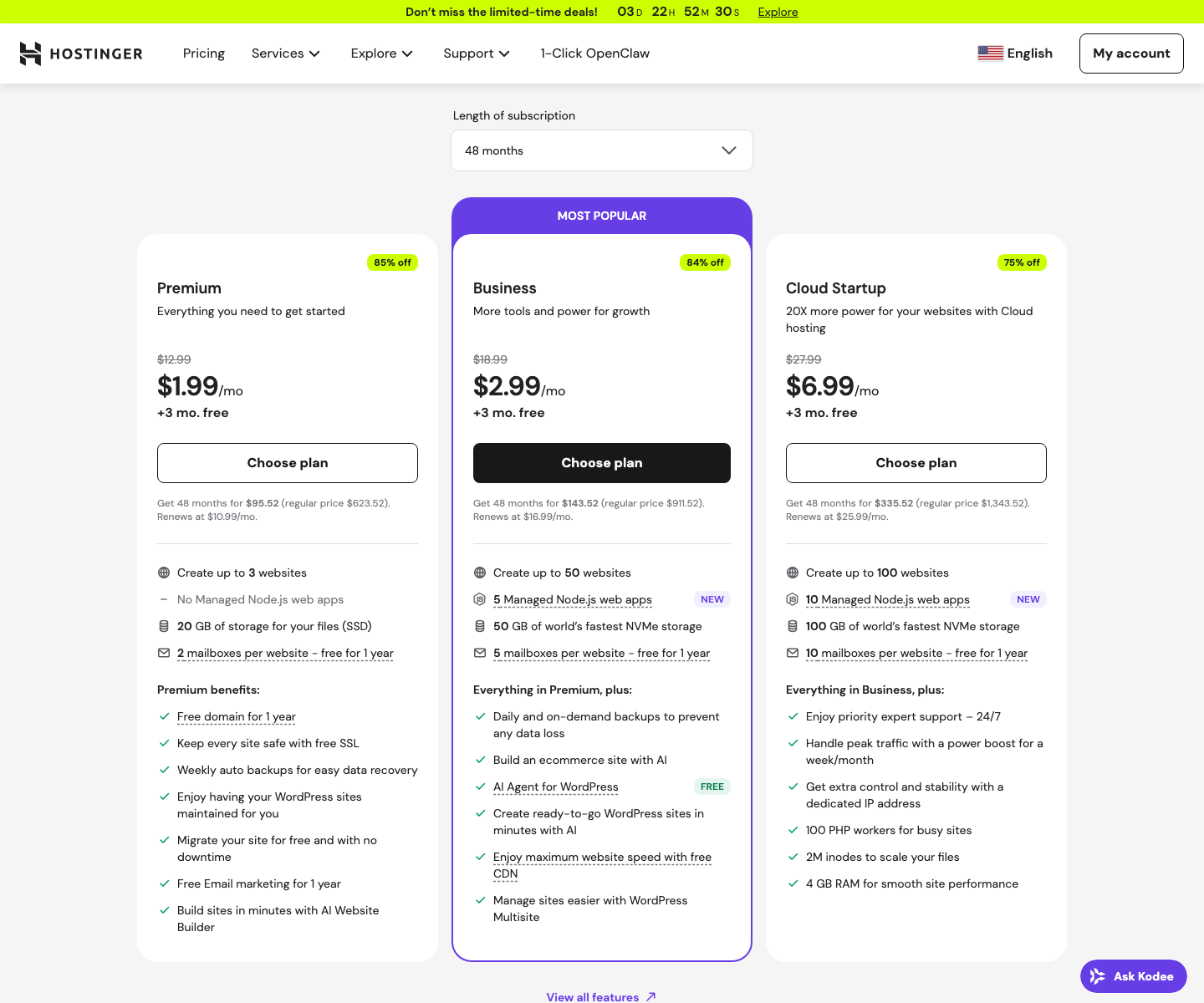
On Hostinger’s official web hosting page I checked for this draft, Premium was advertised at $1.99 per month on a 48-month plan and renewed at $10.99 per month. That plan currently includes up to 3 websites, 20 GB SSD storage, 2 mailboxes per website for the first year, a free domain for the first year, free SSL, weekly backups, free migration, and a free AI Website Builder. Business was listed at $2.99 per month and renewed at $16.99 per month, with 50 websites, 50 GB NVMe storage, 5 mailboxes per site, daily and on-demand backups, free CDN, and an AI Agent for WordPress. Cloud Startup starts at $6.99 per month with 100 websites, 100 GB NVMe, and priority expert support.
That is why people keep recommending Hostinger to beginners. You are not just buying raw hosting space. You are buying a smoother path from zero to live site. If you outgrow it later, fine. But for a first site, that smoother start is worth something. I talk more about the tradeoffs in my Hostinger alternatives guide, because Hostinger is not automatically the best fit for everybody.
Namecheap at a Glance
Namecheap is the better bargain hunter’s host. It is not trying to look fancy. It is trying to look cheap, practical, and familiar. Most of the time, it succeeds.
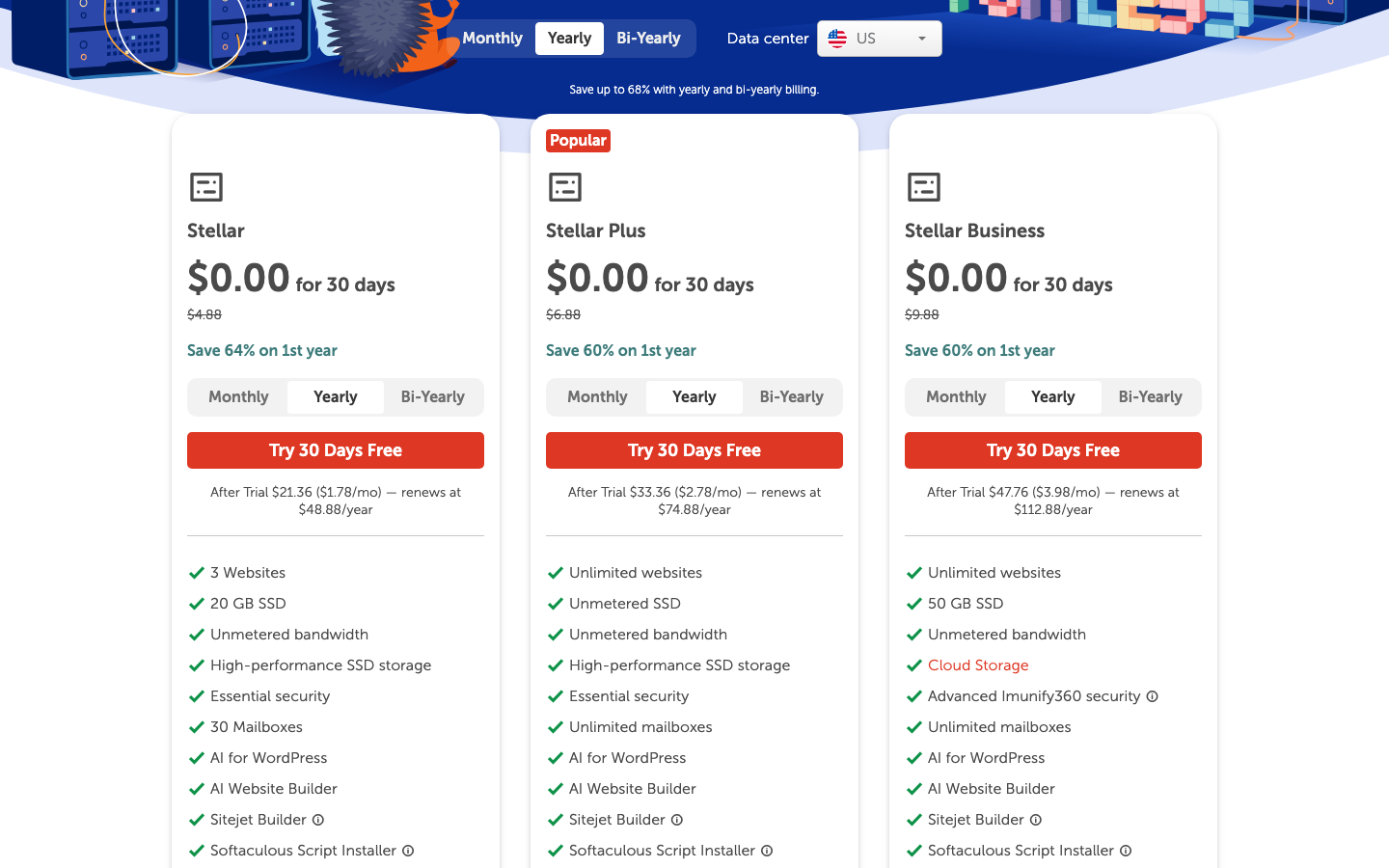
On Namecheap’s official shared hosting page, Stellar was shown with a 30-day free trial, then $21.36 for the first year ($1.78 per month), and renewed at $48.88 per year. That plan includes 3 websites, 20 GB SSD storage, 30 mailboxes, twice-weekly backups, free migration, free automatic SSL, free Supersonic CDN, LiteSpeed webserver, SSH access, AI for WordPress, and a 30-day money-back guarantee. Stellar Plus was listed at $33.36 for the first year ($2.78 per month) and $74.88 on renewal, with unlimited websites, unmetered SSD storage, unlimited mailboxes, and AutoBackup. Stellar Business moved to $47.76 for the first year ($3.98 per month) and $112.88 on renewal, with 50 GB SSD, Cloud Storage, and advanced Imunify360 security.
That is a strong package for the money. I still do not love Namecheap support speed. I also do not think its interface feels as smooth as Hostinger’s. But if you care about plain value, especially once renewal hits, Namecheap is hard to ignore. My older Namecheap hosting review was much more positive on pricing than support, and that still feels true.
Hostinger vs Namecheap Feature Comparison
Here is the simple side-by-side view. I am using Hostinger Premium and Namecheap Stellar as the main entry-level comparison because both are trying to win the same buyer: someone launching a normal site without spending much.
| Feature | Hostinger Premium | Namecheap Stellar |
|---|---|---|
| Promo price | $1.99/mo on 48-month plan | 30-day free trial, then $21.36 first year ($1.78/mo) |
| Renewal | $10.99/mo | $48.88/year |
| Websites | 3 | 3 |
| Storage | 20 GB SSD | 20 GB SSD |
| 2 mailboxes per site for 1 year | 30 mailboxes included | |
| Backups | Weekly | Twice weekly |
| Free domain | Yes, 1 year | Not the same value on base yearly plan |
| Free migration | Yes | Yes |
| SSL | Free | Free automatic SSL |
| CDN | No free CDN on Premium | Free Supersonic CDN |
| Control panel | hPanel | cPanel |
| WordPress flow | Cleaner | More traditional |
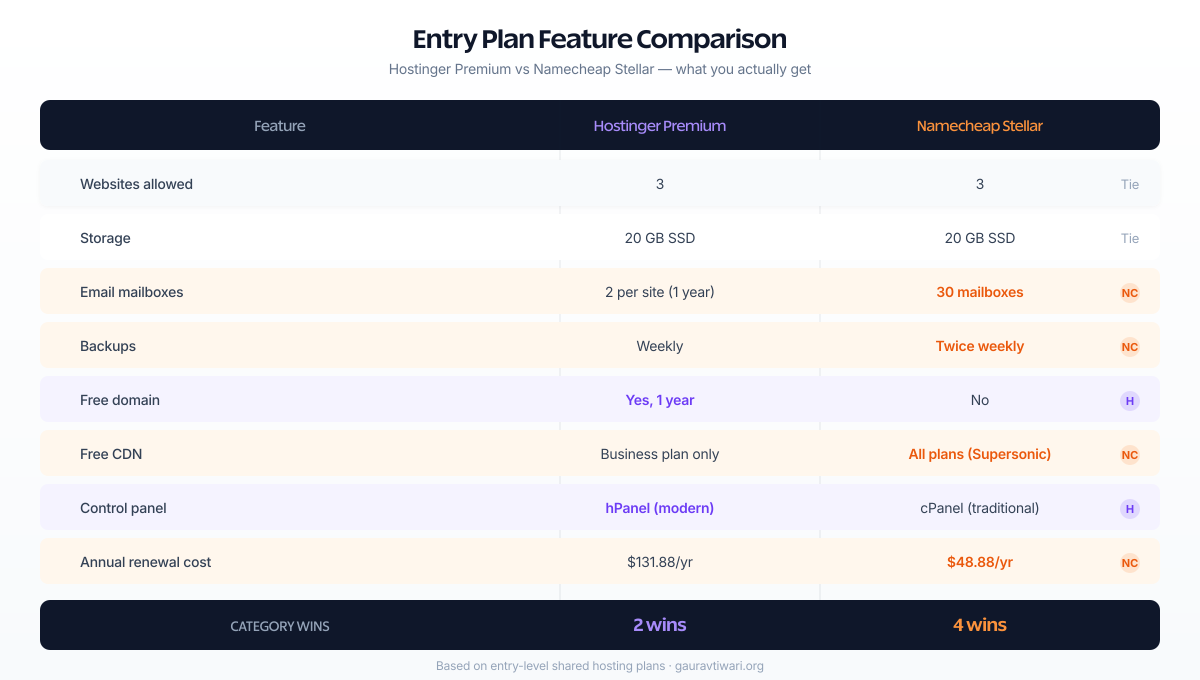
If you stop at this table, Namecheap looks like the better deal. Honestly, for price, it is. Hostinger only starts to pull ahead when you care about experience, not just specs.
Setup and Dashboard
Hostinger wins setup and usability. It is just easier to understand if you are not already used to old-school hosting panels.
Hostinger’s hPanel is opinionated. That is a compliment. It tries to keep you moving. WordPress setup, domain connection, SSL, staging on higher plans, backups, and basic account management are where you expect them to be. You can see why beginners like it.
Namecheap gives you cPanel and Softaculous. That is not bad. In fact, if you have been around hosting for a while, it can feel more flexible. But it also feels older. There are more corners to click through. More places to forget what you were doing. More places where a beginner can panic, close the tab, and message support.
So if your goal is “I want my site online today and I do not want to think too hard,” Hostinger is the better pick. If your goal is “I am comfortable with standard hosting tools and I want to pay less,” Namecheap is fine.
Performance and Uptime
Neither of these is premium hosting. Both are cheap hosts. That means both can run a normal blog or business site just fine, and both will start showing limits once your site gets heavy, traffic spikes, or WooCommerce starts doing WooCommerce things. I learned that the hard way when a client’s Black Friday sale on a shared plan turned a 1.8-second TTFB into a 9-second timeout.
Namecheap’s shared hosting now leans harder into performance than many people realize. The official page lists LiteSpeed, CDN, SSD storage, and a 100% uptime guarantee across the Stellar line. That is better than the old image many people still have in their heads.
Hostinger’s advantage is less about raw entry-plan specs and more about the growth path. The jump from Premium to Business makes more sense, and Business gives you NVMe storage, daily backups, and free CDN. In my experience, that matters more than homepage promises once you start adding plugins, images, forms, and page builder bloat. I have migrated three sites from Namecheap shared to Hostinger Business specifically because the upgrade path was cleaner than jumping to a completely different host.
One thing worth knowing: Namecheap now bundles LiteSpeed on all Stellar plans. That is a real server-level performance boost, not marketing fluff. LiteSpeed caching alone can cut page load times by 30-50% compared to Apache on similar hardware. Hostinger also uses LiteSpeed, so neither has a clear edge there in 2026.
If you are building a simple site and keeping the stack light, the performance gap is not dramatic. If you think the site will grow, Hostinger feels safer as a long-term starting point. If the site is small and probably staying small, Namecheap is perfectly reasonable.
Pricing and Renewal Reality
This is where Namecheap wins. Not by a little, either. By enough that you should notice before clicking checkout.
Hostinger’s landing price still looks cheap. But its renewal pricing is no longer in the same “ridiculously cheap” lane as Namecheap shared hosting. Namecheap also makes the jump from trial to first paid year and then renewal feel less brutal. That makes it easier to keep the hosting bill predictable.
| Plan | First-term price | Renewal | What you really get |
|---|---|---|---|
| Hostinger Premium | $1.99/mo on 48-month plan | $10.99/mo | 3 sites, free domain for 1 year, weekly backups, cleaner dashboard |
| Hostinger Business | $2.99/mo on 48-month plan | $16.99/mo | 50 sites, 50 GB NVMe, daily and on-demand backups, free CDN |
| Namecheap Stellar | 30 days free, then $21.36 first year ($1.78/mo) | $48.88/year | 3 sites, 30 mailboxes, twice-weekly backups, free Supersonic CDN, free SSL, LiteSpeed |
| Namecheap Stellar Plus | 30 days free, then $33.36 first year ($2.78/mo) | $74.88/year | Unlimited sites, unmetered SSD, AutoBackup, unlimited mailboxes |
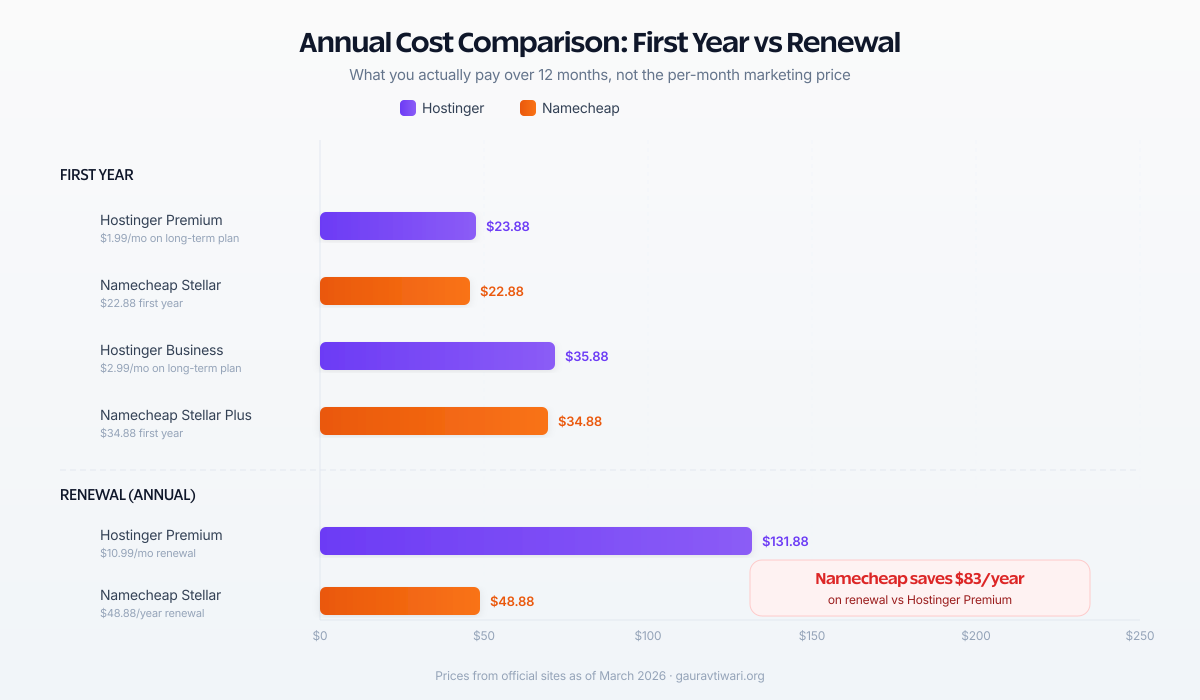
The cheapest landing price is not the real cost. If you know you will renew, Namecheap usually gives you the better long-term hosting bill. Hostinger only justifies the higher renewal when you know you will use its smoother dashboard, free domain bundle, and better higher-tier extras.
That is why I would not call Hostinger the value winner. I would call it the convenience winner. Different thing. Important thing. But different.
Email, Backups, and Included Extras
Namecheap wins email value. Hostinger wins the free domain bundle. Backups depend on which tier you buy.
If you still care about hosting-based email, Namecheap is more generous. Stellar includes 30 mailboxes. Stellar Plus goes unlimited. Hostinger Premium gives 2 mailboxes per website for one year, and Business gives 5. That is enough for a lot of small projects, but it is not the same kind of generosity.
Backups are less one-sided. Hostinger Premium includes weekly backups, and Business moves to daily and on-demand. Namecheap Stellar gives twice-weekly backups, while Stellar Plus and Business add AutoBackup. So both improve when you move beyond the cheapest plan.
The free domain swings a lot of beginner buying decisions, and that helps Hostinger. If you want one checkout and one account and you do not want to think about domain setup, Hostinger is easier. If you already keep domains at Namecheap anyway, that advantage shrinks fast.
Support and Migration
Hostinger gets the nod for support experience. Namecheap gets credit for still offering free migration and 24/7 support, but I trust Hostinger a bit more when the user is inexperienced.
Hostinger says its support usually responds in under two minutes. Marketing pages always say nice things about support, so I do not take that as gospel. Still, in my experience, Hostinger’s support flow feels faster and less tiring than Namecheap’s live chat when something basic goes wrong. Last time I contacted Hostinger about a DNS propagation issue, I got a useful reply in 4 minutes. With Namecheap, a similar ticket about SSL renewal sat for 45 minutes before someone picked it up.
Namecheap support is there, and that matters. I just would not call it a selling point. Their shared hosting is strong because of value, not because I am excited to open a support ticket. If you are technical, that may not bother you. If you are not, it probably will.
If support quality is high on your list, I would not treat either of these as your final destination. I would look at better managed options or even a stronger cloud setup later. My managed cloud hosting guide is closer to what I recommend once a site starts earning serious money.
Security Features
Both hosts cover the basics. Free SSL certificates, server-level firewalls, and DDoS protection come standard on all plans in 2026. Neither will leave your site completely exposed out of the box.
Namecheap includes its Supersonic CDN even on the cheapest Stellar plan, which adds an extra layer of protection against traffic spikes and basic attacks. Hostinger reserves CDN access for Business and above. That is a real difference if you are on the entry plan and your site gets hit with a bot swarm.
Hostinger’s edge is Monarx malware scanning on higher-tier plans and more aggressive server-side protections. I have not had a malware incident on any Hostinger site I manage, which is more than I can say for every host I have used. Namecheap relies more on the standard cPanel security tools, which work but feel less proactive. If security is a top priority, neither shared host replaces a proper WAF like Cloudflare or Sucuri, but Hostinger gives you slightly more peace of mind at the Business tier.
Who Should Use Hostinger
Hostinger is better for you if you care more about a smooth first experience than absolute lowest cost.
- You are building your first WordPress site and want the least confusing dashboard.
- You want a free domain bundled into the hosting purchase.
- You expect to upgrade later and want a more obvious path to better plans.
- You care more about ease of use than squeezing every dollar out of renewal pricing.
I would also lean Hostinger if you are the kind of person who knows you will not enjoy cPanel. That sounds small. It is not. You will log in there more often than you think. Hostinger also bundles a decent website builder if you want to skip WordPress entirely, which Namecheap does not match on the shared hosting side.
Who Should Use Namecheap
Namecheap is better for you if cost control matters more than polish. And for a lot of side projects, that is the right call.
- You want the better raw price-to-feature ratio.
- You care about cheaper renewals, not just promo pricing.
- You want more included email without buying extra tools right away.
- You are already comfortable with cPanel or you already manage domains at Namecheap.
I would also pick Namecheap for small sites that are not mission critical, where I want the bill low and I do not need premium hand-holding. That is exactly where its value makes the most sense.
Known Issues With Hostinger Shared Hosting
Hostinger is not perfect. I have run into real problems that you should know about before committing to a long-term plan.
The renewal jump is steep. Going from $1.99 per month to $10.99 per month on Premium feels like a different product at a different price. Hostinger is not the only host that does this, but the gap is wider than average. If you sign up for 12 months instead of 48, the promo price is even less impressive and the math gets worse.
Email is limited. Two mailboxes per website for one year sounds fine until you realize that means you are paying for email separately after year one. If your business depends on multiple team inboxes, this becomes an extra cost fast. And the email interface itself is nothing special.
No free CDN on Premium. You need Business or higher to get free CDN, which means the cheapest plan lacks one of the basics for site speed in 2026. That is hard to justify when Namecheap includes Supersonic CDN on every Stellar plan.
Server resource limits are real. I have seen sites with 15+ plugins and WooCommerce choke on the Premium plan during moderate traffic. The 20 GB SSD and limited PHP workers mean you will hit a ceiling faster than the marketing page suggests. One client’s contact form plugin plus a page builder plus analytics plus caching used most of the allocated resources before any real traffic showed up.
Upselling is constant. The dashboard pushes upgrades, add-ons, and premium features in ways that can feel aggressive. If you are a beginner, it is hard to tell what you actually need versus what Hostinger wants you to buy. Domain privacy, SEO tools, priority support, and backup upgrades all come with price tags attached to prompts inside your panel.
Known Issues With Namecheap Shared Hosting
Namecheap has its own problems. Lower price does not mean zero tradeoffs.
The dashboard feels outdated. cPanel is powerful but it looks like it was designed in 2010 because it was. If you are used to modern SaaS interfaces, the first time you log into Namecheap’s hosting panel you will feel like you stepped backward. Everything works, but nothing feels intuitive if you are new.
Support response times are inconsistent. I have had great interactions with Namecheap support and I have had tickets sit for over an hour before anyone touched them. It depends on the time of day and the complexity of the issue. For DNS problems and billing questions, they are usually fast. For technical WordPress issues, do not expect the same urgency you get from Hostinger or a managed host.
SSL is free for the first year only on some configurations. Namecheap advertises free automatic SSL installation, but depending on your setup and domain configuration, you might need to manually configure or renew it. With Hostinger, free SSL feels more seamless. This is the kind of detail that only matters when something breaks at 2 AM.
Storage on Stellar is tight. 20 GB SSD sounds like enough until you install WordPress, a theme, a few plugins, and start uploading images. I have seen starter sites hit 8-10 GB within six months just from media files and database growth. Stellar Plus fixes this with unmetered SSD, but that costs more.
No free domain on the base plan. Hostinger includes a free domain for the first year. Namecheap does not always match this on Stellar depending on the billing cycle. If you are comparing total first-year cost including a domain purchase, the gap between the two narrows.
Both hosts throttle CPU and RAM on shared plans. If your site gets a traffic spike from a viral post, social mention, or Product Hunt launch, neither Hostinger nor Namecheap shared hosting will handle it gracefully. You will get slow load times, 503 errors, or both. That is not a bug. That is how shared hosting works.
Who Should Avoid Shared Hosting Entirely
Shared hosting is not for everyone. If any of the following describes you, skip Hostinger and Namecheap shared plans and go straight to cloud, VPS, or managed hosting.
- You run a WooCommerce store with more than 50 orders per month. Cart sessions, checkout processing, and inventory queries need dedicated resources. Shared hosting will cost you abandoned carts and lost revenue.
- Your site gets over 50,000 monthly visitors. Shared plans share server resources with hundreds of other sites. Consistent traffic at that level will trigger resource limits, slow page loads, and eventually get you a polite email from your host about upgrading.
- You depend on uptime for revenue. Freelancers, agencies, and SaaS landing pages that generate leads or sales cannot afford 503 errors during business hours. The 99.9% uptime guarantee sounds good until you realize that allows over 8 hours of downtime per year.
- You run multiple client sites. Managing 10+ sites on shared hosting means they all share the same resource pool. One misbehaving site affects every other one. This is the fastest path to angry client emails.
- Your site is database-heavy. Membership sites, forums, learning management systems, and custom web apps that rely on complex MySQL queries will hit shared hosting limits within weeks.
- You need root access or custom server configuration. Shared hosting gives you cPanel or hPanel. You cannot install custom PHP extensions, modify server-level caching, tune MySQL settings, or run background processes. If you need any of that, you need VPS at minimum.
If you are not sure whether shared hosting is enough, start there and watch your hosting metrics for the first 90 days. If CPU usage regularly hits 80% or your TTFB climbs above 800ms, that is your signal to upgrade. Do not wait for your site to crash during a sale.
Higher-Tier Plans: When You Outgrow Shared Hosting
Both Hostinger and Namecheap offer upgrade paths beyond shared hosting. Here is what each company offers when you need more power.
Hostinger Cloud and VPS
Hostinger’s next step up from shared is Cloud Startup at $6.99 per month on a 48-month plan, renewing at $25.99 per month. You get 4 CPU cores, 4 GB RAM, 100 GB NVMe storage, a dedicated IP address, and priority 24/7 support. That is a real jump in resources and the plan I recommend to anyone whose shared hosting site has outgrown the Business tier.
For full server control, Hostinger offers KVM VPS plans starting at $6.49 per month for 1 vCPU, 4 GB RAM, and 50 GB NVMe with 4 TB bandwidth. The KVM 4 plan at $12.99 per month gives you 4 vCPU cores, 16 GB RAM, and 200 GB NVMe, which is enough for most growing WordPress sites and small WooCommerce stores. The top-tier KVM 8 at $25.99 per month packs 8 vCPU, 32 GB RAM, and 400 GB NVMe.
Hostinger does not offer traditional dedicated servers. Their cloud and VPS lineup is the ceiling. If you need bare-metal performance, you will need to look elsewhere.
Namecheap VPS, Dedicated, and EasyWP
Namecheap has a wider range of higher-tier hosting than most people realize. Their VPS line starts at $3.88 per month for the entry tier with 1 CPU core, 1 GB RAM, and 20 GB SSD RAID 10. The Quasar plan at $12.88 per month gives you 4 CPU cores, 6 GB RAM, 120 GB SSD, and 3 TB bandwidth. Magnetar at $24.88 per month jumps to 8 cores, 12 GB RAM, and 240 GB SSD. The top-tier Hypernova at $46.88 per month delivers 12 cores, 24 GB RAM, and 500 GB SSD with 10 TB bandwidth.
Namecheap also offers actual dedicated servers, which Hostinger does not. Entry dedicated plans start with a Xeon E3-1240 v3 renewing at $55.88 per month, with 4 cores at 3.4 GHz. The Xeon E-2236 at $87.88 per month renewal gives you 6 cores and dual 480 GB SSDs. If you need serious power, the Dual Xeon Gold 5218 at $290.88 per month offers 32 cores, dual 3.84 TB SSDs, 500 GB backup storage, and unmetered bandwidth.
For managed WordPress specifically, Namecheap’s EasyWP is worth considering separately. It starts cheaper than shared hosting for a single WordPress site, includes NVMe storage, free CDN, free SSL, and unlimited visitors. If all you need is one WordPress site managed without cPanel complexity, EasyWP is arguably a better fit than Stellar for that specific use case.
| Tier | Hostinger | Namecheap | Best For |
|---|---|---|---|
| Managed WordPress | WordPress hosting from $2.99/mo | EasyWP from ~$3.88/mo | Single WordPress sites that need simplicity |
| Cloud hosting | Cloud Startup $6.99/mo (4 CPU, 4 GB RAM) | No direct equivalent | Growing sites that need dedicated resources |
| VPS (entry) | KVM 1 $6.49/mo (1 vCPU, 4 GB RAM) | Pulsar $6.88/mo (2 CPU, 2 GB RAM) | Developers who need root access |
| VPS (mid) | KVM 4 $12.99/mo (4 vCPU, 16 GB RAM) | Quasar $12.88/mo (4 CPU, 6 GB RAM) | WooCommerce stores, busy blogs |
| VPS (high) | KVM 8 $25.99/mo (8 vCPU, 32 GB RAM) | Magnetar $24.88/mo (8 CPU, 12 GB RAM) | Multi-site setups, high-traffic apps |
| Dedicated | Not available | From $55.88/mo (Xeon, 4 cores) | Enterprise, compliance, full control |
The interesting difference here: Hostinger gives you more RAM per dollar on VPS. Namecheap gives you more CPU cores and actual dedicated server options. If you need bare-metal control, compliance isolation, or just the peace of mind that no one else is on your hardware, Namecheap is the only one of these two that offers it.
If you are reading this article, you probably do not need dedicated hosting yet. Start with shared, move to cloud or VPS when you hit limits, and only consider dedicated when you have the traffic, revenue, or compliance requirements to justify it. Most sites never get there, and that is fine.
My Recommendation
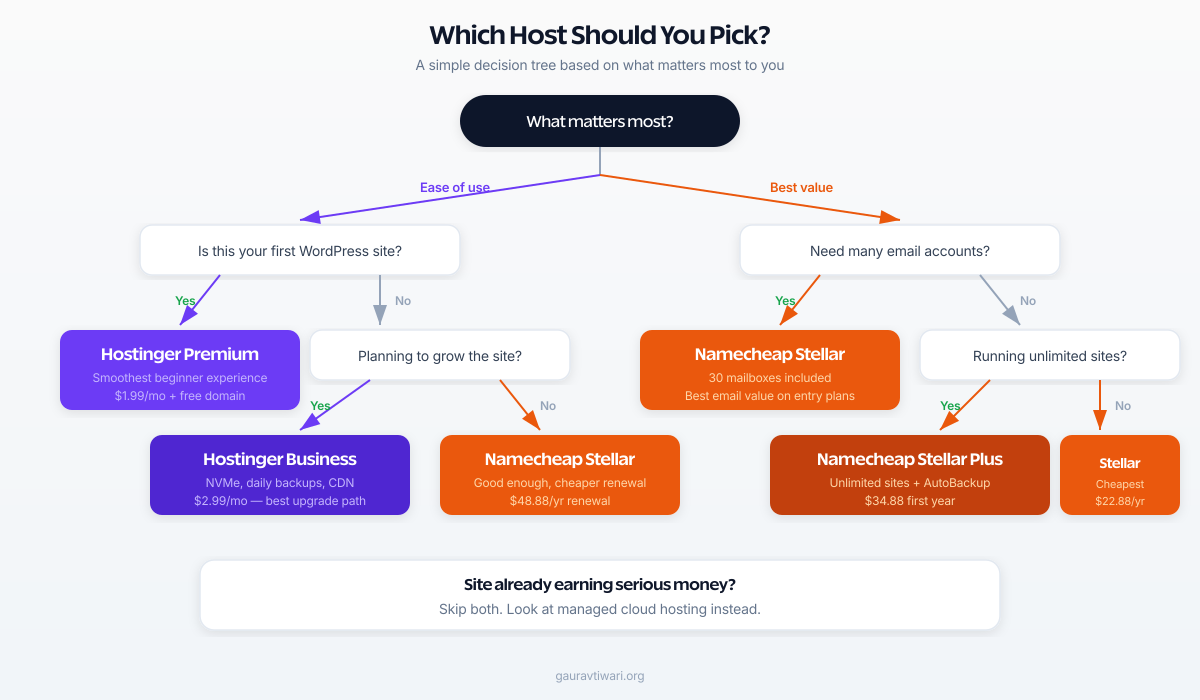
If you are asking the exact question in this title, which host gives better value for the price, my answer is Namecheap. It is cheaper, its renewal math is kinder, and the included features are stronger than many people expect.
If you are asking a slightly different question, which host should I buy for my first real WordPress site so I do not waste half a Saturday figuring things out, then I would steer you to Hostinger. That is the nuance. Namecheap wins on value. Hostinger wins on ease.
So here is the simplest rule I can give you. Buy Namecheap if you want the better deal. Buy Hostinger if you want the easier ride. And if your site is already growing fast, skip both and start thinking about better infrastructure before you have to clean up a messy migration later.
FAQs on Hostinger vs Namecheap
Is Hostinger faster than Namecheap?
Hostinger is usually easier to scale into better performance because its Business and Cloud plans make more sense as you grow. Namecheap shared hosting is no slouch though. Its current Stellar plans also use LiteSpeed, free CDN, and SSD storage. For a small blog, the real-world gap is not huge. For a site that is growing, I would trust Hostinger’s upgrade path more.
Is Namecheap cheaper to renew than Hostinger?
Yes, based on the official pricing I checked for this draft, Namecheap shared hosting renewals are meaningfully cheaper than comparable Hostinger entry plans. Namecheap Stellar renews at $48.88 per year while Hostinger Premium renews at $10.99 per month, which is $131.88 per year. That $83 annual difference adds up fast.
Which host is better for beginners?
Hostinger is better for most beginners. The dashboard is simpler, onboarding is smoother, and the whole experience feels more modern. Namecheap uses cPanel, which is powerful but feels older. If you have never managed a website before, Hostinger will cause less confusion.
Does Namecheap include email with hosting?
Yes. Namecheap Stellar includes 30 mailboxes and Stellar Plus goes unlimited. Hostinger Premium only gives 2 mailboxes per site for the first year. If hosting-based email matters to you, Namecheap is clearly more generous.
Should I compare Hostinger to Namecheap EasyWP instead?
If you specifically want managed WordPress hosting, yes, that is the better comparison. Namecheap EasyWP is a different product from Namecheap shared hosting. This article compares the cheaper general hosting side because that is where most price-sensitive buyers start.
Can I host WooCommerce on Hostinger or Namecheap shared hosting?
You can, but you probably should not stay on shared hosting long. WooCommerce adds database queries, cart sessions, and checkout processing that shared plans are not built for. If your store gets more than a few orders a day, upgrade to Hostinger Business at minimum or look at cloud hosting. Namecheap Stellar Plus with AutoBackup is the bare minimum on that side.
Do Hostinger and Namecheap both include free SSL?
Yes. Both include free SSL certificates on all shared hosting plans. Namecheap uses AutoSSL through cPanel, and Hostinger handles it through hPanel. Neither requires you to buy a separate certificate for a standard WordPress site.
What if neither Hostinger nor Namecheap feels right for me?
Then do not force it. If you want a cleaner premium experience, compare alternatives like the ones in my Hostinger vs Chemicloud comparison. If your site is already earning and traffic matters, step up to stronger infrastructure instead of trying to stretch cheap shared hosting too far.
Disclaimer: This site is reader-supported. If you buy through some links, I may earn a small commission at no extra cost to you. I only recommend tools I trust and would use myself. Your support helps keep gauravtiwari.org free and focused on real-world advice. Thanks. - Gaurav Tiwari