
How to Use the GT Link Manager REST API to Manage Links with AI Tools
Managing hundreds of redirect links manually is a special kind of tedium. You log in, click through the admin, fill out fields one by one, copy slugs, paste URLs… and then do it again for the next link. And the next. And the next.
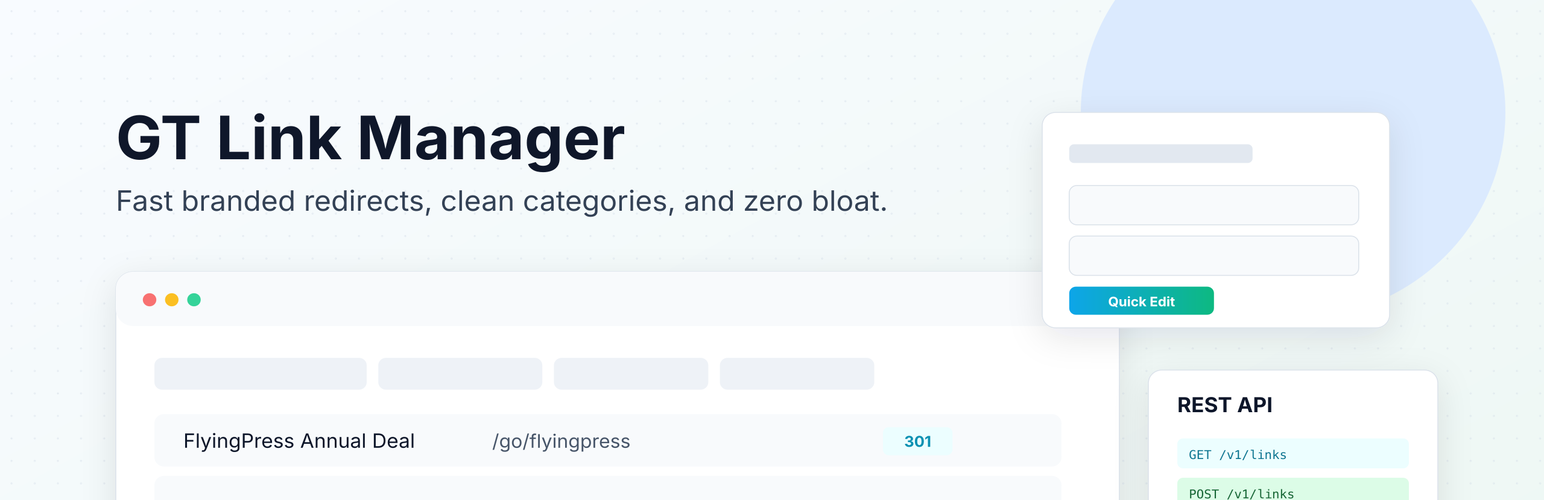
GT Link Manager
GT Link Manager is a high-performance branded link manager for WordPress. It stores links in custom database tables (not custom post types), resolves redirects early on init, and keeps your site fast — even with thousands of links.
I built GT Link Manager to solve the redirect performance problem. Custom database tables, early init resolution, no CPT overhead. But the REST API is where things get genuinely interesting for anyone running links at scale. Because once you have a proper API, you can hand the repetitive work to AI agents and let them manage links programmatically.
This is the complete guide to using the GT Link Manager REST API with six AI-powered tools: Claude Code, OpenAI Codex, WP-MCP, Novamira, Claudeus WordPress MCP, and the WordPress MCP Adapter. All of them connect through the same authentication mechanism: your WordPress username and an application password. I’ll walk you through every endpoint, show you real commands, and explain which tool fits which workflow.

Free Course: GT Link Manager Training
Master the GT Link Manager plugin from basics to advanced usage. Covers link creation, categories, automatic redirects, the block editor integration for inserting managed links, bulk import and export workflows, and the REST API for programmatic access.
Authentication: Application Passwords
Before any AI tool can talk to your site’s REST API, you need credentials. WordPress has had Application Passwords built in since version 5.6, and they’re the standard authentication method for every tool covered here.
Generating an Application Password
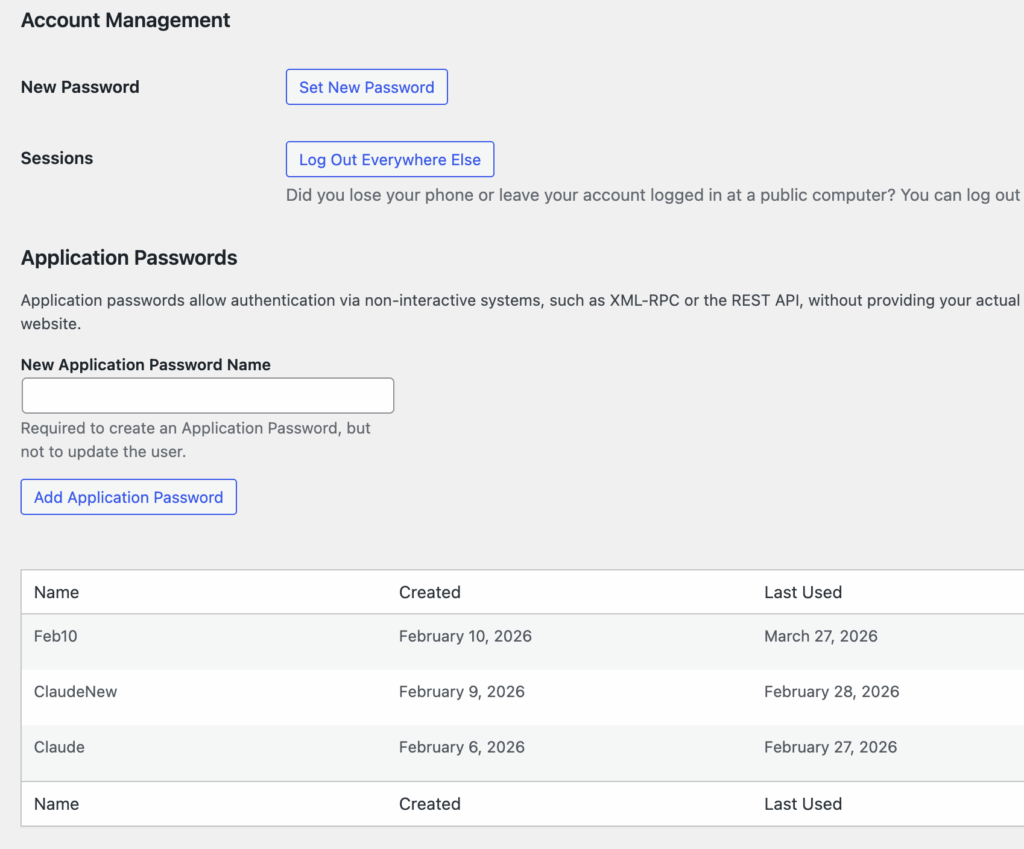
- Go to Users → Profile in your WordPress admin
- Scroll to the Application Passwords section
- Enter a name (e.g., “Claude Code” or “Codex Agent”)
- Click Add New Application Password
- Copy the generated password immediately. WordPress only shows it once
The password looks something like xxxx xxxx xxxx xxxx xxxx xxxx. Spaces are optional when using it.
How Authentication Works
Every REST API request uses HTTP Basic Auth:
Username: your-wordpress-username
Password: xxxx xxxx xxxx xxxx xxxx xxxx
In curl, that’s:
curl -u "username:xxxx xxxx xxxx xxxx xxxx xxxx" \
  https://yoursite.com/wp-json/gt-link-manager/v1/links
Or with a Base64 header:
AUTH=$(echo -n "username:password" | base64)
curl -H "Authorization: Basic $AUTH" \
  https://yoursite.com/wp-json/gt-link-manager/v1/links
Every AI tool in this guide uses one of these two methods under the hood. The only requirement is that your site runs over HTTPS. WordPress blocks Application Password auth over plain HTTP, and honestly, it should.
I save my credentials at ~/.env, so that it is easy to reference. I can just send “use my ~.env credentials to connect to my website and do the following”.
The GT Link Manager REST API: Complete Reference
The API lives under the gt-link-manager/v1 namespace. Here’s every endpoint.
GT Link Manager stores links in its own custom database tables (wp_gtlm_links and wp_gtlm_categories), not as custom post types. This means API operations are fast. No wp_posts table bloat, no taxonomy queries, no post meta lookups. The plugin resolves redirects at init priority 1, before WordPress even loads its template system. That early resolution is what makes it handle thousands of redirects without measurable performance impact.
Links
| Method | Endpoint | What It Does |
|---|---|---|
GET | /links | List links (paginated, filterable) |
POST | /links | Create a new link |
GET | /links/{id} | Get a single link |
PUT/PATCH | /links/{id} | Update a link |
DELETE | /links/{id} | Trash a link (or ?force=true to permanently delete) |
PUT/PATCH | /links/{id}/restore | Restore from trash |
PUT/PATCH | /links/{id}/toggle-active | Activate or deactivate |
POST | /links/bulk-category | Move or copy links to a category |
Categories
| Method | Endpoint | What It Does |
|---|---|---|
GET | /categories | List all categories |
POST | /categories | Create a category |
PUT/PATCH | /categories/{id} | Update a category |
DELETE | /categories/{id} | Delete a category |
Link Fields
When creating or updating a link, these are the fields you can send:
| Field | Type | Required | Description |
|---|---|---|---|
name | string | Yes (create) | Display name for the link |
slug | string | No | URL slug. Auto-generated from name if omitted |
url | string | Yes (create) | Destination URL |
redirect_type | integer | No | 301, 302, or 307 (default: 301) |
rel | string/array | No | Comma-separated or array: nofollow, sponsored, ugc |
noindex | integer | No | 1 to add X-Robots-Tag: noindex header |
is_active | integer | No | 1 (active) or 0 (inactive) |
link_mode | string | No | standard, direct, or regex (added in v1.6.0) |
regex_replacement | string | No | Replacement pattern for regex links (use $1, $2 for capture groups) |
priority | integer | No | Regex matching priority (lower = matched first) |
category_id | integer | No | Category to assign the link to |
tags | string | No | Comma-separated tags |
notes | string | No | Internal notes |
The link_mode field deserves attention. standard is the default. Your slug becomes /go/your-slug/ and redirects to the destination URL. direct (added in v1.4.0) bypasses the /go/ prefix and lets you redirect any arbitrary path on your domain. regex (added in v1.6.0) treats the slug as a regular expression pattern with capture group support, so one rule can handle thousands of URL redirects.
Query Parameters for GET /links
| Parameter | Type | Default | Description |
|---|---|---|---|
search | string | "" | Search name, slug, or URL |
page | integer | 1 | Page number |
per_page | integer | 20 | Results per page (max 200, or -1 for all) |
category_id | integer | 0 | Filter by category |
status | string | "" | active, inactive, or trash |
orderby | string | id | Sort field |
order | string | DESC | ASC or DESC |
Response Headers
List endpoints return pagination headers:
X-WP-Total, total number of matching linksX-WP-TotalPages, total pages
Developer Hooks
GT Link Manager exposes several WordPress filters for developers who need to customize API behavior:
gtlm_capabilities, change the required capability for API access (default:edit_posts)gtlm_redirect_url, modify the destination URL at redirect timegtlm_redirect_type, override the HTTP status code per redirectgtlm_link_prefix, change the default/go/prefix to something else
These filters work with all six tools covered below. If you need tighter API access control for AI agents, gtlm_capabilities is the one to hook.
OK, with the API mapped out, let’s connect it to AI tools.
                     ┌────────────────────────┐
                     │    WordPress Site       │
                     │                         │
                     │  ┌──────────────────┐  │
  AI Tool        ──▶ │  │  REST API Layer  │──┼──→ /gt-link-manager/v1/
  (Claude, MCP)      │  │                  │  │    links, categories
                     │  └────────┬─────────┘  │
                     │           │            │
                     │  ┌────────▼─────────┐  │
                     │  │    GTLM_DB        │──┼──→ wp_gtlm_links
                     │  │    Class          │  │    wp_gtlm_categories
                     │  └────────┬─────────┘  │
                     │           │            │
                     │  ┌────────▼─────────┐  │
  Visitor        ──▶ │  │    init hook      │──┼──→ 301/302/307
  /go/slug/          │  │    (priority 1)   │  │    redirect
                     │  └──────────────────┘  │
                     └────────────────────────┘
Tool 1: Claude Code
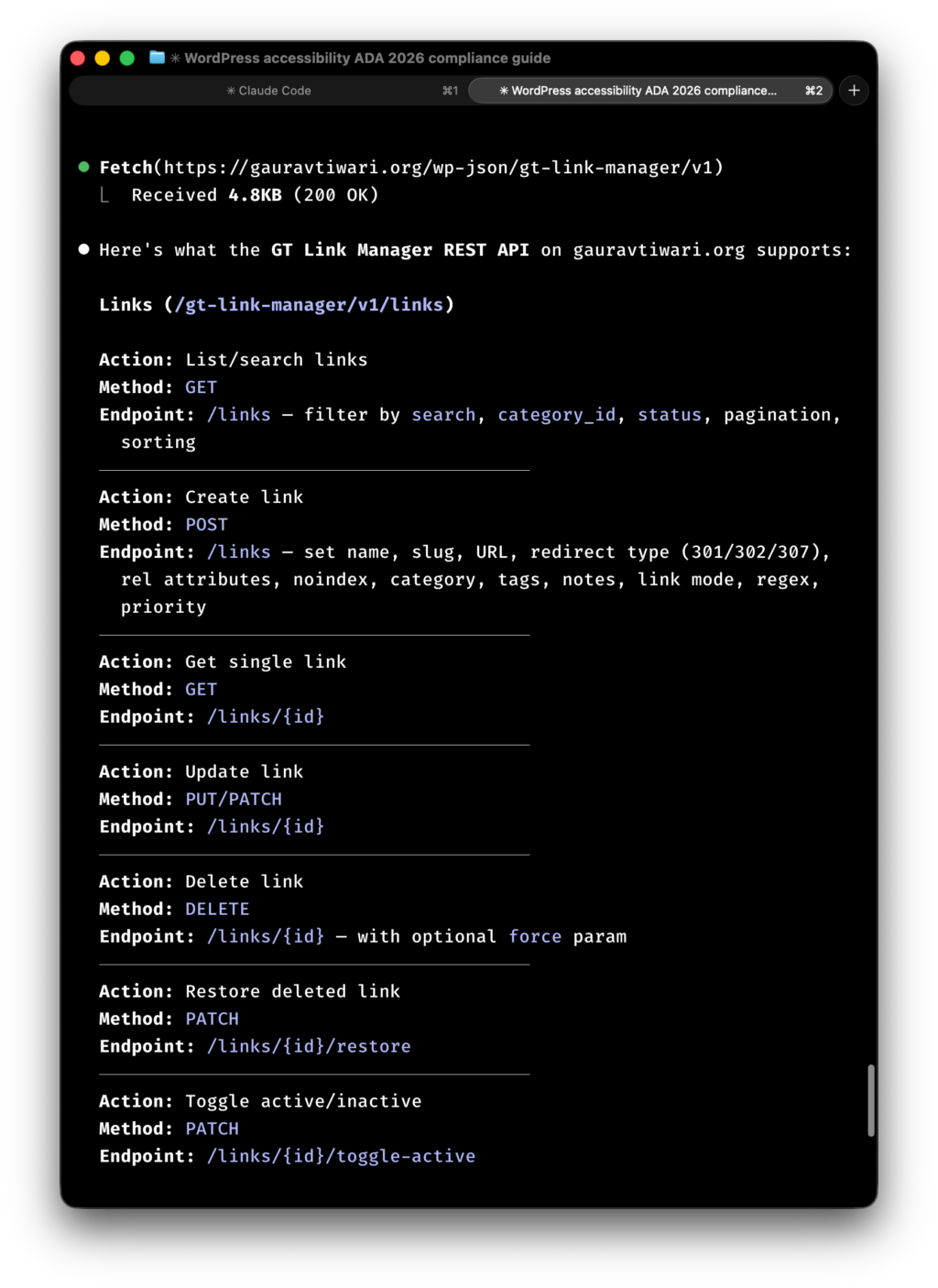
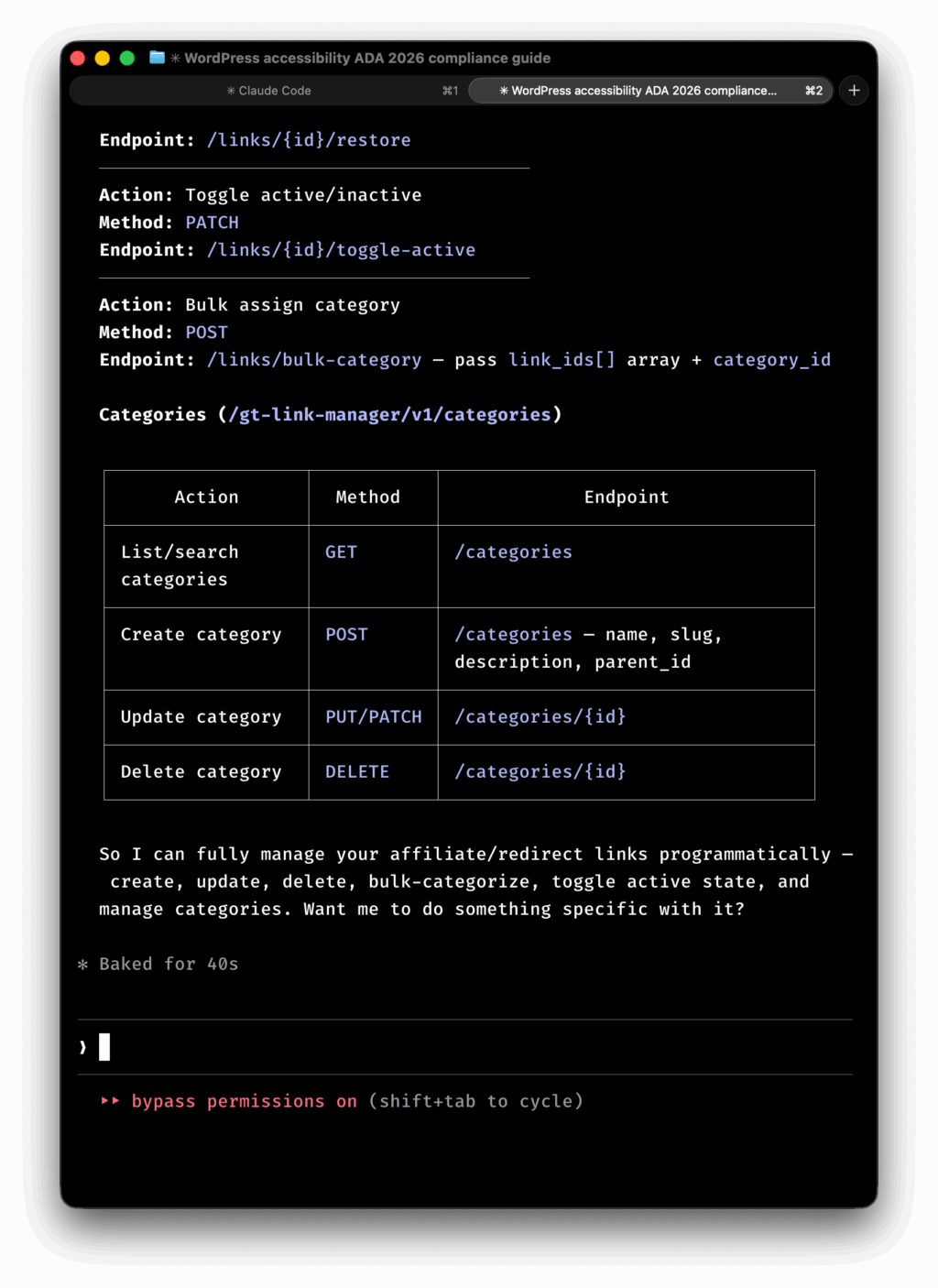
This is my daily driver. Claude Code runs in your terminal, reads your codebase, executes shell commands, and can hit REST APIs directly through curl or any CLI tool.
Setup
No special plugin or MCP server required. Claude Code uses your terminal, so if curl works, Claude Code works.
Set your credentials as environment variables (.env or .env-local file) so you don’t paste passwords into every prompt:
export WP_SITE="https://yoursite.com"
export WP_USER="your-username"
export WP_APP_PASSWORD="xxxx xxxx xxxx xxxx xxxx xxxx"
Creating Links
Tell Claude Code what you need in plain English:
Create an affiliate link called “My Hosting Deal” pointing to https://hosting.example.com/deal?ref=gaurav with slug “my-hosting”, set it as nofollow and sponsored, redirect type 301.
Claude Code will run something like:
curl -s -u "$WP_USER:$WP_APP_PASSWORD" \
  -X POST "$WP_SITE/wp-json/gt-link-manager/v1/links" \
  -H "Content-Type: application/json" \
  -d '{
    "name": "My Hosting Deal",
    "slug": "my-hosting",
    "url": "https://hosting.example.com/deal?ref=gaurav",
    "redirect_type": 301,
    "rel": "nofollow,sponsored",
    "noindex": 1
  }'
Bulk Operations
This is where Claude Code shines. Say you have a CSV of 50 affiliate links to import:
Read affiliate-links.csv and create all these links via the GT Link Manager API. Set them all as nofollow, sponsored, 301 redirects. Put them in the “Affiliates” category.
Claude Code will read the CSV, loop through each row, and fire POST requests. It’ll handle errors, retry failures, and report what worked. I’ve used this to migrate 200+ links from another plugin in under two minutes.
Auditing and Cleanup
List all inactive links and show me which ones haven’t been updated in over 6 months.
curl -s -u "$WP_USER:$WP_APP_PASSWORD" \
  "$WP_SITE/wp-json/gt-link-manager/v1/links?status=inactive&per_page=-1" | \
  jq '.[] | select(.updated_at < "2025-09-01") | {id, name, slug, updated_at}'
Trash all links in the “Expired Deals” category.
Claude Code fetches links by category, then sends DELETE requests for each one. Clean and traceable.
Regex Link Management
With version 1.6.0, you can create regex-based redirects via the API:
curl -s -u "$WP_USER:$WP_APP_PASSWORD" \
  -X POST "$WP_SITE/wp-json/gt-link-manager/v1/links" \
  -H "Content-Type: application/json" \
  -d '{
    "name": "Old Blog Redirect",
    "slug": "^old-blog/(.+)$",
    "url": "https://yoursite.com/blog/$1",
    "link_mode": "regex",
    "redirect_type": 301,
    "priority": 5
  }'
This redirects any URL matching /old-blog/anything to /blog/anything. The $1 capture group substitution happens automatically. Set priority to control which regex rule wins when multiple patterns match, lower numbers match first.
Tool 2: OpenAI Codex
Codex operates differently from Claude Code. It runs tasks asynchronously in cloud sandboxes, pulls your repository, executes code, and returns results. Think of it as a background worker rather than a live assistant.
How It Works with the REST API
Codex can execute scripts inside its sandbox. You write (or ask it to write) a script that interacts with the GT Link Manager API, and Codex runs it.
Example: Bulk Link Creator Script
Ask Codex to create a Python script:
Write a Python script that reads a CSV file of affiliate links and creates them via the GT Link Manager REST API. Use HTTP Basic Auth with environment variables for credentials.
Codex generates:
import csv
import os
import requests
from requests.auth import HTTPBasicAuth

site = os.environ["WP_SITE"]
auth = HTTPBasicAuth(os.environ["WP_USER"], os.environ["WP_APP_PASSWORD"])
endpoint = f"{site}/wp-json/gt-link-manager/v1/links"

with open("links.csv") as f:
    reader = csv.DictReader(f)
    for row in reader:
        payload = {
            "name": row["name"],
            "slug": row["slug"],
            "url": row["url"],
            "redirect_type": int(row.get("redirect_type", 301)),
            "rel": row.get("rel", "nofollow"),
            "noindex": 1,
        }
        resp = requests.post(endpoint, json=payload, auth=auth)
        if resp.status_code == 201:
            print(f"Created: {row['slug']}")
        else:
            print(f"Failed: {row['slug']} — {resp.status_code} {resp.text}")
You commit this script to your repo, Codex runs it in its sandbox, and you get a log of what was created. The key difference from Claude Code: Codex works asynchronously. You fire the task, go do something else, and review results later.
Where Codex Fits
Codex is better suited for batch operations where you don’t need real-time feedback. Migrating links from a spreadsheet, auditing redirect chains across multiple sites, generating link management scripts for your CI/CD pipeline. It’s not the tool for “create one link right now.” Claude Code handles that faster.
Tool 3: WP-MCP
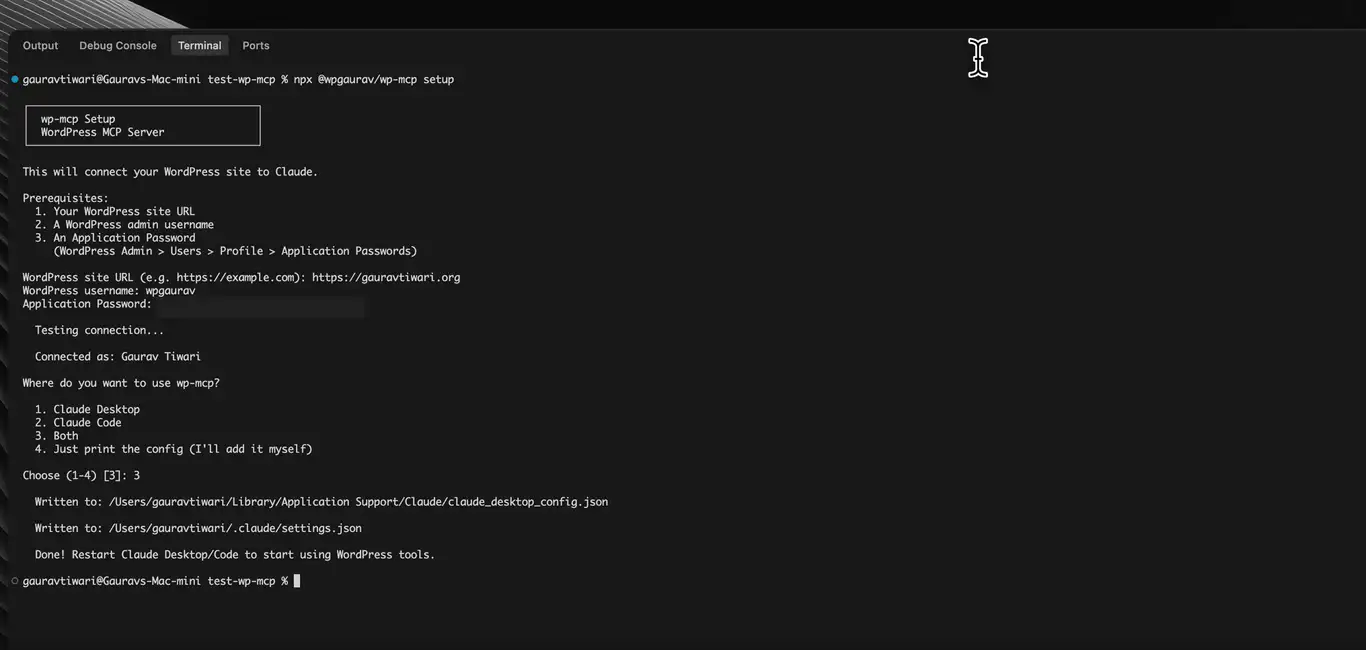
This is my tool. I built WP-MCP because I wanted a single MCP server that could talk to any WordPress plugin’s REST API, not just core endpoints. It ships with 37 hand-crafted tools for WordPress core operations (posts, media, users, taxonomies, menus, settings, Rank Math SEO) and has an auto-discovery engine that detects and exposes any plugin’s REST API endpoints as MCP tools.
That auto-discovery is what makes it work with GT Link Manager out of the box. You don’t need to write adapter code or wait for someone to build GT Link Manager support. WP-MCP reads the plugin’s registered REST routes and generates callable tools automatically.
Setup
Install globally via npm:
npm install -g @wpgaurav/wp-mcpAdd it to your Claude Code or Claude Desktop MCP configuration:
{
  "mcpServers": {
    "wp-mcp": {
      "command": "wp-mcp",
      "env": {
        "WORDPRESS_SITE_URL": "https://yoursite.com",
        "WORDPRESS_USERNAME": "your-username",
        "WORDPRESS_APP_PASSWORD": "xxxx xxxx xxxx xxxx xxxx xxxx"
      }
    }
  }
}
That’s it. No config files, no JSON schema to write. Environment variables handle authentication.
Auto-Discovery with GT Link Manager
Once WP-MCP connects to your site, it discovers GT Link Manager’s endpoints automatically. You can then call them as structured MCP tools:
Tool: wp_api_get
Endpoint: gt-link-manager/v1/links
Params: { "per_page": 50, "status": "active" }
Tool: wp_api_post
Endpoint: gt-link-manager/v1/links
Body: {
"name": "Spring Sale",
"slug": "spring-sale",
"url": "https://example.com/spring",
"redirect_type": 301,
"rel": "nofollow,sponsored"
}The advantage over raw curl is that WP-MCP handles authentication, error parsing, and response formatting. You talk to Claude in plain English, and WP-MCP translates that into proper API calls with the right headers and content types.
Using WP-MCP for Link Workflows
Because WP-MCP also has built-in tools for posts, media, and taxonomies, you can build cross-functional workflows in a single conversation:
Find all published posts that mention “spring sale” in the content. For each one, create a GT Link Manager redirect if one doesn’t exist already, then update the post content to use the
/go/spring-sale/URL instead of the raw affiliate link.
WP-MCP searches posts with its core tools, creates links through auto-discovered GT Link Manager endpoints, and updates post content, all without leaving the AI conversation. Try doing that with curl alone.
Why I Built This
I use WordPress Manager for Raycast for quick admin tasks from my Mac. But for anything involving bulk operations, content analysis, or multi-step workflows, I need an AI agent with full API access. WP-MCP fills that gap. It’s the bridge between “I have a WordPress REST API” and “my AI agent can use it.”
The package is open source on npm (v0.1.8 at the time of writing) and works with any WordPress site running 5.6+ with Application Passwords enabled.
Tool 4: Novamira
Novamira takes a completely different approach. Instead of calling the REST API over HTTP, it runs PHP directly inside WordPress. Your AI agent can execute arbitrary WordPress functions, query the database, and call plugin APIs, no REST overhead, no HTTP roundtrips. Risky but powerful.
Setup
Install the Novamira plugin on your WordPress site (staging or development . Don’t run this on production without understanding the security implications). Then add it to your MCP client configuration:
{
  "mcpServers": {
    "novamira": {
      "url": "https://your-staging-site.com/wp-json/novamira/v1/mcp"
    }
  }
}
Novamira provides 5 primitive tools: run_php, read_file, write_file, list_directory, and run_wp_cli. It’s intentionally minimal. The power comes from being able to execute any PHP code or WP-CLI command on the server.
Using Novamira with GT Link Manager
Since Novamira executes PHP, you can call GT Link Manager’s internal methods directly, no REST API layer needed:
// Create a link using the plugin's own DB class
$db = new GTLM_DB();
$link_id = $db->insert_link([
    'name'          => 'My Affiliate Link',
    'slug'          => 'my-affiliate',
    'url'           => 'https://example.com/?ref=123',
    'redirect_type' => 301,
    'rel'           => 'nofollow,sponsored',
    'noindex'       => 1,
    'link_mode'     => 'standard',
]);
echo "Created link ID: $link_id";
Or query links with full database access:
$db = new GTLM_DB();
$links = $db->list_links(['status' => 'active'], 1, 100);
echo json_encode($links);
When to Use Novamira
Novamira bypasses the REST API entirely. That’s powerful for complex operations: bulk migrations, cross-plugin data syncing, direct database queries that the REST API doesn’t expose. But it’s also riskier. You’re running arbitrary PHP on your WordPress installation.
My recommendation: use it on staging or development environments. For production sites, stick with the REST API through Claude Code or WP-MCP. The REST API has proper permission checks, input sanitization, and rate limiting built in. Direct PHP execution doesn’t.
Tool 5: Claudeus WordPress MCP

deus-h/claudeus-wp-mcp
deus-hClaudeus WordPress MCP Server
Claudeus is a purpose-built MCP server with 145 tools for WordPress management. It connects to your site using Application Passwords and exposes WordPress operations as structured MCP tools that AI agents can call.
Setup
Install globally:
npm install -g claudeus-wp-mcpConfigure your site in wp-sites.json:
{
  "sites": {
    "mysite": {
      "url": "https://yoursite.com",
      "username": "your-username",
      "password": "xxxx xxxx xxxx xxxx xxxx xxxx"
    }
  }
}
Add to your Claude Desktop or Claude Code MCP configuration:
{
  "mcpServers": {
    "wordpress": {
      "command": "claudeus-wp-mcp",
      "args": ["--config", "/path/to/wp-sites.json"]
    }
  }
}
Using Claudeus with GT Link Manager
Claudeus doesn’t have GT Link Manager-specific tools built in, but it has generic REST API tools that work with any WordPress endpoint. You can call the GT Link Manager API through its run_api_function tool:
Tool: run_api_function
Endpoint: gt-link-manager/v1/links
Method: POST
Body: {
  "name": "My Link",
  "slug": "my-link",
  "url": "https://example.com",
  "redirect_type": 301
}
The advantage of Claudeus over raw curl is context. It understands WordPress. When you say “create a redirect link,” it knows what parameters are needed. It can also manage categories, users, and content alongside your links, all in one conversation.
Multi-Site Management
Here’s where Claudeus really earns its keep. Configure multiple sites in wp-sites.json and manage links across all of them from a single AI conversation:
Create the same “Spring Sale” redirect on all three sites: mystore.com, myblog.com, and myportfolio.com.
Claudeus loops through configured sites and fires the API calls. One instruction, three sites updated. If you manage multiple WordPress sites and need consistent redirect links across all of them, this is the most efficient path.
Tool 6: WordPress MCP Adapter

WordPress/mcp-adapter
WordPressAn MCP adapter that bridges the Abilities API to the Model Context Protocol, enabling MCP clients to discover and invoke WordPress plugin, theme, and core abilities programmatically.
The WordPress MCP Adapter is the official WordPress project’s implementation of the Model Context Protocol. It bridges the WordPress Abilities API with MCP, exposing your site’s capabilities as structured tools that any MCP-compatible AI client can call.
Unlike the other tools here, the MCP Adapter doesn’t hardcode WordPress endpoints. It reads your site’s Abilities API (/wp-json/wp/v2/abilities) to discover what’s available, including any plugin that registers its REST routes properly. Since GT Link Manager registers standard REST routes, the adapter picks them up automatically.
Setup
Install the WordPress MCP Adapter plugin on your site. It supports two authentication methods:
- JWT Tokens, generated through Settings → WordPress MCP in your admin. Configurable expiration (1-24 hours). This is the primary method.
- Application Passwords, standard WordPress auth, works as a fallback.
Configure it in your MCP client:
{
  "mcpServers": {
    "wordpress": {
      "url": "https://yoursite.com/wp-json/wp/v2/wpmcp/streamable",
      "headers": {
        "Authorization": "Bearer YOUR_JWT_TOKEN"
      }
    }
  }
}
How Abilities API Discovery Works
The WordPress Abilities API is a newer concept. Plugins declare what they can do, and the MCP Adapter translates those declarations into MCP tools. For GT Link Manager, this means the adapter can expose link creation, listing, updating, and deletion as first-class MCP tools, without any custom integration code.
You can use list_api_functions to discover available endpoints (including GT Link Manager’s), then call them through run_api_function.
Capability-Scoped Access
The key advantage of the WordPress MCP Adapter is permission inheritance. It inherits the creating user’s WordPress capabilities. If you generate a JWT as an administrator, the AI agent has admin-level access. If you generate it as an editor, it’s scoped to editor capabilities. GT Link Manager checks for edit_posts by default (filterable via gtlm_capabilities), so any editor-level token works.
This makes it the most security-conscious option. You can create a dedicated “AI Agent” WordPress user with exactly the capabilities you want, generate a time-limited JWT, and know the agent can’t exceed those permissions.
Current Status
The WordPress MCP Adapter is under active development by the WordPress project. The earlier Automattic/wordpress-mcp repository has been archived, and development has moved to WordPress/mcp-adapter. It has 757+ stars on GitHub and is the officially sanctioned path for MCP integration with WordPress. Worth watching as it matures. This will likely become the standard approach.
Practical Workflows
Let me show you how I actually use these tools together.
Workflow 1: Affiliate Link Onboarding
When I sign up for a new affiliate program, I need to create 5-15 redirect links, one for each product or landing page I plan to reference.
I drop the affiliate URLs into a simple text file and tell Claude Code:
Read affiliate-urls.txt. For each URL, create a GT Link Manager link. Auto-generate slugs from the product names in the URLs. Set all as 301, nofollow, sponsored. Put them in the “Affiliates” category. Show me the branded URLs when done.
Two minutes later, every link exists and I have a list of yoursite.com/go/product-name URLs ready to paste into content.
Workflow 2: Link Audit
Every quarter, I audit my redirect links. Dead destinations, expired deals, inactive links that should be cleaned up.
List all active links from GT Link Manager. For each one, check if the destination URL returns a 200 status code. Report any that return 404, 500, or redirect chains longer than 2 hops.
Claude Code fetches all links via GET /links?status=active&per_page=-1, then tests each destination URL. I get a report of broken links without opening a browser. I wrote more about this kind of maintenance in my guide on content pruning.
Workflow 3: Migration from Another Plugin
Moving from Pretty Links or LinkCentral? Export your links as CSV, then:
Import these links from pretty-links-export.csv into GT Link Manager. Map the columns: “Title” → name, “Target URL” → url, “Slug” → slug. Set redirect type to 301 for all. Skip any that already exist.
The AI reads the CSV, maps columns, checks for duplicate slugs via the API, and creates what’s missing. I’ve done this migration for three client sites. It takes longer to explain what you want than for the tool to execute it.
GT Link Manager also has built-in CSV import with configurable field mapping and presets (added in v1.3.0), so you can do this through the admin UI too. But the API approach is better when you need to transform data, skip duplicates, or apply conditional logic during import.
Workflow 4: Regex Redirect Rules for Site Restructuring
If you’re restructuring URLs , say moving /blog/ to /articles/, for example, regex links handle this in one rule instead of hundreds of individual redirects:
Create a regex redirect in GT Link Manager: any URL matching /blog/(.+) should redirect to /articles/$1 with a 301. Priority 1.
curl -s -u "$WP_USER:$WP_APP_PASSWORD" \
  -X POST "$WP_SITE/wp-json/gt-link-manager/v1/links" \
  -H "Content-Type: application/json" \
  -d '{
    "name": "Blog to Articles Redirect",
    "slug": "^blog/(.+)$",
    "url": "https://yoursite.com/articles/$1",
    "link_mode": "regex",
    "redirect_type": 301,
    "priority": 1,
    "noindex": 1
  }'
One API call. Every /blog/whatever URL now redirects to /articles/whatever. No plugin migration, no database find-and-replace.
Workflow 5: Internal Link Management
Good internal linking is critical for SEO and for AI search engines that crawl your site structure. With WP-MCP or Claude Code, you can audit which redirect links are actually used in your content:
List all GT Link Manager links. For each one, search published posts for the slug. Report any links that aren’t referenced in any post content.
This finds orphaned redirect links: links you created but never used. Clean those up, or better yet, start using them. Every redirect link that doesn’t appear in content is a missed opportunity.
Which Tool Should You Use?
After testing all six extensively, here’s my honest breakdown:
| Tool | Best For | Tradeoff |
|---|---|---|
| Claude Code | Daily link management, quick tasks, auditing | Requires terminal comfort |
| Codex | Background batch jobs, script generation | Async only, no real-time interaction |
| WP-MCP | Full WordPress workflows, auto-discovery, cross-plugin operations | Newer project, still evolving |
| Novamira | Deep WordPress operations, staging environments | Runs arbitrary PHP, not for production |
| Claudeus WP MCP | Multi-site management, structured WordPress workflows | Extra setup, 145 tools can be overwhelming |
| WordPress MCP Adapter | Official WordPress integration, capability-scoped access | Under active development, API surface still stabilizing |
Claude Code  ────▶ curl ────▶ REST API ────▶ wp_gtlm_links
Codex        ────▶ script ──▶ REST API ────▶ wp_gtlm_links
WP-MCP       ────▶ MCP ─────▶ REST API ────▶ wp_gtlm_links
Novamira     ────▶ PHP ─────▶ GTLM_DB ─────▶ wp_gtlm_links
Claudeus     ────▶ MCP ─────▶ REST API ────▶ wp_gtlm_links
WP Adapter   ────▶ MCP ─────▶ Abilities ──▶ REST API ──▶ wp_gtlm_links
If you want one recommendation? Start with Claude Code. It’s the most flexible, requires no extra plugins or MCP servers, and works with any WordPress site that has Application Passwords enabled. Once you outgrow raw curl calls and want structured tool interfaces, add WP-MCP. It auto-discovers GT Link Manager’s endpoints and gives you cross-plugin workflows in one conversation.
GT Link Manager Version History, What’s New
The plugin has evolved significantly since its initial release. Here are the features that matter most for API users:
- v1.6.0, Regex redirect support with capture groups (
$1,$2), priority-based matching, and full REST API exposure for regex links - v1.5.0, Direct link mode (bypass
/go/prefix), improved bulk operations - v1.4.0, Tags support, notes field, enhanced search across name/slug/URL
- v1.3.0, CSV import with configurable field mapping and presets, bulk category assignment via API
- v1.2.0, Category management endpoints,
toggle-activeandrestoreactions - v1.1.0, Click tracking with analytics, pagination headers (
X-WP-Total,X-WP-TotalPages)
The full changelog is on the WordPress.org plugin page.
Security Considerations
A few things to keep in mind:
- Application Passwords have full user-level access. If you generate one for an admin account, the AI tool has admin access. Create a dedicated user with only the capabilities you need.
- Use HTTPS. Always. Application Passwords are blocked over plain HTTP for good reason.
- Rotate passwords periodically. Delete old Application Passwords you’re not using anymore.
- GT Link Manager’s permission filter (
gtlm_capabilities) lets you scope API access. By default, it requiresedit_posts. You can tighten this tomanage_optionsfor admin-only access, or create a custom capability. - Novamira is a different beast. It executes PHP directly. Only use it in environments where that level of access is acceptable.
- JWT tokens expire. The WordPress MCP Adapter’s JWT tokens are time-limited (1-24 hours). That’s a feature, not a bug. It limits the blast radius if a token leaks.
Wrapping Up
The GT Link Manager REST API turns link management from a manual chore into something you can automate, script, and delegate to AI agents. Whether you’re creating one link or migrating hundreds, whether you prefer terminal commands or MCP-connected tools, the API handles it.
I use Claude Code for 90% of my link management now. The other 10% is WP-MCP when I need cross-plugin workflows, like creating a redirect link and immediately updating posts to reference it. The admin UI? I visit it maybe once a week to eyeball the list table.
The plugin is free, open source, and available on WordPress.org. The REST API works out of the box, no premium tier, no API key signup, no usage limits. Create an Application Password and start building.
If you’re building AI-powered WordPress workflows, you might also want to read my guide on formatting blog posts for AI search and my writeup on the best Mac apps for WordPress developers.
Disclaimer: This site is reader-supported. If you buy through some links, I may earn a small commission at no extra cost to you. I only recommend tools I trust and would use myself. Your support helps keep gauravtiwari.org free and focused on real-world advice. Thanks. - Gaurav Tiwari