
Minify, Defer and Delay JavaScript
Three independent switches on Optimization > JavaScript, all off by default. They are separate because their risk profiles are completely different.
| Setting | Key | Risk | What it does |
|---|---|---|---|
| Minify local JavaScript | javascript.minify | Low | Serves smaller copies of eligible local scripts. Results are kept in WordPress storage; no JavaScript files are written. |
| Defer safe JavaScript | javascript.defer | Medium | Adds defer to registered scripts whose dependencies and inline code allow it |
| Delay selected third-party scripts | javascript.delay | High | Holds scripts matching Scripts to delay until the visitor interacts, or for five seconds |
Where it applies
- Only on responses the page cache stores, so the page-cache drop-in must be installed and the origin page cache enabled. Logged-in users, bypassed paths and commerce pages get their scripts unchanged. Test in a private window. See Page Cache.
- Only external classic scripts:
<script src>with notype,text/javascriptorapplication/javascript. Inline scripts, modules and JSON blocks are never touched. - Any script whose URL contains
cart,checkoutorpaymentis never touched. - Scripts matching Never optimize scripts or an automatic exclusion are never touched (see Exceptions).
- Safe Mode stops all three. See Troubleshooting.
- When Perfmatters is active, the Perfmatters ownership setting on Integrations decides which plugin minifies, defers and delays.
Decisions are made by ScriptPlan, which reads WordPress’s script registry rather than guessing from URLs. A registered script is matched to its tag by the {handle}-js id WordPress prints.
Minify
A script is minified only when all of these hold (JavaScriptMinifier):
- Its URL is on this site, under
wp-content, ends in.js, and carries no query parameter other thanver - It is not already named
.min.js - The file is readable and no larger than 2 MB
- The tag has no
integrityattribute - The source does not use
document.currentScriptor dynamicimport()/import.meta. Those scripts locate files relative to their own URL, which a new URL would break. - The minified output is actually smaller
Minification runs in memory with the bundled matthiasmullie/minify library. The result is stored as a WordPress transient (gtperf_js_<hash>) for 14 days, keyed by the plugin version and the file’s contents, so an edited file gets a new result. Nothing is written to disk.
The tag’s src is rewritten to a signed URL on your home page:
/?gtperf_js=<id>>perf_js_source=<original URL>>perf_js_sig=<HMAC>That request is answered early in init, before templates run, with Cache-Control: public, max-age=31536000, immutable, an ETag, and 304 Not Modified revalidation. A request with a bad signature gets 403. Only GET and HEAD are accepted. gtperf_js requests are never stored in the page cache.
If the stored result is gone (the transient expired or an object-cache flush removed it), minify has been turned off, or Safe Mode is on, the signed URL answers with a 302 redirect to the original script. A cached page never points at a dead script.
Defer
Defer safe JavaScript follows WordPress’s own dependency graph:
- A registered script is deferred only when it has no inline code attached after it (
wp_add_inline_script()in theafterposition) and every script that depends on it can be deferred too. Inline code that WordPress attaches to jQuery, or to any script that needs it, still finds jQuery loaded: jQuery stays in place whenever something depending on it cannot wait. - An excluded script is not deferred, and neither is anything it depends on.
- A script that already has
asynckeeps it and gets nodefer. - A script WordPress did not register (a tag a theme or plugin prints directly) is never deferred, because its ordering is unknown.
defer keeps execution order but moves execution to after parsing. It still breaks a script that calls document.write.
The plan only sees inline code attached through WordPress’s script API. A <script> block a theme or plugin echoes straight into the page is invisible to it. If such a block calls a library that got deferred, add that library to Never optimize scripts.
Delay
The aggressive one. A delayed tag is rewritten to type="text/gtp-delayed" with its URL in data-gtp-src, and a small loader (assets/delay.js) is added before </body>. On the first pointerdown, keydown or touchstart, or after five seconds, the loader restores every delayed script in document order.
- A registered script matching a delay pattern is delayed together with every script that depends on it. If any script in that chain is excluded or has inline code after it, none of the chain is delayed.
- An unregistered script is delayed only when it matches a delay pattern and is not excluded.
- Only
<script src>tags present in the HTML are affected. A tag an inline snippet injects at runtime (the standard Google Tag Manager snippet works this way) is not.
Default delay patterns target analytics and pixels, where the win usually is and the risk usually is not:
clarity.ms, connect.facebook.net, google-analytics.com, googletagmanager.com, hotjar.com
These are match patterns compared against scripts your site already loads. GT Performance never contacts these hosts and adds nothing to your site that would. See External Services.
Do not delay consent banners, forms or checkout code. They must run before the visitor’s first interaction.
Per-page options in the editor
Every viewable post type gets a GT Performance box in the editor sidebar (a classic meta box, so it appears in the block editor and the classic editor). JavaScript on this page overrides the site settings for that one page:
| Option | Effect |
|---|---|
| Site settings | Default. The page follows the settings above. |
| Do not delay scripts | Defer and minify still apply; nothing is delayed |
| Do not defer or delay scripts | Only minify still applies |
The choice is stored in the _gtperf_javascript post meta and applies to newly cached copies of the page. The same box has the page’s Hero image field; see Media, Fonts and Embeds.
Exceptions
Patterns on Exceptions > JavaScript exceptions are substrings matched against script URLs.
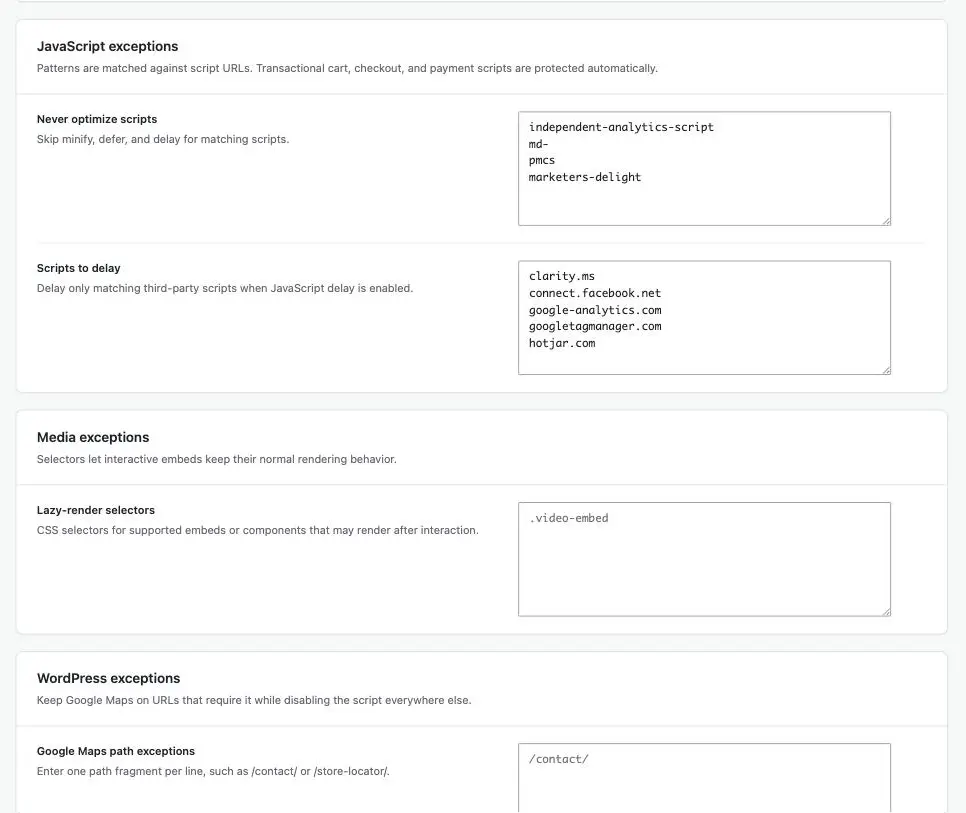
- Never optimize scripts (
javascript.exclusions): skip minify, defer and delay for matching scripts. - Scripts to delay (
javascript.delay_patterns): the delay patterns. They do nothing until Delay selected third-party scripts is on.
With Automatic conflict protection on (Integrations, on by default), scripts of detected plugins are excluded automatically:
| Plugin | Excluded script patterns |
|---|---|
| Independent Analytics | /plugins/independent-analytics/, /plugins/independent-analytics-pro/ |
| Burst Statistics | /plugins/burst-statistics/ |
| Koko Analytics | /plugins/koko-analytics/ |
| Matomo Analytics | /plugins/matomo/, matomo.js, piwik.js |
| WP Statistics | /plugins/wp-statistics/ |
| Site Kit by Google | /plugins/google-site-kit/, google-analytics.com, googletagmanager.com |
| MonsterInsights | /plugins/googleanalytics/, /plugins/googleanalytics-premium/, google-analytics.com, googletagmanager.com |
| ExactMetrics | /plugins/google-analytics-dashboard-for-wp/, google-analytics.com, googletagmanager.com |
| PixelYourSite | /plugins/pixelyoursite/, /plugins/pixelyoursite-pro/, connect.facebook.net, googletagmanager.com |
| Akismet | /plugins/akismet/ (with Protect Akismet assets on) |
| Jetpack | /plugins/jetpack/modules/contact-form/, /plugins/jetpack/modules/subscriptions/, jetpack-search, videopress (with Jetpack compatibility on) |
An exclusion wins over a delay pattern. With Site Kit active, for example, Google tags are neither deferred nor delayed even though googletagmanager.com is a default delay pattern.
Add your own in code:
add_filter( 'gt_performance_javascript_exclusions', function ( array $fragments ): array {
    $fragments[] = '/plugins/my-checkout/';
    return $fragments;
} );
Seeing what it decided
Turn on Diagnostic logging (Optimization > Diagnostics) and each optimized page gets an HTML comment before </body> headed GT Performance JavaScript decisions. It lists every registered handle with its action (defer, delay or keep) and the reason, such as has inline code that runs right after it or dependent … cannot be deferred, plus the number of unregistered scripts that were left alone. The comment is part of the cached page, so turn logging off again when you are done.
Recommended order
- Turn on minify and confirm the site still works.
- Add defer and click through your most interactive templates.
- Only then consider delay, and start with third-party tags rather than your own code.
Test each step on staging. A caching plugin that breaks checkout has cost you more than it saved.