
How the Page Cache Works
GT Performance stores a rendered page as a file and serves it back from advanced-cache.php, before WordPress boots. A hit costs one config read and decrypt, one hash, and two file reads. On a host that already caches pages, it can instead optimize pages on their way into the host’s cache and store nothing itself.
Settings live on the Page Cache tab. The Setup tab picks a mode and installs what it needs.
Cache modes
Page Cache > Origin cache > Cache mode (cache.mode) decides who stores the pages. Setup recommends one, based on whether it found a host page cache.
| Mode | Value | Who stores pages |
|---|---|---|
| Store pages (GT Performance serves them) | store (default) | GT Performance, through the drop-in described on the rest of this page |
| Optimize only (my host already caches pages) | optimize | Your host’s page cache (LiteSpeed, Hostinger, xCloud, Kinsta and similar) |
In optimize-only mode:
- The optimization pipeline runs on responses the eligibility rules would cache, as WordPress sends them, and the host’s cache stores the result. A response must pass the same validation a stored page must, or it is sent unoptimized.
- Nothing is stored at the origin, and the drop-in is not required. The compiled configuration tells an installed drop-in never to serve, so an entry left over from store mode is never used.
- Requests the eligibility rules bypass get no output buffer at all.
- Cache headers for eligible pages are left to the host. A response the eligibility rules would not cache (a cart, a checkout, a search, one of your exceptions) is still sent
no-store, as in store mode: a shared cache that receives noCache-Controlapplies its own default lifetime (two hours at Cloudflare) and would share a page this plugin refused to cache. - Cache warming and the stale-page refresh are skipped, because both exist to fill the origin store.
- With Diagnostic logging on, optimized responses carry
X-GT-Cache: OPTIMIZE-ONLYandX-GT-Cache-Reason: optimize-only. - After changing an optimization, purge your host’s cache so it stores the new version.
The mode is shown on the Dashboard, in the health report’s Page-cache drop-in check, in wp gt-performance cache status (mode=optimize-only or mode=store), and in the gt-performance/get-status ability.
The request path
wp-settings.php
  └─ wp-content/advanced-cache.php     ← the drop-in
       ├─ read and decrypt wp-content/cache/gt-performance/config.json
       ├─ load six runtime classes from the plugin directory
       ├─ build a RequestContext from $_SERVER / $_COOKIE
       ├─ Eligibility::decide()         ← may bypass here
       ├─ CacheKey::hash()
       └─ serve pages/<xx>/<hash>.html  → exit
  └─ (miss) WordPress loads normally
       └─ PageCacheModule validates the response, runs the optimizers, stores it
Nothing in the hit path touches the database or the plugin autoloader. If the config file is missing, cannot be decrypted, or names a plugin directory that no longer exists, the drop-in returns and WordPress renders the page normally. See Architecture for the drop-in contract and the encrypted config format.
When pages are stored
In store mode, capture only runs when both of these are true:
wp-content/advanced-cache.phpis the GT Performance drop-in (statusowned)WP_CACHEistrue
Until then nothing reads what capture would write, so the plugin skips the work. Install the drop-in from Setup (Save cache mode with Store pages), from Dashboard > Operations > Install page-cache drop-in, or:
wp gt-performance cache install-dropinThe installer refuses to overwrite an advanced-cache.php owned by another plugin. When WP_CACHE is not already true it writes define( 'WP_CACHE', true ); // Added by GT Performance into wp-config.php, and it stops with an error instead of editing a custom WP_CACHE declaration it does not recognize. See Installation.
Admin, AJAX and cron requests, feeds and robots.txt are never captured.
Whether a request is eligible
Checked in this order by Eligibility. The first failure wins and becomes the bypass reason:
| Reason | Bypasses when |
|---|---|
javascript_asset | The request carries gtperf_js (a minified script delivery, never an HTML page) |
cache_disabled | Enable origin page cache is off |
method | Not GET or HEAD |
host_missing | No Host header |
foreign_host | The host is not one this site answers to |
authorization | An Authorization header is present |
path:… | The path matches a bypass path, on segment boundaries |
query_array:… | A query parameter is sent as an array (name[]=). The reason names the first one |
query:… | A query parameter is on the bypass list |
query_value:… | A parameter listed under Cache each value separately carries a value longer than 100 characters |
unknown_query:… | Any query parameter that is not on the ignored list or the cache-separately list |
cookie:… | A cookie name starts with a bypass prefix |
Array-valued parameters are refused because PHP’s query parser turns ?preview[]=1 or ?s[]=x into an array, and a request judged and keyed only on scalar values would be treated as the page with no query at all. They are sent no-store, like a never-cache parameter, and responses bypassed by a path, cookie, never-cache parameter or array parameter also carry X-GT-Commerce-Cache: BYPASS (see Commerce Safety).
One more reason is decided after the page renders rather than from the request: page-option, for a post whose editor box has Don’t cache this page ticked. See Per-page options.
The allowed hosts are the hosts of home_url() and site_url(). Add aliases, such as a second mapped domain, with the gt_performance_canonical_hosts filter, then save settings once so the drop-in’s compiled config picks them up. Refusing unknown hosts keeps a catch-all virtual host from minting cache entries (and preload URLs) for hostnames nobody on the site chose.
The unknown_query rule surprises people: an unrecognized query parameter bypasses the cache rather than creating a new cache entry. This is deliberate. An attacker cannot fill your disk by requesting ?a=1, ?a=2, ?a=3, and a parameter your site actually uses can never be silently ignored into a wrong hit. Add parameters you want ignored (stripped from the key, still cached) to Parameters that do not change content, and parameters whose every value is a different page to Cache each value separately (below). See Cache Exclusions.
Defaults:
Ignored (cached, parameter dropped from the key):fbclid,gclid,gbraid,msclkid,utm_campaign,utm_content,utm_medium,utm_source,utm_term
Bypassed:add-to-cart,customize_changeset_uuid,elementor-preview,fluent-cart,preview,s,wc-ajax,gtperf_verify,gtperf_safe_mode,gtperf_css_preview,gtperf_css_build,gtperf_jsWhilesis bypassed, search results are not cached in their permalink form either (/search/<terms>/), since 1.3.6. That form has no query string, so bots replaying old search links used to fill the cache. Removingsfrom the list caches both forms.
Cached separately per value: none
Bypass paths:/wp-admin/,/wp-login.php,/wp-cron.php,/wp-json/,/xmlrpc.php
Bypass cookies:comment_author_,wordpress_logged_in_,wordpress_no_cache,wp-postpass_
Commerce adapters add their own paths, cookies and parameters on top, and Jetpack compatibility adds Jetpack’s visitor-state cookies. See Commerce Safety.
Caching each value of a parameter separately
Exceptions > Cache exceptions > Cache each value separately (cache.vary_query_params) lists parameters that change the page for everyone who sends the same value, such as orderby, a product filter, or lang. Instead of bypassing the cache as unknown parameters, each value gets its own stored copy.
- A value longer than 100 characters is not cached (
query_value:<name>). Long strings are how a crawler or an attacker mints keys. - A page holds at most 100 variants. Past that, a new value is served fresh and not stored (logged as
variant_limit). - Each variant is recorded in a per-page index, so purging the page’s URL removes every variant at the origin and passes the variants’ URLs to the edge purge. See Purging.
- A stale variant is rebuilt from its own URL, query included.
List a parameter here only when the page is the same for every visitor who sends that value. A parameter that personalizes the page belongs under Never cache query parameters.
The cache key
scheme | host | path | sorted-query | variant | generationhashed with SHA-256. The host is lowercased, ignored parameters are removed, and the remaining query (only parameters cached separately per value get this far) is sorted by name. variant is public, or mobile when Separate cache for mobile HTML is on and the user agent matches Mobile|Android|iPhone|iPad (case-insensitive).
generation is a counter in the settings. It advances when a save changes a setting that reaches cached pages, which makes every stored entry unreachable without touching the files. A save made in wp-admin that advances it also purges the page cache outright, which purges Cloudflare and xCloud when they are connected, and garbage collection removes anything left from older generations.
Settings that never change a stored page, its headers, or which request it answers are output-neutral, and saving them purges nothing: cache.post_publish_purge, cache.entry_budget, the three warming settings (cache.preload, cache.preload_max_urls, cache.preload_sitemaps), Cloudflare credentials, domain, zone and drift hash, everything under xcloud, media.optimize_uploads, media.compression, everything under database, the heartbeat and autosave settings, everything under redis, agents and advisor, and remove_data_on_uninstall. Every other setting, including any setting added in a later release, still advances the generation. The list is Settings::OUTPUT_NEUTRAL in Settings.php.
The drop-in and WordPress build this key through the same code, and a test asserts they agree byte for byte. If they ever diverge, every page misses forever, or worse, the drop-in reaches a different bypass decision than WordPress and serves a cached page to a signed-in visitor.
Leave the mobile variant off for a normal responsive theme. It doubles what has to be stored, warmed and purged, and it adds User-Agent to Vary.
What is never stored
Even on an eligible request, the rendered response is validated before it is written:
| Reason | Condition |
|---|---|
status:NNN | Anything other than HTTP 200 |
not_html | Empty body, or no <!doctype html> / <html> tag |
set_cookie | The response sets any cookie |
private_cache_control | Cache-Control contains no-store or private |
content_type | Content-Type is not text/html |
donotcachepage | DONOTCACHEPAGE is defined and truthy |
page-option | The post has Don’t cache this page ticked in its editor box |
The set_cookie rule is what stops a personalized response leaking. If a plugin starts a session or sets a preference cookie while rendering, that page is not stored, with no configuration required. A response that fails validation is sent with Cache-Control: no-store, private, max-age=0 plus CDN-Cache-Control: no-store and Cloudflare-CDN-Cache-Control: no-store, so no shared cache in front of the origin keeps it either.
Freshness
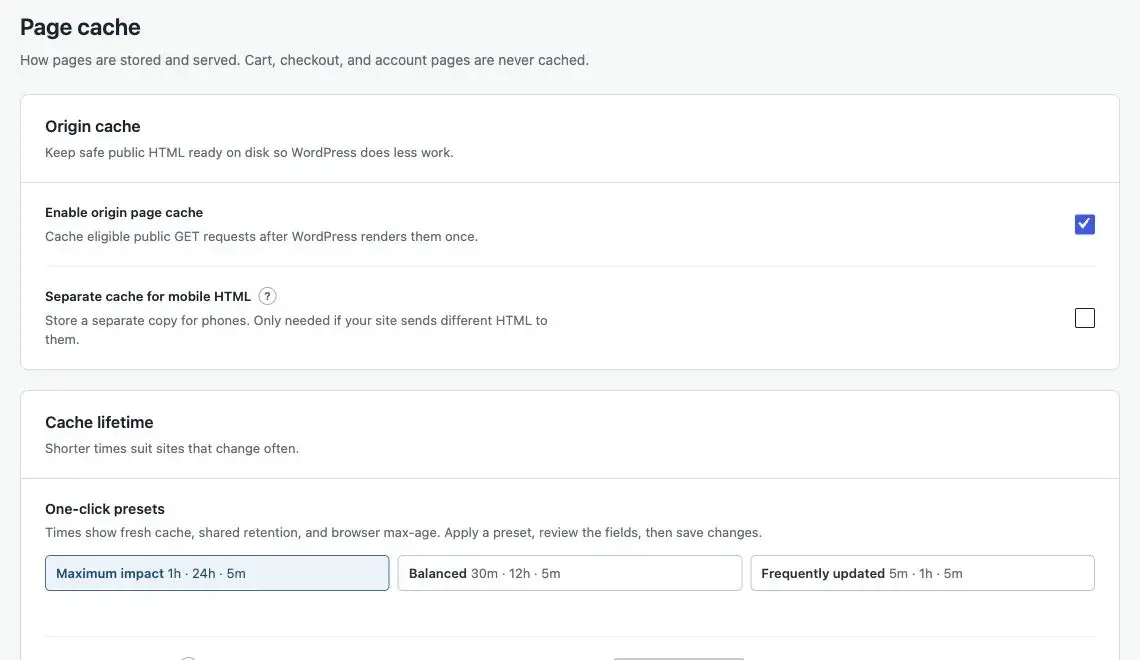
Four windows, all configurable under Cache lifetime:
| Setting | Label | Default | Meaning |
|---|---|---|---|
fresh_ttl | Fresh cache lifetime | 3600s | Served as HIT |
stale_ttl | Stale cache retention | 86400s | Past fresh, still served instantly as STALE until a background rebuild replaces it |
stale_if_error | Stale-on-error window | 86400s | Emitted as stale-if-error for shared caches. 0 turns it off |
browser_ttl | Browser cache lifetime | 300s | max-age sent to the visitor’s browser |
One-click presets fill the four fields; review them, then save:
| Preset | Fresh | Stale retention | Stale-on-error | Browser |
|---|---|---|---|---|
| Maximum impact | 1h | 24h | 24h | 5m |
| Balanced | 30m | 12h | 24h | 5m |
| Frequently updated | 5m | 1h | 6h | 5m |
A stale entry is served instantly and never makes a visitor wait. Once a minute the queue runner looks for stale entries and queues preloads for a few of them (5 per sweep by default, adjustable with the gt_performance_revalidate_batch filter, capped at 200). The sweep only runs while Warm cache after a full purge is on, and it tops up only after the previous batch has been worked off. A request carrying X-GT-Preload skips a stale copy and falls through to WordPress (reported as REVALIDATE), which is how a preload actually refreshes content instead of reading its own stale output. Fresh entries are still served to preload requests, so a burst of preloads cannot stampede the origin.
Past fresh_ttl + stale_ttl an entry is expired and the next request renders it again.
Response headers
| Header | Values |
|---|---|
X-GT-Cache | HIT, STALE, MISS, REVALIDATE, EXPIRED, SAFE-MODE, and with debugging on, BYPASS, DYNAMIC and (in optimize-only mode) OPTIMIZE-ONLY |
X-GT-Cache-Reason | The bypass or not-stored reason, only when Diagnostic logging is on. The drop-in and WordPress sanitize it the same way, keeping letters, digits and _ : / . * -, so path:/cart/ arrives as path:/cart/ |
X-GT-Cache-Key | First 12 characters of the key hash, only when Diagnostic logging is on |
ETag | SHA-256 of the stored body. A matching If-None-Match gets a 304 |
Age | Seconds since the entry was stored |
Cache-Control | public, max-age=<browser>, s-maxage=<fresh>, stale-while-revalidate=<stale>, plus stale-if-error when it is above 0 |
Vary | Accept-Encoding, plus User-Agent when the mobile variant is on |
A hit also replays the security and indexing headers the page was rendered with. Capture keeps an allowlist of them, at most 20 lines of up to 8 KB each: Content-Security-Policy, Content-Security-Policy-Report-Only, Strict-Transport-Security, X-Frame-Options, X-Content-Type-Options, Referrer-Policy, Permissions-Policy, Cross-Origin-Opener-Policy, Cross-Origin-Embedder-Policy, Cross-Origin-Resource-Policy, X-Robots-Tag, Link and Content-Language. The drop-in checks each stored line again before sending it and drops any line with a CR, LF or NUL. Caching and transport headers are not replayed, since the drop-in sets those itself. Pages stored by 1.1.0 or earlier get their headers when they are rebuilt; purge once to refresh them all.
MISS means no usable entry was on disk and WordPress rendered the page. It is stored if it passes validation. EXPIRED comes from the drop-in when an entry is past its stale window. WordPress usually replaces it with MISS when it stores the new copy. REVALIDATE marks a preload that deliberately skipped a stale copy. Only the plugin’s own preloads can do that: they carry an X-GT-Preload token, an HMAC valid for ten minutes and derived from AUTH_KEY, which the drop-in verifies without a database. Any other value in that header is ignored, so a client cannot turn stale pages into full WordPress renders.
BYPASS (the request was not eligible), DYNAMIC (the response failed validation), X-GT-Cache-Reason and X-GT-Cache-Key are sent only while Diagnostic logging (the debug setting, on the Optimization tab under Diagnostics) is on, so a production site does not advertise its bypass rules or key collisions. If you see no X-GT-Cache header at all, the request was bypassed with debugging off, or the drop-in is not installed.
Safe mode
Safe mode stops every HTML transformation and stores nothing, without changing a setting or touching the drop-in:
define( 'GTPERF_SAFE_MODE', true ); // wp-config.phpThe drop-in reads the constant too, so no stored page is served while it is defined: every request falls through to WordPress, and the response carries X-GT-Cache: SAFE-MODE and no-store. Pages already on disk are left alone and are served again once the line is removed. See Troubleshooting.
Storage limits and cleanup
A garbage collector runs hourly and examines up to 4,000 cache entries per pass. It removes:
- entries stored under an older settings generation (unreachable after a cache-relevant save)
- entries past their stale window
- temporary files a crashed write left behind for more than an hour
- metadata that can no longer be parsed
- generated CSS and font files nothing has requested for 14 days
Then it enforces the cache size budget, cache.entry_budget: 5,000 entries by default, oldest evicted first, 0 for no limit, at most 200,000. Shared hosts often bill by file count, and every cached variant is two files. There is no admin field for the budget. Change it through a settings export and import (see Tools):
wp gt-performance config export --file=settings.json
# edit settings.cache.entry_budget
wp gt-performance config import settings.json
Cache warming stops at the same budget.
Storage layout
wp-content/cache/gt-performance/
├── config.json              ← encrypted runtime cache config (see Architecture)
├── redis-config.json        ← encrypted Redis runtime config
├── .htaccess                ← denies *.json on Apache
├── pages/<xx>/<hash>.html   ← cached body
├── pages/<xx>/<hash>.meta.json
├── pages/variants/<sha256>.json ← the query variants recorded for one page
├── assets/css/              ← generated unused-CSS files (publicly reachable by design)
├── assets/fonts/            ← self-hosted Google Fonts (publicly reachable by design)
└── locks/
pages/ and locks/ get an empty index.html and a deny-all .htaccess. Both config files are written with 0600 permissions. assets/ stays reachable because the browser fetches generated CSS and fonts from it. Minified JavaScript is not written here: it is kept in WordPress transients and delivered through a signed URL (see JavaScript Optimization).
Metadata is plain JSON holding timestamps, the URL, the generation and the replayable response headers. Entries are written to a temporary sibling and renamed into place, so a request can never read a half-written page. A full purge re-creates the directory guards it walks past.
Per-page options
The GT Performance box in the editor of every public post type has two cache-related options, stored as post meta:
| Option | Meta key | Effect |
|---|---|---|
| Don’t cache this page | _gtperf_no_cache | The page is never stored or optimized. In store mode every visit renders fresh and is sent no-store, and cache explain reports the reason page-option |
| Use original CSS | _gtperf_original_css | The page keeps its full stylesheets, and no unused-CSS build is queued for it. See CSS Optimization |
In optimize-only mode, Don’t cache this page keeps the page unoptimized, but the plugin does not add a no-store header for it, so whether the host’s cache stores it is up to the host.
The box also has the per-page JavaScript and hero image options. Changes apply to newly cached copies of the page. See Settings Reference.
Clearing the cache
Publishing, updating, unpublishing and commenting purge the affected pages automatically, and a full purge starts a warm run. What each change purges, the purge preview, manual purges and verified receipts are on Purging.
Deactivating the plugin empties the local page store, since nothing purges while it is off. See Installation.