
Remove Unused CSS
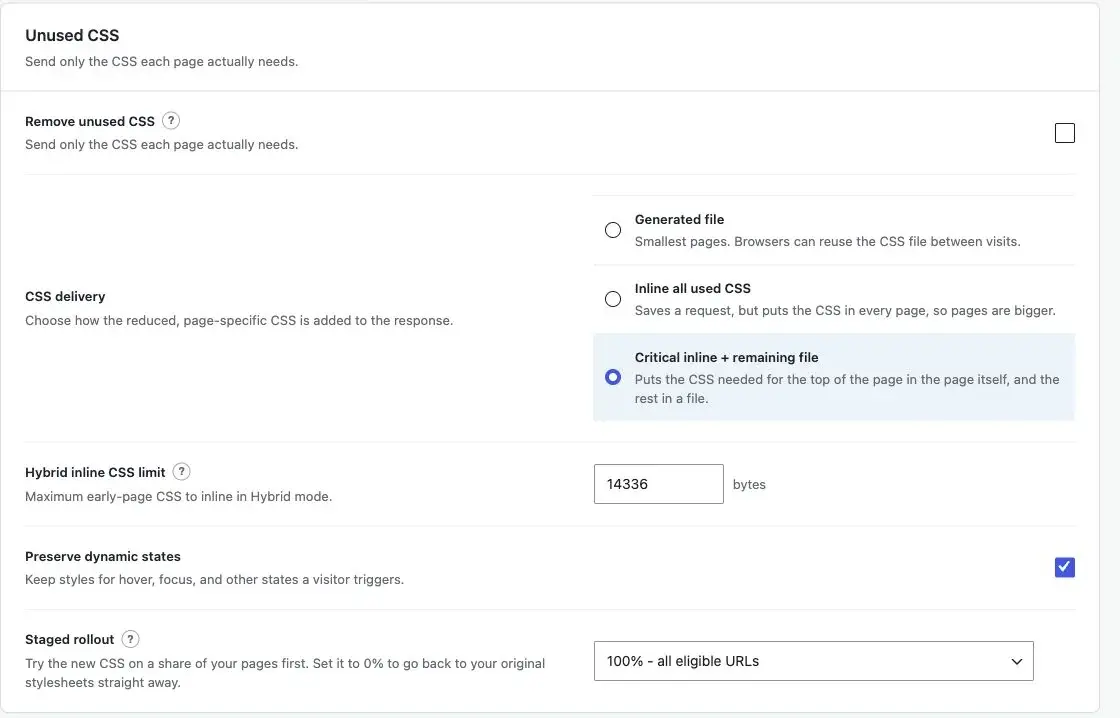
Removes the selectors a page does not use, then delivers what remains in one of three shapes. Collection, analysis, pruning and file writing all run on your own server. No external service ever sees your CSS. Off by default.
Settings live on Optimization > Unused CSS. Build results, statistics and regeneration live on the CSS Status tab. The selector safelist and stylesheet exclusions live on Exceptions > Unused CSS exceptions.
Before you turn it on
Unused CSS only does anything when all of these hold:
- Remove unused CSS is on (
css.enabled), orGTPERF_UNUSED_CSSis defined astrueinwp-config.phpto force it on for a staging site. See Constants Reference. - The origin page cache is enabled. In Store pages mode the GT Performance page-cache drop-in must also be installed and
WP_CACHEmust betrue; without them CSS Status shows Needs cache setup. In Optimize only mode builds do not need the drop-in, though the CSS Status summary still shows Needs cache setup while it is absent. See Page Cache. - Staged rollout is above 0%.
- Safe Mode is off. See Troubleshooting.
- When Perfmatters is active, the Perfmatters ownership setting on Integrations does not hand front-end optimization to Perfmatters.
- Your server can request its own pages (loopback) and WP-Cron runs the background queue.
Reduced CSS is applied only to responses the page cache can store (or, in optimize-only mode, would store). Logged-in users, bypassed paths, commerce pages and any request the page cache refuses get the original stylesheets. So does any post with Use original CSS ticked in its editor’s GT Performance box: that page keeps its full stylesheets and no build is queued for it. Check your pages in a private window.
How a page gets its CSS
Pruning is CPU-bound, so it never runs inside a visitor’s request.
- A visitor requests a cacheable page. If a finished build exists for this URL and the same page markup, the reduced CSS is applied and the page is cached with it.
- Otherwise the page goes out with its original CSS and a build is queued. Only one build per URL is queued at a time.
- The background queue requests the page from your own server with a signed build token (
gtperf_css_build) and a randomgtperf_css_runvalue, so no page cache or edge cache can hand back a stored copy. - The build prunes the page’s stylesheets, stores the result, and purges that URL from the page cache.
- The next uncached request gets the reduced CSS.
A build that takes longer than 20 seconds is abandoned and reported as Skipped. The page keeps its original CSS. A failed build request is retried by the queue.
Builds are keyed to the plugin version, the URL, the delivery mode, the settings generation and the page markup. Script contents, HTML comments, nonce attributes and hidden form values are ignored in that key because they change on every render without changing which selectors match. A page whose markup changes (a stylesheet URL with a new ver, new content) gets a fresh build on its next uncached visit. Because the plugin version is part of the key, builds made by an earlier release are not reused after an update; updating from 1.1.x to 1.2.0 rebuilds every page’s CSS.
A settings save that changes a setting reaching cached pages (every unused CSS setting does) marks every CSS result Out of date and clears the page cache. Saving only output-neutral settings, such as credentials or the database schedule, leaves both alone; see Page Cache. Pages serve their original CSS until each one is rebuilt, either on its next visit or through Force regenerate all CSS.
Which stylesheets are collected
In document order, StylesheetCollector takes:
<link>elements whoserelis exactlystylesheet.rel="alternate stylesheet",disabledlinks and anything inside<noscript>are left alone.- Non-empty
<style>blocks, except GT Performance’s own output.
External stylesheets are read only from this site’s host, the hostname configured on the CDN tab, and any host added with the gt_performance_css_allowed_hosts filter. Stylesheets on other hosts stay in the page untouched.
Files under wp-content are read from disk. Anything else is fetched and must answer 200 with a text/css content type. A local stylesheet larger than 2 MB fails the build; exclude it.
A <link media="print"> whose onload switches it to all (the common async-CSS pattern) is treated as all, not as print-only CSS.
A stylesheet the bundled parser cannot reproduce faithfully, such as one using native CSS nesting, is kept whole rather than guessed at. The check renders the parsed stylesheet back and compares it with the source: when the number of blocks or the number of declarations differs, the stylesheet passes through untouched instead of being pruned, so a declaration the parser drops without an error (such as margin:1px !ie) never disappears from the page. Leading @layer order statements are preserved.
Fluid font sizes are protected. The bundled parser (Sabberworm 9.4 and 9.5) silently drops a declaration with a bare parenthesised group inside a math function, such as clamp(1rem, 1rem + ((1vw - 0.2rem) * 0.196), 1.125rem), which is how WordPress writes every fluid font size in a block theme. Before parsing, such values are swapped for placeholder tokens, and after rendering they are restored byte for byte; pruning reads only selectors, so it never needs them. Builds made before 1.2.0 could lose these declarations, and they are not reused after updating.
Each run of consecutive collected stylesheets is replaced where its first stylesheet stood. Stylesheets left in place (excluded, off-site, or unreadable) keep their position in the cascade.
How pruning decides
The optimizer parses each stylesheet into an AST, converts every selector to XPath with Symfony’s CSS selector component, and queries the page’s DOM. A selector that matches nothing is dropped. See CssPruner.
Several things are kept regardless:
| Kept | Why |
|---|---|
Blocks declaring custom properties (--foo) | A variable may be consumed by a descendant, a pseudo-element, a later state, or markup injected after load. Dropping the block would leave surviving rules with unresolved var(). |
:root, html, body, html body, * | Structural, always relevant |
@keyframes and @font-face blocks | Never matched by a DOM query |
| Selectors matching the safelist, an active page builder’s state classes, or classes found by Fetch important CSS classes | Explicit and automatic escape hatches |
| Selectors that cannot be converted to XPath | Kept rather than guessed at |
Preserve dynamic states
Preserve dynamic states (css.keep_dynamic_states, on by default) tests each rule against the element it decorates, because the server HTML never shows a hover, an open menu, or a checked box. Before matching, it strips:
- Interaction pseudo-classes:
:hover,:focus,:focus-visible,:focus-within,:active,:visited,:target,:disabled,:enabled,:required,:optional,:valid,:invalid,:user-valid,:user-invalid,:checked,:indeterminate,:read-only,:read-write,:placeholder-shown,:autofill,:open,:closed,:popover-open - State attributes:
[open],[hidden],[inert],[aria-current|expanded|selected|checked|pressed|disabled|invalid|busy|hidden|modal],[data-theme|state|open|active|visible|expanded|selected|checked|current|mode] - Pseudo-elements such as
::beforeand::after, including the single-colon spelling:beforethat icon fonts and minifiers still use
So .button:hover is tested as .button, and .icon-add:before as .icon-add. An icon font’s rules for icons that are not on the page are removed.
With the option off, selectors are tested as written. Styles for states the server HTML never shows can then be removed.
The critical segment
Hybrid delivery splits the used CSS in two. The critical part holds rules matching elements in <head> or among the first 160 elements of <body>, plus custom-property blocks, :root/html/body/*, and safelisted or learned selectors. Everything else that is used goes to the remaining file.
Delivery modes
Choose under CSS delivery (css.mode):
| Mode | Key | What the page gets |
|---|---|---|
| Generated file | file | One immutable stylesheet per group of replaced stylesheets. Smallest pages; browsers can reuse the file between visits. |
| Inline all used CSS | inline | All used CSS in <style> elements; no stylesheet request, but every page is bigger |
| Critical inline + remaining file | hybrid | The critical segment inline, the rest as a file |
Files are written atomically to wp-content/cache/gt-performance/assets/css/<sha256>-used.css (or -remaining.css for Hybrid). The name is the hash of the contents, so a file never changes after it is written. Both files and inline blocks are printed through WordPress’s style API and carry data-gt-performance.
Hybrid inline CSS limit
Hybrid inline CSS limit (css.critical_budget) is the most CSS Hybrid puts in the page for its top part. Default 14336 bytes, range 2048 to 51200.
When a page’s critical CSS is larger, Hybrid inlines nothing for that page and sends all of its used CSS as one file, exactly like Generated file. Nothing breaks. The result shows as Ready, one file on CSS Status, which also suggests a better limit (see below).
Staged rollout
Staged rollout (css.rollout_percent) accepts 0, 10, 25, 50 or 100. It is a share of pages, not of visitors: each URL hashes into a fixed bucket, so a page is always either in the group or out of it, and what you check is what visitors see.
At 0% – original CSS only every page serves its original stylesheets straight away and new builds stop. Use it as the instant way back.
Start at 10%, check the pages that got reduced CSS, then raise it.
CSS Status tab
The tab has three parts.
Summary cards. Generation (Enabled, Paused / disabled, or Needs cache setup), then counts for Ready, Out of date, Queued, Building, Failed, Skipped and Pages tracked in the current delivery mode. Below them:
- Total CSS before and after across ready pages, with the percentage removed. These are uncompressed sizes summed per page, not measured visitor bandwidth.
- The current delivery mode and rollout, and the time of the next background queue run.
- A note when pages are out of date, and a count of older results built for a different delivery mode (those are not counted).
- In Hybrid mode, when some builds fell back to one file: how many, and a suggested Hybrid inline limit. The suggestion is the critical size that fits three in four measured pages, rounded up to the next kilobyte. When that is over the 50 KB maximum, it recommends Generated file instead.
Results. The 50 most recent results, newest first, each with the page, a status, a plain-language What visitors get, the last activity and build time, and a Regenerate button. Refresh status reloads the table without leaving the page.
| Status | What visitors get |
|---|---|
| Ready | The reduced CSS, with the before and after sizes and, for Hybrid, how much is inlined |
| Ready, one file | A Hybrid page whose critical CSS was over the limit, delivered as one file |
| Out of date | The original CSS. Settings or the CSS changed after this build; the next visit rebuilds it. |
| Queued / Building | The original CSS until the build finishes |
| Skipped | The original CSS. Every stylesheet was excluded, off-site or unreadable; the build took over 20 seconds; or the page is outside the rollout, paused, or excluded by a cache exception. |
| Failed | The original CSS, so nothing is broken. The explanation names the cause: the site could not request its own page (loopback), the drop-in is missing, the page returned an HTTP error, or no rule matched. |
Regeneration. Save settings before running a build; background jobs use the saved rollout and exclusions.
| Action | Effect |
|---|---|
| Regenerate on a row, or Force regenerate URL with a Public page URL | Invalidates that URL’s results in every delivery mode, purges its cached page, and queues one build. The URL must be on this site, cacheable under your cache exceptions, and inside the rollout. A URL that already has a build queued is not queued twice. |
| Force regenerate all CSS | Marks every result out of date, clears page caches, and rebuilds known URLs in batches of 100, starting with the homepage. Existing CSS files stay available for pages that are still cached. |
Results are stored in the {prefix}gtperf_artifacts table. An hourly cleanup deletes generated CSS files that nothing has read or modified for 14 days.
The same reports feed the health report on Tools, and an AI assistant with access can read a URL’s report and queue a rebuild. See AI and MCP.
Fetch important CSS classes
Some parts of a page are added by JavaScript after it loads: a table of contents, an ad slot, a slider’s state classes. Server-side analysis never sees them, so their styles look unused. This check finds them in your browser. It is the panel at the bottom of CSS Status.
How it works (ScriptClasses):
- It picks up to eight public post types that visitors can browse (pages and posts first, then the types with the most entries). Attachments and builder template types are skipped.
- For each, it opens the two most recently modified published pages (the static front page counts first for pages) at desktop width (1280 px) and mobile width (390 px), three at a time, in visible frames, and scrolls through each one.
- It compares the live page with the same page’s HTML parsed without running scripts, and records the classes and IDs scripts added and the CSS rules that match only after scripts ran (which covers rules like
.toc lithat name no added class). - An ID, or a rule naming one, counts only if it appears on more than one checked page, because scripts often number headings or instances per page.
- The findings are saved per post type. Builds for single entries of that post type keep every rule that names one of those classes, IDs or rules.
When the findings change, all CSS is regenerated automatically. The panel shows what was found per post type and when.
The check runs by itself after you change any unused CSS setting while unused CSS is on: the next time an administrator opens a GT Performance screen, the panel appears and runs. Fetch classes now runs it on demand. It usually takes one to three minutes; keep the page open until it finishes. Parts that only appear after a click, like an open menu, still need a safelist entry.
Page builders
With Automatic conflict protection on (Integrations, on by default), the state classes that page builders add after load are kept: open menus, active tabs and accordions, sticky headers, popups, sliders, and entrance animations.
| Builder | Detected by |
|---|---|
| Elementor, Elementor Pro | Plugin |
| Bricks | Theme |
| Divi, Extra, Divi Builder | Theme or plugin |
| Beaver Builder (plugin or Lite), Beaver Builder theme | Plugin or theme |
| Oxygen | Plugin |
| Breakdance | Plugin |
| WPBakery Page Builder | Plugin |
| Brizy, Brizy Pro | Plugin |
| Kadence Blocks, Kadence Blocks Pro | Plugin |
| Spectra | Plugin |
| GenerateBlocks, GenerateBlocks Pro | Plugin |
| SiteOrigin Page Builder | Plugin |
When any of them is active, classes from the carousel, lightbox, animation, tooltip and select libraries builders commonly bundle are kept too (for example swiper-, splide, slick-, glightbox, fancybox, aos-, animate__, tippy-, select2-).
Two builders are left untouched instead, because their interactive states cannot be listed:
- GT Page Blocks Builder: each block ships its own CSS and scripts, so its stylesheets are excluded from pruning.
- Thrive Architect: its runtime classes are not documented, so its stylesheets are excluded.
The same protection excludes the stylesheets of active commerce plugins (FluentCart, Easy Digital Downloads, WooCommerce) and keeps Akismet’s comment-form privacy notice and Jetpack’s form and block classes. The full list per plugin is on Integrations.
Safelist and excluded stylesheets
On Exceptions > Unused CSS exceptions:
- Selector safelist (
css.safelist): one pattern per line. Plain text is a partial match against the selector. A line starting with/is a regular expression with delimiters and optional flags, such as/^\.modal(?:--|\b)/i. An invalid expression is not saved and the save shows an error. Safelisted selectors are kept in the used CSS and in the critical segment. - Excluded stylesheets (
css.excluded_stylesheets): external stylesheet URL fragments or inline<style>IDs to leave untouched and loaded normally. Useful for a stylesheet a plugin generates per request, or one too large to prune.
Add the smallest stable pattern that protects the component. Both lists are also filterable:
add_filter( 'gt_performance_css_safelist', function ( array $patterns, string $url ): array {
    $patterns[] = '.is-open';
    return $patterns;
}, 10, 2 );

add_filter( 'gt_performance_css_stylesheet_exclusions', function ( array $fragments, string $url ): array {
    $fragments[] = '/plugins/my-app/';
    return $fragments;
}, 10, 2 );
Changes apply to builds made after the save. Use Force regenerate URL or Force regenerate all CSS to rebuild existing pages.
When a page looks wrong
- Set Staged rollout to 0% to put the original CSS back everywhere at once.
- Find the missing component’s class in the browser inspector and add it to the Selector safelist, or exclude its stylesheet.
- Force regenerate URL and check the page again in a private window.
- For a theme or plugin update that edited a stylesheet without changing its URL, Force regenerate all CSS.